Getting locked out of Discord can feel worse than a simple login problem. One moment everything looks normal. The next, you cannot get into your account, your servers, your messages, or the communities you spent time building. That is why so many users start searching for Discord account reactivate answers the moment access disappears.
The hard part is that not every account problem means the same thing. Some accounts are only limited. Some are disabled by mistake. Others may be stuck in appeal review or already moving toward deletion. This guide breaks down what each situation means, how to respond the right way, and what steps give you the best chance of getting your account back in 2026.
Why Was My Discord Account Disabled?
Getting locked out of Discord can feel stressful. Many users think it is just a login error at first. Then they realize it is a disabled Discord account. That is usually when they start searching for Discord account reactivate help. Before you send a Discord account appeal, it is important to understand what may have caused the problem. Discord says it can suspend or terminate accounts that break its Terms, Community Guidelines, or create safety risks on the platform.
Common reasons Discord disables accounts
One common reason is behavior that looks like spam or abuse. A new account that joins many servers fast, sends many friend requests, or repeats the same message may be flagged. Discord also says suspicious behavior can lead to Limited Access, which is a lighter restriction than a full disable. In other cases, a hacked account may send scam links without the owner knowing, and that can also trigger enforcement.
For example, a user may create a new account, join five servers in one hour, and send the same invite message in each one. Even if the goal was only promotion, the pattern can still look unsafe to Discord's systems. That is why some users later ask how to recover a disabled Discord account even though they did not think they broke any rule.
How to check if your account is temporarily or permanently disabled
The first thing to check is whether you still have partial access. Discord says users in Limited Access can still use some features, but cannot join new servers, send new friend requests, or message newly added friends. If you can still sign in and only see those limits, the action may be temporary or narrower in scope.
If you cannot use the account normally and Discord says the account was disabled or banned, the issue is more serious. In that case, the next step is usually to save the notice and submit a Discord support ticket through Discord's official support page.
Signs your account was falsely flagged
Sometimes a Discord account disabled for no reason is not truly “for no reason.” It may be a false flag caused by unusual but harmless activity. Discord's own Limited Access FAQ says mistakes can happen. That matters because it confirms that some users are restricted by error.
For instance, a person may mostly chat with existing friends, avoid mass messages, and still get flagged after logging in from a new place or after sudden account activity. If the timing feels wrong and your recent behavior was normal, that is a strong reason to file a Discord account appeal and explain the situation clearly. A short, calm timeline usually works better than an angry message.

Risks of Not Addressing a Disabled Discord Account Quickly
Once you know your account is really disabled, waiting is rarely a good idea. In most cases, delay only makes the problem harder to handle. That is why the Discord account reactivate process should start early, especially if you may need a Discord account appeal or a Discord support ticket.
What happens if you delay reactivation?
If you wait too long, you may forget key details that could help your case. For example, you may lose the exact email notice, forget when the restriction started, or miss signs that the account was hacked or falsely flagged. A clear timeline is often helpful when trying to explain how to recover a disabled Discord account.
There is also a data risk. Discord says users can request a data package, but if the account is deleted before the download is completed, the request is canceled. That means waiting too long can make it harder to keep useful records.
Can prolonged inactivity lead to account deletion?
Yes, but this is a separate rule from enforcement. Discord says accounts that are inactive for 2 years or more may be scheduled for deletion, and logging back in can stop that process.
Discord also says self-requested account deletion takes 15 days to process. That does not mean every disabled Discord account is deleted in 15 days. It only means different account actions follow different timelines.
How account disablement affects your server roles and data
A disabled account does not only block login. It can also affect your place in servers, especially if you manage communities or hold important roles. Discord's help pages show that server ownership is tied closely to the account, which shows how much access and control can depend on one profile.
For instance, a moderator may suddenly lose access to team chats, role tools, and server history. If your Discord account disabled for no reason seems like a mistake, it is safer to act early, send a Discord support ticket, and begin the Discord account reactivate process before the situation gets harder to explain.
How to Reactivate a Disabled Discord Account
Once you know the account issue is real, the next step is to try the official recovery path first. In the Discord account reactivate process, the right method depends on whether the account is in Limited Access, blocked by verification, or fully unavailable.
Steps to log in and trigger reactivation
If your account is in Limited Access, you may see a red banner in Discord with a Regain Access Here option. In that case, sign in, look for the banner, and use that recovery path first. If you cannot log in normally at all, submit a Discord support ticket through Discord's support portal.
Some users think the account is fully gone, but after logging in they only find a Limited Access notice. Others are completely locked out and need a Discord account appeal instead. This difference matters when you are trying to understand how to recover a disabled Discord account quickly.
What to do if you can't access your email or phone number
If you cannot access your usual login method, recovery can take more work. Try another email linked to the account, or use your phone number if it was added before. If that still fails, contact support.
If phone verification is the problem, the number must be valid. VOIP, burner, and landline numbers are not accepted. If you lost access to your old email or phone, the best move is to explain the issue clearly in one support request instead of creating extra accounts.
How to confirm your account meets Discord's reactivation criteria
There is no single public checklist, but the basic rule is clear. Use the official recovery or support path, provide real account details, and avoid random workarounds. If login problems continue, support is usually the right next step.
A stronger request is short and consistent. Use the same account details tied to the account, explain the timeline clearly, and avoid duplicate tickets. If your Discord account disabled for no reason looks like a false flag, say that calmly. That gives your Discord account appeal a better chance of being reviewed clearly.
How to Appeal a Falsely Disabled Discord Account
If the official recovery path does not fix the problem, the next step is to ask Discord to review the case. This part matters most when your disabled Discord account seems to have been flagged by mistake. At this stage, the goal is no longer just Discord account reactivate in a general sense. The goal is to send a clear Discord account appeal that support can review without confusion. Discord's support portal is the main place to do that.
How to submit an appeal to Discord support
Discord says users should sign in through the support portal and submit a request there. Discord also has a step-by-step help article that explains how to create a support account and send a ticket through the Help Center. That means the safest route is the official one: use the support form, choose the option that fits your account issue, and keep all follow-up messages in the same case when possible.
If your account still lets you log in far enough to see a warning or access issue, Discord may also show an in-app route to challenge that action. Discord's updated warning system says users cannot appeal overall account standing, but they can appeal specific violations that affect it. That is useful because it shows Discord now wants appeals tied to a concrete action, not a broad complaint like “please unlock everything.”
A common mistake is sending many new tickets for the same issue. Discord community guidance around appeals has repeatedly warned users not to open duplicate cases and instead update the first one. In practice, one strong Discord support ticket is usually better than five rushed ones.
What evidence to include in your appeal
A good appeal is short, factual, and easy to check. Include the email or phone number tied to the account, the username if you know it, the date the problem started, and the exact message Discord showed you. If you received an email from Discord, mention that too. This gives support a cleaner timeline and makes your Discord account appeal easier to understand. Discord's support guidance and account-appeal explanations both point users toward giving enough account and case detail for review.
It also helps to explain why you think the action was wrong. For example, maybe your account was hacked, maybe you lost access after changing devices, or maybe your Discord account disabled for no reason right after normal activity with friends. If you have useful proof, include it. That might be a screenshot of the notice, a login alert you did not recognize, or a short note showing that your account activity was normal before the disablement. Keep the tone calm. A clear explanation usually works better than an angry one.
How long does the appeal process usually take?
Discord does not publish one official response deadline for every disabled-account appeal. So the honest answer is that timing varies. Some users report hearing back in days, while others describe waiting much longer in community threads. Discord's own support discussions show that delays can happen, especially in complex cases or high-volume periods.
That means you should set a realistic expectation. After sending your appeal, watch your email, including spam and junk folders, and keep your follow-up polite. If support replies inside the same case, continue there instead of starting over. This will not guarantee a fast answer, but it gives you a cleaner path than resubmitting from scratch. For users trying to understand how to recover a disabled Discord account, patience matters, but so does good record-keeping.
What to Do If Your Discord Account Was Deleted
If appeal and reactivation do not work, the next question becomes more serious: was the account only disabled, or was it actually deleted? This matters because the Discord account reactivate path is different in each case. Under Discord's current account rules, user-deleted accounts, inactive accounts, and accounts removed after enforcement do not follow the same process.
Can you recover a deleted account?
Sometimes yes, but only for a short time. If you started the deletion yourself, the account usually enters a pending deletion period. During that window, logging back in can stop the deletion and restore access. In most cases, that window lasts 15 days.
The result is different when the account was removed after enforcement. In that situation, the normal restore option does not apply. The path is usually a Discord account appeal, not a simple account restore. That is why some people searching how to recover a disabled Discord account realize that “recover” can mean two very different things depending on how the account was lost.
How to differentiate between deletion and deactivation
A disabled Discord account and a deleted account can feel similar at first, but the signs are not the same. A disabled account may still involve review, enforcement, or a support process, which means a Discord support ticket or appeal can still matter. A self-deleted account is different because it stays in a pending state for a short period and can still be restored during that window.
There is also a third case: inactivity. Accounts that stay unused for 2 years or more may be scheduled for deletion. Before that happens, warning messages may be sent by email or text, and logging back in can stop the process. So when someone feels their Discord account disabled for no reason, the real issue may sometimes be long-term inactivity instead of a false flag.
Steps to create a new account if recovery isn't possible
If the old account cannot be restored, the practical next step is to start fresh. Use an email address you can still access, add a valid phone number if verification is required, and keep the login details safe. This will not bring back old server roles, past messages, or account history, but it does give you a stable base for using Discord again. Active access to your email or phone also matters later if you ever need account recovery or verification help.
Some users wait too long and miss the restore window for a self-deleted account. Others spend days trying to restore an account that was actually removed after enforcement, when the only real option was a Discord account appeal or, if that fails, a new account. Knowing which case you are dealing with can save a lot of time and stress.
How Long Does It Take to Reactivate a Discord Account?
After you send your request, the hardest part is often the waiting. Many people expect a fast answer, especially when the account problem feels unfair. But the Discord account reactivate timeline is not fixed. It can be short in some cases and much longer in others. The official support flow explains how to submit a ticket, but it does not promise one standard review time for every disabled Discord account case.
Typical timeframes for account reactivation
There is no single official number that fits every case. In practice, some users report replies within a few days, while others describe waiting one to two weeks or longer for a decision on a Discord account appeal. Support community discussions show a wide range of timelines, especially for account disablement and age-related appeals.
This means it is better to think in ranges, not promises. If your case is simple and the ticket has the right details, the process may move faster. If the account issue needs more review, the wait can stretch out. That uncertainty is frustrating, but it is normal for people searching how to recover a disabled Discord account.
Factors that can delay the process
One delay factor is ticket quality. A short, clear request with the right account details is easier to review than a message with missing facts or emotional language. Another common problem is duplicate tickets. Community guidance around Discord appeals often warns that opening many tickets for the same issue can slow things down instead of helping.
Case type matters too. Some appeals are simple login or verification problems. Others involve hacked accounts, suspected spam, or policy enforcement. Those usually take longer because they need more checking. This is one reason a user who feels their Discord account disabled for no reason may still face a slow review if the system marked the account as risky.
How to follow up on a pending reactivation request
If your request is still pending, the best follow-up is usually a calm one inside the same case. Keep watching your inbox, including spam and junk folders, because support replies often arrive by email. When you respond, add useful new details only if they truly help. Starting over with a brand-new Discord support ticket is usually less helpful than keeping the existing case clean and active.
For instance, if you submitted your appeal and then found a screenshot of the disable notice or a login alert that supports your case, adding that to the same thread makes sense. Sending three more tickets with the same message usually does not. If you are in the middle of a Discord account reactivate request, a clear follow-up gives support a better record to review than repeated submissions.
Tips to Prevent Future Account Disablement
After going through recovery once, most users do not want the same problem again. A careful setup cannot remove all risk, but it can lower the chance of another disabled Discord account and reduce the need for another Discord account reactivate request.
Common mistakes that lead to account disablement
One common mistake is activity that looks like spam. Joining too many servers too fast, sending repeated messages, or adding many new contacts in a short time can make an account look risky. Weak account security is another problem. If someone gets into your account and sends suspicious links or messages, the account can be flagged before you notice.
How to maintain compliance with Discord's terms of service
The safer approach is to keep account activity normal and easy to explain. Use real account details, keep your email or phone access current, and avoid behavior that looks deceptive, abusive, or automated. This also helps if your Discord account disabled for no reason ever happens again, because a clean account history makes a Discord support ticket easier to support.
Tools to monitor your account activity and security
Simple security tools matter most. Multi-factor authentication adds protection, and backup codes can help if you lose access to your normal login method. It also helps to watch for warning signs early, such as unusual messages, changed login details, or sudden verification prompts. Catching problems early can make how to recover a disabled Discord account much easier later.
A More Controlled Setup for Managing Multiple Discord Accounts
For people who manage more than one Discord account for client work, community tasks, creator projects, or regional operations, the bigger problem is often daily account handling. When several accounts are opened in the same browser with shared cookies, mixed local storage, and no clear separation, mistakes become easier to make. A more controlled setup can reduce that risk.
Separate profiles for each account
A cleaner way to work is to keep each Discord account in its own browser profile. That means separate cookies, separate local storage, separate fingerprint settings, and a more independent session history for each login. This kind of setup is useful when one person or one team needs to switch between multiple accounts without mixing activity across them. With DICloak, users can keep each account in a separate browser profile instead of placing multiple logins inside the same shared browser session.

Custom proxy configuration for cleaner routing
Multi-account work also gets messy when every login runs through the same network path. A more stable method is to give different profiles their own proxy settings based on the task, region, or account group. This makes daily operations easier to organize and reduces confusion when teams need different account routes. With DICloak, users can apply custom proxy configuration to each profile, including HTTP, HTTPS, and SOCKS5 options, so different Discord accounts can run through cleaner and more controlled network setups.

Team access without loose password sharing
When several people need to work on the same pool of accounts, problems often start with uncontrolled sharing. A more structured workflow is to let team members open only the profiles they need, keep account data isolated, and leave an operation trail that shows who used what. With DICloak, users can manage shared account work through profile sharing, permission settings, data isolation, and operation logs, instead of passing accounts around in a loose way.

Synchronizer for repeated actions
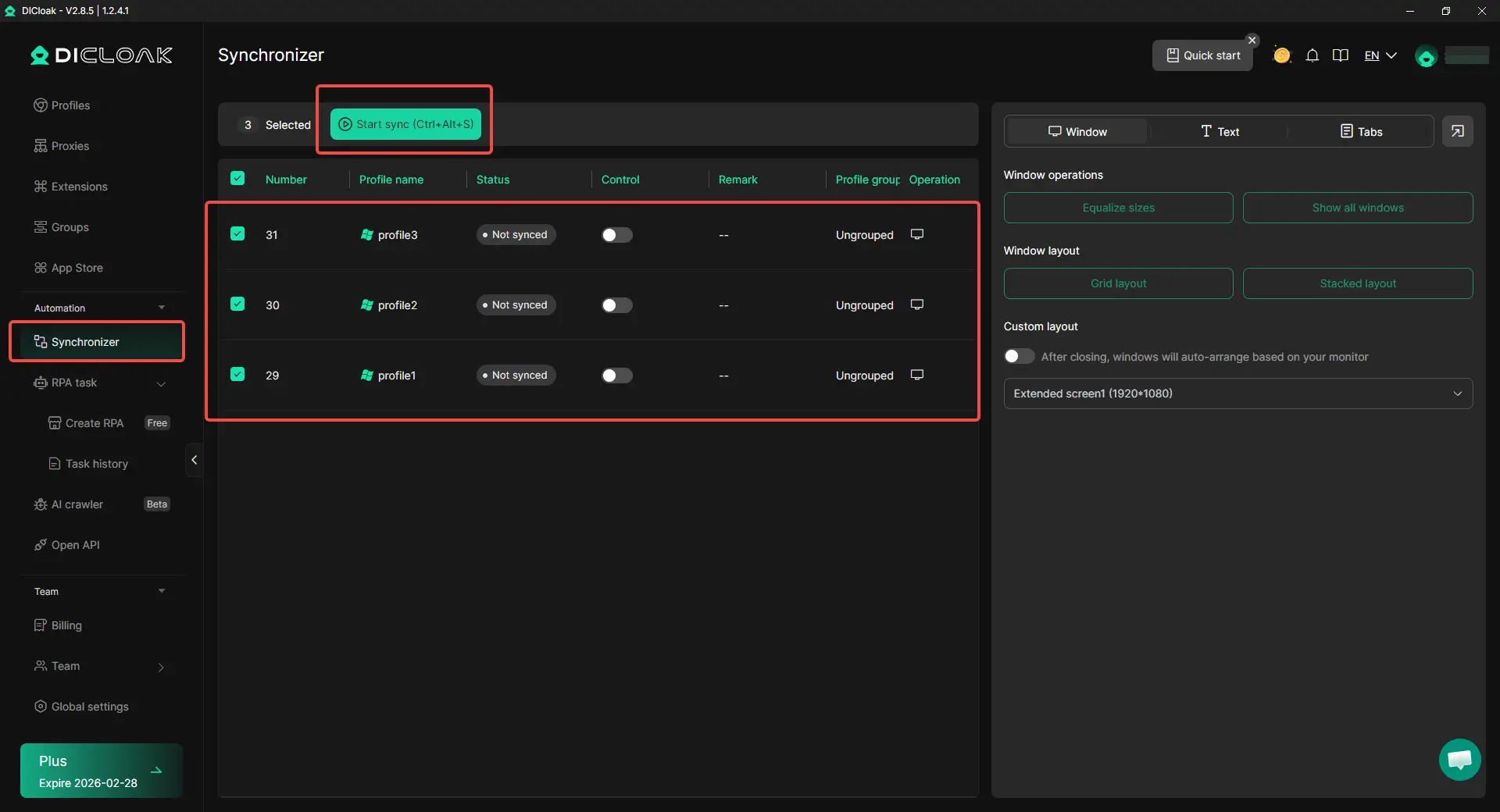
Repeated account work can also create mistakes. Opening the same page, entering the same settings, or repeating the same simple action across several profiles takes time and often leads to inconsistency. A more efficient way is to use Synchronizer to repeat those actions across selected windows while still keeping each account in its own profile. With DICloak, users can use Synchronizer to handle repeated steps across multiple profiles more consistently, which is useful when the same maintenance action needs to be completed across several Discord accounts.
Frequently Asked Questions about Discord Account Reactivate
Can I still start the Discord account reactivate process if I lost access to my email?
Yes, but recovery may be harder. If you cannot use the original email, try logging in with any linked phone number first. If that does not work, the next step is usually to contact Discord support and explain the situation clearly. In this kind of case, giving the correct account details matters a lot.
How long does the Discord account reactivate process usually take?
There is no single fixed timeline. Some users get a reply in a few days, while others wait longer. The review time often depends on the type of account issue, how clear your support request is, and whether your case needs extra review.
Can I complete a Discord account reactivate request if my account was falsely disabled?
In many cases, yes. If the account was flagged by mistake, you may be able to recover it through the official support process. A calm appeal with the right account details, a short timeline, and any useful screenshots usually gives you a better chance than a vague or emotional message.
Is Discord account reactivate possible if the account was already deleted?
That depends on how the account was deleted. If you started the deletion yourself, there is usually a short restore window. If the account was removed after enforcement, normal restore may not work, and an appeal may be the only option. This is why it is important to know whether the account is disabled, pending deletion, or fully removed.
What should I avoid during the Discord account reactivate process?
Avoid sending many duplicate tickets, creating confusion with extra accounts, or leaving out important facts. It is usually better to keep one clear support case, watch your email for replies, and add useful details only when they really help the review.
Conclusion
Losing access to Discord can feel sudden, but the right fix depends on what actually happened. A disabled account, a limited account, and a deleted account do not follow the same recovery path. That is why the first step in any Discord account reactivate process is to check the account status, understand the cause, and act quickly.
In most cases, recovery comes down to using the official access flow, sending a clear support request, and giving the right account details. If the account was falsely flagged, a calm appeal can help. If it was deleted, the next step depends on how the deletion happened. For users managing multiple Discord accounts, cleaner profile separation, custom proxy configuration, team controls, and synchronized repeated actions can also help reduce future risks.
 Web Proxy Tools
 Free Tools
 Cookie Plugin
 UA Generator
 MAC Address Generator
 IP Generator
 IP Address List
 2FA Code Generator
 World Clock
 Anonymous Check
 WebRTC Leak Test
 UUID Generator
 Free Web Proxy Site
 Proxy Checker
 FB Ad Checker
 AI Web Scraping
 Free SMM Tools
 Twitter Shadowban Checker
 Instagram Name Checker
 UTM Generator
 Username Generator
 AI Hashtag Generator
 LinkedIn Headline Generator
 Social Media Image Resizer