Managing multiple X accounts is common in 2026, but doing it carelessly can create real problems. Many creators, brands, agencies, and support teams need more than one account for different audiences or business tasks. X also allows users to add and switch between multiple accounts, so the problem is not simply having more than one account. The real risk starts when several accounts share the same browser data, network patterns, content style, or team access habits.
This matters because X is still a major place for public conversation, news, brand updates, and customer communication. DataReportal reported that X ads reached about 586 million users in January 2025, which shows why many teams still treat X as an important channel. At the same time, X rules focus heavily on spam, platform manipulation, duplicate behavior, and inauthentic activity. That is why learning how to manage multiple X accounts without getting them linked is less about shortcuts and more about building a clean, stable, and repeatable account management setup.
Can You Have Multiple X Accounts in 2026?
Yes, you can have multiple X accounts in 2026. X supports adding and switching between multiple accounts, which is why many businesses, creators, agencies, and support teams manage more than one account at the same time.
Does X Allow Multiple Accounts?
Yes. Having multiple X accounts is allowed when each account serves a legitimate purpose. For example, a founder may use one account for personal thoughts and another for company updates. A SaaS company may operate separate accounts for marketing, customer support, and product announcements. Agencies often manage multiple client accounts as part of their daily work. The platform's concern is not the number of accounts. The concern is how those accounts are used.
When Do Multiple Accounts Become Risky?
Multiple X accounts become risky when they appear to work together in an unnatural way.
For example, several accounts posting the same content, sharing the same links at the same time, reposting each other's tweets repeatedly, or creating artificial engagement can attract unwanted attention. Similar patterns can also appear when many accounts are managed through the same browser profile and follow nearly identical activity routines.
A useful rule is to think of each account as a separate identity. If every account has its own purpose, audience, content style, and normal activity pattern, managing multiple X accounts is usually much easier and more sustainable over time.
| Lower-Risk Activity |
Higher-Risk Activity |
| Personal account and brand account with different content |
Multiple accounts posting the same content repeatedly |
| Separate accounts for different clients |
Accounts artificially boosting each other's engagement |
| Different audiences and posting schedules |
Large groups of accounts acting in sync |
| Unique account positioning and purpose |
Accounts created mainly to amplify reach or influence conversations |
Why Do People Manage Multiple X Accounts?
People manage multiple X accounts because one account often cannot cover all business, brand, or community needs. Each account can serve a clear purpose, reduce confusion for followers, and separate roles in daily operations.
Business and Brand Accounts
Businesses often use multiple X accounts to separate company news, product updates, and hiring posts. Keeping a distinct voice for marketing and support helps followers understand the purpose of each account. For example, a SaaS company may post product announcements from one account while sharing company news and events from another. This setup keeps content organized and reduces confusion for audiences.
Agency and Client Management
Agencies manage multiple client accounts to maintain separate brand identities and posting schedules. Each client account should have its own content plan and audience focus. For instance, an agency handling ten clients may assign a unique content calendar and posting routine to each account. Treating each client account individually helps maintain a professional and authentic presence.
Creator and Niche Accounts
Creators often run multiple accounts to target different audiences or content niches. Mixing personal updates with niche content can confuse followers. For example, a creator might use one account for AI tool reviews and another for personal stories. Separate accounts allow each audience to receive relevant content, improving engagement and clarity.
Customer Support and Community Management
Support and community teams use dedicated X accounts to handle customer questions without cluttering the main brand account. A software company, for example, may use one account for feature announcements and another for support replies. This approach keeps the main account focused on campaigns while providing timely help through the support account.
Using multiple accounts in these ways helps maintain clarity, protect brand voice, and reduce accidental linking of accounts through similar behavior.
How Does X Link Multiple Accounts?
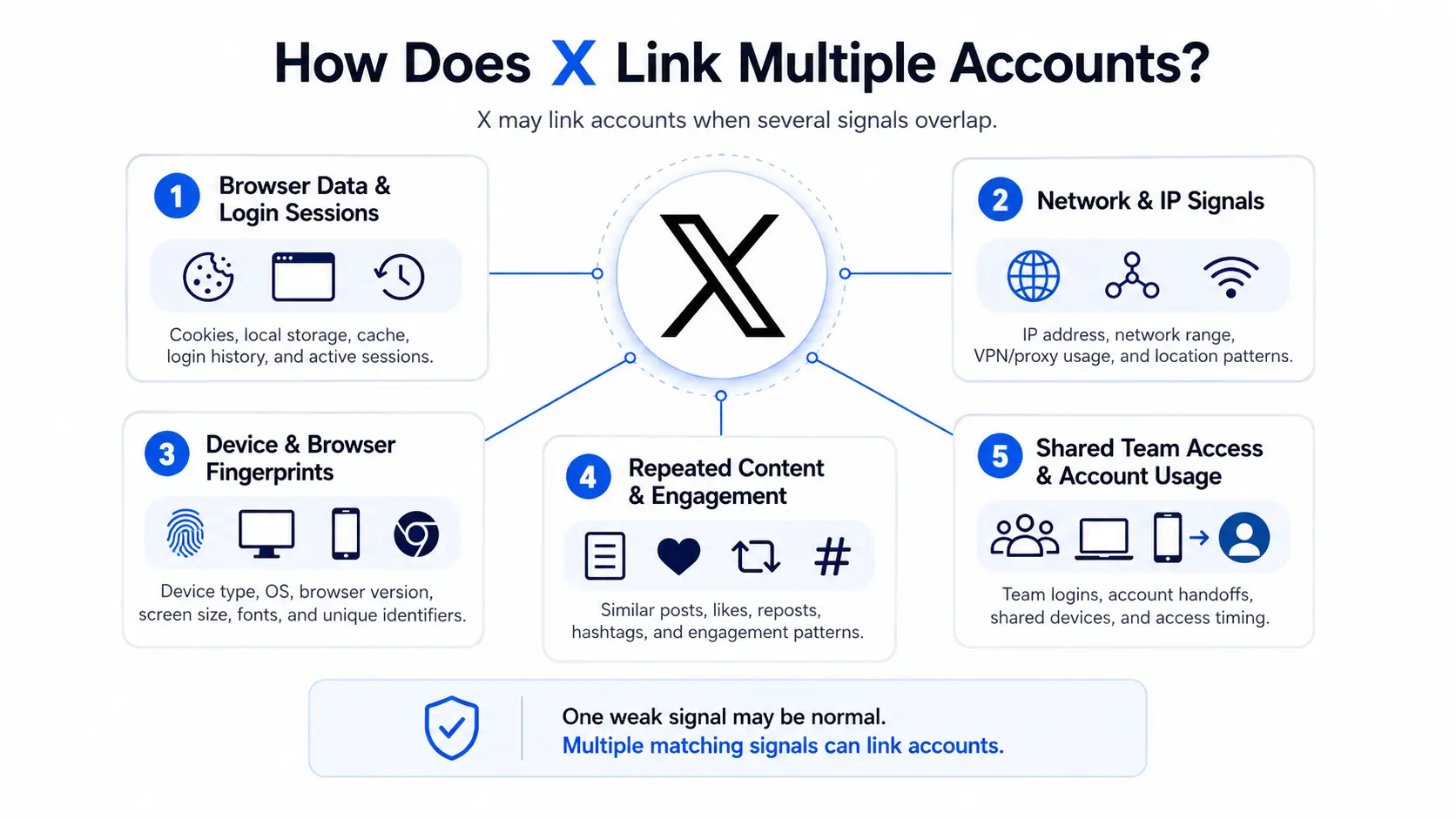
X can link multiple accounts when they share strong signals across login data, device data, network patterns, and repeated behavior. One weak signal may not trigger linkage, but several matching signals can make different accounts look connected. Clean account management keeps each account role clear and behavior distinct.
- Browser Data and Login Sessions: Shared cookies, local storage, and login history can connect accounts. Logging into multiple accounts from the same browser increases risk. For example, a marketer accessing five client accounts in one browser session may appear linked.
- Network and IP Signals: Accounts using the same IP or network pattern can look related. Posting similar content from the same network at the same time raises suspicion. Ten accounts logging from the same office network simultaneously is a common example.
- Device and Browser Fingerprints: Browser and device traits—like OS, screen size, fonts, timezone, Canvas, and WebGL—can connect accounts. Even cleared cookies cannot hide identical device setups. Accounts always using the same browser configuration may appear linked.
- Repeated Content and Engagement Patterns: Posting identical text, links, or hashtags across accounts can signal coordination. Reposting or liking the same posts in a fixed order adds risk. Five niche accounts posting the same promo message within minutes is a typical case.
- Shared Team Access and Account Usage: Multiple people accessing one account without rules can create unnatural patterns. Sudden changes in device, location, or posting style may be flagged. For instance, a support account used by teams across different countries without structured access can appear inconsistent.
Stacked signals, not a single shared trait, usually cause accounts to look linked. Separate roles, isolated environments, stable networks, and natural posting behavior are key to managing multiple X accounts safely in 2026.
Signs Your X Accounts May Be Connected
Your X accounts may be connected if several accounts start showing the same problems at the same time. One warning does not prove account linking, but repeated issues across multiple accounts are a strong sign that something in your setup needs review. X may read signals from login sessions, networks, devices, content, and account behavior. When those signals overlap too much, different accounts can start to face similar checks or limits.
- Frequent Verification Requests: If several accounts often ask for phone, email, CAPTCHA, or login checks, the accounts may be sharing risky signals. This can happen after unusual login activity, fast account switching, or access from changing environments. For example, an agency may notice that three client accounts all ask for verification after being opened from the same browser and network on the same day.
- Unusual Security Warnings: Security warnings can appear when an account shows activity that looks unsafe or inconsistent. One warning may be normal, especially after a password change or new login. But if many accounts show similar warnings after the same work session, the issue may come from shared access habits, not from one account alone.
- Multiple Accounts Triggering Similar Issues: A stronger warning sign is when several accounts face the same issue together. For example, one account cannot follow, another cannot post, and a third is asked to verify within a short period. This does not always mean the accounts are formally linked, but it does suggest that the accounts may share a pattern X treats as risky.
- Sudden Reach or Visibility Changes: A drop in reach can happen for many reasons, including content quality, audience behavior, or policy limits. Still, it becomes more concerning when several accounts lose visibility after posting similar content or links. X may limit the reach of posts that break rules or are judged low quality, and accounts can also be filtered from search when similar messages are posted across multiple accounts.
| Sign |
What It May Suggest |
What to Check First |
| Repeated verification requests |
Login or environment signals may look unusual |
Browser sessions, IP changes, device changes |
| Similar security warnings |
Account access may look inconsistent |
Recent logins, team access, password changes |
| Several accounts limited together |
Shared behavior may be creating risk |
Posting pattern, follow actions, engagement habits |
| Sudden reach drop across accounts |
Content or behavior may look repetitive |
Duplicate posts, same links, same hashtags |
| Search visibility problems |
Accounts may be filtered for similar activity |
Similar messages across accounts or third-party posting tools |
These signs should be treated as early warnings, not final proof. The safest response is to slow down, stop repeating actions across accounts, review recent logins, and check whether the accounts share the same browser, IP pattern, content plan, or team access setup.
Common Mistakes That Link Multiple X Accounts
Most account-linking problems are not caused by having multiple X accounts. They are caused by management habits that make different accounts look connected.
In many cases, users do not realize they are creating the same signals discussed in the previous section. Small mistakes repeated over time can make account separation much weaker.
Using One Browser for Every Account
Managing all accounts from the same browser is one of the most common mistakes. Cookies, login sessions, and browsing data can accumulate over time and make accounts less isolated.
For example, a freelancer managing five client accounts from one Chrome profile may find it convenient, but all accounts are operating inside the same browser profile.
Sharing the Same Content Across Accounts
Posting identical content across multiple accounts can create a strong connection between them. This is especially true when the same text, links, images, hashtags, and posting times appear repeatedly.
For instance, several accounts sharing the same promotional post within a few minutes may look coordinated rather than independent.
Frequent Device and Location Changes
Constantly switching devices, browsers, networks, or locations can create unusual account activity patterns. One change is usually not a problem, but repeated changes in a short period can trigger additional reviews.
For example, logging into the same account from different devices and locations throughout the day may appear less natural than maintaining a stable setup.
Letting Team Members Log In Randomly
Many teams share account access without clear rules. Different team members may use different devices, browsers, networks, and working habits.
Over time, this creates inconsistent account activity. A structured access process is usually easier to manage than allowing everyone to log in whenever they want.
Overusing Automation
Automation can save time, but excessive automation often creates repetitive patterns. Multiple accounts performing the same actions at the same speed or schedule may look unnatural.
For example, if several accounts publish similar posts, follow users, or engage with content in the exact same sequence every day, the activity may start to resemble coordinated behavior rather than normal account usage.
Most linked-account issues come from consistency in the wrong places. If different accounts always use the same environment, same content, and same behavior patterns, they become much easier to connect. The next section explains how to manage multiple X accounts in a cleaner and more organized way.
How to Manage Multiple X Accounts More Safely?
Managing multiple X accounts safely in 2026 is about clarity, separation, and consistent behavior. Each account should have a clear role, a stable environment, and regular monitoring. Following structured steps can reduce risk and make account management more predictable.
1. Give Each Account a Clear Purpose
Assign a distinct purpose to every account. Personal updates, brand news, product announcements, or support interactions should not be mixed. For example, a SaaS company may use one account for feature announcements and another for customer support. Clear roles make content easier to manage and reduce accidental overlap.
2. Separate Login Environments
Keep each account in its own browser profile or session. Avoid logging multiple accounts from the same browser, as shared cookies and sessions can connect accounts. Agencies often use isolated browser profiles for client accounts to prevent environment overlap.
3. Keep Access Patterns Consistent
Maintain consistent login habits and schedules for each account. Sudden changes in devices, locations, or login times can trigger platform alerts. For instance, a support account accessed only during office hours is less likely to be flagged than one logged in randomly from different networks around the globe.
4. Separate Content Strategies
Design unique content plans for each account. Avoid posting identical text, links, or hashtags across multiple accounts. A creator might post AI tool reviews on one account and personal updates on another. Distinct content reduces the chance of accounts appearing coordinated.
5. Organize Team Access
Control who can access each account. Provide team members with defined roles and login permissions. For example, a marketing account may be managed by two people, while a support account is limited to customer service staff. Structured access reduces inconsistent behavior that could link accounts.
6. Review Activity Regularly
Monitor posting, engagement, and login patterns to catch issues early. Check for repeated content, unusual login times, or overlapping engagement patterns. Regular reviews help maintain healthy account separation and identify areas that need adjustment.
7. Use Automation Carefully
Automation can save time but can also create detectable patterns. Avoid running the same actions, schedules, or sequences across multiple accounts simultaneously. For example, if several accounts post identical links or follow the same users automatically, X may treat the activity as coordinated. Controlled automation—limited frequency, varied timing, and distinct actions per account—reduces risk while keeping operations efficient.
Following these steps helps ensure each X account operates independently. Clear roles, isolated environments, consistent routines, distinct content, structured team access, regular monitoring, and careful automation together minimize the risk of accounts being linked while keeping operations efficient.
Comparing Different Ways to Manage Multiple X Accounts
There are several ways to manage multiple X accounts, and each comes with different levels of safety, convenience, and control. Choosing the right method depends on the number of accounts, team size, and operational needs.
X Built-In Account Switcher
X offers a native account switcher that lets users log in and switch between multiple accounts on mobile and desktop. It is convenient for personal or small-scale use. For example, a creator with two accounts can quickly toggle between them for personal updates and niche content. The main limitation is that all accounts still share the same browser profile, which can leave signals that connect accounts if used heavily.
Different Browsers
Using separate browsers for different accounts provides better separation than a single browser. Each browser keeps its own cookies, sessions, and local storage. For example, a social media manager may run client accounts on Chrome, Firefox, and Edge simultaneously. While safer than one browser, overlapping IP addresses or device fingerprints can still signal connections.
Separate Devices
Managing accounts on different devices—like laptops, desktops, or tablets—adds another layer of separation. This reduces shared environment signals and lowers the chance of accidental linking. A small agency may assign one device per client account. However, the cost and logistical complexity grow with more accounts and team members.
Social Media Management Tools
Tools like Hootsuite, Buffer, or Sprout Social allow teams to schedule and manage multiple accounts from one dashboard. They can streamline posting and reporting. For example, a marketing team may schedule posts for five brands at once. The risk is that automated patterns or repeated content across accounts can still generate detectable signals if not carefully managed.
Antidetect browser profiles create isolated environments for each account with unique fingerprints, cookies, and proxy settings. This approach provides the highest level of separation and is widely used by agencies, brands, and growth teams managing dozens of accounts. For instance, an agency handling 20 client accounts can assign each account its own profile, proxy, and scheduled activity, reducing the chance that multiple accounts appear connected.
| Method |
Ease of Use |
Account Separation |
Best For |
Key Considerations |
| X Built-In Account Switcher |
High |
Low |
Personal / Small-scale |
Quick switching, but shared browser profile |
| Different Browsers |
Medium |
Medium |
Small teams |
Separate cookies, but overlapping IP/device signals remain |
| Separate Devices |
Low |
High |
Medium teams |
Physical separation, higher cost and logistics |
| Social Media Management Tools |
Medium |
Medium |
Marketing teams |
Streamlined posting; automated patterns can create detectable signals |
| Antidetect Browser Profiles |
Medium |
Very High |
Agencies / Large operations |
Isolated profiles, unique fingerprints, proxies; reduces linking risk |
Using the right approach depends on your setup and number of accounts. For a single user or small creator, X’s built-in switcher or multiple browsers may be sufficient. Agencies and brands managing many accounts benefit most from isolated environments, like antidetect browser profiles, which provide consistent separation while allowing automation and team collaboration.
How to Manage Multiple X Accounts with DICloak
Once you start managing multiple X accounts, the goal is simple. Each account should operate in its own environment, with fewer shared signals and less manual confusion. A practical setup can follow these steps.
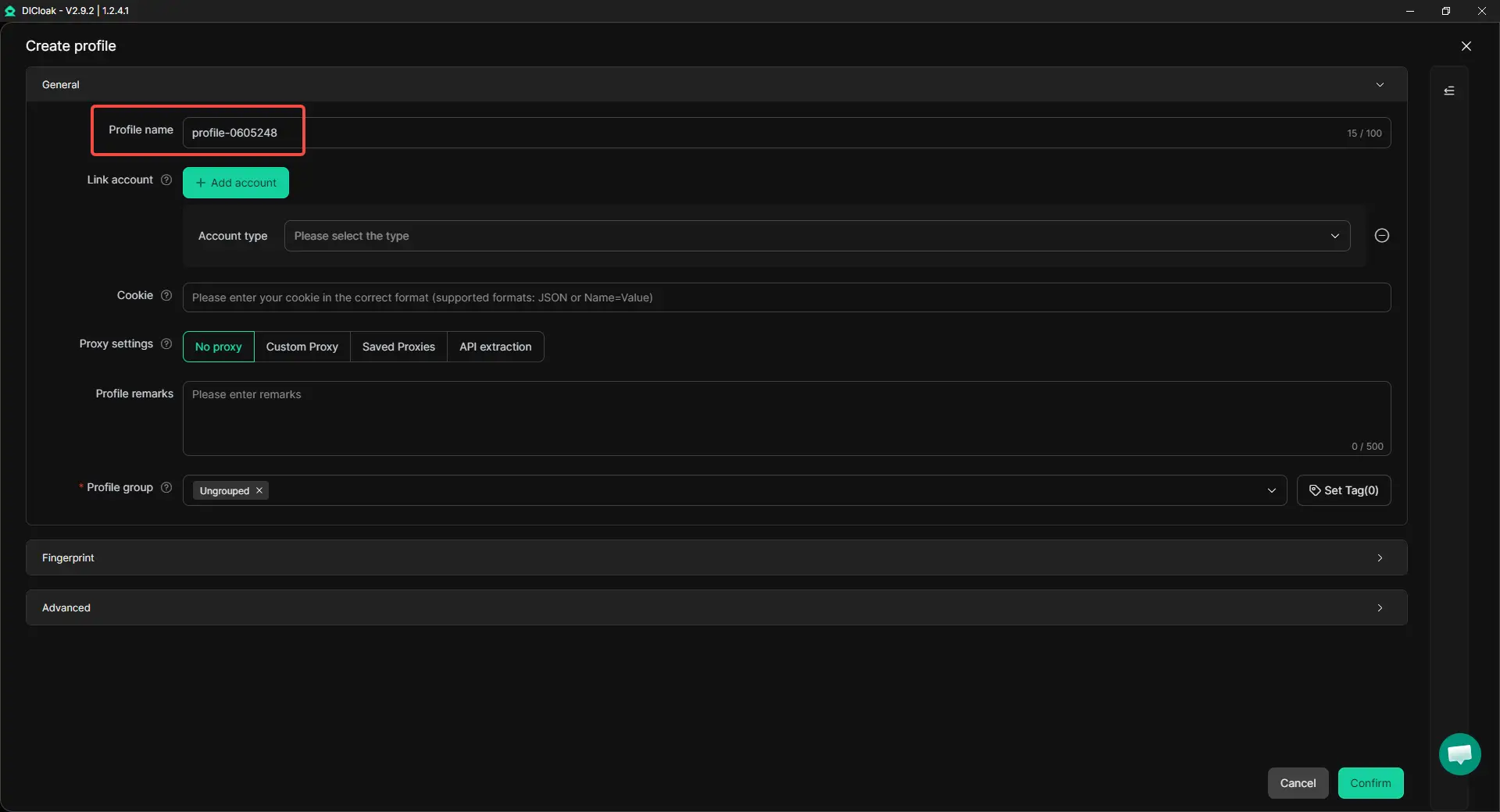
Step 1: Create One Browser Profile for Each X Account
Create a separate browser profile for every X account you manage. Name each profile clearly, so it is easy to find later. For example:
- Personal Brand
- Company Account
- Support Account
- Client A
- Client B
Avoid placing several X accounts inside the same browser profile. This helps keep cookies, login sessions, and browser data separated from the start.
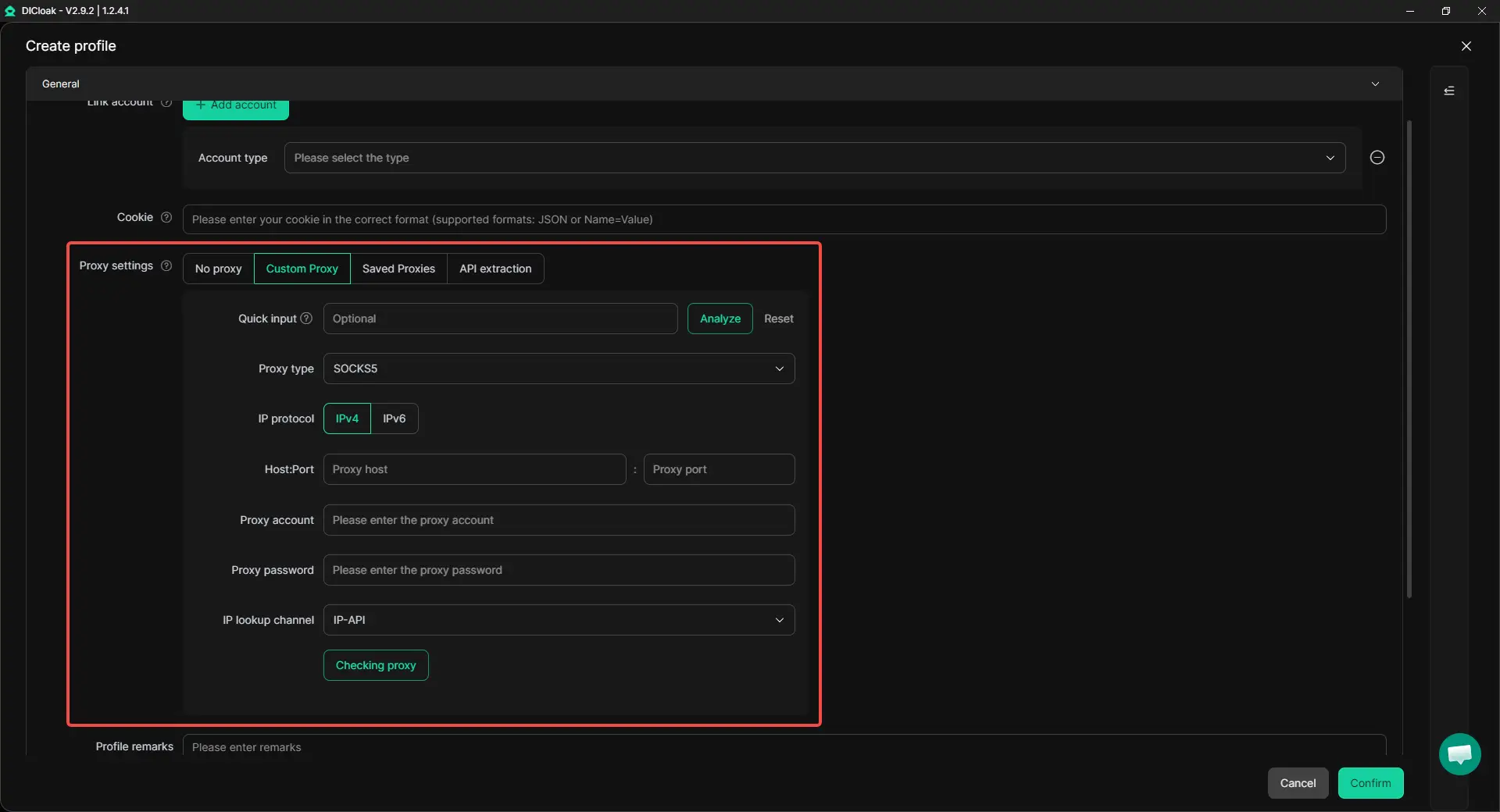
Step 2: Assign a Proxy to Each Profile
After creating profiles, assign a dedicated proxy to each one when your operation needs separate network environments. Many teams follow a simple rule for large-scale account management: keep one X account inside one dedicated browser profile and pair it with one stable proxy.
Once a proxy is assigned, keep it stable. Changing proxy locations too often can make account activity look less consistent.
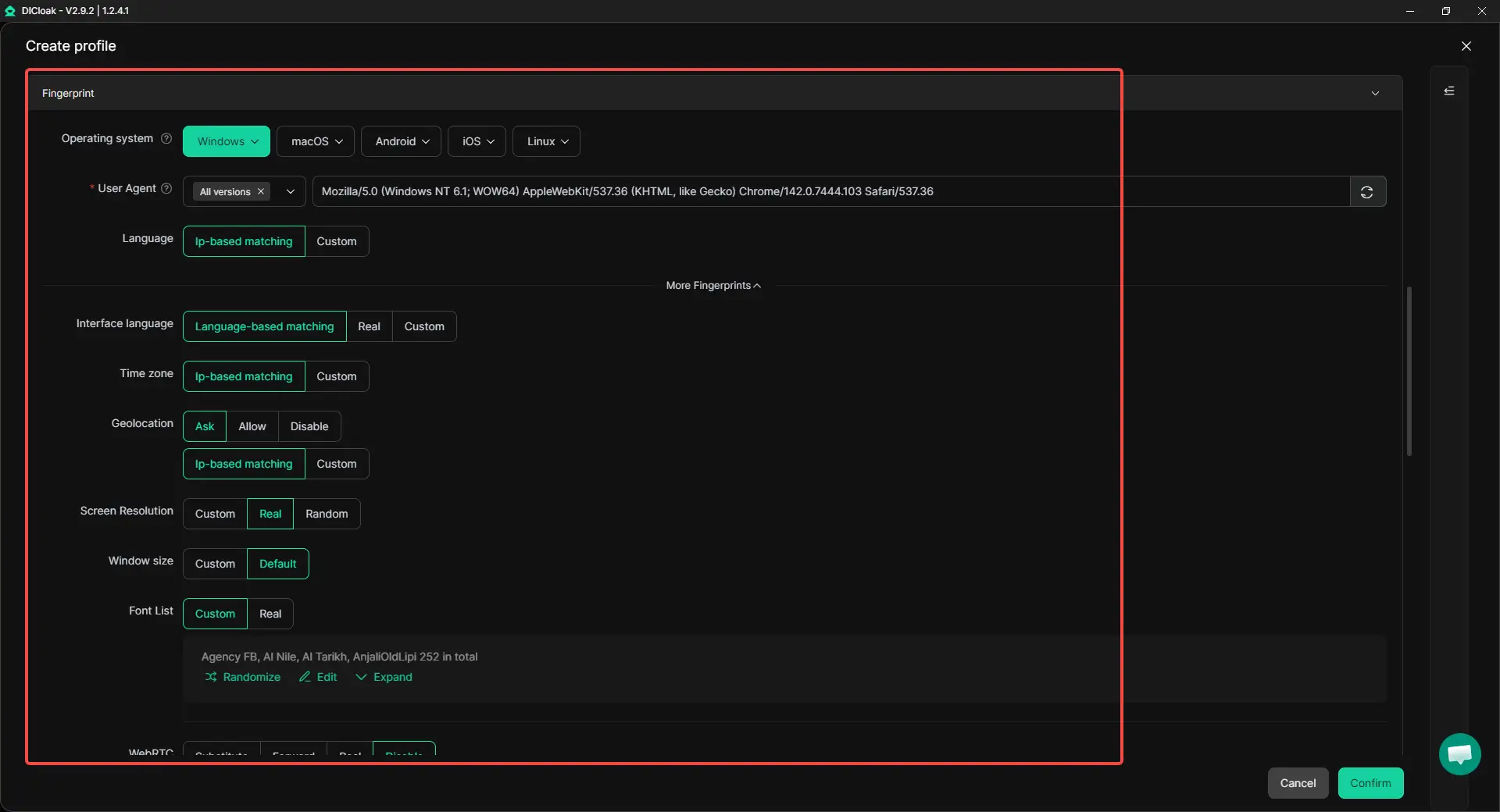
Step 3: Configure Fingerprints and Save the Environment
Before using the account, configure the browser fingerprint for that profile and save the settings. Then log into X inside the profile and keep using that same profile for the same account. This keeps cookies, login sessions, browser data, and fingerprint settings tied to one account environment. For long-term accounts, this is much cleaner than rebuilding the setup every time you need to log in.
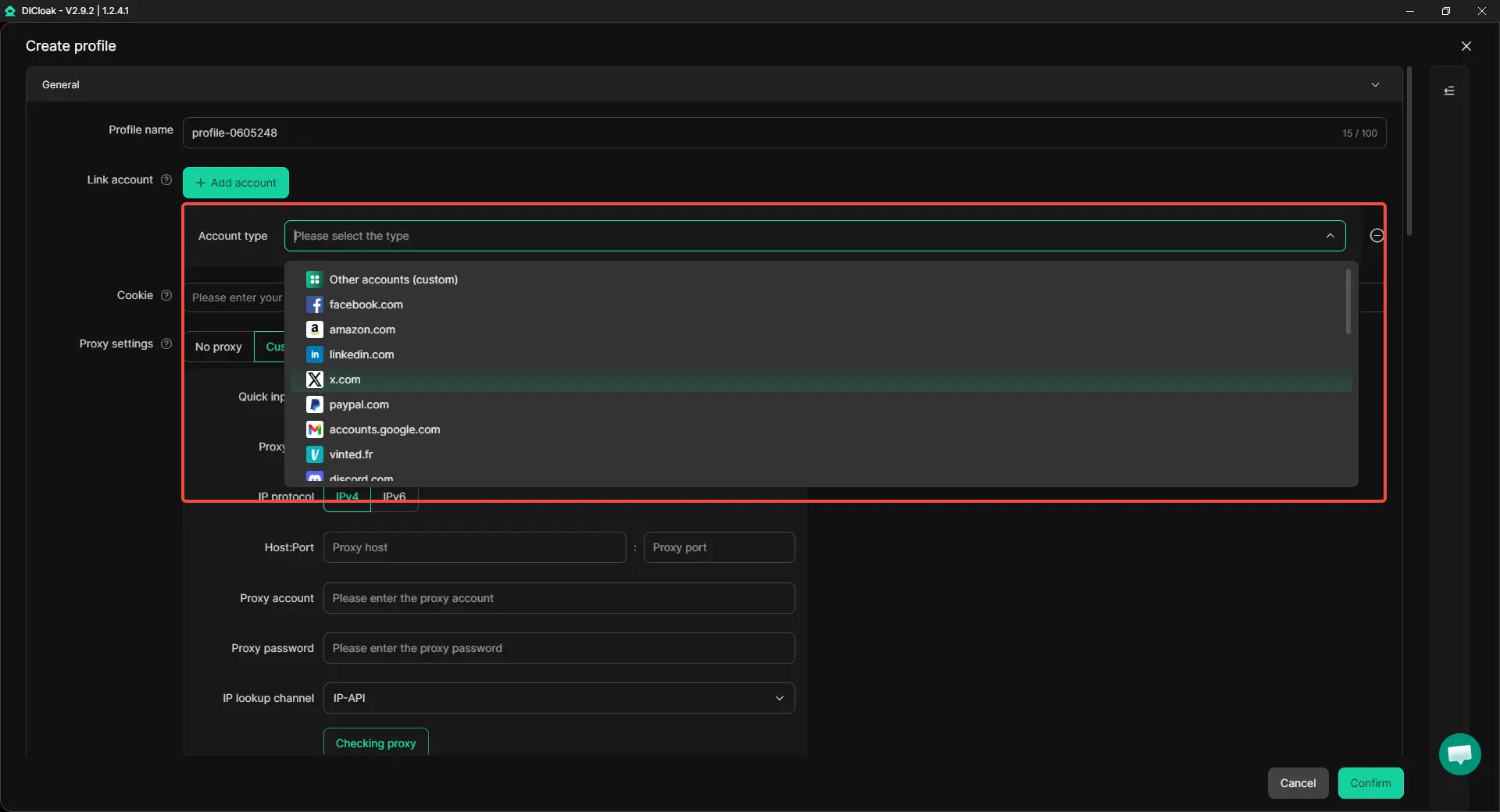
Step 4: Store Account Access in the Profile
After the account is set up, keep the login state inside the profile. This makes daily work easier because users do not need to enter usernames, passwords, or verification codes every time they open the account. It is especially useful when managing many X accounts for brands, clients, or support teams.
The point is not just speed. A stable login environment also helps each account keep a more consistent access pattern.
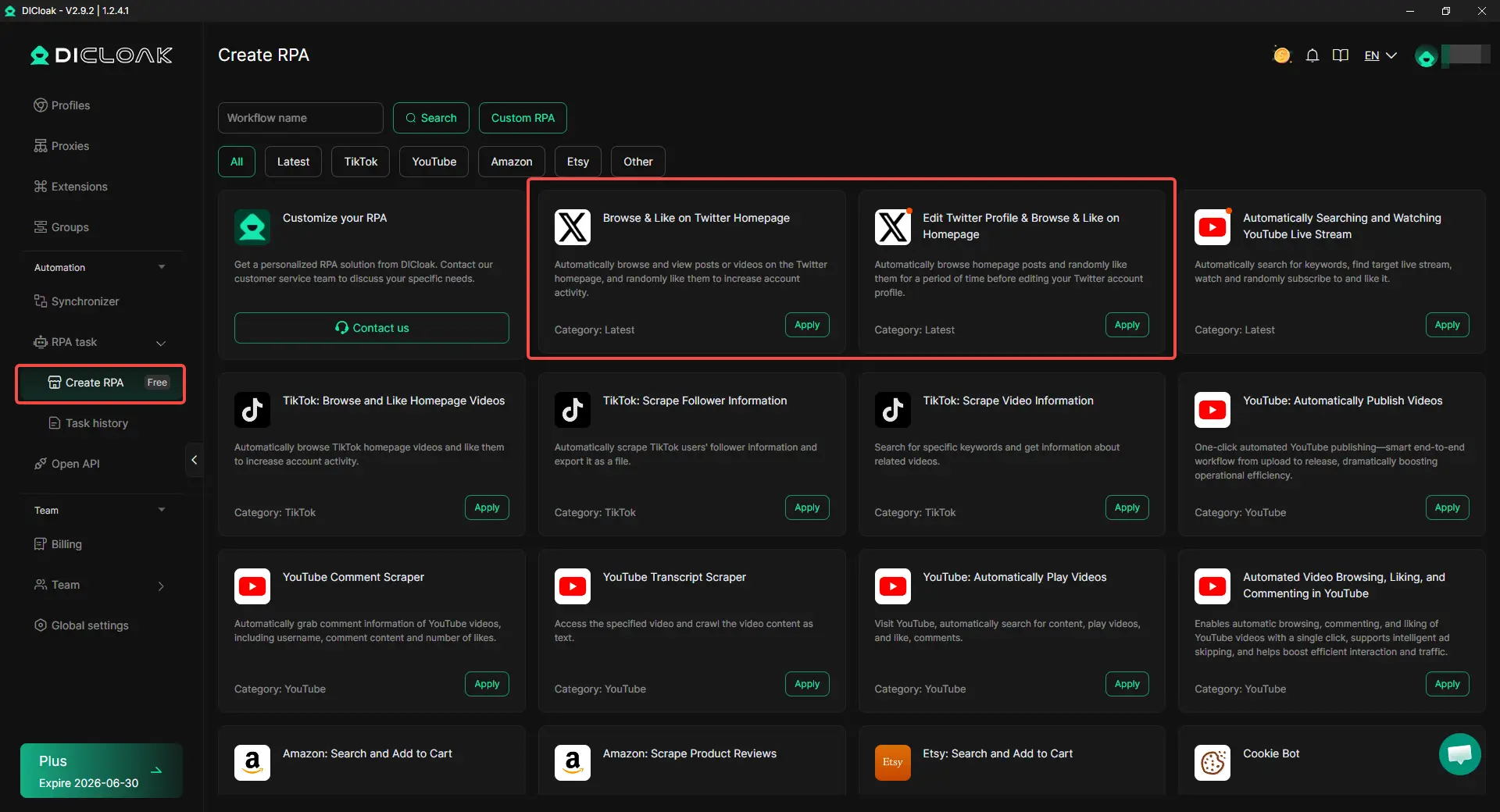
Step 5: Use RPA for Repetitive Account Maintenance
Daily X account management often includes small actions that repeat across many accounts. Users can run RPA templates for routine actions such as:
- Browsing the X homepage
- Viewing posts and videos
- Randomly liking content while browsing
- Browsing the homepage before editing an account profile
The X-related RPA templates can reduce repeated manual clicks during account warm-up or basic maintenance. This is useful when many accounts need light daily activity, but the actions still need to stay controlled and reasonable.
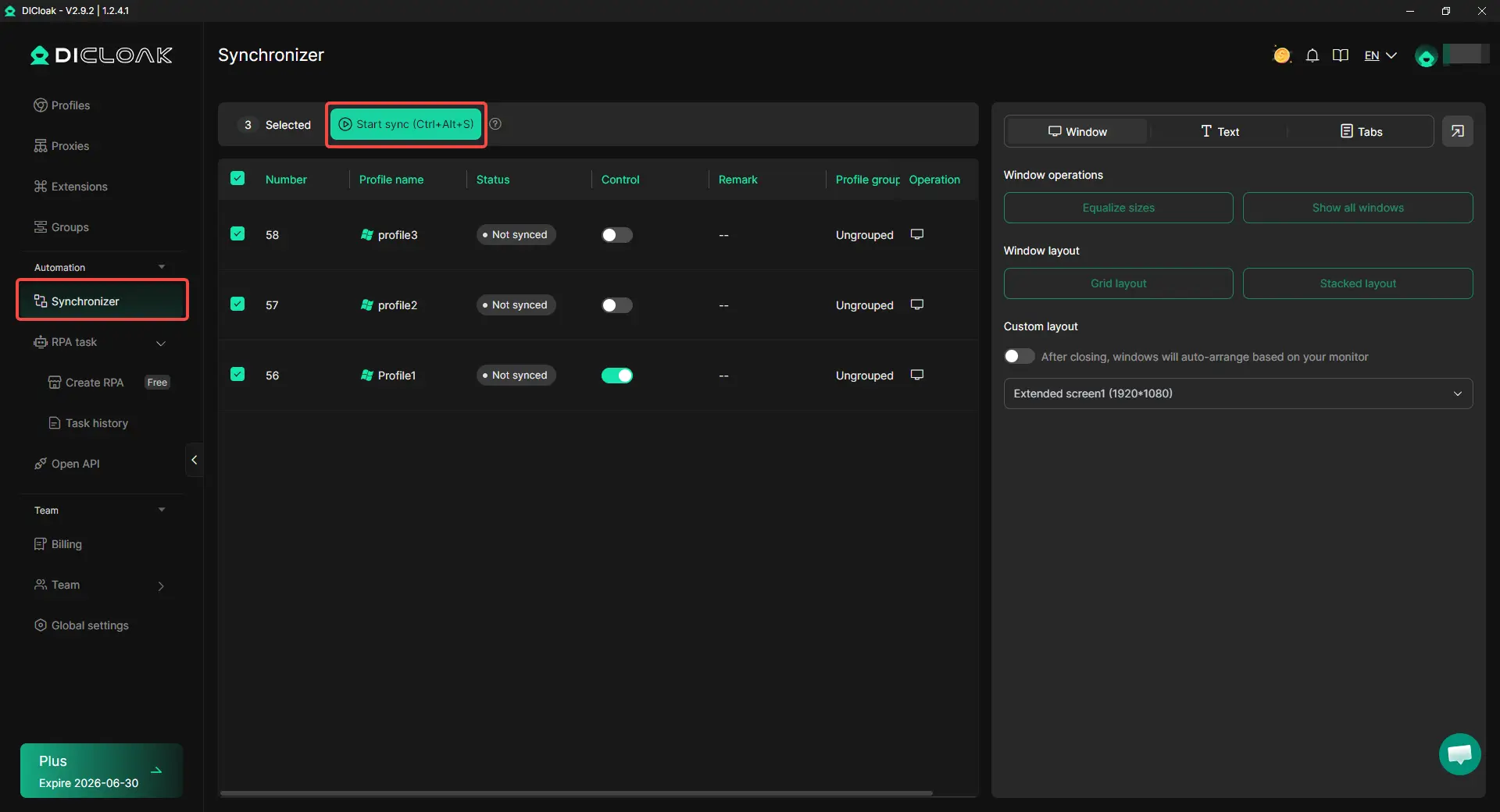
Step 6: Use Synchronizer When the Same Action Is Needed Across Profiles
Some tasks still need manual control, but repeating them one profile at a time can be slow. Synchronizer is useful when users need to complete similar actions across several selected profiles, such as:
- Updating profile descriptions
- Changing profile images
- Adjusting account settings
- Reviewing account pages
For example, a social media team setting up several new X accounts can open the selected profiles together and mirror actions from one main window. This reduces repetitive work without forcing the team to switch between profiles one by one.
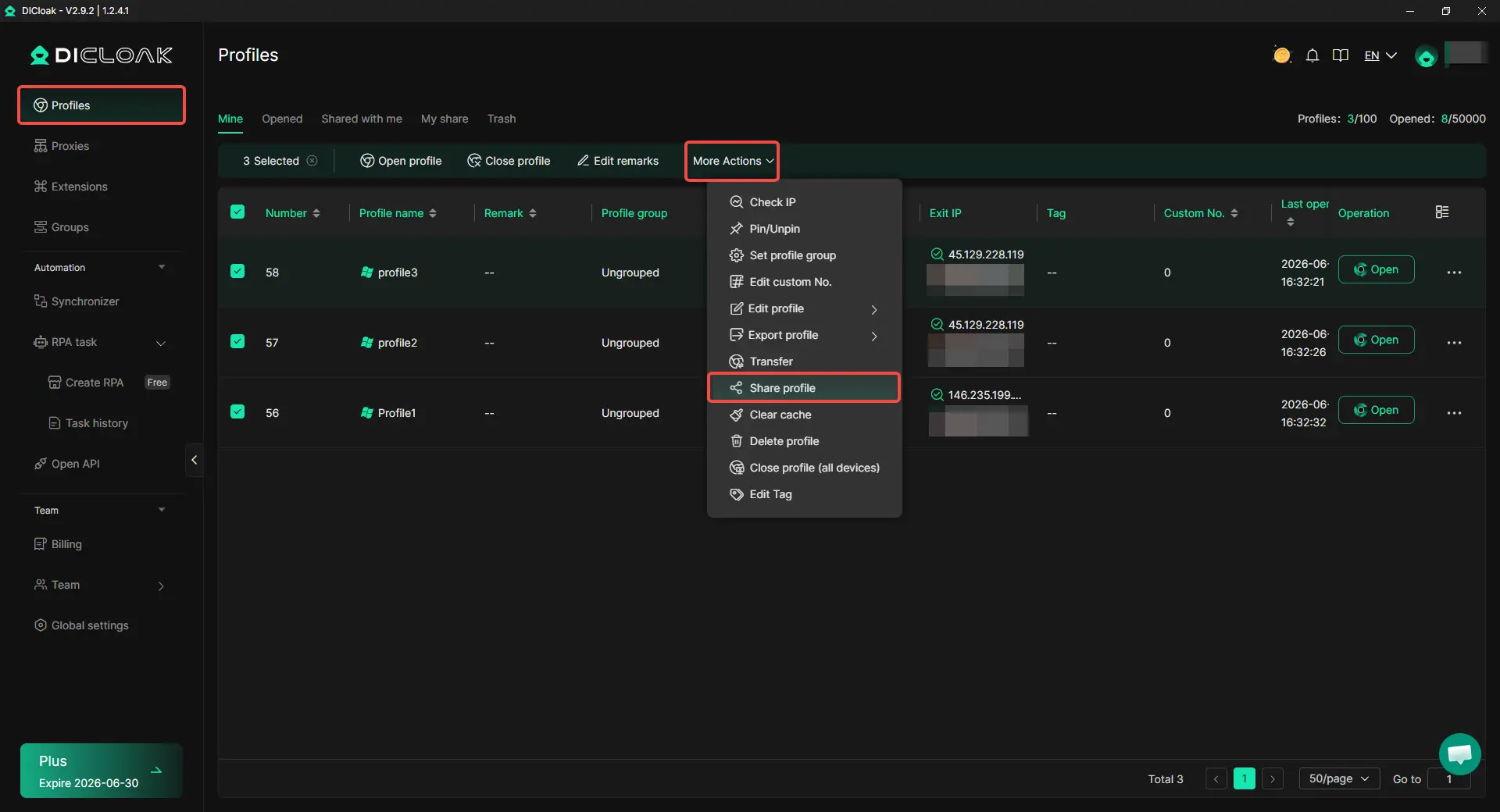
Step 7: Share Profiles Instead of Sharing Passwords
When several people manage X accounts together, account access should not depend on sending passwords through chat tools or spreadsheets. A cleaner method is to share the related browser profile with the right team member. Permissions can be assigned based on each person's role, such as content operator, support member, or manager.
This is useful when one person handles posting, another checks account status, and a manager reviews activity. It also makes account handover easier when a client account or brand account moves to a new operator.
Step 8: Review Profiles Regularly
As the number of X accounts grows, profile review becomes part of normal account management. Teams should take time to confirm that each profile still matches its assigned account and operator. This includes reviewing whether:
- The correct proxy is still assigned
- The profile owner is still accurate
- Automation tasks are still needed
- Team permissions remain appropriate
- The account purpose still matches its daily activity
These small checks help catch problems early. It is much easier to adjust one profile, one proxy, or one permission setting before several accounts start showing similar issues.
Frequently Asked Questions About Managing Multiple X Accounts
Can you have multiple X accounts in 2026?
Yes. Many people manage separate X accounts for personal use, brands, customer support, or client work. The issue is usually not the number of accounts. Problems often appear when accounts share the same environment, repeat the same content, or show highly coordinated behavior.
Can X detect multiple accounts on the same device?
Yes. Multiple accounts can appear connected when they share browser data, login sessions, device signals, or similar activity patterns. This is why many agencies and marketers use separate browser profiles for different accounts. Tools such as DICloak Antidetect Browser allow each account to operate inside its own isolated profile instead of sharing the same browser profile.
Do I need a different proxy for every X account?
Not always. A few personal accounts can often be managed without a complex proxy setup. However, when managing multiple brands, clients, or business accounts, assigning a stable proxy to each account environment can make account management more organized and consistent.
Is it safe to post the same content across multiple X accounts?
Usually not. Repeated posts, links, hashtags, and engagement patterns can make accounts look coordinated. A better approach is to adapt content for each audience rather than publishing identical posts across every account.
What is the best way to manage multiple X accounts without getting them linked?
The safest approach is to give each account a clear purpose, a separate browser profile, consistent access patterns, and its own content strategy. For larger operations, many teams use browser profile management tools such as DICloak Antidetect Browser to organize profiles, proxies, team access, automation tasks, and account activity in one place.
Final Thoughts
Managing multiple X accounts in 2026 is not just about adding more logins. It is about keeping each account clear, separate, and consistent. X accounts become easier to manage when every account has its own purpose, browser profile, network setup, content style, and access rules. Whether you manage brand accounts, client accounts, creator accounts, or support accounts, the goal is to avoid shared signals that make different accounts look connected.
A safer setup starts with simple habits: do not run every account from the same browser, do not post the same content across accounts, avoid random device or location changes, and organize team access carefully. For larger teams, isolated browser profiles, stable proxy settings, controlled permissions, and careful automation can make multi-account work more structured. With tools like DICloak Antidetect Browser, users can manage multiple X accounts in separate profiles, reduce environment overlap, and keep daily operations cleaner as account volume grows.
 Web Proxy Tools
 Free Tools
 Cookie Plugin
 UA Generator
 MAC Address Generator
 IP Generator
 IP Address List
 2FA Code Generator
 World Clock
 Anonymous Check
 WebRTC Leak Test
 UUID Generator
 Free Web Proxy Site
 Proxy Checker
 FB Ad Checker
 AI Web Scraping
 Free SMM Tools
 Twitter Shadowban Checker
 Instagram Name Checker
 UTM Generator
 Username Generator
 AI Hashtag Generator
 LinkedIn Headline Generator
 Social Media Image Resizer