Managing one social media account is already a lot of work. Managing several at the same time is much harder. Each platform has its own audience, style, and posting rhythm. That is why many teams struggle with delays, mixed messaging, weak engagement, and burnout. In this guide, we will look at how to manage multiple social media accounts in a more organized, clear, and effective way.
Common Problems When Managing Multiple Social Media Accounts
Learning how to manage multiple social media accounts sounds simple at first. Then real work starts. One account needs a post approved. Another needs a reply to comments. A third needs a video resized for a different platform. Very quickly, small tasks pile up. That is why many teams struggle, even when they already have good ideas and strong content. Recent social media research also shows that brands are under pressure to create memorable content, prove results, and stay consistent across channels at the same time.
Why juggling multiple accounts often leads to missed deadlines
The biggest problem is not always laziness or bad planning. It is usually too many moving parts. When one person or team manages several accounts, each platform has its own schedule, format, and review process. Later notes that social media calendars help teams stay on the same page because they show when posts go live, where approval steps happen, and where backup content is needed if something gets delayed. Planable makes a similar point: weak approval workflows often lead to missed deadlines because teams do not clearly define who reviews what and when it is truly approved.
A simple example makes this easier to see. Imagine a small brand running Instagram, TikTok, LinkedIn, and X. The Instagram post is ready, but the LinkedIn version still needs edits. The TikTok video needs captions. The X post must go out the same day as the campaign launch. If there is no shared calendar or clear approval order, one delay can push everything back. This is one reason why people searching how to manage multiple social media accounts often realize the real issue is not posting itself. It is coordination.
How inconsistent messaging can harm your brand identity
When brands post across many channels, it is easy for the message to drift. One platform may sound funny and casual. Another may sound too formal. A third may use a totally different promise or visual style. Hootsuite’s recent algorithm guide says consistency and content quality matter because platforms reward reliable, professional accounts. It also advises brands to follow clear brand guidelines, including the right voice, visuals, and posting rhythm.
This matters because people notice mixed signals fast. Sprout Social’s 2025 Index found that consumers want memorable brand content, not random trend chasing, and a third think brands jumping on viral trends can feel embarrassing. That tells us something important: when your message changes too much from one platform to another, people may stop trusting what your brand stands for.
What causes engagement gaps across different platforms
Engagement gaps happen for many reasons, but one of the biggest is treating every platform the same. Hootsuite says engagement rates differ by platform, and posting habits should also change based on audience behavior and timing. Its best-time-to-post research also points out that time zones matter, because the same post can perform very differently depending on when the audience is actually online.
Another reason is format mismatch. A post that works on LinkedIn may feel flat on TikTok. A short update that works on X may not carry enough value on Instagram. Hootsuite’s 2026 trends report also shows that brands are now focusing more on storytelling quality, audience fit, and long-term value instead of chasing surface-level numbers.

Risks of Poor Social Media Account Management
When social media management is weak, the damage is not always obvious on day one. But over time, small mistakes can waste budget, weaken trust, and create security problems. That is why learning how to manage multiple social media accounts is not only about saving time. It is also about avoiding avoidable risk. Hootsuite says social media risk management helps reduce brand, security, financial, and compliance risk.
How neglecting analytics can lead to wasted resources
If you do not track results, you can keep spending time and money on posts that do not work. Hootsuite defines social media analytics as the process of collecting and analyzing platform data to measure performance and guide strategy. Sprout Social also notes that users now spread their time across many networks, which makes guesswork even more expensive.
A simple example is a team posting the same campaign on Instagram, TikTok, and LinkedIn for a month without checking saves, clicks, or replies. The team stays busy, but the weak posts keep eating time and budget.
Why overposting can damage audience trust and retention
Posting more does not always mean better results. Platform advice in 2026 keeps pointing back to relevance, quality, and audience satisfaction. Sprout Social’s Instagram guide says the platform now rewards content people actually want to view and share, while Buffer’s 2026 social media analysis shows audiences are paying closer attention to value, not just volume.
If a brand posts too often without saying anything useful, followers may start ignoring it. Over time, reach can flatten, engagement can drop, and the brand can feel noisy instead of helpful.
The hidden risks of using unverified tools for account management
Unverified tools can create problems that are easy to miss at first. Google warns that unverified apps may not have been reviewed for data security, and that users should not share data unless they trust the developer. Google also says less secure apps can make it easier for hackers to access accounts. Meta has separately warned about malicious apps built to steal login details.
In real use, that could mean giving a cheap tool access to your pages, passwords, messages, or posting rights. So if you want to learn how to manage multiple social media accounts safely, choosing trusted tools is just as important as choosing useful ones.
How to Set Up a Unified Social Media Workflow
If you want to learn how to manage multiple social media accounts well, you need one clear system. Without that, content gets lost, approvals slow down, and small tasks eat up the day. In 2026, most strong teams use one shared workflow to plan, review, schedule, and track content across all accounts. Hootsuite says content planning helps teams stay consistent, save time, and scale, while Later says effective teams use one system to keep everyone aligned.
Steps to create a centralized content calendar for all accounts
Start with one calendar for every platform, campaign, and deadline. Add the post date, platform, format, owner, approval status, and goal for each piece of content. Sprout Social says a well-built social media calendar helps teams stay consistent, plan better, and collaborate more smoothly. Hootsuite also says calendar tools help teams organize content and streamline workflow.
A simple example is a brand that posts product updates on Instagram, customer tips on LinkedIn, and short videos on TikTok. If all three live in one calendar, the team can spot gaps early and avoid deadline conflicts. That is a big part of how to manage multiple social media accounts without chaos.
How to streamline approval processes for team collaboration
Approval works best when every post has a clear path. One person drafts, one person reviews, and one person gives final approval. Hootsuite says an approval workflow is a step-by-step system to review, edit, and approve content before it goes live, and that built-in approval tools can reduce friction and keep content on-brand. Buffer also highlights team approval workflows as a core feature for collaboration.
For example, a designer can upload the visual, a marketer can check the caption, and a manager can approve the final post in one place. That is much better than long email chains or last-minute chat messages.
Tools to automate repetitive tasks without sacrificing quality
Automation helps most when it handles repeat work, not your whole strategy. Good tools can schedule posts, organize queues, send approval reminders, and build reports, while the team still controls the message and final review. Hootsuite says social media automation is best for repetitive tasks like posting content and producing reports, and Later notes that strong 2026 tools now combine scheduling, approvals, and analytics in one place.
A practical setup might use one tool for scheduling, one approval flow, and one report dashboard. That saves time without making the brand sound robotic. When people ask how to manage multiple social media accounts, this is usually the smartest answer: automate the busywork, but keep the quality checks human.
Best Tools for Managing Multiple Social Media Accounts
If you want to learn how to manage multiple social media accounts well, the right tool can save a lot of time. In 2026, most teams look for three things first: scheduling, teamwork, and reporting. Popular platforms like Hootsuite, Sprout Social, Contentstudio,Buffer, and Later all cover the basics, but they do not fit the same type of team or budget. Hootsuite positions itself as an all-in-one tool for scheduling, analytics, listening, and integrations, while Sprout Social positions itself more toward teams that need deeper workflow and reporting features.
How to compare pricing and scalability for different tools
Start by matching the tool to the size of your team. Later’s 2026 pricing comparison says tool costs range from free or low-cost plans for individuals and small teams to $199 to $399+ per seat for larger platforms. It lists Later starting at $18.75 per month billed annually, Hootsuite starting at $99 per user per month, and Sprout Social starting at $199 per seat per month. That tells you something simple: low-cost tools may work well for basic scheduling, but larger teams usually pay more for approvals, deeper analytics, and multi-user workflow control.
A practical example helps. If a solo creator only needs to schedule posts and check simple results, a lower-cost tool may be enough. But if an agency manages many client accounts, needs approvals, and wants stronger reporting, a bigger platform may make more sense even at a higher price. That is a big part of how to manage multiple social media accounts without outgrowing your tool too fast. Buffer’s 2026 roundup also notes that paid plans for simpler tools can start around $15 per month, while Hootsuite highlights broader scaling and integration options for more complex teams.
Why integration with analytics platforms is essential
A scheduling tool alone is not enough. You also need to know what is working. That is why analytics integration matters so much. Hootsuite says its platform combines scheduling with analytics and competitive benchmarking, while Sprout Social highlights analytics as a core part of its platform. Without reporting, teams can keep posting but still miss what drives clicks, saves, replies, or conversions.
For example, a team may post the same campaign across Instagram, LinkedIn, and TikTok and feel productive all week. But if the tool cannot show which channel actually drove engagement or traffic, the team may keep spending effort in the wrong place. So when comparing tools for how to manage multiple social media accounts, it is smart to treat analytics integration as a must-have, not a bonus.
Strategies for Maintaining Consistent Messaging Across Accounts
A strong social presence should feel connected, even when each platform looks a little different. That is a big part of how to manage multiple social media accounts well. In 2026, the best teams keep one clear brand voice, then adjust the format, pace, and style for each channel. Hootsuite says brands should maintain a consistent voice even when posts use different tones, and Sprout Social says a clear brand voice helps build recognition and trust across channels.
How to tailor content for different platforms without losing brand voice
The message should stay the same, but the packaging can change. A LinkedIn post may need more context and a professional tone, while TikTok may need a faster hook and simpler phrasing. Hootsuite’s 2026 brand voice guide says brands should define how they sound, what they say often, and what they avoid. That makes it easier to adapt content without sounding like a different company on every platform.
For example, a product launch can keep the same promise everywhere, but Instagram may focus on visuals, LinkedIn may focus on business value, and X may focus on a short update. That is one of the most useful lessons in how to manage multiple social media accounts: change the format, not the core identity.
Why cross-posting can be effective when done strategically
Cross-posting is not always bad. It works best when you reuse the main idea, then adjust it for the platform. Buffer notes that brands can cross-post content as part of a broader strategy, while Hootsuite says reusable content templates and centralized planning help teams stay efficient across accounts.
A simple example is turning one blog post into an Instagram carousel, a LinkedIn summary, and a short X thread. That saves time, but still respects how people use each platform. Strategic cross-posting works because it keeps the message aligned without making every post feel copied.
How to use templates to ensure consistency across posts
Templates help teams stay faster and more consistent. Hootsuite says reusable templates and shared content libraries help teams manage multiple accounts more easily, and enterprise teams often store pre-approved assets and templates to protect brand consistency across regions and roles. Sprout Social also offers campaign templates built around repeatable content types like launches and events.
A good template can include the post goal, tone, CTA, visual rules, and caption structure. This does not make content boring. It just gives the team a reliable starting point. When you are learning how to manage multiple social media accounts, templates are often what turn messy posting into a system that actually scales.
Tips for Monitoring Engagement Across Multiple Accounts
If you want to learn how to manage multiple social media accounts, you also need a clear way to track engagement. Replies, comments, mentions, and clicks can spread across many platforms fast. Without a system, it is easy to miss what matters most. Hootsuite describes social media analytics as the process of collecting and analyzing platform data to measure performance, while Sprout Social highlights unified engagement tools for handling conversations across profiles.
How to track audience interactions without missing key metrics
Start by tracking a small group of key signals in one place. These usually include comments, replies, shares, saves, clicks, and response time. Hootsuite says social media analytics should guide strategy, not just collect numbers.
A simple example is a team that watches likes but ignores saves and link clicks. The post may look popular, but it may not actually move people to act. That is why good tracking should focus on meaningful engagement, not just easy numbers.
Why a unified social inbox simplifies engagement management
A unified inbox makes it easier to see messages from different accounts in one stream. Sprout Social says its Smart Inbox helps teams find conversations, filter messages, assign work, and respond faster. Hootsuite also promotes a single inbox for managing social messages in one place.
This matters because scattered messages create delays. If Instagram comments sit in one app, X mentions in another, and Facebook messages somewhere else, teams can miss real chances to engage. A unified inbox cuts that confusion and helps teams stay organized.
How to identify trends across platforms to optimize performance
Do not only look at one post at a time. Look for patterns across channels. Hootsuite says AI social listening can surface trends, emerging topics, and audience signals quickly, while Sprout notes that patterns across inbox threads and customer feedback can reveal clear content priorities.
For example, if the same question keeps appearing on Instagram, LinkedIn, and direct messages, that is not random noise. It is a sign that your audience needs clearer content on that topic. This is one of the most practical parts of how to manage multiple social media accounts well: track repeated signals, then turn them into better posts, better replies, and better timing.
How to Avoid Burnout While Managing Multiple Social Media Accounts
Managing many social channels can wear people down fast. Social media work is always moving. Trends shift, comments arrive all day, and teams often feel pressure to respond fast. Sprout Social says social media burnout is a real problem for marketers because of nonstop platform changes, heavy emotional labor, and the pressure of the 24/7 news cycle. Later also says strong social media management in 2026 depends on structure and coordination, not random posting.
Time management techniques for social media managers
The best way to protect your energy is to build a routine. Batch similar tasks together, use one clear content calendar, and set fixed times for posting, replies, and reporting. Later says organized systems help teams handle planning, creation, posting, engagement, and analysis more smoothly in 2026.
A simple example is blocking the morning for scheduling content, the afternoon for comments and messages, and one set time each week for reports. That is much easier than jumping between five platforms every hour.
How to delegate tasks effectively within your team
Burnout gets worse when one person tries to do everything. Clear roles help a lot. One teammate can draft posts, another can review visuals, and another can handle approvals or community replies. Asana explains that approval workflows and task assignment make work easier to track and help teams move projects forward without confusion.
For example, if one person owns TikTok videos and another owns LinkedIn copy, deadlines become easier to manage. Delegation works best when each task has one owner, one deadline, and one clear next step.
Why taking breaks improves creativity and productivity
Breaks are not wasted time. They help people reset. Asana says toxic productivity can hurt well-being and push people into unhealthy work habits, while Sprout Social notes that burnout can affect sleep, balance, and even the ability to enjoy life offline.
In real work, this means short breaks can help you write better captions, make better choices, and avoid the flat, rushed feeling that shows up in weak content. If you want to learn how to manage multiple social media accounts for the long term, rest is part of the system, not a reward after the system.
How DICloak Simplifies Multi-Account Social Media Management
Boost your social media marketing by managing multiple accounts securely on one device.
Why Social Media Marketing
Social media marketing has emerged as a leading strategy because it connects businesses directly with millions of active users on platforms such as Facebook, Instagram, TikTok, and Twitter/X. It enables brands to engage audiences with creative content, cultivate meaningful relationships, and respond promptly to customer needs. In addition to increasing brand awareness, it drives website traffic, boosts conversions, and delivers actionable insights through analytics. Its cost-effectiveness, precise targeting, and potential for viral reach make it an indispensable tool for businesses looking to grow, stay competitive, and build lasting trust with their audience.
Manage Multiple Social Media Accounts Safely
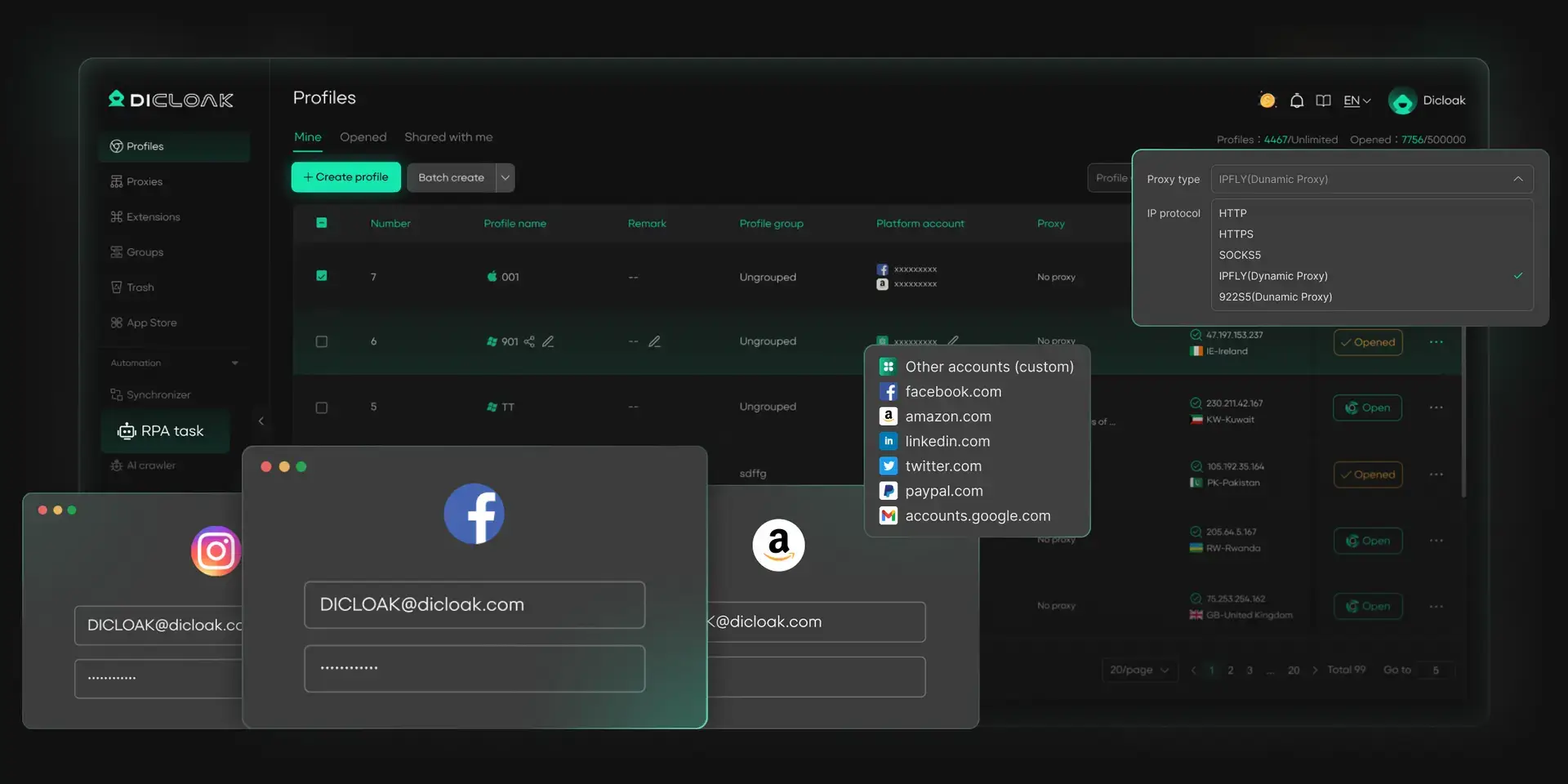
Handling many social media accounts can be challenging, especially for social media marketers or small businesses. DICloak provides the best way to manage multiple social media accounts on a single device. Each account gets a unique fingerprint and isolated browser profile, keeping accounts secure and independent. This reduces the risk of being banned on social media or flagged for suspicious activity while enabling smooth operations across all major social media platforms.
- Secure each account with unique fingerprints
- Run multiple accounts on one device without conflicts
- Maintain natural, consistent activity across accounts
Automate Account Engagement
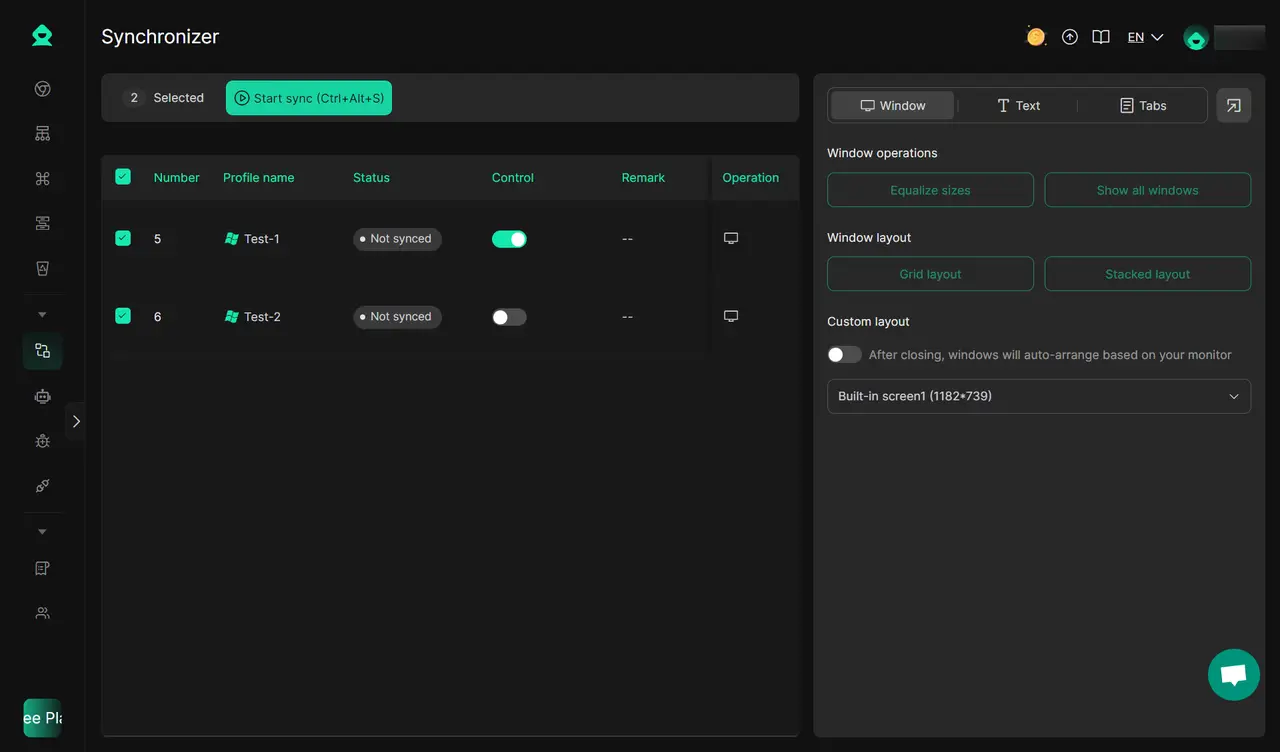
Keep your accounts active and engaging with DICloak’s built-in automation tools. Describe tasks in plain language, and DICloak' RPA handles repetitive actions automatically. The Multi-Window Synchronizer also supports you like, comment, and follow across multiple profiles and platforms simultaneously, mimicking real user behavior for safe social media browsing.
- Act like a real user to avoid detection
- Automatically like, comment, and interact
- Reduce repetitive tasks and save time
Boost Marketing Efficiency
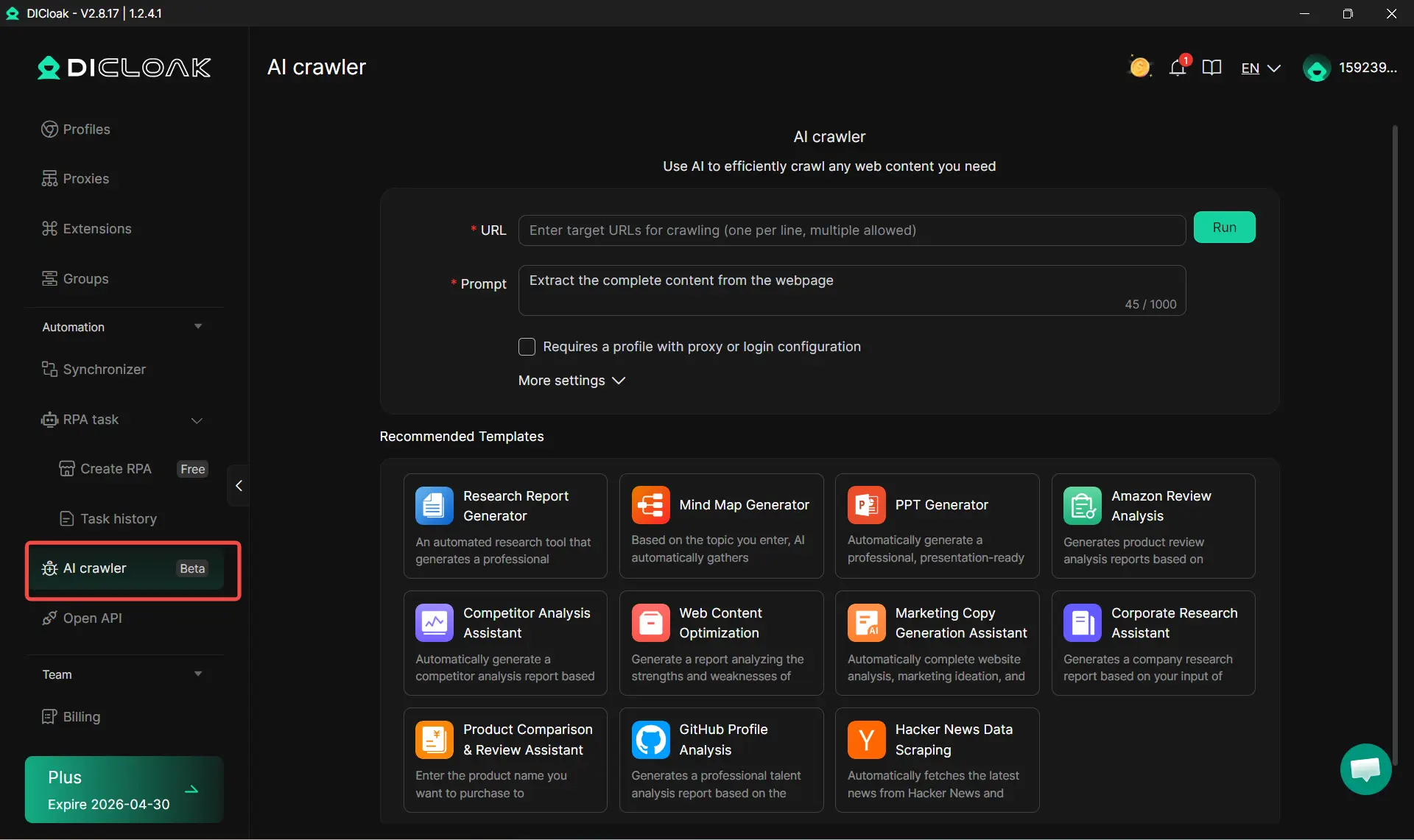
DICloak’s AI Crawlers help simplify social media marketing for small business and agencies. Collect and analyze data, generate content ideas, and create marketing copy effortlessly. You can also gather competitor or product information to optimize campaigns and refine strategies.
- Collect and analyze data efficiently
- Generate content ideas effortlessly
- Refine marketing strategies with AI insights
Start using DICloak today and take full control of your social media accounts safely and efficiently!
FAQ About How to Manage Multiple Social Media Accounts
Can I manage multiple social media accounts without paid tools?
Yes, you can, especially if you only manage a few accounts. You can use native schedulers, spreadsheets, shared calendars, and manual posting. But as the number of accounts grows, the work gets harder to track. Paid tools usually help with scheduling, approvals, inbox management, and reporting, which saves time once the workload becomes more complex.
Is it safe to use the same login credentials across platforms?
No. Reusing the same password across platforms creates extra risk. Google warns that password reuse can make accounts easier to compromise, especially when one account is exposed. A safer setup is using unique passwords for each platform and storing them in a trusted password manager. That matters even more when teams share access.
How do I handle negative comments across multiple accounts?
Start with a simple response plan. Decide which comments need a reply, which need escalation, and which should be ignored or moderated. A shared inbox or clear ownership system helps a lot because it keeps replies from getting missed or duplicated. This is important because negative feedback often spreads faster when teams answer slowly or inconsistently.
What’s the best way to schedule posts for different time zones?
The best method is to post based on when each audience is active, not when your team happens to be online. That usually means using a scheduler that supports time zone planning and then checking performance by region. A post that works in one market may miss the audience completely in another. Good scheduling is one of the most practical parts of how to manage multiple social media accounts well.
Should I create unique content for every platform or repurpose it?
You do not need to build everything from scratch. Repurposing is often the smarter choice, as long as you adapt the content to fit the platform. Buffer’s 2026 tools coverage highlights repurposing and resizing as common parts of modern workflows. The core message can stay the same, but the format, hook, and pacing should match the channel. That way, the brand stays consistent without feeling copied everywhere.
Conclusion
Learning how to manage multiple social media accounts is not about posting more. It is about building a system that helps you stay consistent, save time, and make better decisions. With the right workflow, tools, and team habits, it becomes much easier to manage content, track results, and keep your brand strong across every platform.
 Web Proxy Tools
 Free Tools
 Cookie Plugin
 UA Generator
 MAC Address Generator
 IP Generator
 IP Address List
 2FA Code Generator
 World Clock
 Anonymous Check
 WebRTC Leak Test
 UUID Generator
 Free Web Proxy Site
 Proxy Checker
 FB Ad Checker
 AI Web Scraping
 Free SMM Tools
 Twitter Shadowban Checker
 Instagram Name Checker
 UTM Generator
 Username Generator
 AI Hashtag Generator
 LinkedIn Headline Generator
 Social Media Image Resizer