Many people open Instagram every day without thinking. Then one day, it suddenly stops working. The app will not load. Posts do not refresh. Or your account cannot log in. This moment is frustrating and confusing. If you are searching for instagram unblocked, you are not alone. Millions of users face this problem at school, at work, or even at home. The good news is that most Instagram blocks have clear reasons and simple fixes. Before trying random solutions, it is important to understand why Instagram is blocked and what kind of block you are dealing with.
Understanding Instagram Blocks
When people search for instagram unblocked, they usually just want one thing: access back as fast as possible. But Instagram can be blocked in different ways. Each type feels different. Each one needs a different solution. If you understand the block first, fixing it becomes much easier.
Types of Instagram Blocks
School and workplace restrictions This is very common. Instagram works at home, but not at school or at the office. The app may load forever, show an error, or fail to refresh. This usually happens because the network blocks social media on purpose. Schools and companies often do this to reduce distractions or protect their network.
Example: A student opens Instagram using mobile data and everything works. The same phone connects to school Wi-Fi, and Instagram stops loading. This means the network is blocking Instagram, not the account.
State censorship and regional blocks In some regions, Instagram can be blocked for everyone in that area. This kind of block is outside the user’s control. It can last for hours, days, or longer. When this happens, many people around you have the same problem at the same time.
Example: Instagram does not load on any device. Switching apps or restarting does nothing. Friends nearby also cannot access Instagram. This pattern often means a regional restriction, not a personal issue.
Account-specific blocks Sometimes Instagram itself limits or disables a single account. The app opens, but you cannot log in. Or you see a message saying your account is restricted or disabled. Other accounts on the same network may work fine.
Example: You try to log in and see a warning about unusual activity or rule violations. Your friend logs in on the same Wi-Fi with no problem. This points to an account-level block.
Reasons for Blocking Instagram
Institutional policies Schools and workplaces often block Instagram to control internet use. These rules are set by the organization, not by Instagram. They can change by time of day or by user role.
Government regulations Some governments restrict access to social platforms for legal or political reasons. These blocks affect many users at once and are not caused by anything you did.
Content moderation issues Instagram may limit accounts that break its rules. This can include posting restricted content, using automation too fast, or showing behavior that looks risky. In some cases, the block is temporary. In others, users must request a review.
Methods to Unblock Instagram
Once you know why Instagram is blocked, the next step is choosing the right fix. A school network block needs a different method than a regional restriction. Below are practical ways many users use to get instagram unblocked, explained in simple terms and real situations.
Using Proxy Servers
What are proxy servers? A proxy server acts like a middle stop between your device and Instagram. Instead of connecting to Instagram directly, your traffic goes through the proxy first. To the network, it looks like you are visiting a different address. This is why proxies are often used to bypass school or office blocks.
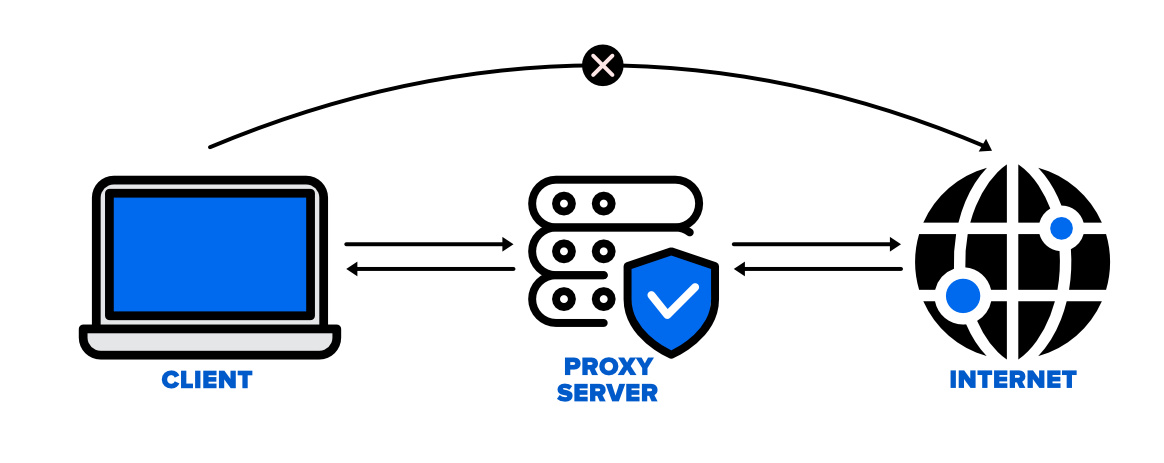
Simple example: Instagram is blocked on your office Wi-Fi. When you use a proxy, the Wi-Fi sees a normal web connection, not Instagram. The app or site loads again.
How to choose a reliable proxy service Not all proxies work well. A good proxy should be:
- Stable and fast
- Dedicated or private (not shared by many users)
- Compatible with mobile apps and browsers
Free proxies often fail or stop working quickly. They can also be slow. For steady access, many users choose paid services with clear setup guides.
Step-by-step guide to setting up a proxy
- Get your proxy details (IP, port, username, password).
- Open your device network settings or browser settings.
- Enter the proxy information exactly as provided.
- Save the settings and reconnect to the network.
- Open Instagram and check if it loads.
If Instagram opens normally, the proxy is working. If not, try a different server from the same provider.
Accessing Instagram via Mobile Data
How mobile data can bypass Wi-Fi restrictions Many Instagram blocks only exist on Wi-Fi networks. Mobile data uses a different route. It does not follow school or workplace rules. This makes mobile data one of the fastest ways to get instagram unblocked.
Real example: Instagram fails on campus Wi-Fi. You turn off Wi-Fi, switch to mobile data, and the app loads right away. This confirms the block is network-based.
Tips for using mobile data effectively
- Turn off background apps to save data
- Avoid watching many videos if your plan is limited
- Use mobile data only to check or post, then switch back
This method is simple, but it depends on your data plan and signal strength.
Buying Foreign SIM Cards
In some regions, Instagram is restricted at a local level. In these cases, local networks may all follow the same rules. A foreign SIM card can help because it connects through a different carrier profile.
How this works in real life: A traveler inserts a SIM card from another country. Instagram loads without issues, even though local SIM cards cannot access it. The network route is different, so the block no longer applies.
When this method makes sense
- Long-term regional restrictions
- Frequent travel
- Users who need stable access for work
This option costs more than others, but it can be reliable in areas with strict local limits.
Other Methods and Shortcuts You Should Avoid
After trying safe and proven options, many users search for “quick tricks” to get instagram unblocked. You may see these methods recommended in forums or short videos. While they sound easy, they often do not work. Some can even cause bigger problems. Below are common methods we do not recommend, and the real reasons why.
Changing DNS or Using Smart DNS (Usually Doesn’t Work)
Changing DNS settings is often suggested as a fast fix. A DNS server only helps your device find a website’s address. It does not hide traffic or bypass real network blocks. Most school, office, and regional restrictions block Instagram at a deeper level.
Example: A user switches to a public DNS service and restarts the phone. Instagram still fails to load on school Wi-Fi. This happens because the network blocks Instagram traffic itself, not just the name lookup.
Smart DNS tools face the same problem. They may work for streaming sites, but they rarely help with social apps. If your goal is instagram unblocked, DNS changes usually waste time and give false hope.
Using Tor (Very Slow and High Risk)
Tor routes your traffic through many encrypted layers. This makes connections very slow. Instagram often flags this type of traffic as suspicious. Login attempts may fail. Accounts may face extra security checks or temporary locks.
Real situation: A user opens Instagram through Tor. Pages load very slowly. After logging in, the account is asked to verify again and again. Some users later report action limits or login blocks.
Tor is built for privacy, not for smooth social media use. If you care about account safety and stable access, this is not a good way to get instagram unblocked.
Browser Extensions (Risky and Unsafe)
Many browser extensions promise one-click access. Some claim to unblock Instagram instantly. This is one of the most dangerous options.
These extensions can:
- Track your browsing
- Read login data
- Inject ads or scripts
- Break Instagram features
Example: A user installs a free “Instagram unblocker” extension. Instagram loads, but the account later shows strange activity. Password reset emails start arriving. This often points to data misuse.
If you want instagram unblocked, avoid shortcuts that put your account at risk. Once an account is compromised, recovery is much harder.
In short, not every method that sounds simple is safe or effective. DNS tricks, Tor, and browser extensions often cause more trouble than they solve. In the next section, we’ll look at what to do if Instagram is still blocked and how to prevent this problem in the future.
The Best Practice for Stable and Safe Instagram Access
After testing many methods, experienced users follow one clear rule: the safest way to keep instagram unblocked is to use a proxy together with an antidetect browser. This approach is not a shortcut. It is a long-term solution used by professionals who care about account safety and stability.
Why Combine Proxies with an Antidetect Browser
A proxy only changes where your connection comes from. It does not change how your device looks. Instagram still sees your browser type, system details, screen size, and many other signals. If these signals look unusual or change too often, access problems can return.
An antidetect browser solves this issue. It creates a clean and isolated browser profile. Each profile looks like a real, normal device. When you pair it with a proxy, Instagram sees a consistent identity instead of mixed signals.
Simple example: A user connects through a proxy but keeps using the same normal browser. Instagram works at first, then shows errors or limits. When the same proxy is used inside an antidetect browser profile, the connection stays stable and the account loads normally.
What an Antidetect Browser Is Used For
An antidetect browser is designed to:
- Keep each account in a separate environment
- Prevent data leaks between sessions
- Maintain a stable digital identity
- Reduce detection risks on restricted networks
This is why many marketers, creators, and business users rely on antidetect browsers when they need instagram unblocked on school networks, work Wi-Fi, or restricted regions.
Why Choose DICloak Antidetect Browsers for Accessing?
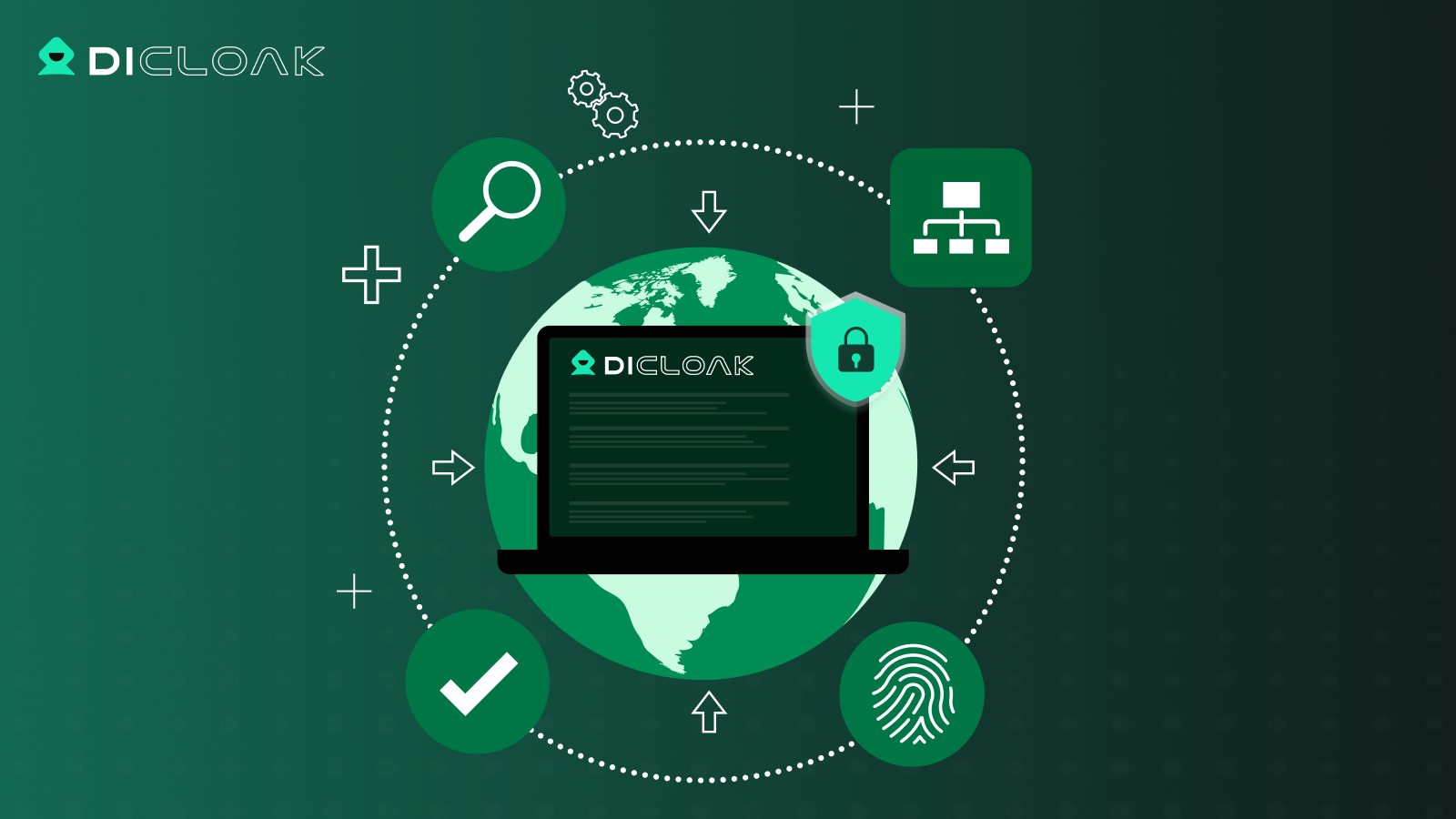
⚡The DICloak Antidetect Browser has become a global favorite for its unparalleled ability to efficiently and securely manage multiple accounts. Designed for professionals in social media management, and more, DICloak offers powerful features like RPA automation, bulk operations, and a synchronizer. Additionally, it allows you to customize fingerprints and integrate proxies for each profile, ensuring top-level security and operational efficiency. It’s the ultimate tool for seamless, secure, and scalable operations.

What Makes DICloak Stand Out?
✅ Manage 1,000+ Accounts on One Device: Stop wasting money on extra hardware! DICloak allows you to manage multiple accounts on a single device, cutting costs and boosting efficiency.
✅ Guaranteed Account Safety, No Ban Risks: Every account gets its own isolated browser profile with custom fingerprints and IPs, drastically reducing the risk of bans. Your accounts, your control!
✅ Flexible Proxy Configuration for Maximum Performance: Seamlessly integrate with all major proxy protocols (HTTP/HTTPS, SOCKS5) and manage your proxy pool with bulk operations. No more struggling with IP management—DICloak has you covered.
✅ Streamlined Team Collaboration for Better Results: Easily manage your team with advanced tools like profile sharing, permission settings, data isolation, and operation logs. Your team works smarter, not harder.
✅ Automate the Grind with RPA: DICloak's built-in RPA saves you hours of manual work. Automate repetitive tasks, streamline workflows, and focus on what really matters—growing your business.
✅ Powerful Bulk Tools to Scale Your Operations: Create, import, and launch multiple browser profiles in one click. DICloak makes scaling your business as easy as it gets.
✅ Compatible with All Major Operating Systems: Based on the Chrome core, DICloak supports simulating Windows, Mac, iOS, Android, and Linux operating systems. No matter what platform you need, DICloak has you covered.
🔗 Ready to Get Started?
Visit the DICloak website to explore more details and choose the plan that’s right for you. Start for free today and experience the power of secure, efficient, and scalable multi-account management!
Where Is Instagram Blocked Right Now?
If you are trying to get instagram unblocked and nothing works, your location may be the reason. Instagram is not only blocked by schools or offices. In some countries, access is restricted at a national level. This means most local networks follow the same rules.
As of late 2025, Instagram is widely reported as blocked or heavily restricted in several countries, including:
- China
- Russia
- Iran
- North Korea
- Turkmenistan
- Nepal
If you are in or traveling to one of these places, Instagram may not load at all. Changing apps or restarting your phone will not help. Many users in the same area usually face the problem at the same time.
Knowing this helps you plan ahead. If access is blocked country-wide, normal fixes will not work, and different strategies are needed to keep instagram unblocked.
Why Is Instagram Blocked in Some Locations?
Instagram bans at the country level usually come from policy decisions, not technical errors. Below are the most common reasons, explained in simple terms.
Control of Information and Political Concerns
In some countries, social platforms are restricted because they allow fast sharing of news, videos, and opinions. Governments may limit Instagram during protests or sensitive political events.
Example: In some regions, Instagram was restricted after people used it to organize demonstrations and share live updates. The block was meant to slow down how information spreads.
National Security and Stability
Some governments see foreign social platforms as a risk. They may worry about outside influence, data control, or rapid message spread during crises. Blocking Instagram becomes a way to keep tighter control.
Example: Users notice Instagram suddenly stops working during major political or military events, while local platforms continue to operate.
Cultural or Social Restrictions
Certain countries block international platforms to protect local cultural or social rules. Instagram content is global and hard to fully control. This makes it an easy target for restrictions.
Example: In highly controlled media environments, most foreign social apps are blocked, not just Instagram.
Economic and Local Platform Protection
Another reason is economic strategy. Some countries support local social media platforms and limit foreign ones to reduce competition. This gives domestic apps more space to grow.
Example: Local users rely on national social apps that replace Instagram’s features, such as messaging, short videos, and social feeds.
Technical Considerations for Keeping Instagram Accessible
If Instagram is blocked in your location, technical setup matters a lot. This is especially true in countries or networks with strict controls. To keep instagram unblocked in a stable way, you need the right tools and the right setup. Small mistakes can cause slow loading, login errors, or new restrictions.
Choosing the Right Proxy
Not all proxies work the same. The wrong choice can make things worse instead of better.
Key features to look for in a proxy service A good proxy for Instagram should have:
- Stable connection – pages load smoothly, not halfway
- Low-sharing – fewer users on the same IP
- Support for social platforms – some proxies block Instagram traffic by default
- Location options – useful if Instagram is restricted in your region
Real example: A user picks a cheap shared proxy. Instagram opens once, then stops loading. After switching to a cleaner, private proxy, the app works normally again.
Why security and privacy matter Instagram checks more than just your IP. If a proxy leaks data or behaves oddly, Instagram may flag the connection. This can lead to login checks or temporary limits. A secure proxy reduces these risks and helps keep instagram unblocked for longer.
How to Configure Proxies Correctly
Even a good proxy will fail if it is set up the wrong way.
Basic setup steps
- Copy the proxy details (IP, port, login info).
- Open your browser or system network settings.
- Enter the proxy information carefully.
- Save the settings and reconnect.
- Open Instagram and test basic actions, like loading the feed.
Simple test: If the homepage loads but stories fail, the proxy may be unstable. Try another server from the same provider.
Fixing common problems
- Instagram loads slowly: switch to a closer proxy location
- Login keeps failing: clear cookies or use a fresh browser profile
- App works once, then breaks: the IP may be overused
Many users find that pairing proxies with isolated browser profiles gives the best results. This keeps sessions clean and reduces conflicts.
To keep instagram unblocked, tools alone are not enough. The way you choose and configure them makes the real difference. In the next section, we’ll look at how professionals avoid repeat blocks and maintain long-term access without risking their accounts.
FAQs About Unblocking Instagram
Is it legal to unblock Instagram?
It depends on your location. At schools or offices, it may break network rules but not the law. In some countries, bypassing national blocks can be illegal.
Is Instagram blocked in China?
Yes, Instagram is completely blocked in mainland China, a restriction enforced by the country's strict internet censorship policy known as the Great Firewall. The ban covers both the mobile app and the website.
What if Instagram is still blocked?
Try another network or proxy, or wait if the block is regional. Some blocks are temporary and affect everyone nearby.
Conclusion
Getting instagram unblocked is much easier once you understand why the block happens. In most cases, simple steps like using mobile data or a reliable proxy solve the problem. For long-term and stable access, many experienced users combine proxies with an antidetect browser to keep a clean and consistent connection. There is no one-size-fits-all solution, so test safe options based on your location and network. With the right approach and patience, you can keep instagram unblocked and avoid repeat issues.
 Web Proxy Tools
 Free Tools
 Cookie Plugin
 UA Generator
 MAC Address Generator
 IP Generator
 IP Address List
 2FA Code Generator
 World Clock
 Anonymous Check
 WebRTC Leak Test
 UUID Generator
 Free Web Proxy Site
 Proxy Checker
 FB Ad Checker
 AI Web Scraping
 Free SMM Tools
 Twitter Shadowban Checker
 Instagram Name Checker
 UTM Generator
 Username Generator
 AI Hashtag Generator
 LinkedIn Headline Generator
 Social Media Image Resizer