A developer on Anthropic’s Claude platform lost access to his account for over a week, not because of a technical bug, but because his KYC (Know Your Customer) check flagged his ID as “unverifiable.” He had uploaded a clear passport scan and matched the address to his payment card, yet the system still locked him out. Experiences like this aren’t rare. As more AI tool providers like Claude enforce strict identity verification, users find that a single mismatch or a proxy IP can freeze their work, block payments, or lead to permanent bans. The rules behind claude kyc are not always clear, and appeals move slowly. Even experienced users struggle to predict what counts as “suspicious activity.” For teams managing multiple accounts, a misstep with browser fingerprints or shared proxies can trigger cascading restrictions.
This guide cuts through the confusion. You’ll see what Claude actually checks during KYC, why some accounts get flagged even when documents look fine, and which early warning signs users often miss. It also breaks down the major risks, from failed verification to account recovery problems. For those managing accounts at scale, you’ll find practical steps to reduce lockout risk, including how tools like DICloak help isolate browser fingerprints and control access safely. Read on to avoid the most common KYC pitfalls and keep your Claude account running without surprise interruptions.
What Is Claude KYC and Why Is It Required Now?
What does KYC mean for Claude users?
KYC stands for “Know Your Customer.” In the context of Claude, KYC means users must prove their real identity before they can access or keep using Claude, Anthropic’s AI chatbot. This is not just a quick email or phone code. Instead, users need to upload documents like a passport, ID card, or sometimes a selfie holding their ID. Claude KYC checks if these documents match the person and if they are not fake or stolen.
Compared to simple email or phone verification, KYC is a much stricter process. Email verification only proves someone can access an inbox, not who they really are. Phone verification is a little stronger, but it can still be bypassed with disposable numbers. KYC makes it much harder to create fake accounts or hide who is using Claude. That’s why more AI companies, not just Anthropic, are moving toward KYC checks, OpenAI and Google have also added identity steps for some services.
The main goal is to tie each Claude account to a real person. If a user fails KYC, Anthropic can block access, request extra documents, or even delete the account.
Why did Anthropic start requiring KYC?
Anthropic didn’t always ask for KYC. The main reasons for the change come from outside pressure and problems with abuse. On the regulatory side, governments now expect tech companies to know who is using their tools. This is especially true in the U.S., Europe, and parts of Asia where rules about digital identity and anti-money laundering are getting stricter. If Anthropic wants to stay online and avoid legal trouble, it must prove it can trace accounts back to real people.
Abuse is the other big reason. AI tools like Claude are popular targets for spam, fraud, and even attacks on other users. Without KYC, one person can create dozens of fake accounts and use them for scams or bypass free tier limits. Anthropic has seen large numbers of accounts created with fake or stolen credentials. Some teams tried to get around usage limits by running hundreds of Claude accounts with different emails, but the same fingerprints or proxies. When KYC is in place, this kind of abuse drops sharply because each user must upload a real ID.
For users, this means stricter checks but also a safer and more stable Claude. Less spam, fewer fake users, and easier tracking if something goes wrong. The key shift is that Claude KYC is now a gatekeeper, not just a background check.
Who is affected by Claude KYC?
Not everyone faces Claude KYC the same way. New users will almost always be asked to complete KYC before they can use Claude fully. This means anyone signing up after the KYC rollout must upload documents right from the start. For existing users, the rules depend on location, access method, and sometimes account activity.
In the U.S. and most of Europe, Claude KYC is now standard for both new and old accounts. If you log in from a country with strict data laws, expect to see the KYC prompt sooner, even if your account is old. In some regions, Anthropic still rolls out KYC in stages. For example, users in certain countries might not see KYC requirements until later, or only if they hit a usage threshold.
Here’s a quick breakdown of who gets KYC checked:
| User Type |
KYC Required |
Notes |
| New sign-ups |
Yes |
Must complete KYC before access |
| Existing users |
Sometimes |
Based on country and account activity |
| Teams/Orgs |
Yes |
Each member may need to pass KYC |
| High usage/flags |
Yes |
Triggered by suspicious logins or account sharing patterns |
Table source: Anthropic Help Center
For teams managing several Claude accounts, the risk is higher. Accounts that share the same browser fingerprint or proxy often get flagged for extra checks or forced into KYC. If you run into repeated restrictions, it usually means Anthropic’s system has detected unusual patterns tied to your group or device. To keep accounts separate and avoid these issues, you can use tools like DICloak to isolate fingerprints and control access per user.
No matter where you are, KYC is here to stay for Claude. If you don’t pass or skip the process, you will lose access to Claude’s main features, even if you paid for a subscription.
What Do You Need to Pass Claude KYC Verification?
Which documents are accepted for Claude KYC?
Claude’s KYC check is strict about what counts as valid ID. You’ll need one government-issued photo document, passport, driver’s license, or national ID card. Temporary or expired IDs rarely work. The photo must be clear, with no glare or blur. For most users, a passport is safest because it’s recognized globally and less likely to trigger extra checks.
You also have to provide a selfie. Claude’s system compares your selfie to the photo on your ID. This means you can’t use old photos or someone else’s documents. The selfie must be well-lit, show your full face, and match the ID. If your photo is too dark, blurry, or cropped, the process will stall. The system might ask for a live “video selfie” if it can’t match your image, similar to what Binance requires for account verification.
Some countries have extra requirements. For example, if your ID is not in Latin script, you may need to submit a translation or a second document. Claude doesn’t accept student IDs, company badges, or digital-only documents. If you try to upload a scan instead of a photo, the system will usually reject it.
The most common reason people fail Claude KYC is submitting unclear or mismatched photos.
What information must you provide?
The Claude KYC process asks for basic personal details. You’ll need to give your full name exactly as it appears on your ID, your date of birth, and your current address. Sometimes, you must enter the ID number and its expiration date. If your address doesn’t match your ID, you may be asked for a utility bill, bank statement, or rental contract to prove residency.
The form also asks for your email and phone number. Make sure these match your account details. If Claude spots inconsistencies, the KYC can be delayed or flagged for manual review. All data is uploaded directly through Claude’s secure portal. You don’t email documents or use third-party apps. The upload page is encrypted, similar to the Stripe Identity process, so your documents are protected during submission.
Once you submit, Claude’s system checks your data against government databases and fraud lists. If anything doesn’t line up, like a wrong birth date or mismatched address, you’ll get a request for more information. You can usually fix minor mistakes by resubmitting, but repeated errors will freeze your account until support reviews it.
How does the verification process actually work?
The Claude KYC process starts when you click “Verify Account” in your settings. You’re guided through a step-by-step upload:
- Submit your ID photo (passport, driver’s license, or national ID).
- Take and upload a selfie or live video selfie.
- Enter your personal details and confirm your address.
- Review and submit the information.
After you submit, Claude’s system runs automatic checks. If the photo and selfie match, and your data matches their records, you’ll usually get a confirmation in 1-3 business days. If the system can’t verify your identity, you’ll get a request for more documents or a live call. Most delays happen when photos are unclear or details don’t match.
Here’s a simple flowchart for the process:
If you’re managing several Claude accounts for a team, it’s easy to trigger warnings by reusing browser fingerprints or proxies. Claude’s system tracks device and network details, so sharing devices or IPs can lead to failed verifications. You can use DICloak to isolate browser fingerprints and set up independent proxy configurations. This reduces the risk of accounts being linked or flagged for suspicious activity. Teams get extra safety by keeping access logs and assigning permissions based on role.
The timeline for Claude KYC is usually quick, but manual reviews can take up to a week. If you’re locked out, check your email for instructions. You may need to join a video call or submit new documents. Make sure all uploads are original, clear, and up-to-date, trying to shortcut the process is the fastest way to get blocked.
For more on KYC requirements and common pitfalls, see Coinbase’s guide to identity verification and Wise’s KYC FAQ. These resources show similar steps and can help you spot issues before they cause delays.
If you want your Claude KYC to go through smoothly, clear photos, accurate details, and unique device setups matter most.
What Are the Main Risks and Common Problems with Claude KYC?
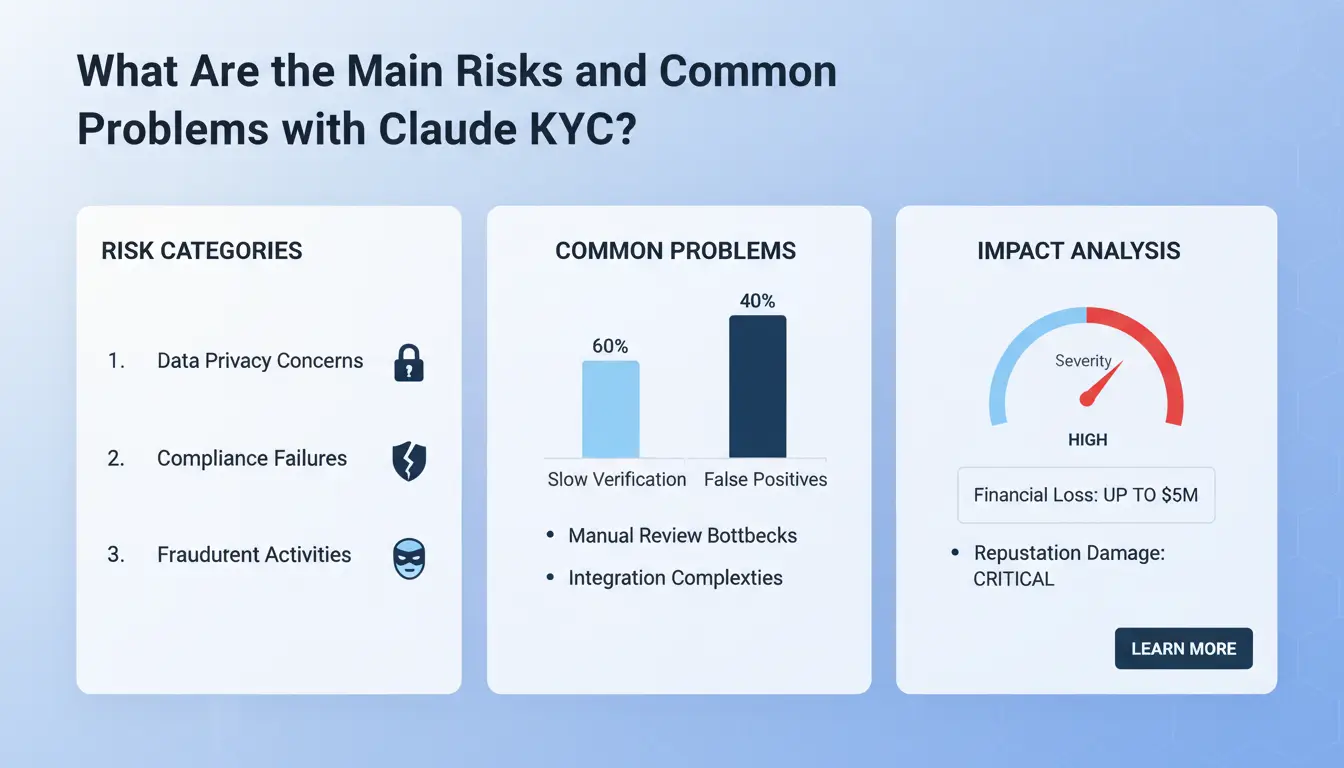
Claude KYC checks are strict, and small mistakes can quickly lead to failed verification or account restrictions. Users often assume that sending in clear documents is enough, but the system flags issues that go beyond just blurry photos or missing pages. Understanding where things go wrong can save your account from being locked or banned.
Why do some users fail Claude KYC?
Most users who fail Claude KYC did not expect their documents or personal information to trigger suspicion. One common issue is mismatched details, if your name, date of birth, or address on the submitted ID does not match what’s in your account profile, the system will usually reject you. Even small differences, like using “Street” instead of “St.” or having a nickname, can cause problems.
Another frequent mistake is unclear documents. Photos taken in poor lighting, with glare, or with parts of the document cut off will almost always get flagged. Claude’s KYC system checks for tampering, so any edits, filters, or attempts to hide information can lead to instant rejection.
For users trying to manage multiple accounts or team logins, browser fingerprints and IP addresses become a weak point. If you access several Claude accounts from the same device or proxy, the platform may see this as suspicious activity. That’s why many teams use specialized tools like DICloak to create isolated browser profiles and avoid accidental overlaps.
What happens if your Claude KYC fails?
If you fail Claude KYC, the platform usually sends you a notification and asks for new documents or information. You can appeal or resubmit, but repeated failures will quickly lead to permanent bans. For example, if you use a document that looks fake or does not match your account, the ban is often immediate.
Permanent bans mean you lose access to your Claude account, and all previous data or credits are gone. The appeal process is short and does not guarantee success. Most users who get banned do not get a second chance unless they can prove the mistake was on Claude’s side.
Teams need to be extra careful. When multiple users try to verify accounts with overlapping details or inconsistent information, bans can affect the whole group. That’s why using clean, consistent data and unique browser setups is key.
What privacy and data security risks should you know?
KYC is not just about passing checks, your documents and personal data get stored and processed by Claude and its verification partners. The most important thing to watch out for is how your ID information is handled. Claude uses third-party verification services, which means your data could be reviewed and stored outside the platform.
Most platforms promise to protect your data, but privacy policies can change. If you’re worried about where your passport scan or driver’s license photo ends up, check the platform’s privacy section and look for details about their data storage. For example, OpenAI’s privacy policy explains how user data may be kept and shared.
If you want to minimize exposure, avoid uploading unnecessary documents and stick to the minimum required for Claude KYC. Always check if you’re uploading directly to Claude or through a third-party portal. Data leaks or mishandling are rare but can have lasting consequences.
How does KYC affect account sharing and team use?
Account sharing introduces extra risks, especially when multiple people log in from different locations or devices. Claude’s KYC system tracks logins, browser fingerprints, and IP history. If it detects frequent switches between places, say, a team in Europe and another in Asia using the same account, this can trigger extra checks or restrictions.
For teams managing several Claude accounts, the biggest risk is overlapping digital traces. Shared proxies or browser sessions can cause the system to link accounts together, flagging them for fraud checks. When accounts get linked, bans or verification failures can spread across all connected profiles.
To reduce these risks, teams often use browser fingerprint isolation tools like DICloak or set up dedicated proxies for each account. This keeps each login environment separate and lowers the chance of accidental cross-contamination. If your team needs to share access, plan clear workflows and never reuse devices or IPs between accounts.
For more direct insights on platform checks, you can review Anthropic’s terms, which cover how Claude handles account verification and user restrictions.
How to Prepare and Pass Claude KYC Verification with Fewer Issues
Checklist: What to do before starting KYC
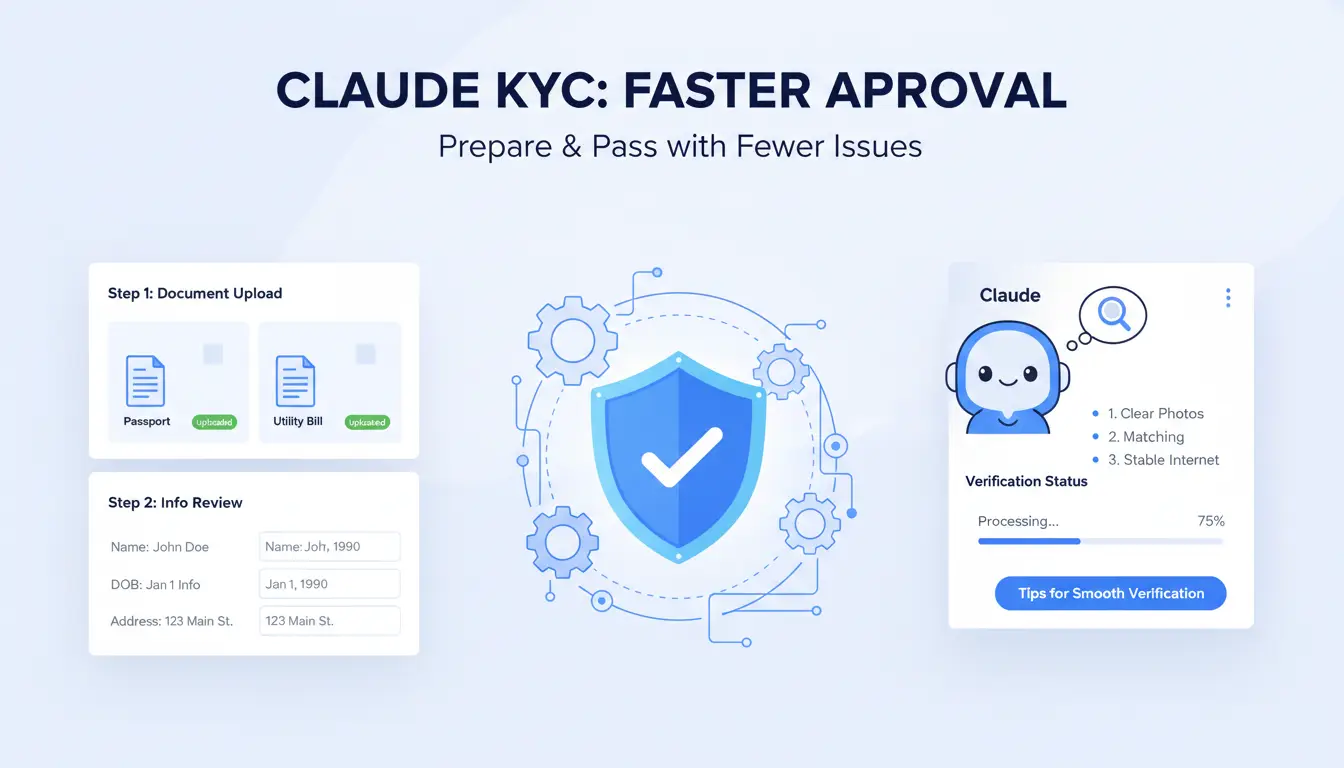
Getting through Claude KYC is less about luck and more about preparation. The process checks for consistency between your documents and how you access the platform. Before you start, gather every document Claude might request, usually a government-issued ID and sometimes proof of address. Make sure your name, birthdate, and address match exactly across all documents and your Claude account profile.
Set up your environment for a clean submission. Use a device that hasn’t been flagged for suspicious logins. If you’re managing multiple accounts or switching devices often, clear browser cache and cookies. For teams, avoid using the same proxy or browser fingerprint. This helps prevent cross-account contamination, one of the fastest ways to trigger a rejection.
Double-check your internet connection. Avoid public Wi-Fi and unstable networks, Claude tracks unusual location changes. Write down any details required for the application before you upload. The single most overlooked step is checking that your account details and ID photos match in spelling and order.
Tips for taking ID photos and selfies
Claude’s KYC system relies heavily on clear photos. Poor quality is a top reason for delays and rejection. When you snap your ID photo, use a well-lit room with a plain background. Hold the ID steady, blurred or cropped images will get flagged. Make sure all four corners are visible. For a selfie, use the same lighting and background, and avoid hats or glasses.
Here’s what helps:
- Aim for sharp focus; Claude uses automated checks and manual review.
- Avoid shadows, reflections, or anything blocking the ID.
Common mistakes include using scanned copies, taking photos with glare, or failing to match the face in the selfie with the ID. If your camera has issues, switch to a phone. Rejection often comes from minor errors, like the ID being slightly out of frame.
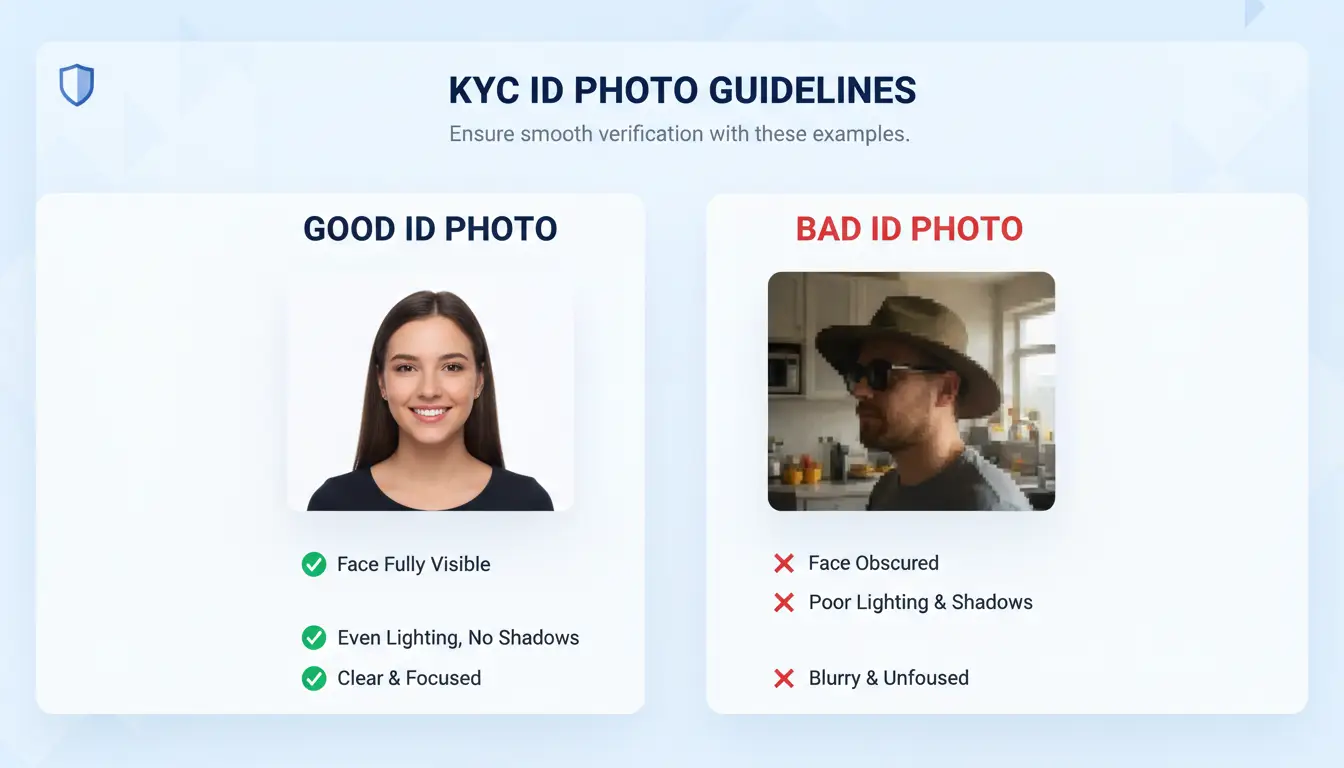
Clear, well-lit photos save days of waiting and cut down repeat submissions.
How to reduce risk if your account is shared or accessed by a team
If several people use the same Claude account, the system can flag “suspicious” activity. Sudden changes in IP address, device fingerprint, or login location are common triggers. To avoid trouble, coordinate access, only one person should log in at a time. Schedule logins so there’s no overlap.
For teams, set up unique browser profiles for each member. You can use tools like DICloak to create isolated environments, bind proxies, and control permissions. This keeps browser fingerprints and access logs separate, reducing risk of cascading restrictions. Never share passwords by email or chat; use secure platforms for credential sharing.
If you must operate from different locations, warn your team about the risk of simultaneous logins. Failing to coordinate logins is the main reason accounts get locked out during Claude KYC.
What to do if your KYC is rejected
A rejected Claude KYC isn’t the end. Start by checking the rejection message, most failures link to either document quality or data mismatch. Fix what Claude highlights first. If your photo was blurry or cropped, retake and upload. If there’s a name mismatch, update your profile or submit a supporting document.
Appeal through Claude’s support portal. Attach clear, updated photos and explain what you changed. Don’t rush, wait for confirmation before submitting again. If your case is urgent, reach out to Claude’s official support channels listed on their help page. Include screenshots and a summary of your issue.
Teams can also use audit logs from tools like DICloak to track who submitted what and when. This helps clarify activity if support asks for details. Addressing issues with document clarity and login history is what turns most rejected cases around.
How to Manage Multiple Claude Accounts and Share Access Safely Under KYC Rules
Why managing multiple Claude accounts is risky under KYC
Handling several Claude accounts is not as simple as juggling passwords. Each login leaves a trail, a mix of device fingerprints, IP addresses, session patterns, and browser details. Claude’s KYC system connects these dots to spot unusual behavior. If two accounts show up with identical device fingerprints or bounce between the same IPs, the system flags this as suspicious.
What usually happens next? Claude may demand extra verification, lock accounts, or even ban access. These triggers are not only about document uploads. The platform checks for overlapping browser profiles, rapid location changes, and repeated use of the same device profile. Teams who share logins or copy browser setups often trip these alarms, even if the documents are genuine.
The hardest part is that Claude kyc checks can escalate quickly. One flagged account can lead to a review of linked accounts, with bans hitting several users at once. That’s why the main risk is not just losing one account, but facing a chain reaction that wipes out access for the whole team.
How to safely share Claude accounts within a team
If you must share access, the key is to act like a single user, at least as far as Claude’s KYC system can tell. The safest method is to use browser profile sharing tools that keep device fingerprints consistent. Rather than handing out passwords and letting everyone log in from their own laptops, set up a unified browser profile. This means each session looks the same to Claude’s backend, avoiding the “multiple device” red flag.
Keep IP addresses stable. Use a dedicated proxy for each account, so every login comes from the same location. Changing IPs too often triggers extra checks. Limit how many people access an account. If five team members hop in and out, session history grows messy and risks climb.
Document who has access and when they log in. That way, if something goes wrong, you can pinpoint the cause. Avoid using generic email accounts or password managers for distribution. Instead, rely on controlled access tools that let you revoke rights instantly.
How DICloak helps teams share and manage Claude accounts securely
DICloak is built for teams who need to handle sensitive accounts without risking bans. The platform lets you create isolated browser profiles, each with its own fingerprint. When you share access, you’re not just giving out a password, you’re handing over a full browser profile that stays stable for every login.
Proxy integration is a core feature. You can tie each Claude account to a specific proxy, so all activity comes from the same location. This reduces the chance of triggering KYC checks for IP changes.
Permission controls let you decide who can access which profile. You can assign team members to specific accounts and set limits on what they can do. Operation logs track every login and action, so you see exactly who did what and when. If something goes wrong, you can quickly trace the problem and lock down access.
The most critical insight is: using isolated browser profiles with stable proxies cuts the risk of KYC bans by making your team look like one consistent user.
When to avoid account sharing and use alternatives
There are times when account sharing is simply too risky. If you need to run sensitive operations, like financial transactions, confidential chats, or anything tied to legal identity, sharing an account can trigger permanent bans or failed KYC checks. Claude’s system is designed to spot this behavior, especially if it sees frequent device swaps or location jumps.
For those cases, set up separate accounts for each team member. Use permission features inside Claude to control access, rather than passing around credentials. If team access is needed, look for official collaboration tools or ask support about safe delegation options. Using third-party tools to mask activity can help, but it’s not a magic fix if the underlying risk is high.
Safer alternatives include using role-based access within Claude, or splitting work across multiple accounts with distinct browser profiles and proxies. This way, each team member operates independently, and you don’t risk a single point of failure.
If your team needs to manage Claude kyc at scale, focus on stable setups, clear access rules, and tools that isolate sessions. That’s the only approach proven to reduce bans and keep your accounts running smoothly. For details on browser fingerprinting risks, see Wikipedia’s device fingerprinting overview. For proxy management tips, check ProxyRack’s guide. For safe team workflows, DICloak’s documentation breaks down practical steps.
What Should You Do If Your Claude Account Gets Restricted or Banned After KYC?
Restrictions or bans after completing Claude KYC can catch users off guard. Even after your identity documents are approved, the system keeps monitoring for signs of unusual activity, policy violations, and risky patterns. If you find your account locked or banned, the way you respond can decide whether you recover access or lose the account for good. Here’s what actually triggers restrictions, how to handle appeals, and how to avoid future lockouts.
Why do accounts get restricted after passing KYC?
Passing Claude KYC doesn’t guarantee permanent access. The most common triggers for post-KYC restrictions are suspicious activity and user mistakes.
- Suspicious activity triggers: Claude watches for patterns that look unusual. Logging in from several locations within minutes, using a proxy that’s shared by other accounts, or changing browser fingerprints can set off alarms. Teams running multiple accounts often trip these flags accidentally, especially when devices or browser profiles overlap. Even if your documents are fine, the system sees these behaviors as potential risk.
- Policy violations and user errors: Sometimes restrictions happen because users break platform rules or make mistakes. Trying to create or manage more than one account per person, sharing login with others, or using automation tools outside allowed boundaries can prompt a ban. Uploading the wrong document during KYC, or failing to update account information when prompted, also leads to trouble. The problem is not always obvious, what feels like a small error can result in a permanent block.
The hardest part is spotting the early warning signs. If you suddenly see login delays, unexpected security checks, or repeated requests to verify your identity, don’t ignore them. These are often the last signals before a full restriction.
How to appeal a restriction or ban
If your Claude account is restricted after KYC, acting quickly is essential. The appeal process is your main route to recovery, but it only works if you provide clear evidence and follow platform instructions.
- What evidence to provide: Gather anything that proves you are the rightful account holder. This includes the original KYC documents, proof of recent activity (such as email logs or device info), and explanations for any unusual behavior. For example, if you used a proxy because of travel, state your location change clearly. Screenshots showing successful KYC approval can help. If multiple people managed the account, explain roles and provide supporting details.
- How long appeals typically take: The review process varies. Some platforms respond within 48 hours, others can take up to a week. Claude’s support team usually starts with an automated review, moving to manual checks if your case is complex. Stay patient, but keep records of all correspondence. If you don’t hear back in a week, send a follow-up message. Avoid sending repeated appeals, this can delay the process.
The most important step is to submit your evidence in one organized message. Scattered emails and missing documents almost always lead to longer delays or outright denial.
How to prevent future restrictions
Once your account is unlocked, or if you’re just starting with Claude KYC, you want to avoid repeating the same mistakes. Safe usage habits and monitoring are key.
- Safe usage habits: Stick to one account per person. Avoid logging in from several devices or locations within a short time. Use a dedicated proxy for each account, not a shared proxy across multiple users. If you manage accounts for a team, set up separate browser profiles to prevent fingerprint overlap. Tools like DICloak let you create isolated browser profiles, bind proxies, and control who can access each account, reducing accidental triggers. Never use automation outside allowed limits, and always keep your KYC documents handy.
- Monitoring account activity: Watch for login alerts, security prompts, and requests to re-verify. Set up email notifications for account changes. If you notice anything odd, such as failed logins, sudden location warnings, or new devices appearing in your account history, act right away. Change passwords, review sessions, and contact support if needed. Proactive checks can catch issues before they turn into bans.
One mistake can lock you out for good, but most restrictions are preventable. Staying alert to early warning signs, keeping your Claude KYC info ready, and using tools to isolate account environments are your best defenses. Focus on these steps and you’ll avoid permanent loss, especially when managing accounts at scale.
Frequently Asked Questions
Is Claude KYC mandatory for all users?
Claude KYC is required for users who want to access advanced features, higher usage limits, or make payments. Basic features may be available without KYC, but most paid or high-volume accounts must complete the process. Minors and some low-risk users can have exceptions, but most individuals need to verify their identity with Claude KYC.
Can I use Claude KYC with a business or organization account?
Currently, Claude KYC supports only personal identification. Business or organization IDs are not accepted. You must provide a government-issued ID that matches your personal details. If you need access for a company, each user must complete the Claude KYC process using their own personal identification.
How long does Claude KYC verification usually take?
Most Claude KYC verifications finish within a few minutes to a few hours. Delays can happen if your documents are hard to read or if extra checks are needed. Make sure your photos are clear and all information matches your account details to avoid longer wait times.
Is my personal data safe during Claude KYC verification?
Claude KYC uses encryption and strict security steps to keep your personal data safe. Only trusted staff and third-party verification partners can access this information for identity checks. Your data is not shared or sold for other uses and is protected under privacy laws.
What should I do if my Claude KYC keeps failing?
If your Claude KYC fails, double-check that your ID is valid and the photos are clear. Make sure your name and details match exactly. If it still fails, try resubmitting with better images or a different ID. If problems continue, contact Claude support for help troubleshooting your KYC submission.
Understanding Claude KYC helps organizations simplify their compliance processes while enhancing user security and privacy. Leveraging advanced AI solutions like Claude can make identity verification more efficient and less intrusive for customers. Try DICloak For Free
 Web Proxy Tools
 Free Tools
 Cookie Plugin
 UA Generator
 MAC Address Generator
 IP Generator
 IP Address List
 2FA Code Generator
 World Clock
 Anonymous Check
 WebRTC Leak Test
 UUID Generator
 Free Web Proxy Site
 Proxy Checker
 FB Ad Checker
 AI Web Scraping
 Free SMM Tools
 Twitter Shadowban Checker
 Instagram Name Checker
 UTM Generator
 Username Generator
 AI Hashtag Generator
 LinkedIn Headline Generator
 Social Media Image Resizer