Have you ever tried to log into ChatGPT, only to see the message, "ChatGPT is at capacity right now"? It is a very frustrating feeling. You might have an urgent report to write or a coding bug to fix. Yet, you are stuck outside. As we move deeper into 2026, more people than ever use artificial intelligence. This huge demand puts a lot of stress on OpenAI's servers. But do not worry. There are ways to get around this problem. In this guide, we will explore why this happens and give you seven easy fixes to get back to your work fast.
Why Does ChatGPT Show the "At Capacity" Message?
To fix a problem, you first need to understand it. The "at capacity" message is simply a digital traffic jam. Think of ChatGPT as a popular restaurant. It only has a certain number of tables. When all the tables are full, new guests have to wait outside.

What triggers the capacity issue during peak times?
The main trigger is simple: too many people are using the tool at the exact same time. Every time you ask ChatGPT a question, a computer server has to do a lot of hard work to generate the answer. In 2026, students use it for homework, writers use it for articles, and programmers use it to write code. When millions of users send prompts at once, the servers reach their maximum limit.
For example, imagine a major news event happens. Thousands of journalists and curious readers might rush to ChatGPT to summarize the news or explain a topic. This sudden spike in traffic causes the system to pause and block new logins to prevent a total crash.
How does OpenAI manage server load?
OpenAI uses smart systems to keep their servers from breaking. When the traffic gets too heavy, they put a "gate" up. This gate stops new users from logging in. They also use a queuing system. This means if you are already inside, your chat might slow down, but it will not kick you out.
OpenAI monitors how much computing power is being used. If the power hits the red zone, the "at capacity" screen appears. They also prioritize the most complex tasks to keep the AI accurate. By controlling the flow of traffic, OpenAI makes sure that the people who are already logged in can finish their tasks without the whole website freezing.
Is this issue more common for free users?
Yes, this issue is much more common for free users. If you are on the free tier of ChatGPT, you are at the bottom of the priority list. When the servers get full, free users are the first to be locked out.
Let’s look at a quick example. John uses the free version of ChatGPT. Sarah pays for ChatGPT Plus. At 10:00 AM on a busy Tuesday, the servers fill up. John tries to log in and sees the capacity error. Sarah logs in at the exact same time and gets right in. OpenAI reserves a large portion of their server space specifically for paying customers.
When Are the Busiest Times for ChatGPT in 2026?
Timing is everything. If you know when the digital rush hour happens, you can plan your work around it. Just like driving on a highway, avoiding peak times makes the trip much smoother.
How does global usage affect peak hours?
ChatGPT is used by people all over the world. This means the server load changes as different countries wake up and go to work. However, there is a point in the day when the work hours in Europe overlap with the morning hours in North America. This overlap creates a massive surge in traffic.
When a user in London is finishing their afternoon tasks, a user in New York is just starting their morning work. Because both sides of the world are online at the same time, the global usage reaches its absolute peak.
What time zones experience the most traffic?
The highest traffic usually happens between 1:00 PM and 4:00 PM Eastern Standard Time (EST). During this window, the US East Coast is deep into the workday. The US West Coast is logging on for the morning. Meanwhile, users in Europe are trying to finish their last tasks before logging off for the evening.
If you live in Asia or Australia, you might actually have an easier time. When it is daytime in Hong Kong or Sydney, the US and Europe are mostly asleep. This means the servers are much quieter.
Are weekends worse for capacity issues?
You might think weekends are busy because people have free time. Actually, weekends are usually much quieter. Most people use ChatGPT for work or school. Since offices and schools are closed on Saturdays and Sundays, the server load drops significantly.
However, Sunday nights can sometimes see a small spike. This happens because students are rushing to finish homework before Monday morning. Overall, if you have a big project that requires a lot of AI help, doing it on a Saturday morning is a very safe bet.
How to Bypass the ChatGPT Capacity Problem
Now that we know why and when the capacity issues happen, let's talk about how to fix them. You do not always have to wait hours to get back to your work. Here are some simple tricks you can try right now.
Can refreshing the page help?
Yes, simply refreshing the page can often work. This is the oldest trick on the internet, and it still works in 2026. When you see the "at capacity" screen, press the F5 key on your keyboard, or click the refresh button on your browser.
Why does this work? People are logging out of ChatGPT every single second. When someone leaves, a "seat" opens up. If you refresh the page at the exact moment a seat opens, the system will let you in. Do not spam the refresh button too fast, though. Wait about 30 seconds between each refresh so you do not look like a robot.
Should you try accessing ChatGPT at off-peak hours?
This is the most reliable free method. If you constantly get locked out during the day, try changing your schedule. Accessing ChatGPT late at night or very early in the morning almost guarantees you will get in.
For example, a freelance writer named Tom kept getting locked out at 2:00 PM. He started waking up at 6:00 AM to do his AI research. At 6:00 AM, he never saw a single capacity error. It requires a change in habits, but it completely removes the stress of being locked out.
How upgrading to ChatGPT Plus reduces capacity problems
The ultimate fix is to upgrade to ChatGPT Plus. OpenAI created this paid tier to give professional users peace of mind. When you pay for the subscription, you get priority access to the servers.
Even when the free version is completely locked down, Plus users can usually log right in. Furthermore, Plus users get faster response times. If you rely on ChatGPT to make money or pass your classes, the monthly fee is often worth it just to avoid the "at capacity" screen forever.
Risks of Using Workarounds for ChatGPT Access
When people are desperate to finish a task, they sometimes look for shortcuts. But not all shortcuts are safe. You must be very careful when trying to force your way into ChatGPT.
Could using browser extensions compromise your data?
There are many browser extensions that claim to "bypass ChatGPT limits." You should avoid most of these. Many of these free extensions are not safe. They might ask for permission to read your browser data.
If you install a bad extension, it could steal your passwords or read your private emails. For instance, a user might install an extension hoping to get faster AI access, but instead, they get annoying pop-up ads and their computer slows down. Always read reviews before adding anything to your browser.
Why third-party tools might violate OpenAI’s terms of service
Some third-party websites offer "mirrors" or unofficial ways to log into ChatGPT. Using these tools is very risky. When you created your OpenAI account, you agreed to their terms of service.
These rules clearly state that you cannot use unauthorized methods to scrape data or bypass their security. If OpenAI catches you using a shady third-party tool, they can ban your account permanently. Losing all your chat history and custom instructions is not worth the risk.
Are alternative methods safe for accessing ChatGPT?
Safe alternative methods do exist, but you must focus on officially supported channels. Using the OpenAI API is completely safe and legal, although it costs money per prompt.
Using verified browser profiles to keep your work organized is also safe. The key is to avoid anything that promises a "hack" or a "cheat." If a method sounds too good to be true, it probably is. Stick to methods that respect OpenAI's rules while protecting your personal computer.
Effective Troubleshooting Steps for ChatGPT Capacity Errors
Sometimes, the issue is not with OpenAI's servers at all. Sometimes, the problem is trapped inside your own computer or internet connection. Here are some technical steps to troubleshoot the error.
How clearing your browser cache can help
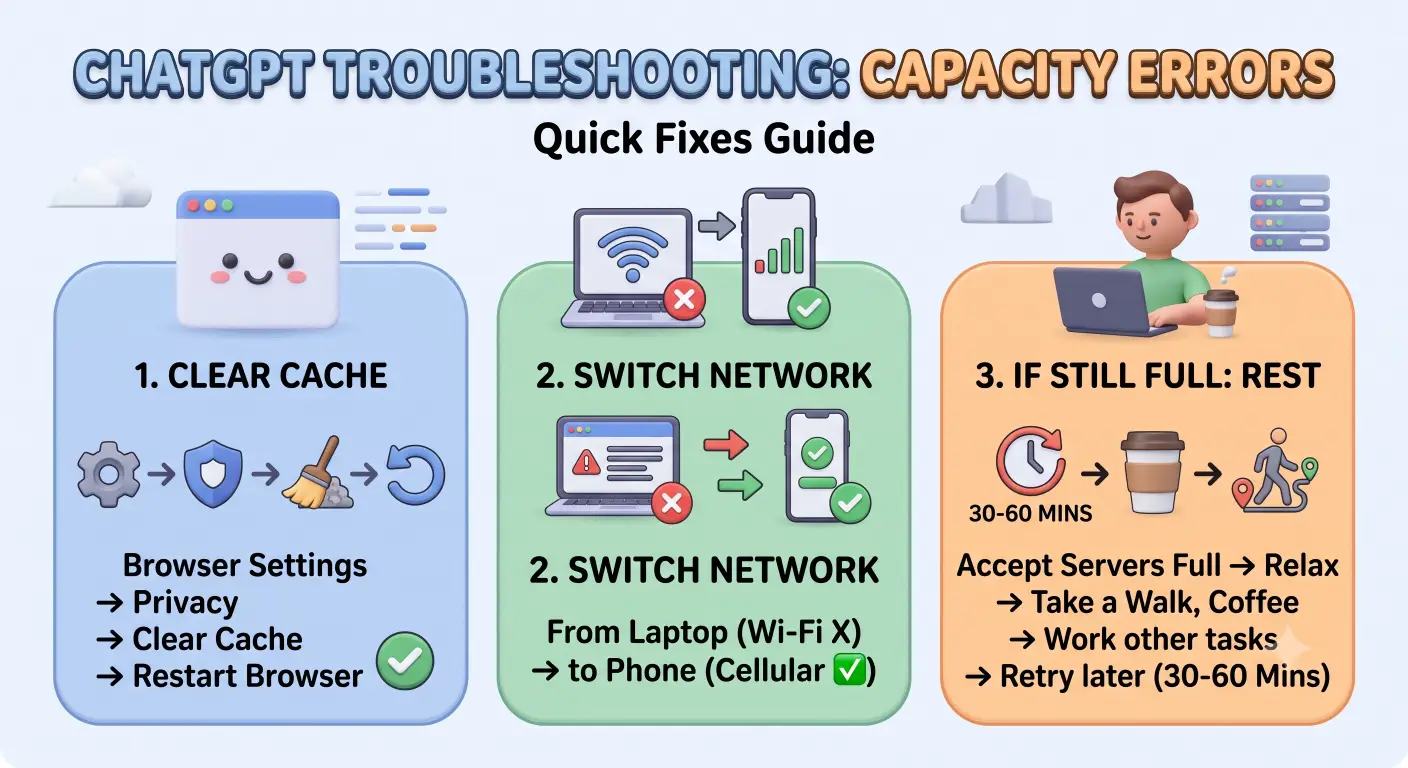
Your web browser saves small pieces of data from websites to help them load faster next time. This is called the cache. Sometimes, your browser saves the "ChatGPT is at capacity" page in its cache. Even when the servers are free, your browser keeps showing you the old, saved error page.
To fix this, go to your browser settings. Look for the "Privacy and Security" section. Click on "Clear browsing data" and select "Cached images and files." Once you clear the cache, close the browser, open it again, and try logging in. You might be surprised to find that you can get straight in!
Why switching devices or networks might work
If clearing the cache does not work, the problem might be your network. Sometimes, OpenAI temporarily blocks traffic from specific internet providers if they see too many requests coming from one place.
Try turning off your Wi-Fi and using your phone’s mobile data. By switching to a cellular network, you get a brand new connection path. You can also try logging in on your phone instead of your laptop. If your phone gets in but your laptop does not, you know the problem is isolated to your computer.
What to do if the issue persists despite troubleshooting
If you have refreshed, cleared your cache, and switched networks, and you still cannot get in, you must accept that the servers are truly full. At this point, you should take a break.
Go grab a cup of coffee, take a walk, or work on a task that does not require AI. Usually, server spikes only last for 30 to 60 minutes. By the time you get back from your break, the digital traffic jam will likely be cleared, and you can resume your work.
Are There Alternatives to ChatGPT When It’s at Capacity?
You do not have to rely only on ChatGPT. The AI industry has grown massively by 2026. There are many incredible tools you can use when OpenAI’s servers are down.
How does OpenAI Playground compare to ChatGPT?
OpenAI Playground is like ChatGPT's older, more technical brother. It is built for developers, but anyone can use it. The best part? It rarely goes down when ChatGPT is at capacity.
Playground uses the exact same AI brain (like GPT-4), but it looks different. You pay per word instead of a monthly fee. For example, if you just need to write one quick email, using Playground might only cost you a few cents. It is a fantastic backup plan when the main ChatGPT website is broken.
Are other AI tools like Google Gemini viable options?
Yes, Google Gemini is a very strong option. In fact, many users in 2026 prefer Gemini for certain tasks. Gemini is built directly by Google and has excellent access to real-time internet data.
If you need to research a current event or find up-to-date facts, Gemini is incredibly fast. If ChatGPT is giving you a capacity error, simply open a new tab and go to Gemini. The interface is very similar, and you can usually paste your exact prompt in and get a great result instantly.
What free alternatives offer similar functionality?
Besides Gemini, there are other great free tools. Anthropic’s Claude is widely praised for its natural writing style and long memory. If you are writing a story or a long article, Claude is a wonderful free alternative.
Microsoft Copilot is another excellent choice. It is actually powered by the same technology as ChatGPT. Because Microsoft has their own massive servers, Copilot rarely suffers from the same capacity limits. It is definitely worth keeping these free tools bookmarked for emergencies.
Long-Term Solutions to Avoid ChatGPT Capacity Issues
Quick fixes are great, but planning ahead is even better. If you use AI every day, you need a long-term strategy so you never miss a deadline because of a server error.
Will OpenAI expand server capacity in 2026?
OpenAI is constantly buying new servers and building larger data centers. In 2026, their capacity is much bigger than it was in 2023. However, the demand is growing just as fast.
Every time they add more space, millions of new users join the platform. Because of this, it is unlikely that capacity issues will disappear completely. You should expect that peak hours will always have some level of digital traffic, even with OpenAI's massive upgrades.
How can users plan for high-demand periods?
The best way to plan is to do your AI research early. If you have a marketing report due on Friday afternoon, do not wait until Friday at 2:00 PM to start asking ChatGPT for ideas.
Generate your outlines, data summaries, and rough drafts on Wednesday night. Save the text in a Word document. This way, if the servers crash on Friday, you already have the heavy lifting done. You can just edit the text yourself. Planning ahead turns a server crash from a disaster into a minor annoyance.
Is ChatGPT Plus worth the investment for frequent users?
If you use ChatGPT for more than a few hours a week, Plus is almost certainly worth it. Think about how much your time is worth. If you spend 20 minutes a day just staring at an "at capacity" screen or refreshing the page, you are losing valuable time.
For a flat monthly fee, you get your time back. You also get access to newer features first. For a student or a business professional, the cost of the subscription pays for itself very quickly in saved time and reduced stress.
If you manage a business, run an SEO agency, or handle multiple client projects, you might need a more professional setup. You can achieve this by managing your browser profile carefully.
Manage Multiple Accounts Without Capacity Issues
If you are running a team, you might have several ChatGPT accounts for different departments. Logging in and out of them on one standard browser can be messy and trigger security blocks. You can use DICloak to set up distinct browser profiles for every single account you manage.
For example, you can create one profile for your marketing account and a separate profile for your coding account. If one account is experiencing a strange glitch or a temporary slow-down, you can simply open a different profile in DICloak. This keeps all your accounts isolated, clean, and ready to use without interference.
Securely Access ChatGPT with Unique Digital Fingerprints
Sometimes, web platforms get confused if they see multiple logins coming from the exact same browser footprint. They might temporarily restrict your access, mistaking you for a spam bot. You can solve this by generating unique digital fingerprints.

When you set up a profile in DICloak, you can configure the digital fingerprint so it looks like a completely different computer. You can adjust the screen resolution, operating system, and hardware data. This means that OpenAI sees a perfectly normal, unique user for each of your profiles. Your accounts remain safe, and you avoid unnecessary security flags.
Frequently Asked Questions about ChatGPT Capacity Issues
Why does ChatGPT keep showing "at capacity" even after refreshing?
If you keep refreshing and still see the error, it means the servers are completely full and nobody is logging out fast enough. It can also mean your browser is stuck showing a cached page. Try clearing your browser cache or wait 15 minutes before trying again.
Can using multiple accounts bypass the capacity issue?
Having two free accounts will not help if the overall system is down. The capacity limit applies to the whole server, not just your specific email address. If the restaurant is full, putting on a different hat will not get you a table. Upgrading one account to Plus is a better solution.
Is ChatGPT Plus always available during peak times?
ChatGPT Plus users have priority access, which means they can almost always log in. However, in very rare cases of a total system outage or a massive global crash, even Plus users might experience slow responses or short delays. But 99% of the time, Plus users skip the line completely.
What happens if you encounter capacity issues while working on a project?
If you are already logged in and chatting, you usually will not get kicked out. However, you might notice that the AI takes much longer to type out its answers. If you try to open a brand new chat window during this time, you might get an error message saying the system is busy.
Are there any browser settings that help avoid capacity errors?
There is no magic browser setting that increases OpenAI's server limits. However, keeping your browser updated, clearing your cookies regularly, and avoiding suspicious extensions ensures that your browser is not causing fake capacity errors.
Conclusion
Seeing the "ChatGPT is at capacity right now" error is annoying, but it does not have to ruin your workday in 2026. By understanding why the servers get busy, you can change your habits. Try to avoid the afternoon peak hours, clear your browser cache, or switch networks if you get stuck. If you are a heavy user, consider upgrading to ChatGPT Plus to skip the line entirely. For professionals managing multiple tasks, organizing your workflows with tools like DICloak can keep your accounts safe and efficient. Keep a backup AI tool like Google Gemini ready, plan your work ahead of time, and you will never let a server error slow you down again.
 Web Proxy Tools
 Free Tools
 Cookie Plugin
 UA Generator
 MAC Address Generator
 IP Generator
 IP Address List
 2FA Code Generator
 World Clock
 Anonymous Check
 WebRTC Leak Test
 UUID Generator
 Free Web Proxy Site
 Proxy Checker
 FB Ad Checker
 AI Web Scraping
 Free SMM Tools
 Twitter Shadowban Checker
 Instagram Name Checker
 UTM Generator
 Username Generator
 AI Hashtag Generator
 LinkedIn Headline Generator
 Social Media Image Resizer