A single RPA bot can handle over 5,000 repetitive clicks per day without a break, as shown in UiPath's industry benchmarks. That’s why thousands of companies use automation to avoid manual mistakes and speed up routine tasks like invoice processing and data entry. But many new users still search for what is rpa automation, not knowing how it actually works, or where the line is between simple scripting and real robotic process automation.
The main difference comes down to how RPA tools mimic human actions across software, logging in, moving files, copying data, all without changing the original apps. Instead of writing custom code for every workflow, RPA lets you build “bots” that work through screens and clicks, just like a person. This means you can automate legacy systems, web apps, or even email, as long as you can explain the steps. For anyone asking what is robotic process automation or how does RPA work, it’s not just about saving time. It’s about making business rules repeatable and less error-prone, freeing up teams for real work.
If you’ve ever wondered where RPA fits in compared to macros or scripts, or want to see what tasks are actually worth automating, you’re in the right place. Here’s how RPA actually works for beginners.
What Does RPA Automation Actually Mean?
RPA automation is about creating bots that copy how humans work on computers, logging in, clicking buttons, filling forms, and handling files. When people search "what is rpa automation," they’re not looking for a software manual, they want to know what makes this kind of automation different. RPA stands for robotic process automation, and it’s built to handle digital tasks that follow rules, repeat often, and eat up time. Instead of changing the apps themselves, RPA bots work through the same screens and steps a person would. The real value is making tasks repeatable without errors and freeing up staff from mindless work. If you’re wondering how does RPA work or want RPA automation explained in plain language, here’s what sets it apart.
How RPA Differs from Traditional Automation
Most people have used macros in Excel or simple scripts to speed up routine work. Macros are locked into one app, and scripts need coding. RPA bots, however, move across apps, even outdated ones, by “seeing” and “clicking” like a user. API automation is another approach, but it needs technical access to the software’s inner workings. RPA doesn’t require this. It’s more flexible, especially for legacy or closed systems.
| Method |
Needs Coding? |
Works Across Apps? |
Handles Legacy? |
| Macros |
No |
No |
Limited |
| Scripts |
Yes |
Sometimes |
Sometimes |
| API Automation |
Yes |
Yes |
No |
| RPA Bots |
No |
Yes |
Yes |
Table: Comparison of automation methods. See UiPath’s official FAQ for more details.
Core Components of RPA
Every RPA setup starts with bots, also called digital workers. These bots run tasks based on clear instructions, not guesses. You map out the process step by step, then set triggers like a new email arriving or a file being updated. The bot waits for its cue, then follows the script. This structure means you can scale up or down as needed, whether for finance, HR, or handling customer requests. Tools like Automation Anywhere and DICloak’s RPA module help build, launch, and monitor these bots for tough digital workflows.
How Does RPA Work Step by Step?
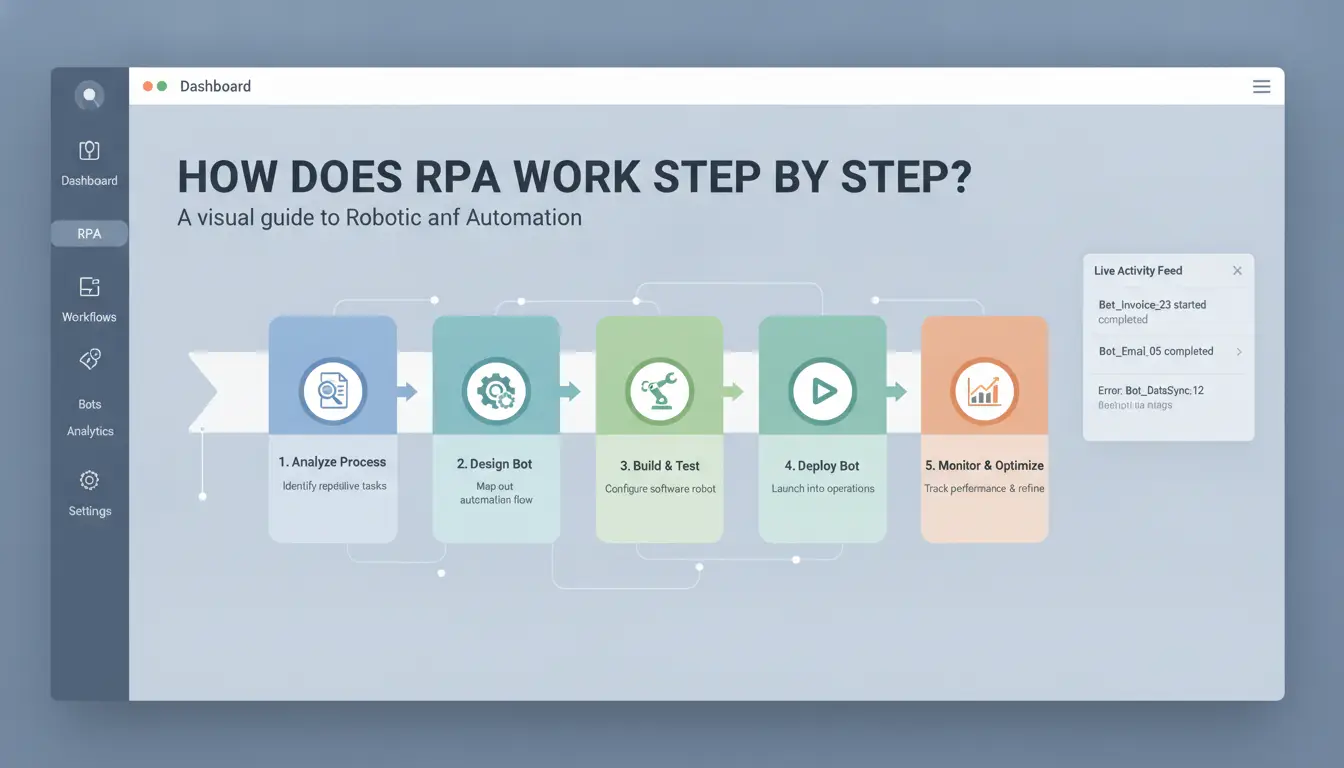
Robotic process automation (RPA) starts with picking the right tasks. Not every repeatable job is fit for automation, some are too messy or change too often. For anyone searching "what is rpa automation" or how does RPA work, the practical workflow is clearer than most guides suggest. Here’s how you move from idea to running bots.
Identifying the Right Processes for RPA
A process is suitable for RPA if it’s rule-based, involves lots of manual steps, and rarely changes. Think invoice entry, copying info between systems, or updating records. The best candidates are tasks done the same way each time. Where most teams slip up is trying to automate jobs that require judgment or change rules often; bots break when the target app moves or the process gets tweaked.
The most critical insight: Only automate processes that are stable and rule-driven, trying to bot messy tasks causes wasted effort and frequent failures.
Designing and Building RPA Bots
You don’t need to be a developer to build RPA bots. Most RPA tools offer no-code drag-and-drop interfaces for simple jobs. For more complex workflows, low-code or developer-built bots handle advanced logic. Testing is not optional, run the bot in a sandbox, check results, and fix any errors before going live. Even small mistakes can snowball if bots process hundreds of records.
Deploying, Monitoring, and Maintaining RPA
Once your bot passes tests, schedule it to run at the right time, daily, hourly, or triggered by an event. Good RPA tools let you track performance in real time and spot failures fast. Handling exceptions is vital; set up alerts for errors or unexpected changes so you can intervene before the bot repeats a mistake. Over time, update bots as processes evolve, or when the target software changes. You can use UiPath’s official guide or Automation Anywhere’s docs for detailed walkthroughs.
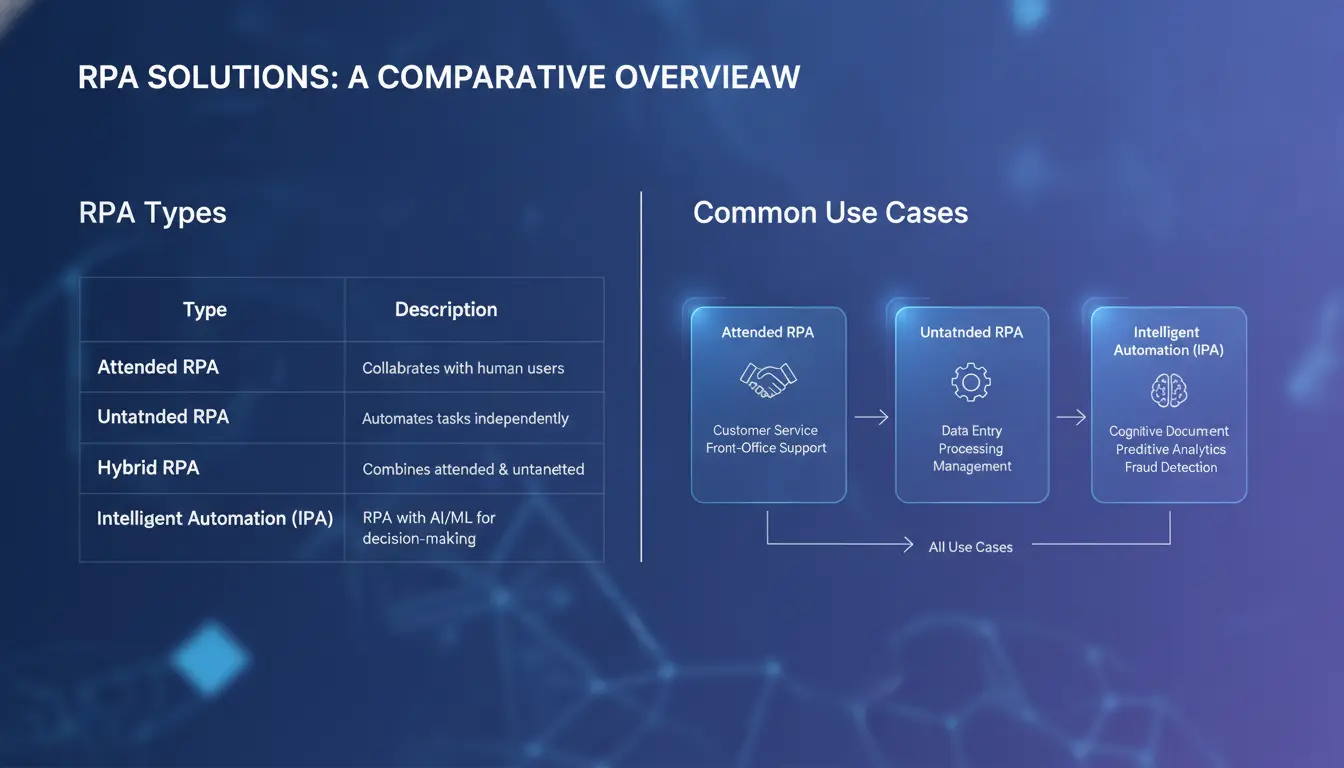
What Are the Main Types of RPA and Where Are They Used?
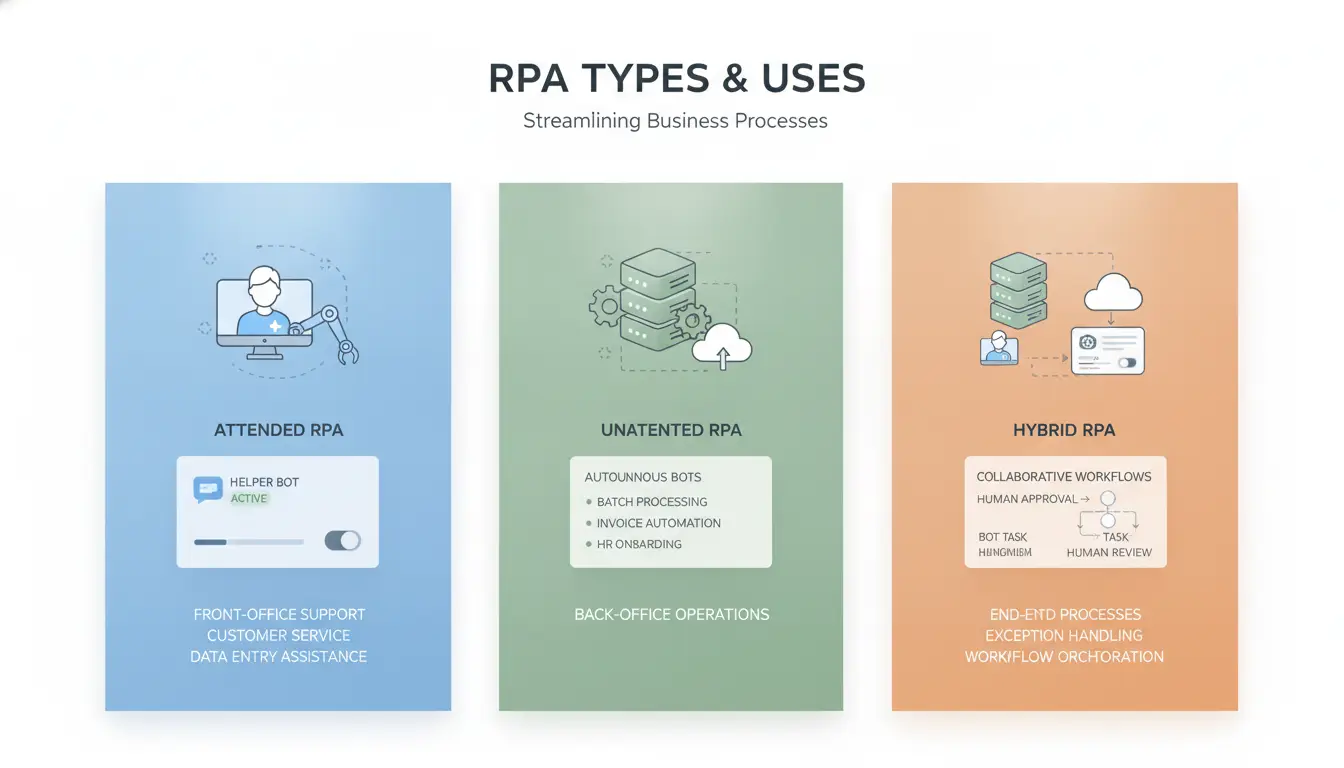
Not all RPA bots run the same way. If you’re searching for what is RPA automation or wondering how does RPA work in real business, the answer depends on who controls the bot and when. These types shape where RPA fits best, from customer calls to back-office batch jobs.
Attended RPA: When Humans Stay in the Loop
Attended RPA bots work right alongside people. Think of a call center rep who needs to pull up records across three systems while talking to a customer. Instead of clicking through screens, the bot fetches the data after the rep triggers it. This speeds up tasks that still need judgment or live input.
Benefits include faster response and fewer errors during manual work. But attended bots rely on people to start them and handle exceptions. They can't run fully alone, so they fit best in roles like customer service, HR onboarding, or sales support, where every case can be a bit different.
Unattended RPA: Fully Automated Workflows
Unattended RPA bots run on their own, often on servers. They handle repetitive back-office tasks, like invoice processing, report generation, or updating databases, without needing anyone to watch. These bots can schedule jobs overnight or trigger based on events.
The upside is clear: unattended bots free up humans for higher-value work. But they need careful monitoring. A bot that fails silently can cause bigger process gaps. You need logging, alerts, and regular checks. For sensitive data, access control and audit trails matter. Tools like UiPath and Automation Anywhere are popular for this setup.
Hybrid RPA: Combining Both Approaches
Sometimes, teams need both real-time help and batch automation. Hybrid RPA lets you mix attended and unattended bots. For example, in e-commerce, a support agent might trigger a bot to check order status, while another bot updates inventory overnight. Hybrid setups suit teams that handle both live customer work and scheduled tasks.
Industry and Department Use Cases
RPA runs across finance, HR, e-commerce, and operations. Finance teams use unattended bots for reconciliation; HR uses attended bots for onboarding. E-commerce businesses automate order entry and inventory checks. Multi-account or web automation, like logging into many sites to collect data, is common. You can use DICloak to manage browser profiles and proxies, making web automation safer and easier.
What Are the Real Benefits and Risks of RPA Automation?
Understanding what is RPA automation means seeing both sides: the clear wins and the common pitfalls. While robotic process automation can boost how teams handle routine tasks, real-world projects often run into trouble without careful planning.
Top Benefits: Efficiency, Accuracy, and Cost Savings
RPA stands out for cutting manual errors that slip through when people get tired or distracted. Bots follow the same steps every time, copying data, moving files, sending emails, so mistakes from human oversight drop fast. This is why companies like UiPath and Automation Anywhere are widely used for banking, insurance, and admin workflows.
Scaling up is another strength. Once you build a bot, you can run dozens in parallel without hiring new staff. For simple tasks like invoice processing or report generation, RPA automation explained in practice means faster turnaround and lower labor costs. Many teams see payback in under a year, especially for rule-based processes.
Hidden Risks: Where RPA Projects Go Wrong
Picking the wrong process to automate is a top mistake. If you try to use RPA for tasks that change often or need judgment calls, bots break down and waste time. Maintenance is another headache, software updates or new forms can cause bots to fail, and fixing them takes effort.
Change management gets tricky too. Staff may not trust bots or might bypass them if the automation feels clunky. This is why mapping out workflows and testing carefully matters more than just launching a bot.
| Benefits |
Risks |
| Higher accuracy |
Bot failures |
| Fast scaling |
Bad process choice |
| Cost savings |
High maintenance |
| Repeatable output |
Staff resistance |
Table source: Gartner RPA Guide
Security, Compliance, and Governance Concerns
Data privacy is often overlooked. RPA bots may access sensitive fields or download files without proper checks. Without clear audit trails, tracking who did what, and when, gets tough. To reduce risk, teams should set up strong monitoring and logs.
Some tools, like DICloak, offer built-in audit reports and permission controls, which help meet compliance rules and keep RPA automation safe. Keeping bots updated and tracking changes is the only way to avoid hidden mistakes.
How to Start with RPA: A Beginner’s Checklist
Getting started with RPA can feel complex, but the real challenge is not the technology, it’s picking the right starting point. Many people search “what is rpa automation” thinking it’s about tools, but the work begins with your own processes. If you set up your project carefully, you lower the risk of wasted effort and make it easier to scale. Here’s what a practical launch looks like.
Assessing Readiness: What to Prepare First
Before you choose a tool, map out your workflow step by step. Write down the routine tasks, including who does them and what apps they use. If your team has never built automation, start small, pick a process that’s repeatable and doesn’t require complicated rules. Strong process mapping can save hours later fixing broken bots. Make sure at least one person understands how to test before rolling out changes. A good pilot project handles tasks like data entry, invoice processing, or simple file moves.
Selecting RPA Tools and Platforms
Choosing a platform comes down to features and fit. Look for drag-and-drop editors, clear error handling, and support for the apps you already use. Compare cloud vs. on-premise by checking how your data needs to be managed. Cloud tools are easier to start and update, while on-premise fits companies with strict IT controls. For teams that need browser automation or want to connect RPA to web apps, tools like UiPath and Automation Anywhere are common. If you want to share browser profiles for safe automation, you can use DICloak to isolate sessions and manage access.
| Feature |
Cloud RPA |
On-Premise RPA |
| Setup Speed |
Fast |
Slower |
| Updates |
Automatic |
Manual |
| Data Control |
Limited |
Full |
| IT Integration |
Easier |
Custom |
Table: Comparing RPA platform types. UiPath and Automation Anywhere are leading options.
Common Mistakes Beginners Make
One of the biggest mistakes is underestimating bot upkeep. RPA bots break when apps change or when screen layouts shift. Treat maintenance as part of the project, not an afterthought. Another risk is skipping change management. If you push automation without training your team, you end up with confusion and resistance. Preparing for ongoing tweaks and clear communication is what sets successful projects apart. When you ask how does RPA work or look for RPA automation explained, remember: the hardest part isn’t building bots, it’s keeping them running smoothly.
How DICloak’s RPA and Automation Tools Help Teams Scale Safely
Teams running dozens or hundreds of accounts face heavy manual work and high risk. What is RPA automation? It’s a way to set up bots that handle routine tasks, like logging in, posting, or scraping data, so people don’t have to repeat the same steps all day. RPA automation explained means less human error and faster scaling.
Automating Multi-Account Workflows with DICloak
You can use DICloak to bulk-create browser profiles, manage logins, and schedule posts across platforms. Instead of clicking through each account, bots handle actions like scraping or posting, saving hours for teams. This fits with what is robotic process automation, since the tool mimics real actions on web apps.
Reducing Risk with Isolated Environments and Proxies
Tools like DICloak let you set up isolated profiles for each account, connect custom proxies, and tweak fingerprint settings. That way, accounts don’t get linked together and bans are less likely. The risk of detection drops because every account runs in its own secure environment.
Team Collaboration and Workflow Automation
With DICloak, permission controls and audit logs help track who does what. Teams in e-commerce, affiliate marketing, or social media can share access safely. Workflow automation cuts mistakes and keeps the process clean.
When to Use DICloak vs. Other RPA Tools
DICloak suits teams needing safe bulk operations and tight control. For complex integrations, you can connect DICloak with other platforms.
What’s Next for RPA? Trends and the Future of Automation
RPA is moving fast. If you’re asking what is rpa automation and where it’s headed, the answer is clear: bots aren’t just about simple clicks anymore. Major shifts are happening, driven by smarter tech, new use cases, and the need for people to work alongside bots.
From RPA to Intelligent Automation
The big jump for RPA is adding AI and machine learning. Instead of just repeating steps, bots now handle messy data, read invoices, and even reply to emails. For example, banks use RPA with AI to spot fraud in real time. This is why many call it “intelligent automation.” You’ll see more tools blending what is robotic process automation with advanced decision-making.
Emerging Use Cases and Industries
Agentic automation means bots can now act more independently. In web3 and crypto, bots run airdrop campaigns and track wallet activity without manual work. Insurance and retail use RPA automation explained as a way to speed up claims or order tracking. These new frontiers go far beyond simple data entry.
What Skills Will Matter Most for the Future?
Knowing how does RPA work isn’t enough. Teams need to learn how to design workflows, train bots, and check results. The real edge comes when humans and bots work together, solving problems that neither could handle alone.
RPA Automation FAQ: Quick Answers to Common Questions
Is RPA the same as macros or scripts?
Macros and scripts work for simple tasks inside one app. RPA automation explained goes further, bots act across multiple programs, websites, or legacy systems. The difference is clear: RPA follows business rules and handles complex workflows, not just shortcuts.
What tasks are best for RPA?
RPA is strongest on work that’s repeatable and rule-based. Think invoice processing, copying data between apps, or checking records. If a person can explain the steps and clicks, bots can take over. Busywork that wastes team time is a good fit.
Does RPA need coding skills?
Most RPA platforms use drag-and-drop or flow charts. You don’t need to write code for basic setups. But for tricky logic, knowing some scripting helps. New tools like UiPath and Automation Anywhere make it easier for beginners.
How is RPA used for account management?
RPA bots can log in, check account status, update records, or trigger alerts. For teams managing hundreds of accounts, this cuts manual errors and speeds up routine checks.
Is RPA secure?
Security depends on bot setup and access controls. Always limit bot permissions and track actions. Products like DICloak help isolate profiles and keep workflows safer.
Frequently Asked Questions
Does RPA automation require coding skills?
Most RPA tools are designed for users without deep coding knowledge. Platforms like UiPath and Automation Anywhere offer no-code or low-code interfaces, letting business users create simple automations. For advanced tasks, like integrating with custom software, basic programming can help. Knowing what is RPA automation opens more possibilities, but coding is not always needed.
How is RPA different from AI or machine learning?
RPA, or robotic process automation, handles repetitive, rule-based tasks like data entry. AI and machine learning analyze data, make predictions, and learn from patterns. RPA follows set instructions, while AI adapts to new information. If you want RPA automation explained simply: it’s great for routine work, but not for complex decision-making.
What are the most common mistakes when starting with RPA automation?
New users often choose the wrong tasks for automation, manual, complex, or changing processes. Some underestimate the need for ongoing maintenance as systems update. Others skip proper change management, leading to confusion among staff. Understanding what is robotic process automation helps teams pick the right processes and plan for long-term success.
Can RPA automation be used for web scraping and multi-account management?
Yes. RPA works well for web scraping and managing many online accounts, especially for businesses. When combined with privacy tools like DICloak, RPA can safely collect data or run actions across multiple accounts, making it ideal for research, monitoring, or marketing tasks at scale.
What is the typical cost of implementing RPA?
RPA costs depend on the tool, project size, and task complexity. Some platforms, like UiPath Community Edition, offer free options for small teams. Paid plans can start at around $500 per month, but prices increase with more users or advanced features. Always check for free trials before choosing a solution.
RPA automation simplifys repetitive, rule-based tasks, allowing businesses to increase efficiency and reduce errors. By integrating RPA, organizations can free up human resources for more valuable work and achieve greater operational agility. Try DICloak For Free
 Web Proxy Tools
 Free Tools
 Cookie Plugin
 UA Generator
 MAC Address Generator
 IP Generator
 IP Address List
 2FA Code Generator
 World Clock
 Anonymous Check
 WebRTC Leak Test
 UUID Generator
 Free Web Proxy Site
 Proxy Checker
 FB Ad Checker
 AI Web Scraping
 Free SMM Tools
 Twitter Shadowban Checker
 Instagram Name Checker
 UTM Generator
 Username Generator
 AI Hashtag Generator
 LinkedIn Headline Generator
 Social Media Image Resizer