You run ads and start seeing clicks pile up, but conversions barely move. The numbers suggest interest, yet your budget drains with little to show. This is the frustration behind google click fraud, when bots, competitors, or hired clickers target your Google Ads, you pay for fake visits that never turn into business.
It’s easy to think Google’s own filters catch most of these attacks. But click fraud on Google Ads slips through in ways you might not expect. Automated scripts can mimic real visitors. Even small-scale abuse from competitors or “ad farm” networks can waste hundreds of dollars before the system flags a pattern. Relying just on default Google ad fraud detection means you’ll miss the subtle cases that drain money over weeks instead of days.
The real problem is spotting the difference between normal traffic and Google Ads invalid clicks. Manual review takes too long, log patterns can be misleading, and by the time you notice, the damage is done. Most advertisers only catch click fraud after seeing a sudden spike or strange geographic patterns. If you wait for Google’s refund system, you might only get a small credit, leaving most of the loss on your side.
Understanding how click fraud works, and knowing what to check first, is the only way to control wasted spend before it gets out of hand. Here’s what actually happens behind the scenes.
What Is Google Click Fraud and Why Does It Matter in 2026?
The main risk isn’t just fake clicks, it’s losing thousands in ad spend before you even spot what’s happening. Google click fraud means real people, bots, or organized groups trigger paid ads with no interest in your product, just to drain your budget or disrupt your campaigns. In 2026, this threat hits both small businesses and large teams, and the attacks are more subtle than ever.
How Google Click Fraud Works
- Click bots: Automated scripts hit your ads over and over to waste your budget. Sometimes these run from data centers, sometimes from infected home devices.
- Competitor attacks: Rival advertisers or agencies click your ads to push your daily spend cap faster, hoping you’ll run out of budget while they get real leads.
- Click farms: Groups of people in low-wage regions manually click ads using different devices and browser profiles, making it harder for Google’s filters to spot patterns.
Why Click Fraud Is Worse Now Than Before
Fraud tactics in 2026 are nothing like what you saw in 2021. AI-powered bots now rotate device fingerprints, switch proxies, and mimic human browsing. That means most “invalid click” filters, designed for simple repeats, miss traffic that looks real on the surface. Automated click farms use remote desktops and mobile device emulators to blend in with normal users. You might see steady ad spend in your Google Ads dashboard, only to find conversion rates crash and bounce rates spike. The toughest part: by the time you notice, most of the budget is gone and it’s almost impossible to get a full refund.
Here’s one example: A competitor sets up a small script that clicks your brand keywords from 20 different IPs, every hour, across the work week. The attack is slow enough to avoid triggering Google’s fraud alarms, but after a month, you’re out $3,000 with nothing to show for it. If your ads run in multiple languages or regions, it gets even harder, fraudsters tune their scripts to mimic local behavior, so the logs look clean until you dig deep.
Most advertisers now face smarter threats, not just brute-force attacks. That’s why understanding these new tactics is the real baseline for defending your ad spend. The next step is to break down exactly where these fraudulent clicks come from and what types you need to watch for.
What Are the Main Types and Sources of Click Fraud on Google Ads?
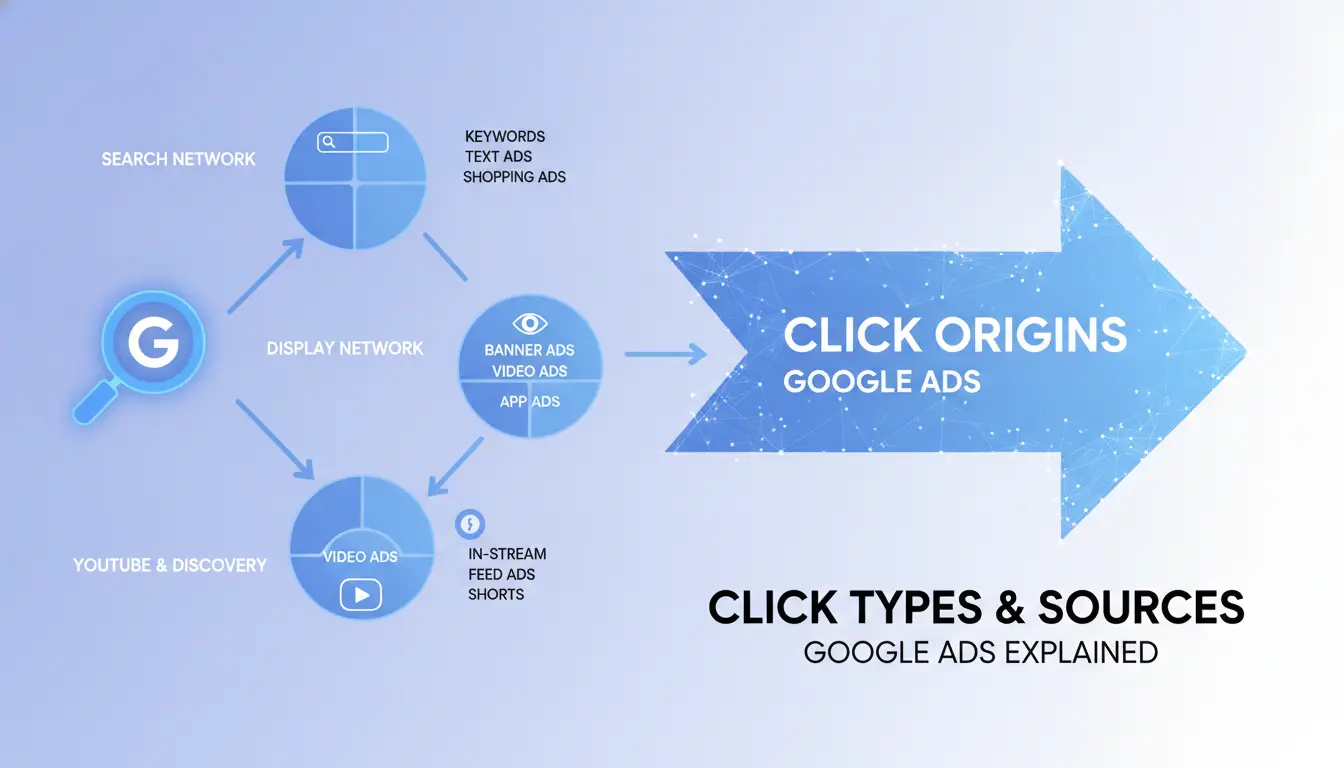
The sources of click fraud on Google Ads fall into three main categories: direct competitor attacks, automated bots or scripts, and organized human fraud. Each group uses a different approach, and missing the signs early can leave your ad budget exposed for weeks. Spotting these patterns is the first step before you can respond.
Competitor-Driven Click Fraud
Competitors have a clear motive, drain your ad spend or skew your campaign data so you waste money on the wrong keywords. Typical tactics include manual clicking to run up your costs, targeting high-value search terms, or using remote teams to mimic real engagement. Most of these clicks blend in unless you catch sudden spikes tied to known business rivals.
Bot and Scripted Clicks
Automated bots are the fastest-growing source of fake clicks. These scripts scan search results, load your ads, and click repeatedly, sometimes hundreds of times per hour. Bots often mask their identity by rotating IP addresses and user agents, making them look like real users. The real challenge is that bot activity rarely shows up as a single big spike. Instead, you’ll notice a steady trickle of invalid clicks that don’t convert, draining budget quietly. For example, if you see conversion rates drop below 1% for a keyword that usually performs at 15%, you’re likely dealing with bot-driven fraud. Manual review can miss these cases because logs look normal until you drill into location, device, or cookie patterns. Missing these slow leaks is what keeps your spend high even after Google’s automated filters catch obvious abuse.
Click Farms and Human Fraud
Click farms mix real people with scripts, making fraud harder to spot. Watch for:
- Unusual concentration of clicks from one city or region
- Repeated visits from similar devices but different accounts
- Patterns where every click comes at regular intervals, not random
Checking these signs is crucial, human fraud adapts fast, so the patterns change every month.
Recognizing these main types lets you narrow your focus and start checking for indicators. Next, you’ll need to know what warning signs to look for in your own campaign logs and reports.
How Can You Spot Signs of Click Fraud in Your Google Ads Campaigns?
If you notice your Google Ads spend draining fast but conversions aren’t rising, you’re likely facing click fraud. Most real cases show up as odd traffic patterns, so spotting them early means knowing what to check and not waiting for Google’s refund queue.
Unusual Patterns in Click Data
The first sign is a sudden jump in clicks, but with zero new leads or sales. For example, you might see your ad get 200 clicks overnight, yet not a single form filled. High bounce rates, users leaving after one page, and session times under five seconds also point to bots or scripts, not real customers.
The key signal: If your ad clicks spike but conversions and quality score stay flat, it’s time to investigate before your budget drains further.
Suspicious IP Addresses and Geolocations
Catch fraud early by tracking where your clicks come from and who’s clicking.
- Check for repeated clicks from the same IP address, especially if the IP shows up dozens of times in a day.
- Watch for traffic from countries or cities you never target, like getting US ad clicks from Indonesia.
- Flag IPs that change frequently but always return to your ad, this is common with click farms and automated bots.
Device and Browser Fingerprint Clues
Sometimes fraudsters use the same device or browser to hammer your ads. Here’s how to spot them:
- Review logs for identical device types or browser versions making multiple clicks in short bursts.
- Look for user agent strings that repeat across different sessions, real users rarely use identical setups every time.
- Match fingerprint data to conversion logs, if one device keeps clicking but never converts, it’s probably not a real customer.
Spotting these clues early can save hundreds in wasted spend and keep your ad campaigns stable. The next step is understanding how these patterns translate to real financial risks, before you lose more than just your daily budget.
What Are the Real Risks and Costs of Google Click Fraud for Advertisers?
When click fraud hits your Google Ads campaigns, you lose money fast, most of it never comes back. The risks aren’t just financial; they can mess up your entire ad strategy.
Wasted Ad Spend and Budget Drain
Each fraudulent click drains your budget, and refunds from Google are rare. Most advertisers only recover a small fraction, leaving you to pay for clicks that never had a real chance to convert.
Distorted Campaign Data and Optimization Failures
Fraud skews your analytics, making smart decisions nearly impossible.
- You might boost bids for keywords that are actually being targeted by bots or competitors.
- The safer move: Pause campaigns showing sudden spikes and audit traffic sources before running new split tests.
Hidden Long-Term Risks
Beyond wasted spend, repeated fraud triggers account reviews, suspensions, and loss of trust with Google. You risk missing real customers while your brand gets flagged for suspicious activity. If your account gets suspended, you lose both historical data and any chance to run new ads until the issue is cleared, sometimes weeks later.
Moving from spotting fraud to investigating it is the only way to limit damage before your campaigns spiral out of control.
How to Investigate and Respond When You Suspect Click Fraud
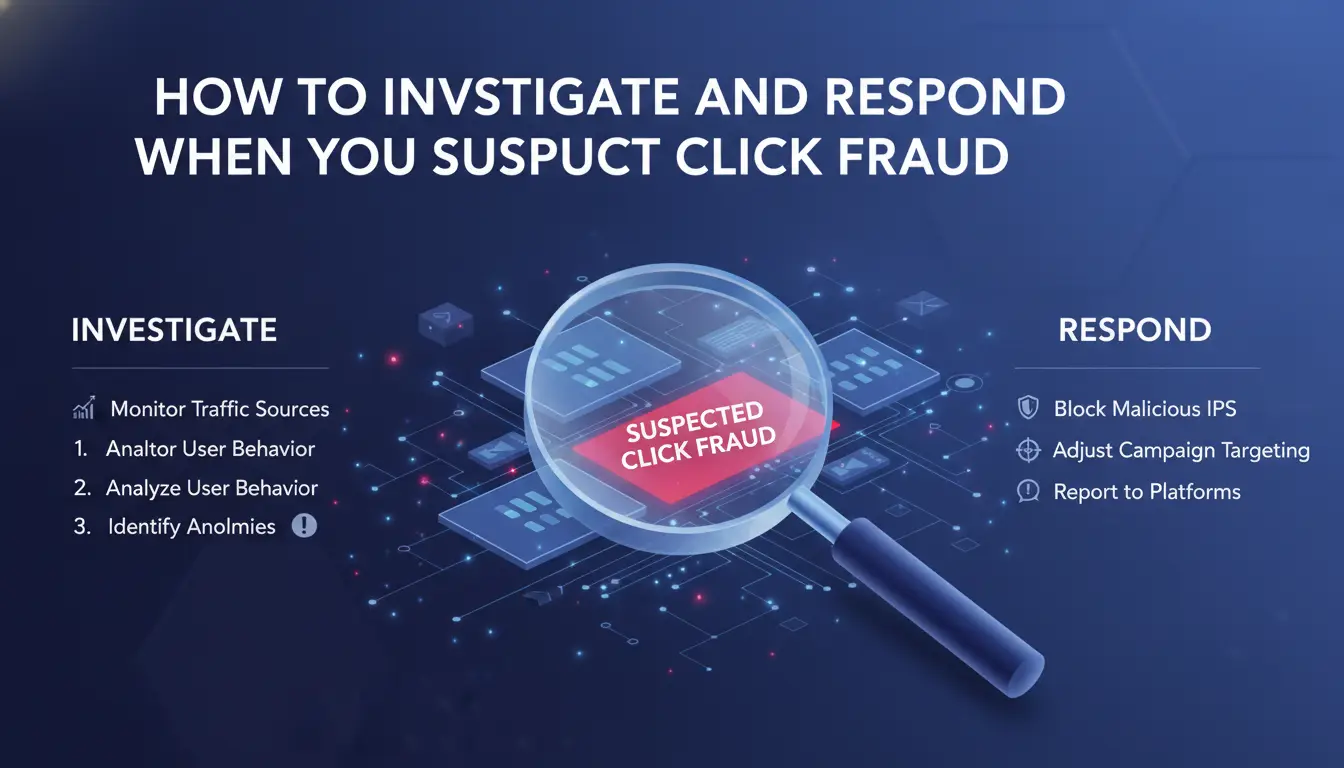
If you see unusual spend or click patterns, don’t wait for Google’s system to catch up. Fast action lets you stop the leak and build a case for credit.
Step 1: Collect and Analyze Evidence
- Export your raw click, cost, and conversion logs from Google Ads.
- Compare suspicious days with normal traffic, look for clusters from the same IP, device, or region.
- Flag repeat patterns: the same IP clicking multiple times, or spikes at odd hours usually point to click fraud, not real interest.
Step 2: Use Google’s Built-In Invalid Clicks Tools
- In your Google Ads dashboard, check the “Invalid Clicks” column. If this number is low but your spend looks off, more fraud likely slipped through.
- Request a manual review using the Google Ads support form. If you only get an automated reply, respond with specific log evidence, this triggers a deeper look.
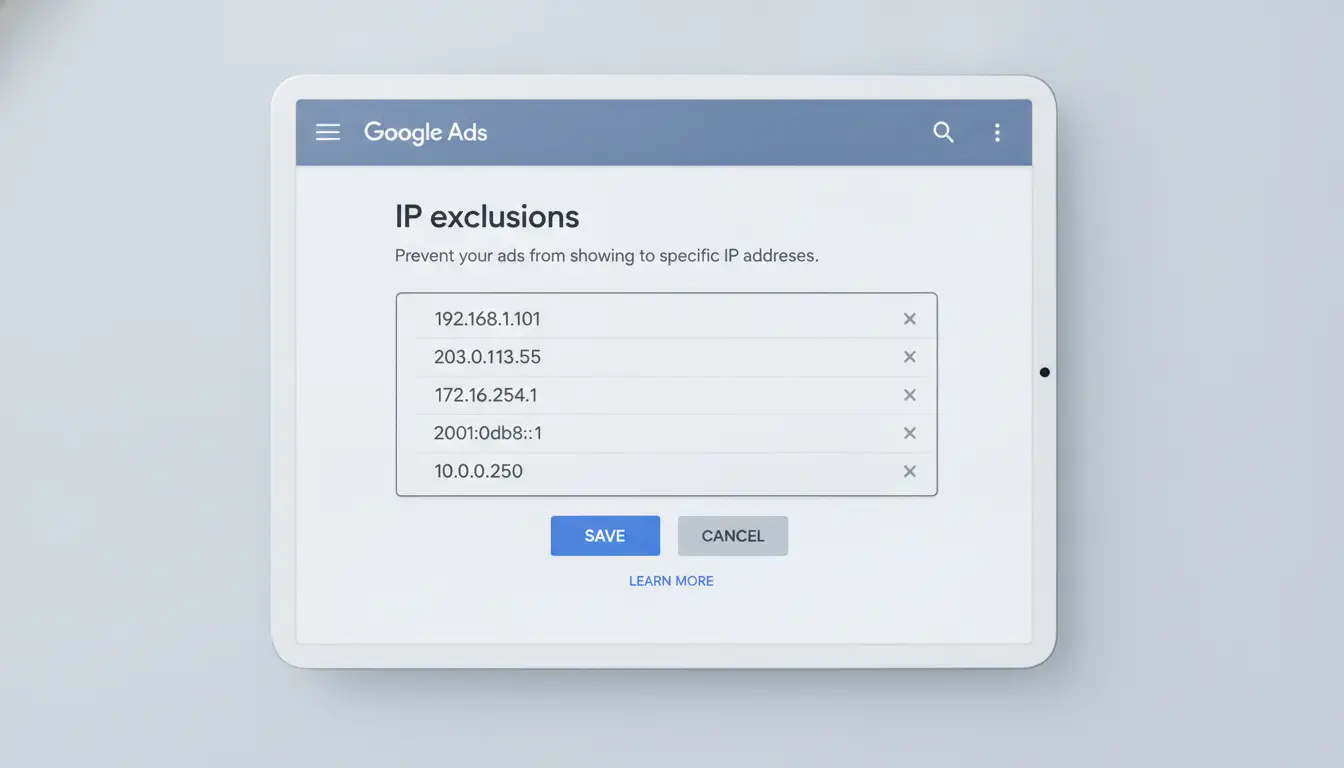
Step 3: Block or Exclude Problematic IPs and Placements
- Go to Campaign Settings > IP Exclusions in Google Ads. Paste the offending IPs and save.
- For display campaigns, exclude placements with sudden jumps in clicks but no conversions. If you miss this, the same fraud source can drain your budget for weeks.
Step 4: Document and Escalate
- Keep a dated copy of all logs, screenshots, and support replies, Google may ask for proof months later.
- If you lose more than $100 without a refund, escalate to Google’s support chat, not just email. If the issue keeps coming back, consider hiring a specialist to audit your setup.
Acting quickly on suspicious activity is the best way to limit real losses before they get out of control.
How DICloak Helps Teams Manage Google Ads Accounts During Click Fraud Investigations
Google Click Fraud is mainly handled through traffic analysis, campaign monitoring, Google Ads controls, and specialized click fraud detection tools. However, teams managing several Google Ads accounts also need to keep each account environment organized and separate while reviewing suspicious activity.
Keep Each Google Ads Account in a Separate Browser Profile
With DICloak, teams can create a dedicated browser profile for each Google Ads account. Each profile stores its own cookies, login session, browser data, and proxy configuration.
This makes it easier for operators to open the correct account without repeatedly logging in and out of the same browser. It also reduces the chance of mixing client sessions, opening campaigns under the wrong account, or sharing browser data between unrelated advertising projects.
Control Who Can Access Each Account
Google Ads accounts may be managed by media buyers, agencies, analysts, and client teams. Giving every member access to every account can create unnecessary operational risk.
Using DICloak, administrators can assign browser profiles to specific members or groups. Team members only access the accounts required for their work, while account owners can update or remove permissions when responsibilities change.
Review Team Operations More Clearly
When suspicious traffic appears, teams may need to confirm who accessed an account, which profile was used, and whether any campaign settings were changed.
DICloak operation logs help teams review profile activity and trace internal actions. These records do not identify fraudulent clicks, but they can help separate external click fraud issues from mistakes made during account management.
Recommended Multi-Account Workflow
Create one browser profile for each Google Ads account, assign a stable proxy when needed, limit profile access to responsible team members, and review operation logs when investigating unusual campaign activity.
DICloak does not detect or block Google Click Fraud. It supports the account isolation, access control, and team organization needed when several Google Ads accounts are managed at the same time.
What Are the Most Effective Ways to Prevent Google Click Fraud in 2026?
Preventing click fraud on Google Ads takes more than one fix. The most reliable approach is a checklist, technical blocks, smart tracking, locked-down team workflows, and constant review. The single biggest mistake is assuming Google’s built-in filters catch everything; real protection comes from combining multiple tactics that fill the gaps.
Set Up IP and Placement Exclusions
Block known fraud sources fast. Add IP exclusions for addresses flagged by third-party tools or patterns in your logs. Placement exclusions matter just as much, remove any site or app that shows sudden spikes, weird conversion rates, or repeat invalid clicks. Update your lists at least weekly, but jump in sooner if you see unusual activity. If you only review exclusions monthly, you’ll miss attacks that drain thousands in days.
Use Advanced Tracking and Detection Tools
- Set up a third-party click fraud detection platform (like ClickCease or CHEQ) that works with Google Ads.
- Integrate custom tracking scripts to log user agent, session duration, and click origin for every campaign.
- Review flagged click logs daily; escalate any pattern that matches bot traffic or competitor sabotage.
Strengthen Account and Workflow Security
Tighten who can access your ad accounts, limit sharing to trusted team members only. Devices should be clean: no browser extensions, risky plugins, or leftover session cookies. Change passwords after team turnover, and never let one person run all accounts on their own machine. If you skip device hygiene, even strong tracking won’t help; compromised endpoints let attackers bypass detection.
Monitor, Audit, and Adjust Regularly
Don’t wait for Google to notify you. Set calendar reminders to check campaign logs, conversion rates, and exclusion lists.
- Run weekly manual audits on all new campaigns and placements.
- Set up automated alerts for spikes in clicks or drops in conversion rates.
- Adjust bid settings and ad targeting immediately if you spot suspicious patterns.
Getting the workflow right means you spot issues before your budget gets burned. The next section breaks down the mistakes that make click fraud much worse, so you know what to avoid.
Common Mistakes That Make Google Click Fraud Worse (and How to Avoid Them)
Advertisers often make basic errors that actually fuel click fraud, wasting budget and making true detection harder. Spotting these issues early is the only way to stop loss before it snowballs.
Ignoring Early Warning Signs
Small anomalies, like a sudden jump in click-through rates or odd locations, usually signal fraud brewing below the surface. Setting up real-time alerts for these patterns means you catch suspicious activity before it drains your budget. Waiting for a major spike is too late.
Weak Account Isolation and Poor Proxy Use
Shared logins and reused IP addresses open the door for coordinated click fraud attacks.
- If you let multiple accounts run from the same device or proxy, Google can link them, making your whole operation vulnerable.
- Always use strict account isolation and dedicated proxies, this prevents cross-contamination and lowers detection risk.
Failing to Update Prevention Tactics
Fraud tactics shift every quarter. Relying on last year’s playbook means you’ll miss new schemes and pattern changes that slip past Google’s filters. Review your fraud checks monthly, outdated setups leave you exposed, even if they worked before.
Frequently Asked Questions About google click fraud
Is Google click fraud illegal?
Google click fraud is illegal if someone clicks on ads to drive up costs or hurt a competitor. Laws vary by country. In the U.S., it can break computer crime laws if there's intent to defraud. Some countries have stricter rules, while others may not cover it directly. Intent to deceive is key for legal action.
Can Google Ads automatically detect and block all click fraud?
Google Ads uses automatic systems to screen for invalid clicks. These systems block most fake activity, like bots or repeated clicks. However, no system is perfect. Some advanced fraud can bypass Google’s filters, so advertisers may still see unwanted charges on their accounts.
How do I get a refund for fraudulent clicks on Google Ads?
To request a refund, log into your Google Ads account and report the suspicious clicks. Provide details such as time, IP addresses, and patterns you notice. Google will review your claim. If they agree, they’ll credit your account for the invalid clicks within a few weeks.
Are there free tools to help detect click fraud?
Yes, there are free tools like Google’s own “Invalid Clicks” report or basic analytics platforms. These can show spikes in clicks or unusual activity. However, free tools often miss more advanced click fraud and may not track all suspicious behavior.
Does using proxies help prevent Google click fraud?
Proxies can hide your ads from certain locations, which might reduce some types of click fraud. But they don’t stop real attackers or bots already targeting your ads. Proxies are only a partial fix and don’t replace real fraud detection methods.
Advertisers looking to safeguard their budgets should consider tools that detect and prevent suspicious activity on their campaigns. Implementing proactive monitoring can help reduce waste and improve the effectiveness of digital advertising efforts. Try DICloak For Free
 Web Proxy Tools
 Free Tools
 Cookie Plugin
 UA Generator
 MAC Address Generator
 IP Generator
 IP Address List
 2FA Code Generator
 World Clock
 Anonymous Check
 WebRTC Leak Test
 UUID Generator
 Free Web Proxy Site
 Proxy Checker
 FB Ad Checker
 AI Web Scraping
 Free SMM Tools
 Twitter Shadowban Checker
 Instagram Name Checker
 UTM Generator
 Username Generator
 AI Hashtag Generator
 LinkedIn Headline Generator
 Social Media Image Resizer