Waking up to the “Your account has been disabled” message on Instagram happens more often than most people think. Thousands of users each month get locked out, sometimes for reasons they don’t understand, sometimes after a single mistake. Instagram’s automated systems often flag accounts for spam, copyright issues, or even fast changes to login info, and appeals are the only real way back. But many users get stuck because the instagram appeal form is confusing, hard to find, or doesn’t always work the way people expect. Miss one detail and you might wait weeks without a response, or lose your account for good.
The real risk isn’t just losing access for a few days. You could lose photos, messages, business contacts, or even your brand’s page. That’s why understanding how to find, fill out, and follow up on the appeal process matters. This step-by-step guide breaks down each part of the appeal, from the fastest way to reach the right form to the details you must get right so Instagram support actually looks at your case. Here’s what users who got their accounts back did differently.
Why Instagram Accounts Get Suspended or Disabled, and What That Means for You
Instagram doesn’t just block accounts at random. Most suspensions or bans happen because something in your account’s actions or setup tripped the platform’s rules. If your account gets disabled, you can’t just fill out the instagram appeal form and hope for the best. The real outcome depends on what triggered the action, and whether you know how to read the warning signs.
Most Common Triggers for Account Suspension
Most users run into trouble for one of two reasons. The first is a clear violation of Instagram’s Community Guidelines. That might mean posting nudity, hate speech, copyright content, or even spam. Sometimes it's not obvious, maybe you shared a meme that got flagged, or a follower reported your post.
The second big trigger is unusual login or activity patterns. Using automation tools, logging in from distant locations in a short time, or switching devices too fast can all look suspicious to Instagram. Even if you’re not breaking rules, actions that look like bots, such as mass following or commenting, may get you flagged. Businesses with team members handling one account are especially at risk. Instagram’s systems detect these patterns and may lock you out without warning.
How to Identify the Real Reason for Your Ban
Most people learn about their ban from a pop-up or email. But not every message tells you the real story. Sometimes, you’ll get “We noticed suspicious activity” or “You violated our guidelines” with little detail. That’s not enough if you want your instagram appeal form to work.
The best move is to read every message from Instagram closely. Look for mentions of specific posts, times, or actions. Check your inbox for warning emails sent before the ban, these often show what triggered the system. If you missed early warnings, you may find clues in your recent activity log. Knowing the exact reason is the only way to pick the right appeal path and avoid losing your account for good.
What to Check Before Submitting the Instagram Appeal Form
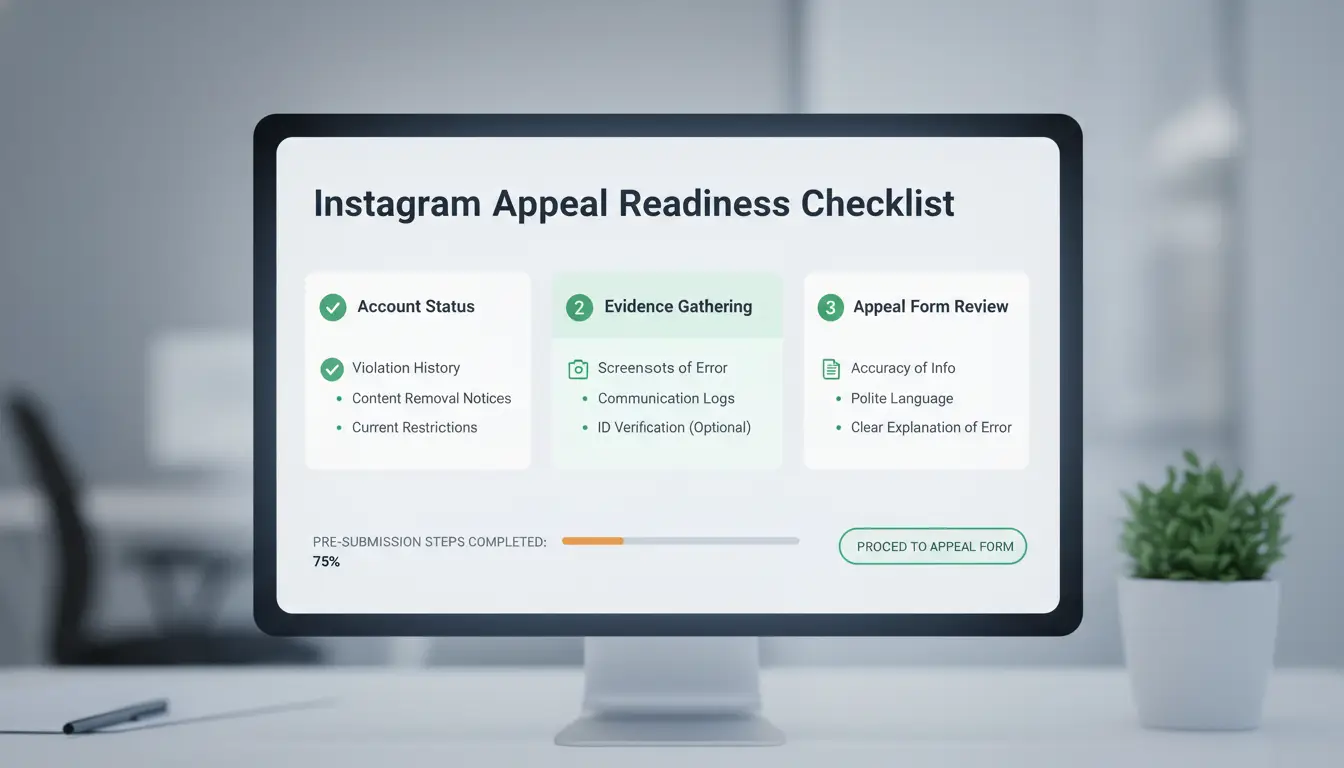
The instagram appeal form is your only real shot at getting a banned or suspended account back. If you miss key steps before submitting, you risk waiting weeks, or losing your profile for good. Before you fill anything out, check these essentials so your appeal doesn’t get ignored or trigger a longer lockout.
Is Your Account Actually Eligible for Appeal?
Not every ban can be appealed. Instagram lets you use the appeal form for most temporary suspensions, copyright flags, and “misuse” bans, but not for accounts deleted after repeated violation (Instagram Help Center). If your account was hacked and then banned, you may have a chance, but if the ban says “permanent,” appeals rarely work. Always check the message you see when logging in. Temporary suspensions usually mention a timeline; permanent bans often say you can't restore the account. Trying to appeal a permanent ban wastes your only shot and may close the window for more appeals.
What Evidence or Information Should You Prepare?
Instagram ignores appeals that lack proof of identity or ownership. Before submitting, gather a clear photo of yourself holding the ID tied to the account, plus any screenshots showing messages or the error screen. If your account represents a business, prepare documents like tax records or business licenses. Save copies of past communications with Instagram or third parties (such as emails about copyright). Strong evidence makes your appeal credible and increases review speed. Weak or missing info is a common reason appeals get rejected without reply.
Why Rushing the Appeal Can Hurt Your Chances
Many users panic and submit the instagram appeal form too fast. The most common mistakes are missing evidence, unclear explanations, or contradicting earlier info. Appeals sent during peak support times (weekends, holidays) often get delayed or auto-rejected. Take a few hours to check details, proofread your case, and avoid spelling mistakes, these can trigger auto-filters. A careful, complete appeal is far more likely to get reviewed than a rushed one.
How to Find and Access the Correct Instagram Appeal Form
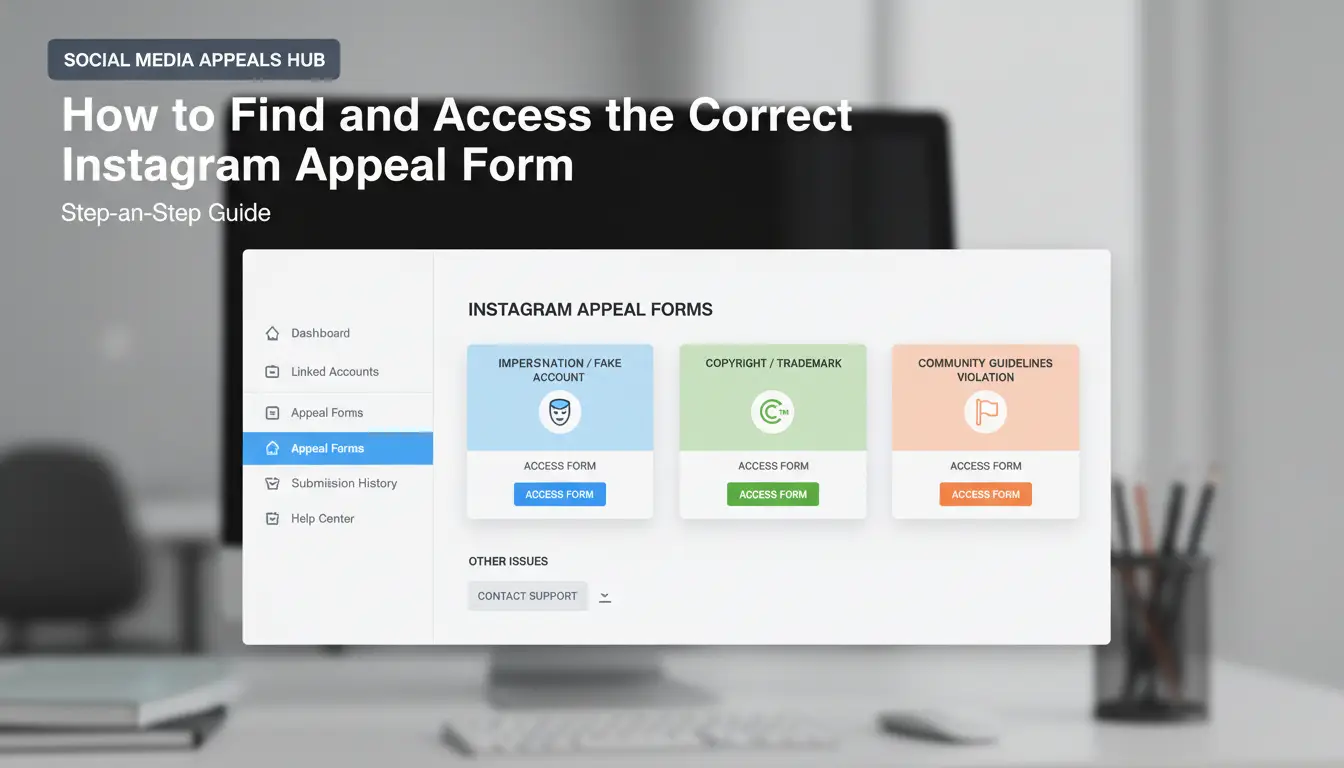
Getting to the right instagram appeal form can make the difference between a quick recovery and losing your account for good. Many fake forms circulate online, and using the wrong one means your appeal never reaches Instagram support. Here’s how to find the official forms, pick the right one, and avoid common traps.
Official Instagram Appeal Form Links (and How to Spot Fakes)
Instagram only handles appeals on its own website. For a disabled account, use the official Instagram Help Center Disabled Account form. If your account was hacked or someone is pretending to be you, go to Instagram’s hacked account page, then follow the steps to report. Never trust links from random emails, Telegram groups, or unofficial “support” sites. Real forms never ask for your password or payment.
If a form asks for money, promises a “guaranteed recovery,” or uses a non-instagram.com address, it’s a scam, stop right there.
Which Form to Use for Your Issue
Selecting the right form speeds up your appeal. If you see “Your account has been disabled for violating our terms,” use the Disabled Account form. For hacked accounts, start at the hacked account page and select “My account was hacked.” If your profile was copied or you’re dealing with a fake account, use the Impersonation Report form. Each form asks for your email, ID, and sometimes a selfie video to prove you’re real.
What to Do If You Can’t Find the Right Form
If the forms don’t load, or you get errors, try using a different browser or clear your cookies. Sometimes, appeal forms are limited by region or device type. You can message Instagram via their Facebook page or reply to emails from support@if.instagram.com. If you don’t hear back in seven days, try again using the same form, but avoid spamming, too many submissions can block your case.
Step-by-Step: How to Fill Out and Submit the Instagram Appeal Form
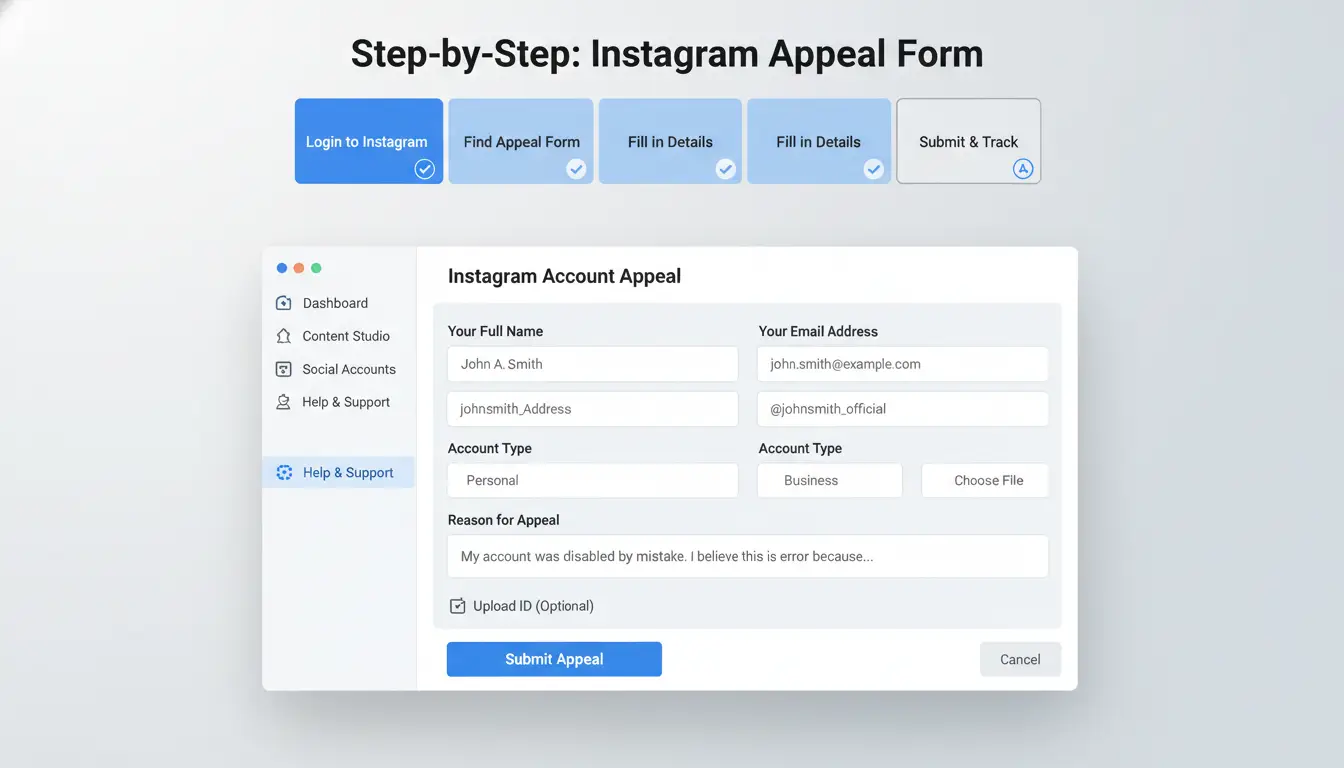
Getting your account back depends on filling out the instagram appeal form without mistakes. The process can feel stressful, but most errors happen when users skip details, upload the wrong files, or write statements that get ignored by Instagram’s review team. Here’s how to avoid common issues and get your appeal seen.
Filling Out Each Section of the Form Correctly
Start with your personal information, use the email and phone number linked to your Instagram account, not a backup or new address. For the username, double-check for typos; a single wrong letter can delay your case. When the form asks for your full name, use the exact name shown on your profile if possible. If you manage a business or brand account, add the official business name and attach any registration proof if requested.
When you explain your case, keep it clear and honest. State the issue (like “my account was disabled for copyright, but I have the rights to my content”) and avoid long stories. If you’re not sure which option to choose in a dropdown, pick the one that matches your situation closest.
What to Write in the Appeal Statement
Your statement should be short, 2-4 sentences is enough. Be direct about why your account was disabled and why you think it should be restored. For example: “My account was disabled after a copyright complaint, but I own the photos and can provide proof.” Avoid blaming Instagram or threatening action, it doesn’t help your case. Instead, focus on facts and attach any details that back up your story.
Uploading Documents or Proof
Instagram accepts JPG, PNG, and PDF files under 10MB each. Take clear photos of your ID or documents, making sure all info is readable and not blocked by glare or shadows. If you’re submitting business proof, official documents work best. Double-check that your uploads match your account’s name and details to prevent more delays.
What Happens After You Submit the Instagram Appeal Form?
Submitting the instagram appeal form is only the start, what happens next can be slow, confusing, and sometimes frustrating. Knowing what to expect cuts down your risk of missing a response or making mistakes that cost your account for good. Here’s what actually happens after you hit “submit,” and how to handle each step.
How Long Does Instagram Take to Respond?
Most users wait between a few hours and 7 days for a reply, but some cases drag on for weeks. Account type, reason for appeal, and how busy Instagram’s review team is all change the timeline. Fastest replies usually come for simple mistakes or clear ID matches. If you appealed for copyright, fake account claims, or repeated violations, expect a longer wait. Don’t trust anyone who promises instant results, official support is the only safe path. The Instagram Help Center posts updates but won’t show your personal case status.
How to Track Your Appeal Status
Instagram uses email and app notifications for all updates. Check both daily, sometimes the next step requires you to reply or send new info within 24–48 hours. Miss a message and your case may close automatically. If you hear nothing after 7 days, check your email spam folder and sign in to the app to see if any banners or pop-ups appear. Still stuck? Try submitting the instagram appeal form again using a new browser or device, or visit the Meta support page for more options.
Why Some Appeals Get Denied (and What to Do Next)
Appeals get denied for mismatched info, blurry documents, or if Instagram thinks you broke their rules. Even a small typo can trigger a rejection. If your appeal fails, read the rejection email closely. Sometimes you can reply with better documents or more detail. If you did nothing wrong, send a second appeal, just make sure every detail matches your profile. The most common mistake is giving up too soon; persistence is often what brings accounts back.
How to Avoid Future Instagram Account Suspensions, Especially for Social Media Marketers
Best Practices for Safe Instagram Usage
Instagram flags accounts for fast changes, spammy automation, or logging in from different places too quickly. Stick to normal posting and engagement patterns. Spread out your actions, don’t like or follow hundreds of profiles at once. Keep your login locations consistent, and avoid tools that promise “quick growth.” If you get locked out, use the official instagram appeal form and check every detail twice before submitting.
How DICloak Helps Teams Manage Multiple Instagram Accounts Safely
Running client accounts or large campaigns means more risk, one mistake can lock out the whole team. You can use DICloak to set up an isolated browser profile for each Instagram account, keeping fingerprints and cookies separate. Pair this with proxy integration to match real locations and avoid detection triggers. For teams, DICloak’s permission controls mean only the right people touch the right accounts, lowering the chance of accidental bans.
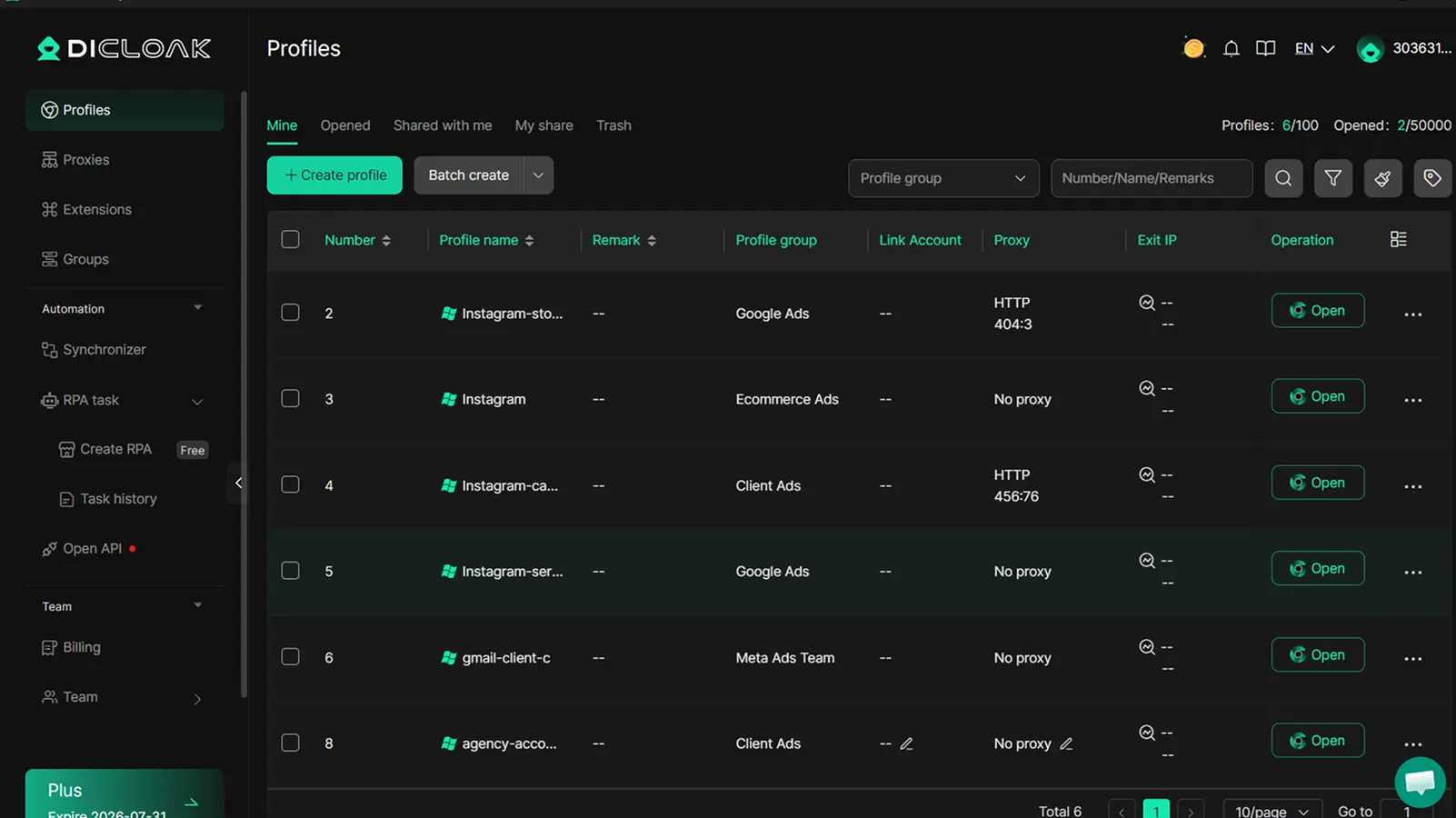
Team Collaboration and Automation Without Risk
Many marketers need automation but fear getting flagged as a bot. Tools like DICloak let you set up safe RPA scripts for tasks like posting or liking, while logging all actions. Operation logs show who did what, so you can trace any issue, cutting down the odds of ever seeing the instagram appeal form again.
Common Mistakes That Cause Instagram Appeals to Fail (and How to Avoid Them)
Submitting the instagram appeal form is often the only real way to get an account back after a ban or lockout. But too many users lose their shot because of simple, preventable mistakes. Here’s where most people go wrong, and how you can avoid the same traps.
Submitting Incomplete or Inaccurate Information
Instagram support will not review your case if your appeal is missing documents or has typos. Even a small error, like a wrong email or username, can put your request at the bottom of the queue. Missing ID photos, unclear selfies, or mismatched account info are the main reasons forms get ignored.
Before you submit, double-check every detail. Make sure your photos are clear and match the account info exactly. If you’re asked for a business document, send the right one. Never rush, one typo can mean weeks of waiting.
Using Multiple Appeals or Spam Tactics
Flooding Instagram with repeated appeals does not speed things up. In fact, sending the form too many times or using spammy messages can flag your account for abuse. Instagram’s help center at help.instagram.com warns that appeals should be sent once per case.
If you manage several accounts, keep careful records. Appeal for each account separately, and don’t copy-paste the same explanation. Track the submission dates so you don’t resend by mistake. Most users who got their accounts back waited for a real response instead of spamming the form.
Falling for Phishing or Fake Support Scams
Scammers target people who are desperate to get back into their accounts. They send fake emails or DMs pretending to be Instagram. Always check if the message comes from an official address like @instagram.com, and never click strange links.
If you’re unsure, visit Meta’s official support page directly. Report any suspicious message right away. Protect your login by changing your password and setting up two-factor authentication if you suspect a scam.
When to Try Again, Seek Help, or Give Up on Your Instagram Appeal
How Many Times Can You Appeal?
Instagram lets you appeal more than once, but flooding the system won’t help. Each time you send the instagram appeal form, double-check all your details. Submitting the same information over and over can get your case flagged as spam. If your appeal is denied, read the message carefully, sometimes there’s a clear reason or a wait period before you can try again.
When to Contact Instagram Support Directly
If you haven’t heard back in a week, or you get the same denial with no real reason, it’s time to contact support. Use the Instagram Help Center to find direct contact options. Give clear details: your username, device, and a short, honest summary of your problem. Screenshots can help, but don’t flood them with extras.
Alternatives If Your Account Can’t Be Restored
If Instagram shuts the door for good, you might need to start fresh. Create a new account and let your old contacts know. For business or brand accounts, register your name again fast and update your website or profiles elsewhere to protect your identity.
Frequently Asked Questions
How many times can I submit the Instagram appeal form?
Instagram allows you to submit the instagram appeal form if you believe your account was disabled by mistake. However, sending the form too many times in a short period can look like spam. Instagram may ignore or block repeated appeals. Wait for a response before submitting again to avoid delays or possible restrictions.
Is there a way to speed up my Instagram appeal response?
There’s no guaranteed way to get a faster reply after submitting the instagram appeal form. Responses can take a few days to several weeks. Make sure your appeal is clear and includes all requested information. Avoid multiple submissions, as this can slow down the process. Check your email and spam folder regularly for updates.
What should I do if I get no reply after submitting the Instagram appeal form?
If you don’t get a response within two weeks, check your email, including the spam folder. Try submitting the instagram appeal form again, but wait a few days between attempts. If you still get no reply, visit the Instagram Help Center or contact Instagram through their official social media accounts for further assistance.
Can I appeal a disabled Instagram account without ID?
Most times, Instagram asks for an ID to confirm who you are before restoring a disabled account. If you don’t have a government ID, you can sometimes use other documents like a school ID or official mail with your name. Always follow Instagram’s instructions on the appeal form for accepted documents.
Is it safe to use third-party services to submit an Instagram appeal?
No, it is not safe to use third-party services for the instagram appeal form. Many sites promising quick account recovery are scams that steal personal information or money. Only submit your appeal through Instagram’s official channels. This keeps your account and data safe from fraud.
Understanding how to properly submit an Instagram appeal form can significantly increase your chances of recovering your account or resolving issues. Make sure to provide accurate information and follow up as needed for the best results. Try DICloak For Free
 Web Proxy Tools
 Free Tools
 Cookie Plugin
 UA Generator
 MAC Address Generator
 IP Generator
 IP Address List
 2FA Code Generator
 World Clock
 Anonymous Check
 WebRTC Leak Test
 UUID Generator
 Free Web Proxy Site
 Proxy Checker
 FB Ad Checker
 AI Web Scraping
 Free SMM Tools
 Twitter Shadowban Checker
 Instagram Name Checker
 UTM Generator
 Username Generator
 AI Hashtag Generator
 LinkedIn Headline Generator
 Social Media Image Resizer