When you order a physical package, the logistics system requires a specific street address to ensure the delivery reaches your door. Without this identifier, the network of couriers and sorting centers fails. Your digital life operates on the exact same protocol. Every time you request a webpage or send an encrypted message, your device uses an IP address to tell the internet exactly where to route the requested data. However, unlike your physical home, this digital address is often public, broadcasted during every handshake, and serves as the primary entry point for those looking to compromise your privacy.
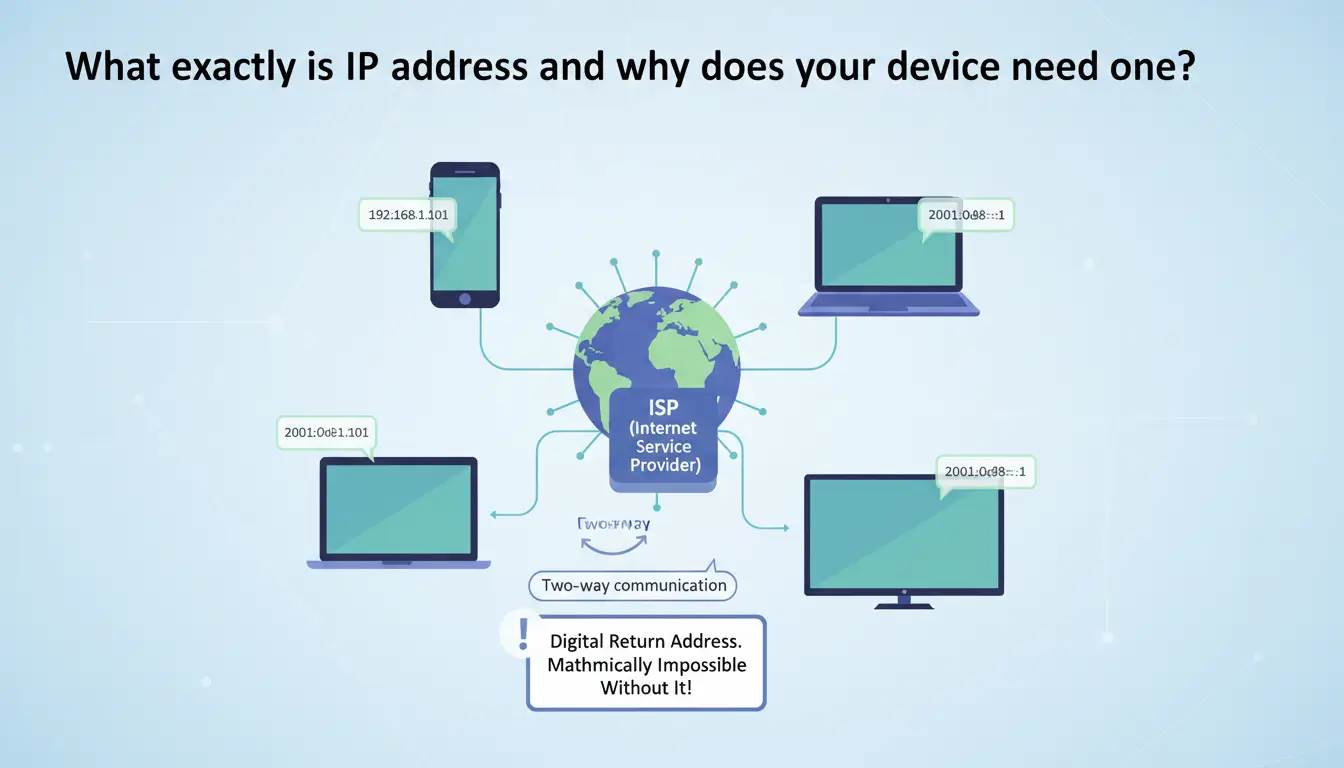
What exactly is an IP address and why does your device need one?
An IP address, or "Internet Protocol" address, is a unique numeric or alphanumeric identifier assigned to every device on a network. It functions as a digital return address. Without it, two-way communication on the internet is mathematically impossible.
The role of the Internet Service Provider (ISP)
Your ISP acts as the gatekeeper. When you establish a connection, the ISP assigns an IP address from its allocated pool to your modem or router. This address makes your network reachable to the rest of the global web. In 2026, ISPs have become even more aggressive in logging the traffic associated with these addresses, making your IP the primary key in your provider’s data-collection database.
How DNS translates human intent into machine routing
While humans use domain names (like example.com), computers only communicate via IP addresses. The Domain Name System (DNS) acts as the internet’s phonebook, translating those words into the IP addresses required for routing. It is a critical privacy checkpoint: your DNS provider—usually your ISP by default—records every "lookup" you perform, creating a comprehensive map of your browsing habits even if the traffic itself is encrypted.
How data packets find their destination
When you execute a query, the request is segmented into data packets. Each packet is "tagged" with your IP address and the destination server's IP. Network routers inspect these tags to ensure the response packets find their way back through the various hops of the global infrastructure to your specific device.
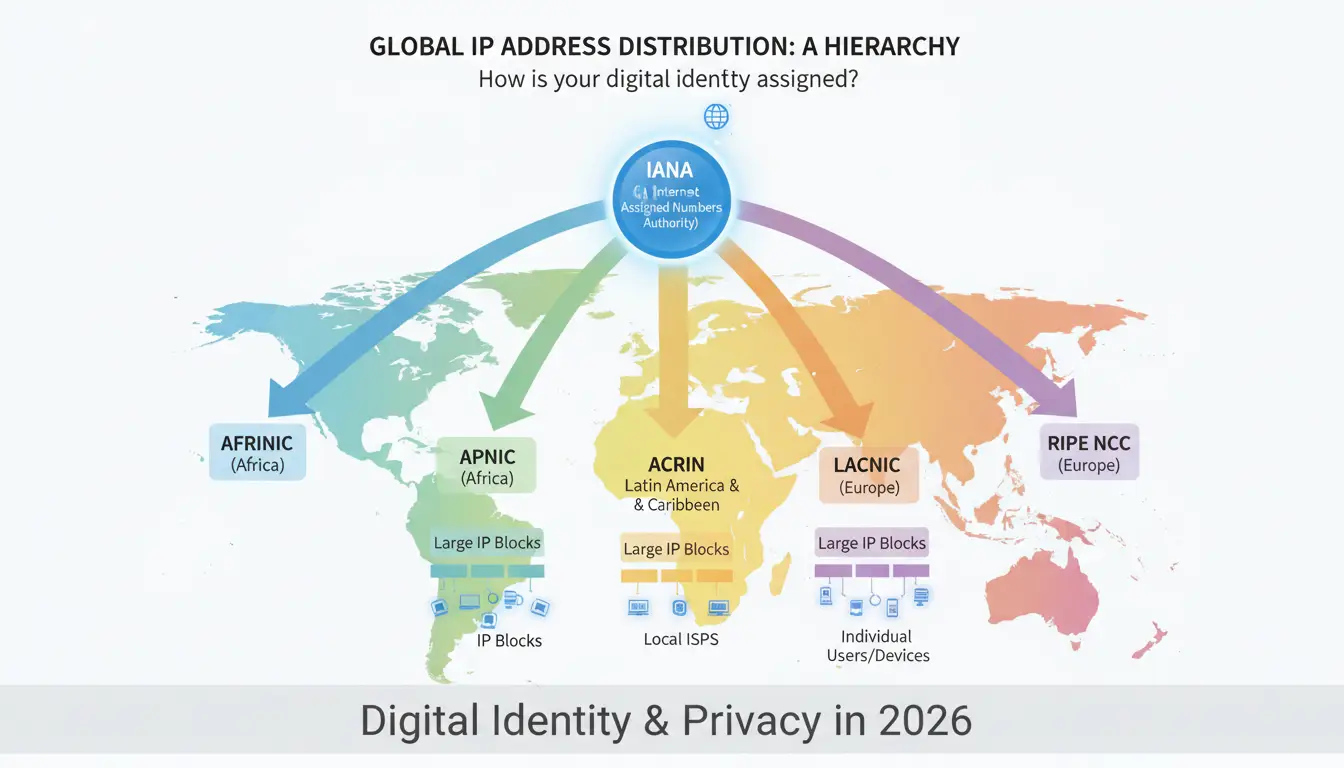
How is your digital identity assigned and distributed globally?
IP addresses are a finite resource managed through a strict global hierarchy to prevent addressing conflicts.
- IANA (Internet Assigned Numbers Authority): The central authority that manages the global IP pool.
- Regional Internet Registries (RIRs): IANA allocates large blocks to five regional bodies, such as the RIPE NCC (serving Europe, the Middle East, and parts of Central Asia).
- National Internet Registries: These bodies distribute sub-blocks within specific countries.
- Internet Service Providers (ISPs): The final link in the chain, providing individual IP assignments to businesses and home users.
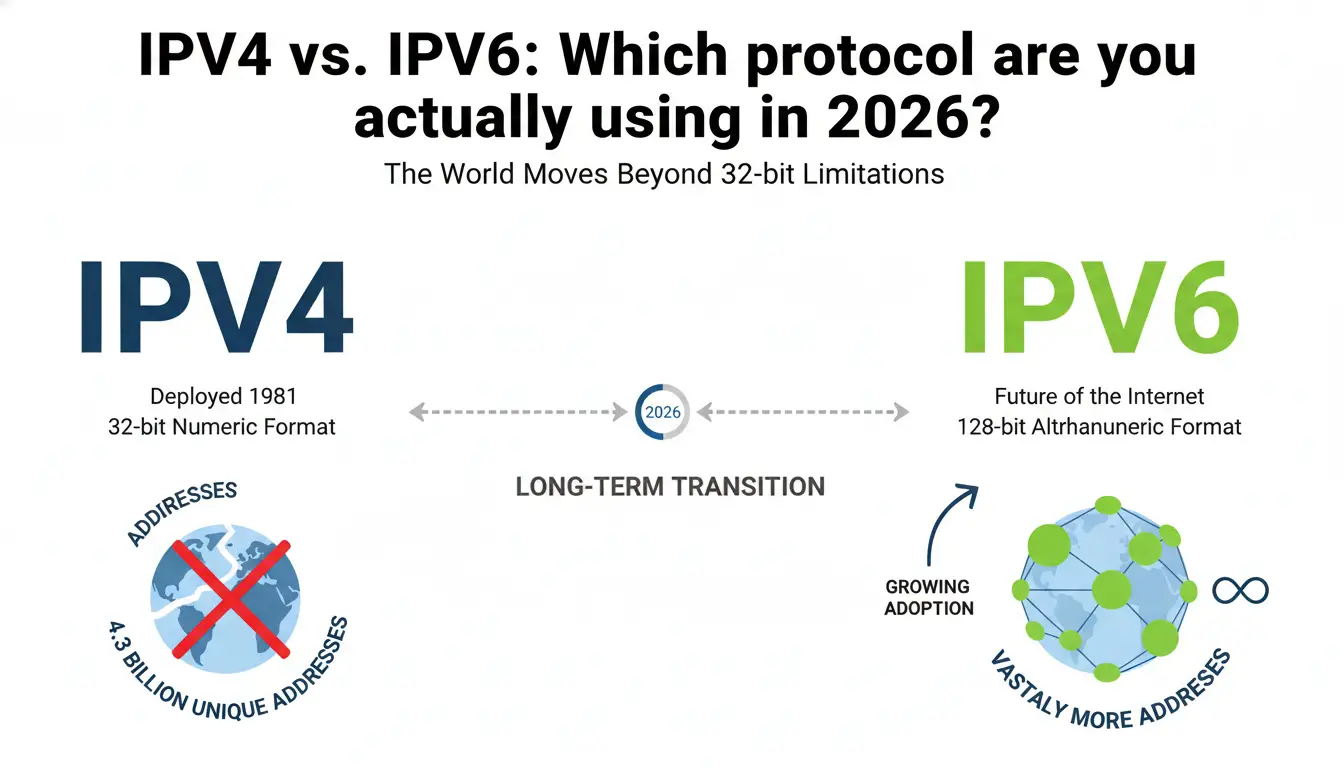
IPv4 vs. IPv6: Which protocol are you actually using in 2026?
We are currently in a long-term transition phase between two distinct generations of the Internet Protocol.
Why the world is moving away from 32-bit IPv4
Deployed in 1981, IPv4 uses a 32-bit numeric format, providing approximately 4.3 billion unique addresses. While this seemed sufficient in the early days of computing, the explosion of mobile devices and IoT hardware has exhausted the supply. In 2019, the RIPE NCC announced it had officially run out of unused IPv4 addresses. Today, IPv4 persists through address reuse and trading, but it is an aging, congested standard.
The 128-bit hexadecimal future of IPv6
IPv6 was designed to solve the scarcity problem permanently. Using a 128-bit alphanumeric hexadecimal format, it supports 340 undecillion addresses. This massive capacity is the backbone of 2026’s hyper-connected environment, allowing every smart sensor and vehicle to maintain a unique, globally reachable identifier without the need for complex network masking.
| Feature |
IPv4 |
IPv6 |
| Deployment Year |
1981 |
1999 (Publicly released 2012) |
| Bit Size |
32-bit |
128-bit |
| Notation |
Numeric dot-decimal (e.g., 192.168.0.1) |
Alphanumeric hexadecimal (e.g., 2001:0DB8...) |
| Address Capacity |
~4.3 Billion |
~340 Undecillion |
Static or Dynamic IP: Which connection type should you choose?
Your ISP assigns addresses using one of two logic models, each carrying different security implications.
The stability and risks of a constant (Static) address
A static IP address never changes. It is essential for hosting servers, managing secure remote access connections, or ensuring low-latency handshakes in professional gaming. However, from a security standpoint, a static IP is a permanent "beacon." Unauthenticated services running on a static IP are an open invitation for automated botnet scanning; once a vulnerability is found, the attacker knows exactly where to return.
Why most users prefer the rotating (Dynamic) model
Most consumer connections use the Dynamic Host Configuration Protocol (DHCP) to assign addresses that rotate periodically. This rotation provides a baseline of "security through obscurity," making it more difficult (though not impossible) for external actors to maintain a long-term connection to your network. In 2026, dynamic IPs are standard for residential users because they are more cost-effective for ISPs to manage across their subscriber base.
Public vs. Private IPs: What information are you exposing to the world?
Understanding the distinction between your internal network and your external footprint is vital for modern digital hygiene.
The router as a communication barrier
Your router serves as the perimeter barrier. Inside your home, it assigns private IP addresses (typically following the 192.168.x.x scheme) to your devices. These are only valid within your local network. Your router uses Network Address Translation (NAT) to facilitate communication between these internal devices and the outside world via a single public IP address. This setup prevents external actors from directly "seeing" or addressing your specific laptop or phone.
Shared vs. Dedicated IPs in web hosting
For those managing online assets, the choice of IP affects reputation and security:
- Shared IPs: Multiple websites reside on one IP. This is cheaper but carries "bad neighbor" risk—if one site on the IP is blacklisted for spamming, your site's email deliverability and search ranking may suffer.
- Dedicated IPs: Your site is the sole occupant. This is required for high-security environments, certain SSL configurations, and stable FTP (File Transfer Protocol) management.
Can someone find your home address or hack you using just an IP?
While an IP address isn't a GPS coordinate, it is a powerful data point that can be weaponized.
The limits of IP-based geolocation
An IP typically reveals your city, zip code, and ISP routing hub. While it is difficult to find a specific house number using an IP alone, it acts as a foundation. When combined with metadata from cookies or social media check-ins, an attacker can triangulate a precise physical location.
DDoS attacks and unauthorized port access
If an adversary targets your public IP, they can launch a Distributed Denial of Service (DDoS) attack, flooding your bandwidth until your connection drops. More dangerously, they may scan for "open ports"—virtual doorways left open by poorly configured software—to gain unauthorized access to your local files or hardware.
Behavioral Tracking and Targeted Advertising
In 2026, your IP address is a "persistent cookie." Ad networks use it to track your activity across different devices on the same network, building a comprehensive behavioral profile. This allows for "Personalized Spam" and targeted advertising that follows you regardless of whether you clear your browser cache.
The threat of "IP Spoofing" for illegal activities
Cybercriminals often use malware to route illegal traffic through a victim’s IP address. If illegal content is downloaded or an attack is launched using your IP, the digital forensics will point directly to your household, potentially creating significant legal liability for actions you did not commit.
How to find your IP address on any device right now?
To manage your security, you must first know what you are broadcasting.
- Mac: Navigate to System Settings > Network > Wi-Fi > Details...
- Windows: Open the command prompt (cmd), type
ipconfig, and press Enter. Look for the "IPv4 Address."
- iPhone: Go to Settings > Wi-Fi, tap the "i" icon next to your network, and scroll to the DHCP section to see the address.
- Android: Navigate to Settings > Wireless & networks/WLAN > Network & Internet > Wi-Fi. Tap your connected network and look for the address; you may need to tap Advanced or Configure to reveal it.
What are the most effective ways to protect your IP address in 2026?
Passive internet usage is no longer safe. You must actively obscure your digital footprint.
Adjusting privacy settings and router security
Close the easiest points of entry. Change your default router credentials immediately to a complex, non-dictionary password. Set messaging applications to "private" to prevent peer-to-peer IP harvesting, and never interact with unsolicited communications that could be used to probe your network’s "handshake" responses.
Leveraging secure connections, Proxies, and Tor
- For enhanced privacy: Services exist that create an encrypted tunnel, replacing your ISP-assigned IP with the IP of a secure server.
- Proxies: These act as a simple relay, masking your IP from the destination site but often lacking the full encryption of a secure connection.
- Tor: This open-source network bounces traffic through three layers of nodes, providing high anonymity at the cost of significant latency.
Implementing advanced identity management with DICloak
For professionals or high-risk users, standard masking is often insufficient due to "browser leaking" and fingerprinting. DICloak provides a more robust security workflow:
- Isolated Browser Profiles: Every profile is sandbox-sequestered, preventing ad networks from using your IP to link different personas via behavioral tracking.
- Digital Fingerprint Customization: Beyond just masking the IP, DICloak allows you to modify the hardware and software signals your browser sends, making your connection appear organic rather than "masked."
- Leak Prevention: It actively monitors and blocks WebRTC and DNS leaks that often expose a user’s real IP even when a proxy or secure connection is active.
FAQ: Common Questions About IP Addresses
Is it illegal for someone to have my IP address?
No. An IP address is public-facing metadata, similar to a vehicle's license plate. Every server you connect to must "see" your IP to send data back to you.
Can I hide my IP address for free?
Yes, via the Tor browser or free proxy lists. However, be cautious: in 2026, many "free" services monetize by logging your data or injecting ads into your traffic.
Does my IP address change when I restart my router?
On a dynamic connection, yes. Power-cycling the modem usually forces a new DHCP request, though some ISPs may reassign the same address if the "lease" hasn't expired.
How often does an ISP change a dynamic IP address?
There is no universal schedule. It can happen daily, weekly, or only when the network backbone undergoes maintenance.
Can two devices have the same IP address?
On the public internet, no—every address must be unique for routing to work. Within a private home network, however, multiple devices can share a private IP (like 192.168.1.1) if they are on different, isolated routers.
Why is my IP address showing a different city than where I live?
IP geolocation is based on your ISP's physical infrastructure. Your IP will reflect the location of the data center or "headend" where your traffic enters the provider’s core network, which may be hundreds of miles from your home.
Understanding your IP address is the first step toward effective digital hygiene. In an era where AI-driven botnets and aggressive data brokers are the norm, treating your IP as a sensitive credential is not just cautious—it is a necessity for maintaining a secure online identity.
 Web Proxy Tools
 Free Tools
 Cookie Plugin
 UA Generator
 MAC Address Generator
 IP Generator
 IP Address List
 2FA Code Generator
 World Clock
 Anonymous Check
 WebRTC Leak Test
 UUID Generator
 Free Web Proxy Site
 Proxy Checker
 FB Ad Checker
 AI Web Scraping
 Free SMM Tools
 Twitter Shadowban Checker
 Instagram Name Checker
 UTM Generator
 Username Generator
 AI Hashtag Generator
 LinkedIn Headline Generator
 Social Media Image Resizer