Why You Keep Getting Blocked
You set up a new account, follow all the rules, and still get flagged. Or you run a scraper that works fine for an hour, then suddenly every request returns a CAPTCHA or a block. Someone in a forum tells you to use a residential proxy, and now you are trying to figure out if that actually solves anything.
It often does. But only if you understand what a residential proxy is, how it works, and where it fits in your setup. Getting that wrong means paying for something that does not fix your actual problem.
What Is a Residential Proxy
A residential proxy is an IP address assigned by an Internet Service Provider (ISP) to a real home or mobile device. When you route your traffic through a residential proxy, the website you visit sees that ISP-assigned address instead of your own.
This matters because websites use IP addresses as one of the first signals to judge whether a request looks legitimate. An IP tied to a real ISP account in a real city looks very different from one hosted in a data center.
The term "residential" refers to the origin of the IP, not the physical location of the proxy server. The IP belongs to a real device on a real ISP network, which is what gives it a higher trust score on most platforms.
How Residential Proxies Work
When you send a request through a residential proxy, the traffic path looks like this: your device sends the request to the proxy provider's network, which routes it through a real device connected to an ISP, and that device forwards your request to the target website. The website sees the ISP-assigned IP of the real device, not yours.
Proxy providers build networks of these real devices, usually by partnering with device owners who opt in to share their bandwidth in exchange for compensation or free services. The size of this pool and how it is managed affects how well the proxies perform.
Rotating vs Static Residential Proxies
Rotating residential proxies assign you a different IP from the pool with each new request, or after a set time interval. This works well for web scraping, price monitoring, and any task where you do not need to maintain a session. Each request looks like it comes from a different user, which makes it harder for sites to block you based on IP pattern.
Static residential proxies, sometimes called sticky sessions, keep you on the same IP for a set period. This matters for account logins, checkout flows, or any platform that ties session state to an IP address. If your IP changes mid-session, the platform may flag the account or force a re-authentication.
Choosing between rotating and static depends entirely on your task. Scraping jobs generally benefit from rotation. Account management almost always needs sticky sessions.
Mobile Proxies as a Subset
Mobile proxies are a specific type of residential proxy where the IP comes from a mobile carrier network rather than a home ISP. Platforms like Instagram, TikTok, and Facebook see mobile IPs as higher-trust because real users access those apps from phones on cellular networks.
The trade-off is cost. Mobile proxies typically run higher than standard residential proxies, and bandwidth can be limited. For mobile-heavy platforms where account trust matters, that cost is often worth it. For general scraping or desktop-oriented sites, standard residential proxies usually perform just as well.
Residential Proxies vs Datacenter Proxies
Datacenter proxies come from cloud hosting providers like AWS, Google Cloud, or DigitalOcean. They are fast, cheap, and easy to provision at scale. A datacenter IP might cost USD 1 to 2 per IP as a flat rate.
The problem is that platforms know these IP ranges. Hosting ASNs (Autonomous System Numbers) are publicly listed, and any IP block registered to a data center is immediately identifiable as non-residential. Anti-bot systems flag these IPs at a much higher rate because real users do not browse from AWS servers.
Residential IPs pass more checks because they originate from ISP networks, carry real device history, and show behavioral patterns consistent with actual users. A residential IP from a home in Chicago looks like a Chicago resident browsing the web.
The honest trade-off is that residential proxies are slower and more expensive. Expect to pay USD 5 to 15 per GB of bandwidth depending on the provider, pool quality, and location coverage. For high-volume scraping, that cost adds up fast. For account management or ad verification where you need a clean, trusted IP, the price difference is usually justified.
If you just need to make a few hundred requests to a site that does not use aggressive bot detection, datacenter proxies may be enough. If you are working with platforms that use fingerprinting, behavioral analysis, or IP reputation scoring, residential proxies are the more reliable choice.
Real Use Cases for Residential Proxies
Web Scraping at Scale
Price monitoring, SERP tracking, and large-scale data collection all run into IP-based rate limits quickly. Rotating residential proxies distribute requests across many IPs, which reduces the chance of triggering blocks. For competitive intelligence or market research that requires pulling data from multiple regions, residential proxies also let you see localized results.
Multi-Account Management
Running multiple accounts on platforms like Amazon, eBay, Facebook, or Google Ads requires each account to appear as a separate, independent user. A shared IP across accounts is one of the fastest ways to trigger a linking detection.
Residential proxies help here by giving each account a distinct IP tied to a real ISP. But IP alone is not enough. Platforms also check browser fingerprints, cookies, and behavioral signals. This is where proxy use connects to broader multi-account infrastructure.
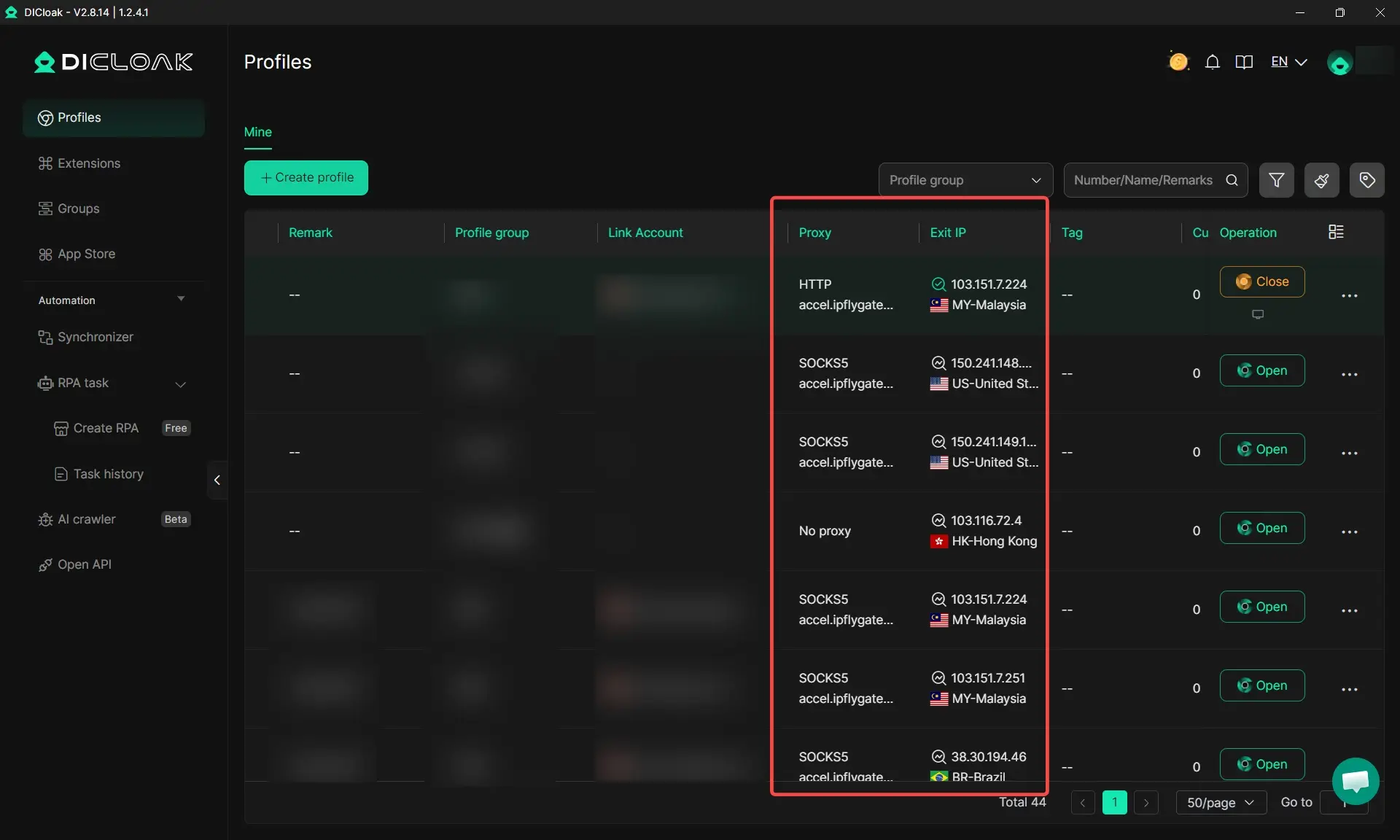
Managing multiple accounts across platforms requires more than just a proxy. The browser profile itself needs to be isolated per account. DICloak addresses this by letting you create separate browser profiles, each with its own fingerprint, cookies, and assigned proxy. Specific workflow steps include:
- Assigning one residential proxy per browser profile so each account has a unique IP that does not overlap with others
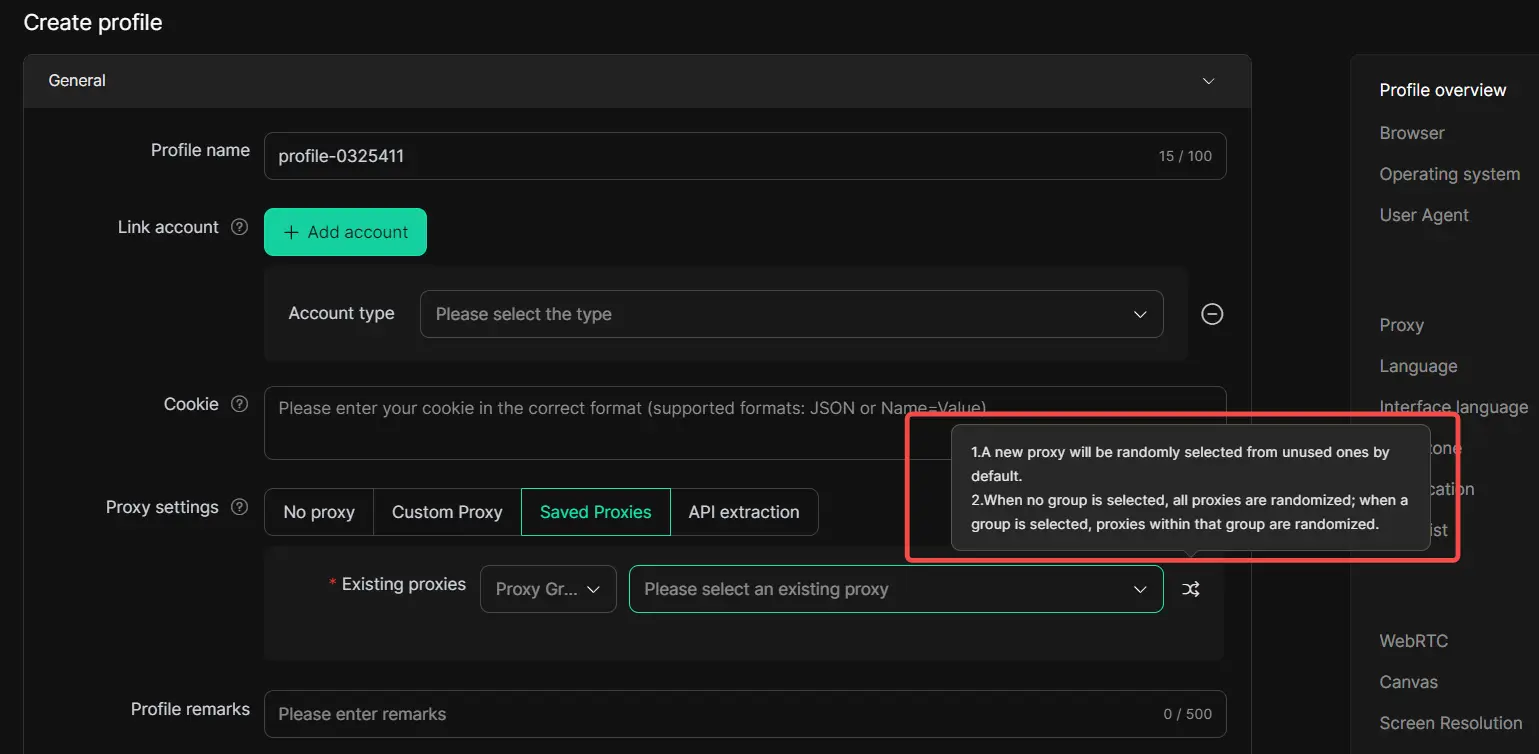
- Using sticky sessions within each profile to maintain consistent IP assignment during account activity
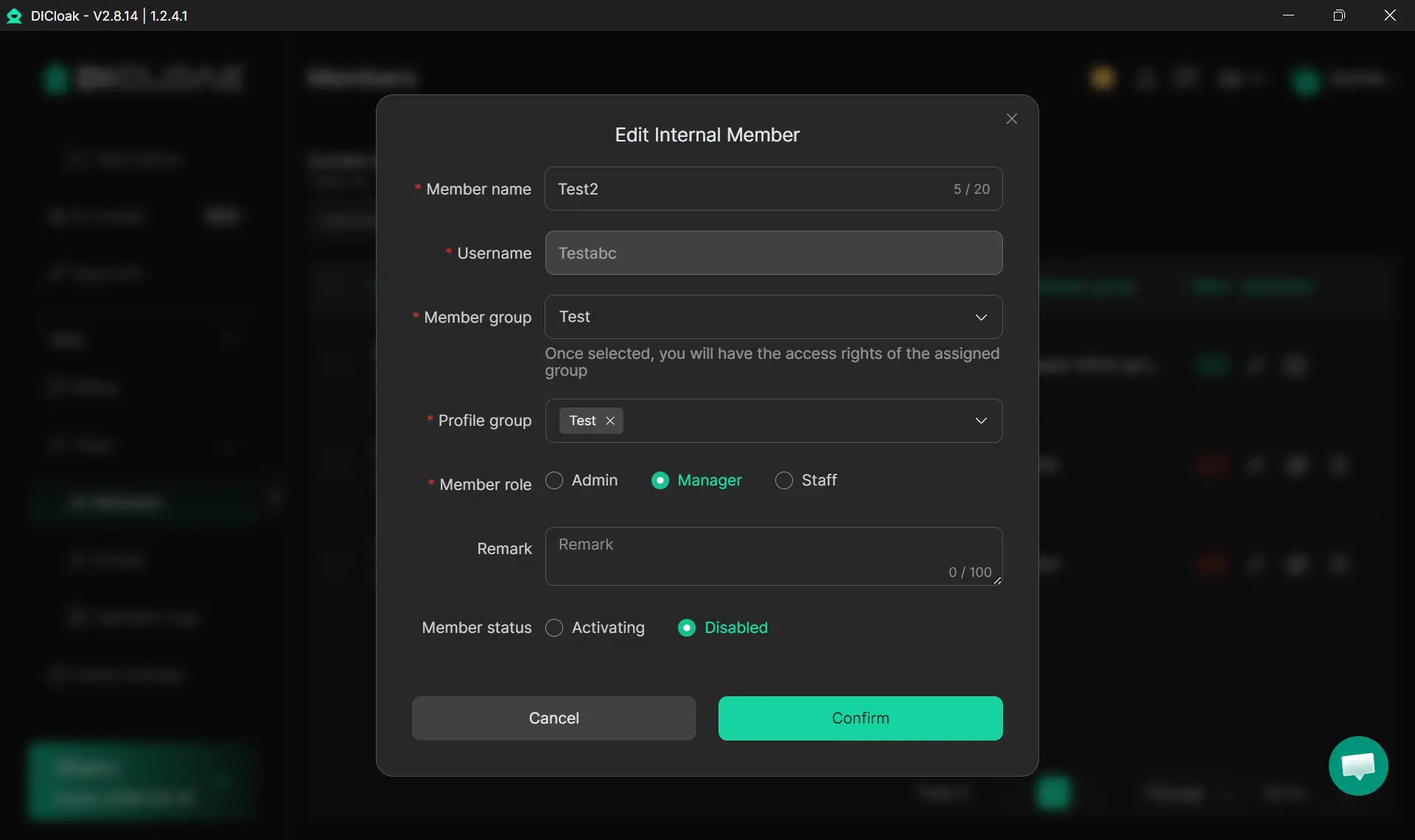
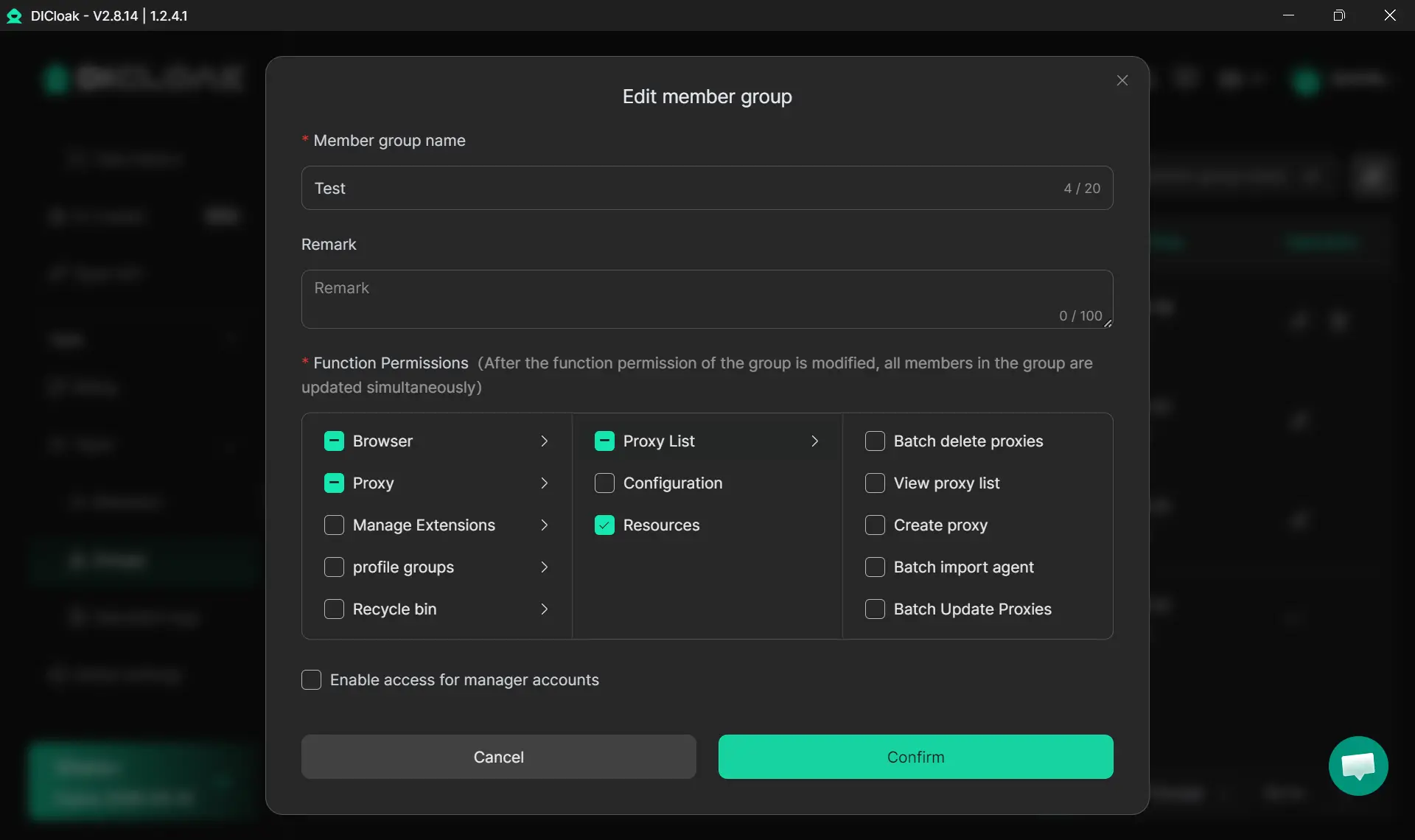
- Managing team member access per profile so collaborators can work on assigned accounts without accessing others
- Keeping proxy credentials scoped to individual profiles so a compromised credential does not expose the full account set
Ad Verification
Advertisers use residential proxies to check how their ads appear in different countries, cities, or on different devices. Ad networks serve different creatives based on location, device type, and audience segment. A residential proxy in the target region lets you see exactly what a local user sees, which helps catch geo-targeting errors, fraudulent placements, or competitor ad activity.
Geo-Restricted Content Access
Some content, pricing, or services are only available in specific regions. Researchers, journalists, and businesses use residential proxies to access region-locked data without physically being in that location. This is common in competitive research, compliance monitoring, and academic data collection.
How to Pick a Residential Proxy Provider
The most important factor is IP sourcing. Ethical providers build their networks from opt-in device owners who knowingly share bandwidth. Some providers source IPs from compromised devices or botnets, which creates legal and operational risk for you as the user.
Ask providers directly how they source their IPs. Reputable ones publish this information. If a provider is vague about it, treat that as a warning sign.
Other factors to evaluate:
- Pool size and location coverage. A larger pool means less IP reuse and better geographic spread. If you need IPs in specific cities or countries, confirm coverage before committing.
- Sticky session support and length. Check the maximum session duration. Some providers cap sticky sessions at 10 minutes, others at 30 or 60. For account management, longer sticky sessions reduce the risk of mid-session IP changes.
- Pricing model. Bandwidth-based pricing (per GB) suits scraping and high-volume tasks. Per-IP pricing works better when you need a fixed set of IPs for account management. Compare total cost based on your actual usage pattern.
- IP reputation. Shared pools mean IPs get used by many customers. Burned IPs that have been flagged by major platforms will perform poorly for you even if you have done nothing wrong. Ask about pool refresh rates and whether you can get dedicated IPs.
Risks and Ethical Concerns
Using residential proxies carries real risks that are worth understanding before you commit to a provider or a workflow.
In March 2026, the FBI issued a public service announcement noting that cybercriminals use residential proxies to hide illicit activity, including fraud, credential stuffing, and cyberattacks. This has led to increased scrutiny of residential proxy networks by law enforcement and platform security teams. Using a provider with poor sourcing practices can put you in proximity to that activity, even if your own use is legitimate.
Most major platforms prohibit proxy use in their Terms of Service. Accessing an account through a proxy may violate those terms, which can result in account suspension or permanent bans. The risk level varies by platform and use case.
Proxy providers can see your traffic. If you are routing sensitive requests through a third-party network, understand what data they log and what their privacy policy actually says. End-to-end encryption helps, but it does not eliminate all exposure.
Shared IP pools also create reputation bleed. If other users on the same pool engage in abusive behavior, those IPs get flagged, and you inherit that reputation. This is a practical reason to pay more for cleaner, less-shared pools.
FAQs
Is using a residential proxy legal?
In most countries, using a residential proxy is legal for legitimate purposes like research, account management, or ad verification. However, using proxies to commit fraud, violate platform terms, or access systems without authorization can be illegal. Always check the laws in your jurisdiction and the terms of the platforms you access.
Are free residential proxies safe to use?
Free residential proxies carry significant risk. They are often sourced from compromised devices, log your traffic, or inject ads and malware. For any task involving account credentials or sensitive data, free proxies are not a safe option.
How is a residential proxy different from a VPN?
A VPN routes all your device traffic through a single server and encrypts it. A residential proxy routes specific requests through an ISP-assigned IP without necessarily encrypting traffic. Proxies are typically used at the application or browser level, while VPNs operate at the system level. They serve different purposes and are not interchangeable.
Can platforms detect residential proxies?
Yes, in some cases. Advanced anti-bot systems use behavioral analysis, fingerprinting, and IP reputation databases that include known proxy ranges. Residential proxies are harder to detect than datacenter proxies, but they are not undetectable. High-quality, ethically sourced IPs from reputable providers perform better in these checks.
Are mobile proxies worth the extra cost?
For platforms that are primarily mobile-native, like Instagram or TikTok, mobile proxies often perform better because the IP type matches expected user behavior. For desktop-oriented sites or general scraping, standard residential proxies usually provide enough trust at a lower cost. Evaluate based on the specific platform you are targeting.
What happens if my residential proxy IP gets flagged?
If an IP gets flagged, requests through that IP will be blocked or CAPTCHAed. With a rotating pool, the provider should cycle you to a new IP automatically. With a static IP, you may need to request a replacement. This is why pool size and refresh rates matter when choosing a provider.
Final Thoughts
A residential proxy solves a specific problem: making your requests look like they come from a real user on a real ISP network. It does that job well when you choose a provider with clean, opt-in sourcing, appropriate session handling, and enough pool coverage for your target regions.
The decision comes down to your actual use case. If you need to scrape at scale, rotating residential proxies reduce block rates meaningfully. If you manage accounts, sticky sessions paired with isolated browser profiles give each account a consistent, independent identity. If you are doing ad verification, residential IPs in target regions give you accurate, localized results.
Pick the proxy type that matches the task, verify how the provider sources their IPs, and understand the terms of the platforms you are accessing. That combination gets you most of the way to a setup that actually works.
 Web Proxy Tools
 Free Tools
 Cookie Plugin
 UA Generator
 MAC Address Generator
 IP Generator
 IP Address List
 2FA Code Generator
 World Clock
 Anonymous Check
 WebRTC Leak Test
 UUID Generator
 Free Web Proxy Site
 Proxy Checker
 FB Ad Checker
 AI Web Scraping
 Free SMM Tools
 Twitter Shadowban Checker
 Instagram Name Checker
 UTM Generator
 Username Generator
 AI Hashtag Generator
 LinkedIn Headline Generator
 Social Media Image Resizer