In March 2025, a cryptocurrency trading team was still precisely tracked by the platform after switching proxies. Upon investigation, the problem was not with the IP pool, but with WebRTC directly exposing the real address in the backend. Many people think that as long as proxies are used well and browser fingerprints are distributed enough, IPs won't leak, but running through WebRTC leak detection tools reveals that the actual exposure paths are far greater than expected. WebRTC leak testing is not exclusive to tech enthusiasts. More and more risk control bypasses, account bulk operations, and even cross-border business scenarios require a thorough WebRTC IP leak test first. Otherwise, you might think that after changing your identity, the target website can restore your real public IP within seconds.
What really frustrates people is that many browsers have WebRTC enabled by default, allowing backend communication to bypass local proxies, which even security teams easily overlook. Conventional proxies only change the HTTP/HTTPS channel; WebRTC runs its own UDP stream, so even if fingerprints are disguised and user trajectories are hidden, as long as WebRTC leak detection is not performed, the risk points remain. At this point, how to conduct full-process WebRTC privacy risk testing, how to determine whether protection is effective, and in which scenarios advanced tools must be used—these are the real problems most people want to solve. Common misconceptions and practical details will be discussed below.
What is WebRTC leak testing? Why 2026 still matters
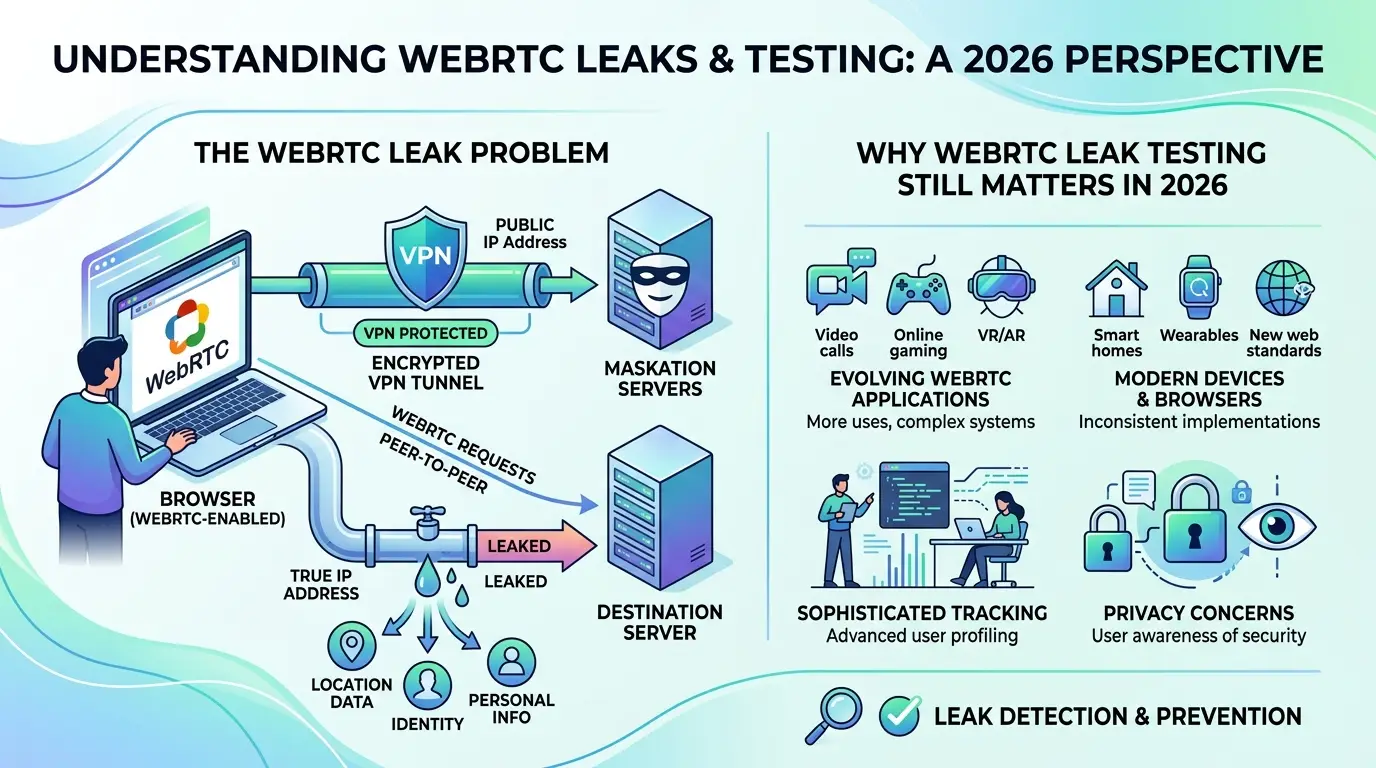
WebRTC leak testing uses various detection tools and methods to confirm whether your browser's WebRTC protocol directly exposes your real public IP. In 2026, the vast majority of mainstream browsers will still have WebRTC enabled by default, especially on Chrome, Edge, and mobile devices, where background communication rarely hints at any risk of leakage. Even if you switch IPs with proxies or impersonate browser fingerprints, the WebRTC channel can still send the local real IP to the target website within seconds. What truly determines whether your account can be securely traced in bulk and cross-border transactions is often not the proxy you use, but whether WebRTC leak testing is thoroughly conducted.
How the WebRTC protocol causes IP leaks
The core risk of WebRTC lies in STUN server communication. When the browser establishes a P2P connection, it automatically uses the STUN protocol to request "your real IP" from the external server. No matter what proxy you use, the STUN server will receive only the local network card IP. This process completely bypasses HTTP proxies; UDP traffic can penetrate directly. As long as the target site embeds a piece of JS, it can obtain your real public IP or even internal network address. Common detection methods such as BrowserLeaks and IPLeak.net display all IPs exposed by WebRTC in real time, and many security teams use WebRTC privacy risk testing to confirm protection effectiveness. If you haven't disabled WebRTC or run WebRTC leak detection, your account may appear to have changed your identity, but your actual IP has already been exposed, and the risk control system can almost instantly restore your true geographic location.
Application scenarios for WebRTC leak testing
Batch management of social accounts, advertising operations, cross-border e-commerce, and sensitive business are all essential scenarios for WebRTC IP leak testing. For example, when operating Facebook, X (Twitter), or Telegram accounts, team members log in bulk with different proxies. If WebRTC leak detection is not performed, the risk lies not in the proxy pool but in the protocol itself. E-commerce and advertising placements also commonly use multi-account distribution operations, and WebRTC privacy risk testing can directly determine whether accounts are truly segregated. In practice, many people run through BrowserLeaks and find that even if proxy switching is normal, WebRTC still exposes local IPv6. For team scenarios, it is recommended to use tools like DICloak that can isolate browser fingerprints and independent proxy configurations, combined with WebRTC leak testing to ensure true account security separation. Ultimately, WebRTC leaks are not rare events, but a necessity for most account bulk scenarios. In which situations is your real IP most likely to be leaked by WebRTC? The next section will explain in detail.
Under what circumstances is your real IP most vulnerable to WebRTC leakage?
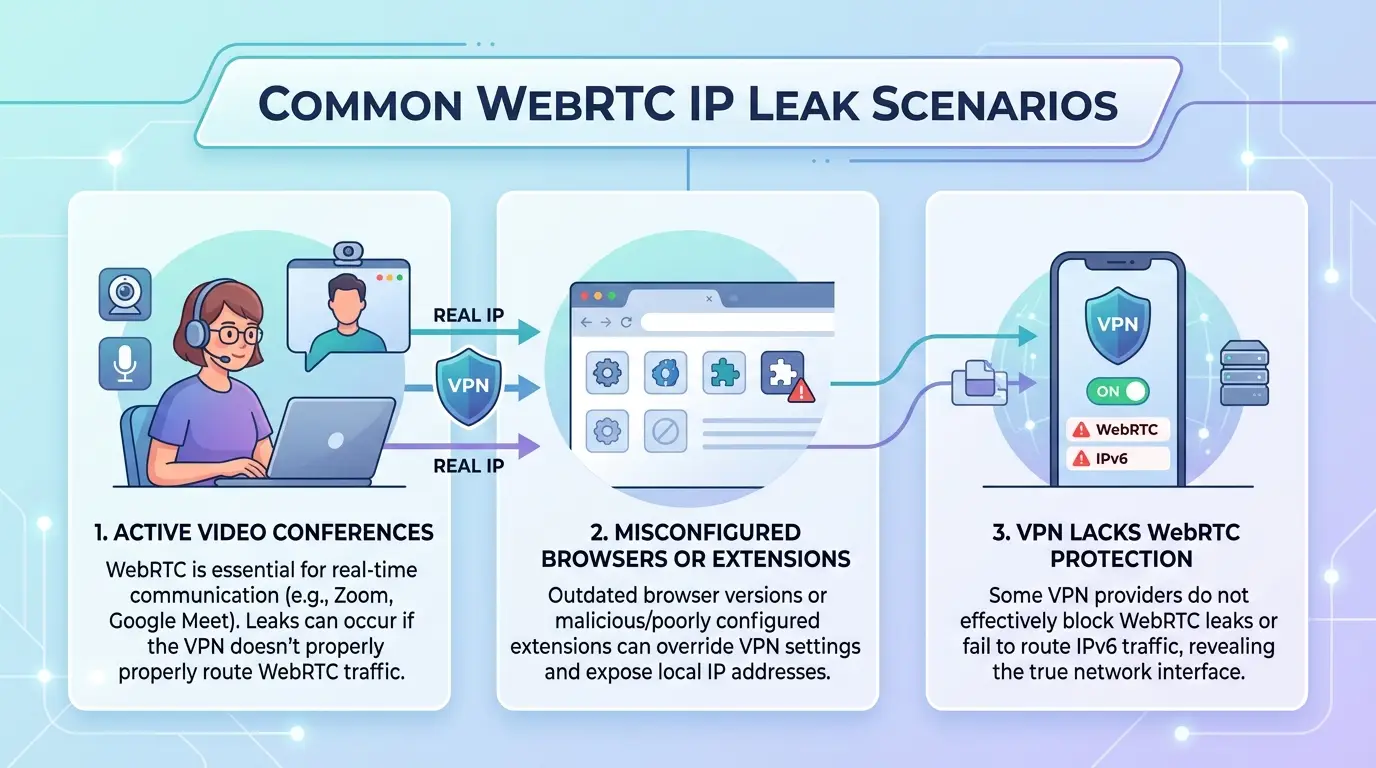
Many people think that as long as the proxy is set up, the real IP won't be visible to websites. But WebRTC's special communication method means it can expose your local public IP without you noticing. WebRTC leak testing is designed to identify these risk points, especially in scenarios involving bulk account operations, multi-device team collaboration, or identity switching, where IP leaks are often more likely to occur than you might think.
Risk under browser default settings
Nowadays, mainstream browsers like Chrome, Edge, and Firefox all have WebRTC enabled by default. You just need to open the webpage with native settings, and the backend will automatically set up a UDP channel, without asking if you want to expose your local IP. Even if you don't authorize proactively, some websites only need to call the WebRTC API to obtain the LAN IP or even the real public network address. Many people are used to only looking at browser proxy plugins, overlooking WebRTC communication itself to bypass these changes. The table below shows the default WebRTC enabled status across different browsers:
| Browser |
WebRTC is the default state |
User permission requests |
Real IP exposure risk |
| Chrome |
Activated |
No obvious reminder |
High |
| Firefox |
Activated |
Some tips |
High |
| Edge |
Activated |
No obvious reminder |
High |
| Safari |
Partial support |
There is a hint |
Middle |
Data sources: Mozilla official documentation, Chrome Developer Guide
As long as your browser doesn't set extra restrictions, the target website can use WebRTC to get your real IP. Most people won't proactively turn off WebRTC, so the result is switching proxies while exposing local IPs in the background, leaving the risk points completely unblocked.
WebRTC Leakage Misconceptions in Proxy Environments
Using proxies to mask IPs is a routine practice for bulk operations and risk control bypassing. However, the communication principle of WebRTC determines that it operates on an independent UDP stream and is not controlled by conventional HTTP/HTTPS proxies. You might think switching proxies means safety, but in reality, WebRTC directly passes through these proxies and sends the local real IP to the target website.
Many proxy providers only manage web traffic and ignore WebRTC traffic. As long as you haven't done a dedicated WebRTC leak check, the backend may directly expose your real address. **The most common scenarios for problems are: multiple devices operating simultaneously, switching between multiple locations under the same account, or forgetting to disable WebRTC during batch management. **In this situation, team members use different proxies, but WebRTC exposes everyone's real IPs to the same platform. Finally, the platform cross-checks your IPs, and within minutes, you can reconstruct all your operational traces.
WebRTC leak testing is not done in one go; it must be repeatedly tested for different scenarios. Especially during bulk account operations, team collaboration, and identity switching across multiple locations, only by continuously running WebRTC IP leak tests can you promptly identify which devices are still exposing the real IP.
Speaking of operations, the next step is how to conduct the latest WebRTC leak detection for 2026 and identify which steps are most likely to be missed.
How to conduct WebRTC leak testing: Latest steps for 2026
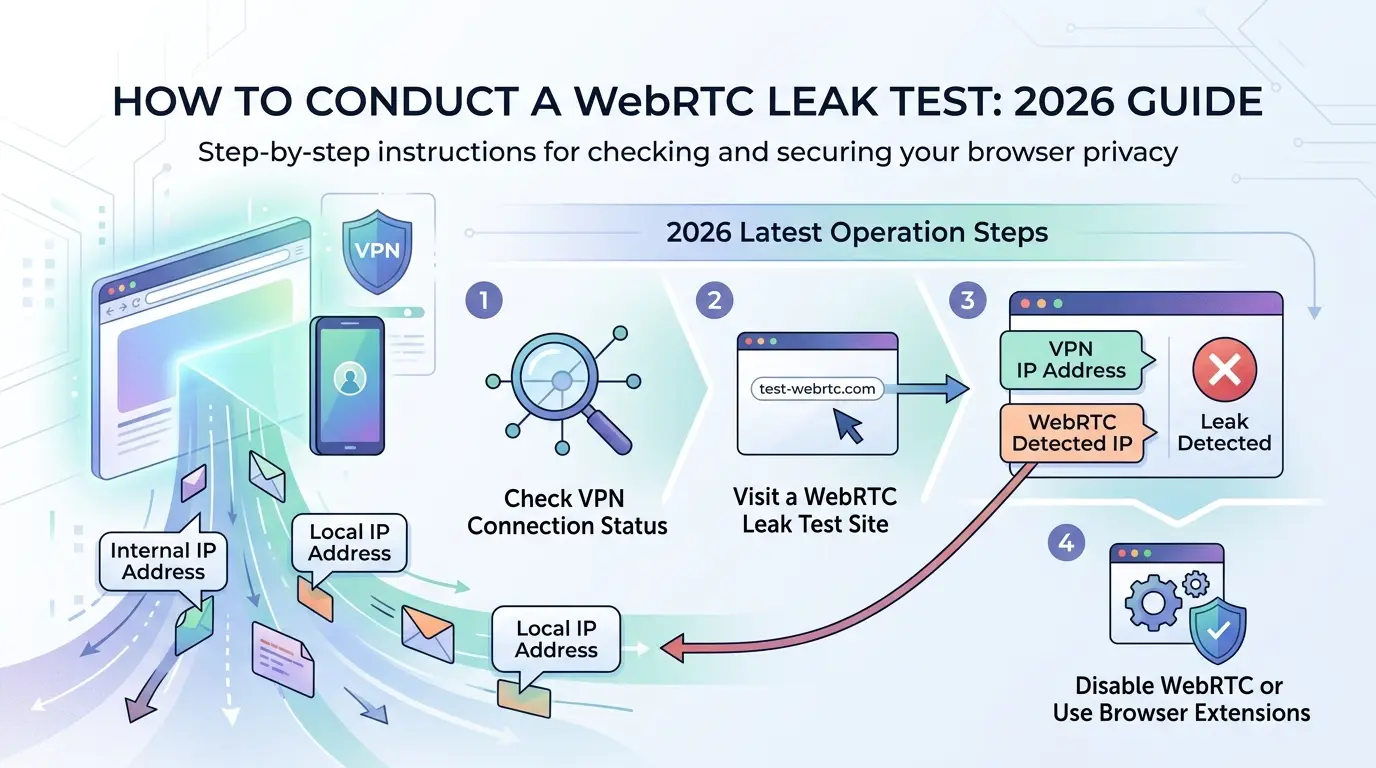
To quickly determine whether your real IP has been leaked by WebRTC, the most direct method is to use online detection tools combined with your browser's local inspection. This process is not only suitable for daily testing of individual accounts, but also for security self-checks in multi-region team collaboration and bulk account scenarios. Below is a breakdown of two commonly used methods.
How to use the online WebRTC leak detection tool
Opening authoritative detection sites like browserleaks.com/WebRTC or ipleak.net requires no login; the page automatically triggers the WebRTC detection process. Under normal circumstances, the page directly displays all visible IPs in the local network environment, including public IPs and local area IPs. If you clearly switch proxies but the detection page shows a real home or office network IP, it means WebRTC has directly penetrated the proxy and a leak has occurred.
How do you read the test results? If there are IPs in the list that do not match your proxy line, or if there is a local LAN segment (such as 192.168.x.x, 10.x.x.x), be alert to failing the WebRTC privacy risk test. Pay special attention to the fact that some websites may mark the "WebRTC Local" or "WebRTC Public" fields, which often expose content directly identified by the target platform. As long as the WebRTC leak detection page shows the real public IP address, it means the proxy protection is insufficient, and actual business operations risk being precisely traced.
Detailed steps to manually verify WebRTC leaks
In some scenarios, relying solely on testing tools is not sufficiently safe. You can open the browser developer tools (shortcut key F12), go to the "Network" or "Console" tab, refresh the detection page, and search for the keywords "rtc" or "candidate." Normally, when WebRTC establishes a connection, it generates a set of ICE candidates (Session descriptions) that include all the IPs the browser tries to expose to. Click the analysis line by line; the "candidate" field will directly indicate the IP type and specific address. If a public IP inconsistent with your proxy appears, it means WebRTC has bypassed the proxy settings.
The biggest advantage of manual inspection is that you can see which details have been sent remotely, including hidden IPs in local area networks, internal networks, and even multi-network network environments. This step is especially important for batch accounts or teams operating remotely from multiple locations, because if one step is overlooked, the other security measures are basically wasted.
Only by achieving this level of WebRTC leak testing can you know whether your protection is in place. Many people think that running through the inspection tool once is foolproof, but the common misconceptions and operational oversights go far beyond these. We will break down common risk points in detail later.
Common Misconceptions and Risk Warnings in WebRTC Leak Testing
A false sense of security in an agent environment
Many people think that as long as the proxy is set correctly, WebRTC IP leaks won't happen, but the reality is far more complicated than imagined. The most common pitfall is: the proxy only handles HTTP traffic, while WebRTC goes directly through UDP, sending your real IP to the target website's backend. If WebRTC is not disabled in your browser, even if you use an independent proxy, WebRTC leak detection will still show the real public IP address. This kind of false sense of security is dangerous even when operating a single account; bulk accounts and identity switching are more likely to cause problems. For example, when running accounts in bulk, if each browser profile uses a different proxy but forgets to perform WebRTC privacy risk testing, the platform still identifies the same user ownership and the accounts become invalid in bulk.
Leakage risks in team collaboration scenarios
When multiple people share accounts, the risks are magnified. A typical scenario is when team members log into the same account on different networks from different locations, WebRTC does not handle it, and the real IP is directly fetched by the backend. There were minor oversights in permission management, such as frequent switching of accounts across multiple platforms or failure to conduct WebRTC IP leak tests, but the platform quickly restored the team's operational path. The most easily overlooked aspect is that the tool only disguised fingerprints without WebRTC, resulting in precise account tracking. In a team environment, WebRTC leak detection and permission allocation must be combined; proxies alone are simply insufficient.
Speaking of protective measures, the next step is truly needed for specialized solutions for multi-account and team scenarios.
How to effectively prevent WebRTC leaks: Solutions for multi-account and team operation scenarios
Browser configuration and tips for disabling WebRTC
Most browsers do not completely block WebRTC by default. To reduce the risk in WebRTC IP leak test results, WebRTC must be manually disabled in each browser configuration. Chrome series can usechrome://flags adjustments, while Firefox supportsabout:config turning it offmedia.peerconnection.enabled. Edge, Brave, and others also require separate setups. When operating multiple accounts in batches, one account per configuration is the safest. A common practice is to first perform a WebRTC leak test to confirm the disable is effective, then quickly copy the settings using a configuration tool (such as a batch Profile Manager). Manually checking each item can easily cause oversights, but automated batch configuration is more efficient and helps avoid oversights in new browser profiles.
How DICloak helps protect multi-account and team security
When collaborating with multiple accounts and teams, relying solely on the browser's built-in features makes it difficult to truly isolate WebRTC privacy risks. DICloak specifically supports assigning a dedicated browser profile to each account, with all WebRTC parameters customizable. The real IP is not exposed if teams switch devices or proxies. Proxy binding is detailed for each environment, with individual permissions assigned to team members. Who changed which configurations and which WebRTC leak detections were performed—the backend has detailed operation logs. Only by achieving dual isolation of account environment and WebRTC parameters can it truly block cross-account identification and batch risk control penetration. These methods can be used in scenarios such as account bulk distribution, risk control bypass, or social media operations teams, minimizing WebRTC privacy risks. If large-scale environmental stability testing is needed later, automated batch testing will be more useful.
WebRTC leak testing automation and batch detection methods
Automated scripting detects WebRTC leaks
Manual WebRTC leak testing is only suitable for single accounts; batch account operations simply don't take time. Many teams use Python, Node.js, or Selenium automated scripts to call webrtc.org and other test pages to automatically pull test results. The process typically includes automatic proxy switching, configuring browsers, and collecting the IP and candidate addresses returned by the test. If you need to test dozens or even hundreds of accounts at once, it's recommended to design script groups and parameters in advance to avoid results being confused due to environmental reuse.
The most easily overlooked issue is: if the account environment is not thoroughly isolated, batch script scanning can easily result in residual IP serial numbers or WebRTC parameters, resulting in inaccurate results and increasing risk. Therefore, the batch inspection process must ensure that each account uses a dedicated browser profile and independent proxy.
Batch inspection and risk control through teamwork
When multiple members run WebRTC leak detection together, permission allocation and operation records are equally critical. You can use tools like DICloak to configure browser profile, proxies, and WebRTC parameters individually for each account, and assign detection permissions uniformly in the backend. Team members only see the accounts they are responsible for, and even misoperations can be traced. All test results are automatically archived to facilitate subsequent risk review and compliance management. High batch detection efficiency, complete operation logs, and minimizing account privacy risks.
Interpretation of WebRTC Leak Test Results and Follow-up Handling Suggestions
How to determine the risk level in the test results
After running WebRTC leak tests, the key is not to check whether an IP exists, but to distinguish which type of IP is exposed. If the test results show a local LAN address (such as 192.168.x.x), the actual threat is very low, and the platform cannot directly locate you through it. But if you see a public IP, especially one that doesn't match your current proxy, that's a high-risk signal. In multi-person account environments, risk assessment is more detailed. If you batch check and find that an account exposes the same public IP address, even if only briefly, all subsequent account isolation could be linked together by the risk control system. What truly needs to be watched out is the overlapping trajectories exposed when public IPs and proxy IPs are mixed, and such anomalies are most easily marked by automatic risk control.
Protective measures should be taken immediately after testing
Simply finding problems isn't enough; you must immediately adjust your browser settings. Prioritize turning off WebRTC-related functions in browsers, or use a strongly isolated antidetect browser to completely block WebRTC channels. Don't forget, ordinary proxies cannot control WebRTC's UDP flow, so simply changing proxies does not guarantee complete invisibility. For team or batch scenarios, it is recommended to simultaneously strengthen fingerprint isolation to prevent accounts from being linked due to identical fingerprint or network configurations. When necessary, regularly re-check with WebRTC leak detection tools to ensure no new risks arise after each environmental change.
New Trends and Future Risk Outlook for WebRTC Leak Testing in 2026
The evolution of WebRTC protocols and increased detection difficulty
In 2026, the WebRTC protocol itself underwent new changes. For example, some browsers have started introducing dynamic ports and confusing ICE parameters, resulting in outdated WebRTC leak detection scripts often failing to fully detect or even missing reports. Currently, mainstream WebRTC IP leak testing tools need to be adapted individually for each browser core; otherwise, it is easy to encounter false security issues where "tests pass but are still leaking." For example, Mozilla's official documentation clearly states the differences between multiple versions and implementation, so you shouldn't rely on just one tool in practice.
Future privacy protection trends for multiple accounts and team scenarios
WebRTC privacy risk testing is no longer just a concern for individual account players; multi-account teams and cross-border businesses all need automated detection scripts, running tests in batches and then correcting them step by step by account. Furthermore, in team collaboration scenarios, permission hierarchy and operation logs have become standard. For example, DICloak supports batch detection and fingerprint isolation, reducing collective exposure caused by misoperations. The real trend is that no matter how tools are upgraded, WebRTC leak testing must be deeply integrated with daily risk control processes; otherwise, once a new protocol is updated, old methods quickly become ineffective.
Frequently Asked Questions About WebRTC Leak Testing
Is the WebRTC leak test applicable to all browsers?
Most mainstream browsers such as Chrome, Firefox, and Edge support WebRTC leak testing. However, some versions of Safari default limit WebRTC functionality, so testing results are limited. Some browsers require manual adjustments (for example, disabling the "WebRTC IP Handling Policy" extension in Chrome) to accurately detect WebRTC leaks. It is recommended to check the configuration first according to your actual browser profile.
Why does conducting WebRTC IP leak tests in a proxy environment still expose the real IP?
The WebRTC protocol allows browsers to directly establish point-to-point connections, with some packets bypassing proxy servers and directly exposing local or real IP addresses. Therefore, even if you use an HTTP or SOCKS proxy, WebRTC IP leak testing may still detect your actual IP. This is a privacy risk caused by the underlying mechanism of WebRTC.
How to batch WebRTC leak detection when operating multiple accounts?
It is recommended to use automated scripts (such as Selenium or Puppeteer) to perform WebRTC leak detection in batches. Teams can establish unified workflows that collect results from scripts and analyze them centrally. This allows for efficient detection of WebRTC privacy risks under multiple accounts, especially suitable for scenarios requiring batch testing such as risk control and account management.
After conducting WebRTC privacy risk testing, what should be prioritized when leak risks are identified?
Once WebRTC privacy risk testing detects exposure of real IPs, the first step is to disable WebRTC functionality in browser settings or use dedicated extensions to block WebRTC traffic. At the same time, check and optimize proxy configurations to ensure all traffic is forwarded through secure proxies, preventing future leaks.
How does DICloak help prevent WebRTC leaks?
DICloak effectively prevents WebRTC leaks through browser isolation, proxy binding, and team permission management. Each account runs in an independent environment, and all WebRTC traffic is forcibly bound to a proxy to prevent real IP exposure. Team member permission settings can also prevent accidental operations, significantly reducing WebRTC privacy risks.
By enhancing the security and efficiency of team collaboration, companies can better cope with risks such as information leaks and achieve stable development. Choosing the right collaboration tools will safeguard enterprise information security. Download DICloak and start safer team collaboration
 Web Proxy Tools
 Free Tools
 Cookie Plugin
 UA Generator
 MAC Address Generator
 IP Generator
 IP Address List
 2FA Code Generator
 World Clock
 Anonymous Check
 WebRTC Leak Test
 UUID Generator
 Free Web Proxy Site
 Proxy Checker
 FB Ad Checker
 AI Web Scraping
 Free SMM Tools
 Twitter Shadowban Checker
 Instagram Name Checker
 UTM Generator
 Username Generator
 AI Hashtag Generator
 LinkedIn Headline Generator
 Social Media Image Resizer