Managing social media can become messy faster than expected. One Instagram account may be easy. Add Facebook, TikTok, LinkedIn, client accounts, comments, content calendars, and reports, and the work starts spreading across many tabs and apps.
That is why free social media management tools can be useful. They bring common tasks such as writing, scheduling, publishing, and basic analytics into one place. The challenge is that “free” means something different for every product. Buffer limits how many posts can sit in your queue. Metricool uses a monthly posting limit. Publer limits accounts and stored post history. Typefully takes a more writing-focused approach.
This guide compares the tools based on their current free offers in September 2026. It also covers two products, Axel Technology SocialHub and Agorapulse, that often appear in social media software searches but do not fit the normal free-tool category.
What Makes a Great Free Social Media Management Tool
Before comparing products, it helps to decide what “good” actually means. A useful free tool should save enough time to justify moving your workflow into it. A long feature list matters less if the free plan does not support the networks or posting volume you use every week.
The strongest options usually balance publishing, content creation, platform support, and some form of performance tracking. Limits also matter. A tool that supports three accounts but only one user, for example, may work well for a freelancer but poorly for a marketing team.
How We Tested and Ranked These Applications for Social Media
For this comparison, we checked the current official pricing pages, help centers, supported-network pages, and free-plan documentation for each product. We looked at five areas: free-plan availability, supported social networks, scheduling, content creation, and analytics. We also considered how quickly a normal user might reach each plan's limits.
This creates a fairer comparison than counting features alone. For example, Buffer and Publer both allow three social connections on their free plans, but their workflows are different. Buffer gives free users Insights and a Community inbox, while Publer puts more emphasis on content preparation, Canva integration, post customization, and scheduling tools.
Metricool is different again. Its free plan centers on one brand and allows up to 20 planned posts per month, while also giving users 30 days of analytics and competitor tracking. Typefully is more focused on writing and publishing across text-led networks such as X, LinkedIn, Threads, Bluesky, Mastodon, and Substack Notes.
Core Features to Look for in Free-Tier Social Media Management and Content Creation Tools
For basic social media management and content creation, four features matter most: scheduling, platform support, content preparation, and basic performance data. A solo creator may only need a calendar and drafts. A local business may care more about comments and customer messages. A B2B marketer may place LinkedIn support above everything else.
The important point is to compare features with your real workflow. Imagine two businesses. A café mainly uses Instagram, Facebook, and TikTok, while a consultant relies on LinkedIn and X. Metricool's free plan may work for the café, but LinkedIn and X are excluded from its free tier. Buffer may be a better fit for the consultant because both networks are among its supported channels.
Content type matters too. If you mainly write threads and text posts, Typefully's focused editor may feel more natural than a larger dashboard. If you regularly prepare images in Canva and adapt the same campaign for several networks, Publer's built-in image tools and Canva integration may fit better.
Common Limitations You Should Expect From Free Plans
Almost every free plan puts a limit somewhere. Buffer allows up to three channels and 10 scheduled posts per channel at one time. Publer also supports three accounts and 10 pending posts per account, but stores published-post history for only 24 hours. Metricool uses a different model: one brand, 20 scheduled posts each month, and 30 days of analytics.
These limits affect people differently. A freelancer posting three times a week may rarely notice Buffer's queue cap because new spaces open after posts are published. A shop preparing 30 posts for an entire month may find Metricool's monthly limit more restrictive. An agency that needs six months of client reports may outgrow both free analytics options much sooner.
Team features are another common limit. Buffer's free plan includes one user, and Publer also limits free accounts to one user. Metricool saves its team management, roles, approvals, and client features for its Advanced plan.

Free Social Media Management Tools at a Glance
There is no single winner for every user. Buffer is easier to recommend for simple multi-network scheduling. Metricool has a stronger analytics angle. Publer gives solo users many practical publishing and content tools. Typefully stands out when writing is the center of the workflow.
Quick Comparison: Best Use Case, Standout Feature, and Free-Plan Limits
| Tool |
Best for |
Standout strength |
Main free-plan limit |
| Buffer |
Creators and small businesses |
Simple scheduling across many network types |
3 channels, 10 queued posts per channel |
| Metricool |
Users who value analytics |
Planning plus 30-day analytics and competitor data |
1 brand, 20 posts/month; no LinkedIn or X |
| Publer |
Solo users creating and scheduling visual content |
Canva, photo editing, previews, cross-network customization |
3 accounts, 10 queued posts/account, 24-hour post history |
| Typefully |
Writers, founders, and text-first creators |
Writing and cross-posting for text-led platforms |
Free plan available; broader multi-account and advanced features move to paid tiers |
Buffer and Publer look similar if you only compare the number three. In practice, they feel different. Buffer is more useful when you want a clean scheduling system plus basic Insights and engagement tools. Publer is attractive when the work happens earlier in the content process, such as editing images, saving drafts, previewing posts, and changing the same post for different networks.
Metricool makes more sense when data is part of the weekly routine. Typefully is the more specialized choice. It supports X, LinkedIn, Threads, Bluesky, Mastodon, and Substack Notes, so it fits creators who publish ideas, commentary, threads, and professional posts better than businesses that depend heavily on Instagram-first visual workflows.
Top Free Social Media Management Tools Reviewed
Each of the following tools solves a slightly different problem. Rather than asking which one has the most features, it is more useful to ask which one removes the most work from your normal week.
Buffer: Best Free Tool for Simple Social Media Scheduling

Buffer remains one of the easiest free social media management tools to understand. The free plan supports up to three channels and allows 10 scheduled posts in each channel's queue. Those are queue limits, not monthly publishing limits. Once a scheduled post goes live, another slot becomes available.
Its biggest advantage is network coverage. Buffer supports publishing for Facebook Pages, Instagram, X, LinkedIn, Pinterest, TikTok, Google Business Profiles, Mastodon, YouTube Shorts, Threads, and Bluesky, although available analytics and engagement features differ by network.
Think about a freelance photographer using Instagram, LinkedIn, and Threads. Ten open slots per channel may be enough to prepare several days of posts at once. The same free plan would feel much smaller for a media company posting five or six times every day. Compared with Metricool, Buffer gives you fewer restrictions around LinkedIn and X, but Metricool provides a more analytics-led workspace.
Pros
- Free forever with up to three connected channels.
- Supports a wide range of major and newer social networks.
- Includes 100 ideas, unlimited drafts, AI Assistant, Insights, and Community inbox.
- The 10-post limit refills as posts go live.
- Simple enough for new users to learn quickly.
- Only one user is included.
- Advanced analytics and reports require a paid plan.
- Ten open scheduling slots may be too small for high-volume accounts.
- Some networks support fewer analytics or engagement features than others.
Free Plan Details
Buffer currently allows three channels and 10 queued posts per channel, for up to 30 scheduled posts at one time if all three channels are full. Free users also get 30 days of Insights history.
If your main goal is to schedule content without building a complicated system, Buffer is one of the strongest starting points. If your priority is deeper competitor data, Metricool may offer more value. If you care more about visual preparation and Canva-based workflows, Publer deserves a closer look.
Metricool: Best Free Tool for Analytics and Content Planning

Metricool takes a different approach. Instead of giving you three independent channels, the free plan gives you one brand. Within that brand, you can connect supported social networks, but LinkedIn and X are excluded from the free tier. Users can plan up to 20 posts each month and access 30 days of analytics.
That makes Metricool useful for a business that wants to look at publishing and performance in the same place. Imagine a small fitness studio using Instagram, Facebook, and TikTok. The owner could plan posts, then check recent results to see whether workout videos, class updates, or promotional graphics get more response. Buffer can also show Insights, but Metricool places analytics and competitor tracking closer to the center of the product.
The weakness appears when the platform mix changes. A B2B consultant who lives on LinkedIn would get much less value from Metricool Free. That same user might be better served by Buffer or Typefully, both of which support LinkedIn workflows.
Pros
- Permanent free plan with no credit card required.
- One brand with supported social connections.
- Up to 20 scheduled posts per month.
- 30 days of analytics history.
- Five competitor profiles and limited AI text credits.
Cons
- LinkedIn and X are not available on the free plan.
- Monthly post cap can be restrictive for active brands.
- Analytics history is limited to 30 days.
- Team roles, approvals, and client management require Advanced.
Free Plan Details
Metricool Free currently includes one brand, 20 planned posts per month, 30 days of analytics, five fixed competitors, and five AI text-generator credits each month.
For a small consumer brand on Instagram, Facebook, or TikTok, that can be enough to understand basic performance. For someone posting daily to LinkedIn and X, Buffer or Typefully is likely a better starting point.
Publer: Best Free Tool for Social Media Management and Content Creation

Publer stands out because its free version includes several features that help before the post reaches the calendar. Users can customize content for each social network, edit photos, create designs through Canva, preview posts, import media from cloud storage, and organize scheduled posts in a calendar.
This makes it useful for a solo shop owner or freelance marketer who creates and schedules content in the same session. For example, someone promoting a new product could prepare one main post, change the caption for Instagram and LinkedIn, adjust the image, preview both versions, and schedule them from the same workspace.
Buffer can handle the same basic publishing goal, but its strength is simplicity. Publer gives users more small tools around content preparation. Metricool, by comparison, is stronger when recent analytics and competitor data matter more than editing features.
Pros
- Supports up to three social accounts for free.
- Allows 10 scheduled posts per account at one time.
- Includes Canva integration and a built-in photo editor.
- Lets users customize content by social network.
- Supports calendar views, previews, cloud media imports, and automatic scheduling.
Cons
- X accounts require a paid subscription.
- Published-post history lasts only 24 hours on Free.
- Only one user is included.
- Free users can save up to 25 drafts.
Free Plan Details
Publer Free has no expiration date. It supports three social accounts, excluding X, with up to 10 scheduled posts per account and 25 saved drafts. Publer currently supports networks including Facebook, Instagram, LinkedIn, Pinterest, YouTube, TikTok, Telegram, Mastodon, Threads, and Bluesky, although account type and plan rules still apply.
A creator using Instagram, TikTok, and YouTube could therefore build a useful free setup. A creator who depends on X may prefer Buffer or Typefully.
Typefully: Best Free Tool for Text-Based Social Platforms

Typefully feels different from a traditional application for social media. Its interface starts with writing rather than a large marketing dashboard. Users can prepare posts and cross-post content across X, LinkedIn, Threads, Bluesky, Mastodon, and Substack Notes. That focus makes it especially useful for founders, writers, developers, consultants, and creators who publish ideas more often than polished campaign graphics. A founder might write one product lesson and adapt it for X, LinkedIn, and Threads. A fashion store that spends most of its time preparing Instagram Reels and product images may find Publer or Buffer more natural.
Typefully's current site advertises a free plan and highlights writing, scheduling, previews, analytics, and multi-platform publishing. Its own comparison material says paid tiers unlock broader multi-account connections, unlimited scheduling, AI writing, and advanced analytics.
Pros
- Writing-first interface with strong post previews.
- Supports several major text-led platforms.
- Useful for threads and cross-posting.
- Free plan is available.
- Strong fit for creators whose main work is writing rather than image production.
Cons
- Less suitable for businesses centered on Facebook, Instagram, TikTok, or Pinterest.
- Advanced analytics and broader multi-account workflows are paid features.
- It is more specialized than all-purpose tools such as Buffer or Publer.
Free Plan Details
Typefully currently promotes a free plan, but it does not surface the same simple numeric free-plan table as Buffer, Metricool, or Publer on its public pricing page. The safest way to evaluate it is to treat Free as an entry-level writing and publishing plan and check the live account limits before building a large workflow around it.
For a writer choosing between Typefully and Buffer, the question is simple. If writing and threads come first, Typefully may feel better. If you need Instagram, TikTok, Pinterest, or broader multi-network coverage, Buffer is much more flexible.
Other Social Media Management Software Worth Knowing
Not every product found under the phrase “social media manager” belongs in the same category. Two good examples are Axel Technology SocialHub and Agorapulse. Both may appear during research, but neither should be ranked beside Buffer or Publer as a standard free-forever social media tool in 2026.
Axel Technology SocialHub Social Content Manager Software
Axel Technology SocialHub Social Content Manager Software has a name that sounds similar to a normal marketing platform, but its job is very different. Axel Technology describes SOCIALHUB as broadcast software that collects messages and text from social networks and mobile sources, organizes that content for DJs or TV presenters, and sends selected messages to character-generator software for on-screen graphics.
Imagine a live sports show asking viewers to send comments during a match. SOCIALHUB could help the production team collect those messages, choose suitable ones, and show them as on-screen graphics. That is not the same job as Buffer scheduling next week's Instagram posts or Metricool reporting on a campaign.
What It Is Designed For
It is mainly built around broadcast production, message collection, moderation, and on-air graphics. It can work with several social sources and can support automated display workflows in television environments.
Who It May Suit
A television station, radio broadcaster, sports channel, or live production team may have a reason to consider it. A solo creator looking for free social media management tools probably does not.
Why It Is Different From Typical Free Social Media Management Tools
Buffer, Metricool, Publer, and Typefully help users prepare and publish their own social content. SOCIALHUB is designed around collecting incoming social content and moving selected messages into a broadcast workflow. Axel Technology also does not present it as a normal free-forever social scheduling plan.
Agorapulse
Agorapulse deserves attention because it is a mature social media management platform with publishing, inbox, reporting, and team features. However, its status changed in 2026. Agorapulse ended its traditional Free plan on July 6, 2026, so it should no longer appear in a list of standard free-forever management platforms without explanation.
This matters because older comparisons may still describe Agorapulse as free. Its current regular plans start with paid subscriptions, while the company offers a 30-day free trial. The trial provides Advanced access for 15 days with an option to extend another 15 days.
Why It Is No Longer a Standard Free Social Media Management Tool
The former Free plan is no longer available. Users who only want permanent no-cost scheduling should look at Buffer, Metricool, Publer, or Typefully instead.
Agorapulse may still make sense for a growing team that wants to test a fuller inbox and reporting system before paying. For example, an agency evaluating client approvals and centralized community management may get more from a 30-day Agorapulse test than from trying to force those workflows into a single-user free plan.
What Its Free Trial and Archie Plan Include
Agorapulse now offers a free Archie option focused on AI content creation. According to its current help documentation, Archie can support one owner, up to 100 limited Archie-only users, up to 50 Facebook, Instagram, and LinkedIn profiles, and access to the Publishing Calendar and Drafts. However, new posts on this plan must be created using Archie, so it is not the same as the former general Free plan.
This is a useful example of why readers should check what “free” means. Buffer Free is a general management plan. Metricool Free is a limited planning and analytics plan. Archie Free is an AI-led creation plan inside a larger paid social platform. The labels sound similar, but the workflows are not.
How to Pick the Right Free Social Media Management Tool for Your Workflow
The easiest way to choose is to stop comparing every feature and focus on the work you repeat most often. One person may need a simple scheduler. Another may need analytics. A third may spend most of the day writing LinkedIn and X posts.
Start with your main three tasks and your main social networks. Then choose the tool that covers both with the fewest limits. This usually leads to a better decision than choosing the product with the longest feature page.
Match Tool Features to Your Team Size and Platform Stack
For a solo creator on Instagram, TikTok, and Facebook, Buffer and Publer are both practical choices. Buffer offers a simple queue plus Insights and engagement features. Publer may be stronger if the creator frequently edits images, uses Canva, and customizes each post before publishing.
For a local brand that cares about basic performance data, Metricool may be more useful. Its 30-day analytics, competitor profiles, and planner can answer simple questions such as whether Reels or image posts performed better this month. But a LinkedIn-heavy B2B brand should notice that LinkedIn is not part of Metricool Free.
For a founder publishing on X, LinkedIn, Threads, and Bluesky, Typefully may feel more natural because writing is at the center of the experience. A general tool such as Buffer supports more types of networks, but Typefully is designed around turning ideas into posts and moving them across text-first platforms.
Team size changes the answer again. Buffer and Publer free plans are both designed around one user, while Metricool keeps team and client management in its Advanced tier. A three-person team where a writer drafts, a designer prepares creative, and a manager approves posts will probably outgrow a free plan faster than a solo creator.
When You Should Upgrade From a Free Plan
You do not need to upgrade simply because a paid plan exists. Stay free while the limits do not create meaningful extra work. If you can comfortably manage three accounts and refill your scheduling queue once a week, paying only for more queue space may not make sense.
An upgrade becomes easier to justify when the workaround takes more time than the software costs. Consider a small agency managing four clients. If each client has Instagram, Facebook, and LinkedIn, that is already 12 social profiles. Splitting those accounts across several free workspaces, moving reports manually, and sharing logins can make the process harder to manage.
Analytics can also be a trigger. Metricool's 30-day history is useful for checking this month's performance, but a brand that needs quarterly or yearly comparisons needs more history. Buffer's free Insights can answer simple recent questions, while deeper reports and advanced analytics belong to paid tiers.
The same rule applies to collaboration. Once several people need approvals, roles, client access, and shared reporting, a free application for social media may stop saving time. At that stage, the question is not only “How can we manage social media tools for free?” A better question is, “Which paid feature removes enough manual work to be worth the cost?”
How DICloak Enhances Free Social Media Management
A free scheduling tool may be enough when you manage only a few social accounts. The workflow can become more complex once you handle several brands, client accounts, or team members. At that point, marketers may also need to think about browser sessions, account access, and repeated browser tasks. These needs sit outside the main purpose of many free social media management tools.
This is where marketers may use DICloak as a supporting tool rather than a replacement for Buffer, Metricool, Publer, or the native tools offered by social platforms. Teams can continue using their preferred social media management and content creation apps for planning posts and checking performance. They can then use separate browser Profiles, team permissions, and automation tools when their work involves several authorized accounts or repeated browser workflows.
Secure Multi-Account Management for Marketers
Managing multiple social media accounts for brands and clients creates risks of session cross-contamination and unauthorized access. A marketer may manage separate Instagram, Facebook, and TikTok accounts for retail brands and local businesses. Running all accounts within a single standard browser can leak cookies and session data between profiles, risking account detection and mix-ups.
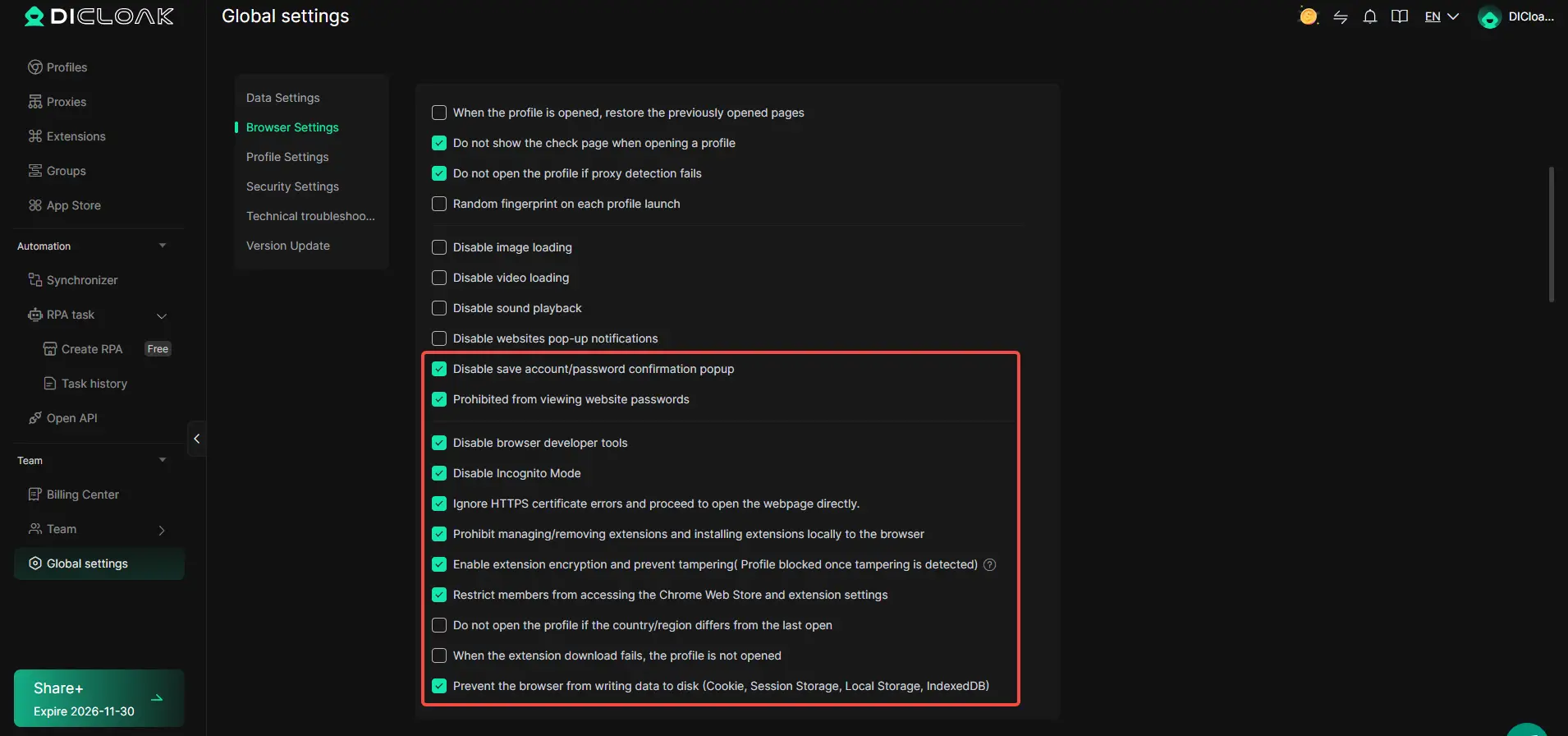
DICloak creates an isolated browser profile for every social media account. Each profile holds independent cookies, cache, fingerprint data and dedicated proxy configurations. The global browser security settings add powerful safeguards: disable password save popups, block access to website passwords, lock developer tools and incognito mode, restrict extension installation and tampering, and even prevent browser data from writing to disk.
Agencies can organize profiles into client groups and apply granular team member permissions. You can limit team members to only access assigned client profiles, instead of sharing raw account credentials. You can also enforce rules such as blocking profile launch when proxy detection fails.
It is important to understand: these browser-level security controls reduce cross-account leakage risk. They cannot bypass social platforms’ native terms of service. Always manage only authorized accounts, and combine DICloak workspace permissions with the official built-in role controls from each social platform.
Window Synchronizer for Multi-Profile Operations
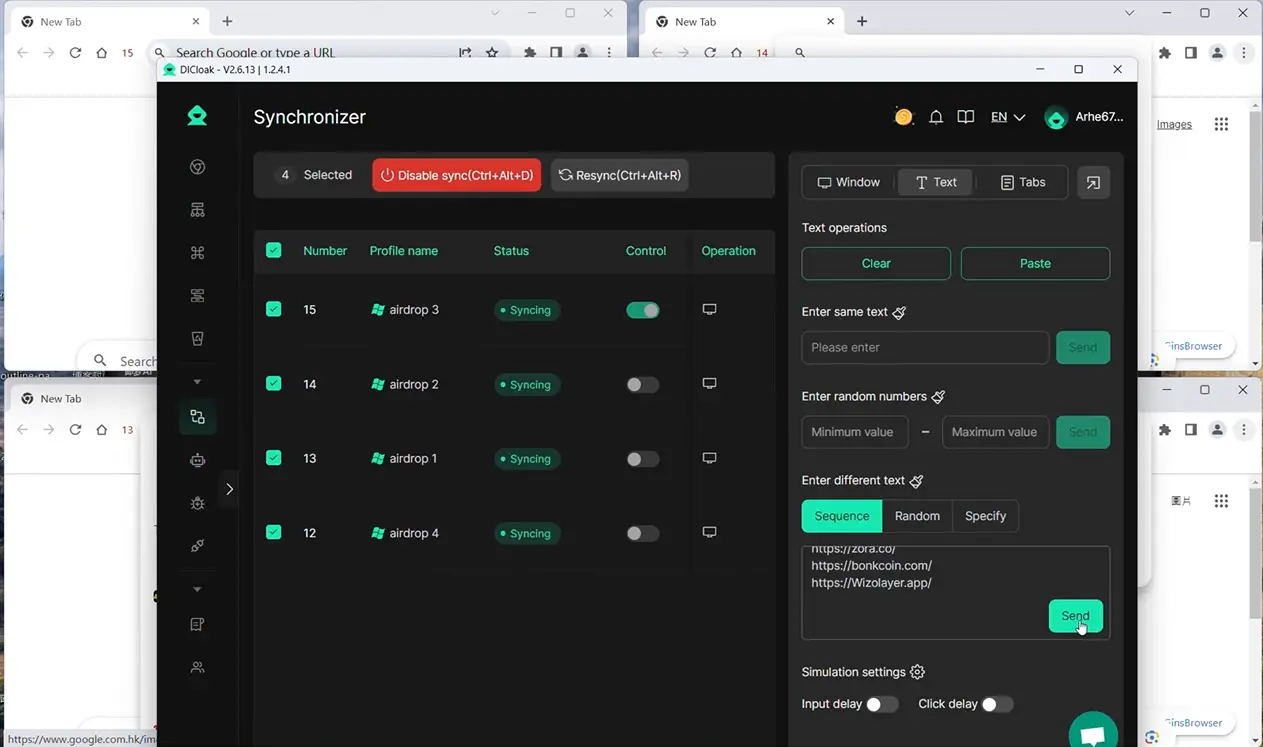
DICloak Synchronizer lets you select multiple browser profiles and sync all actions from your main window to every selected profile simultaneously. From the dashboard, you can send identical, sequential or random text and URLs across profiles. It supports mouse clicks, page scrolling and tab control, plus adjustable input delay and click delay settings to mimic natural human browsing behavior. Hotkeys such as disable sync and re-sync give you quick control over multi-account sessions, helping marketers finish repetitive browser setup and page navigation across dozens of social media profiles in bulk.
RPA Workflow Automation
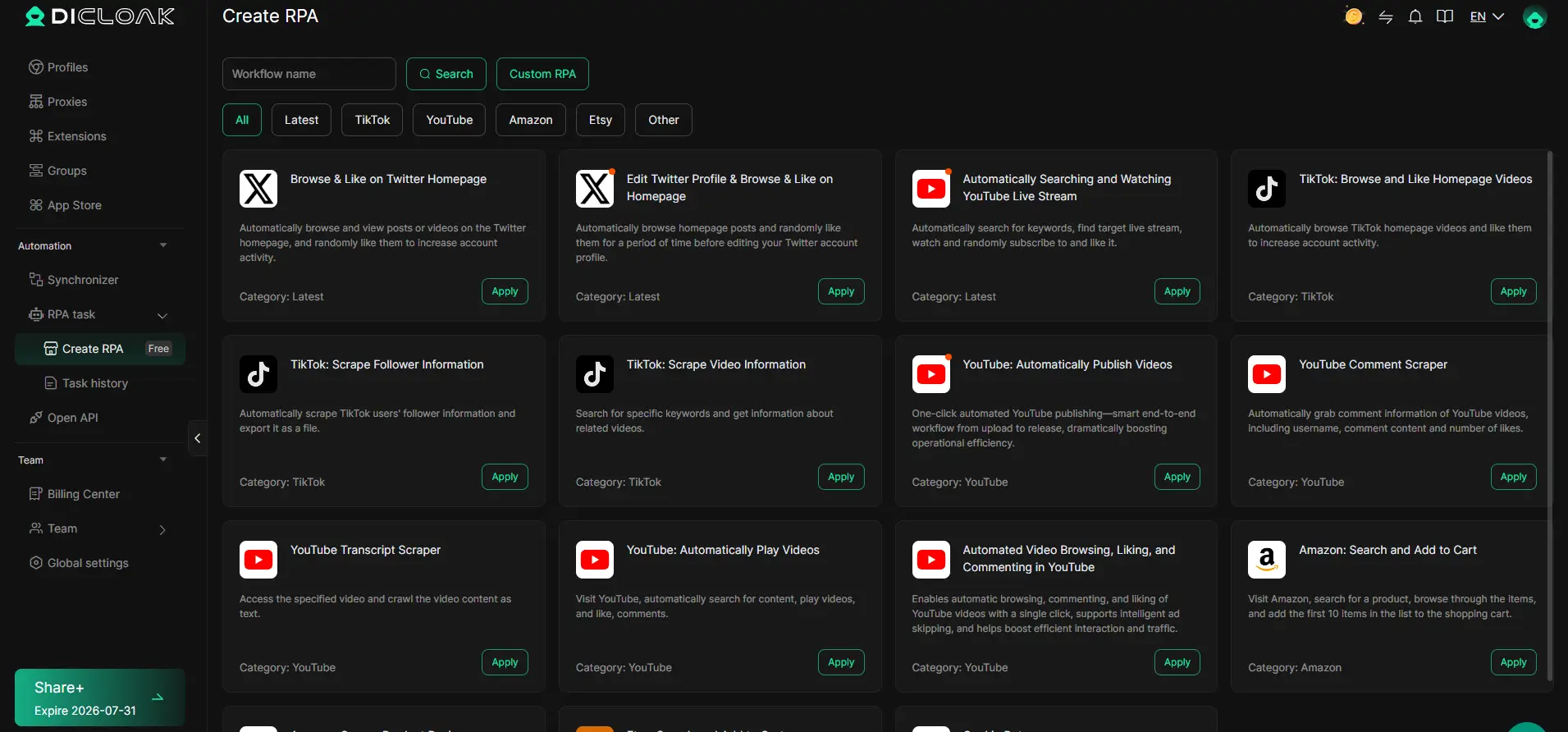
DICloak’s built-in RPA library comes with ready-made pre-built templates for major social platforms including TikTok, YouTube, Twitter/X and Amazon. You can quickly apply these preset workflows for routine tasks like browsing feeds, liking posts, scraping follower or video data, and auto-publishing videos. You can also build fully custom RPA workflows, schedule tasks to run automatically, and review task history logs to check execution results. While these templates streamline repetitive social media operations, always retain human oversight for content decisions and high-risk actions to comply with platform terms and protect your accounts.
FAQs About Free Social Media Management Tools
1. What are the best free social media management tools in 2026?
Some popular free social media management tools include Buffer, Metricool, Publer, and Zoho Social. The best choice depends on the platforms you use, how often you post, and whether you need analytics or content creation tools.
2. Are free social media management tools really free?
Yes, many free social media management tools offer ongoing free plans. However, free tiers usually limit the number of social accounts, scheduled posts, users, or analytics history.
Yes, but account limits are common. Some free social media management tools allow around three connected accounts, while others organize several networks under one brand.
4. Can free social media management tools handle content creation?
Some can. Many free social media management tools include features such as drafts, AI writing support, Canva integrations, post previews, or simple image editing for social media management and content creation.
5. How do I choose the right free social media management tool?
Start with your main platforms and daily tasks. The best free social media management tools should support the networks you use and provide the scheduling, analytics, or content features that matter most to your workflow.
Conclusion
The best free social media management tools are not always the ones with the most features. The right choice depends on your daily workflow, the platforms you use, how many accounts you manage, and whether you need scheduling, analytics, content creation, or team support. Tools such as Buffer, Metricool, Publer, and Zoho Social can all be useful, but their free plans have different limits.
For solo creators and small businesses, a free plan may be enough to handle basic social media management without adding another monthly cost. As the number of accounts, clients, or team members grows, those limits become more important. Users may then need extra support for multi-account access, browser separation, automation, or more advanced reporting.
The best approach is to start with your real needs instead of choosing a tool based on popularity alone. Test one or two free social media management tools, check whether they support your main platforms, and see how well they fit your normal posting routine. If your workflow later becomes more complex, you can add tools such as DICloak to support multi-account management and repeated browser tasks while keeping your main content planning system in place.
 Web Proxy Tools
 Free Tools
 Cookie Plugin
 UA Generator
 MAC Address Generator
 IP Generator
 IP Address List
 2FA Code Generator
 World Clock
 Anonymous Check
 WebRTC Leak Test
 UUID Generator
 Free Web Proxy Site
 Proxy Checker
 FB Ad Checker
 AI Web Scraping
 Free SMM Tools
 Twitter Shadowban Checker
 Instagram Name Checker
 UTM Generator
 Username Generator
 AI Hashtag Generator
 LinkedIn Headline Generator
 Social Media Image Resizer