Test runs that used to finish in 5 minutes now take over 30, especially when teams scale up from 10 to 1,000 tests across browsers. That’s not a rare complaint on Stack Overflow or among QA leads chasing faster feedback. The real headache? Choosing between Playwright and Selenium isn’t just about speed. It’s about whether your automation breaks the moment Chrome updates, whether debugging turns into guesswork, and how you handle flaky tests on mobile or in CI. Search for playwright vs selenium and you’ll see endless feature lists, but most miss what actually matters: stable cross-browser runs, reliable selectors, and practical workflow fit.
Developers don’t just want “more features” or “modern APIs”, they want tools that survive real-world edge cases, support parallel runs without random failures, and let everyone on the team (not just senior engineers) maintain scripts. Playwright claims native support for Chrome, Firefox, and WebKit, while Selenium promises compatibility with nearly every browser and language. But the gap widens when you look at how each handles headless mode, file uploads, or network mocking.
If you’re tired of chasing unexplained bugs or waiting for fixes after browser updates, understanding the real trade-offs is the difference between stable releases and production fire drills. Here’s what actually changes your workflow when picking a test automation tool in 2026.
What Should You Check First Before Picking Playwright or Selenium?
Choosing between Playwright and Selenium shouldn’t start with feature lists. Instead, focus on what actually affects your workflow, team skills, language support, browser demands, and the kind of automation you need. Catching these differences early prevents wasted setup and surprise limitations later.
What Are Your Main Automation Goals?
The best tool can change depending on your goal. For pure UI testing, Playwright’s built-in waits and support for modern browsers make it easier to avoid flaky tests. If you need scraping, both tools support headless mode, but Playwright handles stealth scenarios better. RPA (robotic process automation) often needs multi-account handling, where browser profile isolation matters more than raw speed.
| Goal |
Playwright Strength |
Selenium Strength |
| UI Tests |
Reliable waits |
Broad coverage |
| Scraping |
Stealth features |
Legacy support |
| RPA |
Profile isolation |
Language range |
(Source: Playwright docs, Selenium docs)
Which Languages and Frameworks Do You Need?
Playwright covers JavaScript, Python, C#, and Java. Selenium supports over 7 languages. If your pipeline uses CI/CD with tools like Jenkins or GitHub Actions, both integrate well, but Playwright’s newer APIs often mean simpler setup.
What Are Your Team’s Skills and Existing Workflows?
A team used to Selenium might struggle with Playwright’s async model. Migration means rewriting scripts and retraining. Picking the tool your team can maintain is more important than chasing “modern” features.
Are There Any Platform or Browser Requirements?
Playwright runs Chrome, Firefox, WebKit out-of-the-box and supports mobile emulation. Selenium covers all browsers but sometimes needs extra drivers. Headless support is smoother in Playwright, especially for parallel runs. If you need desktop and mobile tests, check which browsers each tool handles natively.
Why Do Some Teams Switch from Selenium to Playwright (and When Should You)?
What Limitations of Selenium Trigger a Switch?
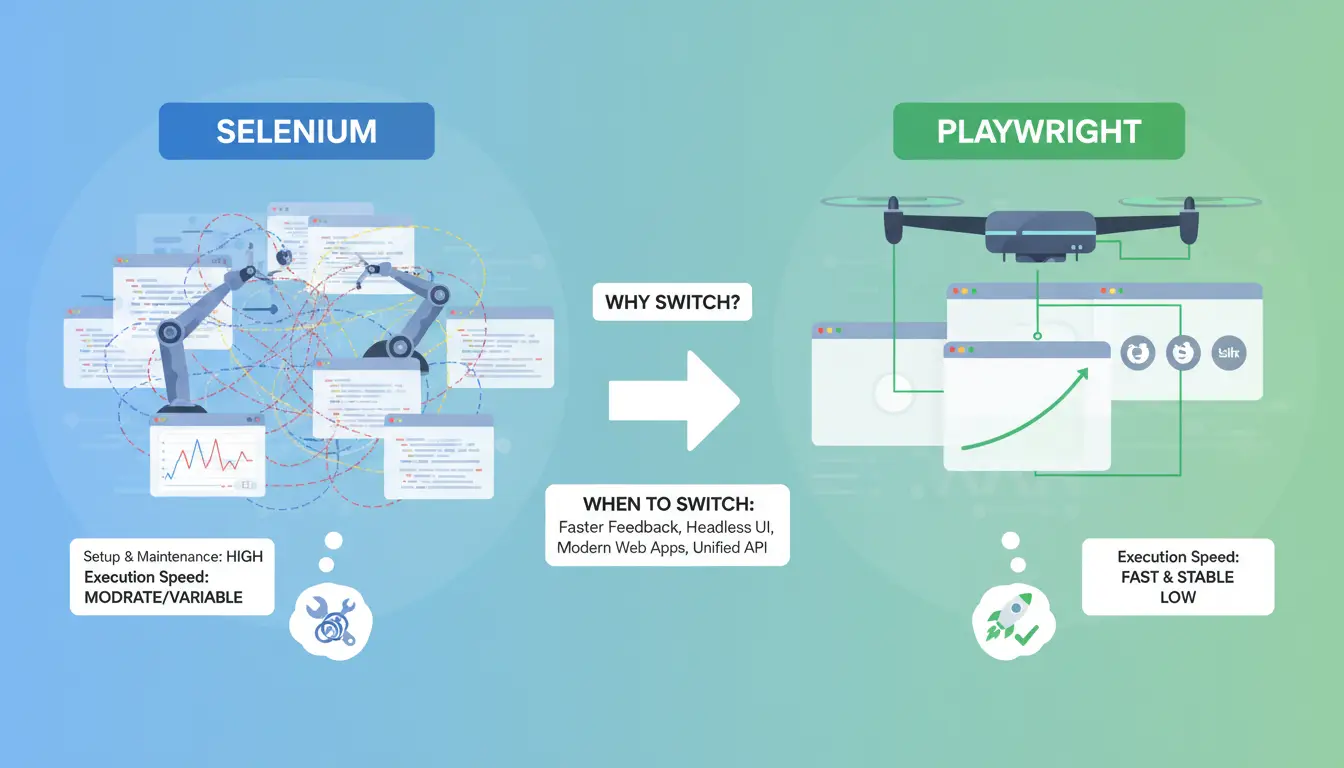
Selenium has powered UI test automation for years, but many teams hit real friction as web apps become more complex. Slow test runs, random failures, and trouble with dynamic content are common complaints. Modern frameworks like React or Angular often break fragile Selenium locators. Sometimes, even simple actions like file uploads or network stubbing require third-party plugins or hacks. When tests become unstable after browser updates, teams start searching for something more reliable.
How Does Playwright Solve Common Selenium Pain Points?
Playwright tackles these issues by handling waits automatically. You don't need to sprinkle manual sleep or wait statements everywhere, tests pause until elements are truly ready. Its selectors feel more natural for today’s single-page apps. Playwright also supports headless Chrome, Firefox, and WebKit out of the box, so cross-browser checks need less setup. Mobile emulation and network mocking are built in, cutting out extra dependencies. This helps teams spend less time on workarounds and more on real coverage.
When Is Selenium Still the Better Choice?
Selenium remains the safer bet for legacy projects. If your app depends on Internet Explorer or you use languages Playwright doesn’t support, sticking with Selenium makes sense. Large test suites built over years might not migrate smoothly. Many companies with deep Java or C# investments choose to extend their current stack rather than rewrite tests.
What Are the Hidden Costs of Switching?
Switching isn’t free, rewriting tests, retraining the team, and updating CI pipelines all take real time. Some Playwright features may not cover niche Selenium plugins. Gaps in the ecosystem, like limited integrations or fewer Stack Overflow answers, can slow adoption.
How to Decide If the Switch Is Worth It
Check your pain points: Are flaky tests, slow runs, or missing browser support holding you back? If most of your testers are comfortable with JavaScript or TypeScript, the move is easier. But if you rely on rare language bindings or have thousands of legacy Selenium tests, migrating may not pay off fast. For a deeper look at browser automation trends, see browser-automation.io and Microsoft’s Playwright docs.
How Do Playwright and Selenium Actually Work Under the Hood?
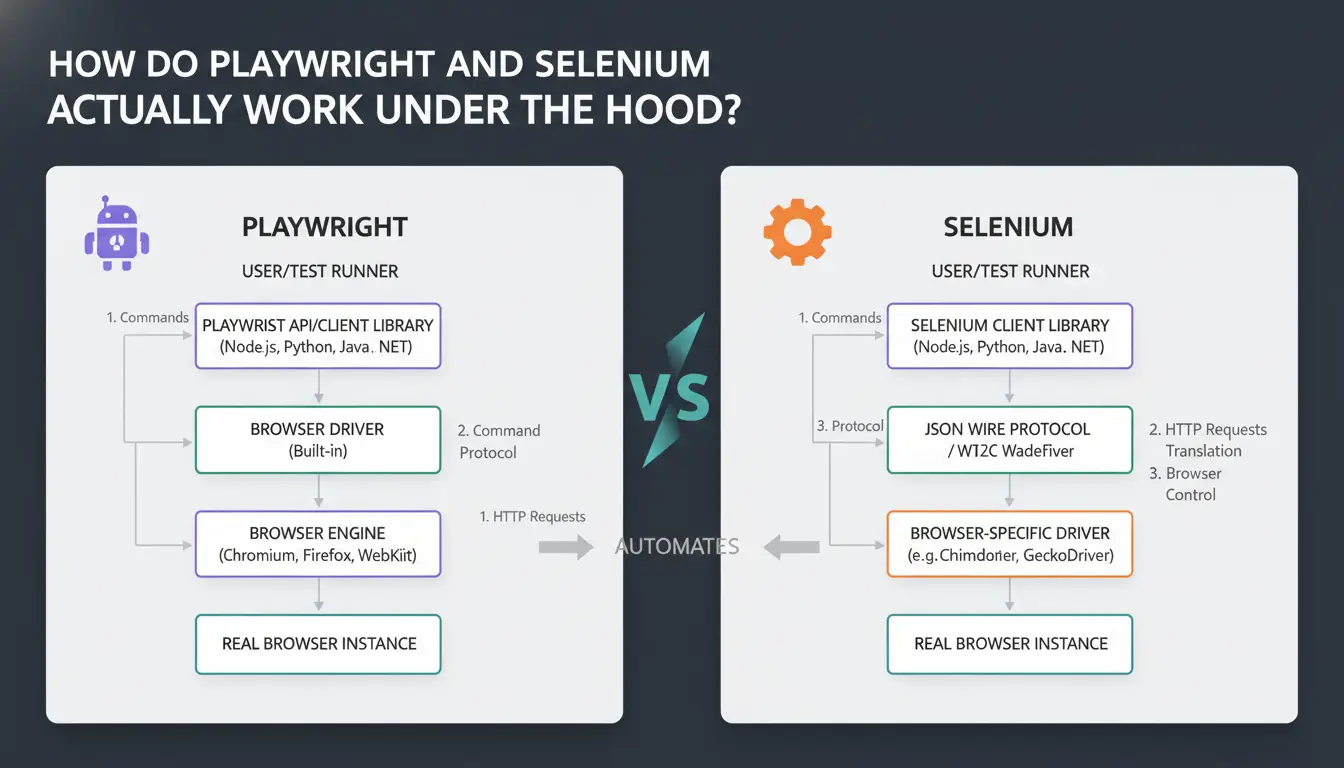
How Selenium Communicates with Browsers
Selenium relies on the WebDriver protocol, which means test scripts talk to a WebDriver server. This server acts as a middleman, sending commands to browser-specific drivers like ChromeDriver or GeckoDriver. Each browser needs its own driver, and updates can break compatibility. So, when you run tests, you’re depending on third-party binaries and remote communication. This extra layer can introduce delays and random failures if the drivers or browsers fall out of sync. Selenium’s official docs break down the protocol in detail.
How Playwright Handles Browsers Differently
Playwright skips the WebDriver layer. Scripts communicate directly with browser engines using native APIs. It comes bundled with its own browser binaries for Chrome, Firefox, and WebKit. This means fewer moving parts, no separate driver downloads, less chance for mismatches. Updates are handled inside Playwright’s package, so you get consistent environments from machine to machine. Playwright’s architecture maps this out.
What Does This Mean for Speed and Stability?
Cutting out third-party drivers gives Playwright faster starts and fewer flaky tests. Direct control reduces random failures and speeds up parallel runs. Selenium can struggle when scaling to dozens of parallel tests, especially if browser drivers misbehave. Teams notice this difference most during CI runs or when debugging rare bugs.
How Each Tool Handles Headless and Mobile Testing
Both tools offer headless mode, but Playwright’s bundled browsers mean headless runs are more predictable. For mobile, Playwright supports device emulation and real device testing out of the box. Selenium can emulate mobile through ChromeDriver but lacks built-in support for real iOS devices.
What About Browser Updates and Maintenance?
Selenium depends on browser vendors to update drivers. This can cause delays after browser releases. Playwright updates its browser binaries alongside its core package, making maintenance easier. Community support is strong for both, but Playwright’s tight integration reduces update headaches. Stack Overflow shows frequent discussions about this difference.
What Are the Most Common Mistakes When Using Playwright or Selenium?
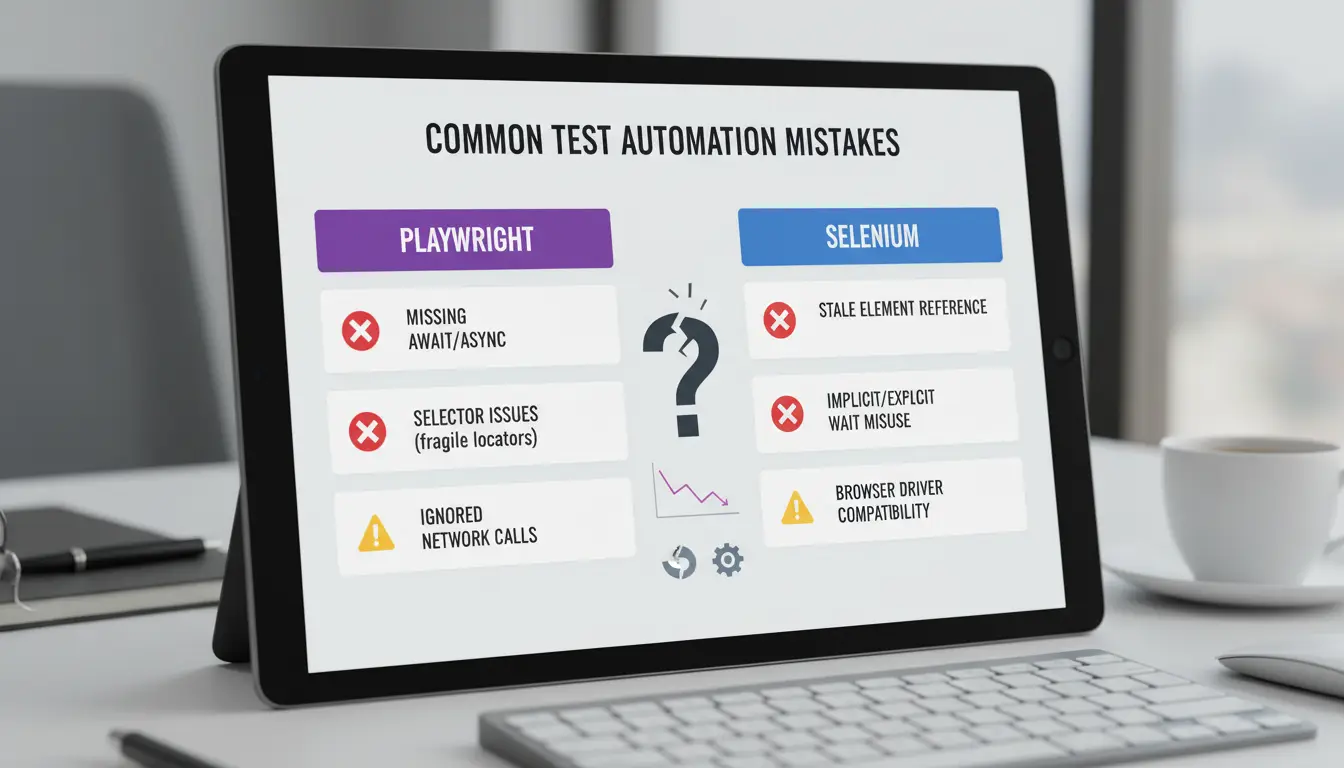
Automation tools like Playwright and Selenium can save time, but small mistakes often lead to wasted effort or even account bans. Users comparing playwright vs selenium usually want to avoid common pitfalls that turn simple scripts into production headaches.
Why Do Automated Tests Fail Unexpectedly?
Timing issues are everywhere. Scripts often wait for elements that never load, or click before the page is ready. Flaky tests happen when code relies on hardcoded delays instead of waiting for real events. Another frequent mistake is using brittle selectors, like absolute XPaths or dynamic IDs, which break whenever the UI changes.
How Can Account Bans Happen During Automation?
Websites spot bots by checking browser fingerprints and tracking suspicious patterns. Running Playwright or Selenium in headless mode, for example, can trigger detection. Mismanaging proxies means all traffic comes from the same IP, making bans much more likely. Failing to isolate browser profiles is the fastest way to get flagged.
What Are the Risks of Running Multiple Accounts or Tests in Parallel?
Session leakage is a hidden threat. If you don’t separate cookies and local storage, data from one account can spill into another. Scaling up too fast, without checking resource limits, often causes random crashes or failed logins.
How Do Teams Accidentally Expose Sensitive Data?
Storing credentials in scripts or sharing debug logs with passwords can leak data. Logs left on shared drives, or debug output sent to public channels, give attackers an easy path in.
What Are the Most Overlooked Workflow Mistakes?
Skipping test isolation lets bugs spread. Ignoring tool updates means scripts break after browser changes. Teams that don’t review workflows risk repeating the same failures across projects.
How Can You Reduce Detection and Ban Risks When Automating Multiple Accounts?
Automation scripts often trigger bans because websites now check for browser fingerprints beyond just IP addresses. The gap between tools like Playwright and Selenium gets real when you need to handle more than one account at scale. Here’s what matters most.
Sites spot automation tools by checking for signs like missing plugins, odd screen resolutions, or default user agents. They can flag Playwright or Selenium bots if browser fingerprints look too similar or have obvious automation traits. Parameters like canvas fingerprint, WebGL, fonts, and timezone often get checked, if you miss these, bans follow fast.
How to Use Proxies and Isolated Environments Effectively
Setting up a unique proxy for each account is baseline. Avoid running multiple accounts through the same IP or device; this links them and makes bans more likely. Isolation means running each account in a separate profile with its own proxy, so leaks can’t cross over. Tools that tie browser profile to proxy, like DICloak, make this easier.
How DICloak Helps Secure Multi-Account Automation
You can use DICloak to build isolated browser profiles, each with custom fingerprints and proxy setups. Bulk proxy configuration and RPA automation cut manual errors and speed up onboarding. The main win: less risk of cross-account bans, and easier scaling when your team grows.
Best Practices for Team Collaboration and Workflow Safety
Sharing profiles safely means using permission controls, only let trusted teammates access sensitive accounts. Audit logs and cloud sync help track who did what and roll back mistakes. This keeps mistakes from multiplying, especially in team runs.
When to Use Antidetect Browsers vs. Standard Automation Tools
Antidetect browsers like DICloak add value when you need real isolation, bulk account management, or want to mask automation traces beyond what Playwright vs Selenium offer. For solo runs or basic tests, standard tools are fine, but at scale, specialized tools matter. Integration is simple: run scripts inside browser profiles, not outside.
How Do Playwright and Selenium Compare for Real-World Use Cases?
Which Tool Is Faster and More Reliable for Large Test Suites?
Playwright runs tests in parallel by default and tends to finish big suites faster, while Selenium needs extra setup for true parallelism. Teams often find Playwright less flaky on modern sites, but Selenium’s stability improves with careful waits and retries.
How Do They Handle Modern Web Apps and Single Page Applications?
Both tools support React, Angular, and Vue, but Playwright auto-waits for dynamic content, so fewer manual waits are needed. Selenium can lag behind when sites use advanced JavaScript or websockets.
What About Mobile and Cross-Browser Testing?
Selenium supports almost any browser, including legacy ones. Playwright covers Chrome, Firefox, and WebKit, plus device emulation. For native mobile, both need extra tools, neither handles real devices out of the box.
How Easy Is It to Integrate with CI/CD and DevOps Pipelines?
Playwright’s setup is simpler for new projects. Selenium can be trickier with grid setup, but both tools fit into pipelines like GitHub Actions.
Which Tool Is Better for Multi-Account or Social Media Automation?
Running multiple sessions is where both tools hit limits. You can use DICloak to create isolated browser profiles, set up bulk proxies, and manage fingerprints for each test user. Tools like DICloak let teams automate at scale, avoid cross-account bans, and keep workflows clean, especially important for high-volume or social automation.
When Does It Make Sense to Combine Playwright, Selenium, and Antidetect Tools?
Hybrid automation setups are not rare, teams often mix Playwright, Selenium, and antidetect browsers to cover gaps that a single tool leaves open. The real challenge is knowing when combining tools actually solves problems instead of creating new ones. If you're stuck between "playwright vs selenium," look at the edge cases your workflow hits.
Why Teams Sometimes Need Both Playwright and Selenium
Legacy apps might force you to keep Selenium, especially for older browser versions or rare language bindings. Playwright handles modern web features and offers built-in support for Chrome, Firefox, and WebKit, but Selenium still connects with Internet Explorer or custom environments. If your team runs both old and new projects, splitting coverage is sometimes the only practical path.
| Tool |
Modern Browser Support |
Legacy Support |
Language Options |
| Playwright |
Chrome, Firefox, WebKit |
Limited |
JavaScript, Python, C# |
| Selenium |
Most browsers |
IE, Edge |
Java, Python, C#, Ruby |
How to Integrate Antidetect Browsers Like DICloak with Automation Scripts
Running scripts inside isolated browser profiles blocks fingerprint leaks. You can use tools like DICloak to launch Playwright or Selenium tests in sandboxed sessions, then sync logs so teams track changes without exposing account details.
What Are the Risks of Overcomplicating Your Stack?
Stacking tools piles up maintenance. Debugging failures across multiple layers wastes time, and training new team members turns into a bottleneck. Knowledge silos often appear when only a few engineers can untangle complex setups.
Best Practices for Hybrid Automation Workflows
Keep clear boundaries: match tools to tasks, document integration steps, and push for simple process controls. If you blur responsibilities, errors multiply fast.
When to Re-Evaluate Your Automation Strategy
Watch for slow releases, rising bug counts, or confusion about workflow ownership. If your current stack turns small changes into major headaches, plan a review, future browser updates will only make things trickier.
FAQ: Playwright vs Selenium, What Else Do Users Ask?
Can you run Playwright and Selenium tests in the same project?
It’s possible, but tricky. Both tools need their own setup, drivers, and dependencies. Teams sometimes run Playwright for modern browsers and Selenium for legacy ones. Mixing frameworks can create confusion with selectors or test logic, so most stick to one.
Which is faster for large test suites?
Playwright usually runs tests faster, especially for parallel execution. Its built-in parallelism doesn’t need extra plugins. Selenium can parallelize too, but setups like Selenium Grid are more complex. Speed depends on hardware and how tests are written.
Do both tools support headless mode?
Yes. Playwright runs headless by default, with native support for Chrome, Firefox, and WebKit. Selenium can run headless for Chrome and Firefox, but setup for other browsers is less direct.
Is Playwright or Selenium easier for beginners?
Playwright’s modern API is simpler for new users. Selenium has more documentation, but its syntax can be harder for those just starting automation.
What about CI/CD integration?
Both fit into CI/CD pipelines. Playwright works well with GitHub Actions, while Selenium is often used with Jenkins.
Frequently Asked Questions
Is Playwright replacing Selenium for all web automation?
No, Playwright is not replacing Selenium for all web automation. While Playwright offers faster execution and better support for modern web apps, Selenium is still widely used, especially in legacy projects and organizations needing multiple programming languages. In the "playwright vs selenium" debate, Selenium remains essential for cross-language support and existing test suites.
Can Playwright and Selenium be used together in the same project?
Yes, you can use Playwright and Selenium in the same project, but it takes careful planning. Mixing them works well for hybrid or transitional workflows, like when migrating from Selenium to Playwright. For example, you might keep old Selenium tests for some features, while writing new ones in Playwright. Always manage dependencies to avoid conflicts.
Which tool is easier for beginners to learn?
Playwright is often easier for beginners working on modern web apps. Its API is simpler, and setup is quick. However, Selenium has been around longer and has more tutorials, forums, and community support. If you compare playwright vs selenium for learning resources, Selenium has the edge, but Playwright may feel more user-friendly for new projects.
How do I avoid detection when automating social media or e-commerce sites?
To avoid detection, use isolated browser profiles, custom browser fingerprints, and proxies. These steps help hide automation activity. Tools like DICloak can make your Playwright or Selenium scripts harder to detect. Always follow site rules, because breaking terms can lead to blocks or bans.
What are the main risks of running automation at scale?
Running web automation at scale, whether with Playwright or Selenium, risks account bans, data leaks, flaky tests, and workflow complexity. Sites may detect and block bots, or your scripts might break with site updates. Use proper tools, secure your data, and update scripts often to reduce these risks.
Choosing between Playwright and Selenium depends on your project's specific automation needs, with Playwright offering modern features and speed, while Selenium provides broad language support and maturity. Both tools have unique strengths, so evaluating your team's requirements and existing infrastructure is essential before deciding. Try DICloak For Free
 Web Proxy Tools
 Free Tools
 Cookie Plugin
 UA Generator
 MAC Address Generator
 IP Generator
 IP Address List
 2FA Code Generator
 World Clock
 Anonymous Check
 WebRTC Leak Test
 UUID Generator
 Free Web Proxy Site
 Proxy Checker
 FB Ad Checker
 AI Web Scraping
 Free SMM Tools
 Twitter Shadowban Checker
 Instagram Name Checker
 UTM Generator
 Username Generator
 AI Hashtag Generator
 LinkedIn Headline Generator
 Social Media Image Resizer