In 2026, running Instagram ads is more competitive—and expensive—than ever. You can no longer just “boost a post” and hope for sales. Without a well-managed Ads Manager, you’re likely burning budget on the wrong audience, broken placements, or ads that never get approved.
This guide walks you through exactly how to avoid those costly mistakes, set up your campaigns correctly, and use Instagram Ads Manager like a pro—whether you’re a solo business owner or an agency handling multiple client accounts. Follow these steps, and you’ll turn your ad spend into smarter, more predictable results.
For agencies managing multiple client Instagram Ads Manager accounts, the real challenge isn't just optimization—it's staying logged in. Meta's security system flags multiple logins from the same device, triggering constant verifications and login blocks. Standard fixes like VPNs or proxies no longer work against Meta's browser fingerprinting.
That's why many agencies now use DICloak—a browser isolation tool that creates separate digital fingerprints for each account, making each look like a unique real device to Meta.
What Are the Most Common Mistakes When Setting Up Instagram Ads?
Instagram Ads Manager looks simple enough when you first open it. But here's the reality: most advertisers waste money not because their product is bad, but because their setup is flawed. Small mistakes in targeting, objectives, or placements can quietly drain your budget—and you won't even notice until you check the results weeks later. Let's look at the most common ones, so you can avoid them from day one.
| Common Mistake |
Impact |
Example |
How to Fix |
| Incorrect Targeting |
Wastes budget, low conversions |
Clothing brand targeted all adults 18–65 → low sales |
Refine audience using Custom/Lookalike Audiences in Instagram Ads Manager |
| Misaligned Objectives |
Clicks without conversions |
Gym used Traffic objective instead of Leads → many clicks, few signups |
Align campaign objective with business goal (e.g., Leads for membership) |
| Ignoring Ad Placements |
Low engagement, awkward display |
Same creative used in Feed, Stories, Reels → low engagement |
Adjust creative format for each placement (e.g., vertical 9:16 for Stories/Reels) |
Why Incorrect Targeting Can Waste Your Budget
Bad targeting wastes your Instagram Ads Manager budget because your ad shows to people who aren't interested. For example, a clothing brand targeting all adults aged 18–65 spent money on views that didn't convert. In 2026, Meta's algorithm needs quality data to find likely buyers. A mid-size e-commerce store spent $3,000 per week but saw few sales because its audience was misaligned.
How Misaligned Objectives Lead to Poor Results
Choosing the wrong campaign objective also wastes money. For instance, selecting "Engagement" instead of "Leads" shows ads to people likely to like, not buy. A local gym ran Traffic instead of Leads and got many clicks but few signups. Aligning objectives with business goals is crucial for Instagram Ads Manager success.
What Happens When You Ignore Ad Placement Options
Ignoring placements can reduce ad performance. A square image may look fine in Feed but be cropped in Stories or Reels. One advertiser ran the same creative across placements, getting more impressions but low engagement. Adjusting creatives to vertical formats (9:16) improved engagement and conversions.
Avoiding these mistakes helps you use your Instagram Ads Manager budget more efficiently and improves campaign results.
Setting Up Instagram Ads Manager: First Steps
Now that you know common mistakes, let’s look at how to set up Instagram Ads Manager right. The first steps are simple but very important. You must link your Instagram ads account to the right tools and add payment info so your ads can run without errors. Doing this well saves time and Instagram Ads Manager cost issues later.
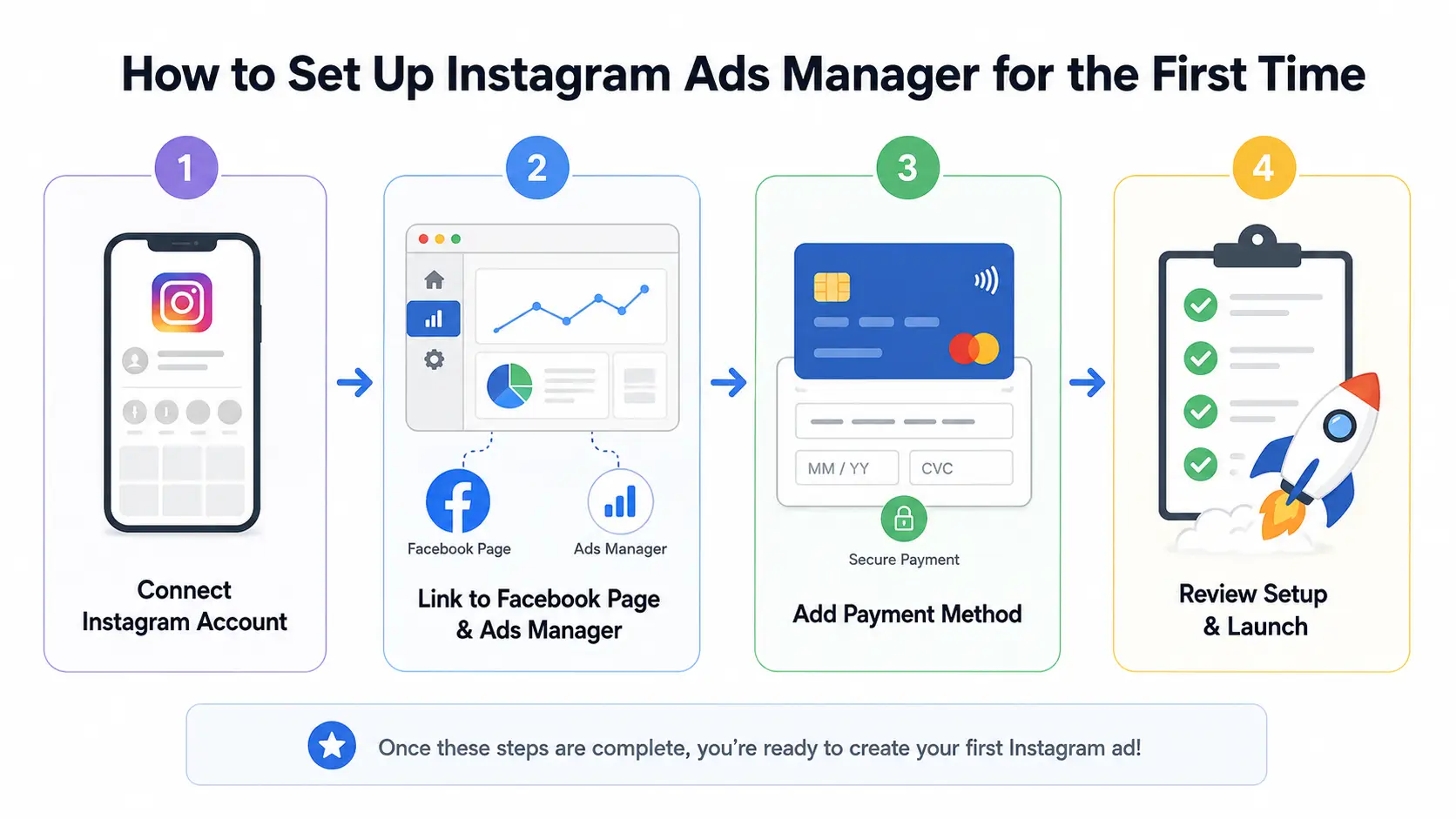
Steps to Link Your Instagram Account to Facebook Ads Manager
Before creating ads, connect your Instagram profile to Meta’s ad tools. Instagram ads run through Facebook Ads Manager, so your Instagram account should be linked to a Facebook Page and ad account. In Meta Business Suite or Business Manager, go to “Business Settings,” choose “Accounts,” then “Instagram Accounts.” Add your profile and link it to the right Page and ad account.
For example, a new online shop owner linked her Instagram before running ads. After setup, her ads showed the correct brand name and logo in Instagram placements. If the link is wrong, Instagram Ads Manager may not show the account when you create a campaign.
How to Configure Your Payment and Billing Information
After linking your accounts, add a payment method in Ads Manager. Go to “Billing,” then “Payment Settings.” Add a credit card, debit card, PayPal, or another supported payment method.
For example, a food truck owner created a campaign but forgot to add payment details. The ad could not run until the card was added and set as default. Setting billing early helps avoid paused ads and makes your Instagram ads manager cost easier to track.
Getting these steps right helps your Instagram ads account run smoothly from the start.
Targeting the Right Audience in Instagram Ads Manager
After you set up your Instagram Ads Manager, the next big step is choosing who will see your ads. Good targeting makes your ads cheaper and stronger. Choosing the wrong people wastes budget and time. The smart way to target helps lower Instagram ads manager cost and increases real results from your Instagram ads account.
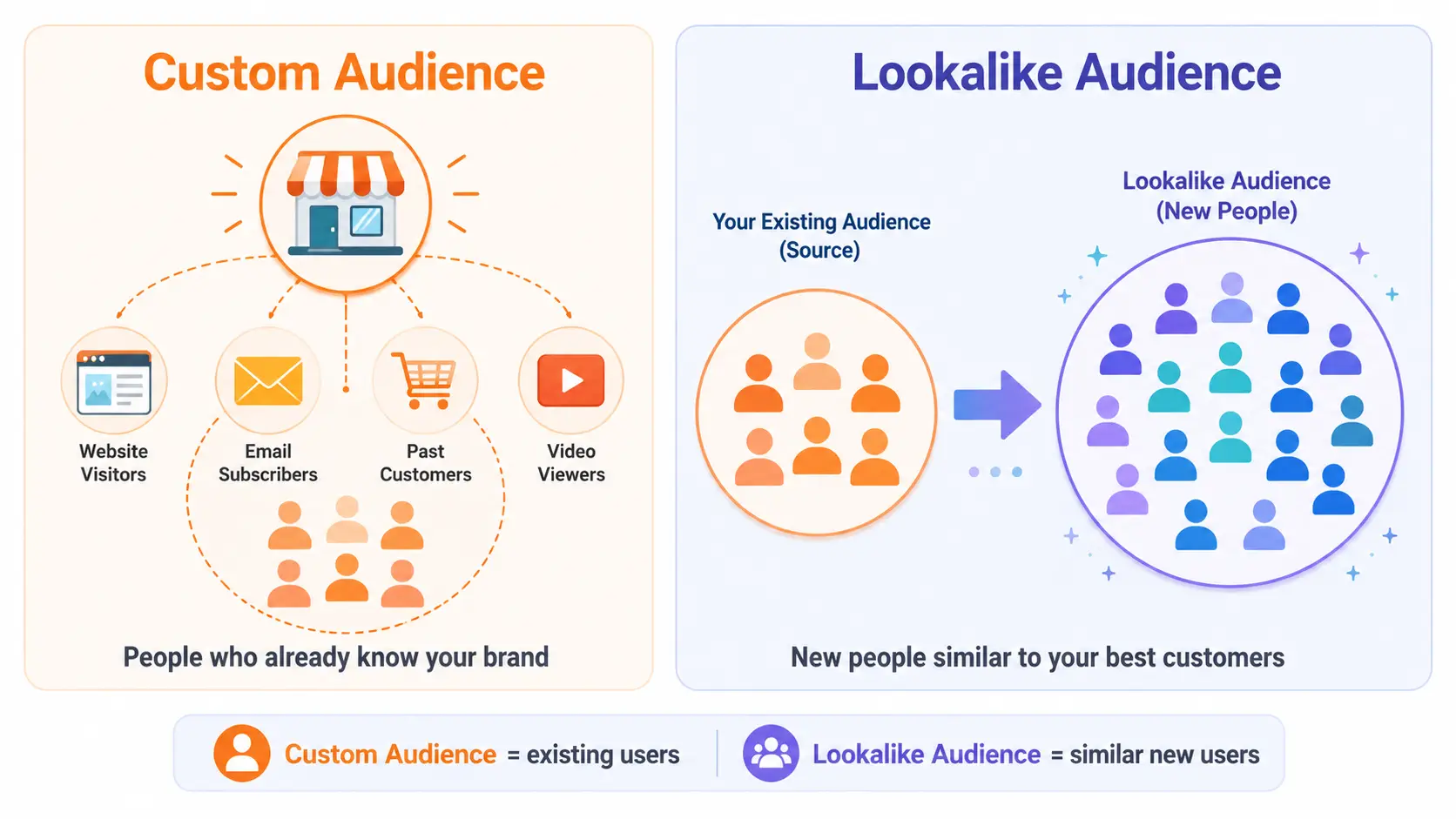
How to Use Custom Audiences for Better Results
Custom Audiences are people who already know your brand. They may have visited your website, joined your email list, or watched your Instagram videos. These users are warmer than new visitors, so they often convert better.
For example, a jewelry shop used Custom Audiences to target people who added items to cart but did not buy. After showing them a special offer in Instagram Ads Manager, more users returned and completed their purchase. This helped lower the ad cost per sale.
What to Know About Lookalike Audiences
Lookalike Audiences help you reach new people who are similar to your best customers. You can create them from a Custom Audience, such as past buyers or high-value leads. Meta then finds users with similar patterns.
For example, a coffee brand created a 1% Lookalike Audience from its top buyers. This group brought more sales than broad interest targeting. After the test worked, the brand expanded to a 3% Lookalike to reach more people.
Why Audience Size Matters for Ad Performance
Audience size affects how well Instagram Ads Manager can deliver your ads. If the audience is too small, Meta may not have enough data. If it is too large, your ads may reach people who do not care.
For Custom Audiences, use enough real data, such as website visits or email contacts. For Lookalikes, many advertisers start with 1% to 3% and expand after seeing strong results. The right size helps control cost and improve conversions.
Optimizing Creatives That Stop the Scroll
Now that you know how to choose the right audience in Instagram Ads Manager, it’s time to make ads that people stop and watch. Good creative helps boost engagement, lowers wasted spend, and improves your Instagram ads manager cost overall. Great visuals and copy make your ads work harder in your Instagram ads account.
| Creative Element |
Key Focus |
Example |
| Hook / Opening |
Grab attention in first 1–3 seconds |
Skincare brand shows product being used immediately |
| Visual Format |
Use vertical 9:16 for Stories/Reels |
Reels video fills the phone screen naturally |
| Main Benefit |
Show value quickly |
“Free Delivery Today” instead of long captions |
| Ad Copy & CTA |
Short, direct, clear action |
“Shop Now” or “Claim Offer” |
| A/B Testing |
Test one change at a time |
Test two headlines, keep the same image |
What Makes a Scroll‑Stopping Image or Video
A strong image or video grabs attention in the first few seconds. Most people scroll quickly, so your ad must stop the thumb. Use bright colors, close-ups, or a real person using the product. Videos should start with a hook. Vertical 9:16 framing for Stories and Reels works best in 2026.
For example, a skincare brand tested two Reels: one showing only the product, the other showing it in use with text “Glow in 7 Days.” The second ad had higher engagement, showing that context and storytelling matter more than just pretty visuals.
How to Write Ad Copy That Converts
Keep copy short and emotional, showing users the benefit quickly. Simple instructions like “Swipe Up to Save 20%” work well. Put the main benefit in the first line.
A bakery added “Free Delivery Today!” on images and captions. This clear offer increased orders and lowered cost per sale.
Why Testing Multiple Creatives Improves Performance
Always test multiple versions of creatives. Change one element at a time to see what works in Instagram Ads Manager.
For example, a clothing shop tested a lifestyle carousel versus simple product photos. The lifestyle version drove more clicks and purchases, lowering Instagram ads manager cost. Testing ahead of time helps focus budget on the best-performing ads.
Good creatives speak to viewers, fit the platform, and are tested to maximize engagement and results.
How to Analyze Instagram Ad Performance Metrics
Once your ads are live in Instagram Ads Manager, the work isn’t done. You need to check performance data and learn from it. Without analysis, you won’t know if your ad spend is working well or if your Instagram ads manager cost could be lower. Using real numbers helps you make better decisions and fix problems faster.
How to Use A/B Testing to Improve Results
A/B testing means running two ad versions to see which one works better. In Instagram Ads Manager, test one change at a time, such as the image, headline, or call to action. This helps you know what truly affects performance.
For example, a fitness studio tested two ad texts: “Join Now for a Free Week” and “Get Fit Today – Special Deal.” After one week, the first version got more clicks and signups. The studio paused the weaker ad and moved more budget to the winner, lowering its cost per signup.
A good test should run long enough to collect useful data, often 7–14 days.
Why Click-Through Rate Isn’t the Only Metric That Matters
Click-Through Rate, or CTR, shows how many people clicked your ad after seeing it. It is useful, but it does not tell the full story. A high CTR means your ad gets attention, but it does not always mean people buy.
For example, a boutique shop had a 3% CTR but few sales. After checking Instagram Ads Manager, they found the conversion rate and ROAS were low. The ad was getting clicks, but the landing page and offer were weak.
In 2026, track CTR, CPC, conversion rate, and ROAS together. These numbers show whether your ads are only getting clicks or bringing real business results.
What Advanced Strategies Can Maximize Your Instagram Ad ROI?
After you learn how to analyze metrics in Instagram Ads Manager, you can move into advanced tactics that boost return on investment (ROI). Instagram ads today are not just about setting an audience and creative once. Smart advertisers use retargeting and seasonal planning to make every dollar count in their Instagram ads account. These strategies also help manage Instagram ads manager cost more wisely.
How to Use Retargeting to Re‑Engage Potential Customers
Retargeting shows ads to people who already visited your site or interacted with your brand. These warm audiences are more likely to act. In Ads Manager Instagram login, you can create Custom Audiences using Meta Pixel data, such as visitors who viewed products or added items to cart but didn’t buy.
For example, an online shop ran a campaign targeting cart abandoners with a small discount. This group had 3x higher purchase rates than cold traffic, lowering cost per purchase and improving overall Instagram ad ROI.
How Seasonal Trends Can Influence Your Ad Strategy
Seasonal trends affect ad costs and performance. CPM may rise during holidays (e.g., November) and drop in slower months (e.g., January). Planning ahead helps stretch your budget and reduce Instagram ads manager cost.
For example, a summer gear brand started teaser ads in late spring, then ran full campaigns at peak season. Early warming plus timing matched user interest, improving conversions and lowering cost per sale.
Using retargeting and seasonal planning ensures your Instagram ad spend works smarter, guiding users through the buying journey and maximizing ROI.
Common Issues with Instagram Ads Manager and How to Fix Them
Even after setting up advanced strategies, many advertisers still run into problems in Instagram Ads Manager. These issues can stop ads, delay delivery, or raise Instagram ads manager cost without clear reason. Knowing the common problems and real fixes helps you keep campaigns running smoothly in your Instagram ads account and avoid stress.
Why Your Ads Might Be Rejected and How to Resolve It
Ads can be rejected if they violate Meta’s content or policy rules, such as using copyrighted music or making misleading claims. Always check the rejection reason in Instagram Ads Manager and fix it before resubmitting.
For example, a fitness coach’s Reel was rejected for implying specific weight loss results. After changing the text to “Tips for healthy habits,” the ad passed and started delivering, showing small wording changes can make a campaign successful.
How to Troubleshoot Billing and Payment Errors
Billing issues occur if your payment method fails or is missing. Ads will pause until you fix the problem. In Ads Manager Instagram login, check that card details are correct and up to date in Billing.
For example, a restaurant owner forgot to update an expired card. Ads paused until the card was updated and the billing address confirmed. Other fixes include contacting the bank or using PayPal. Always check account limits or unpaid balances if problems continue. Resolving these issues quickly protects your budget and keeps campaigns running smoothly.
How to Manage Multiple Client Instagram Ads Manager Accounts Without the Headache
Let's be honest: managing multiple client Instagram Ads Manager accounts from one device is a headache. Constant logouts, verification codes, and the fear of triggering Meta's security flags. Here's a better way.
Switch Between Ad Accounts Instantly
DICloak gives each client account its own isolated browser profile—unique digital fingerprint, separate cookies, clean session. To Meta, a clothing brand, a restaurant, and a fitness studio each look like they're on completely different computers.
Think about your typical morning: log into Client A, get a verification code, answer an SMS. Log out. Log into Client B, another code. By lunch, you've spent an hour just logging in and out. With DICloak, each profile stays logged in. You click once, and you're in.
What you can do:
- Operate multiple ad accounts at the same time
- Track and optimize campaigns across profiles without switching back and forth
- Run A/B tests without triggering detection
Bottom line: Fewer "suspicious activity" flags. Less logging in and out. More time actually managing campaigns.
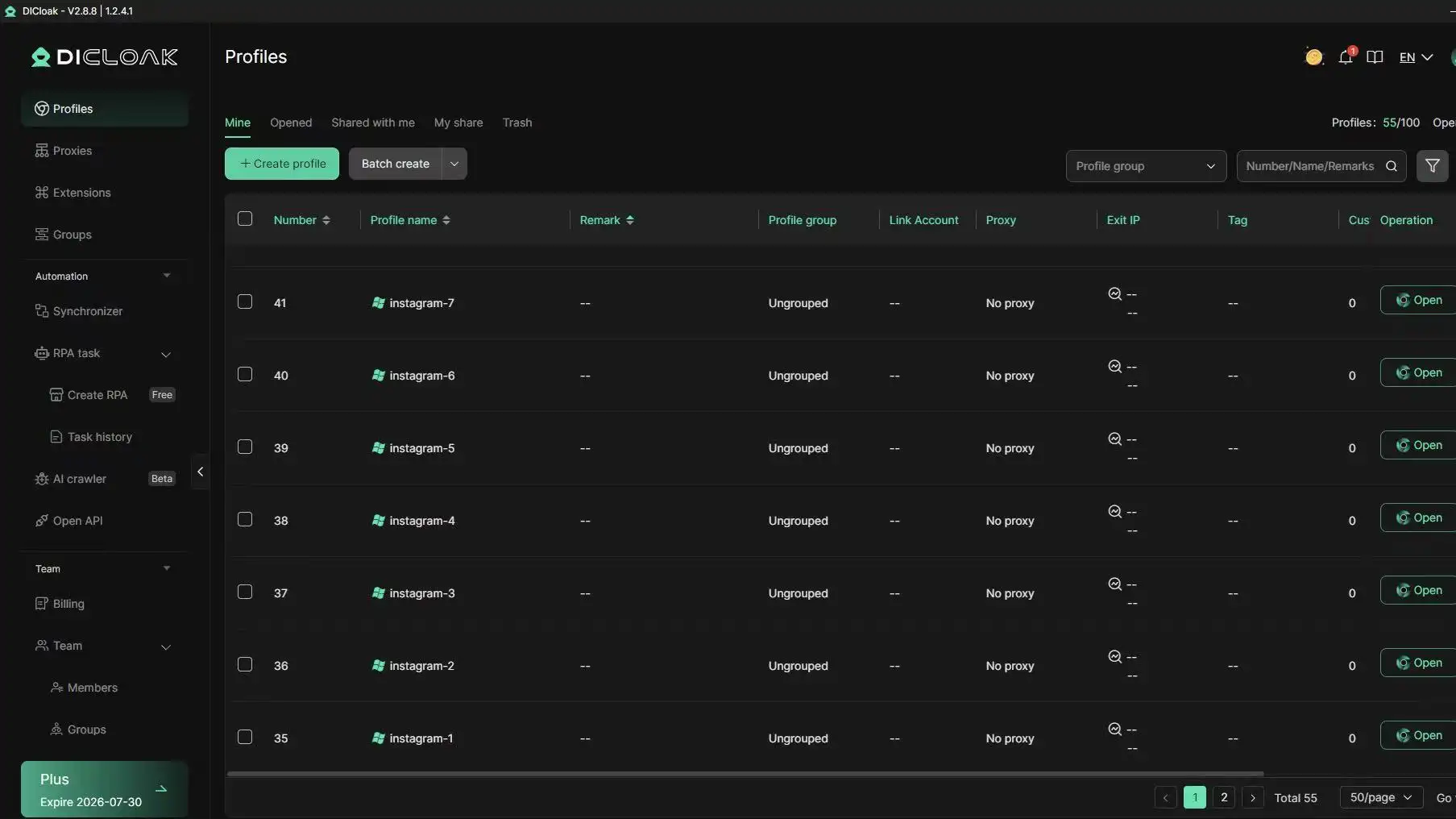
Keep Client Campaign Workflows Organized
When an agency handles many clients, the problem is not only logging in. It is also keeping every campaign, asset, and account in the right place.
DICloak helps agencies organize client work by browser profile, folder, or team member. One profile can be used for Client A’s Instagram Ads Manager, another for Client B’s ad account, and another for reporting or creative checks. This makes it easier to avoid opening the wrong account, mixing client sessions, or confusing campaign assets.
What you can do:
- Group client profiles by brand, campaign, or team
- Keep each Instagram ads account in a separate workspace
- Save login sessions, cookies, and account settings inside each profile
- Switch between client workspaces without messy browser tabs
Bottom line: Cleaner campaign workflows. Fewer account mix-ups. More control when your agency manages several Instagram Ads Manager accounts at once.
Collaborate Without Sharing Passwords
Your team doesn't need to see each other's passwords. In fact, sharing passwords is a security risk—and it makes it impossible to know who did what.
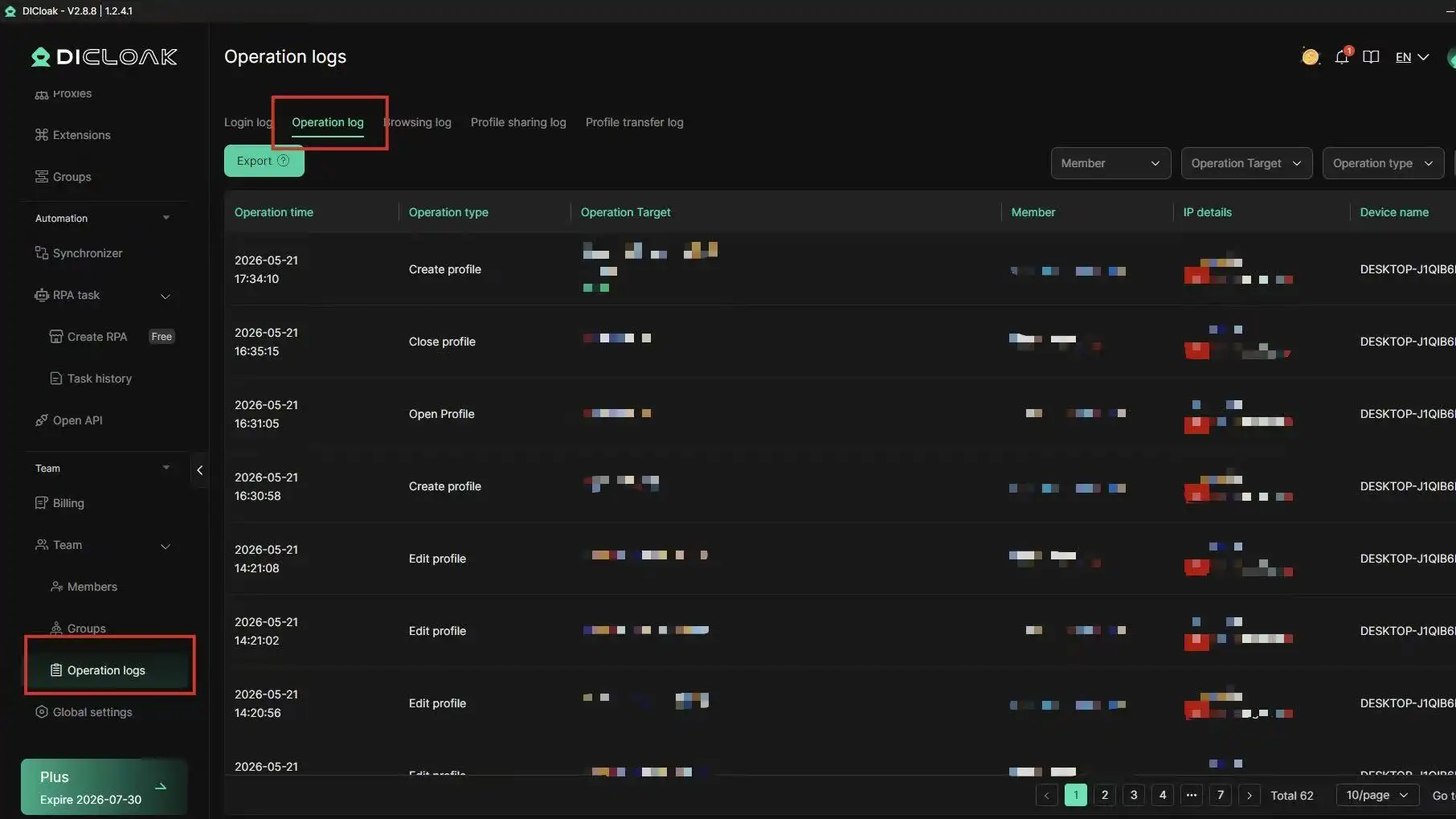
DICloak lets you assign role-based permissions. Give your media buyer access to specific client folders. Give your junior analyst view-only access. And track every single action in operation logs—who logged in, what they changed, when they did it.
When someone leaves the agency, revoke their access with one click. No need to change every client password.
What you can do:
- See who did what and when with detailed operation logs
- Revoke access instantly when someone leaves the team
- Keep client accounts organized without constant logins
Bottom line: Your team works faster. Your clients stay more secure. And you always know who accessed what.
Combine Instagram Ads Manager with DICloak, and you get one dashboard to manage all your client accounts—more safely, more efficiently, with fewer everyday headaches.
Ready to simplify your agency workflow? Try DICloak today.
Frequently Asked Questions About Instagram Ads Manager
How much does it cost to run ads on Instagram in 2026?
The cost of running ads in Instagram Ads Manager varies depending on your audience, placement, and campaign objective. Costs are typically calculated as CPM (cost per 1,000 impressions) or CPC (cost per click). For example, targeting highly competitive audiences during peak seasons may raise costs, while testing smaller audiences can reduce your Instagram ads manager cost.
Can I run Instagram ads without a Facebook account?
No. Instagram Ads Manager requires a connected Facebook Page and ad account. Instagram alone cannot run ads. Linking your accounts ensures proper tracking, billing, and access to audience targeting, placements, and performance metrics. Without a Facebook account, Ads Manager features are not available.
How long does it take for Instagram ads to be approved?
Ads in Instagram Ads Manager are usually reviewed within 24 hours. Some ads may take longer if flagged for policy checks. Ensuring your creative follows Instagram’s content guidelines helps your ads get approved faster and start running without unnecessary delays.
What’s the difference between boosting a post and running an ad?
Boosting a post is a quick way to increase visibility for an existing Instagram post using simplified options. Running an ad in Instagram Ads Manager gives you full control over objectives, audience targeting, placements, and optimization. Ads Manager allows advanced A/B testing and detailed performance analysis, making it better for campaigns focused on conversions or ROI.
How do I know if my Instagram ads are reaching the right audience?
You can monitor audience performance in Instagram Ads Manager using metrics like CTR, conversions, and engagement. Custom Audiences, Lookalike Audiences, and detailed demographic data help ensure your ads reach the people most likely to act. Regularly reviewing performance reports ensures your campaigns target the correct audience.
Conclusion
Mastering Instagram Ads Manager in 2026 goes beyond launching campaigns. Success requires proper setup, precise targeting, creative testing, and performance analysis. Using advanced strategies like retargeting and seasonal planning, and tools like DICloak for multi-account management, helps maximize ROI, reduce wasted spend, and reach the right audience. Applying these practices ensures smarter, safer, and more profitable campaigns.
 Web Proxy Tools
 Free Tools
 Cookie Plugin
 UA Generator
 MAC Address Generator
 IP Generator
 IP Address List
 2FA Code Generator
 World Clock
 Anonymous Check
 WebRTC Leak Test
 UUID Generator
 Free Web Proxy Site
 Proxy Checker
 FB Ad Checker
 AI Web Scraping
 Free SMM Tools
 Twitter Shadowban Checker
 Instagram Name Checker
 UTM Generator
 Username Generator
 AI Hashtag Generator
 LinkedIn Headline Generator
 Social Media Image Resizer