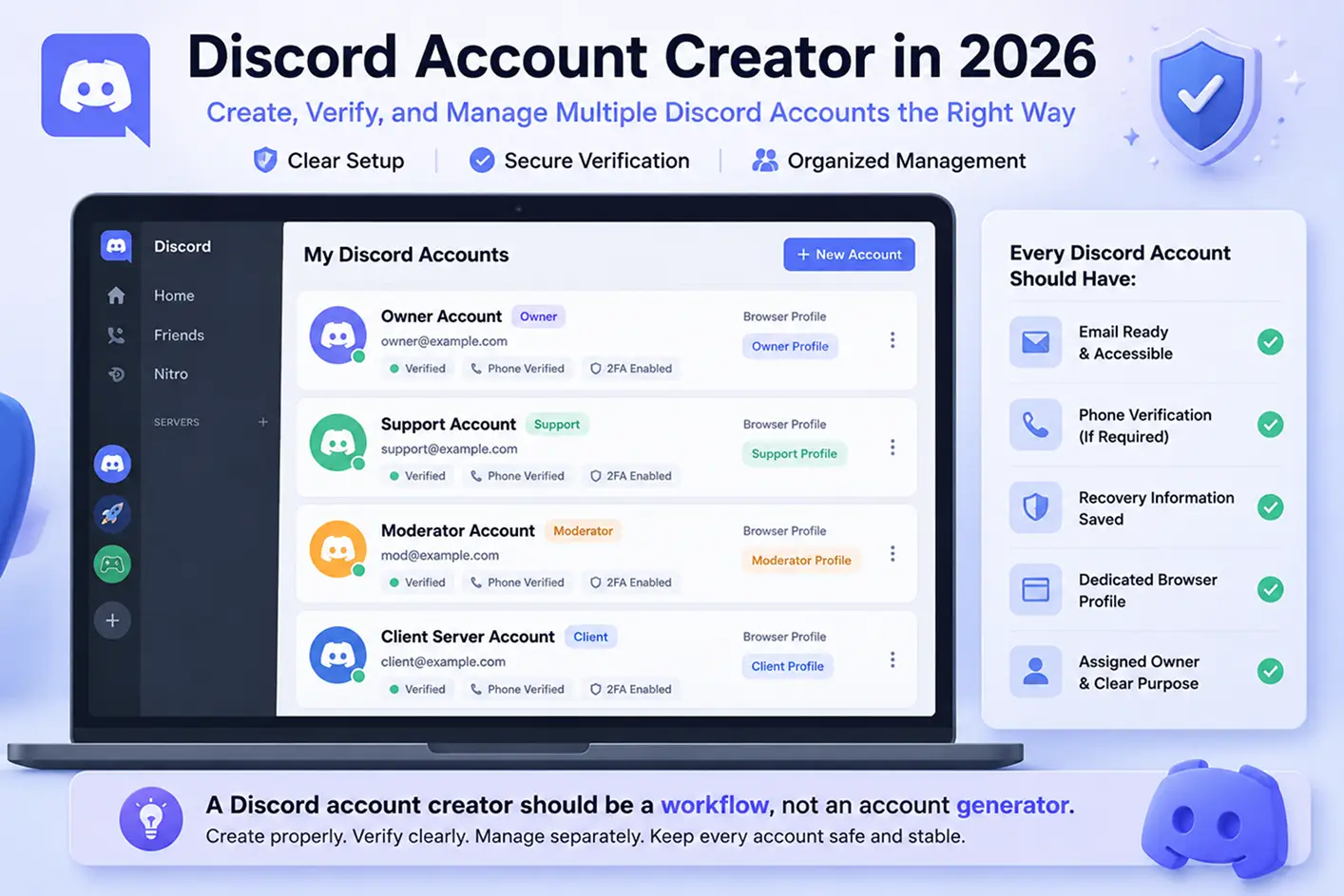
A Discord account creator in 2026 should not just mean a tool that makes more accounts. For most real users, it means a cleaner way to create, verify, and manage Discord accounts without losing control of emails, login records, or account roles.
This matters when one account is no longer enough. A gaming server may use separate accounts for support and moderation. A Web3 community may need different accounts for announcements and member help. An agency may manage several client servers and keep each account separate.
Discord account creation also needs planning. One email cannot be used for multiple Discord accounts, and phone verification may be required. This guide explains how to create accounts properly and manage multiple Discord accounts without mixing sessions, roles, or team access.
Why Some Discord Account Creations Fail Immediately
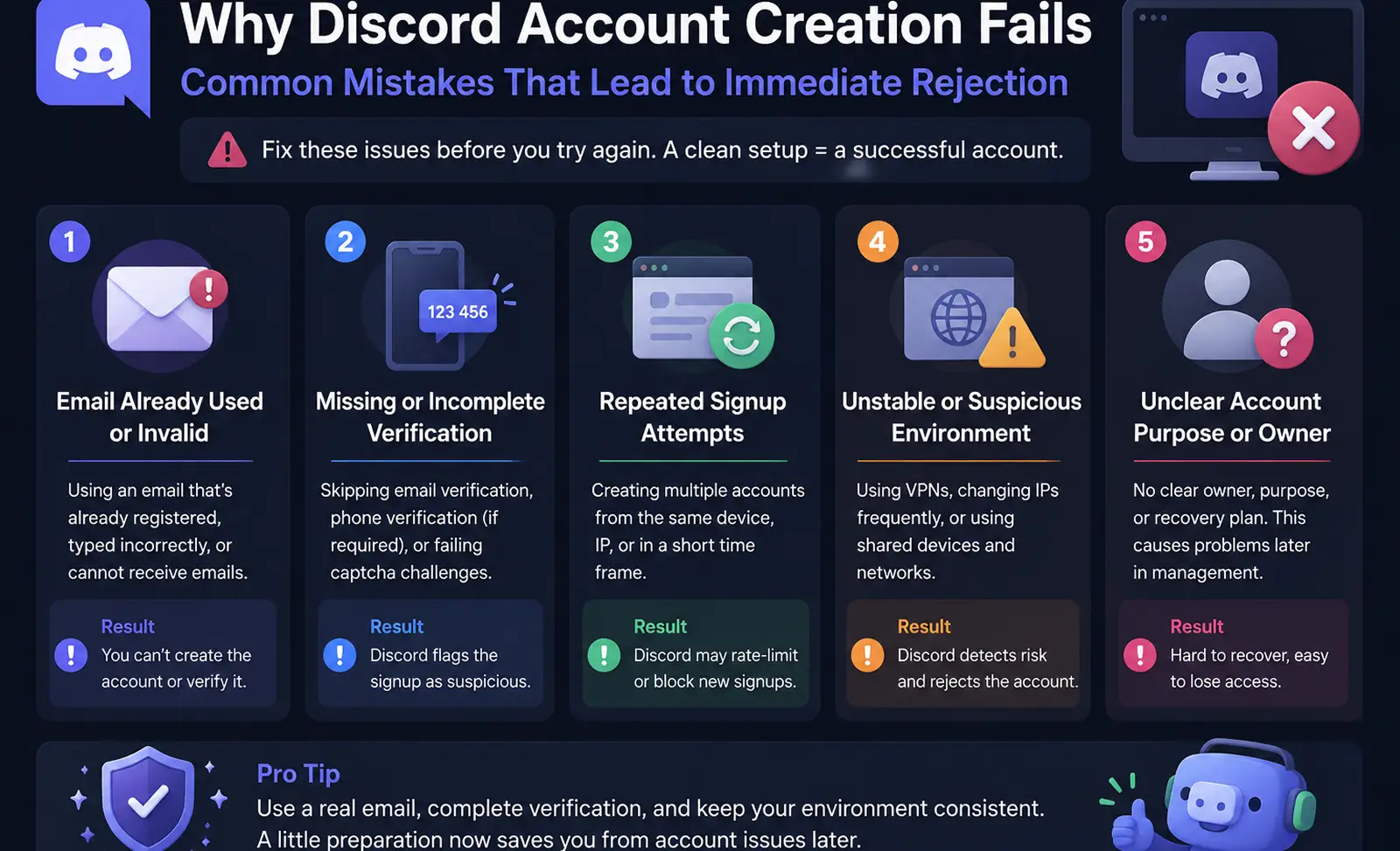
Some people think a Discord account creator fails because Discord blocks every new account. That is not always true. In many cases, failed Discord account creation starts with small setup mistakes. The email may be wrong. The inbox may not open. The same signup may be tried too many times. Or the login setup may keep changing.
This becomes a bigger problem when a team creates multiple Discord accounts for real work. A gaming server admin may need one personal account, one moderation account, and one support account. If the team creates them in a rush, they may lose track of the email, phone number, browser session, and owner for each account. That is when simple Discord account creation turns into a messy workflow.
What Common Mistakes Lead to Immediate Rejection
One common mistake is using an email that is already linked to another Discord account. Discord does not allow the same email to register more than one account. If the signup page says the email is already registered, the safer move is to recover the old account or use another real email. Repeating the same signup will not fix the issue.
Another mistake is using unclear account information. For example, a community team may create a “support” account with a random name, a shared inbox, and no assigned owner. The account may not fail only because of the name. But later, no one knows who should verify it, check security emails, or recover it if login fails.
Repeated signup attempts can also create friction. If one person keeps trying to create several accounts, switches browsers, changes devices, or refreshes after errors, the process becomes harder to manage. This does not mean every repeat attempt will fail. It means the setup is more likely to cause prompts, errors, and confusion.
How Discord Verification Impacts Account Creation
Discord verification is part of normal account safety. During or after signup, Discord may ask for email verification, phone verification, captcha, or other security checks. A valid email and a real mobile phone number can affect whether the account can be verified and used smoothly.
This matters for teams. A phone number is not just a small signup detail. If one teammate uses a number for one account, another teammate may not be able to use the same number for a different account. So the team should decide who owns the phone and email before creating the account.
Verification can also affect server access. Some Discord servers require a verified email before a new account can send messages. So if a new moderator account joins a client server and cannot post right away, it may not be broken. It may simply need to finish account verification first.
Why Unverified or Temporary Emails Can Cause Issues
Using a temporary email may seem fast, but it is risky for long-term Discord account management. The account may work today, but the inbox may disappear tomorrow. If Discord sends a password reset, security notice, or recovery message, the team may not receive it.
This happens often in agency work. A staff member creates a Discord account for a client server with a disposable inbox. Three months later, the client needs access. The account needs a password reset, but the email is gone. Now the issue is not signup. It is an account recovery problem.
A safer Discord account creator workflow should use a real inbox, clear email access, a known owner, and basic recovery records. The goal is not only to create the account. The goal is to keep it usable after the first login.
How to Successfully Create a Discord Account in 2026
Once you know why Discord account creation can fail, the next step is simple: prepare before you sign up. A clean setup is better than a fast setup. This is especially true when you need to create a Discord account in 2026 for a server, team, client, or support role.
Discord allows users to register with an email address or phone number, then follow the signup prompts and enter the required details. A valid birthday is also part of the signup flow. The process is not hard. Most problems start when people use the wrong email, skip verification, or forget who owns the account.
Step-by-Step Guide for Desktop Users
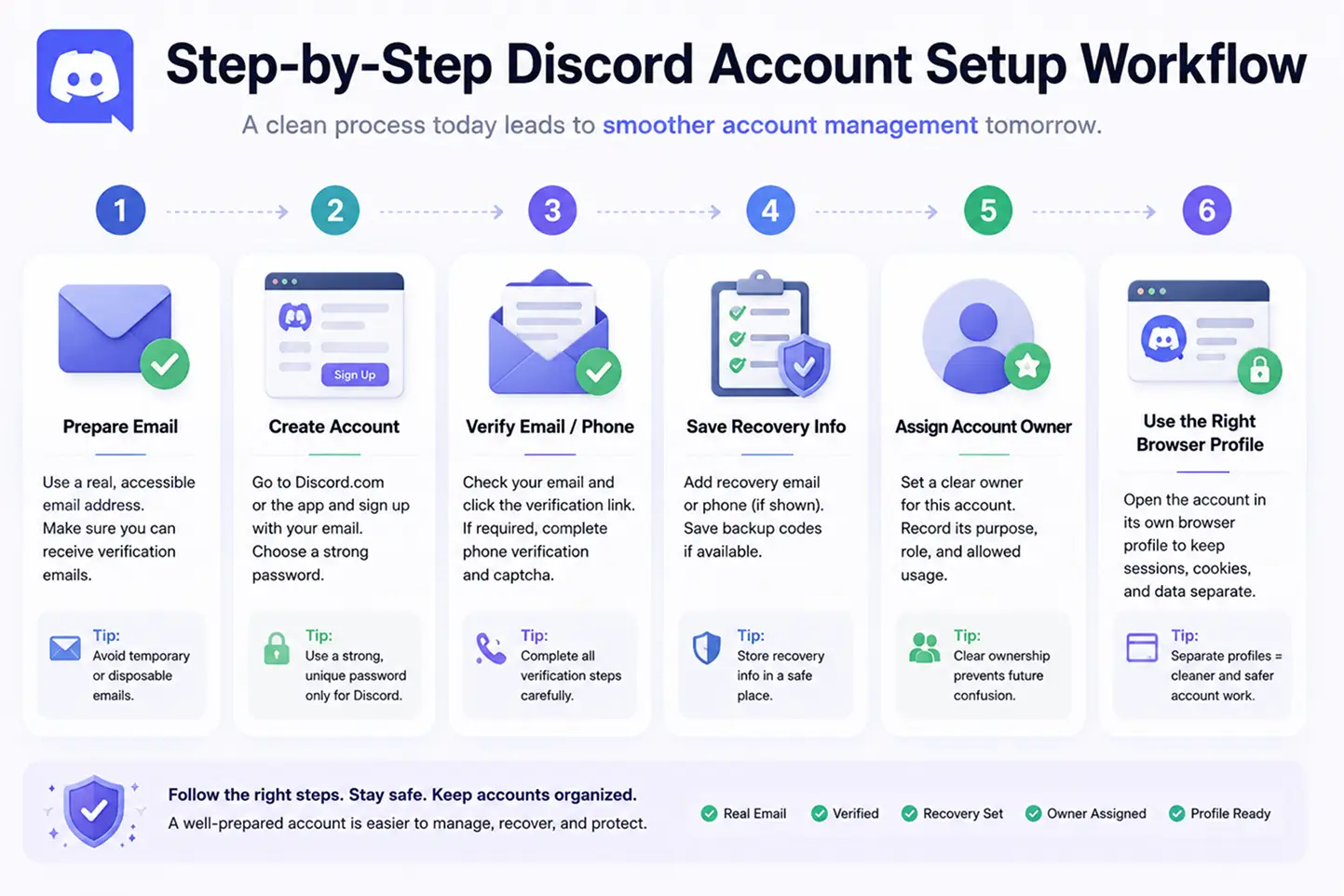
For desktop signup, start from the official Discord website or desktop app. Choose Register. Then enter a real email address or phone number, a username, a password, and your date of birth. After that, follow the on-screen steps.
The important part is not only filling out the form. You should also open the email inbox right away. If Discord sends an email verification message, verify it before doing other setup work. Discord also lets users resend a verification email from User Settings when needed.
Here is a simple example. A small gaming team wants a support account for ticket replies. The team should not create it with one random teammate’s personal inbox. A better setup is a shared business inbox that the lead admin can access. The team should also record the email, account purpose, account owner, and verification status on the same day. This saves time later.
Mobile Account Creation: What You Need to Know
Mobile signup is useful when the account will be used often from a phone. Discord’s mobile guide shows that new users can create an account from the mobile app and follow the setup steps there.
Still, mobile signup needs care. If you create the account on one phone, then log in from another phone, and then move to desktop on the same day, you may face more checks. This does not mean device switching is wrong. It means teams should keep login records clear.
For example, a Web3 community may ask a moderator to create an account on mobile during an event. Later, another team member tries to log in from desktop to post updates. If the team did not record who created the account, which phone was used, and which email was verified, a simple login can become a support issue.
How to Prepare Email, Phone, and Recovery Information
Before creating multiple Discord accounts, prepare the basics for each one. Each account should have clear email access, a known phone number if phone verification is needed, and saved recovery information.
This matters because phone verification may require a valid mobile number, and Discord says the number cannot already be attached to another Discord account. So a team should not assume one phone number can verify every account.
Security should also be planned early. Discord supports multi-factor authentication, including passkeys, authenticator apps, and SMS. It also provides backup codes in case users lose access to the MFA device. For team accounts, the assigned account owner should know where these recovery details are stored.
A good Discord account creator workflow is not just a signup form. It is a small record system. For each account, write down the role, email, phone status, owner, login device, and recovery method. That way, the account is easier to verify, easier to manage, and easier to recover when the team changes.
What Tools Can Assist With Discord Account Creation and Setup
After you prepare the email, phone, and recovery records, tools can make the setup cleaner. But the tool should support the work around the account. It should not act like a risky Discord account creator that registers accounts for you, skips checks, or promises easy mass signup.
A good tool helps you stay organized after Discord account creation. A bad tool creates new risk. This is the key difference.
Where Automation Can Help After Account Creation
Automation after account creation can help with simple admin work. For example, a team may use a routine to open Discord, check whether the account is still logged in, visit a fixed server page, or review a short setup checklist. This kind of automation supports routine admin work. It does not create the Discord account for you.
This is useful for small teams. A gaming community may have three support accounts. Each morning, the lead admin may need to check whether each account can log in, whether the right server is open, and whether any security notice appears. A simple login status check can save time and reduce missed steps.
Still, automation should stay inside safe limits. Discord says normal user accounts should not be automated outside the proper bot system. Discord’s own help page says automating normal user accounts, often called self-bots, is forbidden and can lead to account termination.
Risks of Using Bots or Account Generators
The biggest risk comes from Discord account generators, bot tools, token tools, cheap bulk accounts, and unknown downloads. They may look helpful because they promise speed. But they often create accounts you do not really control.
Some tools may give you accounts with emails you cannot access. Some may ask for tokens instead of normal login details. Some may include malware or steal passwords. Some may also create accounts in ways that break platform rules.
Discord’s platform abuse policy warns that Discord can take action against accounts registered for platform abuse. It also says Discord may remove spaces that distribute account-creation tools, token generators, CAPTCHA-solving services, spambots, raid tools, and other spam tools.
So if a tool promises “unlimited Discord accounts,” “no verification,” or “captcha bypass,” treat it as a warning sign. It may not be a real Discord account setup tool. It may put your team accounts, servers, and client work at risk.
What to Check Before Using Any Third-Party Tool
Before using any third-party tools, ask a few simple questions. Does the tool ask for your Discord password? Does it store tokens? Does it ask for unusual permissions? Does it promise verification bypass promises? Does it explain who runs the product and how your data is handled?
This matters because Discord’s developer terms require API use to follow Discord’s documentation and not compromise, break, or bypass technical processes or security measures. The terms also say developer credentials, such as keys and tokens, must be protected.
For a real team, the safer choice is boring but reliable. Use tools that help you organize profiles, check setup steps, and manage records. Avoid tools that sell accounts, hide ownership, or ask for sensitive login data. A strong Discord account creator workflow should make account setup easier to manage, not harder to trust.
How to Manage Multiple Discord Accounts Without Confusion
Tools can help with setup, but they cannot replace clear account rules. If your team uses multiple Discord accounts, the real problem is often not creation. It is daily Discord account management: who owns each account, who can log in, and which account should be used for each server task.
Keep Verification, Login, and Recovery Records Clear
Every account should have a simple record. At minimum, track the email, phone verification status, recovery method, account owner, and account purpose. This sounds basic, but it prevents many real team problems.
For example, a small agency may manage Discord servers for three clients. One account is for Client A support. One is for Client B moderation. One is for internal testing. If the agency does not keep verification records, login records, and recovery records, a password reset can turn into a client problem.
Discord’s terms say users are responsible for account security. Discord also recommends a strong password, a password used only for Discord, and two-factor authentication. This matters more when accounts are shared across a team, because one weak account can affect server work, client access, and recovery time.
A good rule is simple: each account needs a known account owner and a clear account purpose. If no one owns the account, no one will notice when the inbox stops working, the phone number changes, or a recovery code is missing.
Avoid Sharing the Same Browser Session Across Accounts
Discord has an official Account Switcher on desktop, which helps users with multiple Discord accounts switch between accounts more easily. But Account Switcher does not solve every team problem. It does not replace clear records, role planning, or safe handoffs.
The bigger issue is the same browser session. When many people use the same browser for several accounts, mistakes happen fast. Someone may post from the wrong account. A support reply may come from a personal account. A client server may be opened with the wrong login. Cookies and saved sessions can also make it harder to know which account is active.
This is not only a security issue. It is an operations issue. Mixed cookies, session confusion, wrong-account actions, and repeated login prompts waste time. They also make it harder to explain what happened when a server admin asks, “Who made this change?”
For daily work, do not treat all accounts as one big login pool. Keep each account in a clear workspace. Then the team knows which account is active before posting, moderating, or checking messages.
Separate Personal, Team, Client, and Server Roles
Discord servers depend on roles and permissions. Discord’s role guide explains that server permissions control what members can do, and some actions depend on role position. Channel permissions can also decide which members or roles can access certain spaces.
That is why account roles should be clear before daily work starts. Personal accounts should not be used for every team task. Team accounts should have a clear job. Client accounts should stay linked to the right client. Server roles should match the real work the account does.
For a Web3 community, one account may handle announcements. Another may answer member questions. A third may help with partner talks. For a gaming server, one account may be for owner work, one for moderation, and one for support. For an agency, each client workspace should stay separate.
The goal is not to make account management complex. The goal is to make it boring, clear, and easy to check. A strong Discord account creator workflow does not end after signup. It keeps each account easy to identify, easy to recover, and hard to misuse.
After the accounts are created and the records are clear, the daily work begins. Teams still need to log in, switch roles, check messages, handle handoffs, and keep each Discord account easy to identify.
DICloak Antidetect Browser helps by turning each account into a separate browser workspace. For teams managing multiple Discord accounts, this keeps daily work cleaner. Each account can have its own profile, session, browser profile, and access rules, instead of everything being mixed in one browser.
Separate Browser Profiles for Each Discord Account
The easiest way to reduce account mistakes is to give each Discord account its own browser profile.
A support account can have one profile. A moderation account can have another. A client server account can have its own workspace too. This helps team members know which account they are using before they send a message, join a server, or make a change.
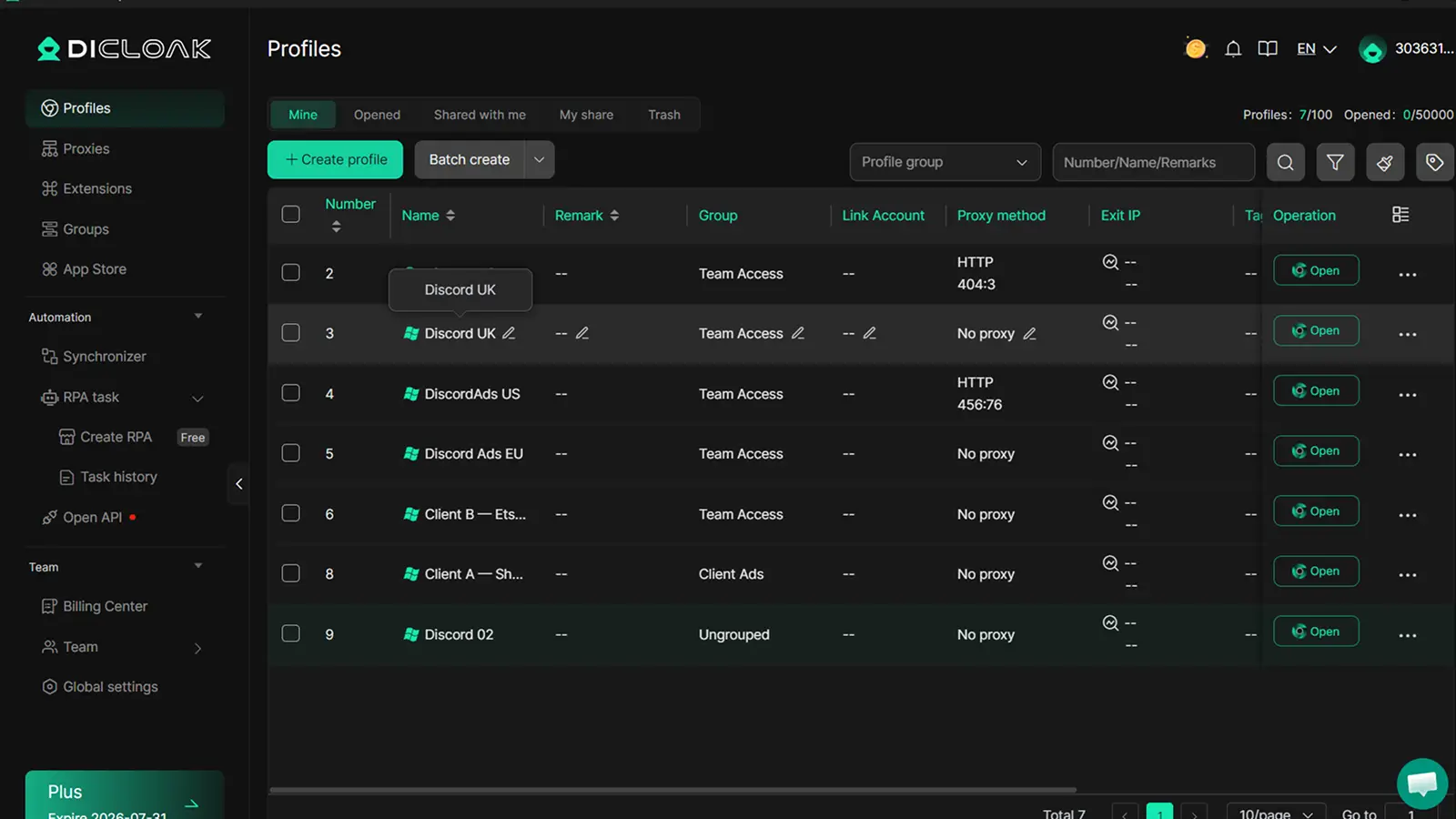
In DICloak, users can create, open, edit, delete, and filter browser profiles from the Profiles page. This helps teams organize Discord accounts by role, client, server, or team member.
Each profile can also keep its own cookies, cache, sessions, fingerprints, and profile settings. This matters because saved logins and browser data can make it unclear which Discord account is active when several accounts share the same browser.
For example, an agency managing three Discord communities can create one browser profile for each client account. The profile name can include the client name, account role, and owner. A Web3 team can also keep its announcement account, support account, and partner account in separate profiles. This turns a messy login list into a clear Discord account workspace.
Teams can also configure proxy settings for each profile when their workflow needs a stable setup. DICloak supports HTTP and SOCKS5 proxy settings, while users provide their own proxy service.
Manage Team Access Without Sharing Passwords Everywhere
Account access becomes harder when a team grows. If every teammate uses the same passwords, handoffs become risky. When someone leaves the team, access becomes unclear. When a client asks who handled a message, the team may not have a clean answer.
DICloak helps teams manage access at the profile level. Admins can assign profile groups, set member permissions, and decide which members can use which profiles. Its member roles include Super Admin, Admin, Manager, and Staff.
This works well for Discord teams. A support member may only need the support profile. A senior moderator may need the moderation profile. A manager may need access to all client profiles.
Instead of sharing passwords everywhere, teams can share the right browser workspace with the right person. This makes handoffs cleaner and reduces the chance of someone using the wrong Discord account.
Use Batch Profile Operations and RPA for Routine Management
When a team manages several Discord accounts, repeated work can take more time than expected. Someone has to open the right profile, check whether the account is still logged in, confirm the account role, and clean up old client workspaces.
DICloak helps make this easier with batch profile operations. Instead of handling every browser profile one by one, teams can open, close, transfer, or delete selected profiles together. This is useful when an agency reviews several client Discord accounts or when a community team checks support, moderation, and announcement profiles at the start of the day.
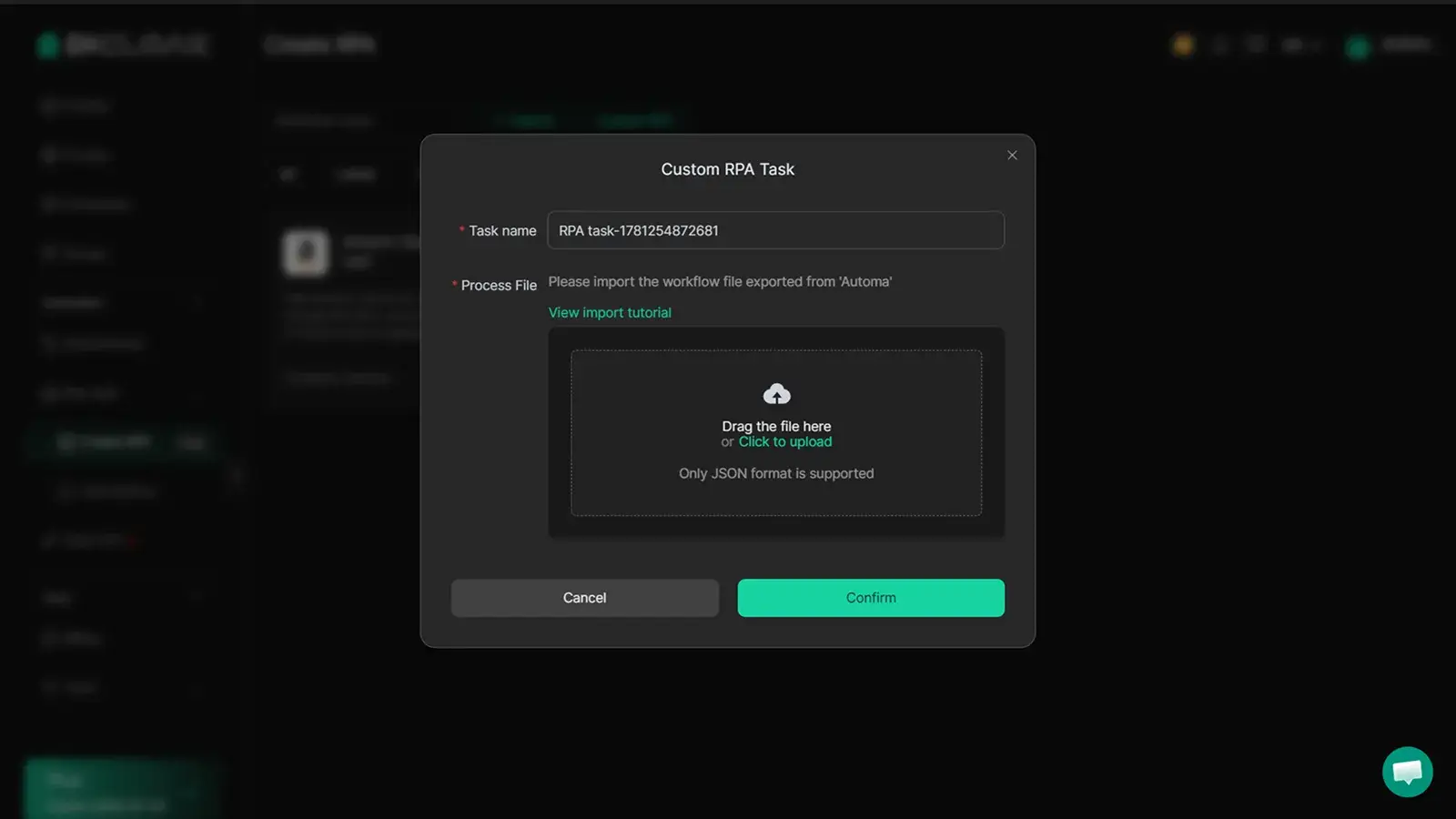
RPA can also help with simple routine steps. A team can use RPA to open fixed pages, follow a basic review checklist, or repeat the same setup check across approved profiles.
For Discord account management, this matters because many mistakes happen during routine work. A teammate opens the wrong account. A profile is left unused for months. A client workspace is not cleaned up after a project ends. Batch profile operations and RPA help teams keep these small tasks more organized.
Frequently Asked Questions about Discord Account Creator
Can I create a Discord account without a phone number?
Yes, in many cases you can start Discord account creation with an email address. But Discord may still ask for phone verification during security checks or account verification. A safe Discord Account Creator workflow should prepare both a real email and valid recovery information before signup. Discord states that one email can only be used with one Discord account at a time.
Can I use the same email for multiple Discord accounts?
No. Discord says one email address can only be linked to one Discord account at a time. If the email is already registered, you need to log in to that account, recover it, or use another real email. A good Discord Account Creator process should assign a unique email to each account.
Is a Discord Account Creator the same as a Discord account generator?
No. A safe Discord Account Creator should mean a clear workflow for creating, verifying, and managing accounts. It should not mean a tool that sells bulk accounts, uses tokens, or promises verification bypass. Discord warns against platform abuse, spam tools, self-bots, and account-creation abuse.
What are the signs of a locked or limited Discord account?
A locked or limited account may be asked to verify by phone, lose access to some actions, or be unable to join new servers or start new direct messages. Discord says Limited Access can happen when suspicious account behavior is detected. A proper Discord Account Creator workflow should keep login records, recovery details, and verification status clear.
What is the best way to manage multiple Discord accounts?
The best way is to keep each account organized from the start. Use a real email, record the owner, track verification status, and separate browser sessions for different roles. A Discord Account Creator workflow should not stop after signup. It should help teams manage multiple Discord accounts without mixed cookies, wrong-account actions, or lost recovery access.
Creating Discord accounts is only the first step — keeping each account clear, verified, and easy to manage matters even more when you run several communities, client servers, or team roles.
You can use DICloak to keep each Discord account in a separate browser profile, manage cookies and sessions independently, and assign the right profiles to the right team members without mixing logins, roles, or account actions during daily community work.Try DICloak for Free.
 Web Proxy Tools
 Free Tools
 Cookie Plugin
 UA Generator
 MAC Address Generator
 IP Generator
 IP Address List
 2FA Code Generator
 World Clock
 Anonymous Check
 WebRTC Leak Test
 UUID Generator
 Free Web Proxy Site
 Proxy Checker
 FB Ad Checker
 AI Web Scraping
 Free SMM Tools
 Twitter Shadowban Checker
 Instagram Name Checker
 UTM Generator
 Username Generator
 AI Hashtag Generator
 LinkedIn Headline Generator
 Social Media Image Resizer