Telegram often blocks connections from certain regions, but one look at Telegram’s own FAQ shows that millions still find workarounds daily. Even power users get stuck: a sudden “Connecting…” message, chats that don’t load, or login errors right when you need to verify a code. What’s really behind these headaches? Most times, it’s network blocks or IP bans. The fix isn’t as obvious as switching WiFi, using a telegram proxy server is what keeps access stable and lets you keep messaging when others get cut off.
But not all proxies work the same way. A Telegram MTProto proxy supports end-to-end encryption and is built for the app, while a telegram SOCKS5 proxy might handle general traffic but leaves gaps that some firewalls catch. The wrong type means you’ll still see errors or face account risks. Even if you’re just trying to run a personal channel or manage multiple accounts for a team, a misconfigured proxy can get you flagged or cause message delivery failures.
This guide cuts through the confusion. It shows exactly how to set up the right proxy server, what settings matter, and which mistakes usually get accounts restricted. If you want to avoid downtime or bans, and keep Telegram running when your network says no, here’s what actually works.
What Does a Telegram Proxy Server Actually Do and Why Do People Use It?
A telegram proxy server keeps your access to Telegram open when your network or country blocks the app. It sits between your device and Telegram, passing messages back and forth. You don’t connect to Telegram directly. Instead, you connect to the proxy, and it forwards your traffic, so Telegram sees the proxy’s address, not yours. People turn to proxies when their school, workplace, or entire country cuts off Telegram. But proxies also make it harder for outsiders to track who’s using which account.
How Telegram Proxies Help Bypass Censorship and Restrictions
Some countries, like Russia, Iran, and China, try to block Telegram at the network level. Internet providers follow government rules and stop connections to Telegram’s servers. Even in places where Telegram is allowed, schools and offices sometimes block it to limit distractions.
A telegram proxy server, especially a telegram MTProto proxy, gives you a workaround. MTProto proxies use Telegram’s own encryption protocol, so they blend in with normal traffic and are harder to block. If one gets cut off, you can switch to another. This sidestep means you can keep chatting, sharing files, or running channels even if the main service is blocked. People use telegram proxies not just to access chats, but also to manage groups, send broadcasts, and keep business running when others get locked out.
What Makes a Proxy Different from a Regular Connection
A regular connection sends your device’s IP address straight to Telegram and any network firewall in the middle. A telegram proxy server hides your real address and replaces it with the proxy’s address. This makes it harder for network filters to tie Telegram traffic back to you.
A telegram SOCKS5 proxy can pass any type of traffic, but it’s not built for Telegram’s encryption. A telegram MTProto proxy is designed for Telegram and can even hide that you’re using a proxy at all. The real win is that a well-chosen proxy keeps your account safer from blocks while making your activity harder to trace.
Which Types of Telegram Proxy Servers Exist and What’s the Difference?
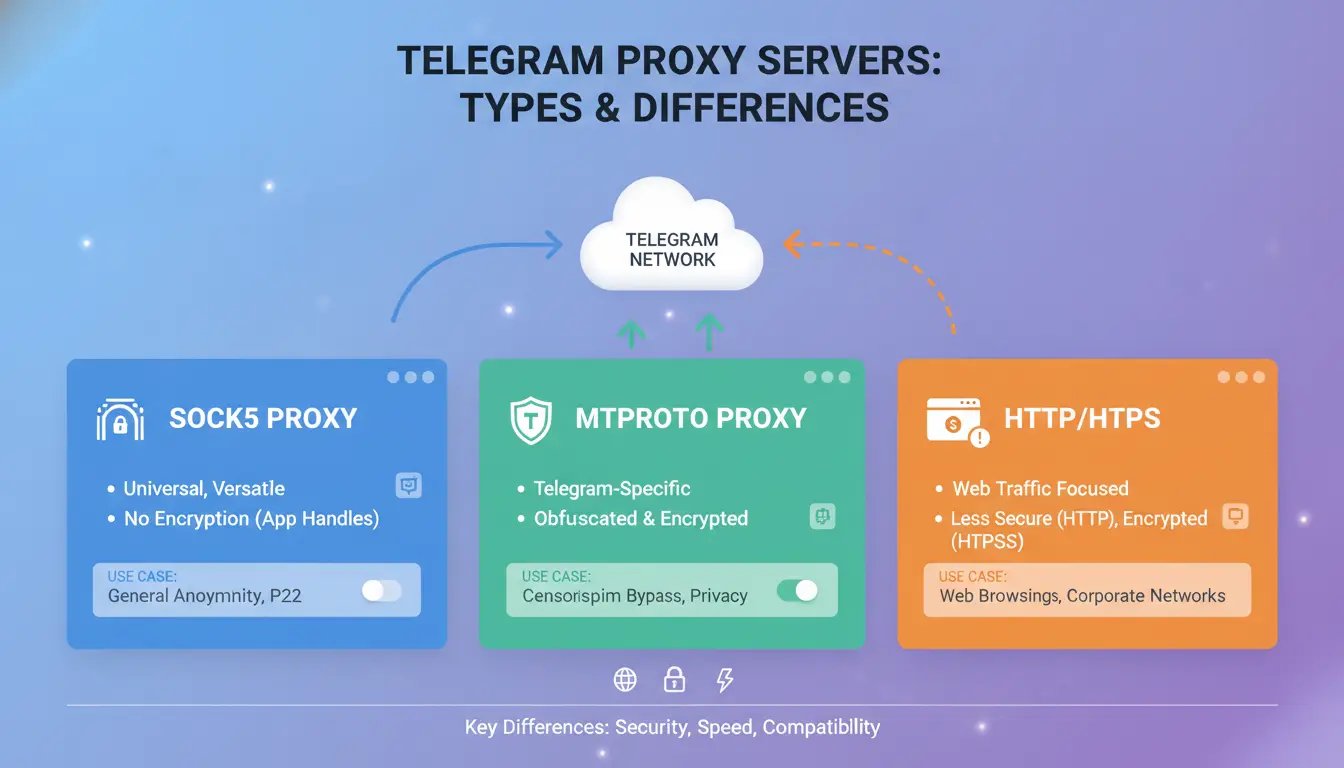
Telegram supports two main proxy server types: MTProto and SOCKS5. Each works differently and brings its own strengths and risks. Picking the wrong one can mean lost messages, restrictions, or even failed logins. Here’s how they actually compare.
What Is an MTProto Proxy and How Does It Work with Telegram?
MTProto is Telegram’s official proxy protocol. It was built to let users bypass internet blocks without breaking the app’s end-to-end encryption. When you connect through a telegram MTProto proxy, your messages stay private, and the Telegram app recognizes the connection as trusted. This means fewer dropped sessions and fewer “network error” popups, especially in countries where standard proxies get blocked fast. MTProto proxies are the only type that support push notifications on all devices, so group admins and power users rely on them to keep communication steady.
How Does a SOCKS5 Proxy Compare for Telegram?
A telegram SOCKS5 proxy is a general-purpose tool. It works for many apps, not just Telegram. SOCKS5 proxies don’t know anything about Telegram’s special needs, so they can’t guarantee push notifications or keep all traffic encrypted end-to-end. If your network only blocks Telegram’s servers, SOCKS5 might help, but firewalls often catch these proxies and cut you off. Still, some users pick SOCKS5 when they want to run multiple accounts in one place, or need a simple relay for testing bots. Just know SOCKS5 does not offer the same privacy or reliability.
Which Proxy Type Should You Choose for Your Needs?
This table shows the real-world differences:
| Feature |
MTProto Proxy |
SOCKS5 Proxy |
| Telegram Support |
Official |
Unofficial |
| Encryption |
End-to-end |
Depends on setup |
| Push Notifications |
Works everywhere |
Often fails |
| App Compatibility |
Telegram only |
Multi-app |
| Block Resistance |
High |
Lower |
If you need stable messaging or run a team channel, MTProto is almost always the safer pick. For simple one-off connections, SOCKS5 can work, but it carries more risk. For full details, check Telegram’s proxy FAQ.
How to Set Up a Telegram Proxy Server: Step-by-Step for Any Device
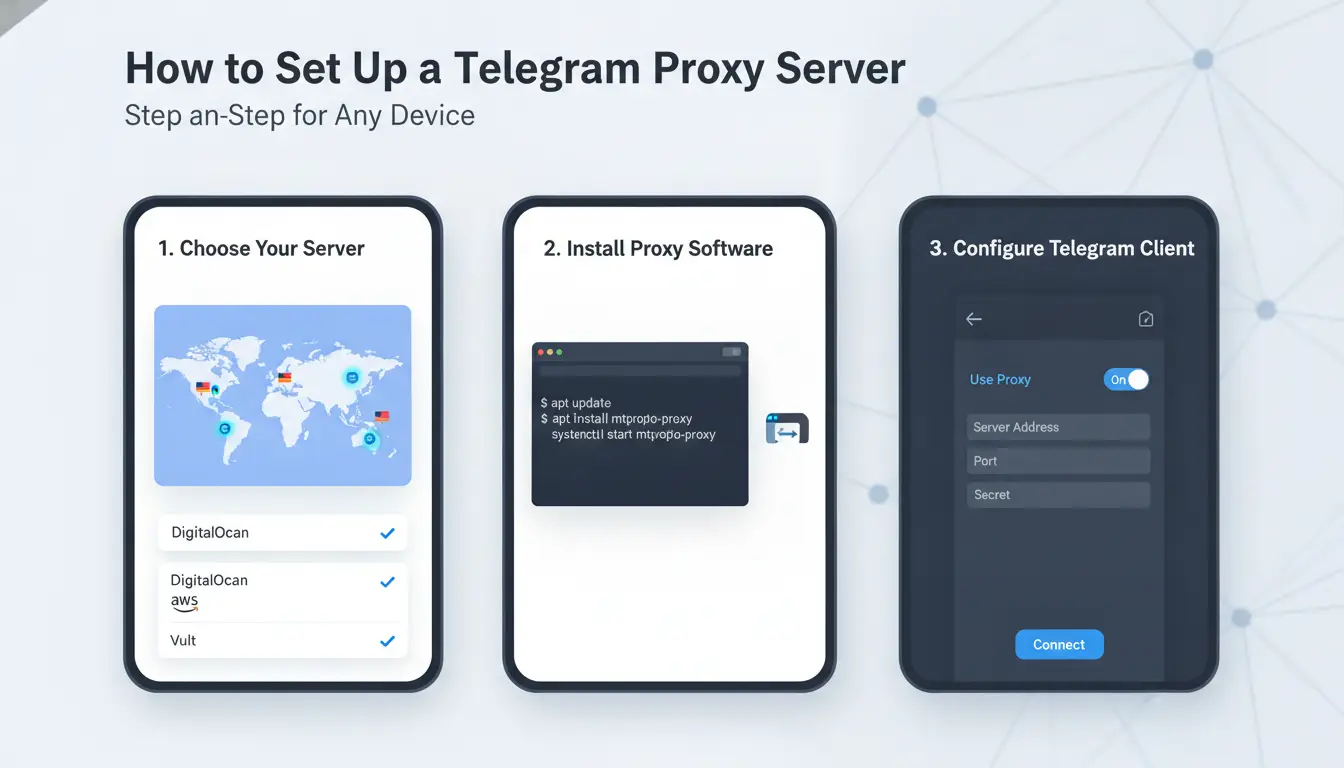
Setting up a telegram proxy server is fast if you know where to look in the app. Just one mistake, like typing the wrong port or missing a step, can block all your chats. Here’s how to do it right on every device, with tips for both telegram MTProto proxy and SOCKS5 proxy options.
How to Add a Proxy in Telegram Mobile Apps (Android & iOS)
Head to Telegram’s main screen, open Settings, then tap Data and Storage. Scroll down to "Proxy Settings." Tap "Add Proxy."
- For MTProto: Enter the server address, port, and secret key.
- For SOCKS5: Enter the server address, port, and, if needed, your username and password.
After saving, make sure the toggle is ON. You’ll see a shield icon if the connection works. If you get "Connecting..." for more than a few seconds, double-check all info or try another proxy.
How to Set Up a Proxy in Telegram Desktop
On desktop, click the three lines in the top left. Go to Settings → Advanced → Connection Type. Choose "Use Custom Proxy."
- For telegram SOCKS5 proxy: Enter address, port, and credentials if needed.
- For MTProto: Fill in server, port, and secret.
Click "Save." Watch for a shield icon in your chat list, this means you’re connected. If messages fail to send, check for typos, or switch between MTProto and SOCKS5 types. Some networks only allow one kind. 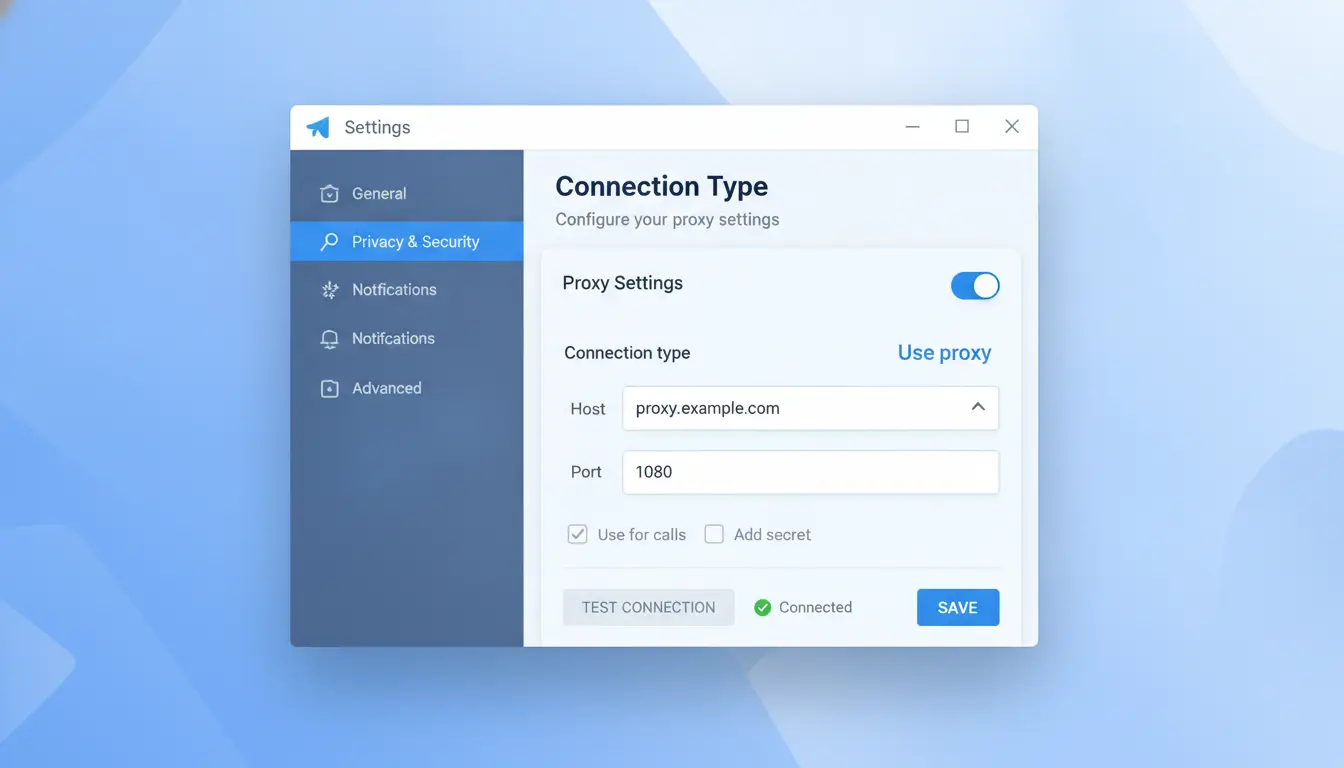
Where to Find Reliable Telegram Proxy Server Addresses
Only use telegram proxy addresses from trusted sources. Popular options include t.me/proxy for public proxies, or Telegram’s official FAQ for setup guides. Never trust proxies from random sites, they may log data or fail often.
To test a proxy, add it and send a message. If you connect fast and messages deliver, it’s working. A working proxy keeps you online when others can’t connect.
What Are the Main Risks and Mistakes When Using Telegram Proxies?
Using a telegram proxy server seems simple, but small errors can lead to account flags or failed connections. Each proxy type, MTProto, SOCKS5, or others, handles traffic differently. If you pick the wrong one or rely on a provider you barely know, the risks multiply. Here’s what most users miss and what actually causes trouble.
Why Some Proxies Leak Your Real IP or Fail to Connect
Not every proxy hides your real IP as promised. Many users grab a free telegram proxy server from forums or unknown sites. If that server logs traffic or misroutes connections, Telegram can spot the mismatch and restrict your account. Technical misconfigurations, like using SOCKS5 instead of a telegram MTProto proxy for Telegram’s encrypted channels, often mean your real IP still slips through. Even a typo in the server address or wrong port can cause Telegram to ignore your settings and reconnect directly, exposing your true location. That’s why it’s safer to check provider reputation and test connection logs. See Telegram’s official proxy guide for setup details.
How Free Proxies Can Put Your Privacy or Account at Risk
Free proxies look tempting, but they often record every message, login, and session. Some even inject spam or malware during use. A telegram SOCKS5 proxy from a random list can be targeting your data, not just passing traffic. Many “free” servers are built to harvest credentials or leak chat history. If you’re managing sensitive channels or team accounts, using a free proxy is the fastest way to lose privacy and control. Paid options, like those from ProxyMarket, usually have audits and clearer policies, lowering risk.
Common Setup Mistakes That Cause Telegram to Disconnect
Misconfiguring your telegram proxy server is more common than you think. Users often enter the wrong port or set up an MTProto proxy where SOCKS5 is needed. Forgetting to update proxy settings after changing networks leads Telegram to drop the connection and reconnect without protection. If you run multiple devices, not syncing proxy settings across all of them causes session mismatches. Always verify settings after any change, otherwise, Telegram may ignore your proxy and reconnect directly. For step-by-step checks, review Telegram’s troubleshooting page.
How to Manage Multiple Telegram Accounts Safely with Proxies (and DICloak)
Running several Telegram accounts on the same device or network can quickly lead to bans. Telegram’s system is built to spot patterns. If two accounts keep logging in from the same IP or share the same device fingerprint, it’s only a matter of time before they get linked, and sometimes restricted. Using the wrong telegram proxy server makes things worse: some proxies leak enough info that Telegram sees through the separation. Even a solid setup can fail if you don’t isolate accounts with care.
Why Managing Multiple Accounts Gets Risky Without Isolation
Most bans happen when Telegram connects the dots between accounts. If you use the same IP address, a shared device, or a proxy that doesn’t swap out fingerprints, accounts start to look related. For example, running five accounts through one telegram SOCKS5 proxy means Telegram can match them by IP. Worse, device fingerprints, like browser details or OS info, act as another marker. The more overlap, the higher the risk.
How DICloak Helps: Isolated Profiles and Proxy Integration
The safer approach is to give each account its own telegram proxy server and a unique browser fingerprint. You can use a telegram MTProto proxy for better privacy, or a SOCKS5 proxy if your network blocks MTProto traffic. DICloak lets you set up a separate profile for each Telegram account. Each profile can have a different proxy, device fingerprint, and session. That means if one account has a problem, the others stay safe. Isolating both proxy and fingerprint is the single best way to prevent mass bans.
Team Collaboration and Automation for Telegram Account Management
If a team needs to manage these accounts, sharing raw logins is risky. DICloak lets you give team members access to profiles with set permissions, no one sees passwords they don’t need. For busy teams, DICloak’s built-in RPA tools can automate steps like logging in, sending bulk messages, or rotating proxies. That cuts mistakes and keeps accounts safer, even as the team grows. For more on safe automation, check DICloak’s official site.
What to Do If Your Telegram Proxy Server Stops Working
How to Diagnose Proxy Connection Issues
If Telegram suddenly won’t connect, check whether the proxy is responsible. Open Telegram’s settings and see if your current proxy shows as “connected.” If not, try visiting a site like ping.pe to test your proxy server’s status. A telegram MTProto proxy should respond quickly, if it times out, it’s likely blocked. Sometimes, switching to a telegram SOCKS5 proxy can help, but only if your network allows it.
When to Switch Proxies and What to Look for in a Replacement
Frequent disconnects, random lag, or error messages usually mean your proxy is overloaded or flagged. If several users report the same problem, your telegram proxy server may be blacklisted. Look for a replacement with a fresh IP and low usage. Check official Telegram documentation and trusted proxy lists before switching.
How to Keep Your Telegram Connection Stable Long-Term
Don’t keep using a single proxy for months. Update your proxy list every few weeks and watch for login alerts or suspicious session activity. Rotating proxies and keeping each account separate lowers the ban risk. Tools like DICloak let you bind a unique proxy to each Telegram profile, automate routine checks, and share team access safely, making multi-account management much more stable.
Best Practices for Choosing and Using Telegram Proxy Servers Safely
Choosing the right telegram proxy server isn’t just about getting around network blocks. It’s about keeping your messages safe, your accounts stable, and your activity private. A few practical steps make the difference between smooth use and sudden restrictions.
How to Evaluate Proxy Server Trustworthiness
A proxy that looks open today might be gone tomorrow, or worse, snooping on your traffic. Always check who runs the proxy. If the provider hides their identity, offers no uptime data, or changes addresses often, that’s a red flag. Reliable telegram proxy servers share uptime records or let you see recent connection stats. Look for public discussions or reviews on sites like Reddit’s r/Telegram to spot common complaints about disconnects or security scares. If you see sudden IP changes or your Telegram app warns you about suspicious activity, switch proxies fast.
Why Rotating Proxies and Profiles Matters for Security
Sticking to one proxy or device profile makes your pattern easy to spot. Telegram’s anti-abuse systems flag accounts that always connect from the same unusual IP, especially if it’s shared by others. By switching between different telegram MTProto proxies and using fresh browser or app profiles, you cut the risk of being grouped with spam accounts. A tool like DICloak lets you assign a unique proxy and browser fingerprint to each Telegram account, helping you avoid bans from repeated environments or IP overlap.
How to Keep Your Telegram Data Private When Using Proxies
Not all proxies keep your info safe. Some log traffic or leak your login data. Always avoid free proxies that don’t publish privacy details. When connecting, never share Telegram credentials with a proxy site, configure the proxy only in your Telegram app settings. Clear cookies and session data after switching proxies to prevent cross-account leaks. For team use, keep each account in a separate browser profile and restrict access. The safest habit is to treat every proxy as semi-trusted, never reuse passwords or store sensitive info in plain text.
FAQ: Telegram Proxy Server Troubleshooting, Legality, and More
Why won’t my Telegram proxy server connect?
Most connection issues come from using the wrong proxy type or a bad address. Make sure your telegram proxy server uses the MTProto protocol, not just SOCKS5, if you want full support and better privacy. Double-check that the server IP and port are correct. Some networks block certain ports, especially public SOCKS5 proxies. Try switching to a different telegram MTProto proxy or test your connection on another network.
Is using a Telegram proxy server legal?
In most countries, using a telegram proxy is legal, but some places have strict rules about bypassing network blocks. Check your local laws or search Telegram’s official FAQ. You’re responsible for any risks if you use a proxy to get around restrictions.
Will a proxy keep my messages private?
A telegram MTProto proxy encrypts messages between your app and the proxy. But once traffic leaves the proxy, your privacy depends on Telegram’s own security. SOCKS5 proxies don’t offer built-in message encryption. For secure chats, always use official Telegram clients and settings.
Frequently Asked Questions
Is using a Telegram proxy server legal in my country?
Legality depends on your local laws and why you use a telegram proxy server. Some countries block Telegram or restrict proxy use. Before connecting to a proxy, check official regulations in your region. Using a telegram proxy server for illegal activities, like hiding crime, is never allowed and can lead to penalties.
Can I use the same telegram proxy server for multiple Telegram accounts?
You can use one telegram proxy server for several accounts, but this increases risks. Telegram may link accounts sharing the same proxy, which could result in bans or restrictions. To stay safe, use separate proxies for each account or choose a telegram MTProto proxy designed for privacy.
Why does my Telegram proxy keep disconnecting or failing?
Common issues include downtime or maintenance on the telegram proxy, incorrect proxy settings, or your internet provider blocking proxy traffic. Double-check your proxy details and try a different telegram SOCKS5 proxy if problems persist. Some proxies also have limits on user numbers, causing drops when overloaded.
How do I know if my Telegram proxy is safe to use?
Choose a telegram proxy server from reputable providers. Avoid free proxies, because they may log your data or leak your personal info. Look for clear privacy policies and user reviews. A telegram MTProto proxy is often safer, since it encrypts traffic between you and Telegram.
Can I switch between different proxies in Telegram easily?
Yes, Telegram lets you add and switch between proxy servers in the app’s settings anytime. You can set up a telegram SOCKS5 proxy or MTProto proxy by entering the server details. Switching proxies is quick and does not affect your chats or contacts.
A Telegram proxy server is an effective solution for bypassing censorship and ensuring private, uninterrupted access to Telegram. By using a reliable proxy, users can improve their privacy and maintain smooth communication even in restricted environments. Try DICloak For Free
 Web Proxy Tools
 Free Tools
 Cookie Plugin
 UA Generator
 MAC Address Generator
 IP Generator
 IP Address List
 2FA Code Generator
 World Clock
 Anonymous Check
 WebRTC Leak Test
 UUID Generator
 Free Web Proxy Site
 Proxy Checker
 FB Ad Checker
 AI Web Scraping
 Free SMM Tools
 Twitter Shadowban Checker
 Instagram Name Checker
 UTM Generator
 Username Generator
 AI Hashtag Generator
 LinkedIn Headline Generator
 Social Media Image Resizer