TikTok Shop is no longer just a place for viral products and quick trends. In 2026, it has become a real sales channel for small sellers, growing brands, and first-time entrepreneurs who want to turn content into orders. That opportunity is exciting, but it also creates a lot of questions. Many beginners still do not know what it takes to get approved, how to set up a store the right way, or what actually helps products sell once the shop goes live.
This guide walks through the full process of how to sell on TikTok Shop step by step. You will learn what sellers need before opening a shop, how to register, how to build better product pages, how to attract traffic, and how to avoid common mistakes that slow growth. If you want a clear starting point without getting lost in vague advice, this article will help you understand what matters most and where to focus first.
What Are TikTok Shop's Eligibility Criteria for Sellers?
If you want to learn how to sell on TikTok Shop, start with the seller approval rules. TikTok Shop checks who you are before it lets you open a store. In the US, sellers usually need to be at least 18 and submit real identity, tax, bank, and address details. These are part of the basic TikTok Shop seller requirements. If your information does not match across your forms and documents, approval can slow down or fail. TikTok also reviews some product categories more closely, so opening a shop and getting a product approved are not always the same step.
Minimum requirements to open a TikTok Shop
Most new sellers need a valid ID, tax information, a bank account for payouts, and clear documents that match the name and details used during TikTok Shop seller registration. This matters more than many beginners think. A blurry ID photo, an expired document, or a mismatch between your signup name and bank record can cause problems. If you plan to publish your first TikTok Shop product listing, some categories may also need extra review.
Can individuals sell without a business license?
In many cases, yes. TikTok Shop allows individual sellers in the US, so you may not need a business license just to get started. That can help small sellers test products before building a larger business. For example, someone selling handmade accessories may begin as an individual seller first. Still, that does not mean there are no rules. Some products need extra documents before they can go live, even after the shop is approved.
Common reasons applications get rejected
Most rejections happen because of simple setup mistakes. Common problems include blurry ID uploads, expired documents, mismatched information, or contact details already linked to another account. Some sellers also get rejected because they choose restricted products or make claims that break platform rules. This is one reason people ask, Is TikTok Shop safe? The answer is that TikTok Shop does have real checks in place, and those checks affect both store approval and later tools like TikTok Shop affiliate marketing and TikTok Shop live shopping. If your setup is clean from the start, the rest of the process becomes much easier.

How to Register and Set Up Your TikTok Shop
Once you understand the basic rules, the next step in how to sell on TikTok Shop is setting up your seller account the right way. This part matters more than many beginners expect. A clean setup helps you move faster to approval, product upload, and your first sale. TikTok's official seller guides show that the process usually starts with sign-up, then verification, tax details, product setup, and account linking.
Step-by-step guide to registering as a seller
If you are learning how to sell on TikTok Shop, the seller setup process usually follows a clear order.
- Go to TikTok Shop Seller Center and create an account. You can usually sign up with an email, phone number, or an existing TikTok account.
- Choose your seller type. TikTok Shop normally asks whether you are registering as an individual or a business. Pick the one that matches your real situation and documents.
- Fill in your basic store and identity information. This includes your legal details and other required profile information. Make sure everything matches your official records.
- Submit your verification and tax details. This is a key part of TikTok Shop seller registration. Wrong or incomplete information can slow down approval.
- Set up your payout method. Add the bank details TikTok Shop needs so you can receive payments after sales start coming in.
- Wait for review and move to store setup. Once approved, you can begin creating your first TikTok Shop product listing and prepare your store for launch.
A small seller might start as an individual, finish identity and tax checks, and then upload a few products. A larger brand may register as a business and complete more setup at the beginning. The path can look a little different, but the goal is the same. You want a clean, accurate account that is ready for review and ready to sell.
Which documents are required during registration?
The documents depend on the seller type, but TikTok's US seller materials make the basics clear. Individual sellers are asked for legal name, date of birth, residential address, ID expiration date, SSN or ITIN, bank account details, ID documents, address verification, and a W-9 form. TikTok also says your phone number or email must not already be tied to another TikTok Shop account. These are part of the current TikTok Shop seller requirements, and they should match exactly across every form you submit.
This is where many new sellers lose time. Someone may upload a good ID but use a different address on the bank account or type a nickname instead of a legal name. That can create review problems even before the store goes live. If you want a smoother start, prepare your ID, tax form, bank details, and address proof before you begin. That small step can make the setup feel much easier.
How to link your TikTok account to your shop
After your documents are approved, you can link your TikTok account to the shop. TikTok's official guidance says sellers can go to Seller Center, open Linked Accounts, and connect an Official Account by scanning a code and approving access. Sellers can also invite Marketing Accounts. In some TikTok Shop regions, a store can bind one Official Account and several Marketing Accounts, which helps with content and promotion. This matters if you plan to grow through videos, TikTok Shop affiliate marketing, or TikTok Shop live shopping later on.
This account link is more than a technical step. It connects your shop to the content side of TikTok. That is what helps shoppers move from watching to buying. It also helps explain why people ask, Is TikTok Shop safe? From the seller side, TikTok is not just letting stores appear without structure. It uses verification, account linking, and policy rules to build a more controlled selling system.
Mistakes to avoid during the setup process
The biggest setup mistakes are usually small ones. Sellers often use an email or phone number that was already used elsewhere, upload unclear documents, rush through tax details, or skip reading category rules. TikTok also makes clear that some branded or trademarked items need brand authorization before they can be listed, and some categories need separate qualification approval. So even if your account setup looks done, your selling setup may not be complete yet.
A good way to avoid delays is to think in order. First, create the account with fresh contact details. Next, submit clear and matching documents. Then finish tax and payout setup. After that, link your TikTok account and check whether your category or brand needs extra approval. Sellers who follow that order usually have a smoother path than sellers who jump ahead and try to publish too fast. That early discipline makes the rest of how to sell on TikTok Shop much easier.
How to Create and Optimize Your TikTok Shop Storefront
Once your account is approved and linked, the next part of how to sell on TikTok Shop is making your store look clear, trustworthy, and easy to shop. This matters because shoppers do not only see one product. They also judge the whole store. A messy page can make even a good item feel risky. A clean store can help people feel more confident, which also connects to a common question, Is TikTok Shop safe? For many buyers, trust starts with what they see on the product page and store home. TikTok's Shop Design tool lets sellers add logos, banners, product collections, and promotions, and TikTok says stores using Shop Design convert at 3.78%, compared with 1.73% for stores without it.
Tips for designing a user-friendly storefront
A good storefront should feel simple. Use a clear logo, one strong banner, and product groups that make sense. Do not try to show everything at once. If you sell skincare, for example, it is better to group items into "Daily Basics," "Acne Care," and "Travel Size" than to place all products in one mixed row. TikTok's own guidance says Shop Design can be used to build a more branded and organized shopping experience, which helps shoppers trust the store and browse more easily.
How to write compelling product descriptions
Your description should answer the buyer's first questions fast. What is it, who is it for, what problem does it solve, and what should the buyer expect? TikTok Shop's product listing guide says descriptions should focus on selling points in short paragraphs, and product titles should be accurate, clear, and built around real product details rather than hype. A weak TikTok Shop product listing often sounds vague, like "best beauty item ever." A stronger one says something specific, like "lightweight gel moisturizer for oily skin with niacinamide and no added fragrance." That gives the shopper a reason to trust the page.
Best practices for showcasing product images
Images do a lot of the selling on TikTok Shop. TikTok's current listing guide says sellers need at least one image, can upload up to nine, and should use high-resolution images with a minimum size of 600 by 600 pixels. It also says the main image should show the full product, and sellers should avoid watermarks, misleading edits, or extra text. In practice, that means one clean hero image, then a few angles, close-ups, and simple use shots. If you sell a lunch box, do not only show the closed box on a white background. Show the inside, the size in hand, and how it looks with food packed inside. That makes the listing easier to trust and easier to buy.
How to use TikTok analytics to refine your storefront
After the store goes live, do not guess what is working. Check the data. TikTok Shop's analytics tools let sellers review product performance, content performance, traffic, sales, and shop-level metrics like conversion and service quality. TikTok says Product Analytics can help sellers improve pricing, content, and marketing efficiency, while Product Intelligent Analysis shows product views, orders, GMV, creator activity, and ad impact. A simple example is a store that gets many product views but few orders. That usually points to a weak listing page, pricing issue, or lack of trust signals. If one item sells well during TikTok Shop live shopping or through TikTok Shop affiliate marketing, look at that product page closely and use what worked there across the rest of the store.
How to Upload and Manage Products in Your TikTok Shop
Once your storefront is ready, the next step in how to sell on TikTok Shop is adding products the right way. This affects visibility, approval, and sales. TikTok allows sellers to upload products one by one or in bulk through Seller Center. Each listing needs complete and accurate information before it can go live.
Step-by-step guide to adding products to your shop
The process is easier when you follow a clear order.
- Go to Seller Center and open the Products section.
- Add the main product details, such as the name, category, price, stock, and images.
- Complete the required fields, including product attributes and shipping details.
- Submit the listing and wait for review.
For example, a water bottle listing works better when it includes the size, material, lid type, shipping weight, and clear photos.
How to categorize products for better visibility
Category choice affects both discoverability and approval. If a product is placed in the wrong category, buyers may not find it, and the listing may face review issues. Some products also need extra category approval before they can go live.
Managing inventory and stock levels effectively
Stock management is a big part of running a stable shop. If stock numbers are inaccurate, sellers can face cancellations, shipping delays, and performance issues. This matters even more when a product starts getting traffic from TikTok Shop affiliate marketing or TikTok Shop live shopping.
How to update product listings to boost sales
A product page should not stay unchanged after it goes live. Sellers should update weak titles, missing details, and poor images when needed. For example, a title like "Portable Blender Cup for Travel" is too broad. "Portable USB Blender Cup 350ml for Smoothies and Protein Shakes" gives buyers much clearer information. Small updates like this can improve clicks and conversions.
How to Promote Your TikTok Shop and Drive Sales
Once your products are live, the next step in how to sell on TikTok Shop is getting the right people to see them. A strong store and a clear TikTok Shop product listing matter, but visibility matters too. On TikTok Shop, sales often come from a mix of ads, creator partnerships, and steady organic content.
Using TikTok ads to target your audience
TikTok Shop now gives sellers several ways to promote products through paid traffic, including tools like GMV Max and Smart Promotion. These tools can help sellers test campaigns and improve reach. Still, ads work best when the product page is already clear and easy to trust. For example, a seller may get clicks on a trending product, but weak images or vague copy can still hurt conversions.
How to collaborate with influencers for promotions
Creator partnerships are a big part of TikTok Shop affiliate marketing. Sellers can work with creators through TikTok's collaboration tools, and creators can promote products for commission. This works best when the creator's audience matches the product. For example, a skincare item is usually a better fit for a beauty-focused creator than for a broad lifestyle account.
Organic strategies to increase shop visibility
Organic content still matters, especially for newer shops. Short videos, product demos, and useful content can help build trust and drive traffic without relying only on ads. TikTok Shop live shopping also plays an important role here. For example, a seller offering lunch containers can post meal prep tips or size comparisons instead of only pushing sales. That kind of content feels more useful, helps products stand out, and makes the shop feel more trustworthy over time.
Common Mistakes TikTok Shop Sellers Make and How to Avoid Them
As you keep learning how to sell on TikTok Shop, small mistakes can start costing you real sales. A weak page, missed data signals, shipping problems, or policy violations can slow growth even when the product itself is good. TikTok's seller materials put strong focus on listing quality, fulfillment, and compliance, which shows how much these basics matter.
Why poor product descriptions hurt your sales
Poor descriptions make shoppers hesitate. TikTok says listings should be accurate, complete, and easy to understand, and product details should match what buyers receive.
For example, "high quality hair tool" is too vague. A better listing explains the barrel size, heat settings, hair type fit, and what comes in the box. That gives buyers more confidence and reduces disappointment later. It also makes the TikTok Shop product listing stronger.
How ignoring analytics can lead to missed opportunities
Some sellers keep posting without checking the numbers. That is a mistake. TikTok's analytics and Opportunity Insights tools help sellers spot demand trends, content performance, and product opportunities.
For instance, a creator video may bring clicks through TikTok Shop affiliate marketing, but low orders may point to a weak product page or poor pricing. The same thing can happen in TikTok Shop live shopping. If you do not check the data, you may keep fixing the wrong problem.
Overcoming fulfillment and shipping challenges
Shipping problems can hurt a store fast. TikTok tracks fulfillment performance, and seller-caused shipping issues can affect enforcement and overall store health. TikTok has also expanded shipping tools in the US to improve delivery consistency.
For example, a product may start trending, but if stock is low or orders ship late, buyers may cancel or leave poor feedback. That is one reason people ask, "Is TikTok Shop safe?" A shop feels safer when products arrive on time and match the listing.
Avoiding compliance issues with TikTok Shop policies
Policy mistakes often begin with wrong categories, misleading images, restricted items, or duplicate listings. TikTok says sellers must follow platform rules, product restrictions, and applicable legal requirements. It also warns against duplicate or mass-created listings that hurt buyer trust.
So even after TikTok Shop seller registration, the work is not done. Sellers still need to keep listings honest, review category rules, and make sure they have the approvals or licenses required for their products. That is a big part of how to sell on TikTok Shop without avoidable setbacks.
Advanced Tips for Scaling Your TikTok Shop Business
Once your store is stable, the next step in how to sell on TikTok Shop is scaling without losing control. At this stage, growth usually comes from improving a few key areas, not from doing everything at once.
How to leverage TikTok Live for real-time sales
LIVE can do more than bring views. It can help turn interest into orders while buyers are still watching. TikTok Shop now includes LIVE tools like coupons, giveaways, and flash sales to support this. For example, a skincare seller can use a short LIVE session to show product texture, answer questions, and offer a limited discount. That is one reason TikTok Shop live shopping has become such an important sales channel.
Automating processes to save time and resources
As your shop grows, repeated work can take up too much time. TikTok now offers tools like automatic listing sync for Shopify sellers and bulk actions for shoppable videos. These can help sellers update content faster and reduce manual work. For example, a shop that adds new products every week can save time by syncing listings instead of uploading everything by hand.
Expanding your product range strategically
Many sellers grow too fast by adding too many unrelated products. A better approach is to expand based on demand signals. TikTok's analytics tools can help sellers spot product trends and market gaps. For example, if one lunch container sells well, adding matching utensil sets makes more sense than jumping into a different product category.
How to use customer feedback to improve your shop
Customer feedback can show sellers what needs fixing. TikTok Shop lets sellers review customer comments, ratings, and refund patterns in Seller Center. For example, if buyers keep mentioning weak packaging or unclear size details, that points to a real problem. Better images, clearer product text, or stronger packaging can improve trust and sales over time.
A Smarter Way to Manage Multiple TikTok Shop Accounts
As a TikTok Shop business grows, account management often gets more complicated. One account may be used for the shop, another for content testing, and another for affiliate or regional work. At that stage, the challenge is not only getting more sales. It is also keeping accounts separate, stable, and easy to manage. Using DICloak here makes sense because sellers can work with separate browser profiles, matched proxy settings, team access controls, and synchronized actions in one place.
Keep Multiple TikTok Accounts Separate
When several TikTok Shop accounts are handled on one device, overlap becomes a real risk. Cookies, login sessions, and browser fingerprints can mix together if everything runs in the same setup. A safer approach is to keep each account in its own isolated profile with its own fingerprint and browser state. That works well for sellers managing a main store account, content accounts, creator outreach accounts, or region-based accounts.

Pair Each Profile With Its Own Proxy
As more accounts are added, proxy management matters too. A more stable setup comes from pairing each profile with its own proxy and keeping that pairing consistent. This is useful for sellers handling different stores, markets, or campaign roles and trying to avoid making every login look the same.

Reduce Repeated Work With Synchronizer
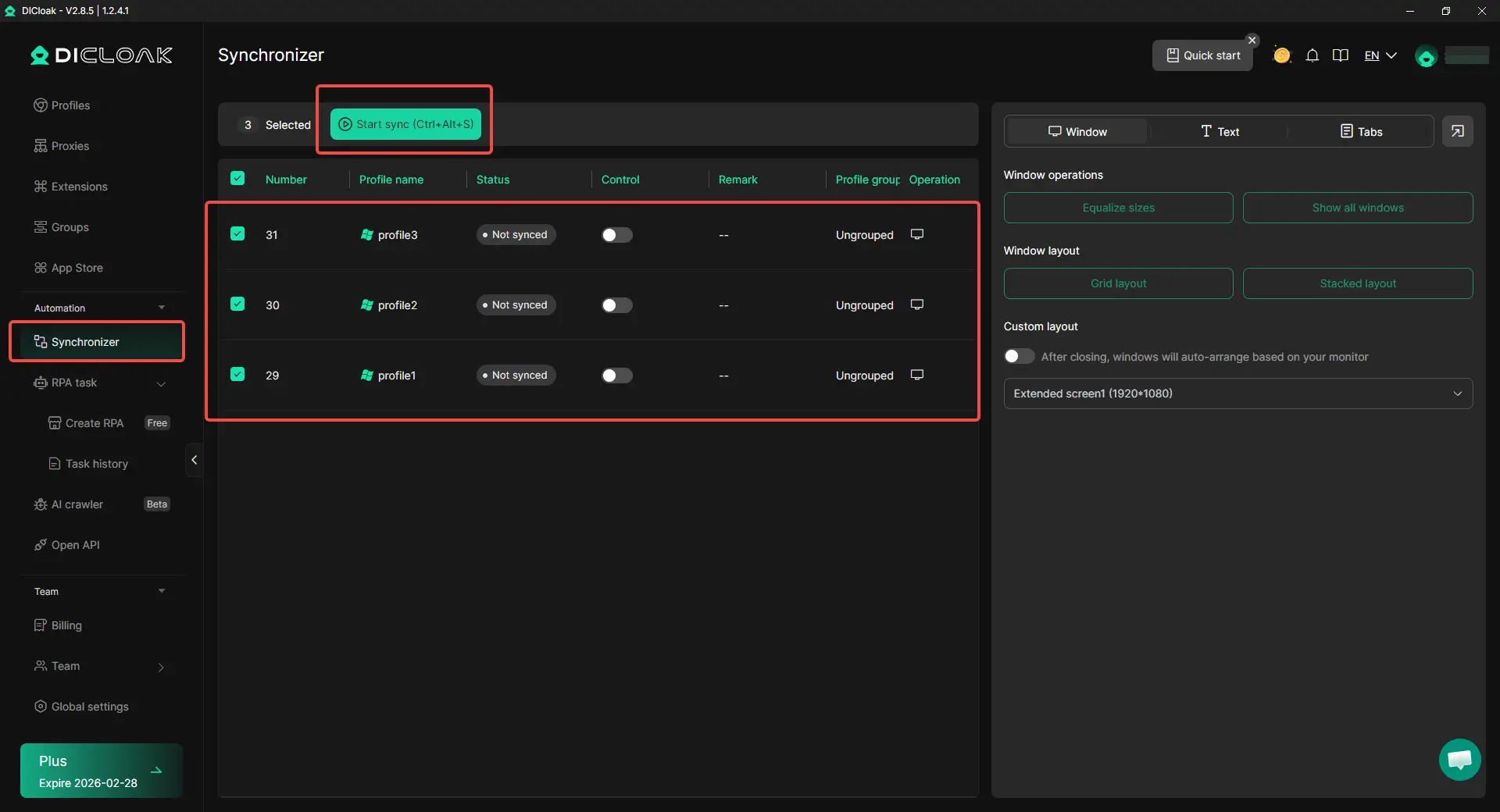
Repeated actions can waste a lot of time when the same task has to be done across many accounts. Opening the same page, switching tabs, or repeating the same steps again and again quickly adds up. With Synchronizer, the same URL can be opened across profiles at once, and actions like clicks and typing can be mirrored in real time. For sellers managing multiple content or store-side accounts, that can make daily work much faster and less messy.
Make Team Access Easier to Control
TikTok Shop work is often shared across a team. One person may update listings, another may contact creators, and another may handle customer replies. In that case, passing passwords around creates risk and confusion. A cleaner setup is to let team members work through shared profiles with permission controls, access limits, and activity logs. That keeps collaboration organized without losing track of who did what.

Frequently Asked Questions About How to Sell on TikTok Shop
How do beginners start learning how to sell on TikTok Shop?
Start by opening a Seller Center account, choosing a seller type, and preparing your ID, tax, and bank details. After approval, you can link your TikTok account, set up the store, and upload your first product.
Do I need a business license to learn how to sell on TikTok Shop?
Not always. Some new sellers can start as individuals, but they still need valid identity, tax, and bank information.
What do I need before I can start to sell on TikTok Shop?
You usually need a valid ID, matching registration details, tax information, and a bank account. Some products may also need extra approval or brand authorization.
How long does it take to get approved when learning how to sell on TikTok Shop?
It depends, but approval often takes around 3 to 5 business days if your documents are clear and correct.
What are the biggest mistakes to avoid when learning how to sell on TikTok Shop?
Common mistakes include mismatched documents, wrong product categories, restricted items, and misleading product pages or content.
Conclusion
Selling on TikTok Shop in 2026 starts with getting the basics right. Sellers need to meet the platform's requirements, complete setup carefully, and build product pages that are clear, accurate, and easy to trust. A strong store is not only about listing products. It also depends on good images, useful descriptions, smart category choices, and clean account setup.
Growth comes from steady execution. Ads, creator partnerships, organic content, and live selling can all help bring traffic, but better sales usually come from strong listings, good fulfillment, and close attention to data. As a shop grows, automation, customer feedback, and better account management can make daily work easier and help the business scale with less confusion.
 Web Proxy Tools
 Free Tools
 Cookie Plugin
 UA Generator
 MAC Address Generator
 IP Generator
 IP Address List
 2FA Code Generator
 World Clock
 Anonymous Check
 WebRTC Leak Test
 UUID Generator
 Free Web Proxy Site
 Proxy Checker
 FB Ad Checker
 AI Web Scraping
 Free SMM Tools
 Twitter Shadowban Checker
 Instagram Name Checker
 UTM Generator
 Username Generator
 AI Hashtag Generator
 LinkedIn Headline Generator
 Social Media Image Resizer