- ResourcesOnline Tools



EN

As one of the world's leading social networks, Facebook connects billions of people globally. Yet, users occasionally encounter account restrictions, with permanent disabling being one of the most serious and impactful issues.
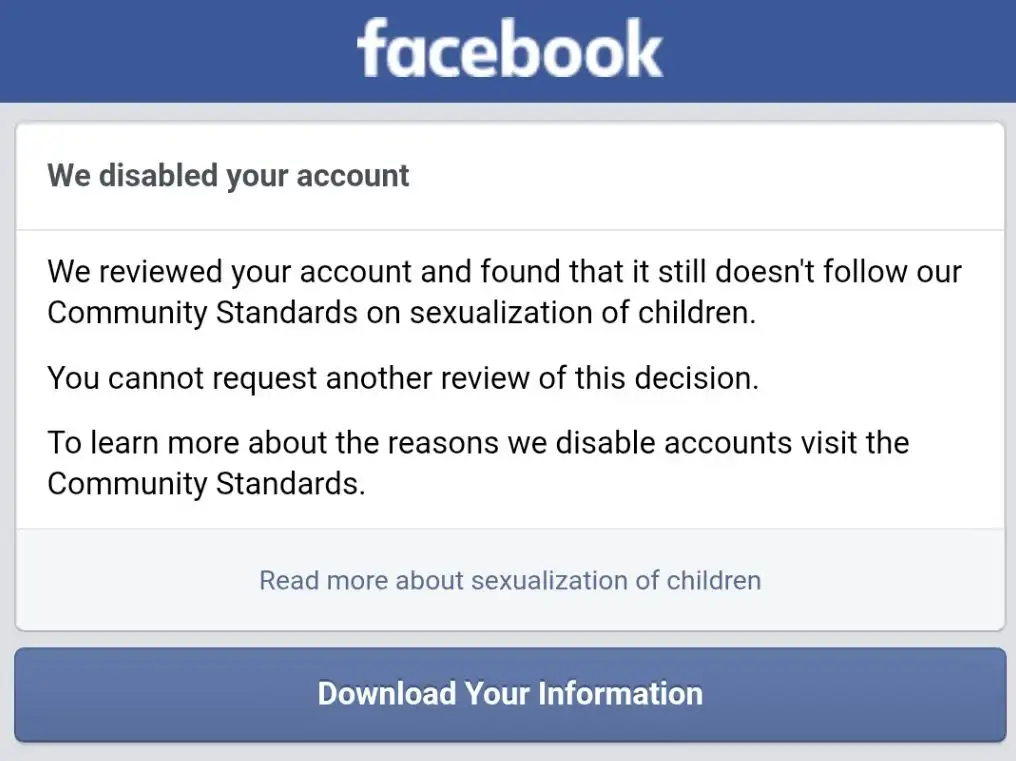
Typically, you may receive notifications like these before or upon account loss:
In this article, we will discuss the reasons and solutions for a 30-day account suspension, and more importantly, how to effectively prevent your Facebook account from being suspended in the future.
If you are still unsure why your Facebook account was disabled, you can open your Support Inbox to view the platform’s violation notice. Click “View Details” in the notification to see which specific post was flagged. Sometimes it may be a system error—in such cases, you can submit an appeal.
If your Facebook account is suspended for 30 days, don’t just wait—take these steps to speed up your account recovery.
Go to your Support Inbox or Account Quality page in Facebook. The notice will show the reason “suspicious activity” or “Community Standards violation”). Click “See Details” to find the flagged post or action.
If you believe it’s a mistake, appeal directly via
Facebook Help – Appeal a Suspension
✅ Briefly explain why your account was wrongly restricted
✅ Stay polite and factual—avoid emotional language
✅ Submit only once to avoid system delays
Complete verification if asked
Facebook may request:
Wait for review (usually 1–7 days)
Minor or mistaken violations often get resolved within days. Check your email and Support Inbox for updates.
If appeals fail
After 30 days, access is restored automatically. If you need a new account:
If your formal appeal to Facebook is unsuccessful, you can consider the following alternative approach to regain access to the platform responsibly and safely:
Use a different device or browser profile.
Connect through a new and clean IP address (avoid IPs, devices, or browsers linked to the suspended account).
You may use privacy-focused tools like Dicloak to assign a unique browser fingerprint and dedicated IP to the new account, reducing the risk of being associated with the previous suspended account.
Start with light, genuine activity—avoid adding many friends or joining multiple groups in a short time.
Use a phone number or email that hasn’t been linked to any restricted account.
Gradually increase engagement over several days to appear natural.
Carefully review Community Standards and avoid past mistakes.
Do not use automation tools, post questionable content, or log in from unstable networks.
This method helps rebuild your presence while minimizing the risk of being flagged again. Remember, maintaining authentic and policy-compliant behavior is key to long-term account security.
❌ Avoid posting similar content repeatedly: Publishing large volumes of content in a short period—especially duplicate text or content with links—can easily be flagged by the system as spam or advertising.
❌ Avoid adding many friends in a short period: Adding dozens of strangers immediately after registration may be seen as "marketing activity" and trigger risk control measures.
❌ Avoid posting or sharing sensitive content or comments: Even simple reposts can violate policies (e.g., violent images, hate speech, misleading news).
❌ Avoid frequently switching between multiple accounts in the same browser: Facebook may interpret this as "potential bot behavior."
✅ A safer approach is to use an anti-browser-fingerprinting profile isolation tool like DICloak. Its advantage lies in simulating real-user browser fingerprints, device parameters, and network profiles. It supports matching static IPs corresponding to the Facebook platform region, making each testing account appear as an independent real user, thus avoiding detection as a malicious or automated testing account.
✅ Follow Facebook's official blog and Meta Business Help pages. If you encounter a 30-day ban or advertising restrictions, immediately check your Support Inbox.
✅ Create isolated profiles that simulate fixed devices and IP addresses, maintain normal operations, avoid bot detection, support batch account management, and enable team collaboration.
To ensure your account remains secure in the future, besides adhering to the platform’s Community Standards, you can also consider using an antidetect browser. It helps create an independent online profile for your Facebook account, avoiding tracking by the platform.
Antidetect Browsers help users avoid Facebook account bans by masking browser fingerprints. This means Facebook cannot track your activities or identify suspicious behavior that might lead to account restrictions. Such browsers are often used by online marketers or spammers but are equally suitable for regular users who wish to protect their privacy and avoid being flagged by the platform.
Among the many antidetect browsers, DICloak stands out as the top choice.
DICloak is currently one of the best antidetect browsers, specifically designed to protect online privacy and prevent detection by Facebook. It employs advanced technology to simulate real browser configurations, making it nearly impossible for Facebook to detect any unusual activity. Additionally, DICloak hides your IP address and geolocation through proxy servers, further enhancing privacy and security.
A key feature of DICloak is its user-friendly interface, making it easy for anyone to get started. The browser is also regularly updated to stay ahead of Facebook’s detection algorithms, ensuring you can use it continuously and without worries.
Now, let's look at how to specifically use DICloak to create a new browser profile for your Facebook account to avoid being tracked by Facebook.
Step 1:
Click the button below to register for free, then download the software to your computer based on your operating system. The product offers both Windows and Mac versions—choose the one that fits your device.
Step 2:
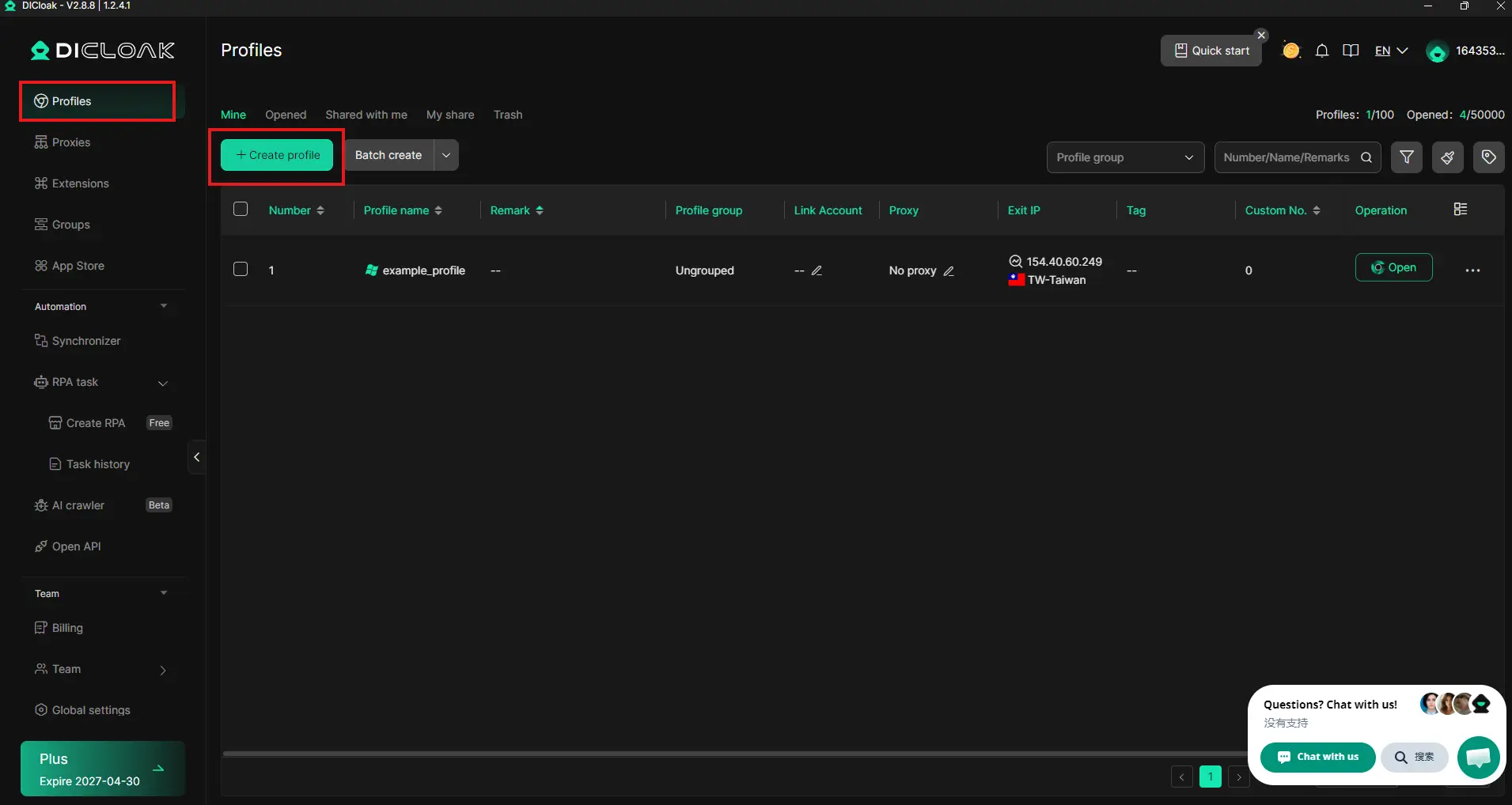
Launch the program and log into the client. Click the "Profiles" button in the top-left corner of the interface. Then select "Create profile" to open an profile and generate a completely new, unique web browser fingerprint.
Step 3:
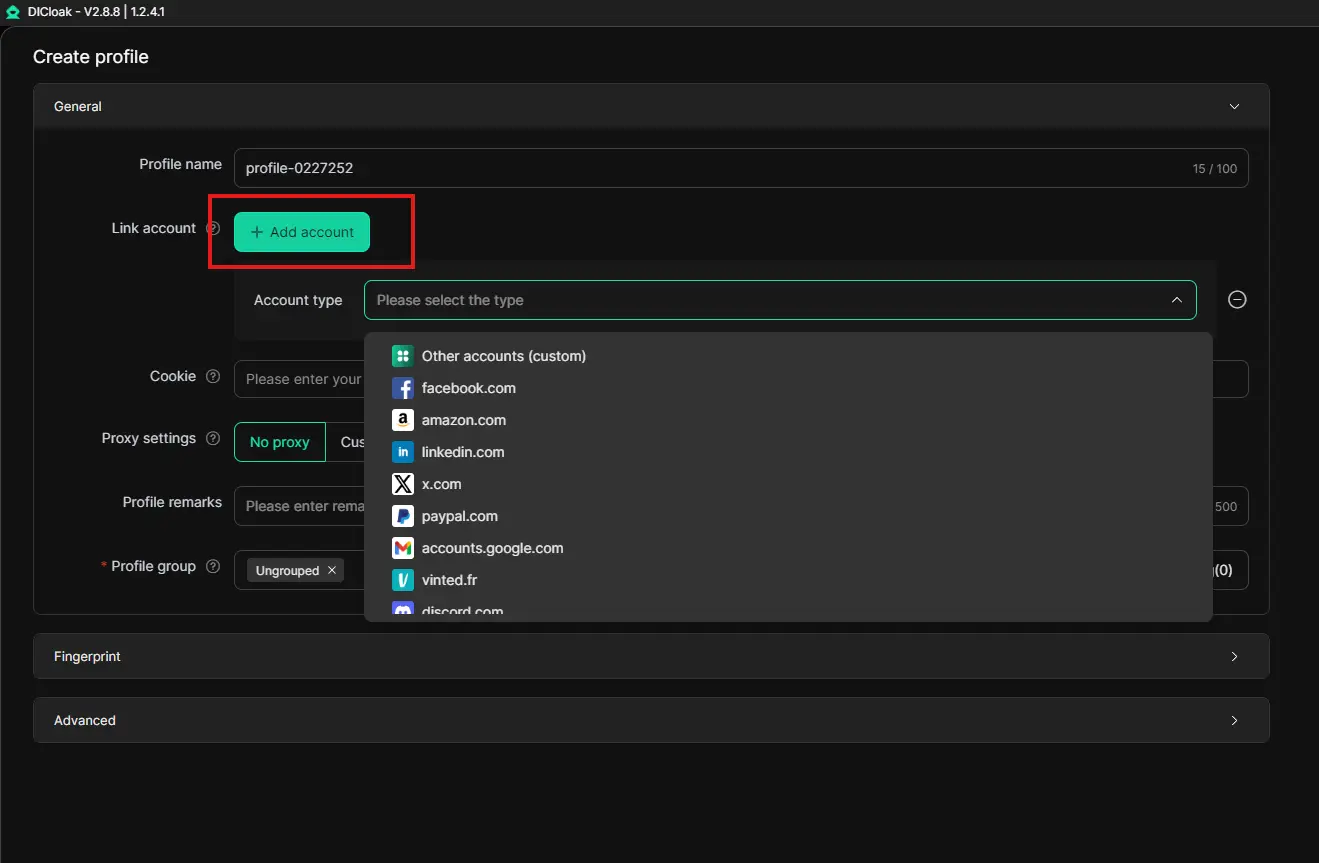
Add an account by clicking the account type and selecting the platform.
Step 4:
Return to the profile interface, click on the created profile, and proceed to the platform interface to start using it.
Therefore, it’s important to maintain multiple Facebook accounts and assign each a separate browser profile in DICloak to ensure your operations aren’t disrupted by account bans.
In addition to complying with platform rules and understanding the appeal process, taking proactive measures to prevent future bans is equally crucial. As we move into 2026, using antidetect browsers has become a mainstream strategy for efficiently managing social media accounts and significantly reducing risks. These tools help you create independent, secure digital profiles for each account, effectively avoiding automatic penalties triggered by platform tracking algorithms.
Among the many options available, DICloak offers a comprehensive and forward-looking solution. You can build a robust protection system through it, with specific operations including:
By integrating a tool like DICloak into your daily operations, you are essentially building a proactive technical barrier for all your Facebook accounts. It allows you to focus more on content creation and community engagement without worrying about potential bans caused by underlying technical profiles. In 2026, combining compliance strategies with advanced tools is undoubtedly the most reliable path to achieving long-term, stable account operations.
A: Facebook typically imposes a 30-day ban for violations of platform policies. Common reasons include: posting prohibited content (such as hate speech, violence, or false information), performing a large number of actions within a short period (e.g., frequently adding friends or sending messages), using false identity information, or having an abnormal login profile (such as frequently changing IP addresses). The system automatically detects suspicious activity and imposes restrictions once a violation is identified.
A: You can submit an appeal through Facebook's "Support Inbox" or "Account Status" page. Click the "View Details" or "Appeal" button in the ban notification, briefly explain the situation (e.g., "mistaken penalty" or "account hacked"), and upload the required identity verification documents (such as an ID card or passport). Keep the appeal clear and polite, avoid submitting multiple appeals, and note that the review process typically takes 1-7 days.
A: Yes, antidetect browsers like DICloak can help isolate account activities by creating unique browser fingerprints and fixed IP profiles, reducing the risk of bans triggered by abnormal login profiles or account associations. However, please note that such tools must be used in combination with compliant operations (such as adhering to community guidelines and avoiding spam behavior) to effectively serve as a preventive measure.
A: It is not recommended. Creating a new account during the ban period may be flagged by the system as "circumventing penalties," potentially leading to restrictions on the new account or an extension of the original ban. It is advisable to wait until the ban period ends before resuming use or to attempt an early resolution through the formal appeal process.
A: In addition to complying with platform rules, it is recommended to: 1. Enable two-factor authentication to protect account security; 2. Use privacy tools (such as DICloak) to manage multiple accounts or sensitive operations; 3. Avoid logging into important accounts on public networks or using proxies; 4. Regularly check "Account Security Settings" and remove any suspicious devices. If frequent operations with multiple accounts are required, it is advisable to configure an independent profile for each account.
Having your Facebook account banned is a common issue faced by many users, but it can be resolved with the right approach. Understanding the reasons behind the ban, submitting an appeal, and using antidetect browsers like DICloak can help prevent future restrictions while protecting your online privacy.
It is important to note that no method can completely eliminate the risk of an account ban. Adhering to Facebook’s rules and guidelines remains the best way to prevent account-related issues.