Opening a website only to find a "blocked" message is one of the most common frustrations on the internet. Whether you're at school, at work, or in a country with content restrictions, hitting this digital wall is an annoying dead end. What can you do? Is there an easy way around this?
There are several methods to bypass these blocks, but they vary greatly in effectiveness and safety. Some solutions are slow and insecure, while others are powerful and reliable. This guide cuts through the noise, ranking every method from most powerful to most dangerous, ensuring you can unblock any website with confidence and security.
Use a Standard Proxy IP to Unblock Websites
A Standard Proxy IP is a specific IP address provided by a proxy server. When you browse the internet through this IP, websites see the proxy IP instead of your real IP. This allows you to Unblock Proxy restrictions and access blocked websites.
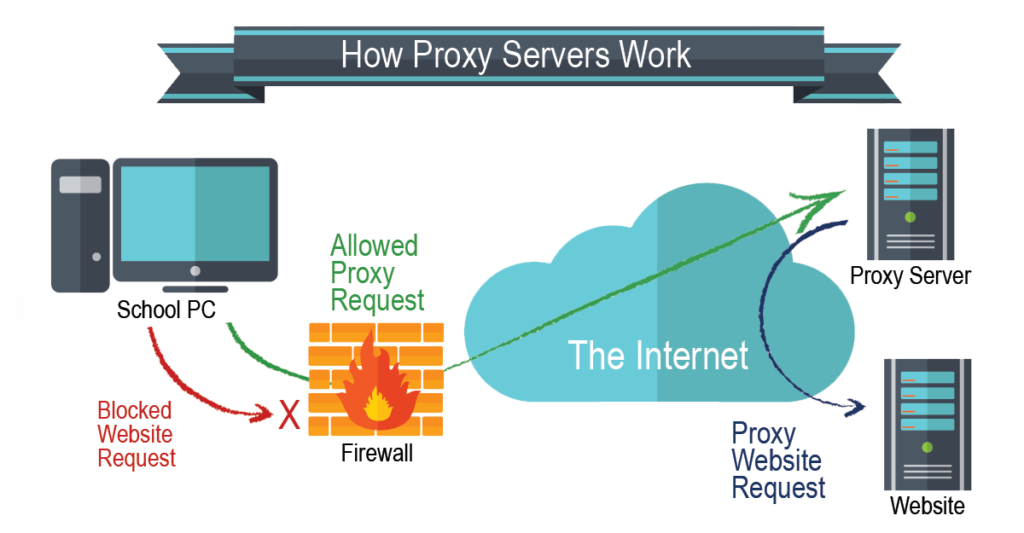
Example: If a video streaming site is blocked in your school, using a standard proxy IP from another region lets you watch content as if you were outside the school network.
Key Points to Consider:
- HTTP/HTTPS IPs: Easy to set up, works for most websites.
- SOCKS5 IPs: Fast, supports multiple traffic types, suitable for gaming or secure applications.
- Residential IPs: Harder to detect, useful when websites block known proxy IPs.
- Datacenter IPs: Very fast, good for heavy use, but easier to detect.
| Standard Proxy IP Type |
Advantages |
Disadvantages |
| HTTP/HTTPS |
Easy to set up, works on most websites |
Can be slow, blocked by advanced filters |
| SOCKS5 |
Fast, flexible, supports multiple protocols |
Requires technical setup |
| Residential |
Hard to detect, reliable |
Expensive |
| Datacenter |
Very fast, ideal for heavy use |
Easier to block by websites |
Recommendation: For everyday browsing or streaming, HTTP/HTTPS or SOCKS5 IPs are usually sufficient. Residential IPs are better for sensitive work requiring stealth.
Browser Extensions for Unblocking
Browser extensions let you manage proxies directly in your browser. They make it easy to Unblock Proxy without changing system settings.
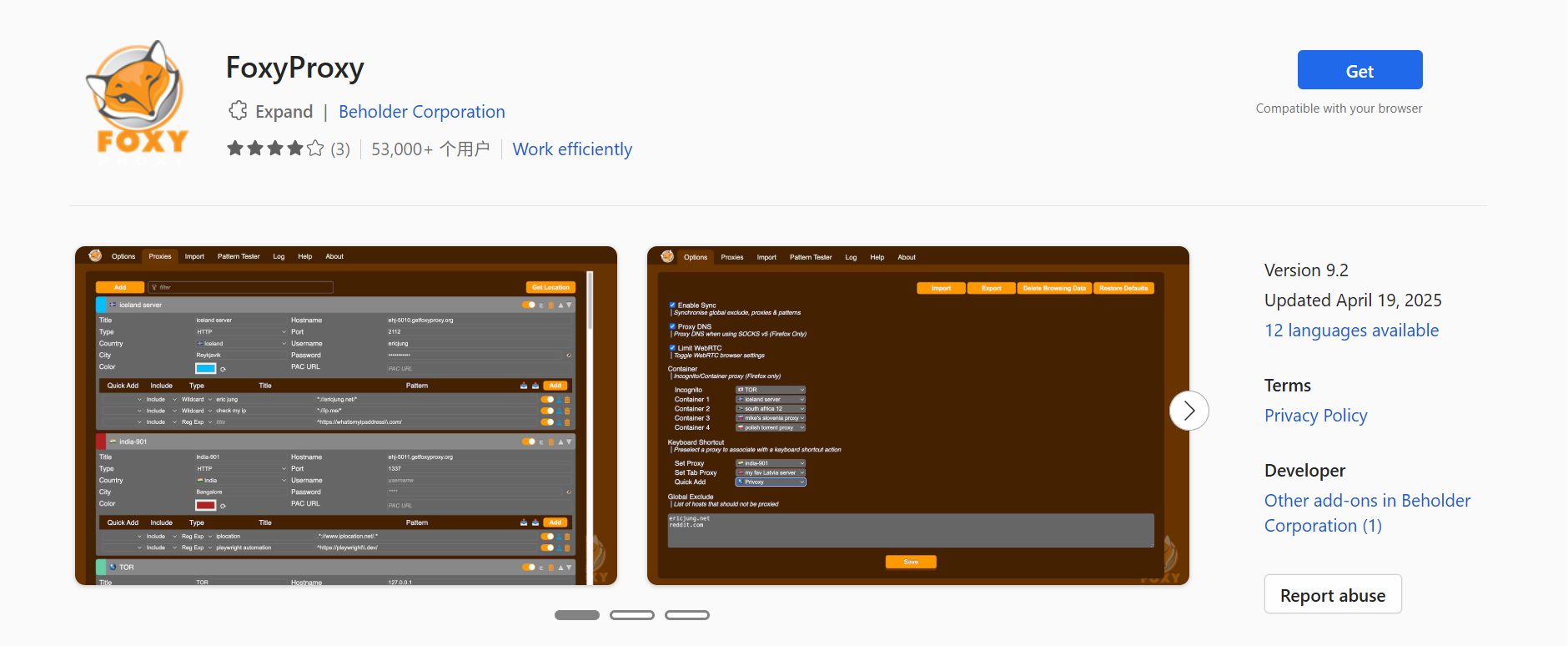
Example: Extensions like Proxy Switcher or FoxyProxy let you store multiple proxy profiles and quickly switch between them. This is useful for remote workers, researchers, or anyone who accesses multiple restricted sites daily.
Key Points to Consider:
- Easy setup and user-friendly interface.
- Works well with a reliable proxy IP.
- Quick switching between multiple proxies.
- Limited to browser traffic, doesn’t unblock everything.
| Method |
Advantages |
Disadvantages |
| Proxy Switcher/FoxyProxy |
Easy to switch proxies, simple interface |
Requires manual input of proxies |
| Browser-based extensions |
No system changes needed |
May not unblock all sites |
Recommendation: Best for occasional access and users who want a fast, simple solution. Pair with a good proxy IP for best results.
Using Tor for Unblocking Proxy
Tor Browser sends your traffic through multiple servers worldwide, hiding your location. This helps you Unblock Proxy when other methods fail.
Example: Journalists and activists often use Tor to access news sites blocked in their countries.
Key Points to Consider:
- High anonymity and privacy protection.
- Effective against strong censorship.
- Slower browsing due to multiple server hops.
- Some sites may block Tor exit nodes.
| Method |
Advantages |
Disadvantages |
| Tor Browser |
High anonymity, bypasses strong censorship |
Slower browsing, some sites block Tor nodes |
Recommendation: Use Tor for privacy-focused browsing or when other methods cannot access the content. Avoid high-bandwidth tasks like streaming.
URL Shorteners and Web Archives
URL shorteners hide the original web address, and web archives store previous versions of pages. Both can help Unblock Proxy in simple cases.
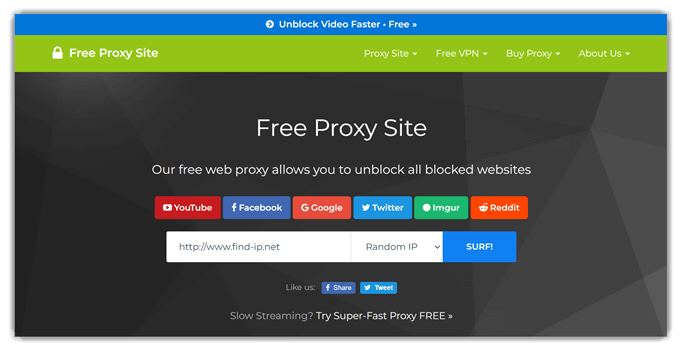
Example: If a school blocks a news article, a URL shortener or archived version on the Wayback Machine may allow access.
Key Points to Consider:
- Fast and easy to use, requires no installation.
- Works best for static content or older pages.
- May not work for dynamic websites or login-required pages.
| Method |
Advantages |
Disadvantages |
| URL Shorteners |
Quick, simple, free |
Not reliable for dynamic or secure sites |
| Web Archives |
Access historical content, bypass basic blocks |
Only works for pages already archived |
Recommendation: Good for casual access to blocked articles or pages. Combine with other methods for interactive or secure sites.
Google Translate as a Bypass Tool
Google Translate can act as a simple proxy. By entering a blocked URL, it loads the website through Google’s servers, helping you Unblock Proxy for basic sites.
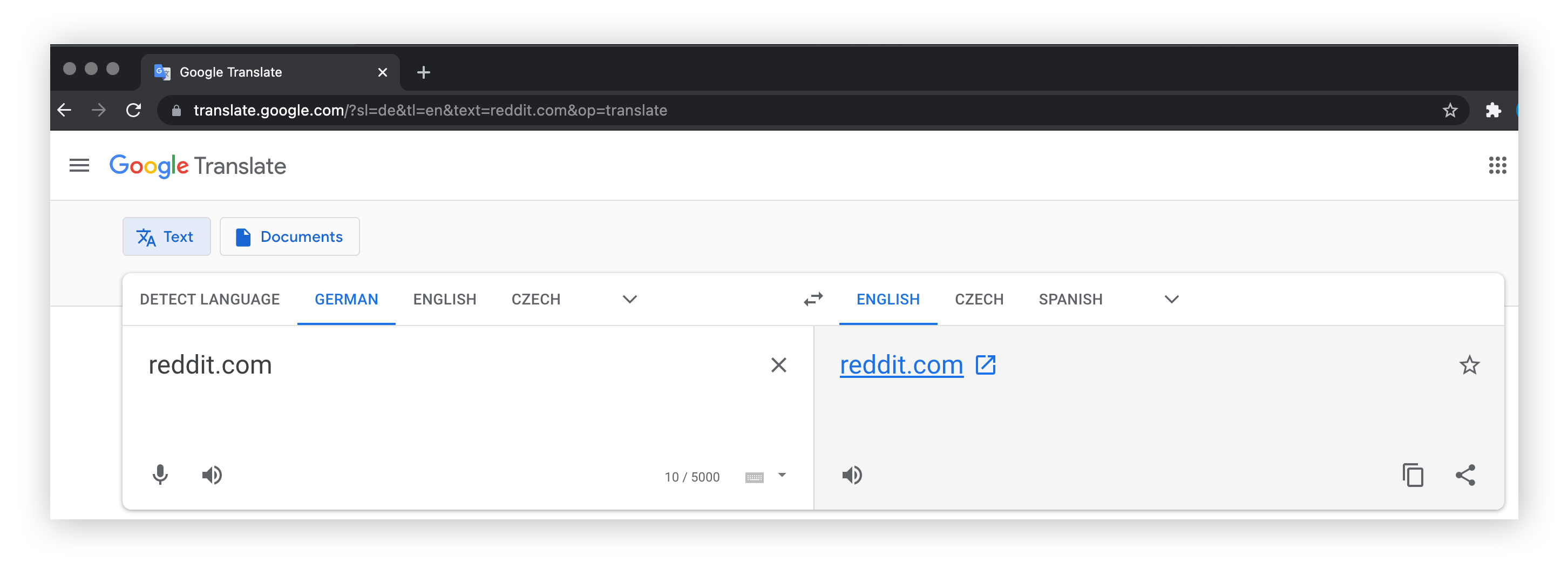
Example Steps:
- Open Google Translate.
- Paste the blocked website URL.
- Choose any language into English.
- Click the translated link to view the site.
Key Points to Consider:
- Free and very easy to use.
- Works well for basic pages.
- Not suitable for secure logins, dynamic content, or interactive sites.
| Method |
Advantages |
Disadvantages |
| Google Translate |
Free, simple, no installation |
Limited to basic pages, not suitable for secure or dynamic content |
Recommendation: Use Google Translate as a quick workaround. For regular or sensitive browsing, use proxy IPs or Tor.
The Best Unblock Solution: DICloak Antidetect Browser
The most powerful and reliable way to unblock any website is by using a professional antidetect browser like DICloak. This tool works regardless of why a site is blocked—whether it's by a government, your Internet Service Provider (ISP), or the website itself through an IP ban.
Why Choose DICloak Antidetect Browsers for Unblocking Proxy?
⚡The DICloak Antidetect Browser has become a global favorite for its unparalleled ability to efficiently and securely manage multiple accounts. Designed for professionals in social media management, and more, DICloak offers powerful features like RPA automation, bulk operations, and a synchronizer. Additionally, it allows you to customize fingerprints and integrate proxies for each profile, ensuring top-level security and operational efficiency. It’s the ultimate tool for seamless, secure, and scalable operations.

What Makes DICloak Stand Out?
✅ Manage 1,000+ Accounts on One Device: Stop wasting money on extra hardware! DICloak allows you to manage multiple accounts on a single device, cutting costs and boosting efficiency.
✅ Guaranteed Account Safety, No Ban Risks: Every account gets its own isolated browser profile with custom fingerprints and IPs, drastically reducing the risk of bans. Your accounts, your control!
✅ Flexible Proxy Configuration for Maximum Performance: Seamlessly integrate with all major proxy protocols (HTTP/HTTPS, SOCKS5) and manage your proxy pool with bulk operations. No more struggling with IP management—DICloak has you covered.
✅ Streamlined Team Collaboration for Better Results: Easily manage your team with advanced tools like profile sharing, permission settings, data isolation, and operation logs. Your team works smarter, not harder.
✅ Automate the Grind with RPA: DICloak's built-in RPA saves you hours of manual work. Automate repetitive tasks, streamline workflows, and focus on what really matters—growing your business.
✅ Powerful Bulk Tools to Scale Your Operations: Create, import, and launch multiple browser profiles in one click. DICloak makes scaling your business as easy as it gets.
✅ Compatible with All Major Operating Systems: Based on the Chrome core, DICloak supports simulating Windows, Mac, iOS, Android, and Linux operating systems. No matter what platform you need, DICloak has you covered.
🔗 Ready to Get Started?
Visit the DICloak website to explore more details and choose the plan that’s right for you. Start for free today and experience the power of secure, efficient, and scalable multi-account management!
Other Unblock Tricks We Don’t Recommend
While searching for solutions, you might encounter other tricks that are often ineffective, outdated, or problematic. It's best to avoid the following methods:
- Change DNS / Smart DNS: This only works for the most basic ISP blocks and won't bypass more advanced filtering.
- Video Downloader Websites: These are dangerous, inconvenient, and rarely work on modern, secure websites.
- Shadowsocks: This proxy-like tool is too complicated for most users to set up and can be more expensive than a normal proxy.
Reasons for Website Blocking
Knowing how to Unblock Proxy is useful, but it’s also important to understand why websites get blocked in the first place. Websites can be restricted for several reasons. Some blocks are technical, some are legal, and some are about control. Below are three main reasons — each with real examples to help you see how they work.
Geographical Restrictions
Geographical restrictions happen when a website limits access based on your location. Websites check your IP address and decide if you are in an “allowed” area. If not, the site won’t load or shows a message like “not available in your region.”
A common example is video streaming services. Some shows on Netflix or Hulu are available only in certain countries because of licensing deals. If you travel abroad, you might not be able to watch the same shows you can at home. This is a geo‑block in action.
Because geo‑blocks depend on your IP address, tools used to Unblock Proxy — like proxy IPs or Tor — can help you appear as if you are in a different country and access the content you want. It’s important to understand local rules, as breaking terms of service can be risky.
Institutional Restrictions (Schools and Workplaces)
Many schools and workplaces block websites to protect safety, productivity, or security. They use firewalls and filters that restrict access to categories like social media, gaming, or streaming.
For example, a school network might block YouTube and TikTok during class hours so students stay focused. A company might block social apps or streaming services to avoid bandwidth overload and keep employees productive.
These institutional blocks are usually managed at the network level. They don’t mean the site is illegal — just that the network owner does not want users to access it on their system. That’s why people often seek ways to Unblock Proxy inside these networks using safe tools. However, it’s important to respect workplace and school rules.
Censorship and Information Control
Censorship is when governments or authorities block access to online content to control what people can see. This happens in many countries with strict media rules or political controls.
A well-known example is the blocking of social media platforms, search engines, or news websites in certain countries. Sometimes these blocks are temporary during political events to limit the spread of information.
Because of censorship, many users look for ways to Unblock Proxy to access global news, educational resources, or social platforms. Tools like proxy servers, Tor, or specialized browsers can help. However, bypassing these controls can be illegal in some regions, so users should always be cautious.
Legal and Ethical Considerations
Before you try to Unblock Proxy to access blocked websites, it’s important to think about the legal and ethical issues. Some methods may be allowed in one place but not in another. Some actions might break a website’s rules even if they are not illegal. Understanding these points helps you stay safe and responsible online.
Is It Legal to Unblock Websites?
In many countries, using tools like proxy servers or Tor is not illegal if you use them for lawful purposes — such as protecting your privacy or accessing public information. For example, browsing a news website that is restricted in your region is usually harmless. Using a proxy to Unblock Proxy and read the article may not break the law.
However, some countries with strict internet controls treat bypassing censorship as illegal. In these regions, using a proxy to access blocked websites can lead to fines or other serious consequences.
Example: A traveler in a country with strict censorship uses a proxy to read global news during a political event. Even if the content itself is legal, the act of bypassing national blocks could be treated as a legal violation.
Understanding Terms of Service
Even if it is legal in your country to use a proxy, the website you visit may have its own rules. These rules are called the Terms of Service (ToS). When you use a site, you agree to these terms, often just by logging in or clicking “Accept.”
Many streaming services and social platforms state in their ToS that users should not use proxies to bypass regional blocks. If you Unblock Proxy to watch a show in another country, doing so may violate these rules. The platform could suspend or ban your account, even if no law is broken.
Example: A user connects through a proxy to watch a show on a subscription service licensed only for certain countries. Even though it may be legal to use a proxy in their country, the service can restrict or terminate their account for violating the terms.
Ethical Side of Unblocking
Legal rules are one part of the picture. There is also the ethical side. Some restrictions protect content creators, protect data, or respect cultural standards. Even if a proxy can bypass a block, it’s fair to ask: Is this respectful? Is it right?
For instance, bypassing location restrictions on a paid platform can reduce revenue for creators who paid for regional rights. Using a proxy only for unauthorized access is ethically questionable.
Another ethical point is respecting local culture and laws. Some countries block content for political or cultural reasons. Ignoring these norms may be disrespectful and could lead to trouble, even if the tools themselves are legal.
In short, tools to Unblock Proxy can give you more access and privacy, but they do not override laws or website rules. Always check local laws and respect website terms of service. Making informed and ethical choices keeps you safe online and protects you from unintended risks.
FAQs
1.Is it legal to use an unblock proxy?
Yes. The methods we discussed above, such as using an antidetect browser,or a standard proxy, are all legal ways to unblock websites.
2.What is the most reliable way to unblock a website I use often?
For regular, long-term access, an antidetect browser like DICloak is the most efficient and effective method. You can create a dedicated browser profile with a stable proxy for that specific site, ensuring you always appear as a consistent, legitimate user without any interruptions.
3.Can an unblock proxy hide my activity from my ISP?
It depends on the method. Standard proxies do not offer encryption. A comprehensive tool like DICloak, when used with a quality proxy, provides a high level of privacy by masking your entire digital fingerprint, not just your IP address.
4.Why should I pay for a tool like DICloak instead of using a free web proxy?
Free web proxies are slow, unstable, and dangerous. They lack encryption and often make money by selling your personal data. DICloak is a secure, professional tool designed to protect your privacy, guarantee access, and provide a stable, high-performance experience.
Conclusion
Using an Unblock Proxy in 2026 helps you access restricted content, protect your privacy, and bypass blocks from geography, schools, or censorship. Tools like DICloak Antidetect Browser, standard proxy IPs, browser extensions, Tor, URL shorteners, and Google Translate each offer ways to Unblock Proxy, but it’s important to follow local laws, website terms, and ethical guidelines. By using these methods responsibly, you can navigate the internet safely and freely while respecting rules and creators’ rights.
 Web Proxy Tools
 Free Tools
 Cookie Plugin
 UA Generator
 MAC Address Generator
 IP Generator
 IP Address List
 2FA Code Generator
 World Clock
 Anonymous Check
 WebRTC Leak Test
 UUID Generator
 Free Web Proxy Site
 Proxy Checker
 FB Ad Checker
 AI Web Scraping
 Free SMM Tools
 Twitter Shadowban Checker
 Instagram Name Checker
 UTM Generator
 Username Generator
 AI Hashtag Generator
 LinkedIn Headline Generator
 Social Media Image Resizer