Scaling a Facebook advertising campaign often feels like a high-stakes game of waiting for the other shoe to drop. You finally find a creative angle that works, your ROAS starts improving, and you are ready to scale—only to wake up to the red banner that every advertiser dreads: “Account Restricted.” For e-commerce founders and agency owners, that kind of disruption is more than a technical issue. It can stall momentum, interrupt delivery, and put revenue under immediate pressure.
This is exactly why more advertisers start looking into Linkwave structures. In today’s Meta ad environment, performance is no longer driven by copy and targeting alone. A lot of teams hit a ceiling not because demand disappears, but because their account setup is too fragile to support stable growth. From that perspective, Linkwave structures are often discussed as a way to build a more resilient operating framework—one that helps teams think beyond short-term fixes and focus more on continuity, separation, and safer scaling.
Common reasons Facebook ad accounts face sudden restrictions
Facebook’s ecosystem is governed by aggressive automated review systems designed to protect the platform. These systems don't care about your profit margins; they care about consistency and data signals. Even a minor discrepancy can trigger a "total shutdown" of your assets.
Automated systems look for specific "Red Flags" that deviate from established patterns:
- Repeated ad disapprovals: Frequent policy friction, even on minor points, signals a high-risk user to the algorithm.
- Payment discrepancies: Issues with billing sources or a lack of clear payment history can lead to immediate suspensions.
- Geographically inconsistent logins: Accessing accounts from multiple IPs or locations that don't match your historical data triggers "suspicious activity" alerts.
- Policy "Inconsistencies": Any sudden shift in behavior—such as a massive budget spike on a fresh account—can be flagged as irregular activity.
Because these systems prioritize safety over accuracy, one small trigger can lead to a mass restriction of every asset tied to your identity.
Understanding the logic behind Linkwave structures
Linkwave was founded by veteran e-commerce operators who have managed brands generating millions in monthly revenue. They recognized that the biggest bottleneck to growth wasn't the ads themselves, but the lack of "uptime." Linkwave’s core mission is to turn short-term wins into long-term success by providing turnkey, high-performance advertising systems.
The logic behind these structures is centered on risk mitigation and operational continuity. Linkwave isn't just selling accounts; they are selling a managed environment that reduces risk signals and ensures your campaigns keep running even if a specific component faces scrutiny. By using professional ad structures and managed account hygiene, they allow advertisers to move away from constant troubleshooting and back toward scaling.
Choosing between DIY setups and Linkwave structures
A professional structure is a significant investment in your business’s infrastructure. For most beginners or businesses spending less than €3,000 per month, a basic DIY setup may suffice. However, once you cross that threshold, the "Opportunity Cost" of your time becomes the deciding factor. At this scale, the cost of a manager spending hours every week manualy managing account hygiene or recovering from bans far exceeds the cost of a managed service.
| Feature |
Basic DIY Structure |
Managed Linkwave Experience |
| Components |
2 Business Managers (BMs) |
Multi-layered BMs with redundancy |
| Profile Management |
7 Profile types (Manual) |
7 Browser profiles (Automated) |
| Redundancy |
Basic backups |
High-level Admin vs. Employee hierarchy |
| Onboarding |
None |
Slack Onboarding & Strategy |
| Support |
Self-managed |
Professional Guide & Management |
How a Linkwave structures layout prevents total asset loss
Linkwave utilizes a "security-by-design" philosophy that treats your assets like a secure facility. The goal is to isolate the "vault" from the "front line." In this setup, your Pixel is the vault—it contains your most valuable data—while the ad accounts are the disposable front line.
The standard deployment uses a 7-profile hierarchy to ensure that if one component is restricted, the system remains upright:
- Unverified BM #1 (Advertising Focus): The Disposable Front Line
- Ad BM Admins (2 Profiles): These are kept "clean" and used only for high-level control.
- Ad BM Employees (3 Profiles): These roles do the day-to-day heavy lifting and campaign execution; they carry the most risk so the Admins don't have to.
- Unverified BM #2 (Pixel Focus): The Data Vault
- Pixel BM Admins (2 Profiles): These profiles strictly manage the Pixel and data assets, isolated from the active advertising accounts to prevent mass restriction events.
By separating the pixel data from the advertising execution, Linkwave ensures that even if an ad account is flagged, your data remains secure and can be instantly re-linked to a new advertising arm.
Using DICloak to support your Linkwave structures workflow
While Linkwave focuses on account structure and access logic, with DICloak, users can manage the browser profile behind that workflow in a more controlled way. This can help teams keep different roles, accounts, and access points more clearly separated during day-to-day operations.
Maintaining clearer account separation with dedicated browser profiles
With DICloak, users can assign a dedicated browser profile to different Business Managers, roles, or account layers within a Linkwave setup. Each profile keeps its own cookies, cache, local storage, and fingerprint settings, which helps reduce unnecessary overlap between account environments and makes multi-account operations easier to organize.

Using custom-configured proxies for more consistent access settings
With DICloak, users can configure a custom proxy for each browser profile based on their own workflow needs. This allows different account environments to run with different network settings, which can help maintain more consistent login conditions across separate profiles.

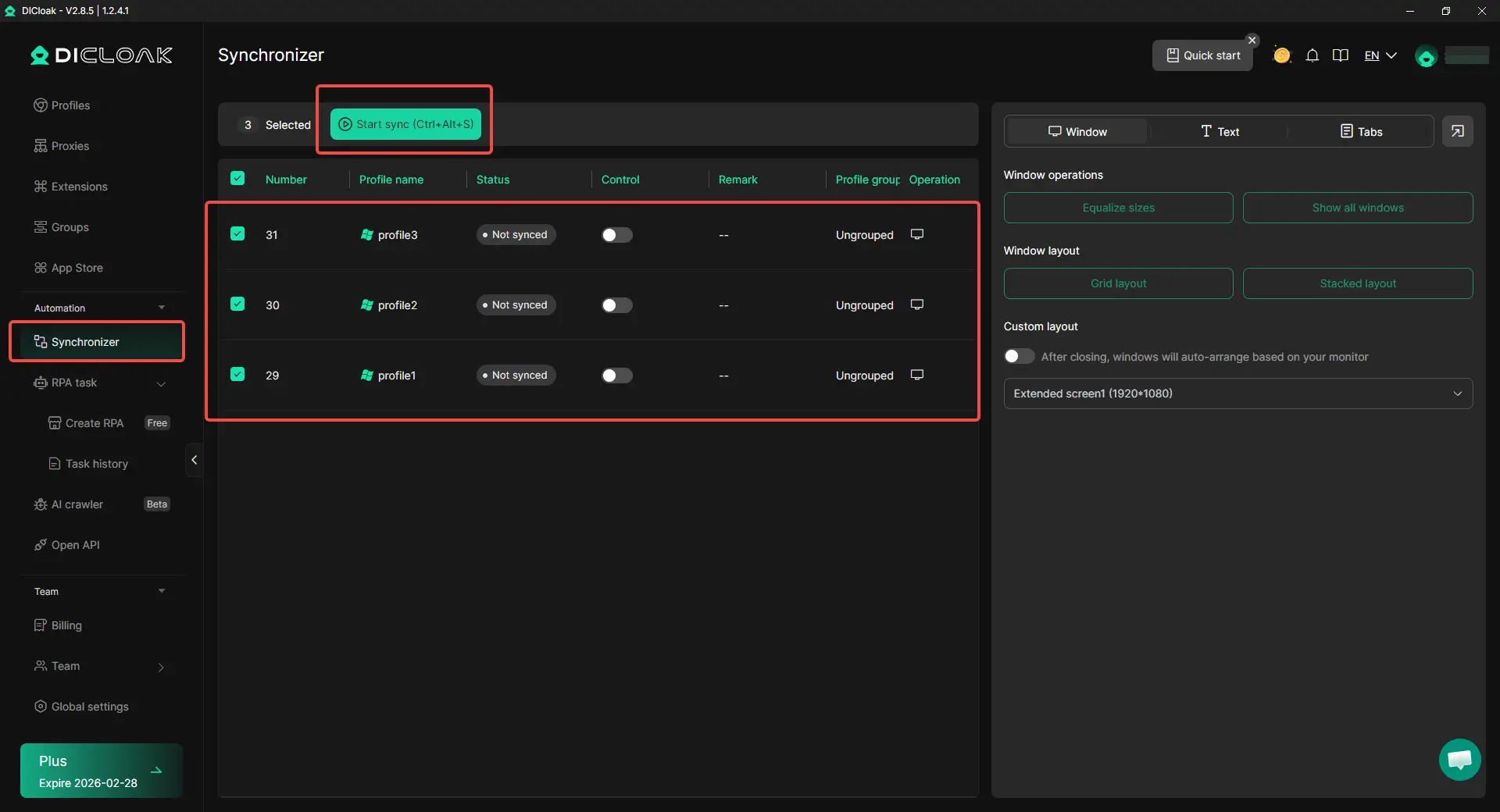
Improving workflow efficiency with the Synchronizer
When multiple profiles need similar updates or repeated actions, with DICloak, users can use the synchronizer to handle those tasks more efficiently across several windows. This can reduce repetitive manual work and make ongoing profile management easier for teams handling larger account structures.
Supporting team collaboration with more controlled profile access
When several team members need to work within the same broader account system, with DICloak, users can organize access around specific browser profiles instead of sharing one general environment. This can make collaboration more structured and help teams manage different operational responsibilities with clearer boundaries.

What to expect when setting up a managed ad environment
The transition to a managed environment is a deliberate 6-step process designed for stability:
- Request: A consultation via WhatsApp to determine business needs and review the pricelist.
- Strategy: Development of a scoping plan involving BMs and profiles arranged for redundancy.
- Onboarding: Secure communication and data handling through a dedicated Slack channel.
- Implementation: Technical configuration of browser profiles, BMs, accounts, and pixels.
- Testing: A rigorous phase of connectivity validation and stability monitoring.
- Handover: Delivery of the completed structure. While the strategy and setup take time, the actual delivery of the final structure often occurs within 10 minutes of payment confirmation, accompanied by a comprehensive management guide.
Conclusion
In the current digital landscape, scaling Facebook ads is no longer a matter of luck; it is a matter of engineering. Relying on a single, unprotected account is a recipe for a "heart-sink" moment that can stall your business for weeks. By implementing a professional, layered structure, you stop firefighting and start scaling with the confidence that your infrastructure is as robust as your creative.
FAQ
Is this setup compliant with Facebook’s official policies?
Yes. Linkwave intentionally uses unverified BMs to operate within Facebook's official framework without triggering the "verification traps" often associated with older, less stable methods. They use authentic identities and legitimate billing to ensure long-term stability.
How long does the full implementation take once started?
While the onboarding and configuration are thorough, the delivery of the structural assets is highly efficient—most services are delivered within 10 minutes of payment confirmation.
What is the recommended minimum ad spend for this structure?
This system is designed for experienced e-commerce professionals with a minimum monthly spend of €3,000.
How do I recover a disabled Facebook account if I'm not using a structure?
You must visit the Account Quality section and submit an appeal. However, if this fails, the only reliable path forward is to rebuild using trusted profiles and verified accounts to prevent the same triggers from recurring.
What are the best practices for preventing ads from being restricted?
Beyond using a professional structure, you should audit your ad policies, use original creative, and ensure your landing pages are secure. Combining these practices with an isolated browser profile like DICloak is your best defense.
Can I manage the setup myself after it is delivered?
Yes. Linkwave provides a detailed management guide upon handover. You have the choice to manage the system internally or retain their services for ongoing replacements and optimization.
 Web Proxy Tools
 Free Tools
 Cookie Plugin
 UA Generator
 MAC Address Generator
 IP Generator
 IP Address List
 2FA Code Generator
 World Clock
 Anonymous Check
 WebRTC Leak Test
 UUID Generator
 Free Web Proxy Site
 Proxy Checker
 FB Ad Checker
 AI Web Scraping
 Free SMM Tools
 Twitter Shadowban Checker
 Instagram Name Checker
 UTM Generator
 Username Generator
 AI Hashtag Generator
 LinkedIn Headline Generator
 Social Media Image Resizer