Can you share ChatGPT Plus account access with someone else?
At first, it may seem like a simple way to save money. Some people want to share with family. Others want to share with a friend, partner, or small team. But once you look closer, the issue is not only about cost. It is also about rules, privacy, security, and control.
In this guide, we will explain what OpenAI’s policy means, what risks shared accounts can create, why some people still do it, and what users should think about before making that choice.
Is It Possible to Share a ChatGPT Plus Account?
Can you share ChatGPT Plus account access with another person? In practice, you can give someone your login. But under OpenAI’s rules, a personal account is for the person who created it and you may not share your account credentials or make the account available to anyone else.
What Are the Official Policies on Account Sharing
The official policy is simple. A ChatGPT Plus account is meant for one user, not for shared use by friends, family, or a team. This means share ChatGPT Plus account access under official rules is no. If more than one person needs access, each person should have their own account.
Why Some Users Attempt to Share Despite Restrictions
Some people still try to share because they want to save money or keep everything under one paid plan. For example, two freelancers may think one Plus subscription is enough for both of them. A couple may also want to split the cost. This is easy to understand, but it still goes against the current account-sharing policy.
How Sharing Could Affect Account Security
Sharing can also create security problems. OpenAI says suspicious activity alerts may appear when it detects unusual sign-ins, inconsistent usage patterns, or multiple concurrent sessions. For example, if one person logs in from New York and another logs in from a different country soon after, the account may look risky to the system. Sharing can also expose your chat history, saved settings, and payment details to another person.
Risks of Sharing Your ChatGPT Plus Account
Before you decide to share, it is important to understand what can go wrong in real use.
What Happens If Your Account Gets Flagged?
OpenAI uses security systems to detect unusual activity. If your account shows strange patterns, it may get flagged. This can happen when multiple people use the same login from different locations or devices.
For example, one user logs in from the US, and another logs in from another country a few hours later. The system may treat this as suspicious behavior. You may then see warnings, forced logouts, or temporary limits on features.
In some cases, you may need to reset your password or verify your identity. This can interrupt your work. If you rely on ChatGPT daily, even a short lockout can be frustrating.
So even if you are still wondering can you share ChatGPT Plus account, you should know that shared usage often looks risky to automated systems.
How Sharing Can Lead to Privacy Breaches
A shared account means shared data. This is where real problems begin.
Every user on the account can see:
- chat history
- uploaded files
- custom instructions
- saved prompts
Imagine a freelancer using ChatGPT to write client content. If they share the account with a friend, that friend may see private drafts or business ideas. This is not just awkward. It can damage trust.
Another example is a small team sharing one Plus account. One member may delete chats, change settings, or overwrite instructions without others knowing. There is no clear control over who did what.
When people ask can you share ChatGPT Plus account, they often forget that the account is not just access. It is also data, history, and personal work.
Why Shared Accounts Might Get Banned
Account sharing can also increase the risk of account restrictions or bans.
OpenAI’s rules state that accounts should not be shared between users. If the system detects behavior that breaks these rules, the account may face limits or suspension.
This risk becomes higher when:
- many users log in at the same time
- usage patterns change quickly
- different regions access the account
- automated or unusual activity appears
How to Share a ChatGPT Plus Account Safely
By now, you already know the answer to can you share ChatGPT Plus account is “not officially allowed.” But in real life, some people still try to do it. If you are in that situation, the goal is to reduce risk as much as possible.
This section is not about encouraging sharing. It is about helping you avoid common mistakes if you decide to do it anyway.
Which Tools Can Help Manage Shared Access?
If more than one person uses the same account, control becomes very important. Without control, things get messy fast.
Some users try to manage access by sharing passwords in chat apps. This is risky. A better way is to use a password manager that allows controlled sharing. Tools like password managers can let one person keep ownership while giving limited access to others.
For example, a small content team may store the login in a shared vault. Only approved members can use it. If someone leaves the team, access can be removed without changing everything.
Another option is to avoid sharing completely and use official solutions like team or business plans. These give each user their own login while still working in one space. This is the safest way to handle multi-user needs.
How to Set Permissions for Shared Users
ChatGPT personal accounts do not support user roles or permissions. This is where problems start. If you still share, you need to create your own rules.
For example:
- Decide who can change settings
- Decide who can upload files
- Avoid editing each other’s chats
- Do not store sensitive data
A simple real case: two freelancers share one account. One uses it for writing, the other for coding. If they do not set clear boundaries, they may overwrite each other’s work or change instructions that break workflows.
Since there are no built-in permissions, everything depends on trust and communication.
What to Do If a Shared User Misuses the Account
Problems can happen. Someone may misuse the account, either by mistake or on purpose.
If that happens, act quickly:
- Change the password immediately
- Log out all active sessions
- Review recent activity
- Remove saved sensitive data
- Enable two-factor authentication
Another common case is someone deleting chats or changing key settings. If there is no backup, the work is gone.
So the safer mindset is this: treat it like giving someone access to your personal workspace. Once something goes wrong, recovery is often harder than expected.
In most situations, using separate accounts or an official team setup is still the better long-term choice.
Evaluating the Cost Benefits of Sharing
Cost is usually the main reason for people to share ChatGPT Plus account. A Plus subscription has a fixed monthly price, so sharing may look like an easy way to save money. But the real value depends on how you use it. It is important to look at both the savings and the hidden costs before deciding.
How Sharing Can Reduce Subscription Costs
The biggest benefit is simple: you split the price.
For example, if two people share one Plus account, each pays half. If three people share, the cost per person becomes even lower. This is why students, couples, or small teams often try this.
But this only works well under very limited conditions:
- low usage
- no overlap
- no sensitive data
- strong trust between users
Once these conditions break, the cost advantage may disappear.
Why Some Users Choose Not to Share
Some users decide not to share at all, even if it costs more.
The main reason is control. With your own account, everything is clear. Your chats, your files, your settings.
Another reason is privacy. Many users do not want others to see their prompts, ideas, or data. This is especially true for freelancers, developers, and marketers.
There is also the risk factor. As explained earlier, sharing may lead to warnings, restrictions, or security issues. Some users prefer to avoid that completely.
For example, a solo developer may choose to pay full price just to keep their workflow stable and private. For them, peace of mind is worth more than saving a few dollars.
How to Decide If Sharing Is Right for You
The answer depends less on “can” and more on “should.” The right choice comes down to how you use the account, who you share with, and what you are willing to risk.
What Factors Should You Consider Before Sharing?
Start with how often you use ChatGPT.
If you use it every day for work, sharing may slow you down. You may run into conflicts, lost chats, or changed settings. But if you only use it a few times a week, sharing may feel easier.
Next, think about what you store in the account.
If you use ChatGPT for personal ideas, drafts, or client work, sharing can expose that information. For example, a marketer may store campaign ideas or client data in chats. Sharing the account could make that visible to others.
Also consider usage patterns.
If two people log in at the same time or from different places, it may trigger warnings or interruptions. This can affect your workflow without warning.
How to Assess the Trustworthiness of Potential Shares
Trust is the most important factor in any shared account.
You are not just sharing access. You are sharing:
- your chat history
- your saved data
- your account control
Before sharing, ask yourself simple but important questions.
- Do you fully trust this person not to misuse the account?
- Will they respect your work and not delete or change things?
- Will they follow basic rules, like not uploading risky content?
Why Some Users Regret Sharing Their Accounts
Many users feel sharing is a good idea at the start. But some regret it later.
One common reason is lost work. Shared accounts make it easy for someone to overwrite or delete chats.
Another reason is confusion. When multiple people use one account, it becomes hard to track who did what. This can slow down work and create frustration.
Privacy is also a big issue. Some users later realize that others can see their ideas, drafts, or private prompts.
User Experiences with Sharing ChatGPT Plus Accounts
In practice, some users say sharing works for them, while others run into problems after a short time. Looking at real scenarios can help you decide what to expect.
What Positive Outcomes Have Users Reported?
Some users report that sharing works well in simple cases.
For example, a couple may share one account and use it at different times of the day. One uses it for schoolwork, the other for small tasks like emails or translations. Since they rarely overlap, they do not face conflicts.
Another example is two freelancers in different time zones. One works in the morning, the other at night. They share the cost and avoid using the account at the same time. For them, sharing feels smooth and efficient.
How Some Users Resolved Issues with Shared Accounts
Not all experiences are smooth. Many users run into issues, but some find ways to manage them.
A common problem is mixed chat history. To fix this, some users create clear rules. For example:
- each person uses specific chat threads
- no one deletes shared content
- important work is saved outside ChatGPT
Another issue is account access conflicts. Some users solve this by setting time blocks. One person uses the account during certain hours, and the other uses it later.
Legal Implications of Sharing a ChatGPT Plus Account
Sharing a personal account can go against the platform’s rules, and that can lead to real consequences.
What Legal Risks Are Involved in Sharing?
The main risk comes from breaking the Terms of Service.
OpenAI’s terms state that you should not share your account or give access to others. When you share your login, you are going against those rules. This is not a criminal issue in most cases, but it is still a contract issue between you and the platform.
There is also a data risk. If shared users handle sensitive or client information, this may create legal concerns depending on your work. For example, sharing access while handling private business data could lead to disputes if something goes wrong.
How Terms of Service Violations Are Handled
When a platform detects behavior that breaks its rules, it can take action.
This usually starts with warnings or restrictions. For example:
- temporary limits on features
- forced logouts
- security checks
If the behavior continues, stronger actions may follow, such as account suspension. But in most cases, platforms do not jump straight to permanent bans. But repeated violations increase the risk.
Why Legal Advice Might Be Necessary
For personal use, most people will not need legal advice. But in business situations, it can be important.
If you use ChatGPT for client work, team collaboration, or handling sensitive data, sharing one account can create unclear responsibility. If something goes wrong, it may be hard to prove who did what.
In these cases, getting basic legal advice or following proper account setup (such as separate accounts for each user) is a safer approach.
Using DICloak Antidetect Browser for Secure Account Sharing
How DICloak Enhances Account Security
When multiple users access the same account, the biggest risks are exposure of credentials, inconsistent login environments, and platform-triggered security checks. DICloak Antidetect Browser addresses these issues by isolating each shared account inside a dedicated browser profile with controlled access and environment consistency.
Key security advantages include:
- Profile-based isolation that prevents cross-account contamination
- Encrypted storage of cookies and session data
- Controlled profile access without exposing credentials
- Protection against accidental logouts or session invalidation
Managing Permissions with DICloak for Shared Access
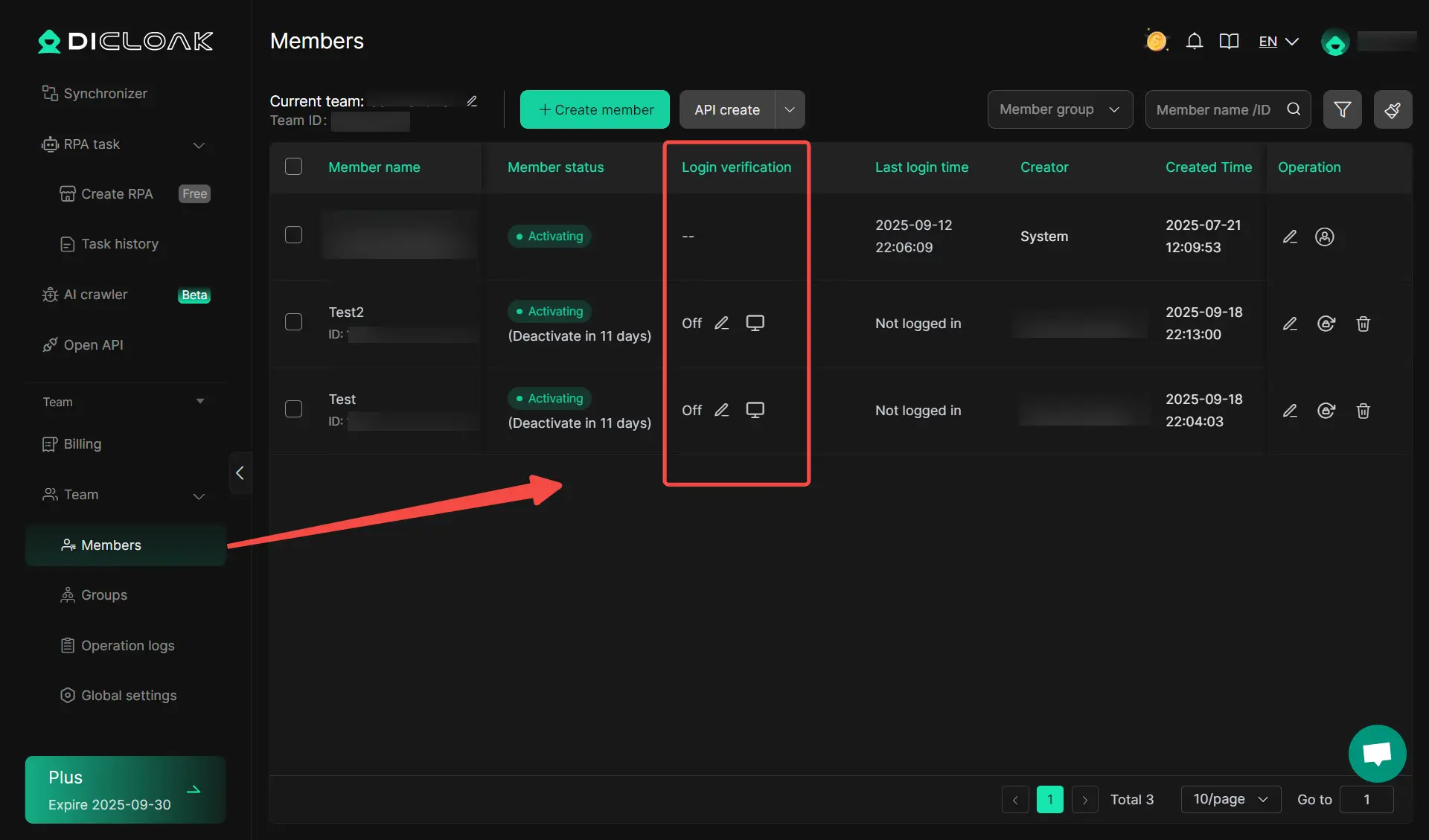
A major problem with shared accounts is the lack of control—once access is given, it’s hard to limit what others can do. DICloak solves this through built-in team collaboration and permission management features.
Practical permission controls include:
- Role-based access for different team members
- Profile sharing without exposing passwords
- Operation logs to track who did what and when
- Ability to revoke or adjust access instantly
Preventing Account Flagging with Unique Digital Fingerprints
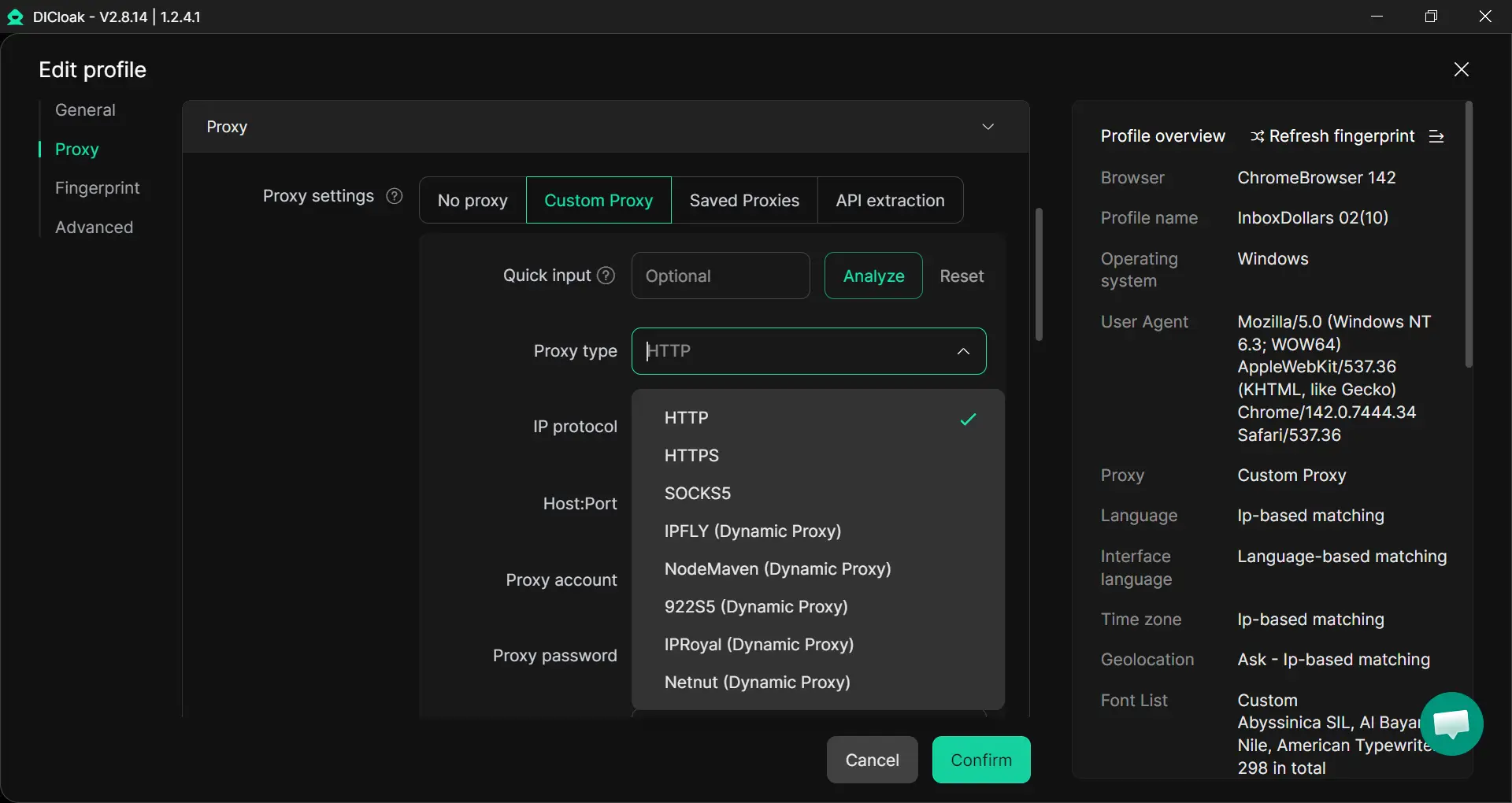
You can use DICloak to prevent account flagging by standardizing how shared accounts appear to external platforms. Even if multiple users access the same account, they operate under a consistent browser fingerprint, making activity look like it comes from a single user.
How this reduces detection risk:
- Unified or controlled fingerprints across shared sessions
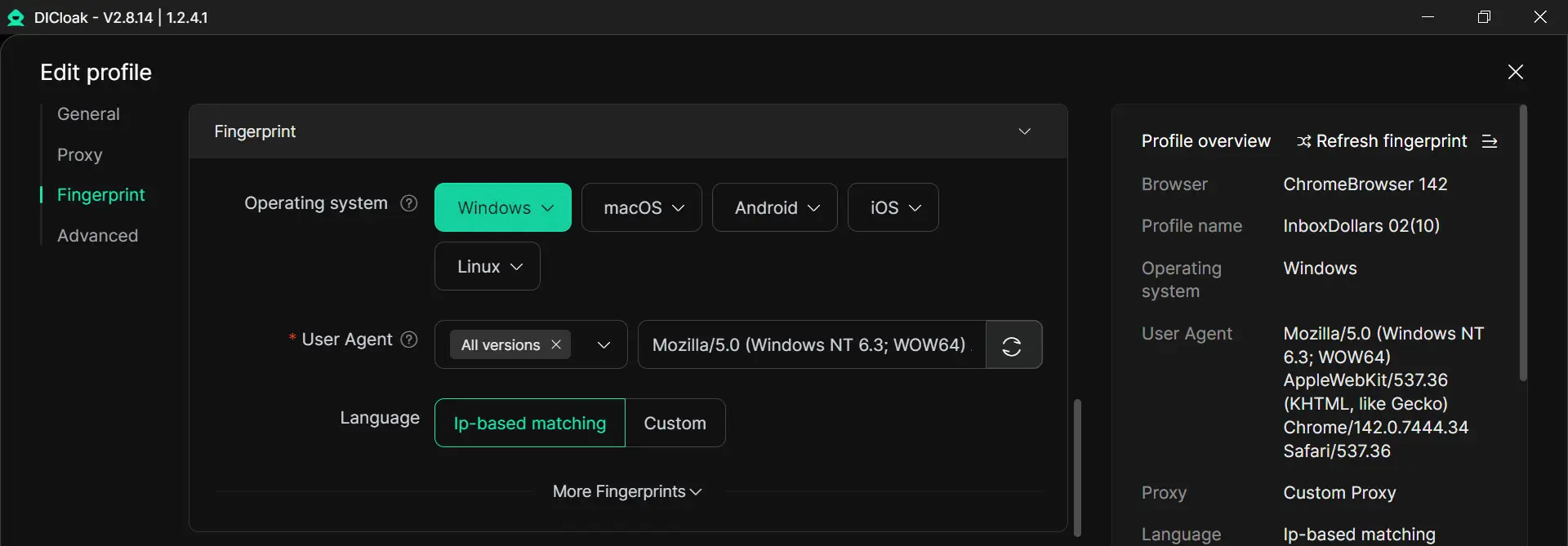
- Stable browser profiles that avoid anomaly detection
- Proxy configuration to maintain consistent IP behavior
- Simulation of real-user interaction patterns
Warm Tips: If you ever run into issues (like ChatGPT Server Error), check out our helpful guides: Fix ChatGPT Internal Server Error or ChatGPT Ban Guide.
FAQ
Can You Share ChatGPT Plus Account with Family?
Not officially. OpenAI says you may not share your account credentials or make your account available to anyone else, even though one person can use their own account on multiple devices.
What Happens If You Share Your Account with a Friend?
You take on the risk. Your friend may see your chats, files, and settings, and you are still responsible for everything done on the account. OpenAI also warns that shared access can lead to security issues.
Is There a Limit to How Many People Can Use One Account?
OpenAI does not list a supported “user limit” for Plus because Plus is designed for one individual user, not a shared group. Business plans are the multi-user option, starting at 2 users.
How Can You Revoke Access from a Shared User?
Change your password right away, log out of other sessions if available, and turn on two-factor authentication. That is the fastest way to cut off access and secure the account.
Are There Any Discounts for Multiple Account Purchases?
OpenAI prices Plus per user. For multi-user needs, the official option is ChatGPT Business, which is built for teams starting at 2 users.
Conclusion
Can you share ChatGPT Plus account access in real life? Technically, yes. But officially, it is not the right setup for multiple users.
For some people, sharing may look cheaper at the start. But the risks can grow fast. Mixed chat history, privacy problems, account warnings, and loss of control can all turn a small saving into a bigger problem.
If you only care about short-term costs, sharing may seem attractive. But if you care about safety, stability, and clear ownership, separate accounts or an official multi-user plan are usually the better choice.
 Web Proxy Tools
 Free Tools
 Cookie Plugin
 UA Generator
 MAC Address Generator
 IP Generator
 IP Address List
 2FA Code Generator
 World Clock
 Anonymous Check
 WebRTC Leak Test
 UUID Generator
 Free Web Proxy Site
 Proxy Checker
 FB Ad Checker
 AI Web Scraping
 Free SMM Tools
 Twitter Shadowban Checker
 Instagram Name Checker
 UTM Generator
 Username Generator
 AI Hashtag Generator
 LinkedIn Headline Generator
 Social Media Image Resizer