Identifying the Warning Signs of a Restricted Account
Twitter (now X) operates under a content moderation philosophy as "freedom of speech, not freedom of reach." From a technical perspective, this means that while your account may remain active, its visibility is suppressed through "shadowbanning" or "deboosting."
Deboosting is the specific algorithmic mechanism used to enact this policy. While your content exists on the platform, the algorithm refuses to "transport" it to other users’ feeds. This suppression happens without formal notification, making it difficult to detect without looking for specific indicators.
There are four primary symptoms of an account restriction:
- Missing Search Results: Your profile or recent tweets do not appear when searching for your exact @username while logged out.
- Hashtag Failure: Your posts are absent from the "Top" and "Latest" feeds of hashtags you have used.
- Hidden Replies: Your responses to other users are relegated to a "hidden" section or require multiple clicks to view.
- Significant Engagement Drops: A sharp, sudden decline in impressions and interactions, particularly on content that mirrors previously high-performing posts.

How to Check if Your Twitter Account is Restricted Using Manual Tests
Because X does not notify users of deboosting, manual verification is essential. These tests bypass personalized algorithms to show you how the platform actually presents your data to the public.
This test is vital because it bypasses cached user data and personalized search results that might give you a "false positive" of visibility when you are logged in. 1. Open a web browser in Incognito or Private mode. 2. Navigate to X.com without logging in. 3. Search for your exact username in the search bar. 4. Check the "Latest" Tab: This is where deboosting is most visible. If your recent tweets do not appear in the "Latest" results for your own name or a unique phrase you recently posted, your reach is restricted.
The Trusted Friend Test (Conversation Visibility)
This test determines if you have been deboosted in threads.
1. Reply to a popular tweet or a high-traffic thread.
2. Ask a friend (or use an unrelated account) to view that same thread.
3. Identify the Container: Have the friend scroll to the bottom.
If your reply is missing from the main flow and is instead buried under the "Show more replies" button or the "Tweets that may contain offensive content" filter, your account has been flagged.
Using External Tools to Check for a Twitter Restriction
Third-party tools, such as the Circleboom shadowban checker, provide a quick automated assessment. These tools typically work by simulating API queries or scraping search results to see if your account appears in the "Search" or "Suggestion" layers of the platform.
Cautionary Note on Accuracy: However, these tools are not infallible. Because they rely on external scraping rather than Twitter’s internal moderation database, they can produce lag or false negatives. Always cross-reference a tool's findings with the manual Incognito test for definitive proof.
Common Behaviors That Trigger a Restricted Account Status
The X algorithm flags behavior that mimics spam or violates community safety standards.
| Common Trigger |
Why It Flags the Algorithm |
| Violating Rules |
Promoting hate speech, misinformation, or explicit content triggers safety filters that deprioritize the account's reach. |
| Excessive Automation |
Exceeding velocity limits for liking, following, or retweeting suggests non-human activity and triggers anti-bot measures. |
| Repetitive Content |
Posting identical links, hashtags, or phrases repeatedly across multiple tweets flags the account as a spam vector. |
| Suspicious Links |
Directing users to domains previously flagged as malicious or "spammy" severely degrades account credibility. |
| Controversial/Abusive Conversations |
Frequent participation in heated, reported, or high-conflict threads can lead the algorithm to "deboost" your visibility to maintain site-wide safety. |
Realistic Steps to Resolve a Twitter Restriction
Recovery is an algorithmic process, not an instant fix. Follow this roadmap to reset your account's standing.
- Identify the Cause: Review your recent activity against X’s community guidelines.
- Remove Problematic Content: Delete tweets with excessive hashtags, repetitive links, or those involved in heated disputes.
- Pause Posting for an "Algorithmic Reset": Cease all activity for 48 hours to one week. Crucial: Avoid all interactions, including "likes" or "DMs," as any activity can reset the cool-down period and prolong the restriction.
- Appeal the Status: If the restriction persists, use the technical appeal path: Settings > Help Center > Contact Us > Appeal a locked or suspended account (or the relevant "Reach" inquiry).
- Build Positive Engagement: Once you resume, focus on original text-based content and organic interactions with high-authority accounts.
- Use Tools Responsibly: Ensure all third-party apps are revoked if they perform automated actions.
- Monitor Progress: Use the manual tests daily to see if your "Latest" search visibility returns.
Pro-Tip: The Technical Health Check
To confirm a shadowban through data, check your X Analytics. If your "Impressions from Non-Followers" metric has dropped to near zero while your followers can still see your content, it is a definitive technical indicator that the algorithm has stopped "transporting" your tweets to the Discovery and Search layers.
Managing Multiple Profiles Safely with DICloak
For professionals managing multiple accounts, X may treat repeated overlap in browser profile signals as unusual activity. With DICloak, users can reduce unnecessary account linkage by separating each profile’s browsing environment.
Isolating Browser Profiles for Account Security
DICloak uses profile isolation technology to keep each session separate. Each profile has its own cookies, local storage, and browser profile, which helps reduce the chance of multiple accounts being associated through shared browser data.

Configuring Custom Proxies for Network Separation
Users can configure a different proxy for each profile, helping separate account sessions at the network level instead of relying on the same IP environment.

Using the Synchronizer for Efficient Management
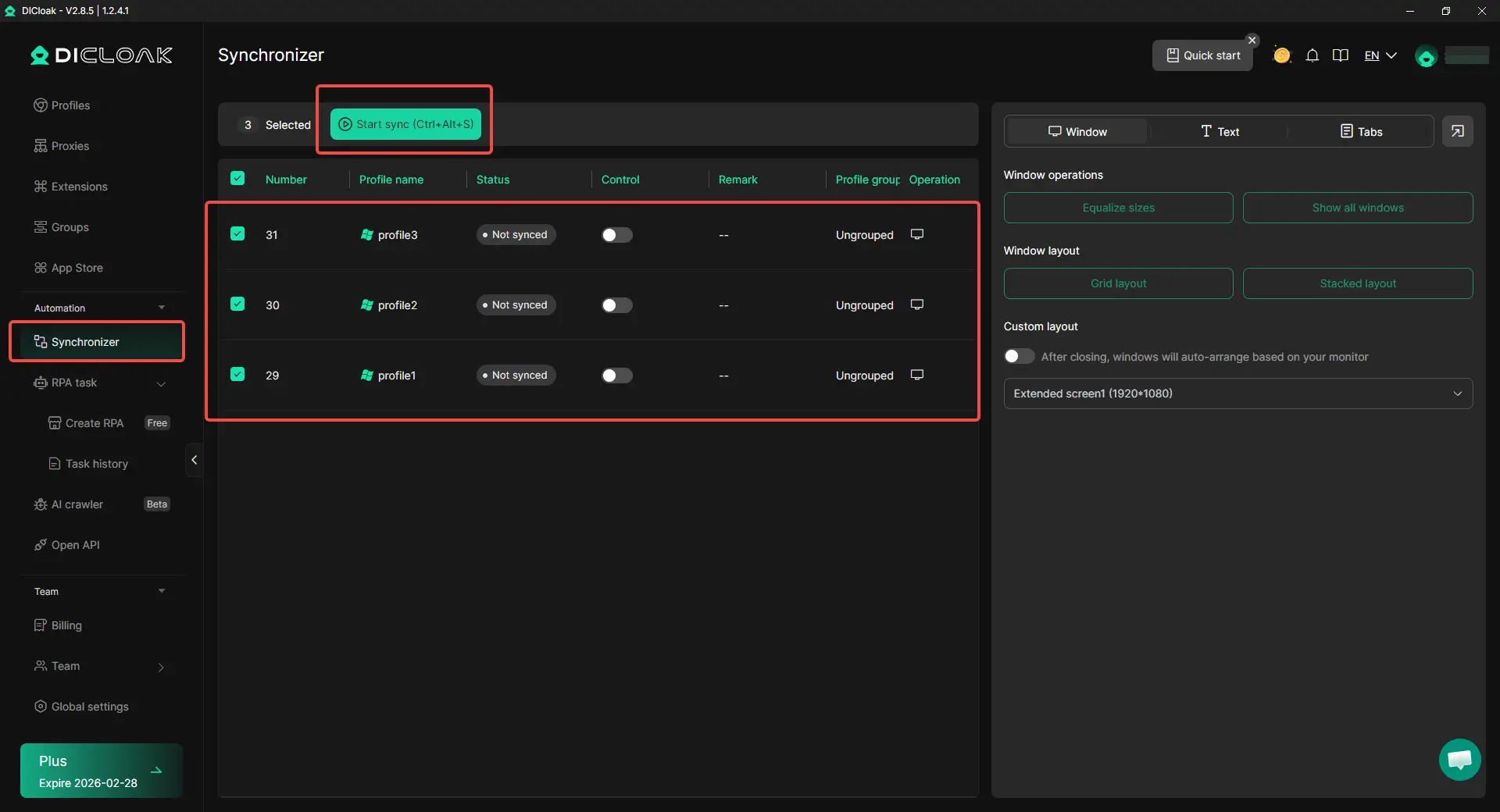
The Synchronizer feature allows you to perform repetitive actions across multiple profiles simultaneously. Technically, it executes these commands while maintaining the individual fingerprint isolation of each profile, allowing for scale without triggering "coordinated inauthentic behavior" flags.
Streamlining Operations with Team Collaboration
DICloak allows team members to access profiles without sharing raw login credentials. This maintains security and reduces the risk of "suspicious login" flags that often occur when accounts are accessed from new, unverified devices.

Conclusion
Patience is the most critical factor in restoring a restricted account. Most shadowbans are temporary, lasting between 48 hours and one week, provided you allow the "algorithmic reset" to occur. By prioritizing organic engagement and utilizing tools like DICloak for multi-account management, you can maintain high visibility and long-term account health.
Frequently Asked Questions
How long does a Twitter shadowban usually last?
Most restrictions are temporary and are lifted within 48 hours to one week, provided the user stops the behavior that triggered the flag.
Does X notify you if your account is restricted?
No. Deboosting is designed to be subtle. Users must rely on manual tests and engagement analytics to identify a restriction.
Can private accounts face these restrictions?
Yes. Even if your tweets are protected, a restriction can suppress your profile in search results for your existing followers and decrease your visibility in internal threads.
Does deleting a tweet immediately lift the restriction?
No. While deleting the offending content is necessary, the algorithm requires a "cool-down" period to re-evaluate the account's behavior. The lift is never instantaneous.
Is it only controversial accounts that get deboosted?
No. Accounts are frequently deboosted for technical reasons, such as excessive automation, hitting velocity limits, or posting repetitive links, regardless of the political or social nature of their content.
 Web Proxy Tools
 Free Tools
 Cookie Plugin
 UA Generator
 MAC Address Generator
 IP Generator
 IP Address List
 2FA Code Generator
 World Clock
 Anonymous Check
 WebRTC Leak Test
 UUID Generator
 Free Web Proxy Site
 Proxy Checker
 FB Ad Checker
 AI Web Scraping
 Free SMM Tools
 Twitter Shadowban Checker
 Instagram Name Checker
 UTM Generator
 Username Generator
 AI Hashtag Generator
 LinkedIn Headline Generator
 Social Media Image Resizer