Many advertisers search for unlimited Facebook ad accounts when one ad account is not enough. A brand may need separate accounts for different regions. An agency may manage ads for several clients. An e-commerce team may want different accounts for testing campaigns, products, or landing pages.
But “unlimited” does not mean Meta gives every business endless ad accounts. Meta says businesses have ad account creation limits, and new advertisers may start with one ad account until they make a confirmed payment. You can also check your business portfolio’s ad account limit inside Meta Business Suite.
So the real goal is not to create accounts without rules. It is to get more Facebook ad accounts in a safer way, understand Facebook ad account limits, and build a clean system to manage multiple Facebook ad accounts. This guide explains the safer options, common risks, and tools that can help you keep Facebook ad account work more organized in 2026.
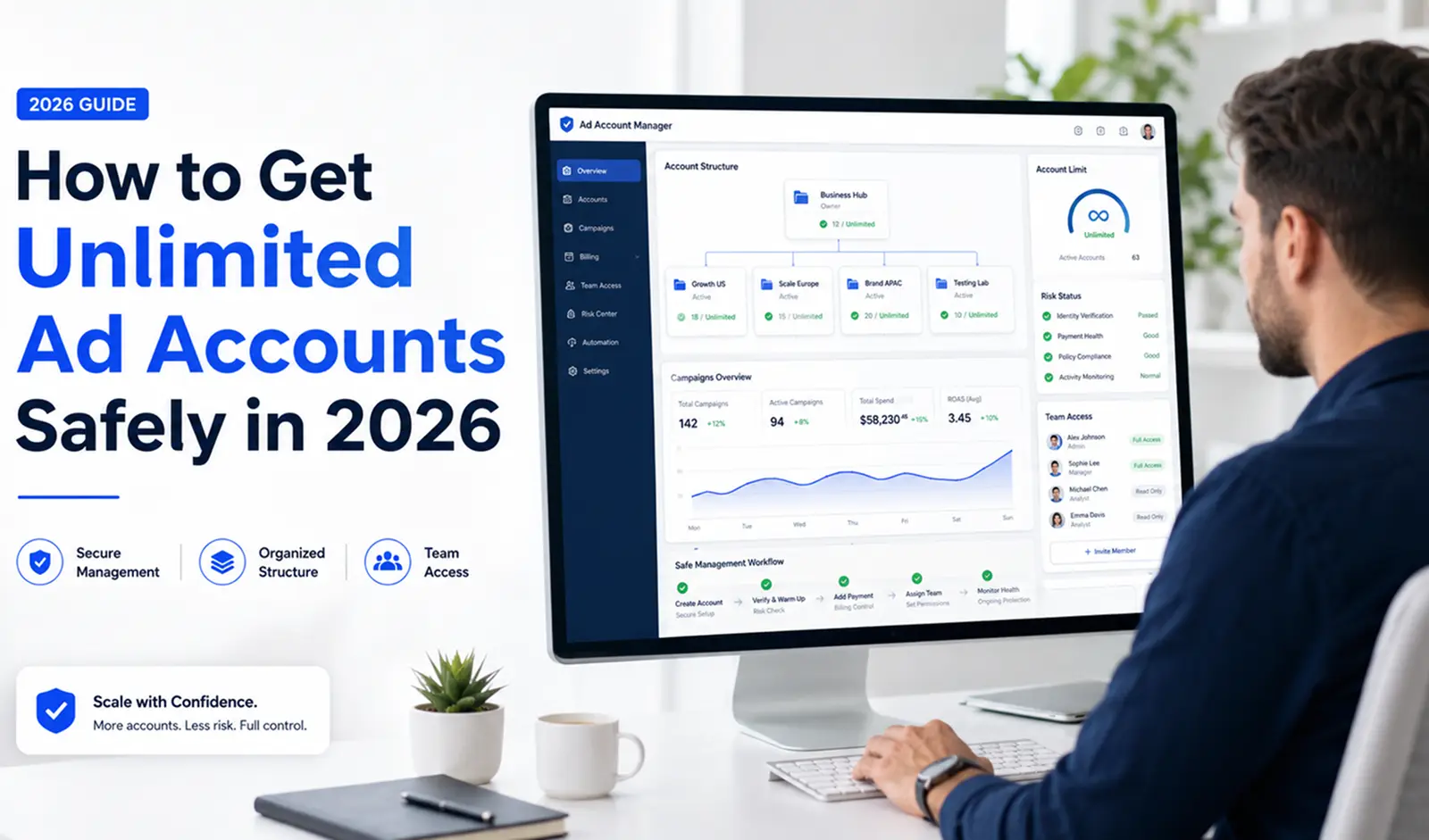
Can You Really Get Unlimited Facebook Ad Accounts?
After understanding why people search for unlimited Facebook ad accounts, the next question is simple: can you really get them? In a strict sense, no. Meta does not offer unlimited ad accounts to every advertiser. It sets limits to reduce fraud, payment risk, and account abuse.
What “unlimited” means in real advertising work
In real work, “unlimited” usually means having enough account capacity for your business needs. For example, an agency may need separate ad accounts for different clients. An e-commerce team may need different accounts for separate brands or regions. The goal is not endless account creation. The goal is a clean system to manage multiple Facebook ad accounts without mixing clients, assets, or billing.
Why Meta still sets account limits
Meta says businesses begin with an ad account creation limit of one until they make a confirmed payment. Meta also lets users check their business portfolio’s ad account creation limit in Meta Business Suite.
This means Facebook ad account limits are normal. They are not always a problem. They are part of how Meta controls risk across advertisers.
When businesses need more than one ad account
Some businesses have real reasons to get more Facebook ad accounts. A clothing brand may separate ads by country. A marketing agency may manage one ad account per client. A product team may keep different brands or landing pages in different accounts.
The safer path is to grow account capacity through proper business setup, clean billing, and clear access rules. If every account has a real purpose, it is easier to manage and easier to review when something goes wrong.
Legit Ways to Get More Facebook Ad Accounts
Once you understand that unlimited Facebook ad accounts is not a true platform feature, the better question is this: how can a business get more ad account capacity in a safe way? The answer usually starts with Meta’s own tools, proper access rules, and clear business use cases.
Creating ad accounts through Meta Business Manager
The first option is to create ad accounts inside Meta Business Manager, now often called a business portfolio. Meta says all advertisers start with one ad account until they make a confirmed payment. After that, Meta may allow more ad accounts, and you can check your ad account creation limit in Business Suite.
For example, a brand may start with one ad account for its main store. Later, it may add another account for a new country or product line. This is a cleaner way to get more Facebook ad accounts than opening random accounts without a business reason.
Using client-owned ad accounts with partner access
Agencies do not always need to own every ad account. A client can keep ownership of the account and give the agency partner access. Meta’s Business Help Center explains that businesses can add partners to business assets through Meta Business Suite settings.
This is useful for agencies that manage ads for many clients. Each client keeps control of their own assets, while the agency gets the access it needs to run campaigns. This also helps keep billing, pages, pixels, and permissions cleaner.
Working with agencies or verified business partners
Some businesses work with agencies or approved partners when they need more support. This can be useful if the business lacks ad account experience, has several markets, or needs help with permissions and account setup. Meta also lets business portfolio owners manage people and permissions, so each team member only gets the access they need.
Why Facebook Ad Accounts Get Restricted?
After you find legit ways to get more account capacity, the next step is protecting what you already have. More accounts do not help much if the same issues keep causing restrictions. Facebook ad accounts usually get restricted because of policy problems, payment risk, or messy business asset connections.
Policy violations and rejected ads
A Facebook ad account restricted issue often starts with ads that break Meta’s advertising rules. Meta says its review system checks ad text, images, videos, targeting, landing pages, and business assets. If a violation is found, the ad may be rejected, and the business account or assets may be restricted.
For example, a skincare brand may get ads rejected if the copy makes strong health claims or targets people in a sensitive way. One rejected ad may be fixable, but repeated problems can hurt account trust.
Payment, billing, and identity issues
Payment problems can also lead to account issues. Meta says failed payments can happen for several reasons, and it may limit how many ad accounts use the same payment method to help keep accounts safe.
For example, if several new accounts use the same card, then one payment fails, the whole setup may become harder to manage. This is why clean billing, valid payment methods, and clear business details matter when you manage multiple Facebook ad accounts.
Shared assets, admins, pages, pixels, and domains
Restrictions can also spread through business assets. Meta says it reviews business accounts and assets such as ad accounts, Pages, and user accounts. If an asset is restricted, it may not be able to advertise across Meta technologies.
This matters when many accounts share the same admins, Pages, pixels, domains, or billing setup. If one account has a serious issue, connected assets may face more review. A safer setup keeps client assets, payment details, and access roles clearly separated.
Should You Rent or Buy Facebook Ad Accounts?
After learning why a Facebook ad account restricted issue can happen, it is natural to ask whether renting or buying accounts is a shortcut. Some advertisers search for buy Facebook ad accounts or rent Facebook ad accounts when their own accounts are limited. But third-party accounts can bring hidden risks, especially around ownership, billing, policy history, and access control.
Why rented or bought accounts may look attractive
Rented or bought accounts may look useful because they seem ready to run ads. Some providers may promise aged accounts, higher spend limits, or faster approval. For example, a small e-commerce team may want a backup account after one ad account gets restricted. But a “ready-to-use” account does not mean it is clean or safe.
Risks behind third-party ad account providers
The biggest risk is that you may not fully control the account. The provider may still own the Business Manager, payment setup, Page, pixel, or admin access. Meta says business accounts and assets can face advertising restrictions when ads, behavior, or linked assets break its rules. If the account has old policy problems, you may inherit that risk.
There is also scam risk. Some providers may sell access, take payment, then remove your access later. Others may offer accounts tied to unclear billing or risky ad history. Meta’s help pages also show that disabled or restricted accounts often need review through Business Support Home, which may be harder if you are not the real owner.
What to check before using a third-party account
Before using any third-party Facebook ad accounts, check who owns the account, who controls billing, and who can remove users. Ask for proof of account status, payment history, Page access, pixel access, domain setup, and past restrictions. Also check whether your ads, landing pages, and products follow Meta’s Advertising Standards before spending money.
How to Manage Multiple Facebook Ad Accounts Without Chaos?
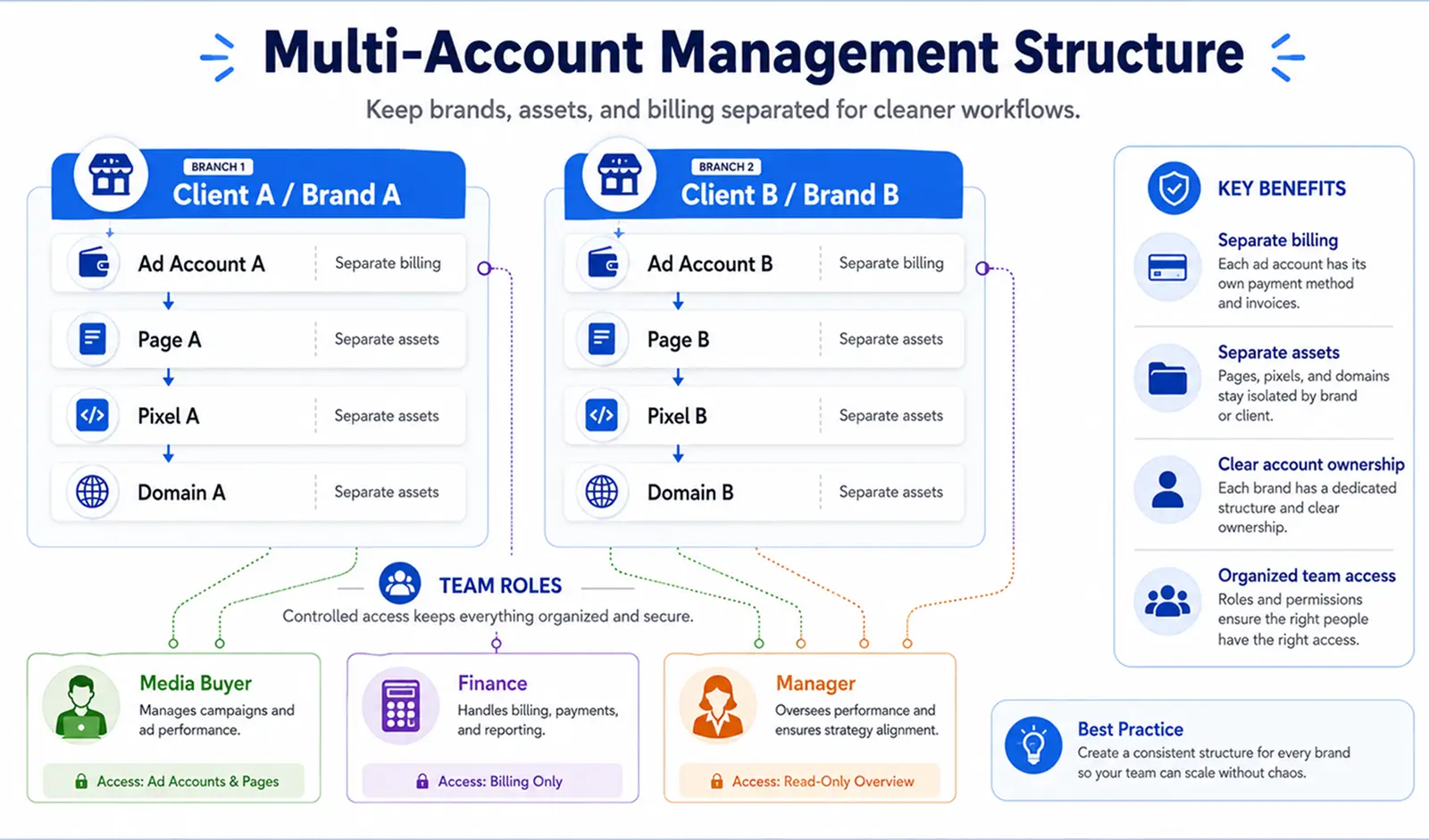
After looking at rented or bought accounts, it is clear that more accounts can also mean more confusion. If you want to manage multiple Facebook ad accounts safely, structure matters. Each account should have a clear purpose, clean ownership, and the right access rules.
Separate accounts by brand, client, or campaign type
Do not put every campaign into one messy setup. A better Facebook ad account management system separates accounts by real business use. For example, an agency can use one account for each client. An e-commerce team can separate accounts by brand, country, or product line.
Keep billing, pages, pixels, and domains organized
Many problems start when assets are mixed. If one ad account uses the wrong Page, pixel, or domain, your data can get confusing fast. Meta says a business portfolio helps businesses manage assets such as Pages, Instagram accounts, and ad accounts in one place.
A simple example helps. If you run ads for two different stores, do not use the same pixel and domain setup for both unless there is a real business reason. Keep billing details clear too, so payment issues in one account do not affect the whole workflow.
Use naming rules and access roles for team workflows
Team access can also become messy. Meta explains that business portfolios and business assets can have full control or partial access. Partial access limits people to the assets or tasks they are assigned.
Use simple naming rules like client-name-country-campaign or brand-region-product. Give each team member only the access they need. This makes multiple ad account workflow easier to track and reduces mistakes when several people work on ads at the same time.
How DICloak Helps Manage Facebook Ad Accounts More Safely
When you manage several Facebook ad accounts, the hard part is not only getting more accounts. It is keeping each account, client, and campaign workflow separated. You can use DICloak to create different browser profiles for different Facebook ad accounts, so cookies, sessions, and browser fingerprints do not get mixed in one normal browser.
Keep Facebook ad accounts in separate browser profiles
You can place each Facebook ad account in its own DICloak profile. This is useful for agencies or teams that manage different brands, clients, or regions on one device.
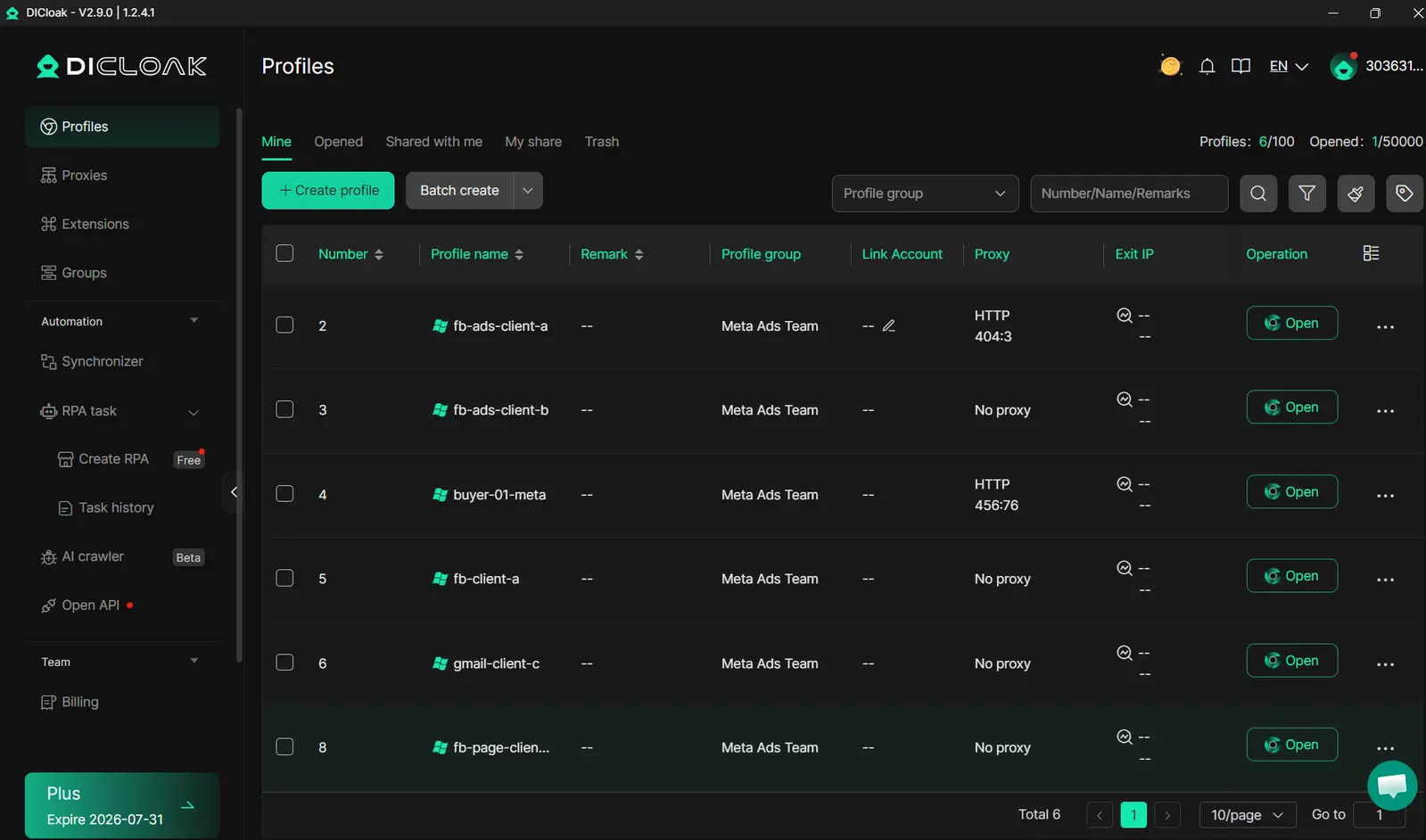
Configure custom proxies for consistent account environments
You can configure a custom proxy for each profile based on the account’s region or work needs. This helps keep each account environment more consistent and easier to track.
Share profiles with team members without exposing passwords
You can also share selected profiles with team members and set access permissions. This helps teams work together without sending main login details around.
Frequently Asked Questions
Can you really get unlimited Facebook ad accounts?
Not in a literal way. If you want to know how to get unlimited facebook ad accounts, the safer answer is to build more account capacity through Meta Business Manager, client access, agencies, or clean business structures.
How many Facebook ad accounts can one Business Manager have?
The limit depends on your business history, payment status, and Meta’s account rules. New businesses may start with a lower limit, while trusted business portfolios may be allowed more ad accounts over time.
Is it safe to rent or buy Facebook ad accounts?
It can be risky. Rented or bought accounts may have old policy issues, unclear ownership, weak billing history, or provider control problems.
Why do Facebook ad accounts get restricted?
Facebook ad accounts may get restricted because of policy violations, payment issues, suspicious activity, or messy asset connections. Shared pages, pixels, domains, admins, and billing details can also create risk.
What is the safest way to manage multiple Facebook ad accounts?
Use clear business structures, separate assets, clean billing, and proper team permissions. If you manage many accounts on one device, keeping each account workflow in a separate browser profile can also make daily management cleaner.
Building a larger Facebook advertising operation is not just about getting more accounts. It is about using the right account structure, keeping business assets organized, and reducing unnecessary risks as you scale. By understanding Facebook ad account limits, following Meta's guidelines, and managing accounts more carefully, you can create a more stable advertising workflow in 2026. Try DICloak For Free.
 Web Proxy Tools
 Free Tools
 Cookie Plugin
 UA Generator
 MAC Address Generator
 IP Generator
 IP Address List
 2FA Code Generator
 World Clock
 Anonymous Check
 WebRTC Leak Test
 UUID Generator
 Free Web Proxy Site
 Proxy Checker
 FB Ad Checker
 AI Web Scraping
 Free SMM Tools
 Twitter Shadowban Checker
 Instagram Name Checker
 UTM Generator
 Username Generator
 AI Hashtag Generator
 LinkedIn Headline Generator
 Social Media Image Resizer