School districts in the US blocked YouTube for over 80% of students during exam season last year, according to EdTech Magazine. But most restrictions are not about security, they’re just blanket filters that leave teachers, developers, and regular users locked out of research, tutorials, or even official channels. People search “how to get unblocked youtube” because the usual fixes, switching browsers, clearing cache, or looking for “YouTube unblocked” sites, rarely work when the block is network-level.
The real pain starts when you need access fast, but the admin won’t budge. For developers, a blocked YouTube means no API testing, no access to live demo videos, and no way to verify embedded content. Students and remote workers hit the same wall: the “access blocked youtube” guides online are full of dead links, outdated tricks, or risky advice. Most proxy services get flagged or break the video player, and some so-called “unblock YouTube” tools ask for personal info, which raises privacy flags.
This guide cuts through the noise. You’ll see which safe methods actually let you access blocked YouTube without risking your account or getting caught by network filters. It’s not about guesswork, it’s about practical steps, real risks, and what actually works when the pressure is on. Here’s what users who need YouTube unblocked do right now.
Why YouTube Gets Blocked: Main Causes and What You’re Up Against
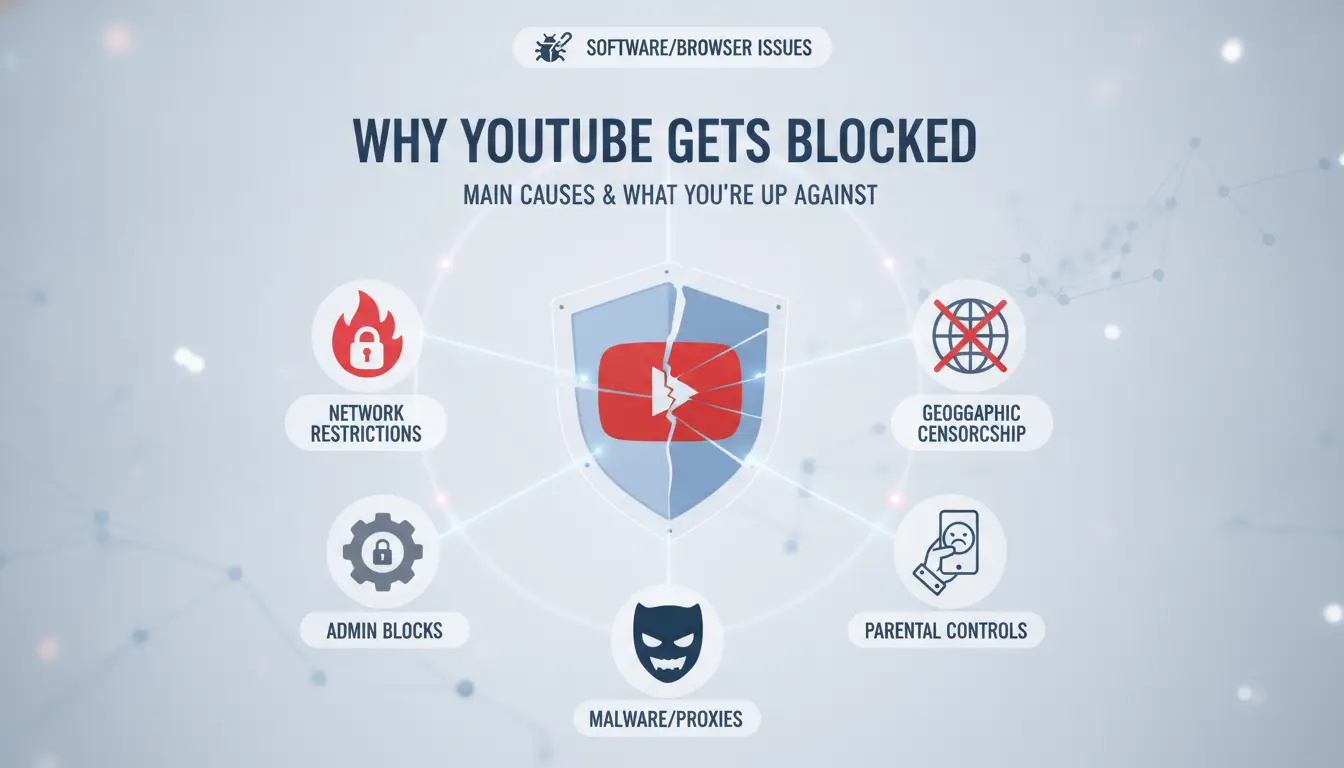
If you’re searching for how to get unblocked YouTube, the first thing to understand is why YouTube access gets shut down in the first place. Blocks aren’t random, they’re targeted, and the method used changes how hard it is to get YouTube unblocked. Here’s what you’re really up against.
Network Restrictions: School, Office, and Public Wi-Fi
Most schools, offices, and even libraries don’t just block websites for fun, they use strict network rules to keep students and workers focused, limit bandwidth, or avoid “inappropriate content.” These places usually block YouTube in three main ways:
- Firewall filtering: The network blocks traffic to YouTube’s domains. If you try to visit, you hit a “site blocked” page or nothing loads.
- Web filter software: Tools like Fortinet, Cisco Umbrella, or SonicWall scan and block YouTube traffic by category, keyword, or even video type.
- DNS blocking: The Wi-Fi changes where “youtube.com” points, sending you to a blank or warning page.
Each method works at a different level. Sometimes, only the main site is blocked, but video embeds and the YouTube app might still work. Other times, everything from the site to the mobile app is cut off. That’s why so many “access blocked YouTube” tricks fail, one school’s block is nothing like another’s.
Geographic and Country-Level Censorship
YouTube isn’t just blocked by schools. Some countries use government censorship to shut down video sharing sites, including YouTube, for everyone inside their borders. Countries might block YouTube because of political reasons, copyright fights, or to control information.
What to Check Before Trying to Unblock YouTube: Risks, Limits, and Mistakes
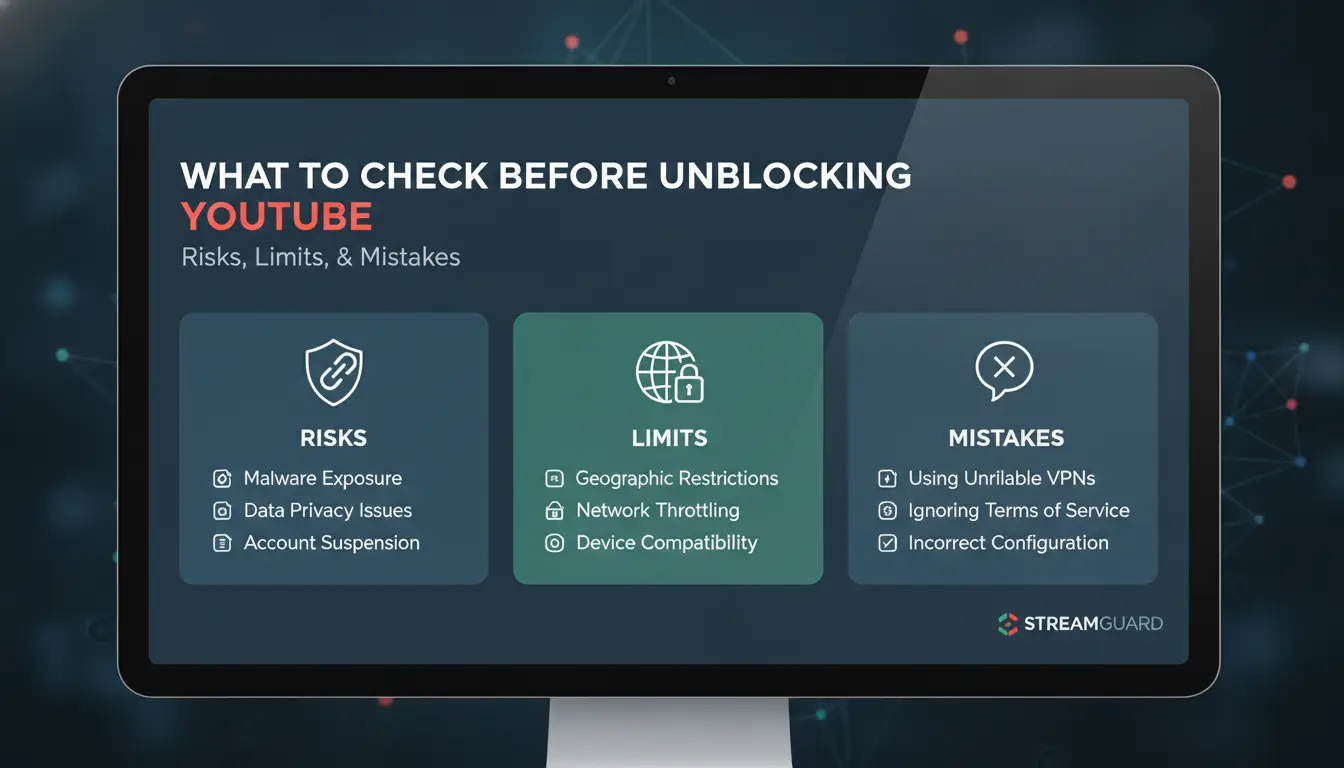
Getting YouTube unblocked isn’t just about finding a working proxy or tool, it’s about knowing what you’re really up against and what can go wrong. If you rush in, you risk getting your device flagged, losing access entirely, or leaking personal info. Before searching “how to get unblocked youtube,” here’s what users check first.
Is the Block Network-Based or Device-Based?
Blocks on YouTube usually fall into two categories: network-based, where the Wi-Fi or wired connection itself filters or blocks YouTube, and device-based, where local settings, parental controls, or admin tools restrict access. The difference matters. Network blocks often affect every device on the same connection and can block even private browsing or proxy attempts. Device-based blocks may only affect one computer or phone and can sometimes be bypassed with a new user profile or safe browser mode.
To identify the restriction, try connecting another device to the same network. If YouTube stays blocked everywhere, it’s network-based. If only your device is affected, local controls are to blame. Knowing which block you face is the single most important step, it guides which workaround will actually work and avoids wasted effort.
Common Mistakes That Make Unblocking Fail
Most “access blocked youtube” guides online skip the basics. Users often grab random proxies, browser add-ons, or “unblock youtube” sites without checking their safety. Cheap proxy lists usually break video playback or get flagged fast. Worse, some tools ask for your Google login or personal info, never hand these over. Failing to check the block type leads to wasted time and more restrictions.
Another mistake: skipping privacy checks. If you use a web proxy, check if it runs over HTTPS, doesn’t log your data, and doesn’t ask for account credentials. For schools or workplaces, using public proxies risks exposing your browsing history. If you need “youtube unblocked” for testing, look for solutions like DICloak that isolate browser profiles and help avoid detection, especially if you’re handling multiple accounts or team access.
Step-by-Step: How to Get Unblocked YouTube with Proxy Methods
Image generation pending: Blog illustration for section "Step-by-Step: How to Get Unblocked YouTube with Proxy Methods" Reason: AI image generation returned no usable image and no stock fallback was available
Getting YouTube unblocked in a locked network is about picking methods that actually work without risking your account or device. Too many guides push tools that get flagged, break video playback, or collect personal info. Here’s how people get past those barriers and access blocked YouTube safely, without guessing.
Using Web-Based Proxy Sites for YouTube
Web-based proxy sites let you load YouTube from their server instead of yours. That means your school, office, or public WiFi sees you visiting the proxy, not YouTube. The main catch: some proxies don’t handle video streaming well, and many get blocked by admins after a while.
To use a proxy site, you visit the proxy’s homepage, paste the YouTube link, and hit “Go.” Popular examples include hide.me, ProxySite, and CroxyProxy. Each works a bit differently; CroxyProxy is known for handling YouTube videos with fewer playback errors.
But there’s a limit. Some proxies won’t let you log in or comment, and video quality can drop. Always check if the site uses HTTPS, no lock icon means your data isn’t protected. The biggest risk is using random proxy sites that ask for your login info or push shady ads, never enter passwords or click pop-ups.
Browser Proxy Extensions: Setup and Safety Tips
Browser proxy extensions are installed right in Chrome, Firefox, or Edge. They reroute traffic to unblock YouTube and work for more than just web pages. To install, search for “proxy” in your browser’s extension store, pick one with good reviews, and follow setup prompts. For example, Setupproxy, GeoProxy, and FoxyProxy are well-known.
Never use extensions with few reviews or ones that demand full access to all your browsing history. Look for clear privacy terms and regular updates. If you’re not sure, test with a throwaway account before using your main login. Extensions can break YouTube unblocked if the proxy server is slow or crowded, so switch servers if you see lag. For long-term access blocked YouTube, stick to extensions supported by real companies, not random developers.
Alternative Ways to Access YouTube When Proxies Don’t Work
Sometimes proxies get blocked, slow down, or fail to stream video. If you’re searching for how to get unblocked youtube but proxies aren’t working, other methods can help you access blocked YouTube without breaking the rules or risking your privacy.
Changing DNS Settings for Unblocked Access
Network blocks often rely on default DNS servers to filter or redirect traffic. Switching to a public DNS, like Google Public DNS or Cloudflare’s 1.1.1.1, can sometimes bypass these restrictions.
Step-by-step DNS setup:
- Go to your device’s network settings.
- Find the DNS section and replace the current addresses with 8.8.8.8 and 8.8.4.4 (Google) or 1.1.1.1 and 1.0.0.1 (Cloudflare).
- Save and reconnect to the network.
This won’t always work, some schools or offices block traffic at a deeper level, but it’s quick, doesn’t need admin rights, and doesn’t involve risky software.
Mobile Hotspot and Data: When to Switch Networks
If Wi-Fi blocks YouTube, switching to your mobile data can give you a fresh IP and a direct path. Turn on your phone’s hotspot and connect your laptop or tablet. This method works well for quick access or when you need YouTube unblocked on the go.
Watch your data usage, video eats up gigabytes fast. If your plan is limited, only use this option when you can’t wait for another fix.
How to Safely Manage Multiple YouTube Accounts and Avoid Detection
Managing more than one YouTube account isn’t just about logging in and out. If you want to get unblocked YouTube access, you need to avoid leaving tracks that trigger platform bans or network detection. Many users think using different browsers or clearing cookies is enough, but the real risks go deeper.
Why Multi-Account Access Gets Risky
YouTube and Google track users through browser fingerprinting, IP addresses, and account linking. When you log into several accounts from the same device or network, their systems flag the pattern. Even something simple, like using the same browser profile for all accounts, can get you banned or blocked.
For example, Google might notice similar device settings, extensions, or login timing. If you try to access blocked YouTube with multiple accounts, they can connect the dots and restrict all your accounts at once. This is why “unblock YouTube” guides that skip profile isolation often fail.
What trips up most users is not the login itself, but the mix of browser fingerprints and account activity that looks automated or suspicious. If your accounts get linked, recovering them is tough, and you might lose access for weeks.
Using Isolated Browser Profiles and Proxies for Each Account
The safest way to keep YouTube unblocked for multiple accounts is to set up isolated browser profiles, one for each account. Each profile gets its own proxy, so YouTube sees a different IP every time. This stops Google from connecting your accounts through device or network data.
Social media marketers often use tools like DICloak to create separate browser profiles and manage proxies. The workflow is simple: assign each YouTube account its own profile, bind a unique proxy, and never mix logins. That way, if one account trips a filter, the others stay safe.
Isolated profiles and proxies break the link between accounts, this is what keeps your workflow smooth and your accounts from getting flagged.
If you want to know how to get unblocked YouTube access reliably, don’t use shortcuts or risky browser tricks. Stick to profile isolation and proxy management so you can keep YouTube unblocked and your work moving.
DICloak for Safer Multi-Account YouTube Access: Social Media Marketing Use Case
Managing more than one YouTube account on the same device almost always triggers risk checks or bans. Marketers and content teams trying to figure out how to get unblocked YouTube access often find that quick fixes, like random proxy sites, don’t help for long. The real problem isn’t just hiding your IP. It’s that YouTube connects accounts by browser fingerprint, cookies, and usage patterns. When two accounts share the same fingerprint, one block can spread to all.
Isolated Browser Profiles: Reduce Ban and Block Risk
You can use DICloak to create a separate, isolated browser profile for each YouTube account. Every profile gets a unique browser fingerprint and independent proxy, so YouTube’s system sees each login as a different person, not a clone. This isolation stops bans from spreading across accounts and keeps your access stable, even if you’re running campaigns for multiple brands or clients. Without this step, most unblock YouTube methods only work once before getting flagged.
Automate Engagement and simplify Workflow
DICloak’s built-in RPA and multi-window tools let you automate posting, comment replies, and even view boosting. Social media marketers can batch tasks for all their YouTube unblocked accounts at once, cutting manual work and mistakes. Teams keep accounts alive longer and get safer, repeatable results. For more details on browser fingerprinting, check Wikipedia’s guide.
Safety and Privacy Checklist Before Using Any Unblocked YouTube Method
When you search for "how to get unblocked youtube," the real problem isn’t just finding a trick that works, it’s avoiding privacy mistakes that can cost you your account or expose your personal info. Most guides skip the safety checks. Here’s what experienced users always look for before trying any method to access blocked YouTube.
How to Spot Unsafe Proxy Sites and Tools
Many sites promising "unblock youtube" are traps. If a proxy asks for your Google password or any login details, close the page, no legit service needs your credentials to stream a public video. Watch for pop-ups demanding permission to install browser extensions or apps; these often collect browsing data or inject ads. Sites with broken SSL (the lock icon missing) can leak everything you do to anyone on the network. If a tool claims "free unlimited access" but bombards you with requests for personal info, that’s a red flag.
Only use proxies you can verify as safe. Check reviews on Reddit or look for recommendations on How-To Geek. Before entering any details, confirm the URL starts with HTTPS. Never use your main account credentials, if a site needs them, it’s not worth the risk.
Protecting Your Data and Account Privacy
If you’re logging in to YouTube after unblocking it, make sure you’re not on a shared proxy or tool that stores session data. Use browser incognito mode or a dedicated browser profile to keep your YouTube unblocked session separate from your regular browsing. Services like DICloak let you create isolated profiles and set up independent proxy configurations, so your activity doesn’t cross over. For extra safety, avoid connecting your Google account unless you trust the access method, many users stick to watching videos without logging in.
The most critical step: never reuse your main Google password on any unblocking tool or proxy. Even if a site looks legit, password reuse can lead to account theft. Stick to tools that don’t require a login and always check for recent security reviews. If you’re unsure, test with a burner account before risking your main credentials.
Legal and Ethical Considerations: What You Need to Know Before Unblocking YouTube
Is It Legal to Unblock YouTube in Your Country?
Before you try any “how to get unblocked youtube” method, check local laws. Some countries treat bypassing network blocks as a violation, even if you only want to watch demo videos. Schools and workplaces often have strict rules, ignoring them can get your account flagged or suspended. The YouTube terms of service ban unauthorized access, so using risky “youtube unblocked” tricks can put your channel at risk. If you’re unsure, search “[country] internet censorship law” or ask your IT admin. Violating rules can mean losing access or facing legal trouble.
Ethical Use: When Unblocking Is Not Appropriate
Unblocking YouTube isn’t always okay. If your school or company blocks the site, respect those policies. Marketers and individuals should avoid “access blocked youtube” tactics that involve sharing login details or using tools that collect personal info. Responsible use means choosing safe, compliant options, never risk other users’ privacy just for quick access. If you need YouTube for work or study, request permission instead of forcing a workaround.
Frequently Asked Questions
Can I get unblocked YouTube without using proxies?
Yes, you can get unblocked YouTube without a proxy. Try changing your DNS settings to use Google Public DNS (8.8.8.8 and 8.8.4.4) or Cloudflare (1.1.1.1). Also, if possible, switch from school Wi-Fi to mobile data. Some people have success using browser extensions that skip blocks, too.
Are unblocked YouTube proxy sites safe to use?
Not all YouTube unblocked proxy sites are safe. Some may steal your data or show harmful ads. Look for sites with HTTPS and avoid those asking for personal info. Use trusted proxies, and never log in to your Google account through a proxy. Consider using a secure browser or proxy for better privacy.
Will accessing blocked YouTube with multiple accounts increase my risk of being blocked?
Yes, using several accounts to access blocked YouTube can link your activity. Websites use cookies, IP addresses, and browser fingerprinting to track users. To lower your risk, clear your browser's cookies, use Incognito mode, or switch devices. However, always follow your school or company’s rules to avoid further blocks.
Is it legal to unblock YouTube in my country or institution?
Before trying how to get unblocked YouTube, check your country’s laws and your school or employer’s policies. Unblocking YouTube may break rules or local laws. This could lead to losing access, school discipline, or even legal trouble. If you’re unsure, ask an adult or IT administrator first.
What should I do if all unblocking methods fail?
If you cannot access blocked YouTube using how to get unblocked YouTube tips, try clearing your browser cache, restarting your device, or contacting your network admin for help. You can also find educational videos on sites like Vimeo, Dailymotion, or Khan Academy as alternatives.
Accessing blocked YouTube content is possible with the right tools and strategies, such as using proxys, proxy sites, or browser extensions. By understanding these methods, you can regain your access while maintaining security and privacy online. Try DICloak For Free
 Web Proxy Tools
 Free Tools
 Cookie Plugin
 UA Generator
 MAC Address Generator
 IP Generator
 IP Address List
 2FA Code Generator
 World Clock
 Anonymous Check
 WebRTC Leak Test
 UUID Generator
 Free Web Proxy Site
 Proxy Checker
 FB Ad Checker
 AI Web Scraping
 Free SMM Tools
 Twitter Shadowban Checker
 Instagram Name Checker
 UTM Generator
 Username Generator
 AI Hashtag Generator
 LinkedIn Headline Generator
 Social Media Image Resizer