Professional networking on LinkedIn is all about momentum—until you hit the wall. If you are a recruiter, sales professional, or active job seeker, you’ve likely encountered the "Commercial Use Limit on Search." This is LinkedIn’s technical throttle; once you reach a specific number of profile views and searches in a month, the platform obscures your results to force an upgrade to a Premium plan costing anywhere from $60 to over $150 per month.
As a strategist who has managed hundreds of profiles, I’ve seen every "hack" in the book. While many online guides peddle outdated or dangerous scams, there are legitimate ways to bypass these paywalls. This guide breaks down verified workflows for 2026, ranging from standard trials to sophisticated multi-accounting strategies for power users.
How to Get LinkedIn Premium for Free with the 30-Day Free Trial
The 30-day trial is the bedrock of LinkedIn’s acquisition model. It remains the most reliable way to access full features like InMail, applicant insights, and lead lists without an initial charge.
How to trigger the trial without immediate charges
- Navigate to the "Me" icon at the top of your LinkedIn homepage.
- Select "Access My Premium" or go directly to the Premium subscription page.
- Choose the plan that fits your current workflow (Career, Business, Sales Navigator, or Recruiter).
- Click "Start My Free Month."
- Enter your payment details. Note: LinkedIn requires a valid credit card to prevent bot abuse and ensure a seamless "Auto-Renew" transition, but you will not be billed if you cancel in time.
Why you can (sometimes) take the trial more than once
The system isn't strictly "one and done." According to the Source Context, users are eligible for a new free trial once every 12 months. If your last trial ended over a year ago, the "Start My Free Month" button will often reappear in your settings.
The critical steps to cancel before the "Auto-Renew" hits
Do not wait until day 29. You can cancel your trial immediately after signing up, and you will typically retain access for the remainder of the 30 days.
- Navigate to Settings & Privacy > Subscriptions & Payments.
- Click Manage Premium Account.
- Select Cancel Subscription and follow the prompts until you receive a confirmation email.
How to Get LinkedIn Premium for Free with 2 Months of Sales Navigator via Referrals
For sales professionals, the standard 30-day trial is often too short to build a pipeline. The Sales Navigator Referral program is a high-value alternative that doubles your access time.
Finding a 1st-degree connection with referral credits
Every active Sales Navigator subscriber has 10 referral credits to give away. When a connection refers you, you receive an email with a unique joining link that grants a 60-day free trial.
The eligibility "Catch-22"
Redeeming these 2-month trials is strictly governed by three rules:
- You must be a 1st-degree connection of the referrer. * You must have no current active Premium subscription (including other trials).
- You must not have used any free trial (of any tier) in the last 12 months.
How to Get LinkedIn Premium for Free for 12 Months Through Special Programs in 2026
LinkedIn maintains long-term philanthropic partnerships that grant year-long access to specific demographics.
The SheerID verification for U.S. Military Veterans and Spouses
Through a partnership with SheerID, U.S. veterans and their spouses can claim 12 months of LinkedIn Premium (usually the Career or Business tier) along with full access to LinkedIn Learning.
The Workflow: Visit the LinkedIn Veterans page. You will need to provide your branch of service, discharge date, and basic ID info for SheerID verification. Ensure your profile reflects your military service before applying to streamline the approval.
The "LinkedIn for Journalists" quarterly application
Verified journalists can secure a one-year subscription to LinkedIn Business Premium. This plan is specifically designed to help journalists find sources and track industry trends.
Requirements: You must join the "LinkedIn for Journalists" group and have a profile that clearly demonstrates a professional journalism career path.
Timing: LinkedIn opens these application windows each quarter. If you miss one window, you must wait until the next period to apply.
Tapping into the #PlusOnePledge and employee coupons
LinkedIn employees receive 6-month Premium "gift" coupons to share with their community.
The Search Query: Don't just browse your feed. Use this specific Boolean string in the search bar: “#PlusOnePledge” AND “Premium”. Filter by "Posts" and "Most Recent."
Practitioner Tip: When you find an employee offering a coupon, don't just comment "Me please." Send a personalized message explaining how the specific features (like InMails for outreach or Learning for a certification) will help you achieve a tangible goal. Employees are more likely to gift coupons to those who show they won't waste them.
How to Get LinkedIn Premium for Free with a Local Library Card for LinkedIn Learning
If your goal is skill-building rather than sales outreach, the "Library Hack" is the only truly "Forever Free" method.
Accessing the Library Portal vs. the Standard Site
You cannot log in via the standard LinkedIn.com homepage for this. Most public libraries have a customized vanity URL, typically formatted as: linkedin.com/learning-login/go/[yourlibraryname]. Check your library’s digital resources page for the specific link.
Why this is the best "Forever Free" hack for skill-building
By entering your library card number and PIN, you gain unlimited access to the entire 16,000+ course library.
The Limitation: This does not grant you the InMail credits, search insights, or the "Who viewed your profile" features of a full Premium subscription. It is strictly for educational access.
How to Get LinkedIn Premium for Free as a Student or Developer
The Visual Studio Dev Essentials "Hidden" Benefit
Developers with a Microsoft account can join the Visual Studio Dev Essentials program for free. Members receive a rotating package of benefits that frequently includes one month of LinkedIn Learning through a LinkedIn Premium Career plan. The best part? This often activates without requiring a credit card on file.
Obsolete Method: Amazon Prime Student
Many blogs still claim that Amazon Prime Student offers a 6-month trial. This partnership is officially dead. Do not waste time signing up for Prime specifically for this benefit; it has been phased out in favor of university-direct partnerships.
What to Do When You Can’t Get LinkedIn Premium for Free
If you have already exhausted your trials, you can exploit LinkedIn’s automated retention algorithm. This isn't a "glitch"; it's a standard SaaS pricing strategy designed to reduce churn.
The "Too Expensive" cancellation trick
- Go to Manage Premium Account in your settings.
- Initiate the Cancel Subscription workflow.
- When the system asks for your reason for leaving, select "It's too expensive."
What to expect from the 2-month discount offer
By flagging price as your primary pain point, the algorithm will often trigger an immediate "Stay with us" offer: 50% off for the next two months. While not free, it is the most consistent way to cut your professional overhead in half.
How to Manage Multiple Accounts With DICloak
For agencies and power users who need to scale outreach, paying for one Premium account is often less effective than running a multi-account strategy. This is the professional alternative to the high cost of Sales Navigator.
Running multiple free accounts to scale reach
A single free account is heavily limited. However, 3 to 5 well-managed free accounts can collectively provide more InMails and searches than one "Recruiter Lite" account. To do this safely, you must bypass LinkedIn’s sophisticated tracking.
Using DICloak for secure multi-account management
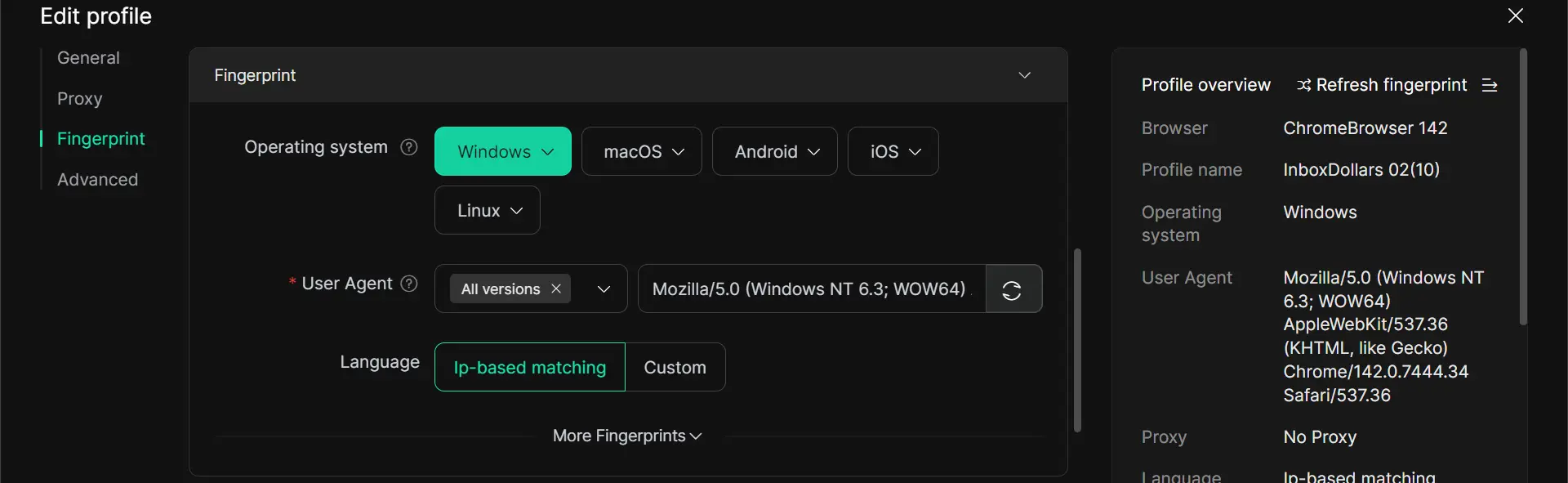
LinkedIn doesn't just track your IP; they use browser fingerprinting to see your hardware signature, Canvas data, WebGL, and RTC settings. To operate multiple profiles, professionals use DICloak, an antidetect browser that creates isolated environments.
- Isolated Browser Profiles: Each profile in DICloak has a unique, randomized fingerprint. LinkedIn sees each one as a completely different physical device.
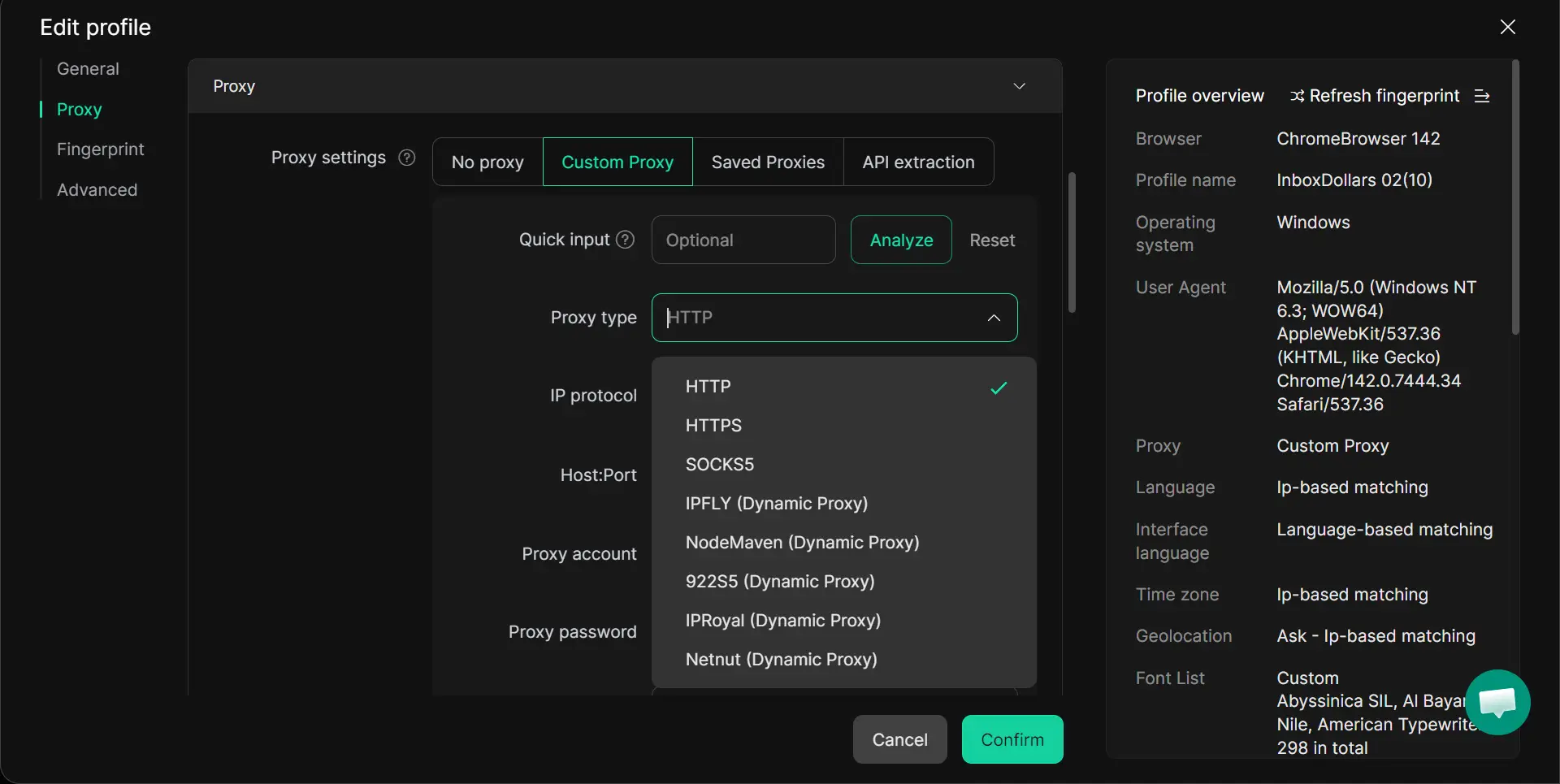
- The Proxy Requirement: To succeed, it is recommend to use high-quality residential proxies. Using a data center proxy is a rookie mistake that will get your accounts flagged instantly. Residential IPs make your connection look like a standard home or office user.
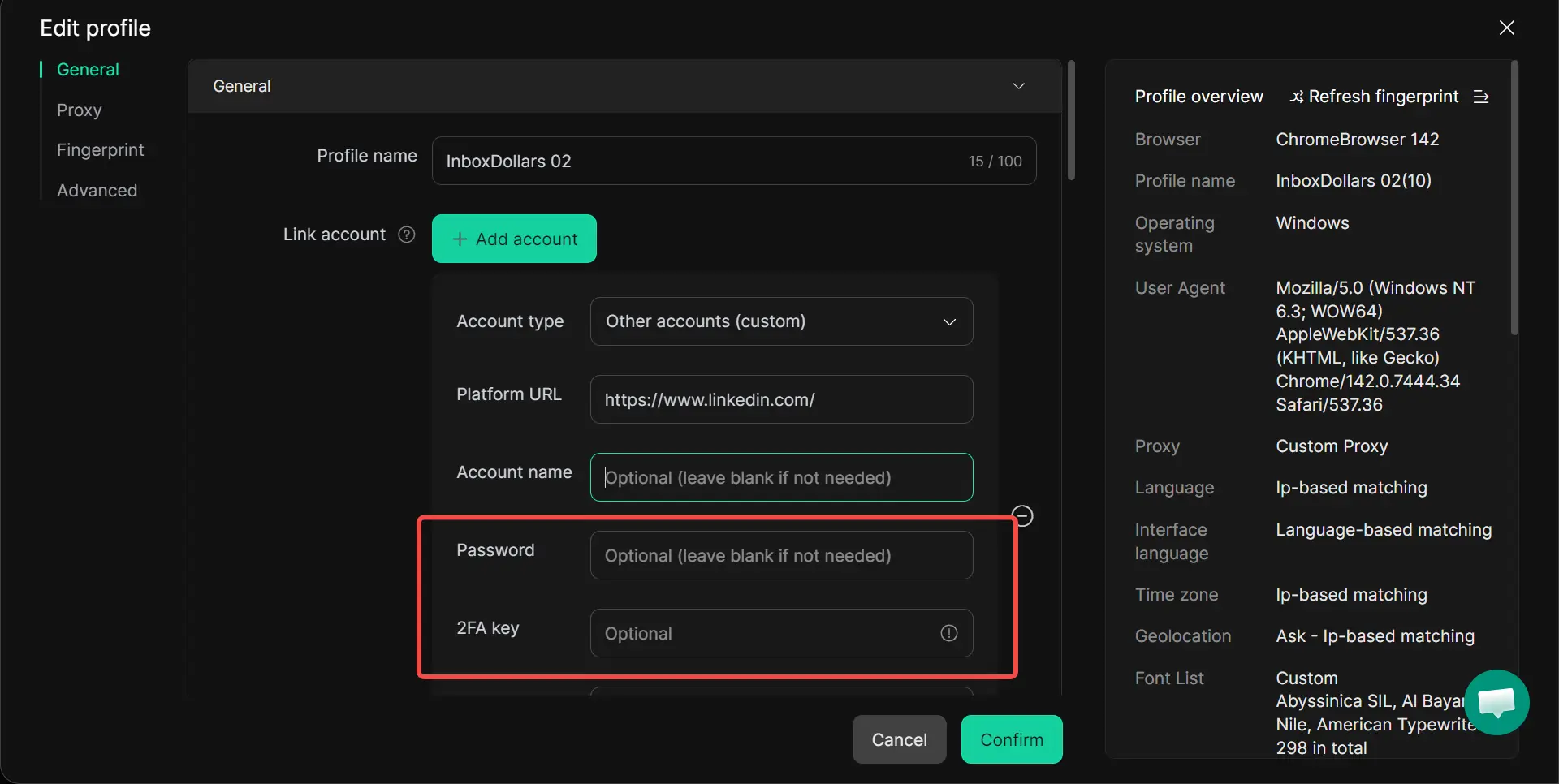
- Session Persistence: DICloak saves your login states in the cloud. You won’t have to deal with repetitive 2FA codes or password entries every time you switch profiles.
- The Free workflow: You can manage up to 5 profiles on DICloak’s free plan, effectively tripling your search and invitation limits permanently.
Risks to Know Before You Try to Get LinkedIn Premium for Free from Third-Party Sellers
The danger of sharing login credentials
If a service asks for your password to "inject" Premium into your account, stay away. These "services" often use stolen credit cards or session hijacking techniques. When the fraudulent charge is eventually charged back, LinkedIn will permanently ban your account for a violation of the User Agreement.
Why "Lifetime" Premium offers are usually scams
LinkedIn is a subscription-only SaaS (Software as a Service) model. The platform's technical architecture does not even support "lifetime" licenses. Anyone selling a lifetime pass is selling you a ticket to a permanent ban.
FAQ: Common Questions About Free LinkedIn Premium
Can I get LinkedIn Premium for free more than once?
Yes. You are typically eligible for a new 30-day trial every 12 months.
Is DICloak safe to use with LinkedIn?
Yes, provided you use it for professional conduct and pair it with high-quality residential proxies. It is a standard tool for lead generation agencies.
Do students still get 6 months free through Amazon?
No. This partnership has ended. Students should check with their university to see if they offer institutional access to LinkedIn Learning.
How do I find LinkedIn employees giving away coupons?
Use the search string “#PlusOnePledge” AND “Premium” and filter for the most recent posts.
Does the library card method give me InMails?
No. It only provides access to the LinkedIn Learning course platform.
Can I use a referral if I already have a trial active?
No. You must have no active subscription and no trials used within the last 12 months to qualify for a Sales Navigator referral.
Final Decision: Which Free Method Should You Choose?
| Goal |
Recommended Method |
Difficulty |
Longevity |
| Job Hunting |
30-Day Premium Career Trial |
Low |
Short-term (30 days) |
| Sales/Lead Gen |
Sales Navigator Referral |
Medium |
Mid-term (60 days) |
| Scaling Outreach |
Multi-accounting with DICloak |
High |
Permanent |
| Skill Building |
Local Library Card Hack |
Low |
Permanent |
Identify your primary objective for this month. If you need immediate results, start the trial. If you are building a long-term business, invest the time to set up a multi-account environment with DICloak and residential proxies to bypass LinkedIn’s limits for good.
 Web Proxy Tools
 Free Tools
 Cookie Plugin
 UA Generator
 MAC Address Generator
 IP Generator
 IP Address List
 2FA Code Generator
 World Clock
 Anonymous Check
 WebRTC Leak Test
 UUID Generator
 Free Web Proxy Site
 Proxy Checker
 FB Ad Checker
 AI Web Scraping
 Free SMM Tools
 Twitter Shadowban Checker
 Instagram Name Checker
 UTM Generator
 Username Generator
 AI Hashtag Generator
 LinkedIn Headline Generator
 Social Media Image Resizer