Getting hit with a Tinder ban in 2026 feels like a digital door slamming in your face. As a privacy researcher, I have seen Tinder’s moderation systems evolve into highly sophisticated, automated engines. Whether the ban resulted from a legitimate violation or an aggressive automated sweep, the result is exclusion from the platform. While the situation is difficult, there are technical paths forward involving official appeals or a comprehensive "Full Identity Reset."
Why was my Tinder account banned and what does error code 40303 actually mean?
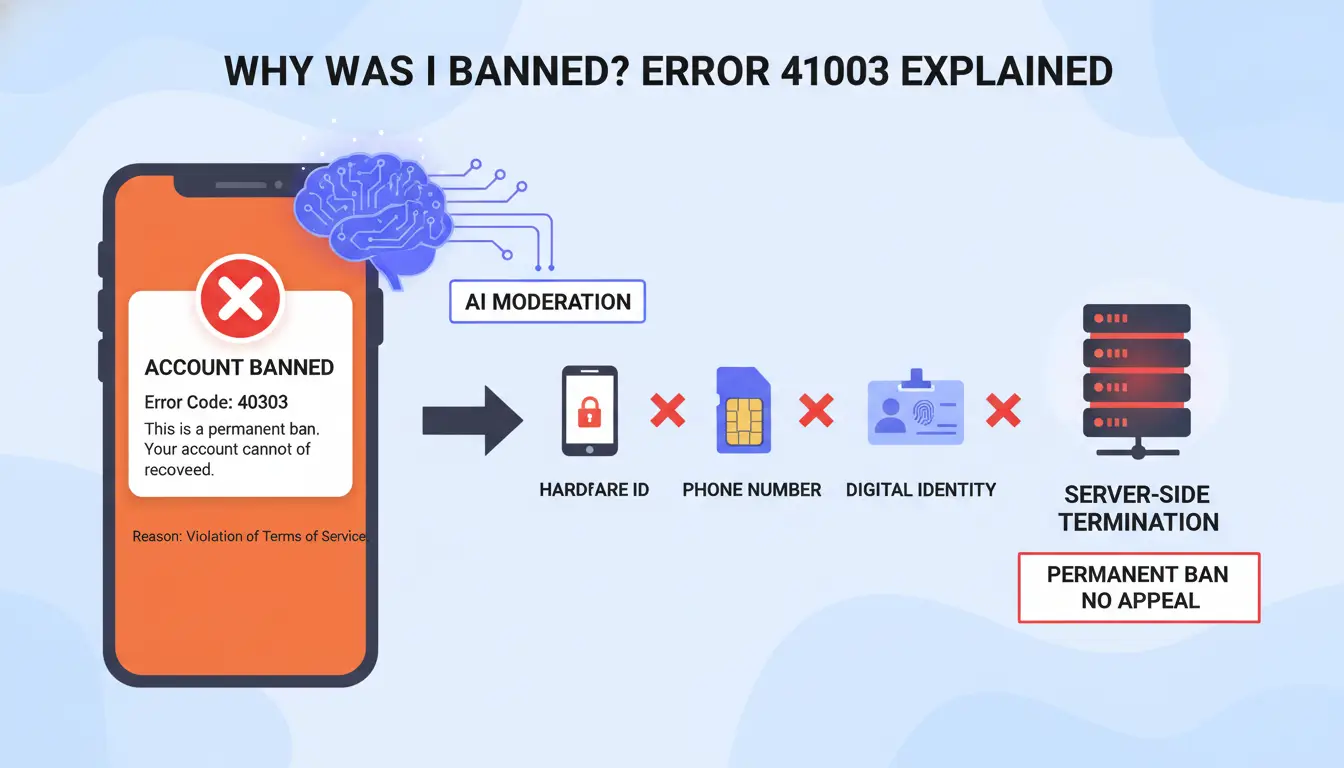
Tinder’s moderation in 2026 is driven by sensitive AI models. Most users discover their status when they encounter Error Code 40303. This is not a glitch; it is a "Hard Ban," signifying a permanent termination of your account. This ban is server-side and tied to your hardware ID, phone number, and digital fingerprint.
Is my ban actually permanent?
While Tinder classifies these as final, the reason for the ban dictates your recovery strategy. Common triggers include:
- Hate Speech or Harassment: Direct violations of safety guidelines.
- Spam or Commercial Promotion: Sharing links to external services (e.g., OnlyFans).
- Bots or Automation: Using auto-swipers or scripts.
- Age Typos: Accidental errors during setup that suggest you are under 18.
- Mass Reports: A critical factor in 2026; automated systems often trigger bans if multiple users report you in a short window, even without a direct policy violation.
How to check if you are "Under Review" or Shadowbanned
Not every restriction is a hard ban. You may be in a state of "Soft Ban."
- Under Review: A temporary holding state where your features are limited while moderators inspect your activity. This typically resolves within 24–72 hours.
- Shadowban: Your account remains active, but your visibility is suppressed. Signs include zero matches despite active swiping and messages remaining unread. This can last weeks and is a precursor to a hard ban.
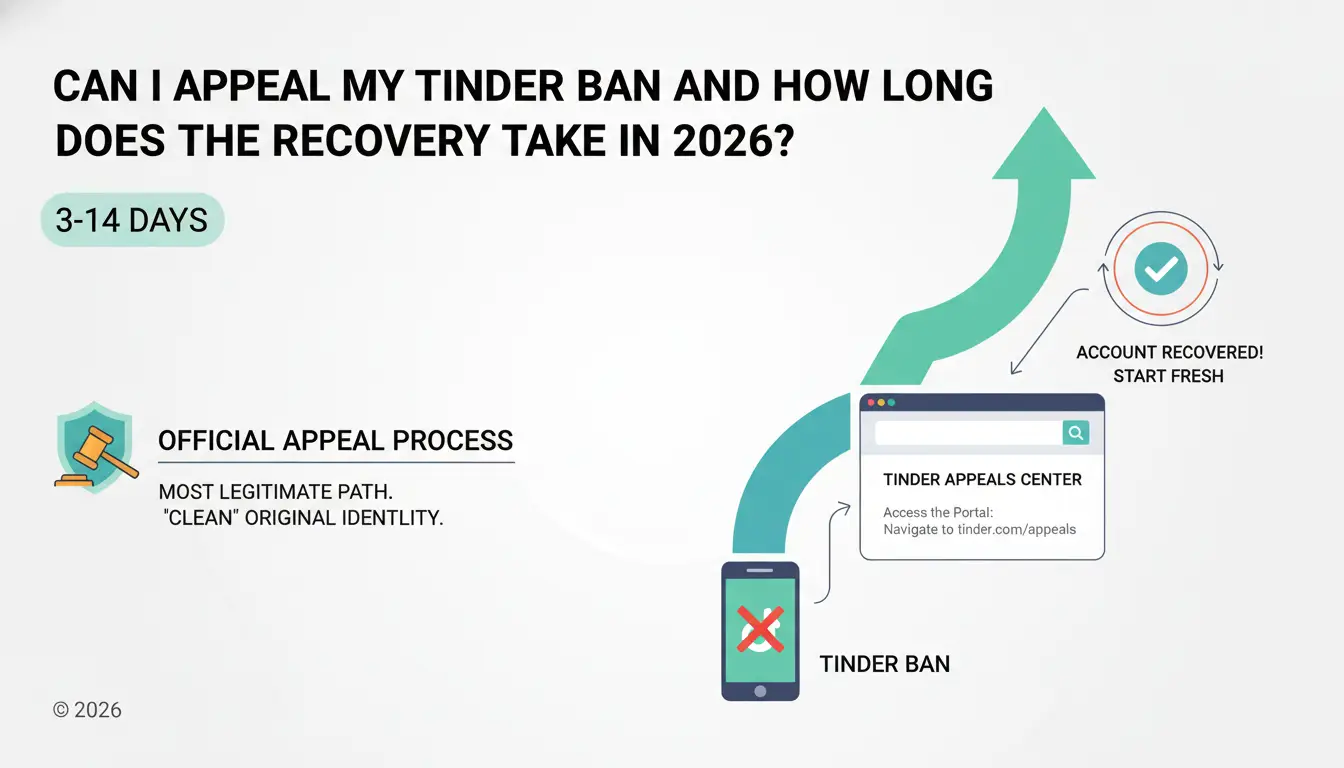
Can I appeal my Tinder ban and how long does the recovery take in 2026?
The official appeal process is the most legitimate path and should always be attempted first. If the ban was a mistake, this is the only way to "clean" your original identity. Expect this process to take between 3 to 14 days.
Using the Tinder Appeals Center step-by-step
- Access the Portal: Navigate to
tinder.com/appeals-centre on a clean browser.
- Authentication: Log in with the credentials associated with the banned account (Email, Phone, or Apple/Google ID).
- Submission: Select "Trouble with account login" and choose the "Banned" option.
- Information Gathering: Ensure you have your phone number, email, and exact device model (e.g., iPhone 15 Pro) ready.
- Monitor: Check your email regularly; Tinder rarely offers second chances after an appeal decision is made.
What to say (and what to avoid) in your appeal message
Tinder typically reviews one submission per incident. Your message must be factual and professional.
- Effective Phrasing: "I believe my account was flagged erroneously due to mass reports from users I unmatched. I have reviewed the Community Guidelines and am committed to a respectful experience. Please review my activity."
- Fatal Mistakes: Never insult the staff, threaten legal action, or admit to "minor" rule-breaking. In the eyes of an automated system, a small admission is a confession of guilt.
How do I create a new Tinder account without getting instantly re-banned?
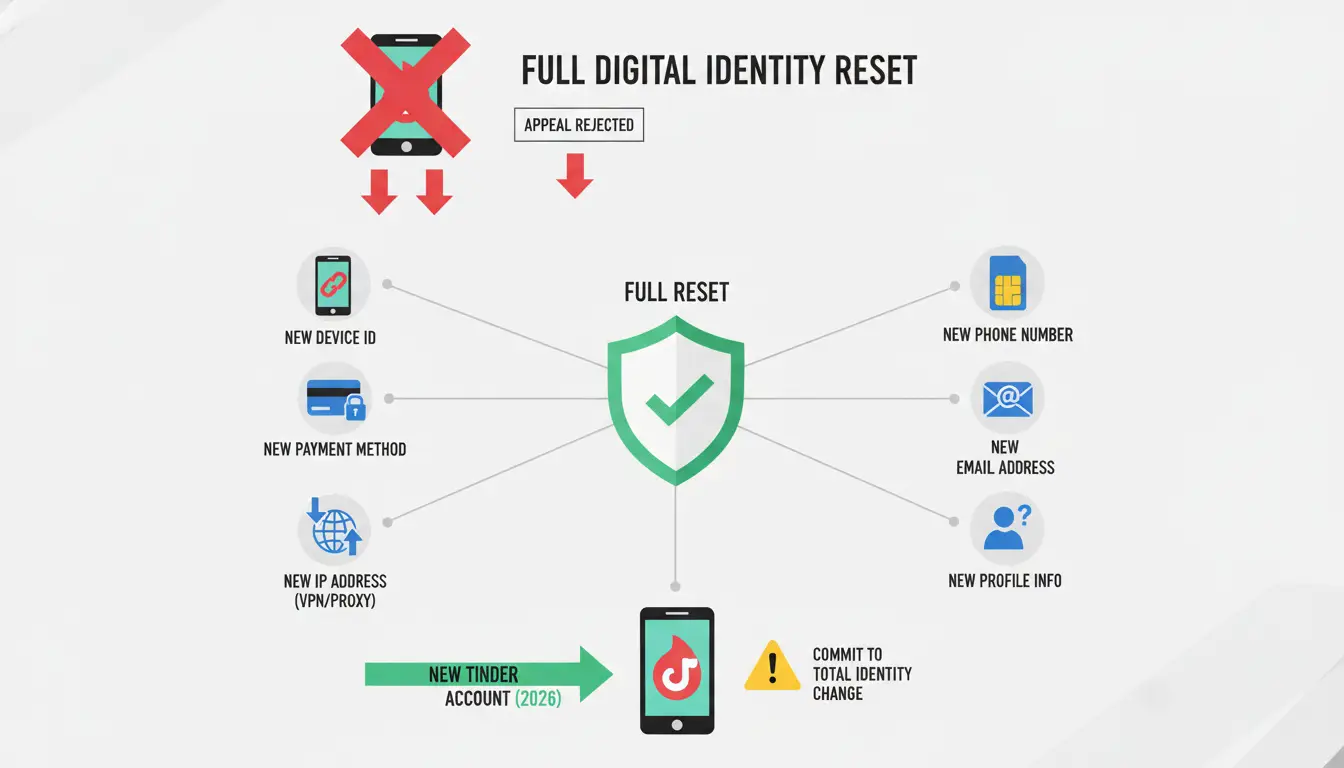
If your appeal is rejected, your original digital identity is "burned." A simple app reinstallation will fail because detection systems track hundreds of signals. You must perform a "Full Reset."
Researcher's Note: Technical isolation is only successful if you commit to a total identity change. Reusing even one piece of old data—be it a photo, a credit card, or a Wi-Fi network—will result in an immediate link-back and re-ban.
Preparing your "New Identity Bundle"
Use the following checklist to ensure no data overlap:
- New Phone Number: Use a physical SIM; VoIP numbers (Google Voice, etc.) are frequently blacklisted.
- New Email Address: A fresh Gmail or Outlook account with no history.
- New Apple/Google Account: Log out of your old ID entirely to prevent app-store level tracking.
- New IP Address: Avoid your home Wi-Fi if it was used for the banned account.
Why you must change your payment and photo data
Tinder’s 2026 systems use "photo hashes"—unique digital signatures—to identify banned users.
- Photo Hashes: Re-uploading a banned photo is an instant detection trigger. You must use new photos or extensively modify old ones.
- Payment Methods: Reusing a credit card linked to a banned Tinder Gold/Platinum subscription is a fatal error. Use a different card or a virtual payment method not previously associated with Tinder.
Why isn't IP masking alone enough to support managing a new Tinder account?
In 2026, IP masking is only the first layer of defense. Tinder utilizes browser fingerprinting to identify the specific hardware and software configuration of your device.
The reality of browser fingerprinting in 2026
Tinder's "Device Fingerprint" consists of your user agent, screen resolution, WebGL hashes, installed fonts, and even battery status.
| Detection Method |
IP Masking Alone |
Full Fingerprint Isolation |
| IP Address |
✅ Often Masked |
✅ Masked (via Proxy) |
| Browser Fingerprint |
❌ Visible |
✅ Unique per profile |
| User Agent/Fonts |
❌ Exposed |
✅ Fully Customizable |
| Cookies/Local Storage |
❌ Often Shared |
✅ Completely Isolated |
Avoiding blacklisted IPs and data center proxies
Some free IP masking services and data center proxies are easily flagged. To Tinder, these look like "bot farms." You must use residential or mobile proxies that match the timezone and location settings of your new identity bundle.
How to use DICloak to support managing a fresh Tinder setup with enhanced security
For users who want a cleaner way to manage different Tinder-related workflows, DICloak provides browser profile isolation and account organization features. Instead of switching between accounts in the same browser, users can keep sessions, cookies, and profile settings separated inside dedicated browser profiles.
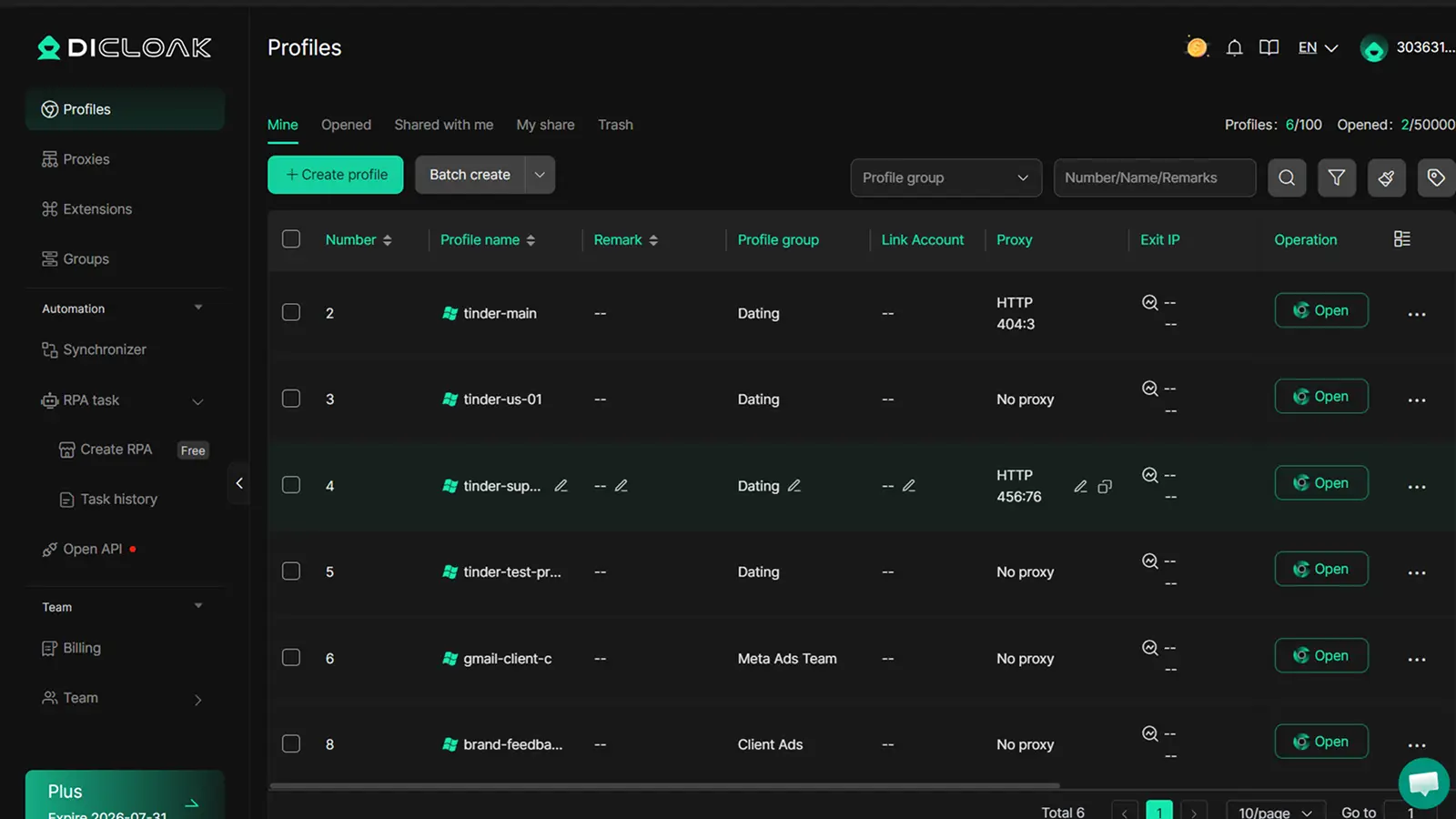
Configuring an Isolated Profile for Account Management
- Isolated Browser Profiles: Create a separate browser profile for each workflow. Every profile maintains its own cookies, local storage, session data, and browser profile settings.
- Custom Fingerprint Settings: Configure browser settings such as User-Agent, language, timezone, WebRTC, Canvas, WebGL, screen resolution, and other profile parameters according to your operational needs.
- User-Configured Proxy Support: Users can assign their own HTTP, HTTPS, or SOCKS5 proxy to a profile if a dedicated network setup is required. DICloak does not provide proxy services.
- Profile Verification: Before logging into an account, review the browser profile settings and confirm that the profile configuration matches your intended setup.
- Profile Data Isolation: Each browser profile keeps its own browsing data, helping users separate sessions and reduce account-management confusion when handling multiple workflows.
Will Tinder recognize my old photos if I upload them to a new account?
Yes. Tinder’s 2026 AI is highly efficient at facial recognition and metadata analysis. If you must use old images, they must be "digitally sanitized."
Techniques for modifying existing photos safely
- Stripping EXIF/Metadata: Use a metadata scrubber to remove GPS coordinates, camera types, and timestamps. This removes the "digital history" of the file.
- Altering Pixel Data (Hashing): To change the image's digital hash, you must slightly crop the photo, adjust color levels, or apply subtle filters. These changes alter the underlying code of the image, making it appear "new" to an AI.
The dangers of using AI-generated or stolen images
While you need "fresh" visuals, do not use AI-generated faces or images belonging to others. Impersonation is an instant, non-reversible ban trigger that no technical tool can bypass.
What mistakes should I avoid to keep my new account from getting flagged again?
Technical isolation is only 50% of the battle. Behavioral patterns on the new account are under heavy scrutiny.
Avoiding "Bot-Like" swiping and messaging patterns
New accounts are monitored for high-velocity activity. Avoid:
- Hyper-Swiping: Swiping on hundreds of profiles in minutes.
- Pattern Messaging: Copy-pasting the same opening line to every match.
- Inhuman Uptime: Activity that suggests 24/7 engagement without rest.
Following the 2026 Community Guidelines strictly
Rules are more strictly enforced than ever. Avoid "instant-ban" triggers:
- Link Spamming: Do not include OnlyFans, commercial links, or aggressive social media handles in your bio.
- Explicit Content: Unsolicited explicit messages or aggressive language will generate the user reports that lead to manual reviews.
Frequently Asked Questions
How long does a Tinder ban actually last?
A "Hard Ban" (40303) is permanent and does not expire. "Under Review" flags typically clear in 24 to 72 hours.
Can I reuse my old phone number if I wait a few months?
No. Tinder’s data retention policies for banned users are long-term. Reusing a banned number is an invitation for an immediate re-ban.
Does factory resetting my phone work?
It can clear some local identifiers, but it is not a guarantee. If you restore from a cloud backup, you likely restore the same tracking IDs that caused the initial ban.
What is the best type of proxy for Tinder?
Always choose residential or mobile proxies. Data center proxies are easily identified and blacklisted by Tinder's security layers.
Can I link my old Instagram or Spotify to a new account?
Absolutely not. This is a fatal error. Linking these accounts creates an immediate technical bridge to your banned profile, resulting in an instant link-back and termination.
Is it possible to get a refund on a Tinder Gold subscription after a ban?
Typically, no. A ban usually voids the subscription terms. Focus on using a new payment method for the reset rather than trying to salvage funds from a dead account.
 Web Proxy Tools
 Free Tools
 Cookie Plugin
 UA Generator
 MAC Address Generator
 IP Generator
 IP Address List
 2FA Code Generator
 World Clock
 Anonymous Check
 WebRTC Leak Test
 UUID Generator
 Free Web Proxy Site
 Proxy Checker
 FB Ad Checker
 AI Web Scraping
 Free SMM Tools
 Twitter Shadowban Checker
 Instagram Name Checker
 UTM Generator
 Username Generator
 AI Hashtag Generator
 LinkedIn Headline Generator
 Social Media Image Resizer