Trying to create bulk X accounts sounds simple at first, just repeat the signup process. But anyone who’s tried scaling past ten accounts knows the real issues start when platforms pick up on patterns, flag IPs, or force phone verification. You might get a few accounts through, then hit a wall: captchas, forced reviews, or sudden bans that wipe out everything you just set up.
Bulk X account creation isn’t just about speed, it’s about blending in. If you use the same device fingerprint, skip proxy setups, or reuse email domains, you’re giving platforms an easy target. Most guides gloss over these details, but missing them means you lose accounts faster than you make them. It’s not just the lost time; sometimes your main accounts get linked and restricted, making the fallout much worse.
The practical way forward is to treat each account as a separate identity. That means using browser profile tools, managing proxies, tracking cookies, and setting up unique recovery details. Pay attention to how session history, permission settings, and bulk creation scripts tie together. Skip these steps, and you'll end up with accounts that barely last a week, or worse, trigger platform-wide restrictions.
If you want to manage many X accounts without constant resets, here’s what actually works.
What to Know Before You Create Bulk X Accounts in 2026
Before you start any bulk X account creation, check the platform’s updated limits and anti-abuse rules for 2026. Trying to make dozens of accounts without reading the fine print means you’re likely to lose them fast, sometimes before you even finish setup.
Current X policies on multiple accounts
Most platforms set a hard cap on how many accounts one person can create, usually 3 to 5 per email, phone, or device. In 2026, platforms flag any attempt to create more than this from the same IP, browser fingerprint, or recovery info. What triggers bans now is not just total account count, but patterns like rapid sign-ups, reused device IDs, and matching cookies.
Why bulk creation gets flagged
Anti-abuse systems now catch bulk X account creation much faster than they did two years ago. Platforms log device fingerprints, proxy patterns, and account session overlaps. If you try to register 20 accounts in one day from a single setup, even across different proxies, platforms can link them using browser profile data, cookie similarities, and reused recovery details.
The real problem shows up after creation: accounts look fine at first, but as soon as platforms run their risk checks, you can see mass lockouts, phone verification requests, or direct bans. For example, if your bulk accounts get flagged for overlapping device IDs, you’ll see login errors or forced password resets within hours. Skip unique browser profiles, and platforms can trace all your accounts back to a single operator, leading to a full cluster ban.
Bulk creation scripts that reuse session history or auto-fill recovery details are easy targets. If you ignore how permission settings and cookies layer together, even “clean” proxies get wasted. The hardest part is keeping each account isolated enough that platforms can’t link them during onboarding or later activity spikes.
When bulk accounts actually make sense
- You have a real need for many accounts, like running separate business units, testing workflows, or handling high-volume support.
- You can keep each account’s identity, recovery setup, and device profile separate without shortcuts.
- You’re not using bulk creation for spam, self-promotion, or bypassing platform restrictions, these use cases usually get flagged and banned.
The next issue is understanding why most bulk X accounts get restricted or banned so quickly after setup.
Why Most Bulk X Accounts Get Restricted or Banned Fast
Bulk X accounts get banned fast because platforms spot patterns that show you’re running multiple identities. These patterns come from reused IP addresses, device fingerprints, and bot-like behavior. Even small slip-ups, like logging in from the same city or using two similar browsers, stand out to automated systems.
IP and location patterns
Platforms flag accounts that share IP addresses or bounce between far-apart locations in a short time. If you log 20 accounts in from one proxy, or switch from New York to Singapore and back in two hours, risk spikes. The system expects each account to have a stable, plausible login history, mass sign-ins from one source look like a farm, not real users.
Device and browser fingerprint overlaps
Fingerprinting links accounts by collecting details like browser version, fonts, screen size, and even hardware quirks. If you open dozens of new X accounts in Chrome on the same laptop, even behind different proxies, those accounts will share a near-identical fingerprint. That’s a red flag for any anti-abuse system. For example, you might think a fresh user profile erases your tracks, but if you miss a detail, like using the same OS, language, and plugin set, X’s backend can group your accounts within minutes. For anyone running bulk X account creation, reusing browser setups is the single fastest way to get mass-banned.
Behavioral signals and automation mistakes
- Copy-pasting the same bio, handle, or tweet across accounts signals automation.
- Skipping warm-up steps (like browsing or following a few users) leaves new accounts looking fake.
- Failing to solve CAPTCHAs or verify phone numbers in a natural order gets you flagged right away.
Platforms combine these signals. One odd login might slip through, but stack up IP overlaps, matching fingerprints, and robotic actions, and even well-crafted accounts last only days. The fastest way to lose a whole batch is to assume “different proxy” equals “unique user.” That shortcut worked in 2020; now, it’s the main reason bulk X accounts die off so fast.
If you’re planning to make or manage many X accounts, you’ll need a checklist that covers more than just IP rotation. The next section breaks down how to set up before you create your next batch, so you don’t repeat these mistakes.
How to Prepare for Bulk X Account Creation: Checklist for 2026
Most failures happen before you even start, missing a single prep step can link all your new accounts or get them locked in hours. Here’s what you actually need lined up before you try to create bulk X accounts.
Email and phone number sourcing
Skip catch-all inboxes and recycled SIMs. You need unique, clean emails and phone numbers for each account. Use new domains or trusted email providers, and avoid reusing numbers from past projects, platforms catch duplicates fast. Burner services work for testing, but not for accounts you want to keep long-term.
Fingerprint and browser profile planning
- Set up a separate browser profile or container for each account.
- Change device fingerprints, screen size, timezone, and language should differ per session.
- Clear cookies and local storage between sessions to avoid cross-linking.
Proxy and network setup
Use high-quality, residential proxies, datacenter IPs get flagged in bulk creation. Plan your locations to match your target audience or blend naturally; random country switches in the same batch usually raise red flags.
Data and workflow organization
Trying to manage dozens of accounts from a spreadsheet with no plan is asking for mistakes. The accounts you lose fastest are usually the ones you forget to track or rush through setup.
- Store each account’s credentials and recovery info in a secure manager.
- Schedule creation windows, avoid creating too many in a short burst.
- Set up a naming or tag system to track which account belongs to which project.
Most guides gloss over these basics, but skipping even one step above can make your whole batch easy to detect. Next up: the creation process itself, done right, it keeps your new accounts off the radar.

Step-by-Step: Creating Bulk X Accounts Without Getting Flagged
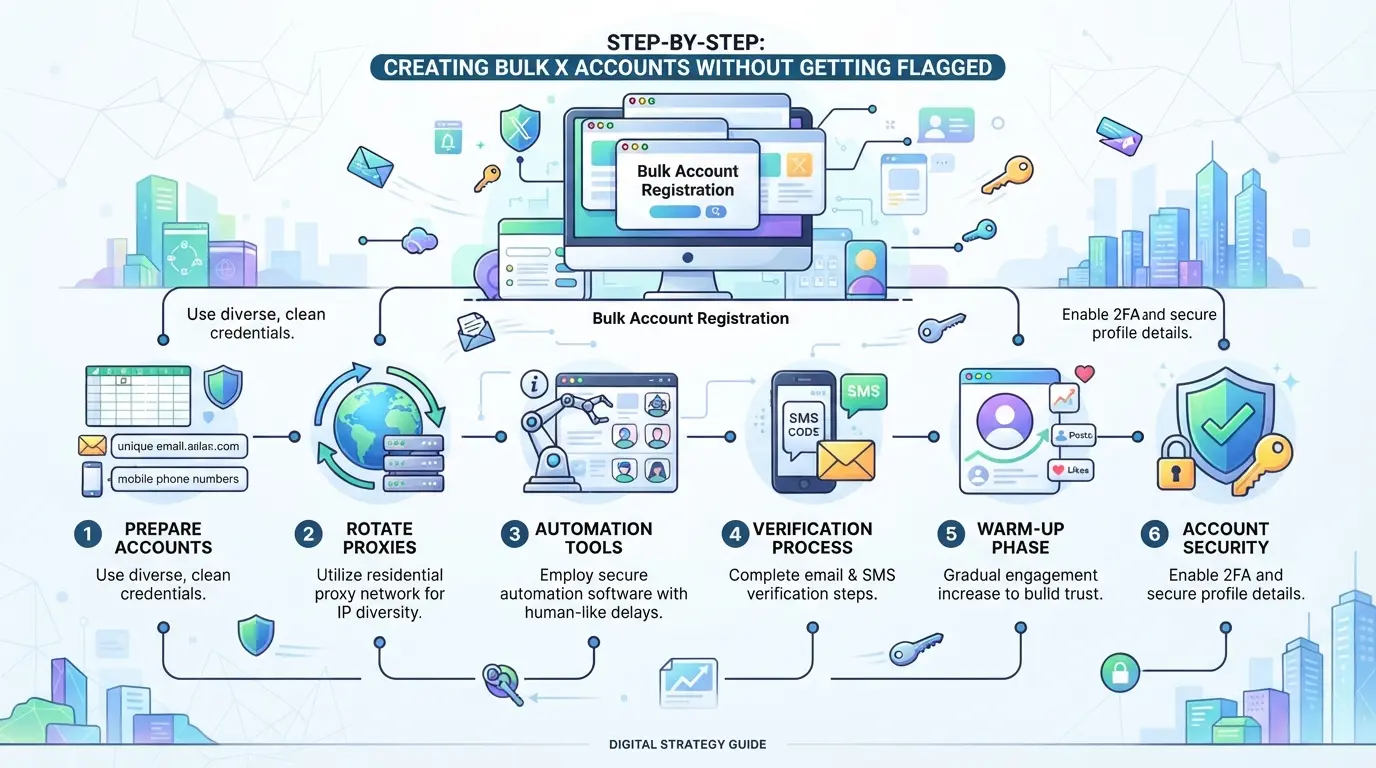
Most bulk creation failures come from skipping the setup details, platforms catch reused browser fingerprints, mismatched proxies, or patterns in email domains faster than any script can save you. If you want accounts that actually stick, follow each step below and check for the usual flags before moving forward.
Step 1: Set up unique browser profiles and fingerprints
- Create a separate browser profile for every account, never reuse one, or fingerprints will overlap.
- Randomize fingerprint data (user agent, screen size, fonts) using your profile tool.
- Launch each profile in an isolated session and check that device info looks unique on test sites.
- If you spot even one matching fingerprint field across two accounts, pause and adjust, platforms often flag these overlaps right away.
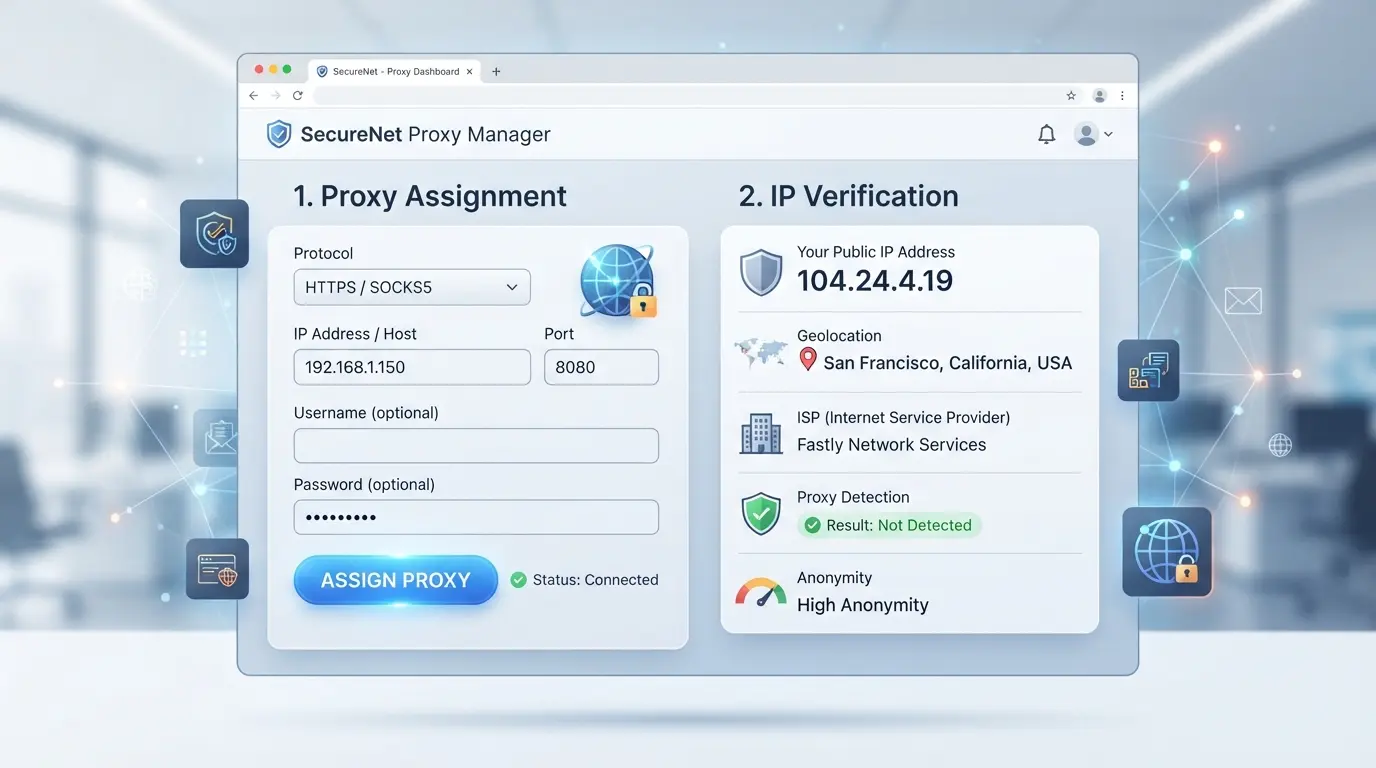
Step 2: Assign proxies and check IP/location consistency
- Pick a dedicated proxy for each profile; don’t share proxies between accounts.
- Test each proxy’s IP, country, and time zone, these must match what you’ll claim in registration.
- Visit a public IP checker from inside the profile. If location or time zone is off, swap proxies or correct browser settings.
- If you log in and see a location mismatch warning, stop and fix it before proceeding, this is a common flag trigger.
Step 3: Prepare emails and phone numbers for registration
- Use new, high-quality emails and phone numbers. Avoid free providers that get blacklisted.
- Each email/phone should have no prior registration on X or related platforms.
- Double-check for patterns, if your email batch all shares a root domain or username style, mix it up to avoid bulk detection.
- If you get a “too many requests” or “wait to register” error at this stage, rotate to a fresh batch and slow your pace.
Step 4: Register accounts in batches with natural timing
- Limit each batch, 5-10 accounts per session is safer than 20+. Larger bursts trigger risk algorithms.
- Add real delays: 2-5 minutes between registrations, not just random seconds.
- Simulate human actions, mouse movement, page scrolls, not just autofill and submit.
- If you get a captcha or verification challenge early, slow down or reduce batch size, this means your pattern is being flagged.
Step 5: Complete profiles and initial activity safely
- Fill in profile info with unique names, avatars, and bios. Never copy-paste across accounts.
- Make a few small actions (like, follow, or post) in the first session, spaced out by minutes.
- Avoid linking accounts or logging in from the same device, cross-contamination is a fast way to lose all your work.
- If any account receives a restriction or review notice, quarantine it and audit that setup before moving on.
Ready accounts can now be managed at scale, but the real stability comes from how you handle them after creation.
How to Manage Bulk X Accounts More Safely with DICloak: Profile, Proxy, and Team Controls
Treating every X account as a truly separate identity gets harder as you scale, manual browser swapping and sticky notes just don’t cut it for teams handling 20, 50, or even 200 accounts. The risk isn’t just losing one login; it’s that a single mix-up links sessions or exposes shared details across your entire network. After bulk X account creation, the right browser profile, network setup, and access control become the backbone of safer ongoing management. Here’s how operators and teams use DICloak to keep these workflows tight.
Isolate each X account with separate browser profiles and fingerprint settings
Teams can create a new browser profile for each X account in DICloak, storing every session, cache, and cookie fully apart. This keeps platform logins from crossing over, even if several team members need to access accounts on the same machine. Operators can also set different browser fingerprints, such as OS, User Agent, timezone, and WebRTC, for each profile, making sure every session exposes its own set of browser signals. The real safety boost is that these profiles don’t share browser storage or fingerprint settings by accident, so a slip by one team member won’t leak over to another account. This scope stays limited to browser-profile access and does not affect X platform settings.

Assign and manage proxies for every profile
Operators configure their own proxy for each browser profile inside DICloak, which means every account session can run through its assigned network route. This helps coordinate account location and network separation, especially when managing accounts from different regions or for clients with specific needs. Proxy settings are profile-specific, users can test the connection and check the detected exit IP before opening the session. The platform doesn’t sell proxies; teams must always supply and test their own.

Control team access and permissions for bulk account workflows
Admins set which team members can access or work on certain profiles by managing permission groups in DICloak. This stops accidental cross-account access or session overlap, regular members may only see and open the profiles they’re assigned. Permission settings cover what features are visible and which fields show up in the Profiles list, making it much easier to enforce least-privilege rules in bigger teams. These controls live inside DICloak and don’t replace X’s own permissions.

Get these basics right, and you’ll spot most permission and environment mistakes before they turn into account losses. The next section tackles the most common errors, plus what to do when something still goes wrong.
Common Mistakes and How to Fix Them When Creating Bulk X Accounts
Even with strong profile and proxy setup, some mistakes will still get bulk X accounts flagged or killed early. Here’s how to spot the most common traps and recover when things go sideways.
Reusing device/browser profiles
If you recycle the same browser or device fingerprint across multiple accounts, platforms can link them in minutes. Change unique browser profiles and device settings for each account, missing this step usually leads to your whole batch getting locked.
Proxy and IP mistakes
Using cheap or public proxies often leaks your real IP or triggers “suspicious activity” warnings.
- What can go wrong: Accounts get mass-flagged, or you see login challenges that lock you out for days.
- Safer move: Only use private, high-quality proxies; test each one for leaks before launch.
Unnatural registration or posting patterns
Spamming the same action or creating accounts in rapid bursts looks fake to X’s systems. Spread out registration times, randomize posting, and mimic real user behavior. Skip this, and your accounts won’t last an hour.
Losing track of account data
Mixing up emails, passwords, or recovery details means you can’t get back into lost accounts. Document every step, use a spreadsheet or manager, and store backup codes right away. One missed detail, and a whole batch can become useless.
When Bulk X Account Creation Is Not the Right Solution
Sometimes, pushing to create bulk X accounts does more harm than good. If you’re seeing higher bans, slow growth, or accounts linked together, it’s a sign you may need a different approach, especially when platforms have stepped up detection.
Scenarios where bulk accounts are likely to be banned
| Scenario |
Risk Level |
Why It Fails |
| Ongoing platform crackdowns |
High |
Automated detection, mass bans |
| Aggressive promo or scraping |
High |
Unnatural activity triggers alerts |
When you see new verification popups or mass suspensions in your niche, bulk creation rarely pays off for long.
When organic growth or paid ads are better
If your goal is reach, paid ads or organic campaigns often cost less in lost accounts and wasted time. These alternatives build presence without burning new profiles every week. Chasing mass creation during a crackdown usually wastes effort and budget.
How to pivot if your accounts get restricted
Don’t double down on failed methods. Instead, pause mass registration and review what triggered the lockouts. Switch to smaller test batches, organic tactics, or look for partnerships with accounts that already have trust and history. Sometimes, scaling back is what keeps the rest of your assets alive.
Frequently Asked Questions About create bulk X accounts
Is it legal to create bulk X accounts in 2026?
The legality of creating bulk X accounts depends on your country’s laws and X’s terms of service. Some countries may restrict automated registrations or bulk account use. X’s policies also limit multiple accounts and automated signups. Always review both your local regulations and X’s rules before you start bulk X account creation.
How many X accounts can I safely create from one device?
Most users can safely create only a few accounts per device before X detects unusual activity. To avoid bans, use separate browser fingerprints, unique proxies, and different behaviors for each account. Many experts recommend no more than 2-5 accounts per device without advanced setups.
Can I use the same phone number for multiple X accounts?
X usually requires a unique phone number for every account. You cannot use the same phone number to verify multiple X accounts. If you try, you’ll get an error or the accounts may be suspended. Consider using virtual numbers, but make sure they are accepted by X.
What’s the safest way to automate bulk X account creation?
To automate bulk X account creation, use unique browser profiles and proxies for each account. Space out your actions to mimic human timing, like waiting several minutes between signups. Avoid scripts with obvious patterns or fast clicks, as X’s system will flag these as bots.
How do I recover a bulk X account that gets restricted?
If one of your bulk X accounts is restricted, start an appeal through X’s support page. Review your setup to check for issues, like reused fingerprints, proxies, or suspicious actions. Fix any problems before trying again, as repeated violations could lead to permanent bans.
Now that you understand how to efficiently generate multiple accounts, consider which tools best suit your workflow and compliance needs. Taking the next step with a reliable solution can help simplify your process and minimize manual effort. Try DICloak For Free
 Web Proxy Tools
 Free Tools
 Cookie Plugin
 UA Generator
 MAC Address Generator
 IP Generator
 IP Address List
 2FA Code Generator
 World Clock
 Anonymous Check
 WebRTC Leak Test
 UUID Generator
 Free Web Proxy Site
 Proxy Checker
 FB Ad Checker
 AI Web Scraping
 Free SMM Tools
 Twitter Shadowban Checker
 Instagram Name Checker
 UTM Generator
 Username Generator
 AI Hashtag Generator
 LinkedIn Headline Generator
 Social Media Image Resizer