You try to snag tickets for two big events, but Ticketmaster only lets you sit in one queue per browser window. The real question is this: can you join multiple Ticketmaster queues at once, or are you stuck waiting for one sale to finish before starting another? Plenty of people open extra browser tabs or devices hoping to join more than one Ticketmaster queue, but the platform’s fingerprinting and session controls can trip you up when you least expect it.
Most users think jumping between multiple Ticketmaster queues simultaneously is as simple as launching new tabs. The catch is, Ticketmaster can spot overlapping sessions, shared cookies, and reused device fingerprints. If you get flagged, you might lose all your queue spots, or even get locked out for future sales. Trying to open several Ticketmaster queues at once isn’t just about juggling windows, it’s about not triggering the platform’s anti-bot checks.
What actually works for joining more than one Ticketmaster queue comes down to how you separate your accounts, browsers, and network setups. There are safer ways to run multiple queues, but you need to know where the real risks are and what happens if you miss a step. If you only rely on basic incognito mode or skip proper fingerprint isolation, you could end up wasting hours and get nothing.
Here’s what you need to know before you try.
What Actually Happens If You Try to Join Multiple Ticketmaster Queues at Once?
Trying to join several Ticketmaster queues at the same time seems simple, open more tabs, use other devices, or run extra browsers. But under the hood, Ticketmaster links your sessions with cookies, device fingerprints, and IP addresses. If you try to run multiple queues from one device or network, most users hit blocks, merged queues, or lost spots. The real problem isn’t just about opening more windows; it’s how Ticketmaster detects and handles overlapping entries.
How Ticketmaster Tracks Queue Entries Across Devices and Browsers
Ticketmaster’s system connects queue attempts across devices using:
- Session cookies: If you open multiple queues in the same browser, your session cookie ties them together. This often leads to queues merging or one session overriding the other.
- Device fingerprinting: Even with incognito mode, Ticketmaster reads browser details, like fonts, screen size, and installed plugins, to spot duplicate sessions.
- IP address tracking: Multiple queue attempts from the same IP trigger rate limits. This can cause all your queues to get blocked or kicked out within seconds.
What Users Report When Attempting Multiple Queues
People who try to join more than one Ticketmaster queue at once often find the outcome isn’t what they expect. If you open several tabs in the same browser, the platform usually merges them into a single queue spot, so you don’t actually get multiple chances. Switching devices can help, but if they share a Wi-Fi network or even similar browser setups, Ticketmaster’s fingerprinting often links those attempts. The harshest failure comes when the system spots too many queues from the same IP: it sometimes throws out all your sessions, leaving you locked out for the rest of the sale.
Here’s a real example. Someone runs Ticketmaster in three Chrome windows, two in normal mode and one in incognito. After a minute, they notice only one queue remains; the others redirect or drop out. If they try again from a phone on the same home Wi-Fi, sometimes all sessions get blocked. The main insight, Ticketmaster’s tracking catches most basic multi-queue attempts, and the harder you push, the more likely you lose every spot.
That’s why people want to know not just if they can join multiple queues, but how detection works and what triggers bans. This sets up the next question: why does Ticketmaster restrict extra queue attempts, and how does detection actually work in 2026?
Why Ticketmaster Restricts Multiple Queue Attempts (and How Detection Works in 2026)
Ticketmaster doesn’t just limit multiple queue attempts for convenience, it’s about stopping scalpers and keeping the process fair. The platform now treats every session, device, and account as a potential risk if it spots overlapping behaviors. If you try to join several queues at once, you’re forcing Ticketmaster’s detection system to decide whether you’re a real buyer or a bot. The real problem isn’t opening extra tabs; it’s whether your sessions get flagged as linked, risking blocks and lost access.
Anti-Bot and Anti-Scalper Measures: What’s Changed Since 2024
Ticketmaster’s queue restrictions are tighter now, thanks to new anti-bot tools and stricter fairness checks. Here’s what’s new:
- Session tracking now links browser fingerprints and device IDs to each queue attempt.
- Behavioral analytics flag suspicious patterns, like rapid queue joins or repeated page reloads.
- IP correlation detects users who try to open multiple queues from the same network or proxy.
How Modern Detection Flags Multiple Sessions
In 2026, detection is about more than just cookies or IP addresses. Ticketmaster uses advanced fingerprinting, combining browser traits (fonts, screen size, OS, hardware) with behavioral data. If you open several queues from the same device, even in incognito or separate browsers, these fingerprints often overlap. Ticketmaster’s system cross-checks session details: if two “buyers” share a fingerprint, the platform treats them as the same person. That’s why clearing cookies or switching browsers isn’t enough anymore. If you use a shared Wi-Fi or a basic proxy, you can still get caught when the system links your device ID and network pattern. The strongest practical insight is: separating physical devices and using unique network setups is now required, browser tricks alone don’t cut it.
Here’s how failure looks: you join three queues, thinking each is isolated. The platform spots identical fingerprints on all attempts and boots you from every queue. Sometimes, it will even block future entries for hours or days. You might see a warning, or your queue spot just vanishes without explanation. This isn’t just theory, users report getting locked out even after switching browsers, because the fingerprinting sticks across sessions.
The next section covers what happens when you’re flagged, blocks, bans, and why you can lose every chance in a single sale.
What Are the Real Risks of Trying to Join Multiple Queues? (Blocks, Bans, and Lost Chances)
Trying to join multiple Ticketmaster queues at once sounds like a shortcut, but the reality is harsh, most users end up flagged, blocked, or miss their shot at getting tickets. If you don’t separate your sessions and device fingerprints, Ticketmaster’s checks can wipe out every queue you open, sometimes in less than a minute.
Account and Device Restrictions: What Users Actually Face
Ticketmaster doesn’t just shuffle you to the back of the line. Users hit three main restrictions:
- Temporary holds: Your account or device gets paused, stopping all queue progress for 15-30 minutes.
- Queue ejection: You’re kicked out mid-queue, sometimes with a vague error, other times with a “too many attempts” notice.
- Permanent bans: Your account gets flagged for future sales, or you get shadow-restricted so you never see early queue access again.
When Multiple Attempts Backfire: Real-World Scenarios
If you try to open several Ticketmaster queues simultaneously, whether by switching browsers, using incognito windows, or stacking devices, platform detection often triggers a cascade of failures. The most common problem is seeing your queue position reset: you think you’re ahead, but suddenly you’re pushed to the end, or booted out with no warning. More aggressive detection links your IP address and device fingerprint, so every account from the same setup gets flagged. This means even if you switch to a family member’s account or borrow a device, you could get all linked accounts blocked in a single sweep.
The hardest mistake to recover from is cross-account blacklisting. Once Ticketmaster marks your network or browser fingerprint as suspicious, every future attempt, even on fresh accounts, starts in a flagged state. You lose access to presales, and often can’t join any queue for hot events. If you’re coordinating with friends or a team, one bad move can wipe out everyone’s chances.
What’s worse, these bans aren’t always obvious. Sometimes you’ll see normal pages, but your queue never moves or you get stuck on a “waiting room” that never advances. The platform won’t tell you directly, you only notice after the tickets are gone.
The next step is figuring out which methods actually stand a chance, and why most tricks people try end up failing.
How People Try to Join Multiple Ticketmaster Queues (and Why Most Methods Fail)
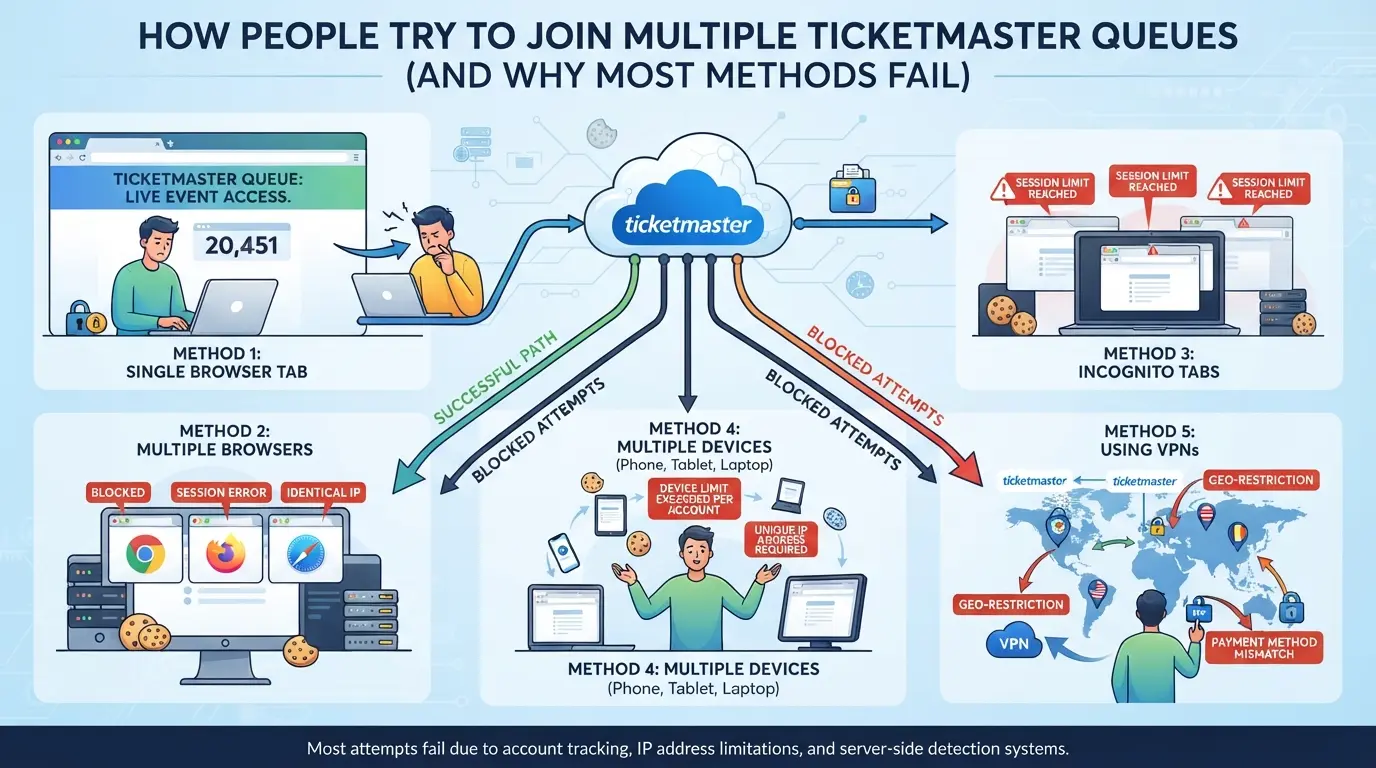
Trying to beat the system by opening several Ticketmaster queues at once sounds easy, but most of the common tricks people use fall apart under platform checks. The real problem isn’t just browser windows, it’s that Ticketmaster tracks device fingerprints, cookies, and IPs in ways that basic workarounds can’t hide.
Opening Multiple Tabs or Windows: What Really Happens
Opening five browser tabs and hoping for five separate queue spots almost never works. Ticketmaster merges sessions, so your cookies and device fingerprint get reused across all tabs. The result? Only one queue slot survives, others overwrite or collapse, sometimes kicking you out entirely.
Using Different Devices or Browsers: Does It Make a Difference?
- Switching browsers on the same device resets cookies, but device fingerprinting still links your attempts.
- Using phones, laptops, or tablets on the same Wi-Fi can get flagged if the IP address matches.
- Opening queues from different browsers works only if each browser has a fresh profile, not incognito mode.
Trying Proxies or Network Tricks: Where Users Go Wrong
Proxy setups seem smart, but Ticketmaster started checking for proxy use and unusual traffic patterns years ago. If you rely on cheap or public proxies, your queue slots get flagged or blocked fast.
- Most free proxies are already blacklisted.
- Behavioral analysis catches repeated patterns from the same user, even if IPs change.
- Buying private proxies doesn’t solve device fingerprint overlap, Ticketmaster sees through mismatched browser setups.
The key point: Unless you isolate every technical layer, device, browser, session, and network, most methods to join multiple Ticketmaster queues simultaneously end in wasted time or blocked chances.
What Actually Works: Safer Multi-Account and Multi-Session Strategies for Ticket Drops
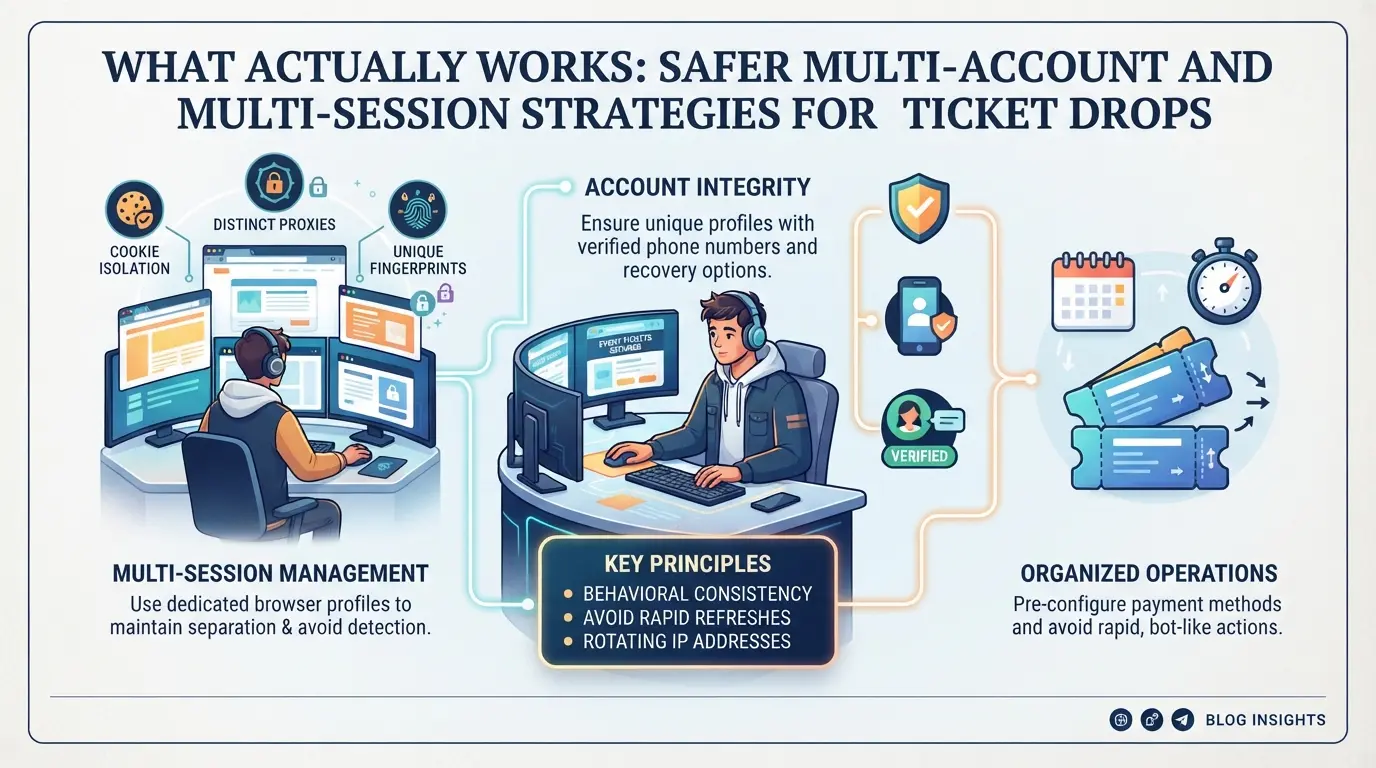
Trying to join more than one Ticketmaster queue comes down to whether you can keep your accounts, devices, and network setups truly separate. If you skip any layer, your sessions can get linked and flagged, even if you think you’re being careful. Here’s how to approach it.
When Separate Accounts Are Allowed (and When They’re Not)
- Check Ticketmaster’s rules, most drops limit one account per person, but household or group accounts can sometimes join if addresses and payment details differ.
- Register each account with unique email, phone, and payment info; avoid reusing any data across profiles.
- Log in on totally separate devices, never run two sessions from the same computer, even in incognito mode.
- Watch for cross-linking: if you see a warning or get logged out of both accounts at once, Ticketmaster probably flagged your setup.
Best Practices for Device, Browser, and Network Separation
- Use a fresh device for each account, mixing sessions on one laptop is risky.
- Run each browser session in a clean environment: clear cache, cookies, and browser fingerprints before logging in.
- Assign a unique IP address to every device. If the same IP shows up across accounts, queue spots can get cancelled.
- Keep session hygiene tight, don’t let browsers auto-fill or sync data between accounts.
When to Use Proxies and What to Watch Out For
- Only use proxies from trusted providers; random free proxies often leak real IP addresses.
- Test each proxy before queue time, run a fingerprint and IP check to make sure nothing links back to your main device.
- Rotate proxies between accounts, but never reuse one across profiles.
- If a queue entry fails or you get blocked, switch both the proxy and device before retrying, repeated failures from the same setup can trigger bans.
The biggest mistake is running multiple sessions without full separation, just opening new tabs isn’t enough.
How Teams and Power Users Can Manage Multiple Platform Accounts More Safely with DICloak
Some teams and advanced users need to keep more than one platform account organized, especially during ticket drops when every session must stay separate. After seeing why device, browser, and network isolation matter, those who manage several accounts side by side often look for tools that make profile setup and switching less risky and less error-prone. DICloak fits that operational gap by letting operators structure session separation at the browser-profile layer, not inside the event platform itself.
Creating Separate Browser Profiles and Configuring Fingerprints in DICloak
Operators can create a new browser profile in DICloak for each platform account, storing its session, cookies, and login info apart from all others. Each profile supports configurable fingerprint signals, like the User Agent, OS, time zone, WebRTC, and screen resolution, so teams can avoid accidental overlap that links accounts. The scope here stays at the browser profile; it does not affect accounts or queue status inside Ticketmaster or any other platform. 
Assigning User-Owned Proxies to Each Profile in DICloak
Where a workflow calls for network separation, users can assign their own proxy to each browser profile. In DICloak, this means entering your proxy details, testing the connection, and confirming the detected IP and region match what you expect. This setup keeps network signals consistent for each session, but users are responsible for proxy quality and compliance. Proxy configuration only affects browser-profile connectivity, not platform access or ticketing actions. 
Clear separation at the browser-profile and network layer reduces mix-ups, but mistakes in configuration still cause most detection issues. The next section covers what operators get wrong most often.
Common Mistakes That Get Users Flagged or Blocked When Attempting Multiple Queues
Most people who get blocked trying to join more than one Ticketmaster queue make the same avoidable mistakes. These errors almost always come down to sloppy session separation, reused fingerprints, and obvious network overlaps.
Reusing Devices, Browsers, or IPs Across Accounts
Ticketmaster links sessions by matching device fingerprints, browser details, and IP addresses. Wiping your device or opening a new browser window rarely hides these traces. Even switching Wi-Fi networks often leaves enough overlap for detection, the platform can spot patterns across dozens of subtle signals you probably never notice.
Ignoring Session Hygiene and Cookie Conflicts
- Use a fresh browser profile for each queue.
- Never let cookies or autofill leak between accounts.
- Skip quick cache clears, old browser data often still exposes you.
Using Low-Quality or Shared Proxies
Low-grade proxies get flagged fast, and shared IP pools leave you exposed if anyone else triggered blocks earlier.
- Check if your proxy IP is already blacklisted.
- Never reuse the same proxy across accounts.
- Watch for DNS or WebRTC leaks revealing your real location.
Before you try to join more than one queue, check these basics, missing just one can cost you all your spots.
When Joining Multiple Queues Is Not Worth the Risk: Deciding If You Should Try
If you’ve read this far, you know splitting across multiple Ticketmaster queues isn’t a sure thing. Sometimes, the extra risk just isn’t worth a slightly better shot at tickets, especially now that detection tech is stricter than ever.
Potential Upsides vs. Real-World Downsides
| Attempt |
What You Gain |
What You Risk Losing |
| Multi-queue access |
Slightly higher chance at tickets |
All queue spots, future access |
| Single session |
Lower chance, less stress |
Missing out if unlucky |
Trying to join more than one queue at once might sound smart, but getting flagged usually wipes out every slot you opened in that drop. Most people overestimate the upside and forget that one misstep can burn all their chances for that event.
When a Single, Clean Session Is the Smarter Move
Waiting in just one queue, with a fresh device and no reused browser data, often means less anxiety, and less chance you’ll get locked out for weeks. If you need more access, focus on account quality and a clean setup, not just more browser tabs.
Frequently Asked Questions About can you join multiple ticketmaster queues at once
Can you join multiple Ticketmaster queues at once from different devices?
Ticketmaster tracks users by device, browser cookies, and IP address. Even if you try to join multiple Ticketmaster queues at once from different phones or computers, the system can often detect overlapping information. This means your chances of getting extra spots in line are low, and you may be removed from the queue or blocked.
Does using a proxy let you join more than one Ticketmaster queue?
Using a proxy changes your IP address but does not guarantee you can join more than one Ticketmaster queue. Ticketmaster uses other tracking tools like browser fingerprinting, which can spot multiple logins even with different IPs. Attempting this may still result in detection and account restrictions.
What happens if you open several Ticketmaster queues in different browsers?
Opening several Ticketmaster queues at once in different browsers can create session and fingerprint overlap. Ticketmaster's system can match your device or browser details, making it likely to catch these attempts. As a result, some or all of your queue spots may be blocked or merged.
Is it against Ticketmaster's rules to try joining multiple queues?
Ticketmaster’s terms say using technical means to unfairly join or buy tickets is not allowed. If you try to join multiple queues at once, your account may be flagged, canceled, or permanently banned. Always read and follow the site’s rules to avoid losing access.
How do teams or families manage multiple Ticketmaster accounts safely?
If families or groups want to use multiple accounts, they should use different devices and separate Wi-Fi or mobile networks. Each person should have their own Ticketmaster account and not share logins. This reduces the chance of being flagged for unusual activity while staying within Ticketmaster’s guidelines.
If you’re hoping to improve your chances of securing tickets, it’s important to weigh the risks and benefits of joining multiple queues, as well as consider any potential restrictions imposed by Ticketmaster. Exploring alternative tools or strategies may help simplify your ticket purchasing process and avoid common pitfalls. Try DICloak For Free
 Web Proxy Tools
 Free Tools
 Cookie Plugin
 UA Generator
 MAC Address Generator
 IP Generator
 IP Address List
 2FA Code Generator
 World Clock
 Anonymous Check
 WebRTC Leak Test
 UUID Generator
 Free Web Proxy Site
 Proxy Checker
 FB Ad Checker
 AI Web Scraping
 Free SMM Tools
 Twitter Shadowban Checker
 Instagram Name Checker
 UTM Generator
 Username Generator
 AI Hashtag Generator
 LinkedIn Headline Generator
 Social Media Image Resizer