For many people, Venmo starts as a simple tool for everyday payments. You use it to send a roommate your part of the bills, pay a friend back after lunch, or move money for small personal needs. But once work, side income, or group expenses enter the picture, one account can start to feel limiting. That is usually when people stop and ask: can you have multiple Venmo accounts?
It is an easy question to understand. Keeping different types of payments in one place can create confusion very quickly. Personal transfers, business-related money, and shared expenses can all end up mixed together. Using a second account may seem like the most practical answer, but with Venmo, the rules matter. Before setting up anything new, it is important to know what is allowed and what could cause problems later.
Before you create anything new, it helps to understand the rules, the limits, and the risks. A wrong step can lead to login trouble, verification issues, or account restrictions. In this guide, we will break it down in plain English. We will answer common questions like can you have two Venmo accounts and can you have multiple Venmo accounts on one phone, and we will show you the safer way to manage things when one account no longer feels like enough.
Can You Have Multiple Venmo Accounts?
This is the first thing most readers want to know, and the answer depends on what kind of Venmo account you mean. Many people ask can you have multiple venmo account access because one profile starts to feel too small once business payments, club money, or side income get added. But Venmo does not treat every extra profile the same way. A second personal account is not the same as a business profile linked to your main account. Venmo’s own help pages make that distinction clear.
Can You Have Two Personal Venmo Accounts?
In normal use, Venmo points people toward one personal account. If your phone number or email is already attached to an active account, Venmo will flag that during sign-up instead of treating it like a clean new start. That is a strong sign that opening a second personal profile with the same identity details is not the standard path. If someone tries anyway, the result is often confusion, not convenience: the app may say the number or email is already registered, and the user may need to prove ownership or contact support.
Can You Have a Personal and Business Venmo Account?
Yes, this is the official route that Venmo does allow. Venmo says you can have a business profile in addition to your personal account, and its User Agreement snippet states that Venmo may offer you the ability to create a single business profile alongside your personal account. Venmo also explains that if you are new, you can sign up for a business profile at the same time you apply for your personal account, because a business profile requires a personal account as the base.
This setup makes sense for many real users. For example, imagine Mia uses her personal Venmo to split groceries with her roommate and send money to family. Then she starts selling custom candles on weekends. She does not want customer payments mixed in with personal transfers. In that case, a linked business profile is much cleaner than trying to create another personal account. It follows Venmo’s intended setup, and it also makes recordkeeping easier when personal and business payments need to stay separate. Venmo’s help center explains that you access the business profile by signing into your personal account and then switching profiles inside the app.
What Does Venmo Officially Allow?
Here is the clearest way to think about it. If you are asking can you have multiple venmo accounts with one phone number, the safer answer is: do not assume you can freely open multiple personal accounts under the same contact details. Venmo says that when a phone number or email is already registered, that means there is already an active account associated with it. In some cases, you may verify ownership of the number, but that process is for recovering or correcting account access, not for casually building a second personal profile.
What Venmo clearly supports is this: one personal account, plus one business profile attached to it. Venmo’s business profile FAQ says the business profile does not have its own separate login. You sign in with your personal account credentials and then switch over in the app. That detail matters because it shows Venmo is not encouraging users to create several separate personal identities. It is offering a structured way to manage different payment purposes inside one approved account system. For most readers, that is the real answer behind the question can you have multiple accounts on venmo: not multiple free-form personal accounts, but a personal account with one linked business profile if you have a valid business use case.
Can You Use Multiple Venmo Accounts on One Phone or Device?
Now that the basic rule is clear, the next question is just as important: what happens on the device side? Many users understand that Venmo does not want one person opening extra personal accounts freely, but they still wonder whether can you have multiple venmo account access on the same phone. This is where people often get confused. Using one device is not the same as being allowed to create multiple personal accounts. Venmo’s setup is built around one personal account per person, with a business profile linked inside that same account if needed. Venmo also says a business profile does not have its own separate login, and users switch to it from the main profile inside the app.
Is It Allowed to Log Into the Same Venmo Account on Multiple Devices?
Yes, Venmo can be used across more than one device, but Venmo treats unfamiliar access carefully. Its login security guidance says that when you use a new browser or clear cookies, Venmo may see that login as a “new device.” Venmo also has a help page for sign-in problems with verification codes from a new device, which shows that extra identity checks are a normal part of the process. In simple terms, using the same account on multiple devices is possible, but Venmo may ask you to confirm that it is really you.
What Happens If You Switch Between Different Accounts on One Phone?
This is where the risk becomes more practical. If one phone is used to move back and forth between different Venmo identities, things can get messy fast. A business profile is different, because Venmo officially allows profile switching inside the same account. But switching between separate personal accounts on one device is not the same thing. Venmo’s help pages repeatedly point users back to one personal account, and they warn people not to create a new one just because they run into login trouble.
Imagine this situation. A user has a personal Venmo account already linked to their phone number. Later, they try to add another personal account on the same phone with a different email. They may think the device is the only issue, but the bigger problem is identity overlap. Venmo’s requirements page says the U.S. cell number used for Venmo cannot already be on file with another Venmo account, and its help page explains that a phone number already attached to an active account can trigger extra verification or support issues. So when people ask can you have multiple venmo accounts with one phone number, the device is only part of the story. The phone number itself is a major limit.
Best Practices for Safer Account Access
The safest approach is simple. Use one personal Venmo account as your main identity. If you need to separate business payments, use Venmo’s official business profile option instead of trying to build another personal profile. That matches how Venmo designed the platform, and it lowers the chance of avoidable account problems. Venmo’s business profile FAQ explains that users access the business profile by signing into the personal account first, then switching profiles in the app.
It also helps to keep your account details current and your access history clean. Venmo recommends checking that the phone number on file is current, reviewing remembered devices, and removing any device you do not recognize. If you sign in on a new phone and do not get the code you need, Venmo provides alternate identity checks and support options instead of telling users to open another account. That matters because many account problems start when people panic and create a second profile instead of fixing the first one.
So, from a real-world point of view, the answer is this: one phone can be used to access Venmo, and the same account can be used across multiple devices, but that does not mean Venmo encourages several separate personal accounts on one device. For most users, the cleanest path is one personal account, one linked business profile when needed, and careful login habits that make your account activity easier for Venmo to trust.
Why Venmo Limits Multiple Accounts
By this point, the device question is easier to understand. A phone or tablet is not the real issue by itself. The bigger issue is trust. Venmo has to know who is using the account, whether the activity matches that person, and whether the money movement looks safe. That is why the question can you have multiple venmo account access is not only about convenience. It is also about identity, security, and fraud prevention.
How Identity Verification Works on Venmo
Venmo uses identity verification to confirm that a real person is behind the account. According to Venmo’s help center, users may need to verify their identity to access and use their Venmo balance, and the process usually takes only a few minutes. If the automatic check does not work, Venmo may ask for more documents in the app. Venmo also says the process starts with the legal name you used when signing up, which means small mistakes can matter later.
This helps explain why account details need to stay consistent. Imagine someone signs up as “Chris Miller,” then later opens another profile with a slightly different name format, a reused phone number, or new contact details that do not match the original account record. From the user’s point of view, that may feel harmless. From Venmo’s point of view, it can look like unclear identity data. That is one reason people searching can you have multiple accounts on venmo often run into friction before they even reach the payment stage. Venmo is not only checking whether an account exists. It is checking whether the person behind it can be clearly verified.
Why Duplicate Personal Accounts Can Trigger Restrictions
Venmo limits duplicate-style personal account setups because they can create confusion and risk. Venmo’s help pages say that if a phone number or email is already registered, it is already tied to an active account. Its sign-in guidance also tells users not to create a new account just because they cannot access the old one. On top of that, Venmo says it may suspend an account, reverse payments, or request documents if account activity raises flags that seem to go against the User Agreement or accepted card policies.
A simple example makes this easier to picture. Suppose Nina already has a personal Venmo account for everyday payments. Later, she tries to open another personal profile to separate side-job money, but she uses overlapping identity details. She may think she is just organizing her finances. Venmo may see something different: two personal profiles connected to the same person, the same device patterns, or the same contact trail. That does not automatically mean fraud, but it can still lead to verification checks, transfer reviews, or account limits. This is why the question can you have multiple venmo accounts with one phone number is risky from the start. Venmo’s own support pages show that reused phone numbers and duplicate contact details are a common source of account trouble.
What Counts as Suspicious Account Activity
Suspicious activity on Venmo is not limited to obvious scams. Venmo says transfer reviews can be triggered by suspicious or illegal activity, but also by account behavior that does not comply with the User Agreement. The company also says it monitors account activity to help identify unauthorized transactions. The specific manifestations include:
- abnormal payment patterns,
- identity information discrepancies,
- unauthorized changes,
- other irregular operations requiring in-depth verification.
For example, a user who keeps switching between different personal identities, reusing contact details, or moving money in ways that do not fit their normal history may face extra checks. A person might think, “I just want to know can you have multiple venmo account options for different uses.” But Venmo has to judge whether that setup looks normal and legitimate. Even outside the multiple-account issue, Venmo warns that unauthorized transactions, fake support messages, and stolen payment methods are real problems on the platform. That is why the company reviews unusual behavior carefully.
So the deeper answer here is simple. Venmo limits extra personal account activity because unclear identity trails create risk for everyone involved. If the platform cannot easily tell who owns an account, who controls a payment method, or whether a transfer is legitimate, it is more likely to step in. That is also why the official personal-account-plus-business-profile path is safer than trying to build several separate personal accounts. It gives Venmo a cleaner identity structure, and it gives the user a cleaner way to manage money without creating signals that may look suspicious.
When a Second Venmo Account Makes Sense
After looking at why Venmo limits duplicate personal accounts, the next question becomes more practical: when does it actually make sense to separate things? This is where many users get tripped up. They search can you have multiple venmo account options because they want cleaner records, not because they want to break rules. In many cases, the real need is not a second personal account. It is a better way to separate payment activity.
Using Venmo for Personal and Business Payments Separately
This is the clearest case where separation makes sense. A personal Venmo account is fine for paying a roommate back or splitting dinner. But once you start charging for a service, selling products, or collecting money for work, it helps to keep that activity out of your regular personal feed and balance flow. Venmo says business profiles are designed for individuals or sole proprietors, associations or clubs, and registered businesses. It also says a business profile must be linked to a personal account, not created as a totally separate standalone account.
Managing Payments for a Club, Side Hustle, or Small Business
This is another strong use case. Venmo’s help center says business profiles can be created for associations and clubs, not just formal companies. That matters because many people handling money are not running a big business. They may be collecting dues for a community group, receiving payments for tutoring, or managing a small side hustle that has grown beyond casual transfers. In these cases, the need for separation is real, but the safer solution is still Venmo’s approved business profile path.
For example, think about a local sports club organizer who collects monthly member payments. Or a freelance designer who gets paid for small logo jobs after work. Both people may wonder can you have multiple venmo account setups so personal and work-related money do not mix. Venmo’s own structure gives them a better answer: use one personal account, then add a business profile for that second payment purpose. If the profile is set up as a sole proprietor, Venmo says payment methods linked to the account will be linked to both the personal and business profiles. If it is set up as a registered business, the payment methods on that business profile can be separate. That difference matters for planning how you want to manage money.
Why Sharing One Account Is Usually a Bad Idea
Some people try to solve the problem in a different way. Instead of asking can you have multiple venmo accounts with one phone number, they ask whether two people can just share one account. In most cases, that creates more problems than it solves. Venmo’s support guidance says you can only create one account per individual, and its identity and security systems are built around knowing who owns and controls the account. When more than one person starts using the same login, it becomes harder to tell who made a payment, who changed a setting, or who triggered a security review.
There is also a practical issue. Venmo says business profiles use the same login credentials as the connected personal account. That means the supported way to separate payment purposes is profile switching inside one approved account structure, not several people passing around one username and password. A shared login may feel easier at first, especially for couples, friends, or group organizers, but it can lead to confusion over payment history, verification steps, and account recovery later. If one person loses access or Venmo asks for identity confirmation, the whole setup can become messy very quickly.
So when does a second Venmo setup really make sense?
- you need a clear line between personal and business-related payments,
- when you manage money for a club or side hustle and want better organization.
But even then, the smart move is not to force a second personal identity into the system. It is to use the kind of extra profile that Venmo actually supports. That gives you cleaner records, fewer account issues, and a much better answer to the question can you have multiple accounts on venmo.
Common Problems With Multiple Venmo Accounts
Once people understand when a second setup makes sense, the next concern is usually this: what can go wrong? That is where the question can you have multiple venmo account access becomes more serious. The problem is not just whether Venmo allows something in theory. The real issue is what happens when account details overlap, identity checks fail, or activity gets reviewed. Venmo says transfers can be delayed, blocked, frozen, or even removed from an account during review, and the company may suspend an account or ask for documents if activity raises flags.
Why a Venmo Account Gets Frozen or Restricted
A Venmo account can be frozen for more than one reason. Venmo says it may suspend an account, reverse some payments, or request documentation when activity seems to go against its User Agreement or accepted credit card policies. It also says transfer reviews may check for suspicious or illegal activity, and for whether your account activity matches the rules. In plain terms, this means a restriction can happen even when a user is not trying to do anything harmful. A failed payment, unusual transfer pattern, or identity mismatch can still trigger a review.
What to Do If Identity Verification Fails
If identity verification fails, the first step is not to open another account. Venmo says users can complete identity verification in the app by going to Me > Settings > Identity Verification.
If Venmo cannot verify the information automatically, it may ask for documents. The company says those documents must be clear, legible, unexpired, and show the full document. It also explains that identity verification is required for certain account functions and for higher limits on personal profiles.
This matters because many users panic when the app does not approve them right away. They start wondering can you have multiple venmo accounts with one phone number and think a fresh signup might solve the issue. In practice, that often makes the situation worse. If the original problem is identity mismatch, old contact information, or incomplete verification, opening another account can create a mess instead of a fix. A better approach is to submit the requested documents carefully, make sure your legal name and date of birth match your records, and wait for Venmo’s review process to finish.
How to Contact Venmo Support and Recover Access
If self-service steps do not work, Venmo’s official support channels are the safest next move. Venmo’s Contact Us page says users can message support in the app through Get Help > Chat With Us, with in-app messaging support available from 8 AM to 10 PM CT. For general support, Venmo also lists a phone number, (855) 812-4430, available every day from 8 AM to 8 PM CT. On several help pages, Venmo repeats that users can go to the app, open Settings, choose Get Help, and ask for an agent in chat.
If your account is frozen because of a failed payment, Venmo says you may be able to restore it by following the in-app prompts or by using the recovery page on the web. If the issue is sign-in access, Venmo says trying a remembered device may help you get past the security code challenge. These details matter because recovery is usually easier when you work through Venmo’s official process instead of creating a new profile out of frustration. So if you are still asking can you have multiple venmo account options after a restriction, pause first. In many cases, the better answer is not another account. It is fixing the account you already have through verification, recovery, or official support.
How to Manage Multiple Venmo Accounts Safely
After looking at freezes, failed checks, and recovery steps, the next question is simple: how do you avoid those problems in the first place? This is where many people search can you have multiple venmo account options and hope there is an easy shortcut. In practice, the safest path is not about making as many accounts as possible. It is about using Venmo in the way its system is built to handle: one personal account, careful identity details, and a linked business profile when you truly need a separate payment space. Venmo’s own sign-in guidance says users are only allowed one personal account, and its business profile help pages explain that a business profile is the approved way to create a separate payment profile linked to that main account.
Use Separate Contact and Banking Details
The first rule is to keep your account information clean and consistent. Venmo says that if a phone number or email is already registered, it is already tied to an active Venmo account. That means people asking can you have multiple venmo accounts with one phone number should be very careful. Reusing the same phone number for a new personal signup is not a good strategy. It usually creates verification trouble instead of a fresh start.
Banking details also matter. Venmo says it now allows up to two Venmo users to share one bank account for funding payments and receiving bank transfers. That rule is helpful for real joint accounts, but it is not a green light to create extra personal profiles just to move money around. Venmo also states that you cannot use Venmo to pay yourself or move money between two of your own payment methods, and that you are only allowed one personal account at a time.
Avoid Mixing Multiple Accounts on the Same Device Carelessly
The second rule is about device use. A phone is not the problem by itself, but messy switching can create extra friction. Venmo says it may treat a sign-in from a new browser or after clearing cookies as a “new device,” and it may send a verification code when that happens. It also says that signing in from a remembered device can sometimes help you skip the security code challenge. That tells us something important: Venmo pays attention to device history.
So if someone keeps jumping between different Venmo identities on one phone, the experience can become unstable fast. This is one reason the question can you have multiple accounts on venmo is not just about account rules. It is also about account access patterns. A safer habit is to avoid careless back-and-forth sign-ins, keep your phone number current, and use remembered devices when recovering access. If you need separate payment activity, it is better to use Venmo’s built-in profile structure than to force several personal-style logins through the same device routine.
Choose the Official Business Profile When Possible
For most people, this is the smartest answer. Venmo’s Business Profiles FAQ says business profiles are built for individuals or sole proprietors, associations or clubs, and registered businesses. It also says the business profile is a separate profile linked to your account for accepting payments for goods and services. That means if your real need is to separate client payments, club money, or side hustle income from everyday personal transfers, Venmo already gives you an official way to do it.
This works well in common situations. Picture someone who uses Venmo for friends and family, then starts a weekend tutoring business. They do not need to keep asking can you have multiple venmo account setups and risk creating a second personal profile the wrong way. A linked business profile is cleaner. It also gives practical benefits. Venmo says business profiles have separate payment and bank transfer limits from personal profiles, which can make it easier to manage business funds without affecting normal personal activity. Depending on how the business profile is set up, payment methods may also be shared with or separated from the personal side.
Managing Multiple Venmo Profiles More Securely With DICloak
If you reach the point where one Venmo setup is no longer enough, the safest move is still to follow Venmo’s official structure first. For most people, that means keeping one personal account and using a linked business profile when there is a real business or side-income need. But even when your setup is legitimate, day-to-day account handling can still get messy. Logging in and out, mixing sessions, or losing track of which profile you opened can create avoidable problems. That is where a tool like DICloak can help as an organization layer. DICloak is built around isolated browser profiles, and its official materials say each profile has its own dedicated browser configuration, cache, and fingerprint. DICloak also supports custom fingerprint settings, user-configured proxy integration, bulk profile operations, and workflow tools like RPA and a synchronizer.

Isolating Account Environments for Cleaner Access
One of the most useful parts of DICloak is profile isolation. Instead of opening everything in the same browser profile, you can keep each workflow in its own separate profile. DICloak’s help center says each browser profile is an independent environment with its own configuration, cache, and fingerprint, while its main site says each account appears as a separate user with a unique digital identity. In a practical sense, that can make account access feel much cleaner. If you are switching between personal financial activity and a permitted business-related workflow, separate browser profiles can reduce cookie mix-ups, session confusion, and general account clutter.
Reducing Cross-Account Login Risk
This kind of setup can also help reduce cross-account confusion. DICloak says it lets users customize fingerprints for each profile and integrate proxies for each profile, while also supporting major proxy protocols like HTTP, HTTPS, and SOCKS5. That does not change Venmo’s rules, and it should never be used to break platform policies. But for allowed account structures, keeping sessions separated can make your login behavior more consistent and easier to manage. Instead of bouncing carelessly between mixed browser states, you are working in clearer, more controlled environments. That is a more stable approach than trying to handle everything in one shared browser session.
Organizing Multiple Profiles More Efficiently
DICloak is also built for scale and organization. Its official materials highlight bulk profile creation and management, team collaboration controls, operation logs, RPA automation, and a synchronizer for repetitive work across profiles. Even if you are not managing hundreds of accounts, those features can still be useful when you want cleaner routines and fewer manual mistakes. The main value here is not “getting around” restrictions. It is staying organized. If you already have a valid reason to separate account environments, DICloak can make that process more structured, more consistent, and easier to manage over time.
How to Create a DICloak Browser Profile for Venmo
If you plan to manage Venmo access in a more organized way, the first step is to build a clean browser profile in DICloak. The goal is not to create random extra accounts. The goal is to keep your account environment clear, stable, and easy to manage. DICloak’s official guide breaks profile creation into a simple step-by-step flow, and that same flow works well when you want to set up a dedicated Venmo environment.
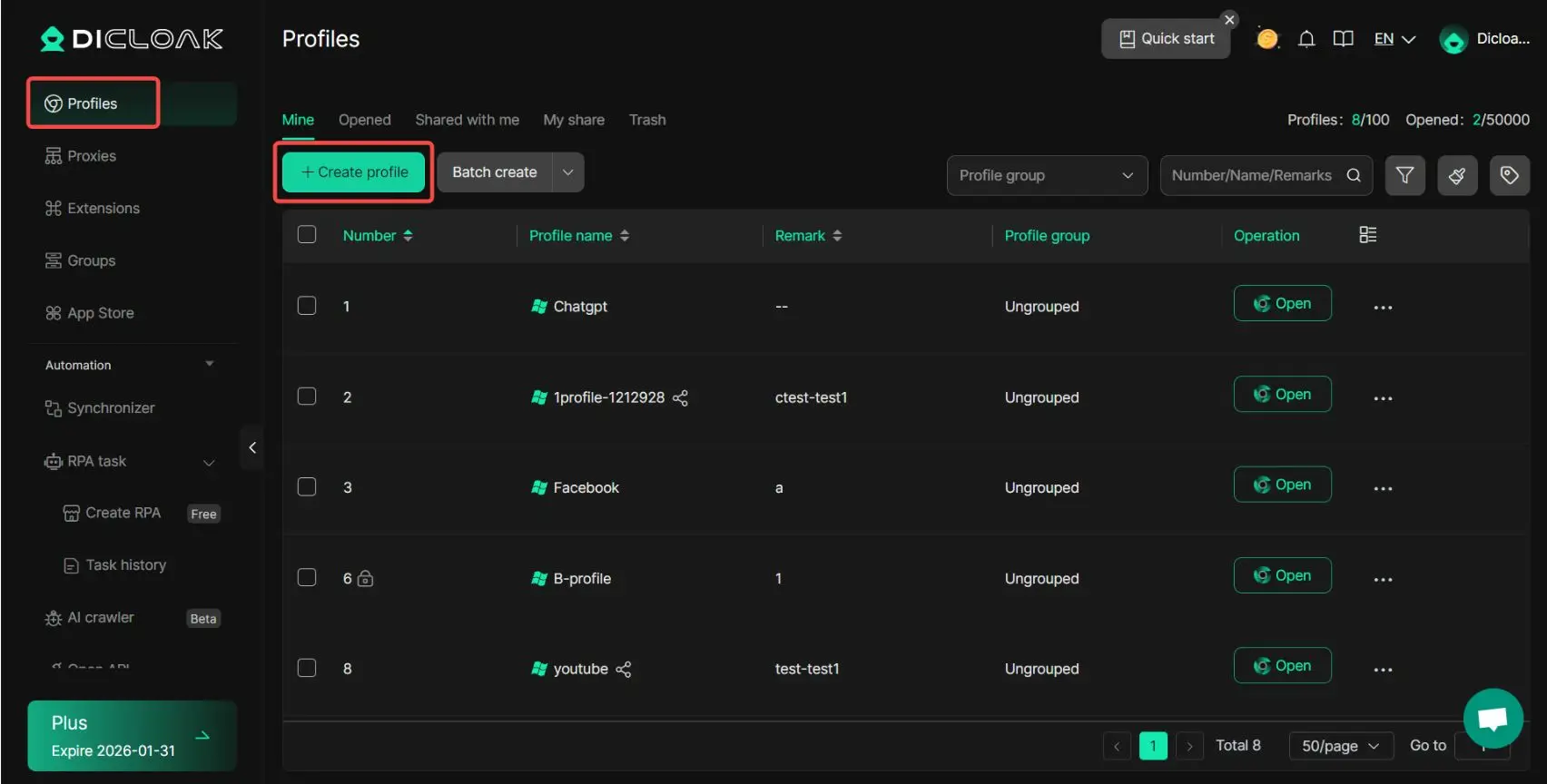
Step 1: Click “Create Profile”
Open DICloak and log in first. Then go to Profiles and click Create Profile. This opens the setup panel for a new browser profile. For Venmo use, this is where you start building a separate browser profile instead of mixing everything into one general browser session.
Step 2: Complete the General Settings
In General Settings, fill in the core profile details first. DICloak says you should enter a unique Profile name, and you can also add a linked account, cookies in JSON format, proxy settings, profile remarks, and a profile group. The available proxy options are No proxy, Custom Proxy, Saved Proxies, and API extraction.
For a Venmo setup, keep this section simple and clear:
- Use a unique profile name such as Venmo Personal or Venmo Business
- Add a short remark so you know the purpose of the profile later
- Put it in the right profile group if you want cleaner organization
- Add cookies only if you already have a valid session you want to preserve
- Set your proxy only if you already use one for that workflow
This step matters because good organization at the start makes it easier to avoid opening the wrong profile later.
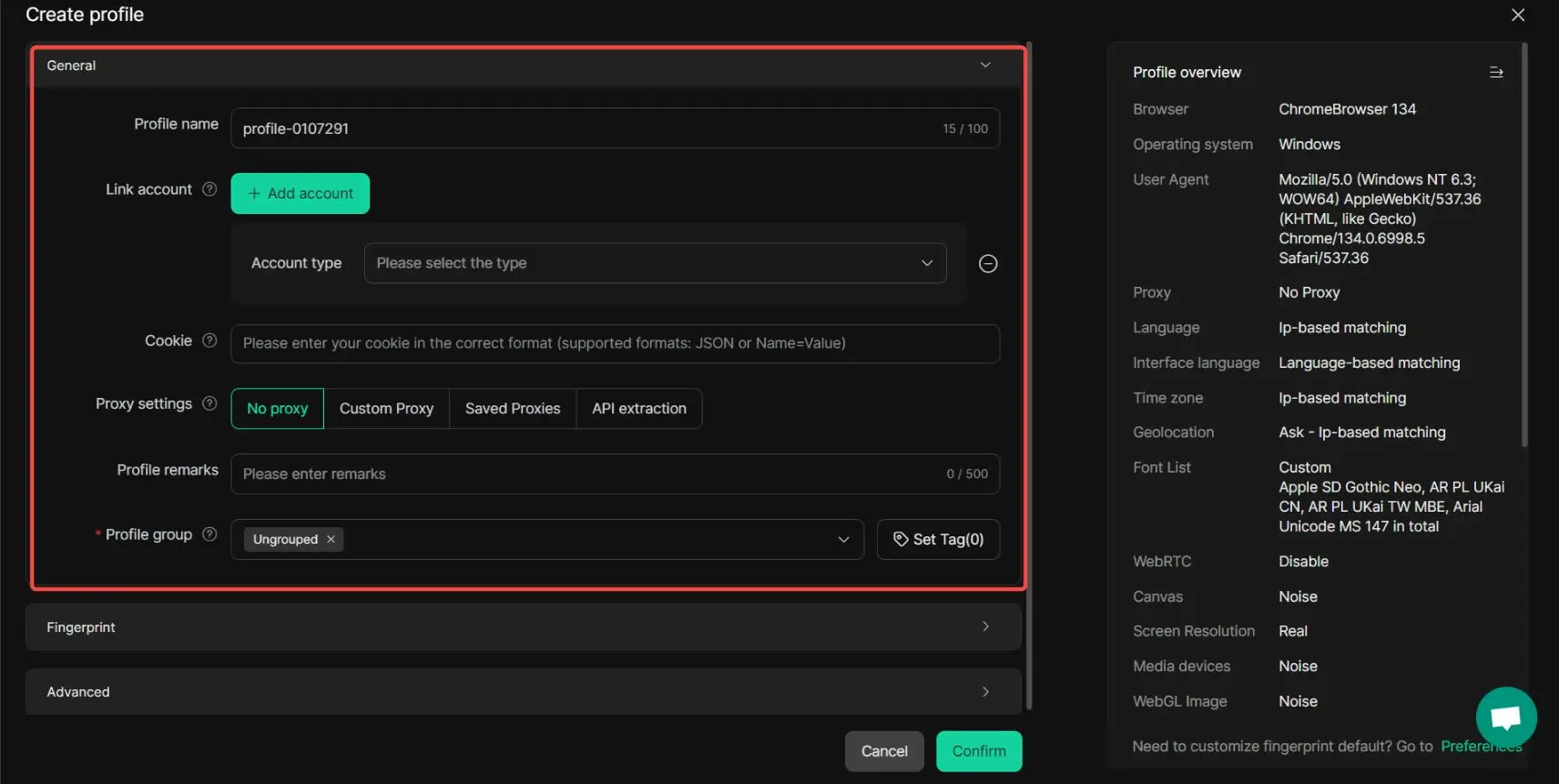
Step 3: Set the Fingerprint Settings
Next, move to Fingerprint Settings. DICloak says you can configure the Operating System, User Agent, Language, Interface language, Time zone, Geolocation, Screen Resolution, and Font List. It also lets you control WebRTC, Canvas, ClientRects, AudioContext, WebGL Image, WebGL Metadata, WebGPU, SpeechVoices, Hardware concurrency, Device memory, Do Not Track, Battery, PortScan protection, Hardware acceleration, and Browser version. DICloak specifically recommends choosing a newer browser version for better website compatibility.
For a Venmo browser profile, the practical idea is to keep the environment coherent:
- Pick the operating system you actually want that profile to simulate
- Choose a recent browser version
- Set language, time zone, and geolocation in a way that makes sense together
- If you use a proxy, DICloak says WebRTC can be substituted with the proxy IP
- Avoid building a profile with conflicting settings that look random or messy
This does not mean overcomplicating the setup. It means making the profile internally consistent.
Step 4: Adjust the Advanced Settings
After that, go to Advanced Settings. DICloak says you can set Default Startup Pages, Restore last session, Data sync, Clear local cache, Browser Settings, Multi-open mode, Bookmark settings, Website access restriction, Extension settings, and Video stream spoofing.
For a Venmo-focused profile, these are the most useful choices:
- Set Default Startup Pages to the Venmo login or account page you use most
- Turn on Restore last session only if that fits your workflow
- Use Data sync if you need cross-device collaboration
- Review Clear local cache based on whether you want to preserve or clear local session data
- Use Extension settings only if you truly need extensions in that profile
This is the part where you shape the profile around your daily routine, instead of opening a blank browser every time.
Step 5: Click “Confirm” to Create the Profile
Once the settings are done, click Confirm. DICloak says this completes the creation of the browser profile. At this point, your Venmo browser profile is saved and ready to use.
Step 6: Open the Browser Profile
Return to the Profiles list and click Open. DICloak says this launches the browser profile. This is the moment when your dedicated Venmo environment becomes active. Instead of logging into Venmo from a mixed everyday browser, you now open the same prepared profile each time.
Step 7: Edit the Profile Later if Needed
DICloak also says you can click the … button on the profile to edit or delete it later. That is useful if you want to update proxy settings, change the startup page, or rename the profile after your workflow changes.
A Simple Way to Use This for Venmo
A clean way to apply this is to create separate profile structures for different approved uses, such as:
- Venmo Personal for everyday account access
- Venmo Business for the business-related workflow tied to your approved setup
That way, your browser access stays more organized. You are not relying on one cluttered browser for everything. You are opening the right environment for the right task, using the exact creation flow DICloak outlines in its official guide.
FAQ
Q1:Can you have multiple Venmo accounts if you already have one personal account?
In most cases, Venmo does not support having two separate personal accounts under one person. If you are asking can you have multiple Venmo accounts, the safer answer is usually no for personal profiles. Venmo’s official option is to keep one personal account and add a business profile if you need a separate space for work-related payments.
Q2:Can you have multiple Venmo accounts with the same phone number?
This is one of the most common questions tied to can you have multiple Venmo accounts. In general, using the same phone number for two different Venmo personal accounts can cause problems because Venmo uses phone numbers to verify account ownership. If a number is already linked to one account, trying to reuse it may trigger sign-up or verification issues.
Q3:Can you have multiple Venmo accounts linked to the same bank account?
Some users asking can you have multiple Venmo accounts are really asking about funding methods. In some cases, Venmo allows limited sharing of a bank account between Venmo users, but that does not mean one person should create multiple personal accounts. The safer approach is to follow Venmo’s official setup and only connect payment methods in ways the platform clearly allows.
Q4:Can you have multiple Venmo accounts on one phone?
A lot of users wonder can you have multiple Venmo accounts on the same device. One phone can be used to access Venmo, but that does not mean it is a good idea to keep switching between different personal accounts. Frequent switching, mixed login sessions, or overlapping account details can lead to confusion, extra verification steps, or account restrictions.
Q5:Can you have multiple Venmo accounts if you need one for personal use and one for business?
Yes, this is the main situation where the answer to can you have multiple Venmo accounts is closer to yes. Venmo allows users to have one personal account and a linked business profile. This is the best option if you want to separate personal payments from business income without creating extra personal accounts that may cause account or verification problems.
Conclusion
So, can you have multiple Venmo accounts in 2026? For most users, the safer answer is to keep one personal account and use a linked business profile if you need to separate business payments. That is much more stable than trying to create extra personal accounts and running into verification or access problems.
The key is to keep your setup clean, follow Venmo’s official structure, and avoid messy account switching. If you need a more organized way to handle separate profiles, DICloak can also help by keeping browser profiles isolated and easier to manage. This can make profile access cleaner and more efficient while helping reduce cross-account confusion.
 Web Proxy Tools
 Free Tools
 Cookie Plugin
 UA Generator
 MAC Address Generator
 IP Generator
 IP Address List
 2FA Code Generator
 World Clock
 Anonymous Check
 WebRTC Leak Test
 UUID Generator
 Free Web Proxy Site
 Proxy Checker
 FB Ad Checker
 AI Web Scraping
 Free SMM Tools
 Twitter Shadowban Checker
 Instagram Name Checker
 UTM Generator
 Username Generator
 AI Hashtag Generator
 LinkedIn Headline Generator
 Social Media Image Resizer