As a privacy architect, I consistently see Telegram users struggling with the platform's accessibility. While Telegram offers robust encryption, its infrastructure is a primary target for state-level censorship and network management. In 2026, regional blocks, ISP throttling, and privacy vulnerabilities continue to disrupt communication. For users in restricted territories—most notably Iran and Pakistan—direct connection to Telegram’s edge servers is often impossible without an intermediary.
A proxy functions as a strategic network hop, rerouting your traffic through an alternative server before reaching Telegram’s infrastructure. By choosing the right proxy architecture, you can bypass local network filters, mask your traffic signature, and maintain the low latency required for high-fidelity voice and video calls.
Why is your Telegram connection slow or blocked?
Telegram connectivity issues are rarely the result of platform downtime. Instead, they are typically the product of sophisticated network interference.
Regional restrictions in Iran and Pakistan
In regions like Iran, nationwide blocks are enforced through state-controlled gateways that identify Telegram traffic signatures and drop packets immediately. In Pakistan, ISPs often employ throttling—intentionally introducing latency to make the app's media-heavy features unusable. In these high-interference environments, static data center IPs are quickly blacklisted, making higher-tier Residential or Mobile proxies essential for maintaining a persistent handshake with Telegram’s servers.
Government firewalls and ISP throttling
Modern censorship relies on Deep Packet Inspection (DPI) and SNI (Server Name Indication) filtering. These technologies allow ISPs to inspect the metadata of your connection requests. If the destination is identified as a Telegram IP range or the SNI header matches Telegram's domain, the request is redirected to a "null" route. A proxy mitigates this by encapsulating your traffic. To the ISP, your traffic appears to be communicating with a legitimate, non-flagged third-party server, allowing the data to bypass the firewall's inspection rules.
SOCKS5 or MTProto: Choosing the right protocol for stability
The protocol you choose dictates the stability and security of your session. Understanding the architectural "overhead" of each is vital for professional use.
Why SOCKS5 is the industry standard
SOCKS5 is the protocol I recommend for almost all practitioner-level workflows. Unlike simpler protocols, SOCKS5 handles the authentication handshake with high efficiency and supports both TCP and UDP traffic—crucial for Telegram’s calling features. Its primary strength lies in its flexibility; it is compatible with high-quality residential, mobile, and ISP proxy pools. For managing multiple accounts or long-running automated sessions, SOCKS5 provides the most robust connection persistence.
The limitations of MTProto and HTTP
MTProto was designed specifically for Telegram, but its reliance on community-run "free" servers makes it a liability. These servers are high-risk targets for Man-in-the-Middle (MitM) attacks and data logging. Furthermore, free MTProto proxies suffer from extreme congestion and frequent dropouts. HTTP/HTTPS proxies, while supported on Telegram Desktop, lack the flexibility of SOCKS5 and often struggle with the complex traffic types required for media and voice synchronization.
Residential, Mobile, or ISP: Which proxy type do you need?
Selecting the right IP reputation is just as important as the protocol.
When to choose Residential or ISP proxies
- Residential Proxies: These utilize real IP addresses assigned to home users. They are highly trusted by Telegram’s security algorithms, making them the gold standard for daily messaging and account management.
- ISP Proxies: Also known as static residential proxies, these offer the trust of a residential IP with the throughput of a data center. NodeMaven’s ISP proxies, for instance, deliver a <70% fraud score and are 5x faster than standard proxies. This makes them ideal for high-speed automation and sessions where a permanent, static identity is required.
Why Mobile proxies offer the highest trust
Mobile proxies utilize 5G/LTE IP pools from real carriers. Because mobile carriers often assign the same IP to thousands of legitimate users (CGNAT), Telegram's firewalls are extremely hesitant to block these IPs. In regions with the strictest DPI-based blocks, mobile proxies are the most effective tool because they provide the strongest trust signals. When using mobile IPs, I recommend utilizing Sticky Sessions to maintain a stable IP for the duration of your task.
How to configure proxy settings in the Telegram app
Configuration is straightforward, but attention to credential detail is necessary to avoid authentication errors.
Setting up proxies on Android and iOS
- Navigate to Settings > Data and Storage > Proxy.
- Enable Use Proxy.
- Select SOCKS5.
- Input the server hostname (e.g.,
gate.nodemaven.com) and Port (e.g., 1080).
- Enter your authentication credentials (Username and Password).
- Pro Tip: If using MTProto, you will see a "Secret" field. For SOCKS5, stick to standard username/password credentials for better stability.
- Tap Save.
Configuring Telegram Desktop for Windows and macOS
- Open the Telegram Desktop menu and go to Settings > Advanced.
- Under Connection Type, select Use Custom Proxy.
- Choose SOCKS5 and input the Hostname (
gate.nodemaven.com) and Port (1080).
- Enter your authentication credentials and click Save.
Why do some Telegram proxies fail or get limited?
Failure usually stems from poor IP reputation or over-saturation of public servers.
The instability of free MTProto servers
Public MTProto servers are often overcrowded, leading to massive latency and "connecting..." loops. Beyond performance, the security risk is high; the operator of a free proxy can log your metadata and potentially intercept unencrypted traffic components.
Identifying flagged or low-quality IPs
Many providers sell "reused" IPs that are already blacklisted by Telegram’s anti-spam filters. Utilizing a provider like NodeMaven is critical here because they use an IP Quality Filter to screen out IPs with high fraud scores or those previously flagged for suspicious activity. This ensures your connection isn't throttled at the application level.
Managing multiple accounts with automatic proxy rotation
For marketing or automation practitioners, manual management is a bottleneck.
Setting up sticky sessions for long-term tasks
Sticky sessions allow you to maintain a single IP for up to 24 hours. This is critical for preventing "suspicious login" flags. Changing IPs in the middle of a session is a major red flag for Telegram's security system; sticky sessions ensure your identity remains consistent throughout your workflow.
Network-level rotation for bots and automation
Professional providers handle rotation at the gateway level. You configure a single endpoint in Telegram, and the provider automatically swaps the underlying IP from their pool based on your timing preferences. This allows for high-volume automation without the manual overhead of updating settings.
How practitioners use DICloak to manage Telegram accounts
For teams or operators managing multiple Telegram accounts, DICloak can help keep each account in a more organized and separated browser setup.
- Profile-level proxy setup
Users can assign their own proxy endpoints, such as SOCKS5, to individual DICloak browser profiles. This helps keep each profile’s network route separate and gives users more control over how different account environments are configured.
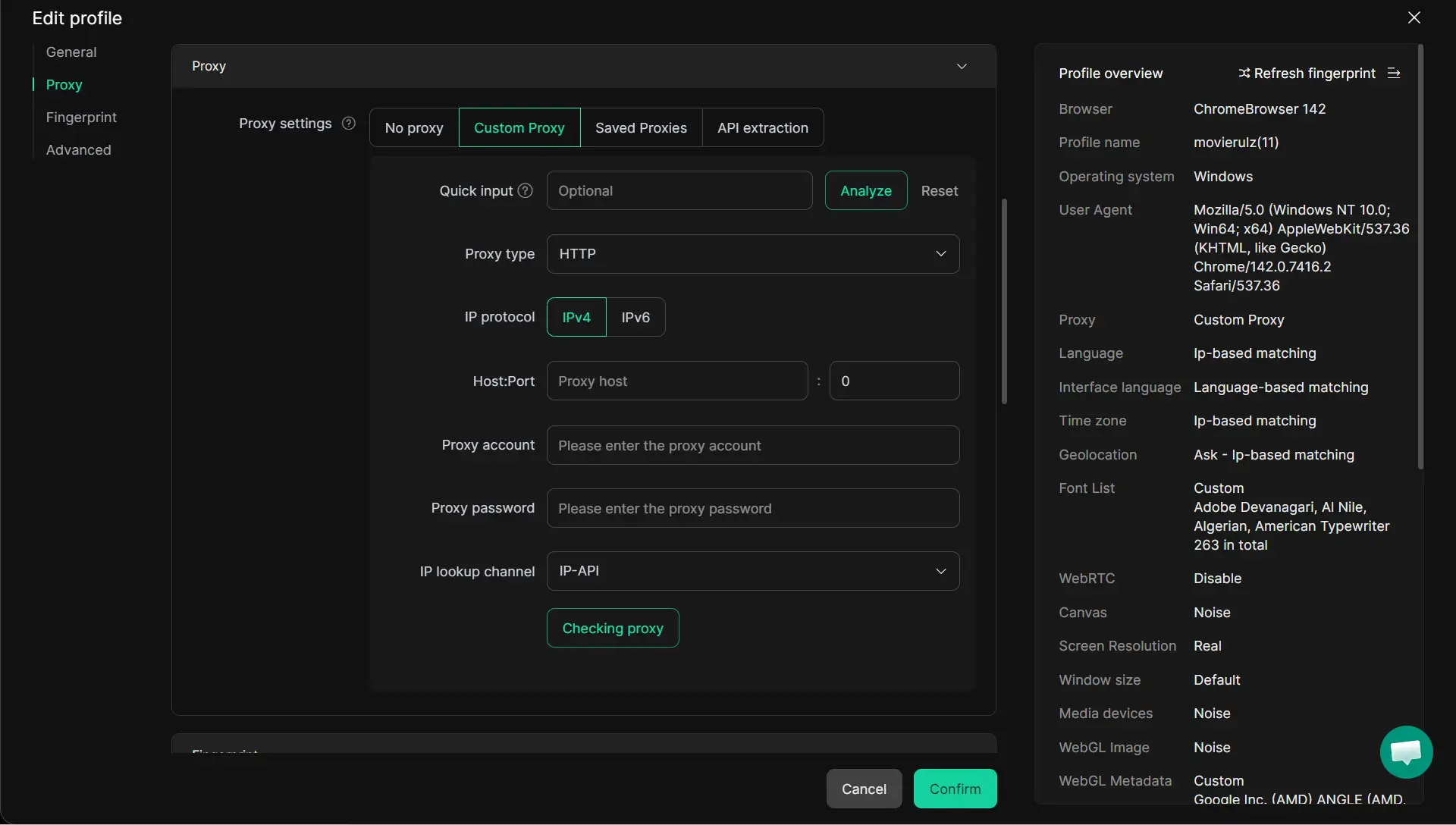
DICloak lets users manage multiple Telegram profiles in isolated browser profiles. Cookies, local storage, cache, and session data stay separated between profiles, which helps reduce cross-profile data mixing during daily use.
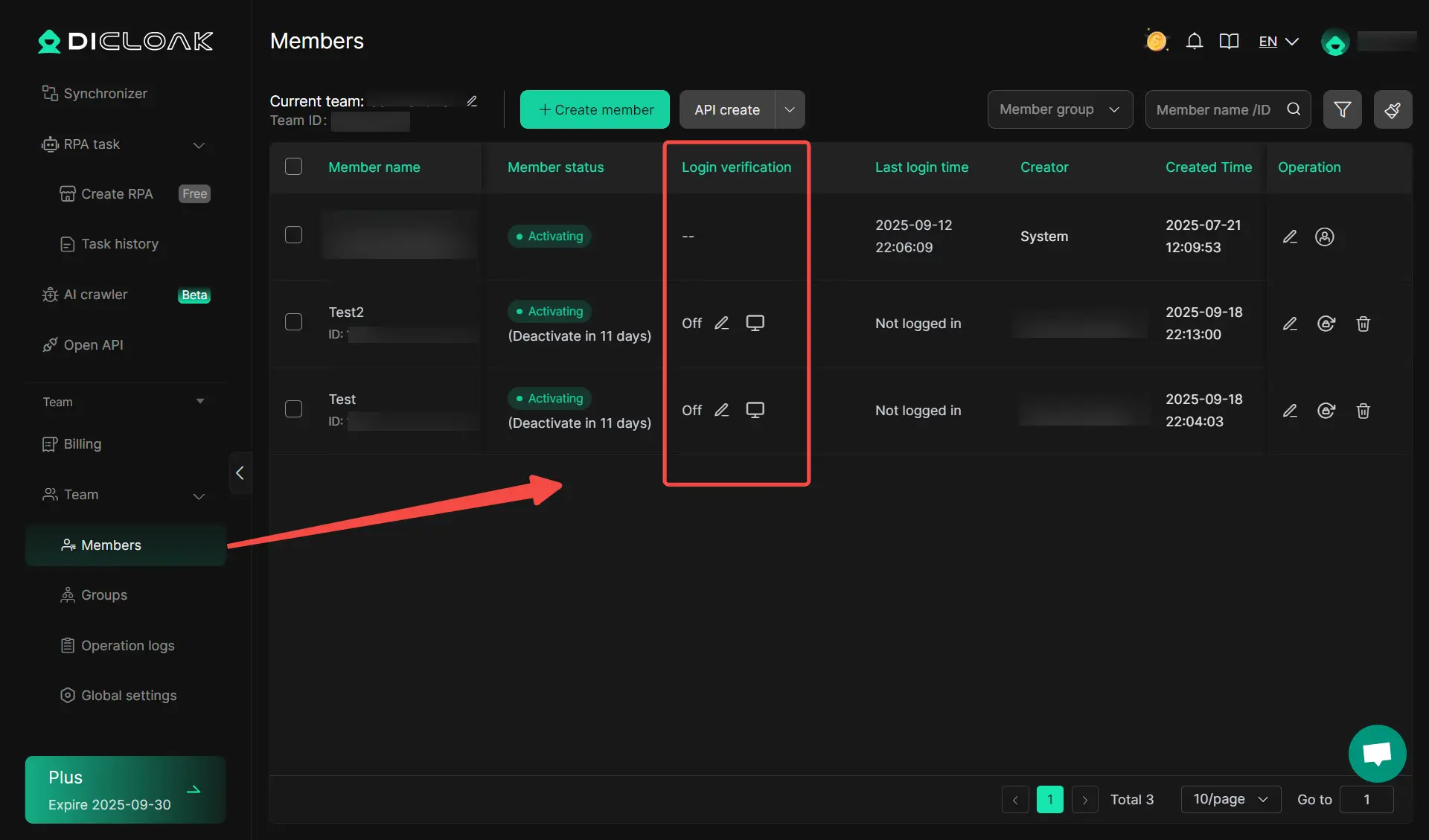
Teams can use separate browser profiles to handle different Telegram accounts or support tasks in a more structured way. This makes shared work easier to manage and helps avoid confusion that can happen when many accounts are handled in the same browser session.
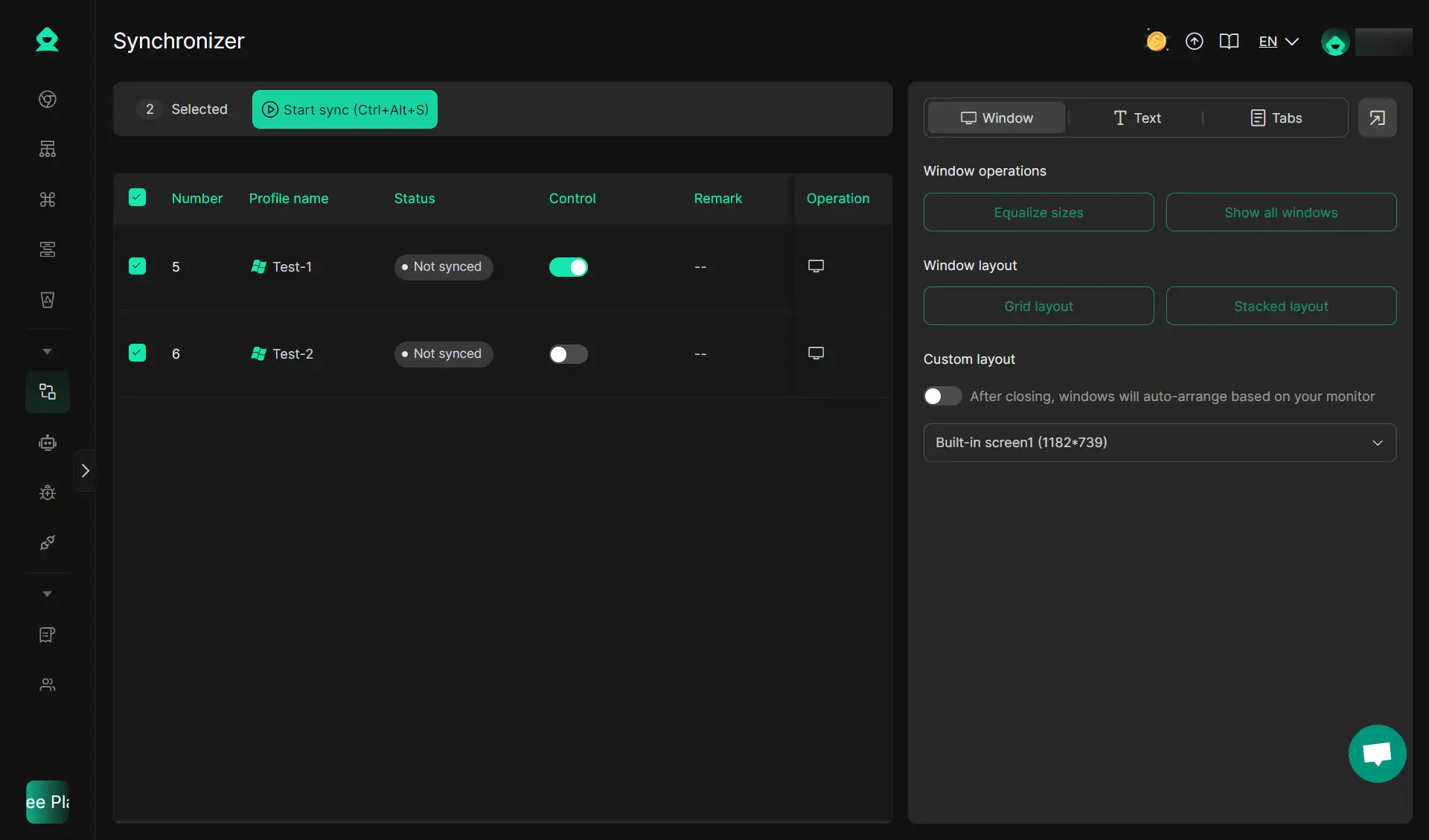
- Structured automation testing
Users can also test automation workflows such as synchronizer inside controlled profile environments. When combined with user-configured proxies, this setup can make large-scale account operations more organized and easier to monitor across different account groups.
Proxy or VPN: Which performs better for Telegram in 2026?
While both tools solve for connectivity, the architectural trade-offs are significant.
Speed and latency trade-offs
Proxies are "surgical." Because they only reroute Telegram traffic, they avoid the heavy encryption overhead of a VPN, which processes every packet on your device. This results in significantly lower latency, which is the deciding factor for the quality of Telegram VoIP calls.
App-level vs device-wide routing
A VPN is a "blunt instrument" that changes your IP for every app on your device. A proxy allows you to keep your local IP for banking and maps while only rerouting Telegram. This app-level routing offers a superior balance of speed, stability, and utility for the power user.
Final thoughts on choosing a Telegram proxy
In 2026, the baseline for a reliable Telegram connection is IP reputation and protocol efficiency. For users in Iran or Pakistan, mobile proxies are the most resilient choice against state-level DPI. For business users, ISP proxies offer the best speed-to-trust ratio. Prioritize providers that offer Traffic Rollover and a Financial Guarantee on IP quality, ensuring your infrastructure costs remain efficient while your connection remains uninterrupted.
FAQs About proxy for Telegram
Is it better to use a free proxy or a paid one for Telegram?
Paid proxies are essential for security and reliability. Free proxies are often honeypots for data logging or are so overcrowded that they fail during high-bandwidth tasks like video calls.
Can using a proxy get my Telegram account banned?
Only if the IP quality is poor. Using NodeMaven’s IP Quality Filter prevents bans by ensuring you never use "flagged" or high-fraud IPs. Bans usually occur when multiple accounts are linked to a single, low-quality data center IP.
Why should I choose SOCKS5 over MTProto for my business accounts?
SOCKS5 is a more robust, versatile protocol that supports standard authentication and handles higher throughput. MTProto is often restricted to community servers that lack the performance and security required for professional operations.
What is the best proxy location for Telegram users in 2026?
It depends on your target. For bypassing regional blocks, choosing a nearby country with a "clean" internet pipe is best. However, for marketing, NodeMaven’s ZIP-level targeting in 150+ locations allows you to match your IP to the specific city of your target audience for maximum authenticity.
How do I know if my Telegram proxy is working?
Check the "Proxy" icon in your chat list—a shield or checkmark indicates an active connection. You can also verify by checking your "Active Sessions" in Telegram settings to ensure the IP address shown matches your proxy's IP.
 Web Proxy Tools
 Free Tools
 Cookie Plugin
 UA Generator
 MAC Address Generator
 IP Generator
 IP Address List
 2FA Code Generator
 World Clock
 Anonymous Check
 WebRTC Leak Test
 UUID Generator
 Free Web Proxy Site
 Proxy Checker
 FB Ad Checker
 AI Web Scraping
 Free SMM Tools
 Twitter Shadowban Checker
 Instagram Name Checker
 UTM Generator
 Username Generator
 AI Hashtag Generator
 LinkedIn Headline Generator
 Social Media Image Resizer