Getting the message “Facebook this feature is temporarily blocked” can be frustrating, especially when you do not know what caused it or how long it will last. One minute you are posting, commenting, sending friend requests, or managing a business page as usual. The next minute, Facebook suddenly stops you. For many users, this feels confusing, stressful, and even risky if the account is important for work, ads, or customer communication.
The good news is that this warning does not always mean your account is permanently banned. In many cases, it is a temporary restriction caused by unusual activity, repeated actions, trust issues, or possible rule violations. The key is to understand why it happens, what you should do right away, and how to stop it from happening again. In this guide, you will learn what Facebook this feature is temporarily blocked really means, how to fix it step by step, how long it may last, and how to protect your account more safely in the future.
Understanding the Temporary Block on Facebook
Seeing this message can feel stressful at first. But in many cases, it does not mean your account is permanently banned. It usually means Facebook has limited one action because its system noticed something unusual.
What Does It Mean When a Feature is Temporarily Blocked?
When users see Facebook this feature is temporarily blocked, it usually means Facebook has stopped one feature for a short time. This may affect posting, commenting, sending friend requests, or joining groups. In simple terms, Facebook is trying to prevent spam, abuse, or unsafe activity.
This message often appears when someone does too many actions too quickly. For example, a user may send many friend requests in one hour or post the same comment many times. Even if the account is real, Facebook may still see that behavior as risky. That is why many people search for this feature is temporarily blocked Facebook after using the platform too fast.
Common Reasons for Temporary Blocks
Facebook usually shows this warning for a few clear reasons. These often include rule-related problems, unusual account activity, or low account trust.
Violating Community Standards
One common reason is breaking Facebook’s rules. This can include spam-like behavior, repeated comments, misleading posts, or other actions that go against platform standards. For example, if someone posts the same promotional message in many groups, Facebook may temporarily block that feature.
Suspicious Activity on Your Account
Facebook may also block a feature when account activity looks unusual. This can happen after a new login, very fast actions, or behavior that looks automated. For example, if an account suddenly starts adding many strangers and joining many groups, Facebook may treat it as suspicious.
Use of Unverified Accounts
New or weak-trust accounts are more likely to face limits. If an account has little profile information, no normal activity history, or starts doing too much too soon, Facebook may see it as unsafe. For example, a brand-new account that begins posting links and sending many requests on the first day may be temporarily blocked.
Steps to Fix Facebook This Feature Is Temporarily Blocked
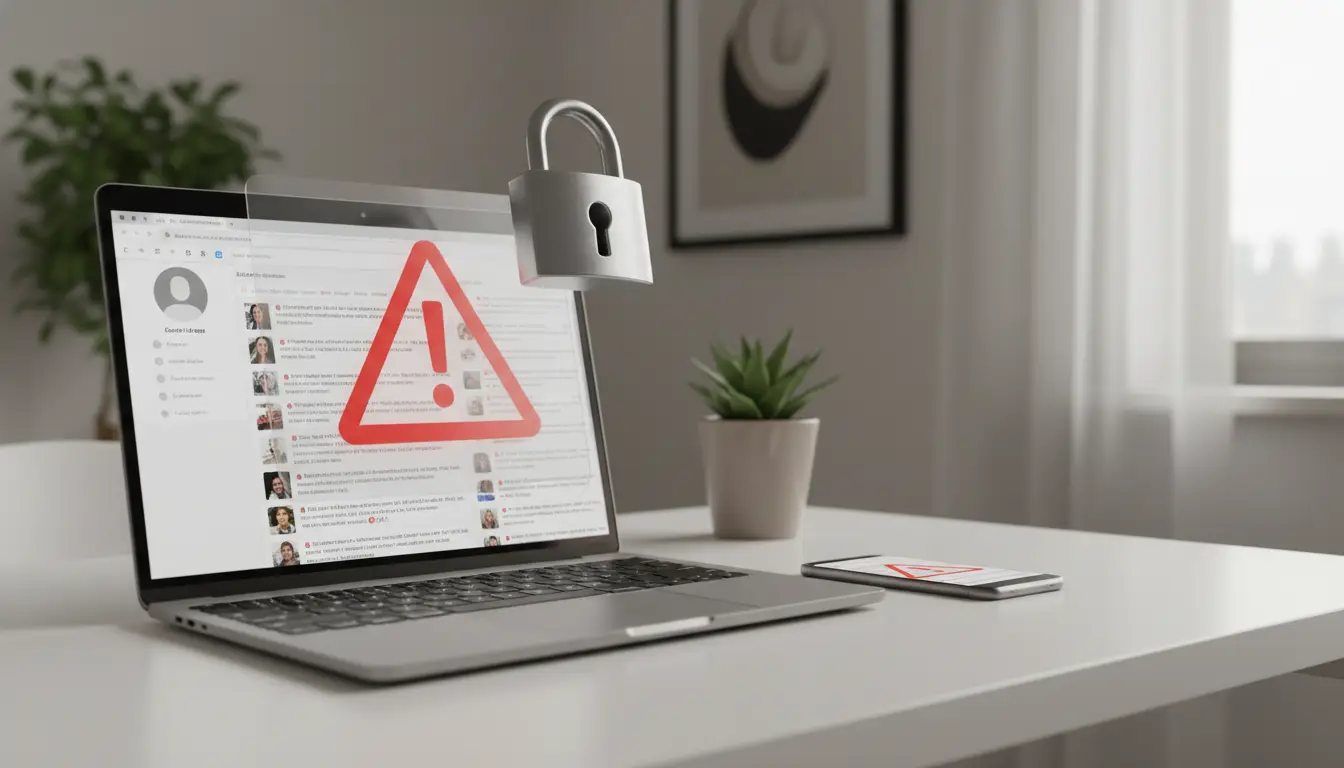
Now that the cause is clearer, the next step is fixing it the right way. If you see Facebook this feature is temporarily blocked, do not keep clicking the same button again and again. A calmer, cleaner response gives you a better chance of getting the feature back sooner. Facebook says some feature limits happen when people use a feature too fast, and some restrictions may also require review or identity checks.
Immediate Actions to Take When Blocked
The first thing to do is stop the blocked action for a while. If Facebook blocked posting, commenting, messaging, or friend requests, do not keep repeating that action. For example, if you were sending many friend requests and then saw this feature is temporarily blocked Facebook, stop sending more right away. Facebook may see repeated attempts as more suspicious behavior, not as a request for help. Facebook’s Help Center explains that some limits are triggered by excessive use of certain features.
Confirming Your Identity
If Facebook asks you to confirm who you are, follow that step as soon as possible. Meta says you can confirm your identity by logging in and following the instructions shown on screen. In some cases, Facebook may ask for an ID to confirm your name or help restore access.
A simple example is a user who logs in from a new device while traveling and then gets limited after fast activity. Facebook may see that as unusual account behavior. In that case, identity confirmation helps show that the real account owner is using the account. When you upload an ID, make sure the image is clear and all needed details are visible, because Facebook says blurry or incomplete documents may be rejected.
Completing Verification Processes
Some users need to complete other security steps, not just upload an ID. This may include confirming a login, checking a security prompt, or following the steps Facebook gives during recovery. The key point is to finish the full process, not just part of it. If Facebook asks for more details and you stop halfway, the review may not move forward. Meta also recommends using the instructions shown during login when identity confirmation is required.
Requesting a Review of the Block
If you believe the limit was a mistake, look for a review option on the warning screen, in Account Status, Page Status, or your Support Inbox. Facebook says users can find alerts and messages from Facebook in the Support Inbox, and some decisions can be reviewed there. For Pages, Meta also says users may see an Appeal or Request Review option after a limit is placed.
How to Appeal a Temporary Block
If the block does not go away after you complete the required steps, an appeal may help. The best appeal is short, honest, and specific. Do not write an angry message. Explain what happened in plain words. For example, you can say that you were using the account normally, that you may have acted too quickly, and that you have now stopped that activity and completed the security checks. If Facebook this feature is temporarily blocked by mistake, a clear explanation gives reviewers more context.
Tips for Providing Additional Information
When you send extra information, keep it relevant. Include the action that was blocked, when it happened, and whether Facebook asked for ID or another security step. If there was a real reason for unusual behavior, mention it. For example, if you logged in while traveling, changed devices, or were helping manage a Page, say so clearly. Good details can make your case easier to understand. Also, do not send fake documents or made-up explanations. Meta’s identity rules and review systems are built to check trust and account integrity.
Contacting Facebook Support
Many users ask how to contact Facebook support after seeing this feature is temporarily blocked Facebook. In practice, Facebook usually wants users to go through its built-in support paths first, such as the on-screen prompt, Support Inbox, Page Status, or the review option tied to the restriction. That is the best place to start because it connects your appeal to the exact action Facebook limited. If a review option appears, use that path first instead of searching for a general email address. Facebook’s Help Center points users to these internal review and support tools rather than a single public support contact for all cases.
A good real-life example is a small business owner who posted the same sales message in several groups and then got blocked from posting. The owner stopped posting, checked the Support Inbox, completed the requested verification step, and then submitted a short review request explaining the business context. That kind of response is much more effective than trying the blocked action over and over again.
How to Prevent Facebook This Feature Is Temporarily Blocked Again
After you recover access, the next goal is simple: do not trigger the same problem again. If you have already seen Facebook this feature is temporarily blocked, the safest move is to make your account look steady, real, and policy-safe over time. That means following Facebook’s rules, watching how people react to your content and ads, and avoiding behaviors that make the account look fake or risky. Meta’s policies on spam, ad standards, and account authenticity all point in that direction.
Adhering to Facebook’s Community Standards
A strong first step is to follow Facebook’s Community Standards closely, especially around spam and deceptive behavior. Meta says spam includes actions that try to get fake engagement, increase visibility in misleading ways, or push people toward links through repetitive and unwanted behavior. In real use, that means you should not post the same text again and again, drop the same link into many groups, or leave copy-paste comments across many posts. A small business page, for example, may think repeated promotion helps sales, but Facebook may read that pattern as spam. That is one common path to Facebook this feature is temporarily blocked.
Maintaining a Good Feedback Score
If you run ads or sell through Facebook tools, user satisfaction matters more than many people realize. Meta says a Page feedback score reflects feedback from people who likely bought something from ads connected to that Page. A low score can hurt delivery and may lead to restrictions in some business cases. This means sellers should set clear delivery times, honest product details, and realistic promises. For example, if a shop keeps advertising “fast shipping” but buyers receive items very late, negative feedback can build up and make the Page look less trustworthy. Over time, weak trust signals can increase the risk of limits and make this feature is temporarily blocked Facebook feel more likely during other account reviews.
Monitoring Ad Performance and User Feedback
It is also smart to watch ad quality before problems grow. Meta says ad relevance diagnostics include signals like quality ranking, engagement rate ranking, and conversion rate ranking. Meta also explains that ad quality is affected by user feedback and by whether people see the ad as low quality, misleading, or frustrating. In plain words, if people hide your ad, report it, or react badly to the landing page, that is a warning sign. A useful example is a lead-generation ad with a dramatic promise and a weak landing page. The clicks may look fine at first, but poor user response can lower quality signals and create bigger account stress later. Checking these metrics early helps you fix problems before they turn into restrictions.
Avoiding the Creation of Fake Accounts
Another key way to prevent future trouble is to avoid fake or misleading accounts completely. Meta’s policies focus heavily on authentic identity and removing fake accounts because fake profiles are often linked to spam, abuse, and manipulation. That means you should not create extra accounts with false names, pretend to be another person, or build backup profiles that do not reflect real use. Even if the goal is only convenience, Facebook may still treat that setup as risky. A common example is someone making several low-detail accounts to join groups and promote the same service. That may seem like a shortcut, but it can quickly lead to trust problems, reviews, or another Facebook this feature is temporarily blocked warning.
The best long-term habit is simple: slow down, stay real, and make each action easy for Facebook to trust. When your content is honest, your ads match the user experience, and your account behavior looks natural, the chance of seeing Facebook this feature is temporarily blocked again becomes much lower.
Duration and Impact of Temporary Blocks on Facebook
Even after you understand the cause and how to avoid it, one question usually remains: how long will this last, and how much damage can it do? That matters even more for people who use Facebook for business, customer contact, or paid campaigns. If you have seen Facebook this feature is temporarily blocked, the timing of the restriction can affect both daily activity and revenue. Meta explains that some restrictions are temporary, while others may stay in place until a review or required security step is completed.
How Long Do Temporary Blocks Last?
The length of a temporary block is not always the same. In many cases, it can last from a few hours to a few days, depending on the action, the level of risk, and whether Facebook sees repeated problems on the account. For broader account enforcement, Meta says some restrictions can last 7 days, and repeated violations can lead to 30-day restrictions for certain actions. That means there is no single timer for every case. A light warning may pass quickly, while a stronger trust or policy issue can last much longer.
A simple example makes this easier to understand. If someone sends too many friend requests in one evening, the block may only affect that feature for a short period. But if the same account keeps repeating the behavior, Facebook may extend the restriction or place limits on more actions. That is why users who search this feature is temporarily blocked Facebook should not assume every case will end in a few minutes. The length often depends on both the trigger and the account’s recent history.
Impact on Advertising and Campaigns
For advertisers, the effect can be much more serious. Meta says that if a user account is restricted from advertising, that user cannot advertise or create new ads. Meta also notes that ad accounts where that person is the only attached user may become disabled. In real business use, this can pause campaign work fast, even when the issue started with one restricted person rather than the whole company.
Consequences of Being Blocked from Advertising Features
When advertising access is blocked, the problem is not just inconvenience. It can delay launches, stop budget spending, interrupt lead flow, and hurt sales during an important campaign window. Meta’s business help also explains that users may need to go through restricted account troubleshooting or request a review if they believe the restriction was incorrect.
For example, imagine a small online store running a weekend sale through Meta ads. If the person managing the ads suddenly loses advertising access on Friday, the campaign may stop at the worst possible time. New ads cannot be published, edits may be delayed, and the business may miss high-conversion traffic. In a case like that, Facebook this feature is temporarily blocked is no longer just a small account warning. It becomes a real business problem that affects timing, reach, and income. This is why advertisers should treat even a temporary restriction seriously and review account quality, verification steps, and support messages right away.
A Smarter Way to Manage Multiple Facebook Accounts More Safely with DICloak
If repeated login changes, unstable browsing environments, or messy team operations are part of the problem, a cleaner setup can help lower future risks. For people who manage several Facebook accounts for marketing, customer service, e-commerce, or social media work, using a more structured browser profile can make daily activity look more stable and easier to control. That is where DICloak can fit naturally into the workflow.
Use Isolated Browser Profiles for Safer Account Management
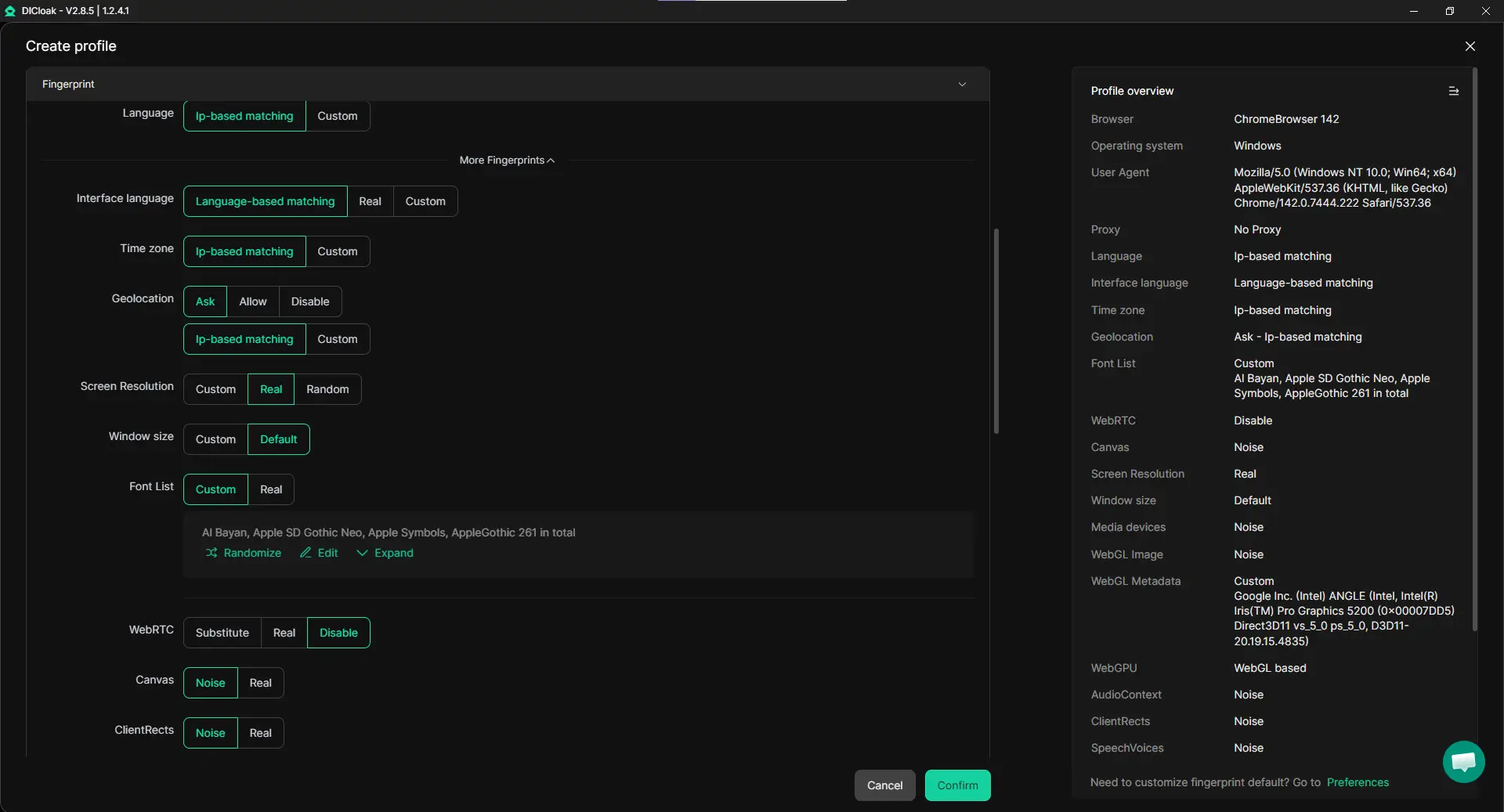
When several Facebook accounts are handled on one device, shared browser data can create risk. Cookies, cache, fingerprints, and session data may mix together and make account behavior look abnormal. With DICloak, each account can be placed in its own isolated browser profile, with a separate fingerprint and browsing environment. This helps keep accounts independent from one another and supports more natural account activity across daily operations.
For example, if a small agency manages client Pages, support accounts, and ad-related logins on one computer, isolated profiles can help prevent overlap between those accounts. That kind of separation is especially useful after seeing Facebook this feature is temporarily blocked, because it gives the user a cleaner way to manage accounts going forward.
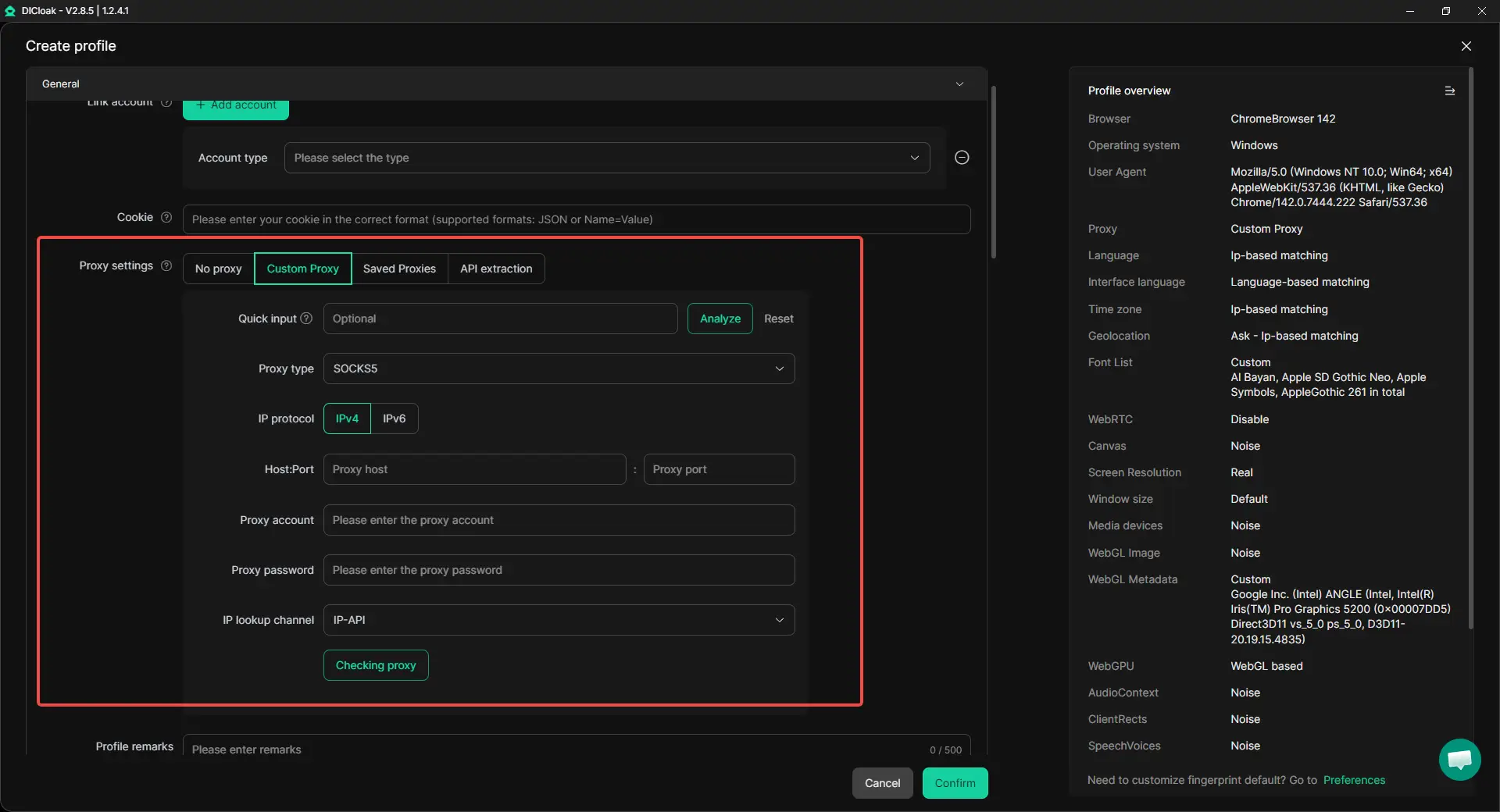
Set a Different Proxy for Each Profile
Network inconsistency is another common reason accounts get flagged. If multiple accounts keep switching IPs in an uncontrolled way, or if different users log in through unstable connections, Facebook may view that behavior as suspicious. With DICloak, each browser profile can be matched with its own proxy, and major proxy types such as HTTP, HTTPS, and SOCKS5 can be configured based on the account’s needs.
This is helpful for teams that want each account to keep a more consistent login pattern. For example, if one account is meant to stay tied to one market or one working location, a dedicated proxy setup can help keep that environment stable. In a real workflow, this gives users more control and reduces the chaos that often leads to this feature is temporarily blocked Facebook warnings.
Manage Team Access Without Sharing Risky Logins
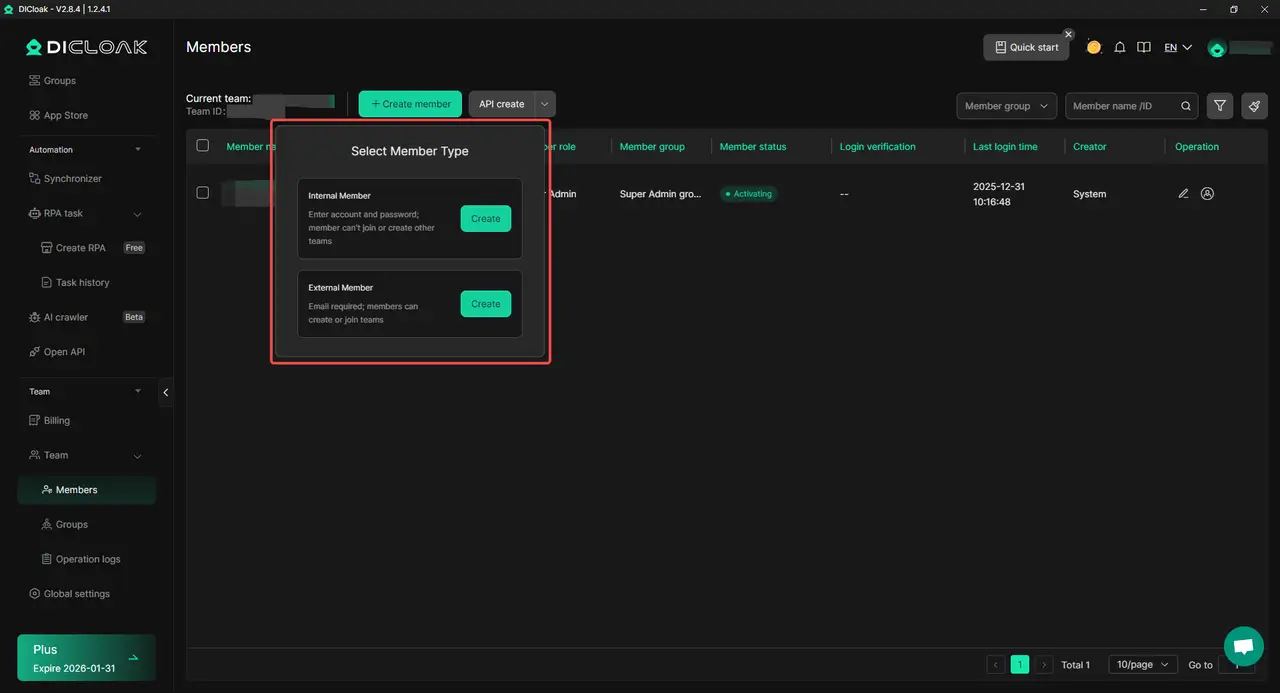
Teamwork can also create problems when many people touch the same account in an unstructured way. Passing passwords around, logging in from different devices, and making changes without clear roles can all increase trust and security issues. With DICloak, account access can be managed through profile sharing, permission settings, data isolation, and operation logs, so team members can work inside the right browser profile without creating unnecessary confusion.
This is useful for social media teams, e-commerce staff, and account operators who need to divide tasks clearly. For example, one team member can focus on posting content, another can check messages, and a manager can control permissions and review actions. That kind of organized workflow is much safer than letting several people log into the same Facebook account freely from different places.
Instead of waiting until Facebook this feature is temporarily blocked appears again, it is often smarter to improve the working environment early. A more organized setup can make account behavior cleaner, reduce operational mistakes, and help teams manage multiple social media accounts with less risk and more control.
Conclusion: What to Do When Facebook This Feature Is Temporarily Blocked
When you see Facebook this feature is temporarily blocked, it usually means Facebook has limited one action because its system detected unusual, risky, or spam-like behavior. In many cases, this is not a permanent ban, but it is still a warning that your account activity, content, login pattern, or trust level may need attention. Understanding the cause is the first step, because the right fix depends on whether the issue came from fast actions, policy concerns, identity checks, or account quality problems.
The best response is to stay calm, stop repeating the blocked action, complete any identity or verification steps, and request a review if needed. Over the long term, the safest way to avoid seeing Facebook this feature is temporarily blocked again is to follow Facebook’s rules, keep account behavior natural, maintain strong ad and feedback quality, and avoid fake or low-trust account setups. For users who manage multiple accounts, a more stable working environment with separated browser profiles, custom proxy settings, and controlled team access can also help reduce risk and support safer daily operations.
Frequently Asked Questions About Temporary Blocks
Why does Facebook say this feature is temporarily blocked?
When you see Facebook this feature is temporarily blocked, it usually means Facebook has limited one action because its system noticed unusual activity. This can happen if you post too fast, send too many friend requests, repeat the same comment, or do something that looks like spam. In some cases, Facebook may also place a temporary block if the account looks new, weak, or risky.
How long does Facebook this feature is temporarily blocked last?
The length of a block can be different in each case. Sometimes Facebook this feature is temporarily blocked lasts only a few hours. In other cases, it may last several days. The timing often depends on what caused the restriction, how serious the issue looks, and whether the account has had similar problems before.
How can I fix Facebook this feature is temporarily blocked?
To fix Facebook this feature is temporarily blocked, stop using the blocked feature for a while and avoid repeating the same action. Then check whether Facebook is asking you to confirm your identity, complete a security step, or request a review. If a review option is available, send a short and honest explanation instead of trying the action again and again.
Can Facebook this feature is temporarily blocked affect my ads?
Yes, it can. If Facebook this feature is temporarily blocked is connected to your business activity or account trust, it may affect your ability to run ads, manage campaigns, or make changes in Ads Manager. For advertisers, even a short restriction can delay launches, reduce reach, and interrupt sales during important campaign periods.
How can I avoid seeing Facebook this feature is temporarily blocked again?
The best way to avoid Facebook this feature is temporarily blocked is to keep your account activity natural and trustworthy. Follow Facebook’s rules, avoid spam-like actions, do not create fake accounts, and do not switch devices or login environments too often without a clear reason. If you manage multiple accounts, keeping each account in a stable and separate working environment can also help reduce future risk.
 Web Proxy Tools
 Free Tools
 Cookie Plugin
 UA Generator
 MAC Address Generator
 IP Generator
 IP Address List
 2FA Code Generator
 World Clock
 Anonymous Check
 WebRTC Leak Test
 UUID Generator
 Free Web Proxy Site
 Proxy Checker
 FB Ad Checker
 AI Web Scraping
 Free SMM Tools
 Twitter Shadowban Checker
 Instagram Name Checker
 UTM Generator
 Username Generator
 AI Hashtag Generator
 LinkedIn Headline Generator
 Social Media Image Resizer