You search for someone on Snapchat, but their profile no longer appears. Their name may also be missing from your Chat list, and your messages may seem to have disappeared. These signs can mean you were blocked, but they can also happen if the person deleted their account, changed their username, or removed you as a friend.
If someone blocked you, you cannot remove that block from your own Snapchat account. Only the person who blocked you can unblock you. You can, however, check the signs, understand what changes after an unblock, and fix common issues if the account still does not appear. This guide explains how to tell what happened, what you can realistically do, and how to unblock someone you previously blocked.
Can You Unblock Yourself on Snapchat?
No, you cannot unblock yourself from another person’s Snapchat account. Only the person who blocked you can remove the block from their settings.
Who Controls the Unblock Action?
Snapchat keeps blocked accounts inside the blocker’s settings. That person can return to the list and remove the block, but you cannot view, edit, or control another user’s blocked list.
No app, website, browser setting, or phone setting can force someone to unblock you. Be careful with services that claim they can change another person’s Snapchat settings. They cannot legitimately control another user’s account.
What Can You Do After Being Blocked?
The most realistic response is to wait and respect the person’s decision. Avoid sending repeated messages or pressuring them to change their mind. Continued contact can make the situation worse and may lead to further blocking or reporting.
You also should not create another Snapchat account to contact someone who blocked you. A new account does not remove the original block. It only creates another way to reach a person who has already chosen to stop contact.
If the person later changes their mind, they can remove the block themselves. You can then check whether their profile appears again and whether Snapchat allows you to send a new friend request.
How to Know If Someone Unblocked You on Snapchat
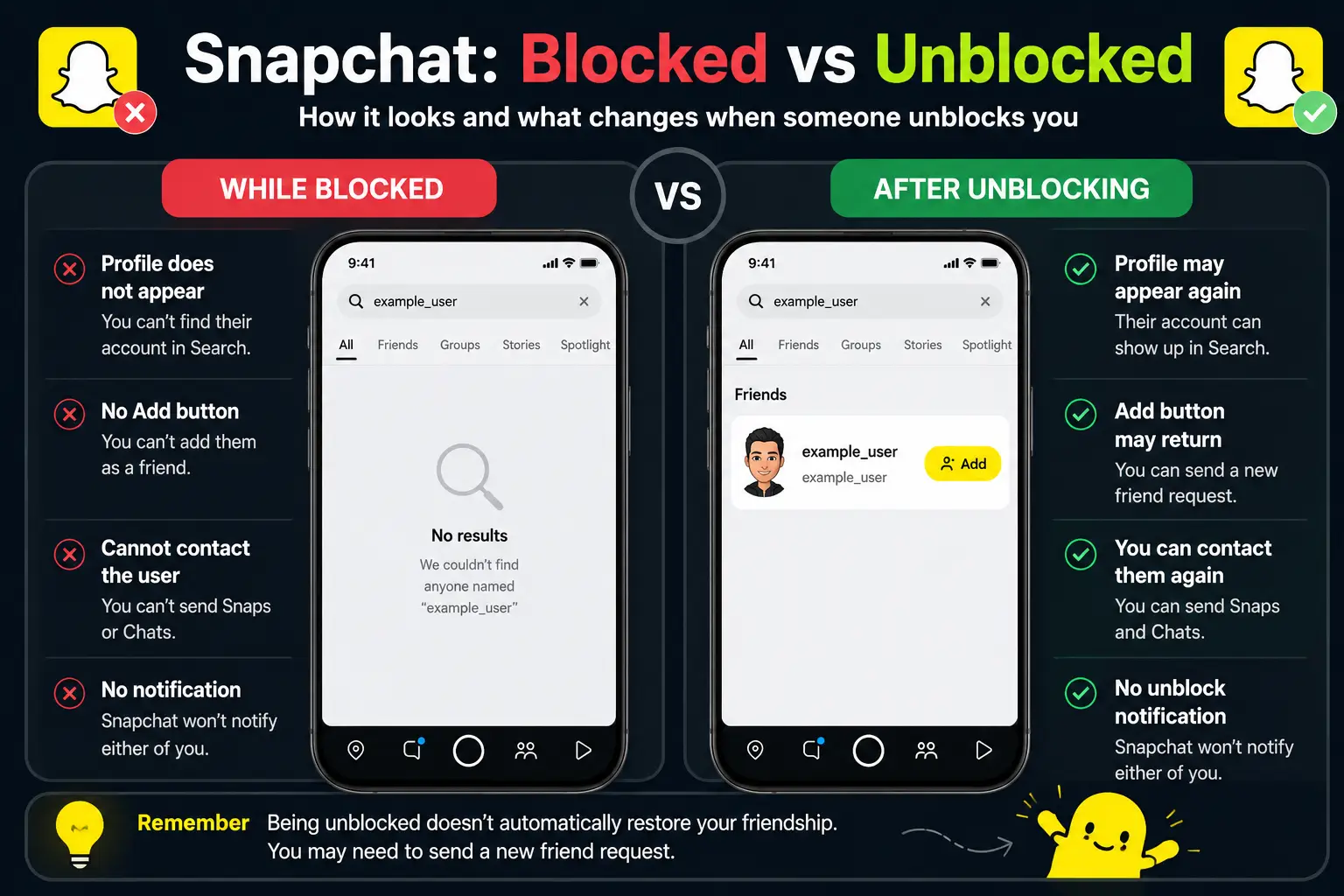
Snapchat does not send you a notification when another person removes a block. To check, search for the account and look for changes in its profile or friend options.
Search for Their Exact Username
Start by tapping the search icon and entering the person’s latest Snapchat username. Snapchat allows users to search by name or username, but the exact username gives you a more reliable match.
When someone has blocked you, their account does not normally appear in your search results. If the profile becomes searchable again, this is a useful sign that the block may have been removed.
Do not rely only on a familiar display name. Display names are not unique and can be changed at any time.
Check Whether Their Profile or Add Button Appears
Open the profile if it appears in search. Look for the + Add button, which Snapchat uses when you want to add an account from search.
If the profile opens and the Add button appears, the account is probably no longer blocking you. However, this only shows that you may be able to send a new friend request. It does not mean the previous friendship has already returned.
The strongest practical sign is a combination of both changes: the account appears in search, and Snapchat gives you the option to add it.
Why These Signs Are Not Always Conclusive
These checks provide clues, not complete proof. Snapchat does not show a label saying that another user has unblocked you, so you have to judge the available account information.
A profile that appears again is a strong sign. A profile that remains missing is less clear. Do not assume one failed search proves that the block is still active.
Why Can’t I Find Someone After They Unblock Me?
Being unblocked does not always make an account appear right away. The friendship may still be removed, the account details may have changed, or the person may no longer be available to you.
Unblocking Does Not Add You Back Automatically
Removing a block only removes the restriction between two Snapchat accounts. It does not automatically return either person to the other person’s friend list.
You may still need to send a new friend request. The other person may also need to accept it or add you back before normal friend features return. This is why an account can be available again without appearing in your Friends list or recent Chats.
They May Have Changed or Deleted Their Account
Snapchat allows users to change their username once a year. If the person changed it after blocking you, searching the old username may no longer show the account. Snapchat recommends using the person’s latest username when searching.
The account may also have been deactivated or deleted. Snapchat confirms that deleted accounts cannot be added and may sometimes remain visible for a short time before disappearing from the app. From your side, there may be no clear way to tell whether the username changed, the account was deleted, or the profile is unavailable for another reason.
They May Have Blocked You Again
A person can unblock you and later block you again. If that happens, the account may disappear from search, and you will not be able to add or contact it.
Snapchat states that blocked accounts do not appear in search results and cannot send Snaps, Chats, or Stories to the person who blocked them. The other user controls this setting, so there is nothing you can change from your own account.
Snapchat May Not Show the Change Immediately
Recent account changes may not always appear in search at once. Snapchat does not publish a fixed refresh time for an unblock.
If you have reliable reason to believe the block was removed, wait and check again later. A short delay does not prove that the person changed their mind or blocked you again.
How to Unblock Someone You Blocked on Snapchat
You can unblock someone only when you were the person who placed the block. The action is completed from your own Snapchat settings and changes your blocked list only.
Open the Blocked Users List
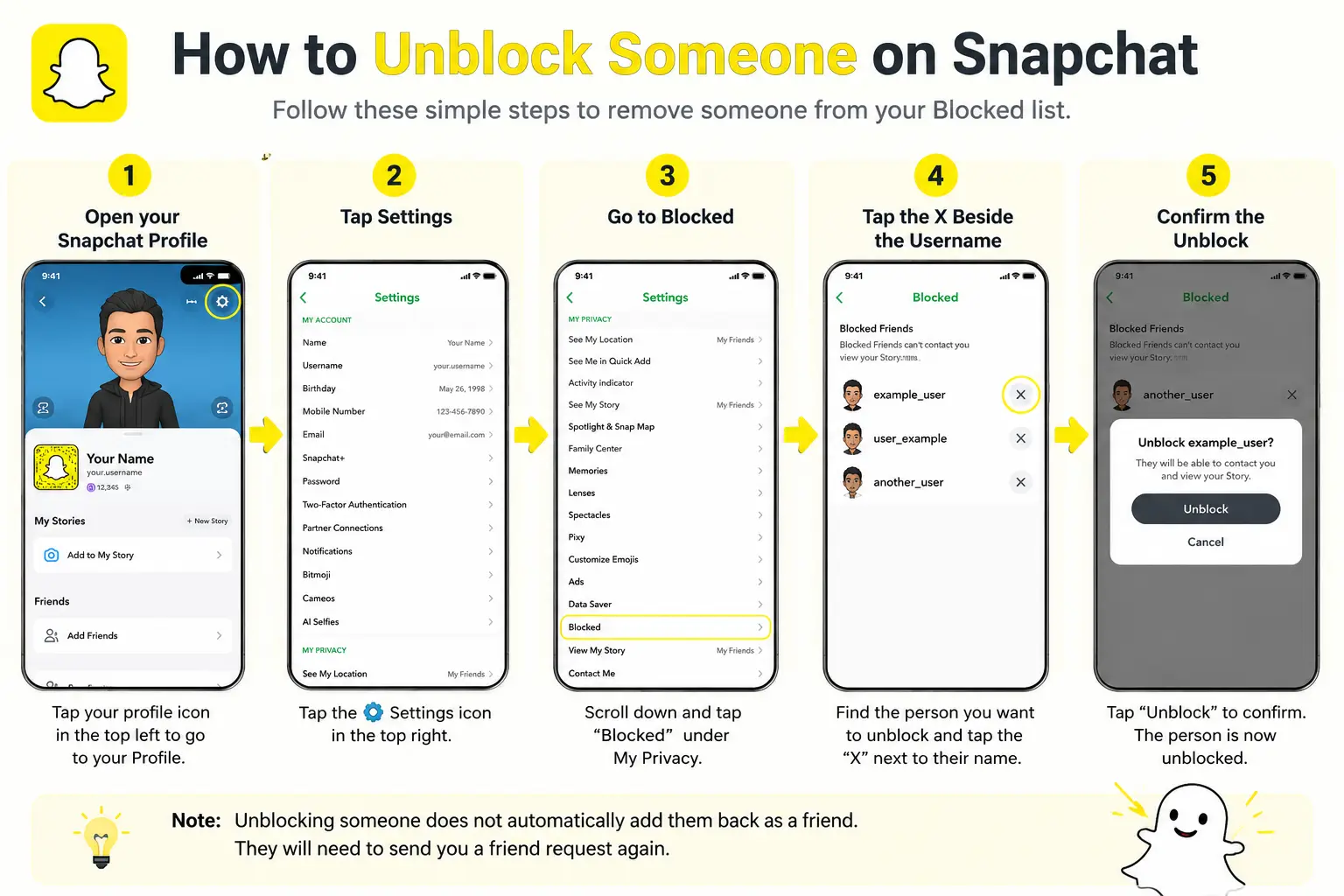
Open Snapchat and tap your profile icon at the top of the screen. Then tap the gear icon to open Settings.
Scroll down and select Blocked. This page shows the Snapchat accounts you have blocked. Find the correct username before making any changes, especially when several accounts have similar display names. Snapchat currently lists the Blocked menu as the official place to manage and remove user blocks.
Confirm the Unblock Action
Tap the X next to the username you want to unblock. Snapchat will then remove that account from your blocked list.
Check the name carefully before tapping the X. Once the account is removed from the list, the block you placed is no longer active. You do not need to search for the user first or open their profile to complete this step.
This action only removes your block. The next section explains what access and contact options may change afterward.
What to Do If the Unblock Option Is Missing
The X should appear beside each account shown in your Blocked list. If the list does not load correctly or the button does not respond, close Snapchat fully and open it again.
You should also check whether your Snapchat app needs an update. If the problem continues, use the troubleshooting steps later in this guide. They cover clearing the app cache, testing your connection, and contacting Snapchat Support.
Do not use a third-party app or website to change the blocked list. Unblocking should be completed through Snapchat’s own settings.
Can You Unblock Someone on Snapchat Web?
Snapchat’s current official unblock instructions describe the process in the mobile app: open your profile, go to Settings, select Blocked, and tap the X beside the account.
Because the official instructions do not provide a separate Snapchat Web process, the mobile app is the most reliable option. Open Snapchat on your phone and manage the block from Settings instead of looking for the control in the browser version.
Once the account is removed from your blocked list, the block is gone. However, that does not automatically restore the previous friendship or every form of access. The next section explains what actually happens after you unblock someone.
What Happens After You Unblock Someone on Snapchat?
Unblocking someone removes the restriction you placed on their account. It does not automatically rebuild the previous friendship or restore every part of your old Snapchat connection.
Are You Automatically Friends Again?
No, you are not automatically friends again after you unblock someone. Removing a block and adding a friend are separate actions on Snapchat.
The person may need to be added again before they return to your Friends list. Depending on the situation, one of you may need to send a new friend request, and the other person may need to accept it.
This distinction is important. Unblocking only allows the accounts to become visible and interact again under your current settings. It does not mean that either person has agreed to restart the friendship.
Can They See Your Stories and Send Snaps?
After you unblock someone, Snapchat says they may again be able to send you Snaps and Chats or view your Stories and Charms. What they can actually access depends on your friendship status, Story audience, and contact settings.
For example, content posted to a public Story may be visible even when the person is not your friend. A Story shared only with friends will remain limited to the audience you selected.
Direct contact also depends on your settings. If Contact Me is set to Friends, only accounts you have added as friends can normally send you Snaps, Chats, or calls. Unblocking makes contact possible again, but it does not automatically give the person full access to your private content.
Does Snapchat Notify Them?
Snapchat does not send a direct notification telling the other person that you unblocked them. They may not notice the change immediately.
However, they could discover it on their own. Your profile may appear in search again, they may see an option to add you, or they may be able to view content that was not visible while the block was active.
The practical judgment is that unblocking is not announced, but it is not completely hidden. Do not assume the other person will never realize that the block was removed.
What Happens to Old Chats?
Blocking someone hides your active one-to-one conversation from your own Friends Feed. Snapchat states that the old chat history can become available again if you later unblock that person.
That does not mean every old Snap or message will return. Snapchat automatically deletes many opened or expired Snaps, and content that has already been removed from its servers normally cannot be recovered.
Saved messages may still appear when the conversation becomes available again. Messages or Snaps that expired before the unblock will not be restored simply because the block was removed.
Knowing what changes is only part of the process. The next section covers the practical steps you should take after unblocking someone, including reviewing access and keeping Snapchat browser sessions separate.
Snapchat Access Problems After Unblocking
After an unblock, any remaining access problem may not be caused by the block itself. Temporary app errors, account issues, or browser session problems can affect how Snapchat displays recent account changes.
App and Cache Problems
Snapchat may continue showing outdated account information after an unblock because the app has not refreshed properly. Cached data can also cause an old search result, profile status, or contact list to remain visible for a short time.
Start by closing and restarting the Snapchat app. You can also clear Snapchat’s cache through the app settings. If the issue continues, check whether a newer version of Snapchat is available in your device’s app store. These steps may help the app load the latest account information, but some changes can still take time to appear.
Login and Account Issues
Personal blocking problems are different from problems accessing your own Snapchat account. If you cannot sign in, receive an account restriction message, or lose access to account features, the other person’s block or unblock action is probably not the cause.
Locked accounts should be handled through Snapchat’s official account recovery or appeal process. Follow the instructions shown in the app or on Snapchat’s support pages. Avoid third-party services that claim they can unlock or restore an account, since they cannot replace Snapchat’s official review process.
Browser Session Problems When Using Snapchat Web
Some creators, agencies, and businesses manage authorized Snapchat Web accounts as part of their daily workflow. In this situation, the main challenge is usually not personal blocking. It is keeping browser sessions organized when several accounts are used on the same device.
Opening multiple authorized Snapchat Web accounts in one browser can cause cookies, browser storage, and login sessions to overlap. Team members may need to sign out of one account before opening another, then repeat the process throughout the day. This can make it harder to track which account is active and increase the chance of using the wrong session.
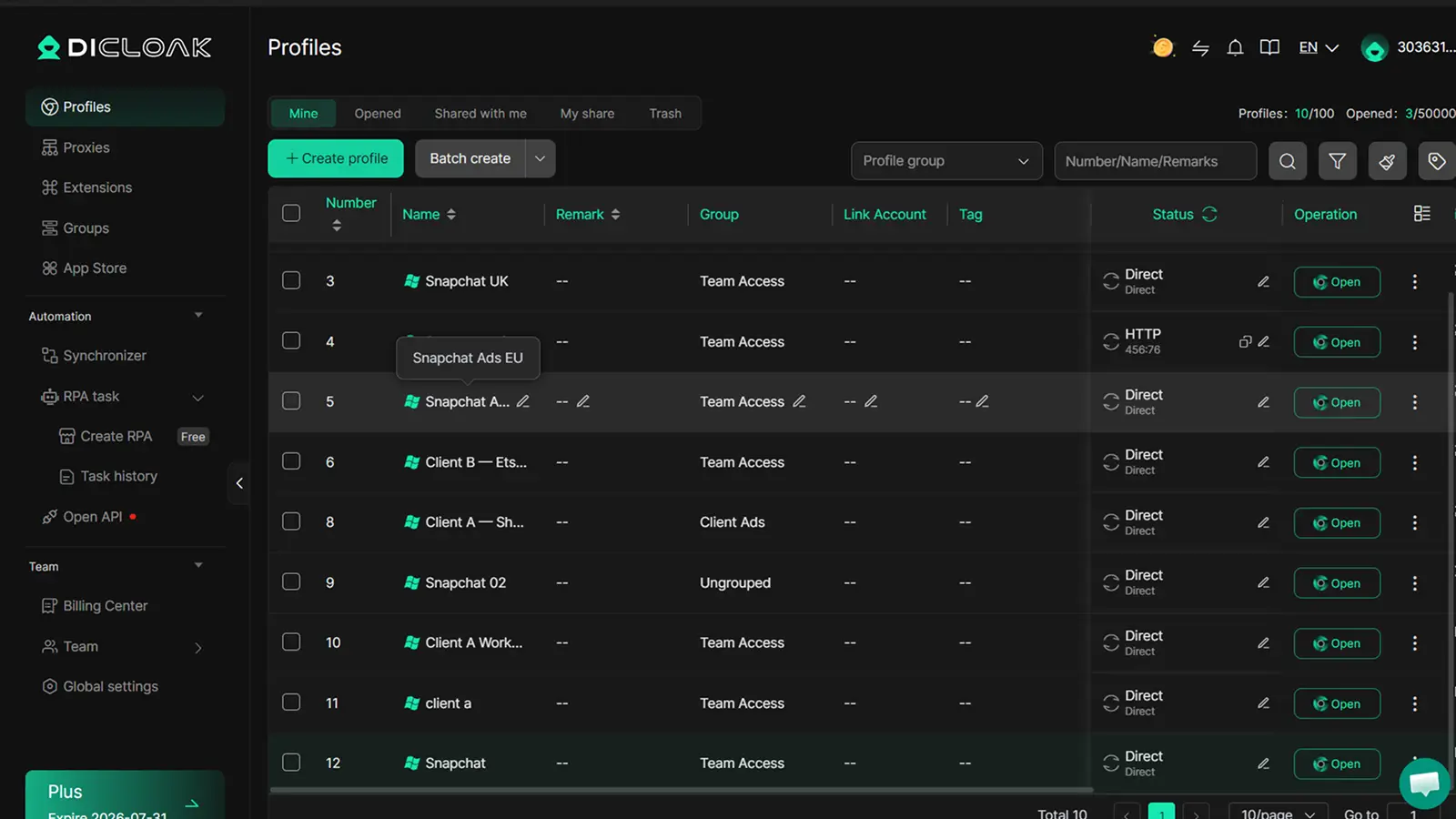
DICloak lets users create a separate browser profile for each authorized Snapchat Web account. Every profile keeps its own cookies, browser storage, and login session. Users can open each profile separately, return to saved sessions, and keep account access organized without repeatedly switching accounts inside one browser window.
Frequently Asked Questions About Getting Unblocked on Snapchat
Can I Get Unblocked on Snapchat by Myself?
No. Only the person who blocked you can remove the block from their Snapchat settings. No app, website, or browser tool can force another user to unblock you.
How Do I Know If I Was Unblocked on Snapchat?
Search for the person’s exact username. If their profile or Add button appears again, the block may have been removed. However, Snapchat does not send an unblock notification.
Will We Be Friends Again After I Am Unblocked on Snapchat?
No. Being Unblocked on Snapchat does not automatically restore the friendship. One of you may need to send a new friend request, and the other person may need to accept it.
Why Can’t I Find Someone After They Unblocked Me?
They may have changed their username, deleted their account, blocked you again, or Snapchat may not have updated the search result yet. A missing profile does not always mean the block is still active.
What Is the Difference Between Being Blocked and Removed as a Friend?
When you are blocked, you normally cannot find or contact the person. When you are only removed as a friend, you may still find their profile and send a new friend request, depending on their privacy settings.
Understanding how blocking and unblocking works on Snapchat is only part of the process. Keeping each authorized Snapchat Web account in a separate browser session also matters when you manage multiple client, creator, or campaign accounts.
You can use DICloak to open each Snapchat account in its own browser profile, keep cookies and login sessions separate, and switch between accounts without mixing browser data.Try DICloak for Free.
 Web Proxy Tools
 Free Tools
 Cookie Plugin
 UA Generator
 MAC Address Generator
 IP Generator
 IP Address List
 2FA Code Generator
 World Clock
 Anonymous Check
 WebRTC Leak Test
 UUID Generator
 Free Web Proxy Site
 Proxy Checker
 FB Ad Checker
 AI Web Scraping
 Free SMM Tools
 Twitter Shadowban Checker
 Instagram Name Checker
 UTM Generator
 Username Generator
 AI Hashtag Generator
 LinkedIn Headline Generator
 Social Media Image Resizer