If Instagram is not letting you follow people, the problem is usually not random. In most cases, it happens because your account triggered a temporary limit, your follow activity looked unusual, or Instagram detected something that seems risky. This can happen after following too many accounts too fast, using unstable login environments, connecting third-party tools, or trying to grow a new account too aggressively. The good news is that most follow restrictions are temporary. Once you understand what caused the block, it becomes much easier to fix the issue and avoid triggering it again. In this guide, we will break down the most common reasons Instagram stops you from following people, how to tell what kind of restriction you are dealing with, and what you can do to restore normal account activity.
The most common reasons Instagram won’t let you follow people
If you keep asking, why did Instagram not let me follow people, the answer is usually simple. Instagram often slows people down when their follow activity starts to look like spam. That does not always mean you did something “wrong” on purpose. Sometimes you just moved too fast, followed too many accounts in one session, or used a tool that made your activity look unnatural. Instagram also has a hard cap: one account cannot follow more than 7,500 people.
You followed too fast in a short period
A very common case is this: you open Instagram, follow many accounts in a few minutes, and then the button stops working. This often happens to new accounts, giveaway accounts, and growth-focused accounts. From Instagram’s side, fast repeated actions can look like bot behavior, even when a real person is tapping the button. That is why someone may feel, “I only followed a few people, so why did Instagram not let me follow people?” The problem is often the speed and pattern, not just the total number.
You hit a temporary action block after too many follows
Sometimes Instagram does not fully ban the account. It places a temporary block on certain actions instead. That can stop follows, likes, comments, or messages for a short time. A real-world example is a user who spends 20 minutes doing follow-for-follow activity, then sees errors like “Try Again Later” or notices that new follows do not stick. In that case, Instagram is usually cooling the account down, not ending it forever. Temporary limits are a normal part of how the platform reduces spam-like behavior.
You are close to or at Instagram’s 7,500 following limit
This is one of the clearest answers to the question why did Instagram not let me follow people. Instagram says it does not allow anyone to follow more than 7,500 accounts. So if your account is close to that number, the follow button may fail no matter how careful you are.
A third-party app or automation tool triggered a restriction
Another major reason is outside access. Instagram warns users not to share login details with apps or services they do not trust, especially tools that promise likes or followers. That matters because many growth tools automate follows, schedule bulk actions, or connect through unofficial methods. Even if the tool says it is “safe,” Instagram may still read the pattern as artificial.
Why Instagram may flag your account even if you did not break an obvious rule
In the last section, we covered the direct causes, like following too fast, hitting a temporary block, reaching the 7,500 limit, or using a third-party tool. But sometimes the situation feels more confusing. You may think, why did Instagram not let me follow people, even though you only followed a few accounts and did not do anything extreme. In many cases, Instagram is reacting to risk signals, not just one single action.
Your account is new and has low trust
A new account often has less history. That means Instagram has less context to judge whether the activity is normal. So if a brand-new account starts following many people in the first day or two, that pattern can look less trustworthy than the same action on an older account with steady activity. This is not always stated as a fixed “new account penalty,” but it is a reasonable inference from Instagram’s anti-spam and authenticity systems. For example, if someone creates a fresh account, uploads no profile photo, follows 40 accounts in a short session, and sends a few DMs right away, the account can look risky even if a real person is behind it. That is one reason people ask, why did Instagram not let me follow people, even when the number of follows did not seem very high.
You logged in from too many devices or unstable IP locations
Another problem is an unstable login environment. Instagram lets you review recent login activity, including device and location, and tells users to act if they do not recognize a login. That shows Instagram is watching for unusual access patterns. If one account is opened on too many devices, or if logins jump between very different locations in a short time, the account may look compromised or risky. A simple example is this: you log in on one phone at home, then on a browser with a different network, then again from another device in a new location on the same
Repetitive behavior can look bot-like to Instagram
Instagram does not only look at how many actions you take. It also looks at how you take them. If your account follows people in the same pattern again and again, that can look automated. For example, if you follow 10 accounts, stop, follow 10 more, then repeat the same action every few minutes, the pattern can seem unnatural. Meta says it acts against spam and inauthentic behavior, which includes activity that looks coordinated or artificially generated.This is why some real users still ask, why did Instagram not let me follow people, even when they did not use an obvious bot. A person can trigger the same warning signs just by repeating actions too neatly for too long.
How to tell what kind of follow problem you actually have
In the last section, we looked at why Instagram may flag an account even when the user did not do anything that felt obviously wrong. The next step is to look at the pattern of the problem. That matters because the symptom often tells you more than the error message does. If you are still asking, why did instagram not let me follow people, do not guess too fast. Start by checking what happens when you tap Follow. A dead button, a warning, a follow that disappears, and a problem with only one account usually point to different causes.
The Follow button does nothing
If the Follow button does nothing, the problem may be technical, not always disciplinary. Instagram says that when something is not working in the app, users should first update the app, restart the device, and check the internet connection. That means an unresponsive follow button can come from an outdated app build, a weak connection, or a temporary app bug. A common case is this: you tap Follow, the button flashes, but nothing changes. Then other parts of the app also feel slow. In that situation, the better first move is basic troubleshooting, not panic. For some users, the answer to why did instagram not let me follow people is simply that the app was not working correctly at that moment.
Instagram says “Try Again Later”
When Instagram shows “Try Again Later,” that is often a stronger sign of a temporary restriction. It usually means the platform wants you to slow down because your recent activity looked spammy, risky, or too repetitive. This can happen after a burst of follows, likes, or other fast actions, especially on a newer account or an account with unstable login patterns. A simple example is someone following many similar accounts in 10 or 15 minutes, then getting blocked from taking more actions. In that case, the warning is part of Instagram’s anti-spam systems, not just a random bug. So if you are wondering why did instagram not let me follow people, this message often points to a short-term action limit rather than a permanent ban.
You can follow, but it gets removed right away
This symptom is different. Here, the button may seem to work, but the follow does not stay. That often means Instagram accepted the action for a moment, then rolled it back because the system did not trust it. In practice, this can happen when the account is already under a soft restriction, when activity looks automated, or when there is a sync problem in the app. A common example is following five accounts, refreshing the page, and seeing that two or three of those follows are gone. That is a useful clue. It suggests the issue is less about one single person you tried to follow and more about Instagram reviewing the action after it happened. If that is your pattern, the question why did instagram not let me follow people is usually linked to account-level trust or action filtering, not just a broken button. Instagram’s Help Center on technical issues and third-party access makes that distinction important.
The issue only happens with one specific account
If you can follow other people but not one specific account, the problem may not be your account at all. Instagram says that when someone blocks you, you will not be able to find their profile, posts, or Story in the normal way. In real use, this can also show up as being unable to follow that one person, especially after a block-unblock situation or when the account’s availability changed. Another possibility is that the account was deactivated, removed, or changed in a way that affects access. A simple example is this: you can follow ten other users today, but one profile will not accept your follow and keeps failing. In that case, it is smarter to inspect that single profile situation first. Not every case of why did instagram not let me follow people is a platform-wide follow limit. Sometimes it is just one account-specific issue.
How to fix Instagram follow restrictions
In the last section, we focused on reading the signs. A dead Follow button, a Try Again Later warning, or follows that do not stay can each point to a different problem. Once you know the pattern, the next step is to fix it in a calm way. If you keep asking, why did instagram not let me follow people, the safest answer is usually not “try harder.” It is “remove risk, slow down, and make the account look normal again.”
Stop follow activity and wait without retrying repeatedly
If Instagram has limited your follows, the first fix is simple: stop following people for a while. Do not keep tapping the button every few minutes to “test” it. That often makes the situation look worse, not better. Meta says it restricts spammy and inauthentic behavior, so repeated retries can keep sending the same bad signal. A common example is someone getting Try Again Later, then trying to follow 10 more accounts to see whether the block is gone. That usually does not help. A better move is to pause, leave the account alone for a while, and come back later with normal activity. For many users, this is the first real step after asking, why did instagram not let me follow people.
Remove suspicious apps, bots, or automation access
If you ever connected a growth app, auto-follow tool, or service that asked for Instagram access, remove it. Instagram warns users not to share login details with people or apps they do not trust, especially apps that promise likes or followers. Instagram also provides a way to review and remove apps and websites connected to your account. This matters because some follow problems start outside the app itself. A real example is a user who connects a follower-growth service, then later finds that normal follows stop working. Even after uninstalling the tool, the account may still need time to recover. So if you are stuck on why did instagram not let me follow people, check connected apps before doing anything else.
Log in from one stable device and network
If your account has been opened from too many devices or changing locations, simplify your setup. Instagram lets users review recent login activity, which shows that device and location history matters for account safety. If your account looks unstable, sign in from one trusted device and one normal network for a while.
Update the app, clear cache, or test another device
Not every follow problem is a punishment. Sometimes the app is just not working well. Instagram’s Help Center says that when the app has issues, users should update the app, restart the device, and check the connection. On Android, clearing the app cache can also help when buttons freeze or actions do not sync well. Another practical test is to log in on a second trusted device and see whether the same problem happens there. For example, if the Follow button does nothing on your phone but works on another device, the issue may be app-level, not account-level.
The key is to fix one layer at a time. Pause follow activity first. Remove anything suspicious. Keep the account on one stable setup. Then test whether the app itself is working correctly. This order is simple, but it is also the most realistic way to recover normal follow activity without making the problem worse.
Why you still cannot follow someone after unblocking them
In the last section, we looked at general fixes for follow restrictions, like slowing down, removing risky tools, using one stable device, and checking whether the app is working. But sometimes the problem is much narrower. You can follow other people again, yet one person still will not go through. That is when many users ask, why did instagram not let me follow people, even after they already fixed the bigger account issue. In this case, the problem may be tied to that one profile, not your whole account. Instagram’s Help Center separates blocking, account availability, and app issues, which is why this kind of follow failure needs its own check.
They may still have you blocked
One simple reason is that the other person may still have you blocked. Instagram says that when someone blocks you, you may no longer be able to find their profile, posts, or Story in the usual way, and blocking changes how access works between the two accounts.
The account may have its own restrictions or glitches
Sometimes the issue is not a block. The account itself may be unavailable, limited, or simply not loading correctly. Instagram notes that accounts can stop showing up in search for reasons tied to account changes, and it also says app problems can affect how actions work.
What to check before assuming it is a follow limit issue
Before you assume this is another account-wide restriction, do a few simple checks in order. First, see whether you can follow other accounts normally. If yes, your main account is probably not the problem. Second, search for that profile from another trusted account or ask a friend whether the profile still appears normally. Third, make sure your app is updated and working well, because Instagram recommends updating the app and restarting the device when something is not working. A common example is this: you cannot follow one person, but you can follow five others with no problem. That pattern usually points away from a global follow block and toward something specific about that one profile. This is often the missing clue when users keep asking, why did instagram not let me follow people.
The main point is simple.First rule out a remaining block, then rule out that account’s own issue, and only after that go back to broader follow-limit causes. That order saves time and usually gives a much clearer answer.
How to avoid follow restrictions in the future
In the last section, we looked at a special case: when you cannot follow one person after unblocking them. But if the problem keeps happening across your account, the real goal is prevention. Many users do not just want to know why did instagram not let me follow people. They also want to know how to stop this from happening again. The good news is that prevention is usually simple. Instagram’s systems look for spammy, scripted, or inauthentic patterns, so the safest approach is to keep your activity steady, natural, and easy to trust.
Spread follows out instead of doing them in bursts
One of the easiest ways to avoid trouble is to stop doing follows in tight batches. A burst of follows in a short time can look like growth automation, even if you are doing it by hand. A better pattern is to spread follow activity across the day or week.
Mix natural actions like scrolling, likes, and story views
Accounts look healthier when their activity is varied. Real users do not only open Instagram to follow people. They scroll, watch Stories, like posts, reply to messages, and leave the app. That is why mixed behavior is safer than a narrow loop of follow-only activity.
Grow follow activity gradually on new or low-trust accounts
New accounts need more patience. If an account has very little history, no stable routine, or recent unusual logins, Instagram has fewer trust signals to work with. In that case, even normal growth tactics can look risky when they happen too fast.
The long-term rule is simple: do less, but do it more naturally. Avoid bursts. Avoid fixed, repetitive routines. Avoid tools that push your account into artificial behavior. That approach is not flashy, but it is the one most likely to keep your follows working over time.
How DICloak helps reduce environment-related follow risks
If your follow problem is not only about speed or follow limits, but also about account environment, then the setup behind the account matters a lot. Instagram does not only look at one tap on the Follow button. It can also react when account behavior starts to look unstable, mixed, or hard to trust. That is why some users still ask, why did instagram not let me follow people, even after slowing down their actions. In this kind of case, a cleaner browser setup can help reduce unnecessary risk.
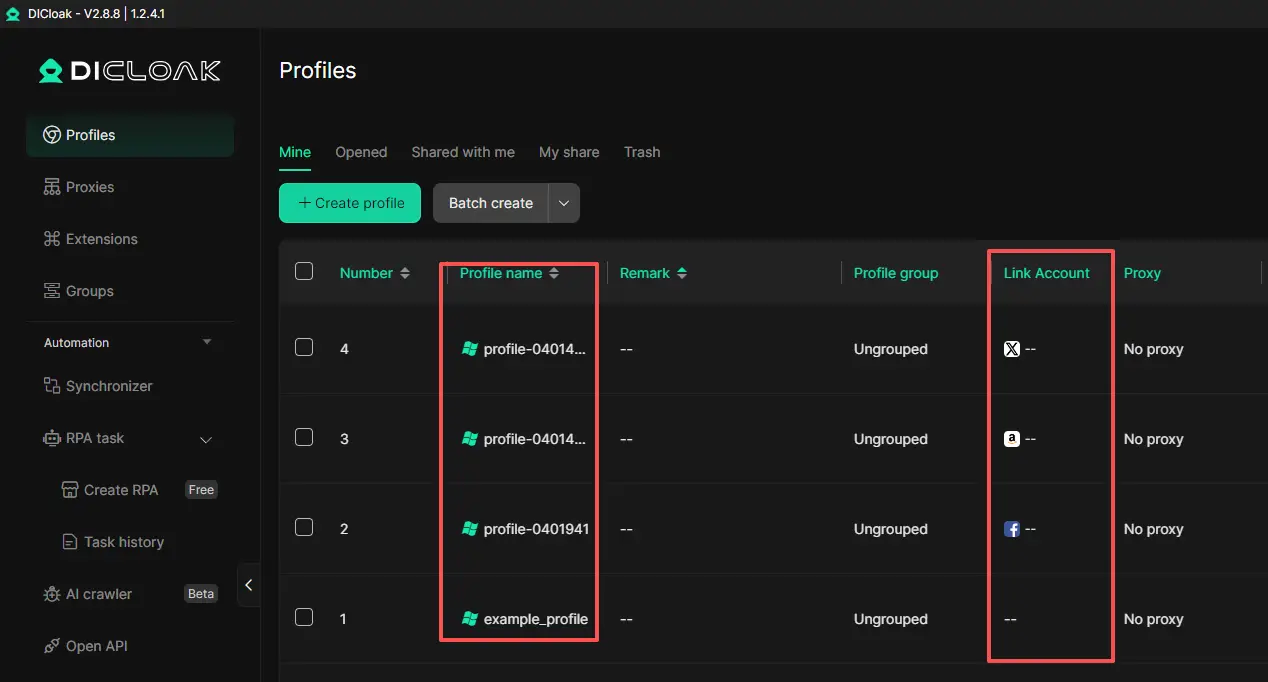
Keep each account in a separate browser profile
One practical way to lower environment-related follow risk is to keep each Instagram account in its own browser profile. With DICloak, each profile can stay separate instead of sharing the same cookies, login sessions, and browser profile. This matters when one person manages a personal account, a work account, and a testing account on the same computer. If all of them run inside one normal browser, signals can get mixed more easily. A separated profile setup is cleaner and easier to control.
Avoid mixed login signals across devices and team members
Another common problem is mixed access. An account may be opened by different people, from different places, or across too many device setups. That can make account activity look less stable over time. DICloak is useful here because it is built for account isolation and team collaboration. It lets teams manage shared account access in a more controlled way, instead of passing logins around casually. This can help reduce messy login patterns, repeated re-verification, and account confusion when more than one person needs access.
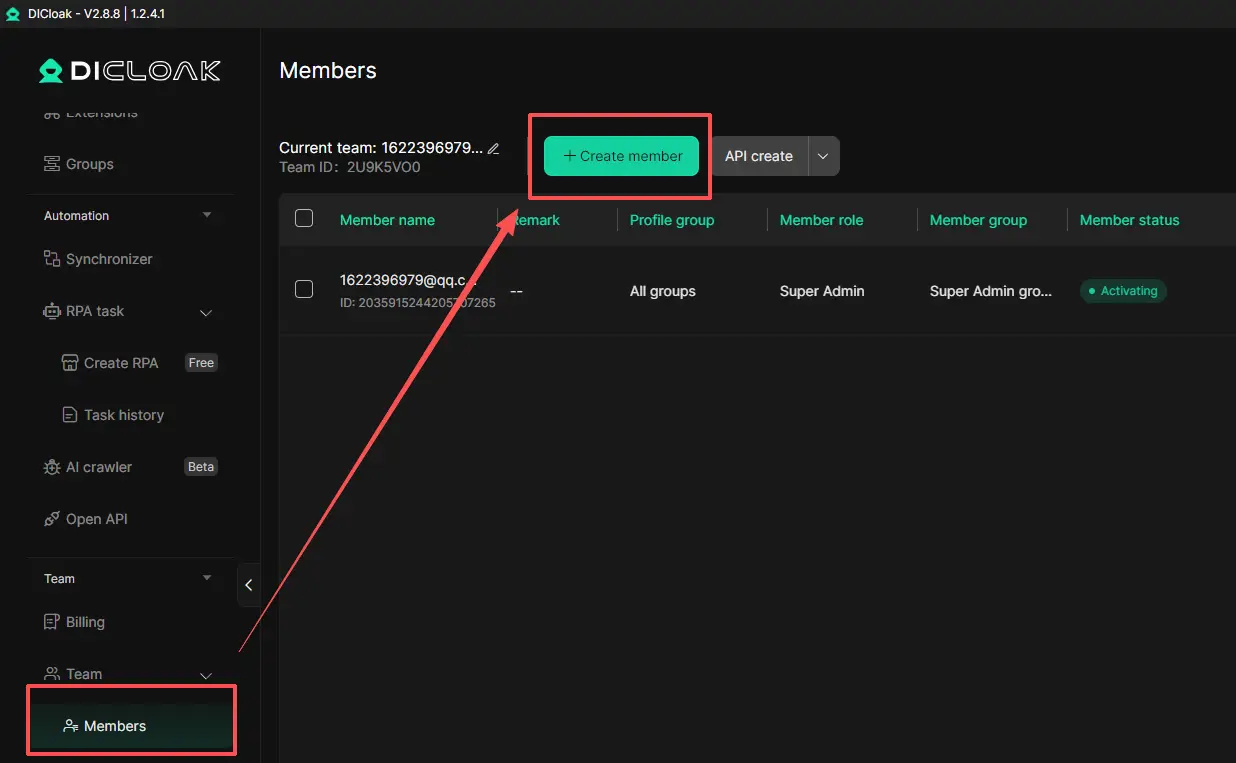
Share account access more safely with team members
DICloak is also helpful when an Instagram account needs to be used by more than one person. In many real cases, follow problems do not come from one user following too fast. They start when team members log in and out again and again, use the same account from different setups, or share passwords in an unstructured way. That kind of access pattern can make the account look less stable over time. DICloak’s account-sharing and team access features make this process more controlled. Instead of passing account credentials around freely, teams can manage shared access in a cleaner way. This helps reduce messy login behavior and lowers the risk of environment-related follow issues.
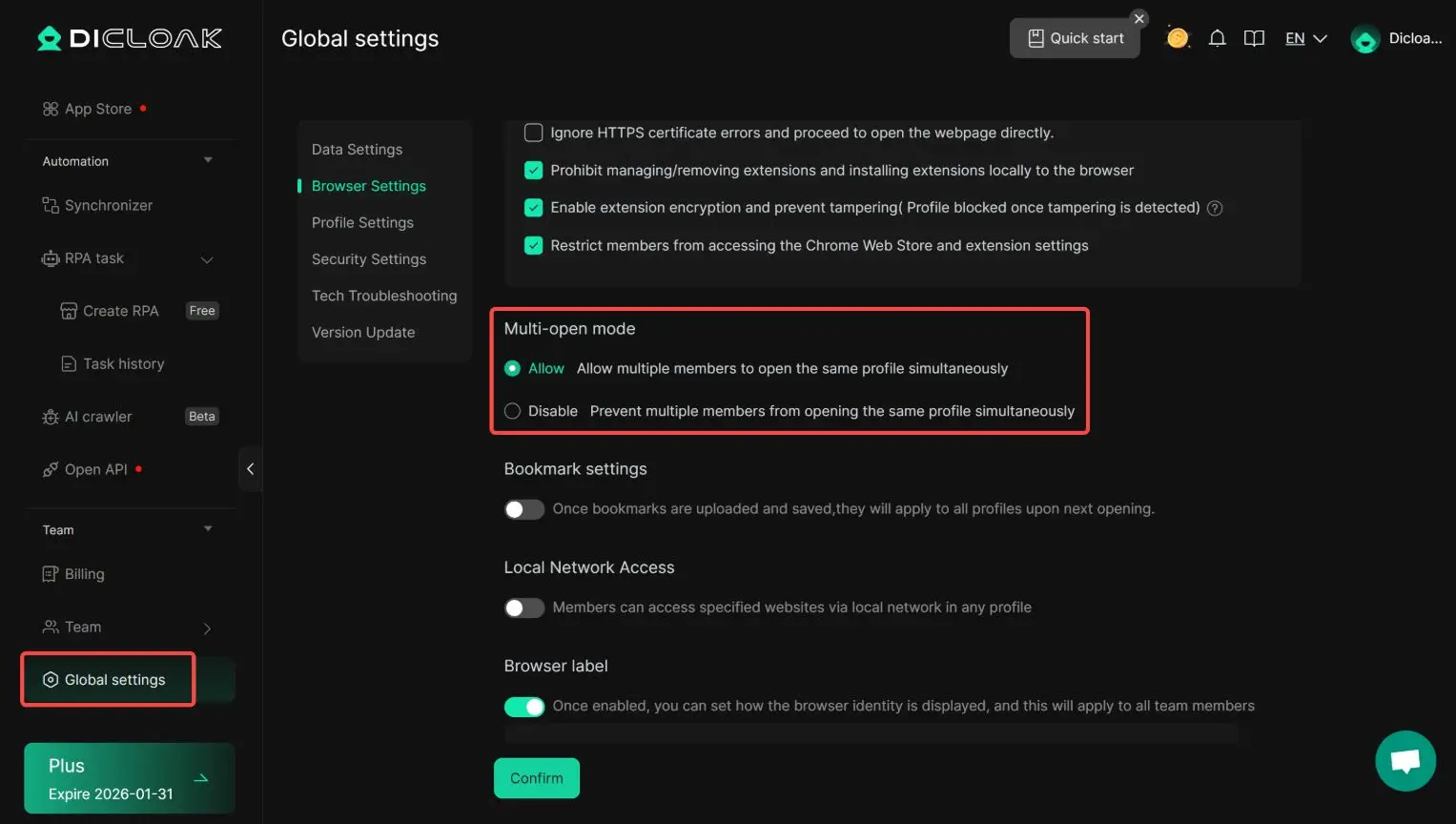
FAQs about why did instagram not let me follow people
Q1: Why did Instagram not let me follow people all of a sudden?
Instagram may stop you from following people if you followed too many accounts too fast, triggered a temporary action block, used a third-party tool, or showed unusual login activity.
Q2: Why did Instagram not let me follow people even though I did nothing wrong?
This can happen when your account is new, has low trust, logs in from unstable devices or IPs, or repeats actions in a way that looks bot-like to Instagram.
Q3: Why did Instagram not let me follow people after I unblocked someone?
If this only happens with one account, the other person may still have you blocked, their account may have its own issue, or the profile may not be working normally.
Q4: How do I fix why did Instagram not let me follow people?
Stop follow activity for a while, avoid repeated retries, remove suspicious apps or bots, use one stable device and network, and update or test the Instagram app.
Q5: How can I avoid why did Instagram not let me follow people in the future?
Spread follows out over time, avoid burst activity, mix in natural actions like scrolling and Story views, and grow follow activity slowly on new or low-trust accounts.
 Web Proxy Tools
 Free Tools
 Cookie Plugin
 UA Generator
 MAC Address Generator
 IP Generator
 IP Address List
 2FA Code Generator
 World Clock
 Anonymous Check
 WebRTC Leak Test
 UUID Generator
 Free Web Proxy Site
 Proxy Checker
 FB Ad Checker
 AI Web Scraping
 Free SMM Tools
 Twitter Shadowban Checker
 Instagram Name Checker
 UTM Generator
 Username Generator
 AI Hashtag Generator
 LinkedIn Headline Generator
 Social Media Image Resizer