You spend 20 minutes crafting a detailed Reddit post, hit submit, and nothing shows up, not even in your profile. No error, no warning, just silence. If you dig deeper, you might spot the telltale signs: your post was deleted by reddit filters, or you notice your reddit post not showing up while others appear instantly. Even seasoned users get tripped up by this, especially as filter rules change without clear notice.
The frustrating part is how unpredictable it feels. One day, a simple link goes live with no issue. The next, a nearly identical post gets caught by the reddit post removed automatically system or flagged as spam for reasons that aren’t obvious. Mods might not respond, and appeals can sit unanswered for days.
What actually triggers these filters is rarely spelled out. Sometimes it’s the text, sometimes the account’s karma or age, sometimes a hidden rule about links or media. Relying on trial and error costs time and rarely gets real answers. Waiting or reposting usually doesn’t help, if you don’t know what set the filter off, you’ll keep hitting the same wall.
To get your posts through, you need to understand what filter actions look like, spot the common triggers, and know how to test if you’re shadowbanned or just filtered. Here’s what actually blocks most Reddit posts in 2026.
Why Do Reddit Filters Delete Some Posts Automatically?
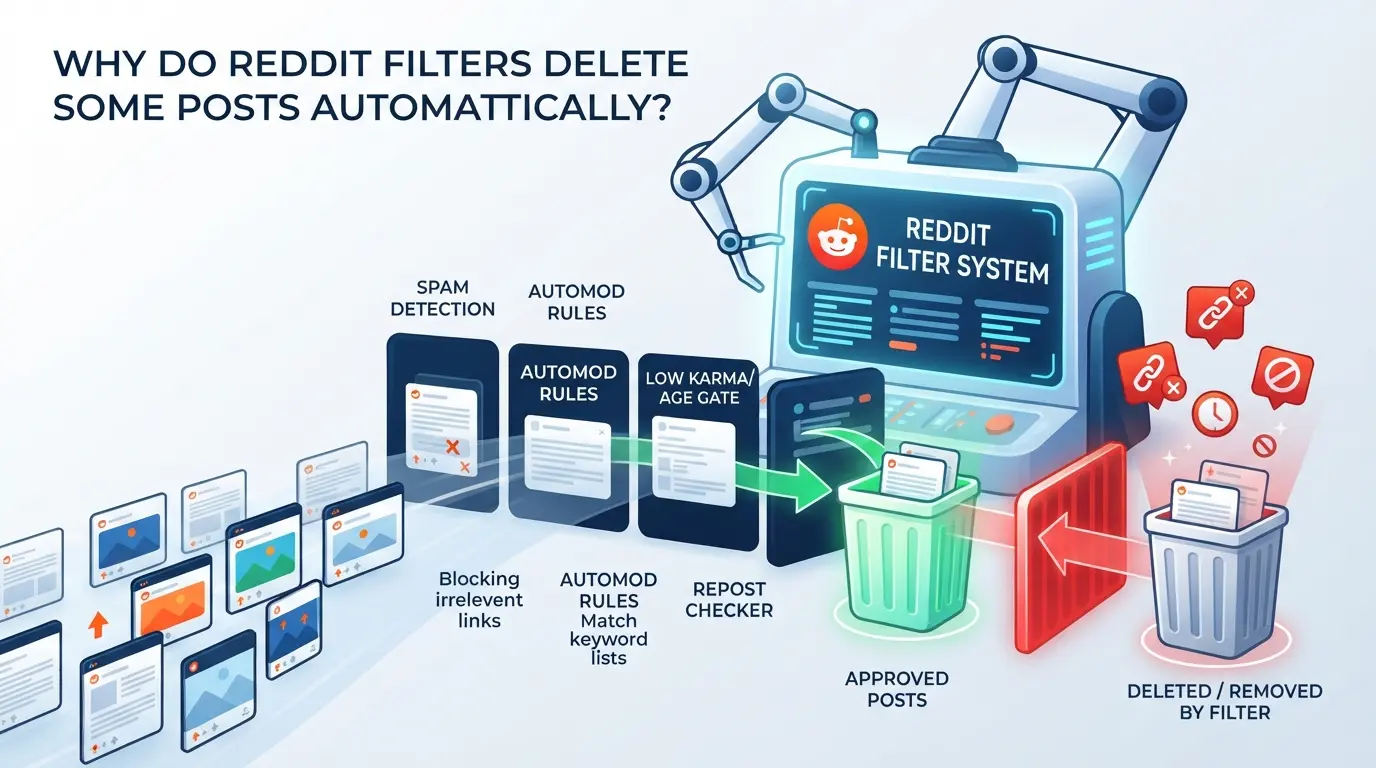
Reddit doesn’t spell out filter logic, but most deletions come from automatic systems looking for spam, rule-breaking, or risky patterns. If your post vanishes right after submission, it’s usually a filter, not a human moderator, behind the removal.
How Reddit’s Spam and AutoModerator Filters Work
Reddit’s spam filter combines automated detection with subreddit-specific AutoModerator scripts. These systems score each post for spam signals, like rapid posting, links, or flagged language, and block anything that looks suspicious. Subreddit mods set their own criteria, so what’s fine in one community can get you filtered in another.
Common Triggers: Links, New Accounts, and Repetitive Content
Most users hit trouble when posting lots of links, using a new account, or repeating content across multiple threads. Reddit’s filter checks for patterns, posting more than two links in a single post often flags it, especially if you’re new or have low karma. If you sign up today and start dropping promotional URLs, your post is likely to get removed automatically. Even changing the wording doesn’t always help. The system tracks how often similar text appears within a short window, so copy-pasting answers or re-sharing the same meme can trigger a filter. Frequent edits can also backfire. Each time you edit, the filter re-checks your post, and if the change looks like spam or contains banned keywords, it’ll pull your post again. A common failure mode: you edit an innocent question, add a link to a resource, and suddenly your reddit post not showing up, no notification, just gone. That’s why seasoned users avoid link-heavy posts on fresh accounts and stagger their activity. The filter’s real target is repetitive, link-driven, or low-trust behavior, if you skip this, you’ll keep running into silent removals.
Subreddit-Specific Rules and Filters
- Custom filters can block posts with certain keywords (like “survey” or “promo”).
- Some subreddits require accounts to be older than 30 days before posting.
- Strict communities auto-delete posts containing links or images outside approved domains.
Mods tweak these rules constantly, so what works in r/technology might fail in r/AskReddit or r/science. If you’re posting in a niche subreddit, check pinned rules and recent posts. Sometimes, even a harmless question gets flagged if it matches a banned phrase or format.
Getting filtered by Reddit isn’t always obvious. The system rarely gives feedback, and mods can be slow to reply. Next, you’ll need to know how to spot whether your post was actually deleted by filters, or if it’s just hidden from public view.
How Can You Tell If Your Reddit Post Was Deleted by Filters?
If your post disappears with no clear message, you’re likely dealing with Reddit’s automated filters, not a moderator or admin removal. The key is spotting the difference early so you don’t waste time waiting for a mod reply or trying to repost blindly.
Signs Your Post Was Filtered (Not Just Hidden)
You’ll notice your post seems to go through: it shows up for you in the thread, but no one else can see it. There’s no mod removal notice and your inbox stays quiet, no PM, no “removed by moderators” banner. If your post is visible only when logged in and totally invisible in a private browser or to friends, it’s almost always the filter, not a human.
Checking with Removeddit, Reveddit, and Similar Tools
- Paste your post URL into Removeddit or Reveddit to see if it was removed, and by what (filter or mod).
- If the tool shows “removed” but lists no mod name or comment, the filter likely did it.
- Remember, as of 2026, many subreddits use custom filters or bots, these tools can miss private or automod removals, so a “not found” isn’t proof your post is live.
Contacting Moderators for Confirmation
A direct, short message to the mod team can clear up if your post was caught by filters or a human. Don’t expect a fast answer, some teams never reply, others send only canned responses.
- Use the “Message the mods” link in the subreddit sidebar to ask if your post was filtered.
- Quote your post title and link, not just “my post is missing.”
- If you get no answer after 48 hours, assume the filter was the cause and rework your next attempt.
Next up: the mistakes that keep triggering Reddit’s filters, even for experienced posters.
What Are the Most Common Mistakes That Trigger Reddit Filters in 2026?
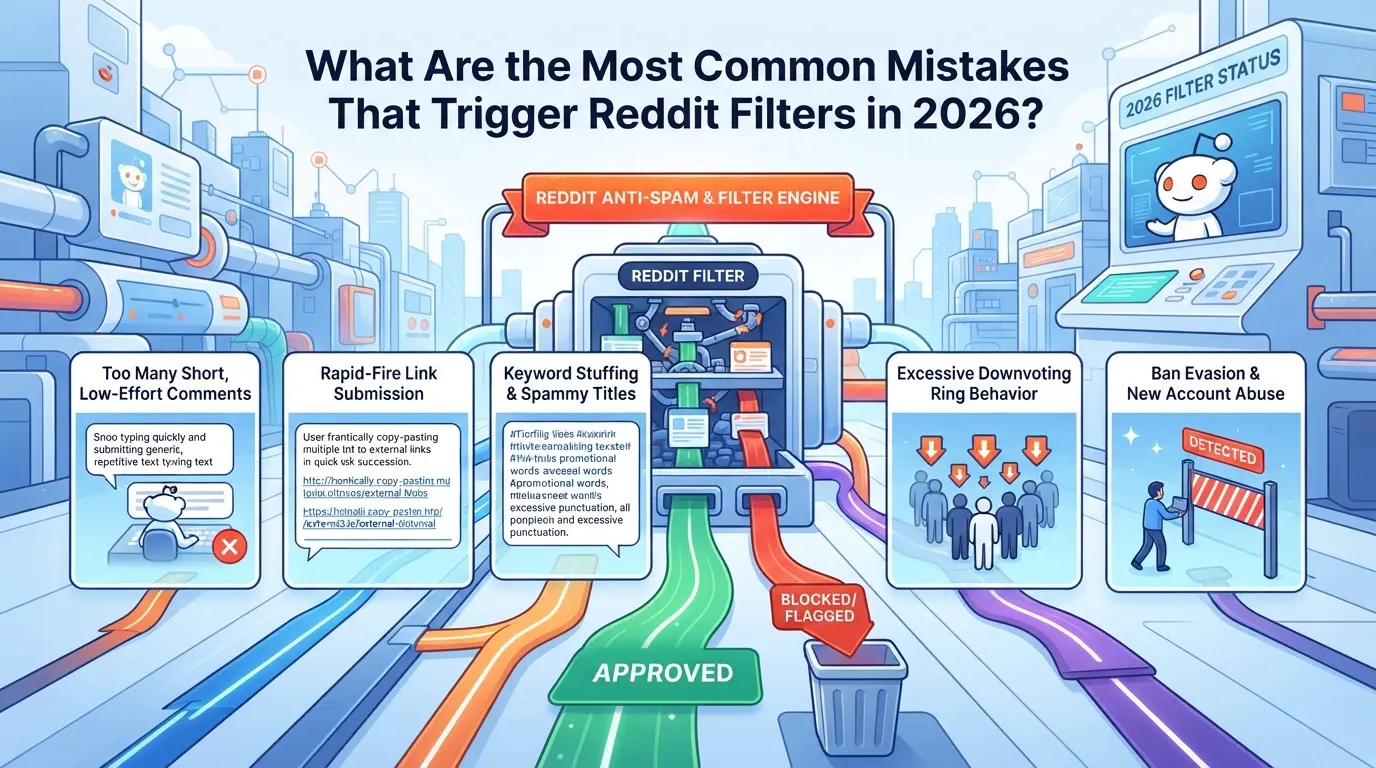
Most posts that get blocked by Reddit’s automatic filters in 2026 fail for the same handful of reasons, too many links, banned phrases, new account patterns, copy-paste content, or skipping subreddit-specific rules. Getting caught up in the “post deleted by reddit filters” cycle usually traces to one of these mistakes, not some hidden bug.
Posting Too Many Links or Promotional Content
Reddit’s filters flag posts with three or more links, especially if those links point to the same domain or have tracking codes. Even if your post is helpful, stuffing it with links (or any obvious promotional language) will make it look like spam. Posts that read like ads or SEO dumps rarely survive, even in subreddits with light moderation.
Using Banned Words or Phrases
- Scan the subreddit’s automod or rules page before posting, many list banned words outright.
- Avoid terms that are trending in spam, like “giveaway,” “promo,” or “free download.”
- Watch for hidden trigger phrases, sometimes even neutral words wind up on blocklists after a wave of abuse.
Low Karma, New Accounts, or Sudden Activity Spikes
A fresh Reddit account with under 10 karma posting links or images will almost always get flagged. Sudden bursts of activity, like posting in multiple subreddits within minutes, raise instant red flags. If your account history is empty or looks like it was created only to promote something, filters will likely block your content.
Reposting or Crossposting Without Adjustments
Reddit’s anti-spam system catches duplicate posts, especially if you copy-paste the same text or title across several subs. Crossposting without making any changes signals automation or spam. Even changing a few words can help, but direct duplicates often disappear before any human sees them.
Ignoring Subreddit-Specific Formatting or Flair Rules
Not following unique post formats or missing the required flair is one of the fastest ways to get filtered. Some subreddits demand specific title structures, tag placements, or body formatting. Skip these, and your post can vanish before mods even notice.
- Double-check for required flair or tags before submitting.
- Review pinned rules or submission guidelines, some subs update them weekly.
- Preview your post to spot missing formatting or errors that trigger instant removal.
Missing even one of these checks is usually enough to get a reddit post removed automatically. In the next section, you’ll see exactly how to fix and resubmit filtered posts without repeating the same mistakes.
How to Fix a Post Deleted by Reddit Filters: Step-by-Step in 2026
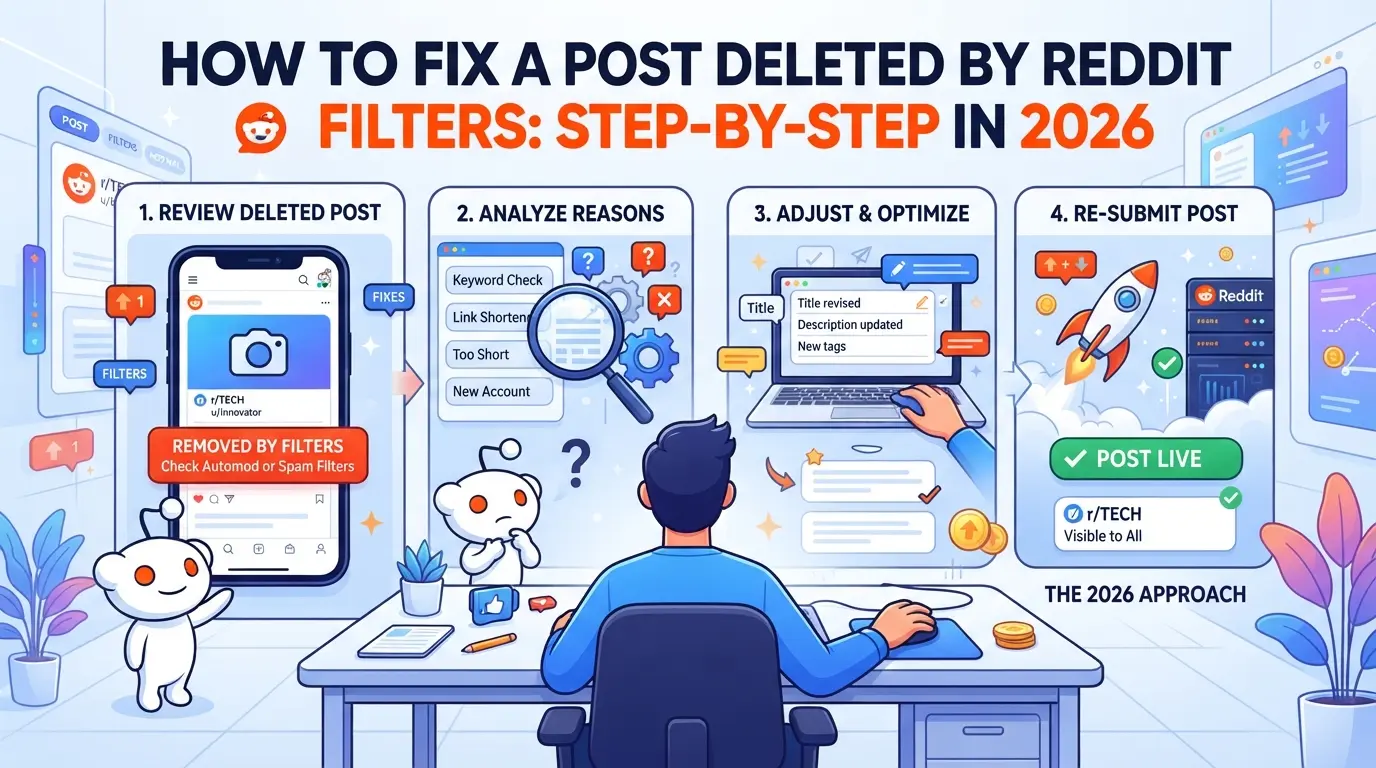
If your Reddit post disappears or gets flagged, you have to move fast and methodically. Here’s how to recover or repost after a filter-based deletion, without getting stuck in the same loop.
Step 1: Confirm the Deletion and Identify the Filter
- View your post while logged out or from a different account. If it’s missing, it’s likely filtered.
- Check for AutoModerator or spam filter comments, these often show up instantly under filtered posts.
- Visit the subreddit’s modlog (if public) to see if your post was flagged or removed.
- If you see no trace, you might be shadowbanned. Try posting a comment elsewhere to check.
Step 2: Review and Adjust Your Post Content
- Scan your text for flagged words, Reddit filters change yearly. Words that were fine last year may now trigger the filter.
- Cut down on links, especially to promotional or new domains. Too many links, or even one link to a “flagged” site, can kill your post.
- Replace images or media with plain text if possible. Some subreddits block media uploads by default.
- If your post still won’t show, rewrite it in your own words. Copy-pasted content from elsewhere gets flagged more often.
Step 3: Check Subreddit Rules and Formatting
- Read the subreddit rules again, many require a specific flair or title format. Missing these can trigger instant deletion.
- Add the correct flair. Wrong or missing flair is one of the most common, avoidable reasons for removal.
- Make sure your post fits the required template. Some subreddits delete posts instantly if they don’t match the format.
- If you spot a formatting issue, fix it and save the draft before reposting.
Step 4: Contact Moderators if Needed
- Use modmail, not public comments, to reach out. Mods respond faster to direct, respectful messages.
- Explain your situation briefly, include your post title, the time you posted, and what you’ve already tried.
- Ask if your post violated a rule or triggered a filter. Don’t demand reinstatement; a polite question gets better results.
- If you get no reply after 48 hours, move to the next step.
Step 5: Repost Carefully or Appeal
- Wait at least 24 hours before reposting, reposting too soon can get your account flagged for spam.
- Change your title and reword your content. Filters often catch near-duplicates.
- If you feel your removal was a mistake, use the subreddit’s appeal process if available.
- If posts keep getting removed, consider posting in a different subreddit with similar topics.
Careful edits and patience usually solve most filter removals, but frequent issues call for deeper process changes, especially for social media teams.
How Social Media Teams and Marketers Can Reduce Reddit Filter Deletions
Teams running multiple Reddit accounts often see the same post hit the filter wall over and over. To cut these losses, focus on three workflow changes that address what actually triggers filter actions.
Spread Out Posting Activity Across Accounts
Blasting similar posts from one device or IP is the fastest way to get flagged. Instead, rotate accounts and schedule posts several hours apart. This mimics human activity and reduces the chance of a reddit post removed automatically, not just for one account, but for the whole batch.
Maintain Consistent Account Histories and Behaviors
- Build up karma with legit comments before posting links.
- Vary post formats; don’t use the same template everywhere.
- Avoid sudden surges in activity, especially after a long gap.
Use Separate Browsers or Profiles for Each Account
Reddit tracks more than just usernames. If accounts share browser fingerprints or cookies, filter triggers can link one flagged post to others. Using true isolation for each account is the only fix that scales for teams.
- Run each account in a unique browser profile.
- Clear cookies before switching accounts.
- Never log in to two accounts from the same session.
Using DICloak to Separate Reddit Account Workflows and Set Up Proxies
As teams start managing multiple Reddit accounts for social media campaigns, the risk of posts getting flagged or deleted by platform filters goes up. Operating several accounts from the same device or network can leave patterns that Reddit’s system catches, even when the content itself follows the rules. For those who need to keep each Reddit account fully separated, DICloak offers practical tools at the browser profile and connection layer.
Creating Separate Browser Profiles with Custom Fingerprints
Operators can set up a new browser profile for each Reddit account in DICloak, making sure login sessions and browser storage don’t overlap. By configuring fingerprint signals, like OS version, User Agent, time zone, and language, teams keep each profile’s environment distinct. This step matters because sharing browser data across sessions is one of the biggest reasons accounts get linked and posts get flagged. The scope is limited to browser-profile access; it does not change Reddit’s filter logic or manage posts.

Assigning User-Owned Proxies to Each Profile
To avoid network-level patterns, operators can assign a user-owned proxy to each browser profile. DICloak lets users enter proxy details and test the connection before starting a session. This means each Reddit account can run through its own IP, country, and time zone, reducing overlap that often triggers reddit post removed automatically errors. Operators are responsible for proxy selection and quality; DICloak only stores and applies the settings for each profile.

If filter deletions keep happening even with separated workflows, it’s time to look beyond browser and proxy setup and review deeper content or behavioral risks.
What to Do If Your Reddit Posts Keep Getting Deleted Despite Following the Rules
If your posts still vanish after you’ve fixed obvious issues, the problem is likely tied to your account or device history. This isn’t about breaking rules, it’s about hidden trust signals Reddit tracks, some of which can be nearly impossible to fix on an old account.
Audit Your Account and Device History
Check for old bans, even a warning from years ago can flag your account for auto-removal. Look at your device and browser fingerprint: if you’ve logged in from lots of places or switched browsers often, Reddit may treat you as high-risk. The hardest cases are accounts with old, silent shadowbans or repeated filter hits, these rarely recover even after months of clean behavior.
Try Posting from a Different Network or Device
- Switch to a mobile network (not public Wi-Fi)
- Use a device never logged into Reddit before
- Make sure your IP isn’t linked to banned or spammy accounts
Consider Building a New, Organic Account
If posts still don’t show up after all checks, the account may be unrecoverable.
- Register with a clean device and network
- Avoid posting links or media for the first 2 weeks
- Watch for instant removals, if they happen on your first post, stop and rebuild again
Frequently Asked Questions About post deleted by reddit filters
Why does Reddit delete my post immediately after I submit it?
Reddit can auto-delete posts right after submission if spam filters are triggered. Common causes include using new accounts with little karma, including lots of links or banned words, or posting in subreddits with strict rules. If your post is instantly removed, it’s likely flagged by an automatic filter, not by a human moderator.
Can I recover a Reddit post deleted by filters?
Usually, when a post is deleted by reddit filters, it's gone for good. However, some subreddits allow you to message the moderators to appeal. If a human mod reviews and approves, they might restore it. If the spam filter removed your post and no mod sees it, recovery isn’t possible.
How do I avoid Reddit spam filters as a new user in 2026?
To avoid having your reddit post removed automatically, build some karma before posting. Avoid posting lots of links or using words often flagged as spam. Always check and follow each subreddit's rules. Commenting and joining discussions can also help your account look more trustworthy to Reddit’s filters.
Do proxies help prevent Reddit post deletions?
Using proxies to create or manage accounts might help keep them separate, but proxies don’t prevent your reddit post from being deleted by spam filters. Reddit’s filters look for behavior patterns, not just IP addresses. Quality content and following community rules are much more important than your connection type.
Are there tools to check if my Reddit post was filtered or shadowbanned?
Sites like Removeddit or Reveddit used to help check if your reddit post was not showing up due to filters or shadowbans. As of 2026, these tools have limited access because of Reddit’s API changes. Checking the post in an incognito window or asking a friend to look can still help confirm visibility.
If your post vanished unexpectedly, reviewing Reddit’s content policies and filter triggers can help identify the cause and prevent future issues. Consider alternative tools for sharing your ideas more securely and reliably, especially if you’re concerned about automated moderation. Try DICloak For Free
 Web Proxy Tools
 Free Tools
 Cookie Plugin
 UA Generator
 MAC Address Generator
 IP Generator
 IP Address List
 2FA Code Generator
 World Clock
 Anonymous Check
 WebRTC Leak Test
 UUID Generator
 Free Web Proxy Site
 Proxy Checker
 FB Ad Checker
 AI Web Scraping
 Free SMM Tools
 Twitter Shadowban Checker
 Instagram Name Checker
 UTM Generator
 Username Generator
 AI Hashtag Generator
 LinkedIn Headline Generator
 Social Media Image Resizer











-03-v13.png?x-oss-process=image/interlace,1/format,webp/quality,q_75)