Losing access to ChatGPT can feel sudden and confusing. One moment everything works, and the next you are staring at a warning you did not expect. If you are trying to figure out why your ChatGPT deactivated message appeared, you are not alone, and the answer is not always as obvious as it seems.
Sometimes the problem is tied to account rules. Sometimes it is a security review, a billing issue, or a verification step that was missed. In other cases, what looks like deactivation is really a login or browser problem. This guide breaks down the most common reasons, how to tell what actually happened, what recovery options may still exist, and what to do next so the same problem does not happen again.
Common Reasons for ChatGPT Account Deactivation
If you see a ChatGPT deactivated message, the cause is usually not random. OpenAI's current guidance points to three common reasons: policy violations, terms violations, and security concerns such as suspected unauthorized access. In some cases, users get a warning first. In more serious or repeated cases, access may be suspended or removed.
Violation of OpenAI Usage Policies
One common reason for a ChatGPT account deactivated notice is activity that OpenAI sees as unsafe, deceptive, abusive, or outside allowed use. OpenAI says accounts can be deactivated for breaking its Usage Policies, and repeated issues after a warning can lead to stronger enforcement.
This does not always come from one obvious mistake. Sometimes the issue comes from a pattern. For example, a user may keep trying to create misleading outreach messages or abusive bulk content. A developer may also connect an app to OpenAI tools but fail to block unsafe user input. If that keeps happening, the account may be reviewed and later restricted.
That is why some users feel confused when they suddenly see ChatGPT account disabled. They may remember one harmless chat, while OpenAI may be looking at account behavior over time. If a user thinks the decision was wrong, OpenAI says an appeal can be submitted through Support.
Breach of Terms of Service
Some accounts are restricted because of how the service is used, not because of the content alone. OpenAI says deactivation can happen when users breach the Terms of Service, such as trying to bypass access restrictions, sharing access in inappropriate ways, or using the service in ways that create risk or harm.
For instance, a team may pass one login around across different people and locations. It may feel convenient, but if the pattern starts to look risky or outside normal use, it can become a terms issue. OpenAI's Terms of Use also say the company may terminate an unpaid account that has been inactive for more than one year after advance notice. So an OpenAI account deactivated notice does not always mean harmful content was involved.
Security Concerns or Unauthorized Access
Not every ChatGPT account deactivated case means the owner did something wrong on purpose. OpenAI says it may temporarily suspend an account if it detects suspicious activity that suggests the account was compromised. Its Help Center recommends changing the password and rotating API keys if unauthorized access is suspected.
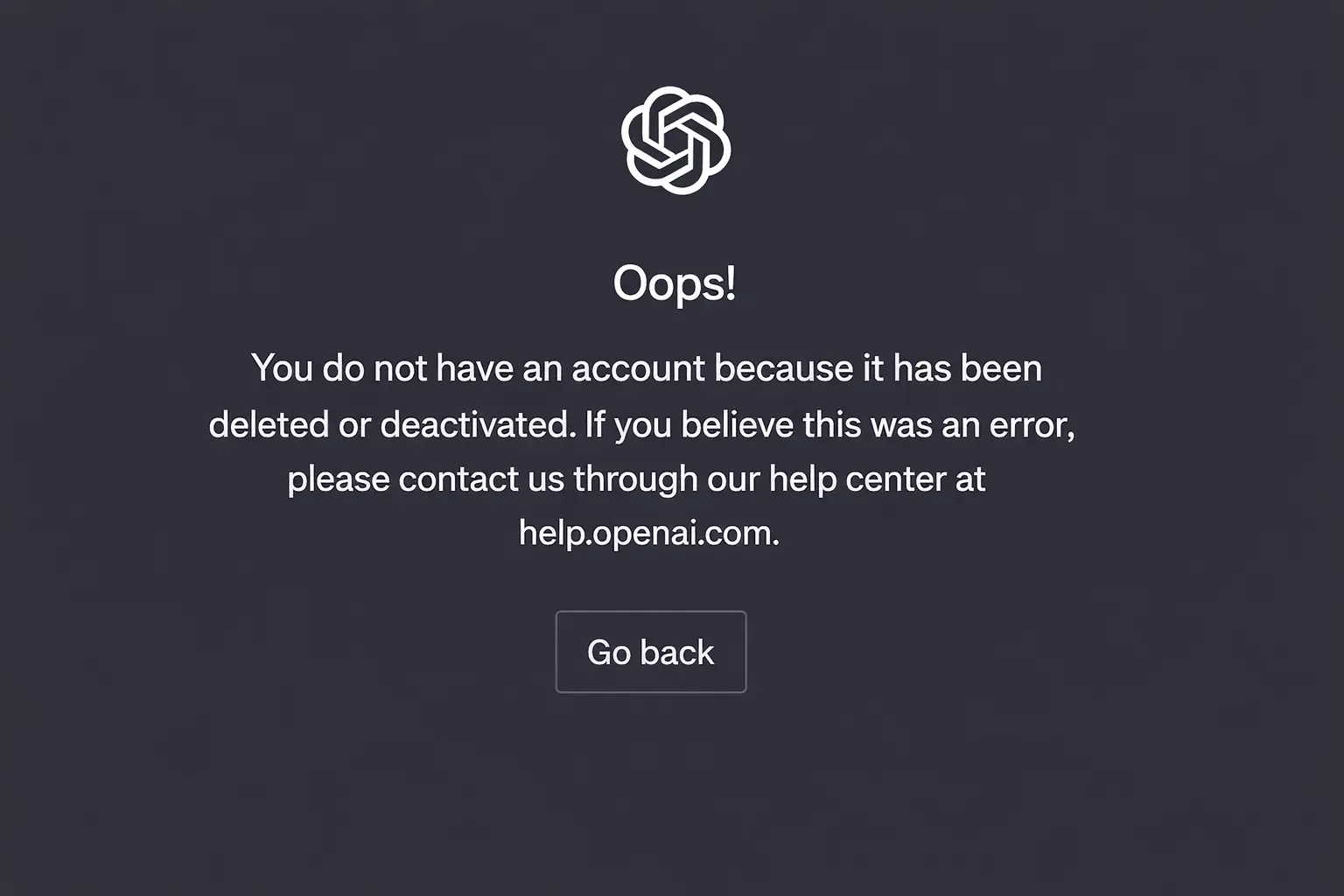
For example, a user may log in and suddenly see that the account has been deleted or deactivated. The real issue may be an unusual login, a reused password, or activity that looked like account takeover. This is often when people search how to reactivate ChatGPT account. OpenAI says users should check their email for a notice. If the account was deleted by the user, it cannot be restored. If it was deactivated by OpenAI, the user may still be able to appeal.
How to Identify If Your ChatGPT Account Is Deactivated
After looking at the common causes, the next step is figuring out whether you are dealing with a real ChatGPT deactivated case or just a login problem. The two can look similar at first. A wrong sign-in method, browser issue, or temporary access problem can feel a lot like deactivation. That is why it helps to check the signs carefully before assuming the account is gone.
Signs of Account Deactivation
A real ChatGPT account deactivated case usually does not go away after basic login fixes. You may try again on another browser or device and still get blocked. You may also receive an email explaining that the account was deactivated or that some action is needed. Checking the inbox, including spam or junk, is important because that message often gives the clearest clue about what happened.
This is where people often get confused. For example, if you still cannot sign in after clearing cookies, using the correct login method, and trying another browser or device, the problem may be more than a simple login error. But if access returns after one of those fixes, the issue was likely technical rather than a true ChatGPT account disabled case. Browser data, sign-in method mismatches, device issues, and network-related problems can all block access without meaning the account itself was shut down.
Error Messages You Might Encounter
The clearest message is the one many worried users search for: account has been deleted or deactivated. That message means the account tied to that email was either deleted by the user or deactivated by the platform team. It is different from a normal password problem, so it should be treated as an account-status issue, not just a browser glitch.
You may also run into a suspicious login warning instead of a direct shutdown message. A notice about unusual or suspicious login behavior points more to an access review than to a confirmed permanent ban. That kind of warning can lead to temporary restrictions, but it is not the same thing as a final OpenAI account deactivated outcome.
Another detail matters here. If the account was deleted by the user, it cannot be restored. If it was deactivated for another reason, there may still be an appeal path. That is why people searching how to reactivate ChatGPT account should pay close attention to the exact wording of the message instead of guessing.
Checking Account Status via OpenAI Dashboard
There is no simple public label that clearly shows whether a ChatGPT account is active or deactivated. In practice, the best check is whether you can still sign in and reach your normal account areas. If ChatGPT or the account pages open normally, the problem may be technical rather than a true ChatGPT deactivated case.
For example, if you use the API or platform side, signing into the OpenAI dashboard can help you see whether you still have access to billing, keys, or settings. If those areas are unavailable and you also received a deactivation notice, that is a stronger sign the account itself has been restricted. If you cannot sign in at all and only see the "deleted or deactivated" message, that already tells you a lot about the account status.
Before you panic, look at three things together: the exact error message, whether the issue stays the same across different login attempts, and whether any account email arrived. Those clues usually make it much easier to tell whether you are dealing with a real deactivation or a login problem that can be fixed much faster.
Steps to Reactivate a Deactivated ChatGPT Account
If you have confirmed this is a real ChatGPT deactivated case, the next step is to match the fix to the cause. Some accounts can be appealed. Some can be restored after a billing or verification issue is fixed. But if the account has been deleted or deactivated because the user deleted it, that account cannot be brought back.
Contacting OpenAI Support for Assistance
Support is the main path when a ChatGPT account deactivated notice looks wrong or does not explain enough. Keep the appeal short. Include the account email, the exact error message, and any email notice you received. If the problem started after suspicious activity, mention that too. A clear factual appeal gives support more to work with than a long guess-filled message. OpenAI's guidance points users to support when an account is deactivated or suspended.
Verifying Payment or Subscription Status
Billing can also be the real issue, especially for Business accounts. If a workspace is deactivated because of an unpaid invoice, access can return after payment. In that case, the problem is billing, not misconduct. So if your OpenAI account deactivated notice is tied to a Business setup, checking the subscription and invoice status should come early.
Resolving Identity Verification Issues
Verification problems can also block access. In some cases, users must complete age verification to keep using the service, and missing that step can lead to deactivation. The recovery path is usually to contact support and complete the required check. This is one reason people searching how to reactivate ChatGPT account should read the notice carefully before assuming the account is gone forever.
So if you see ChatGPT account disabled, do not treat every case the same. Start with the notice itself. If it points to support, appeal. If it points to billing, fix payment. If it points to verification, finish that step first. That is the fastest way to handle a real ChatGPT deactivated problem.
Preventing Future Account Deactivations
Once a ChatGPT deactivated case is resolved, the next goal is making sure it does not happen again. Most repeat problems come from the same few patterns: unsafe use, weak account security, or ignoring earlier warnings. Keeping the account in good standing is usually less about one big fix and more about small habits that stay consistent over time.
Following OpenAI's Usage Guidelines
The safest approach is to treat the rules as part of daily use, not something you only read after a problem starts. The current policy pages make clear that breaking or trying to get around safeguards can lead to loss of access. That matters for both direct ChatGPT use and apps built on OpenAI tools.
For example, a team might think a few risky prompts or loose moderation settings are not a big deal. But if those issues keep showing up, the pattern can grow into a real ChatGPT account deactivated problem. A warning is often the moment to slow down, review what triggered it, and fix the workflow before access gets tighter.
Securing Your Account Against Unauthorized Access
Security is just as important as policy compliance. Good account hygiene means using a strong password, protecting API keys, and rotating keys when needed. Leaked keys can be disabled quickly, and compromised access can turn into billing spikes, suspicious activity alerts, or even an OpenAI account deactivated review.
For instance, if a developer leaves an API key exposed in public code, the damage may start before they even notice. The smarter move is to lock down access early, remove old keys, and react fast when something looks off. That is often more useful than waiting until a ChatGPT account disabled notice appears.
Avoiding Repeated Violations
Repeated violations are where many recoverable cases become much harder to fix. Warnings are meant to give users a chance to correct the issue. If the same behavior continues, restrictions can become permanent.
So if you already had one ChatGPT deactivated scare, do not go back to the same habits. Review the notice, change the workflow that caused it, and keep records of what you fixed. That matters for anyone later searching how to reactivate ChatGPT account, because the strongest appeals usually show that the problem was understood and corrected. It also lowers the chance of seeing another account has been deleted or deactivated message later on.
Troubleshooting Common Issues Related to Account Deactivation
Even after reading the warning signs, some users still cannot tell whether they have a real ChatGPT deactivated case or a temporary access problem. That is normal. Login failures, service outages, and payment issues can all look serious at first. The safest approach is to check the simple causes before assuming your ChatGPT account deactivated notice is final.
Network or Browser Problems
Some access problems start in the browser, not in the account itself. Stored cookies, broken session data, the wrong sign-in method, or repeated failed login attempts can all block access. In those cases, the account may still be active even though the user feels locked out. Trying another browser or device can help separate a real ChatGPT account disabled case from a local issue.
For example, a user may fail to log in on one browser, then sign in normally on another device a few minutes later. That points to a browser or session problem, not a full ban. If the same error appears everywhere, the issue is more likely tied to the account itself. That is often the moment people start searching how to reactivate ChatGPT account, even though the real fix may still be technical.
Server-Side Errors
Sometimes the problem is on OpenAI's side. The status page and incident history show that ChatGPT has had login issues, elevated authentication failures, and broader service outages. When that happens, users may see errors, fail to sign in, or think the account was removed when the platform is really having trouble.
For instance, if many users are suddenly reporting sign-in failures at the same time, it is smart to check the status page before assuming an OpenAI account deactivated result. A temporary outage can feel personal when it only happens once, but the status history shows that account creation and login instability do happen from time to time.
Payment Processing Failures
Payment problems are another common source of confusion. A failed renewal or declined card does not always mean misconduct, but it can interrupt access and make the account feel broken. Current billing guidance points to common causes such as bank declines, incorrect card details, insufficient funds, or card-level security blocks.
For example, a user may lose Plus or Pro access right after a renewal fails and assume the account has been deleted or deactivated. In reality, the account may still exist, while the paid plan simply did not renew. On the Business side, unpaid invoices can also lead to workspace deactivation until payment is completed. That is why billing should be checked early before treating every access loss as a true ChatGPT deactivated event.
So if access suddenly breaks, start with the basics. Check whether the browser session is the problem, whether OpenAI is having a service issue, and whether billing went through. That simple order can save a lot of stress and can stop a temporary problem from being mistaken for a permanent ChatGPT account deactivated case.
Appeal Process for ChatGPT Account Deactivation
If basic troubleshooting does not fix the problem, the next step is the appeal process. This is the part many users care about most after a real ChatGPT deactivated notice. The good news is that there is a formal path for review in some cases. The limit is simple: if the account has been deleted or deactivated because the user deleted it, that old account cannot be restored.
How to Submit an Appeal to OpenAI
The best path is to use the link in the deactivation email. That helps route the case correctly and makes review easier. If you cannot access that email, OpenAI also provides an appeal intake form. If you never received a notice but lost access, the Help Center chat is another support path.
For example, if your ChatGPT account deactivated notice appeared after a suspicious login event, the appeal should explain that clearly. Keep it short. State what happened, when access was lost, and what you already did, such as changing the password or checking for unusual activity. A clean timeline helps more than a long emotional message.
Documentation Needed for Appeals
The review goes faster when the details are complete. The main items to include are the user ID or org ID tied to the account, the exact error message, and any helpful context about recent usage. If the issue may involve account compromise, include the rough date range when you think it happened. If there were unexpected charges, include the dates and amounts of those charges.
This matters because not every OpenAI account deactivated case has the same cause. One user may be appealing a security lock. Another may be dealing with a missed age check. In age verification cases, support can help restart the process, so the best documentation is often the notice itself and any verification steps already completed.
Expected Timeline for Appeal Resolution
This is the part where many articles guess, but the official guidance does not give a fixed review timeline. The safest expectation is that support will review the request and respond as promptly as possible. That means users searching how to reactivate ChatGPT account should not expect the same wait time in every case.
A simple way to think about it is this. A clear case with the right details may move faster than an appeal with missing facts. A security review, billing issue, or identity check may also take different amounts of time. So if you see ChatGPT account disabled, send one complete appeal first, keep the record of your notice, and wait for the reply instead of sending several unclear requests. That usually gives you the best chance in a real ChatGPT deactivated case.
Sometimes the appeal does not work, or the case is still under review and you need a backup plan. That is when it helps to think beyond the original ChatGPT deactivated account. The goal is not to dodge the rules. The goal is to keep working while you wait, or to move on safely if the old account cannot come back.
Exploring Other AI Platforms
If your ChatGPT account deactivated issue is not resolved, other mainstream AI tools can fill part of the gap. Claude has a free tier, Microsoft Copilot is available free on the web, and Perplexity offers a free answer engine with live web results. These are not identical to ChatGPT, but they can cover writing, research, summaries, and basic brainstorming while your case is pending.
For example, someone who mainly used ChatGPT for drafting emails or outlining blog posts can usually keep moving with Claude or Copilot. A user who relied on ChatGPT for fast web-backed answers may find Perplexity more useful during that gap. The best choice depends on the job, not the brand name.
Creating a New ChatGPT Account
This part needs care. If the account has been deleted or deactivated because you deleted it yourself, that old account cannot be restored, but you can sign up again with the same email after 30 days. If the account was deactivated by OpenAI instead, the help pages do not say that creating a fresh account is the normal fix. In that situation, the safer move is to finish the appeal first instead of treating a new signup as a workaround.
So if you are searching how to reactivate ChatGPT account, the answer is not always "make a new one." A new account makes sense after a user-initiated deletion and the 30-day wait. It is much less useful when the real problem is an unresolved OpenAI account deactivated decision.
Using Temporary Access Options
There is also a limited temporary option that some users miss. OpenAI offers 1-800-ChatGPT, an experimental phone service that lets people interact with ChatGPT without an account from supported U.S. and Canadian numbers. It is not a full replacement for the normal web account, but it can help with simple questions while you are locked out.
That matters if your ChatGPT account disabled problem leaves you without quick access for basic tasks. For instance, if you only need short answers, brainstorming help, or a quick rewrite, temporary no-account access may be enough for the day. It will not restore chat history, settings, or paid features, but it can reduce the disruption while you wait for a final answer on the ChatGPT deactivated case.
A More Controlled Setup for Shared ChatGPT Access
If a ChatGPT deactivated scare started after messy shared access, the bigger issue may be how the account is being used. For teams that still need shared ChatGPT access, an antidetect browser like DICloak can help make that setup more stable and easier to control.
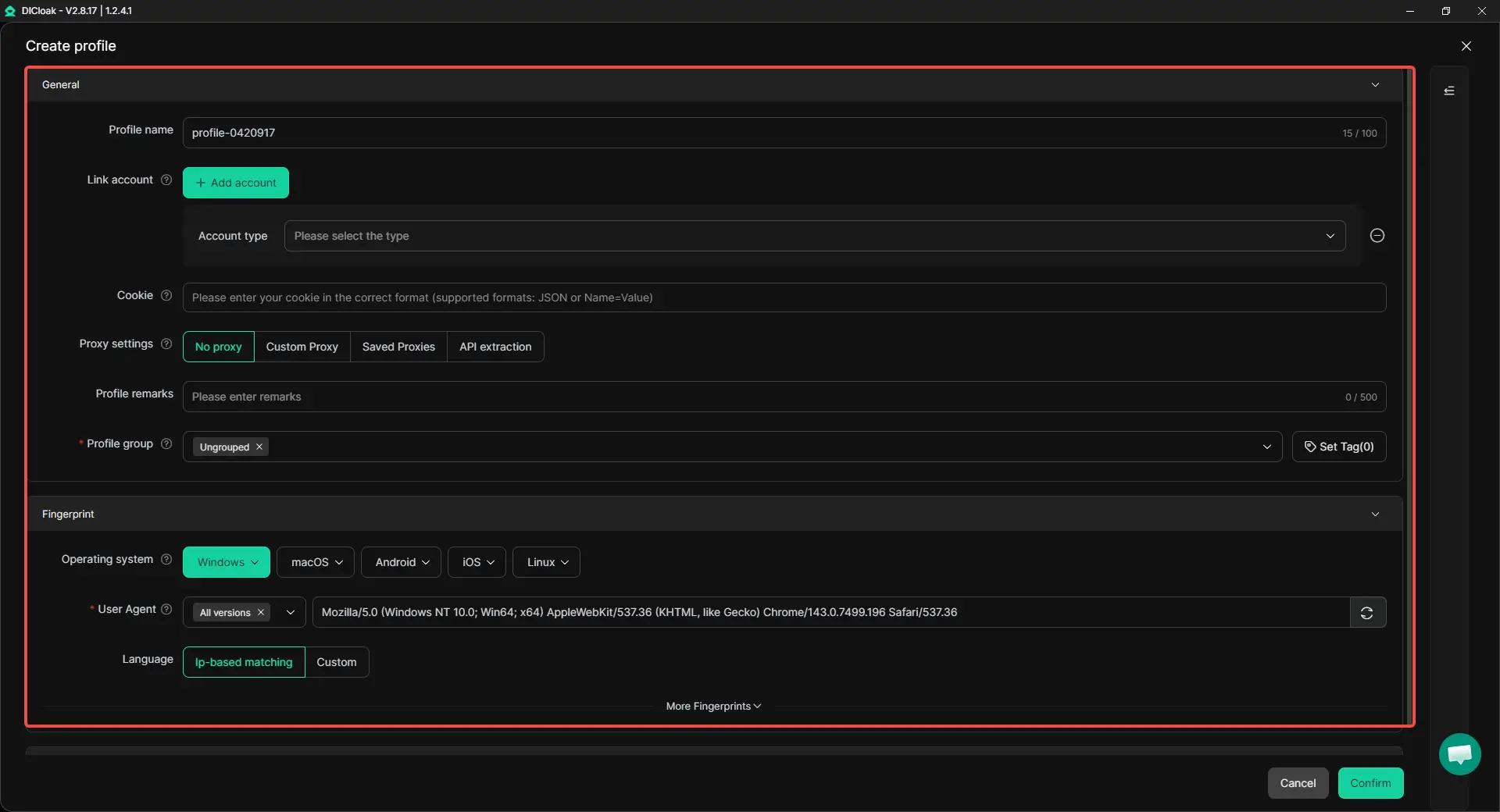
- Keep the shared login in one stable profile: Users can place the shared ChatGPT account inside one separate browser profile and keep it tied to the same custom proxy configuration. This keeps the login environment more consistent and can reduce forced logouts and session confusion.
- Share access without passing passwords around: One person can log into ChatGPT once inside the shared profile, and teammates can then open that same profile from their own devices. Multi-open access can also be enabled, so more than one person can use the same account at the same time.
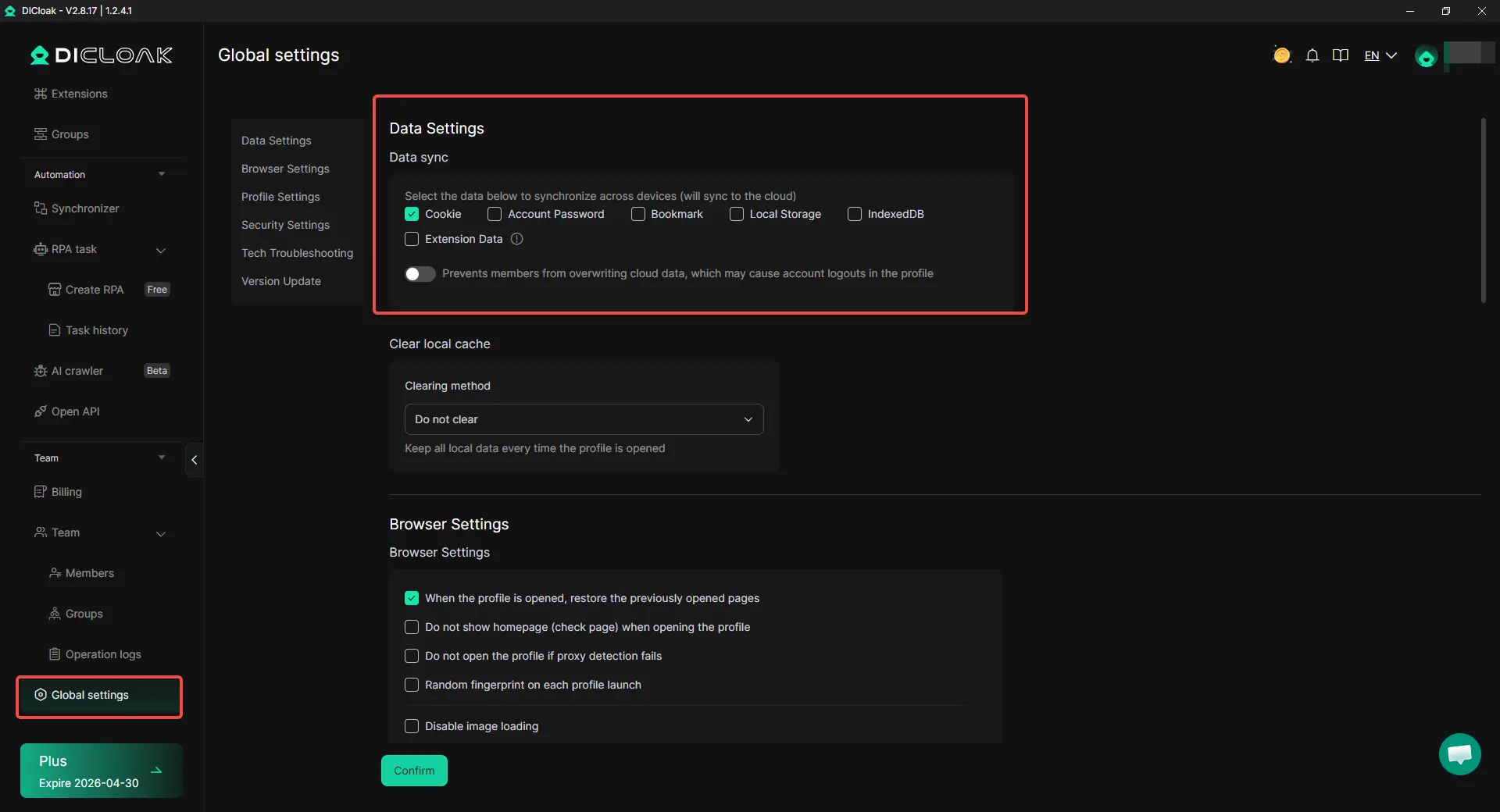
- Control team access more tightly: Users can give teammates access only to the specific shared ChatGPT profile instead of exposing other browser data. Saved passwords can be hidden, and access can be limited to reduce unnecessary risk.
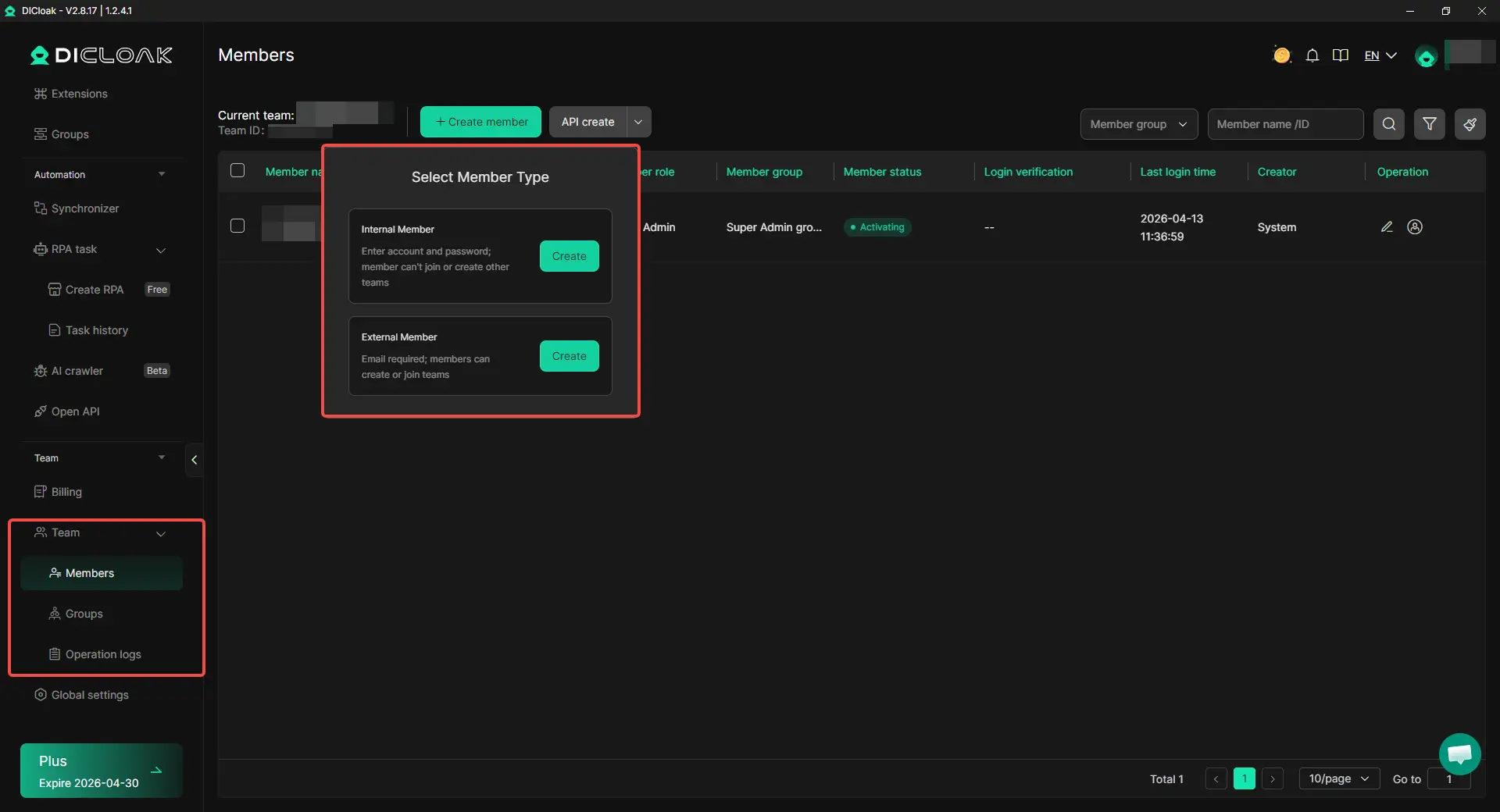
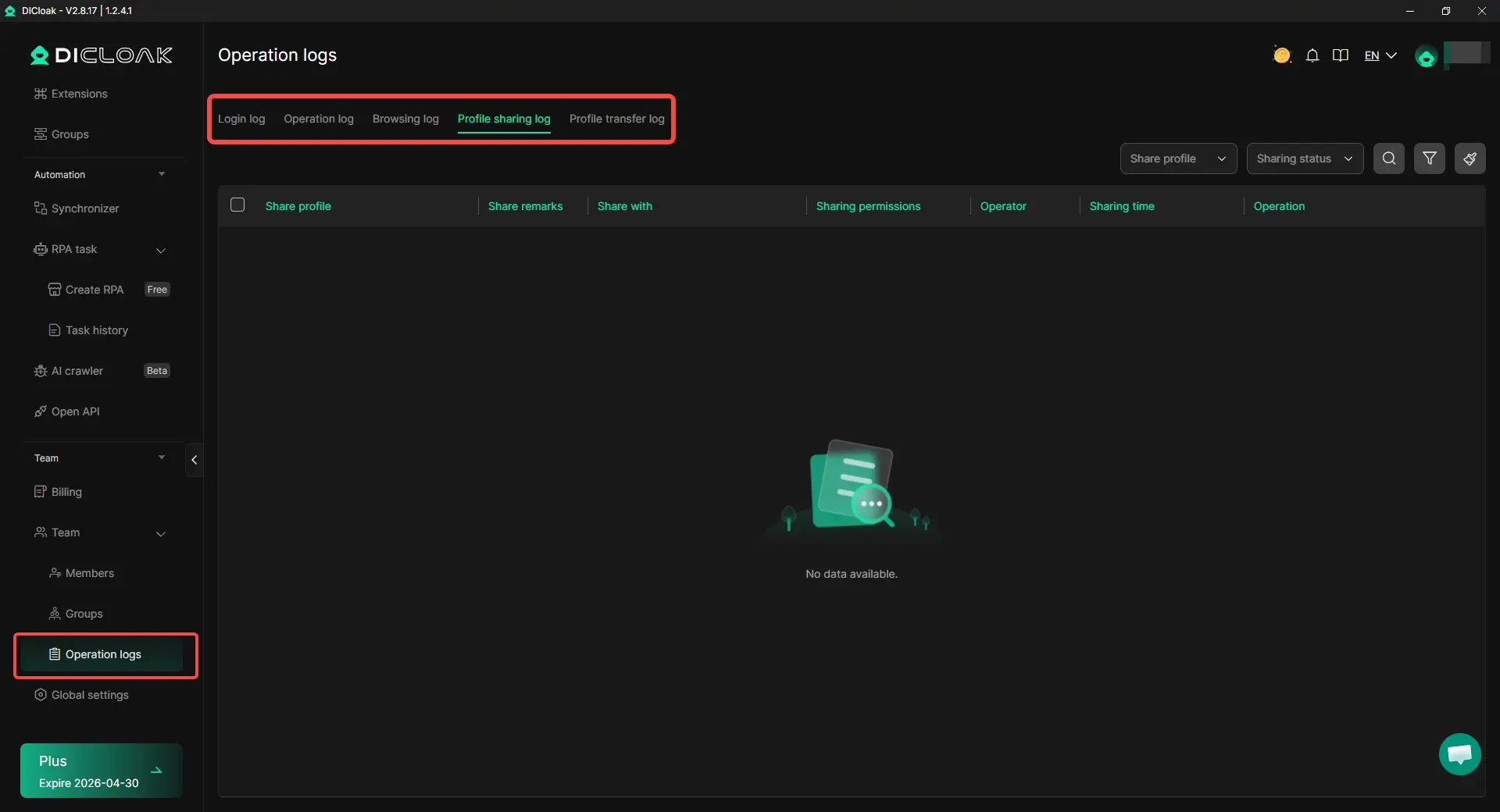
- Review activity if something goes wrong: Access controls and operation logs make it easier to see who used the shared profile and when. That gives teams a clearer way to check what happened after an account has been deleted or deactivated warning.
FAQs about ChatGPT Deactivated
Why does my ChatGPT deactivated message appear?
A ChatGPT deactivated message can appear because of policy issues, terms violations, suspicious activity, billing problems, or missed verification steps.
Can a ChatGPT deactivated account be restored?
Sometimes yes. If the issue can be appealed or fixed, access may return. If the account was deleted by the user, it usually cannot be restored.
How do I know if ChatGPT deactivated is real or just a login problem?
A real ChatGPT deactivated case usually stays the same across different browsers or devices. A temporary login issue often goes away after basic fixes.
What should I do first after seeing a ChatGPT deactivated warning?
Start by checking the exact message and your email inbox. Then look at whether the issue is tied to login trouble, payment, verification, or a real account restriction.
How can I avoid another ChatGPT deactivated notice?
Use the account in a clean and consistent way, protect access, and avoid repeating actions that already triggered warnings.
Conclusion
A ChatGPT deactivated message usually points to a real cause, not a random error. Common reasons include policy issues, terms violations, suspicious activity, billing problems, or missed verification. Since deactivation can look a lot like a normal login problem, it is important to check the exact message, related emails, and account access carefully before assuming the worst.
The right fix depends on the reason. Some accounts can be appealed. Some can be restored after payment or verification is completed. Others, such as user-deleted accounts, usually cannot come back. To avoid future problems, it helps to use the account in a clean, secure, and consistent way, especially when shared access is involved.
 Web Proxy Tools
 Free Tools
 Cookie Plugin
 UA Generator
 MAC Address Generator
 IP Generator
 IP Address List
 2FA Code Generator
 World Clock
 Anonymous Check
 WebRTC Leak Test
 UUID Generator
 Free Web Proxy Site
 Proxy Checker
 FB Ad Checker
 AI Web Scraping
 Free SMM Tools
 Twitter Shadowban Checker
 Instagram Name Checker
 UTM Generator
 Username Generator
 AI Hashtag Generator
 LinkedIn Headline Generator
 Social Media Image Resizer