Your prototype works in ChatGPT, then breaks in production when context limits, tool calling, or JSON output rules shift across models. That risk is real: Samsung restricted employee chatbot use after sensitive code was shared with ChatGPT, as reported by CNBC. If you are comparing chatgpt alternatives, the real question is not “which model sounds smartest,” but which tool fits your workflow, budget, and data rules day to day.
Pricing pages alone show why teams switch: OpenAI API pricing, Anthropic pricing, and Google AI pricing use different token tiers and model options, so the same prompt pattern can cost very different amounts. Data handling also changes by vendor, and policy details in OpenAI enterprise privacy terms show why legal and security checks belong in tool selection, not after rollout.
You will learn a practical selection method: map tasks, test output quality, verify integration limits, check data policy, and estimate monthly cost before migration. Start with the checklist that catches expensive mistakes early.
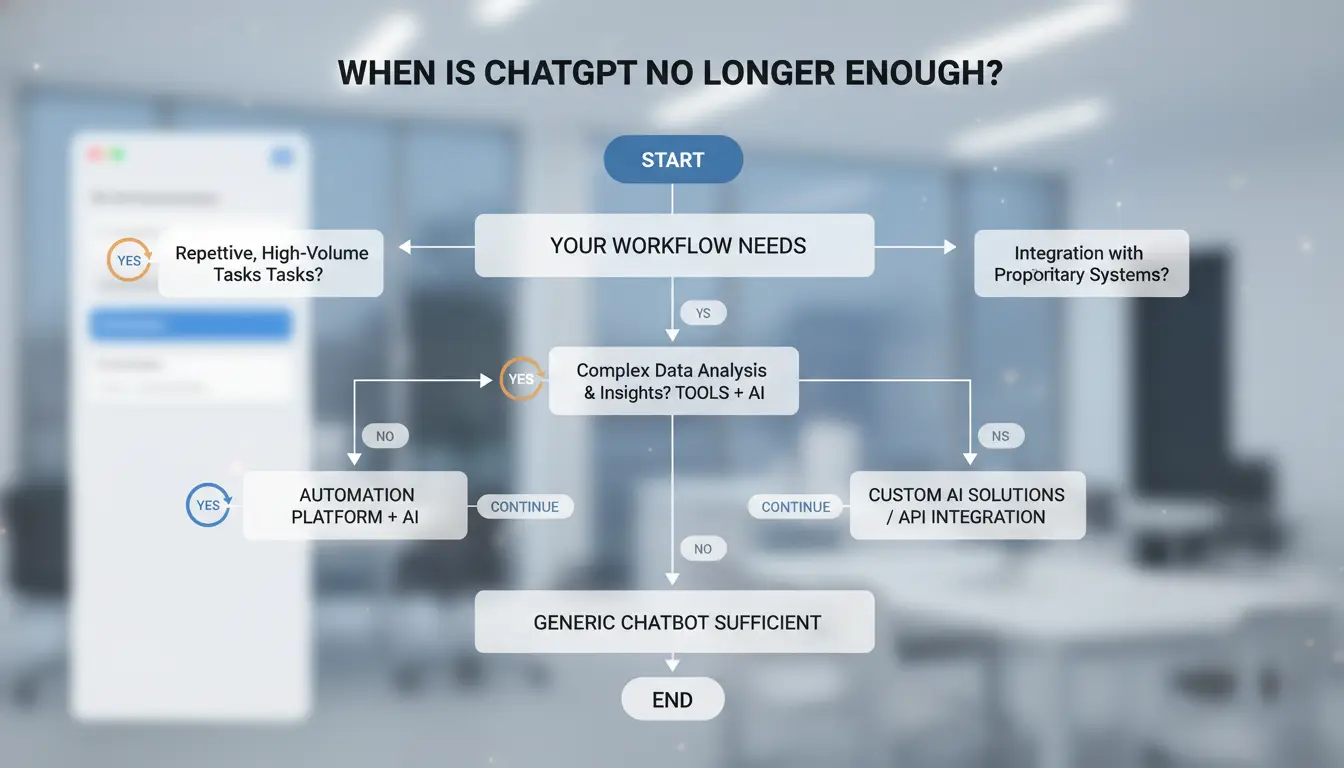
When is ChatGPT no longer enough for your workflow?
What problems usually trigger the search for ChatGPT alternatives?
You start looking at chatgpt alternatives when output quality stops improving for your core tasks. A common case: you get decent drafts, but weak legal wording checks, code review depth, or support reply tone control. Edits keep growing, so AI saves less time.
A second trigger is tool friction. If your process needs tighter links with docs, ticketing, or internal knowledge, copy-paste loops slow work. Cost is another signal. The same prompt pattern can land in different pricing tiers across OpenAI API pricing, Anthropic pricing, and Google AI pricing.
Which limitations matter most for everyday users vs teams?
| User type |
Pain point that triggers change |
What to check next |
| Solo users |
Slow replies, weak output fit, rising monthly spend |
Response speed, model quality on your top 3 tasks, budget cap |
| Teams |
Inconsistent answers, weak access control, policy risk |
Role permissions, audit logs, admin controls, data terms like OpenAI enterprise privacy terms |
If rework time stays high after prompt tuning, the tool is no longer a fit for that task.
How do you decide between adding a second tool and fully switching?
Use a task split when one tool still handles 60–70% of daily work, and a second tool fills a clear gap. Move to full switching when cost, policy, and quality fail on your top workflows at the same time.
What should you compare before choosing a ChatGPT alternative?
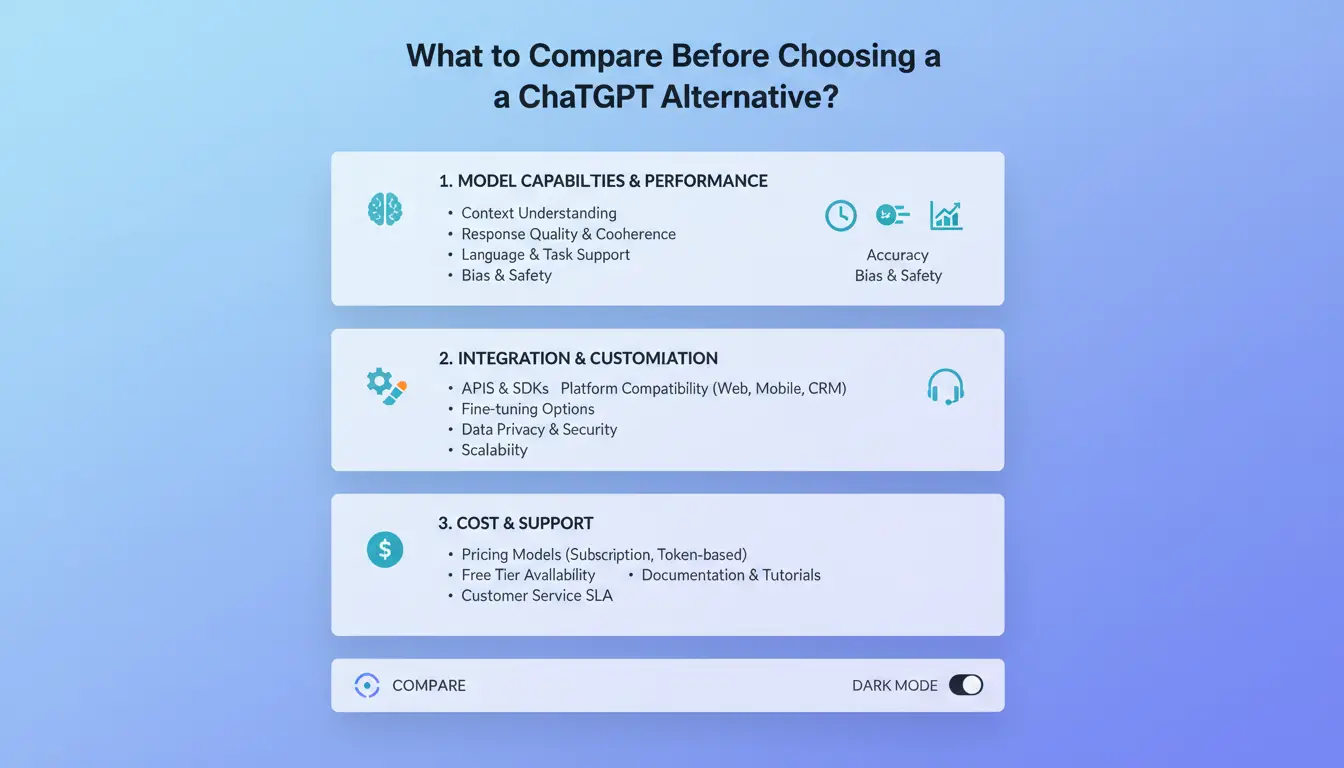
Which evaluation criteria matter most first?
Start with your real tasks, not demo prompts. Test 20 to 30 prompts from support, writing, analysis, and coding work. Score each tool on accuracy, citation quality, context handling, and response speed. If a tool gives fast answers but misses facts, it will create rework.
Check tool coverage in the same test run: file upload, web access, code execution, and app integrations. A model can look strong in chat but fail in your daily stack. Compare cost at the same time using OpenAI API pricing, Anthropic pricing, and Google AI pricing. Token tiers and model classes differ, so equal prompt volume can produce very different monthly bills.
How do privacy, data retention, and compliance affect tool choice?
For teams reviewing chatgpt alternatives, privacy checks should happen before rollout. Confirm whether prompts and outputs can be used for model training, how long logs are stored, and what admins can control. You can verify policy terms in OpenAI enterprise privacy terms.
Then check admin controls: SSO, role permissions, audit logs, and data export or deletion options. If your team handles client data, test a redacted workflow and a non-redacted workflow. Pick the tool that passes policy and audit checks with the least manual work, even if another option looks cheaper on a pricing page.
What does a simple scoring matrix look like for ChatGPT alternatives?
Use weighted scoring tied to task impact. Example below:
| Criteria |
Weight (Individual) |
Weight (Team) |
Tool A Score (1-5) |
Tool B Score (1-5) |
| Output accuracy |
30% |
25% |
4 |
5 |
| Price predictability |
25% |
15% |
5 |
3 |
| Privacy & retention controls |
15% |
30% |
3 |
5 |
| Integrations & workflow fit |
20% |
20% |
4 |
4 |
| Latency |
10% |
10% |
5 |
4 |
Which ChatGPT alternatives are best for writing, coding, research, and daily productivity?
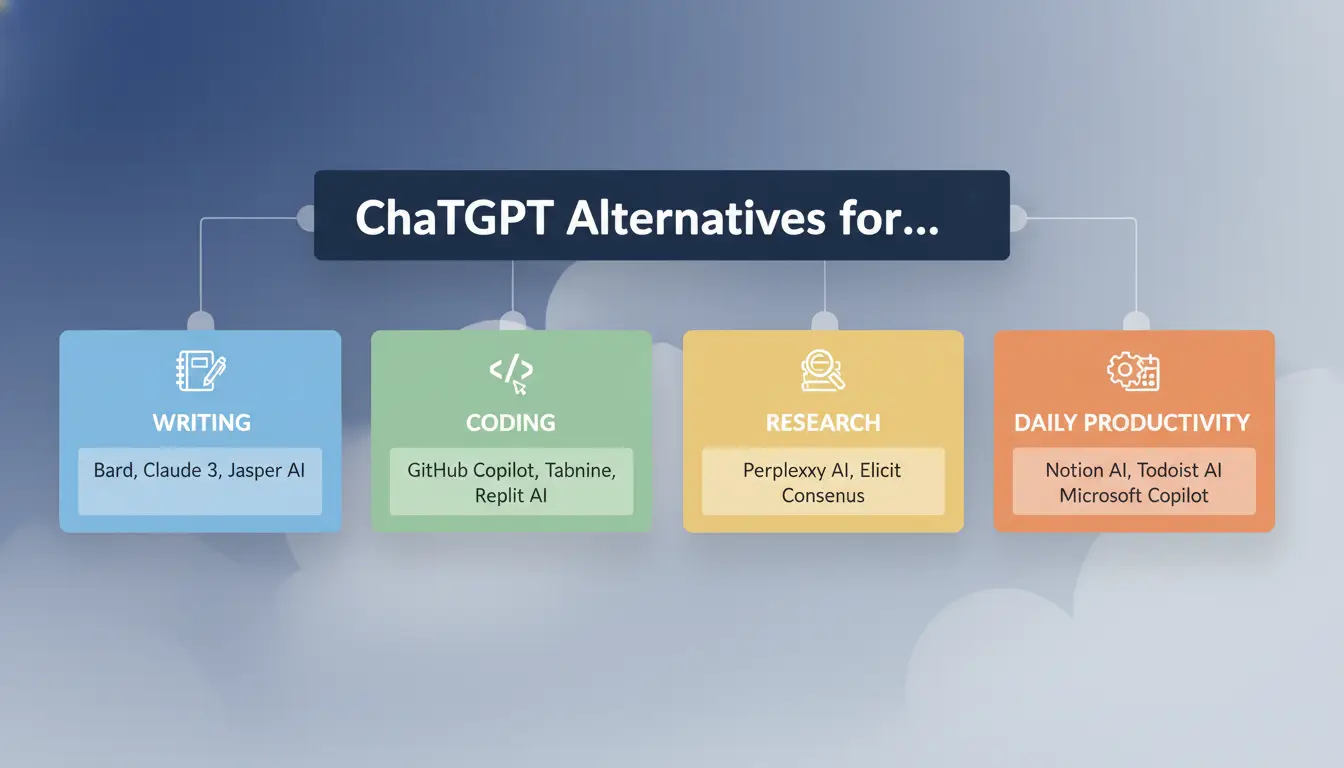
If you compare chatgpt alternatives by logo, you can pick the wrong tool fast. Map each tool to the job you do every day, then test with your own prompts and files.
| Daily task |
Tool to test first |
Why teams pick it |
Common trade-off |
| Long-form writing |
Claude |
Strong tone control and clean structure in long drafts |
Can be slower on short back-and-forth edits |
| Coding in editor |
GitHub Copilot |
Works inside IDE flow with inline suggestions |
Suggestion quality drops without repo context |
| Web research |
Perplexity |
Built for source-linked answers and quick follow-up checks |
Writing style is less polished than writing-focused tools |
| Office docs and meetings |
Gemini for Google Workspace or Microsoft Copilot |
Native links to mail, docs, calendar, slides |
You get more lock-in to one office stack |
Table basis: official product pages and pricing docs such as OpenAI API pricing, Anthropic pricing, and Google AI pricing.
Which tools perform best for writing and long-form reasoning?
Claude usually handles long context and rewrite passes well. Gemini is strong when your draft lives in Google Docs and you need quick edits tied to shared files. For long reports, test tone stability across three rewrite rounds, not one output. Watch citation behavior. Writing-focused models can sound confident even when they lack source links.
Which ChatGPT competitors are stronger for coding workflows?
Copilot fits daily coding when you stay in VS Code or JetBrains. Gemini and Claude can still help with bug analysis and test ideas, especially when you paste stack traces and function boundaries. For code generation, check compile success. For debugging, check if the model asks for missing context before guessing.
Which alternatives are better for web research and fact-checking?
Research quality comes from source visibility and freshness. Perplexity and Gemini can return linked pages quickly, which helps verification. Claude works well on uploaded internal docs, but live web depth can vary by plan and setup. Use a two-step check: model answer, then open at least two cited links.
Which options fit office productivity and ecosystem lock-in?
If your team runs on Google Workspace, Gemini cuts copy-paste work across Docs, Gmail, and Sheets. If your team runs on Microsoft 365, Copilot aligns with Outlook, Word, and Teams. Pick the stack your team already uses daily, then compare policy and cost before rollout.
How do free and paid ChatGPT alternatives differ in real-world value?
What can free ChatGPT alternatives realistically handle well?
Free plans work for short drafts, quick summaries, rewrite help, and basic Q&A. They are a good start when output quality is “good enough” and delay does not block work. Limits show up fast in daily use: request caps, slower replies at peak time, smaller context windows, and fewer tool options. For solo tests, this is fine. For repeated client work, it can create queue time and rework.
Which paid features actually improve outcomes?
Paid tiers usually add faster models, higher usage limits, longer context, file tools, and admin controls.
| Area |
Free tier |
Paid tier |
| Throughput |
Caps and throttling |
Higher limits, steadier speed |
| Model access |
Basic models |
Newer models and tool access |
| Team use |
Little admin control |
Roles, logs, workspace settings |
| Risk control |
Limited policy options |
Better governance options |
How do you estimate ROI before paying for a new tool?
Track one workflow for 5 business days: time per task, edit rounds, and failure rate. Then compare plan cost against labor time saved. If paid access cuts one revision loop per task, it often pays back before month end. Check vendor pricing structure since token billing differs across OpenAI API pricing, Anthropic pricing, and Google AI pricing. This is where chatgpt alternatives should be judged: cost per finished workflow, not seat price alone.
How can you test ChatGPT alternatives in one afternoon?
You can test chatgpt alternatives in about 4 hours if you keep scope tight and score only real work. Run the same prompt set on every tool, then judge output against fixed pass/fail rules.
What should you prepare before testing?
Pick 3-5 core tasks your team does each week. Example: customer reply draft, SQL query help, meeting summary, policy rewrite, and bug triage note. Build one fixed prompt for each task, plus the same input files and context notes.
Define pass/fail before testing:
- Required output format (table, bullets, JSON, plain text)
- Accuracy checks (facts, logic, policy fit)
- Editing limit (for example, no more than 3 manual fixes)
How do you run an apples-to-apples benchmark?
Set one time box per task, such as 10 minutes including retries. Keep temperature, context length, and follow-up count the same across tools. Track three things: response speed, quality at first draft, and rework minutes.
| What stays fixed |
What you score |
| Prompt text, context, time limit |
Pass/fail by task |
| Same reviewer |
Rework minutes |
| Same output format rule |
Response time |
How do you make a final pick without overtesting?
Choose a 2-tool shortlist plus one fallback. If two tools tie on quality, check cost with live pages like OpenAI API pricing, Anthropic pricing, and Google AI pricing. After rollout, set a 30-day review: task pass rate, edit time, and policy fit. That keeps your chatgpt alternatives decision grounded in real usage, not demos.
How can teams share AI accounts safely across ChatGPT alternatives?
If your team tests chatgpt alternatives under one paid seat, shared access can trigger security checks fast. The goal is stable behavior: same profile, same proxy route, clear user permissions, and clean logs.
Why do shared logins across devices get flagged or restricted?
Platforms track login patterns, browser fingerprint signals, and session overlap. If one account jumps across cities, devices, and browser setups in short windows, risk systems treat it as possible takeover. Uncontrolled sessions also cause trouble. Two people sending prompts at once from different environments can lock sessions, force re-login, or trigger temporary limits. Most flags come from inconsistent behavior, not prompt content.
| Risk pattern |
What platforms see |
Safer team rule |
| Mixed personal browsers |
New fingerprint each login |
Use one fixed work profile per account |
| Random IP switching |
Unusual location jumps |
Bind each profile to one long-term proxy |
| Shared password in chat |
Untracked access |
Use role access and action logs |
How does DICloak reduce shared-account risk in practice?
You can use DICloak to create isolated browser profiles, so each shared AI account keeps stable fingerprint settings across sessions. You can assign a dedicated proxy per profile, control who can open or edit that profile, and keep operation logs for audits. This setup lowers accidental overlap and helps with internal reviews when access issues happen.
What team setup works best for account sharing workflows?
Set one profile per subscription, then map people by role: operator, reviewer, admin. Keep prompt data isolated by profile, not by shared local browser history. For repeated tasks, run batch actions or RPA to reduce manual login churn. Also check provider policy and data terms before rollout in OpenAI enterprise privacy terms.
What mistakes cause poor results after switching to ChatGPT alternatives?
Why copying old prompts often fails on a new model
Teams often test chatgpt alternatives by pasting old prompts and calling the output “worse.” That test is weak. Model families follow different instruction patterns in OpenAI prompt guidance, Anthropic prompt guide, and Google Gemini docs. Rewrite prompts per model before judging quality.
| Check |
Old habit |
Better migration test |
| Task prompt |
One long generic prompt |
Role + goal + output format |
| Output check |
“Looks good” |
Pass/fail rubric by task |
How weak onboarding creates adoption failure in teams
A new tool fails fast when each person logs in, writes prompts, and stores outputs differently. You can use DICloak to map each shared AI account to one browser profile with isolated fingerprints and per-profile proxies, so logins stay consistent and risk checks drop.
Tools like DICloak let you set role permissions, share profiles without sharing raw credentials, and track operation logs. That gives one audit trail for QA, prompt updates, and incident review. You can also run batch or RPA actions for repeat login and setup steps to cut manual errors.
Why chasing the newest model can hurt consistency
Frequent switching breaks team memory. Set one baseline model, lock prompt templates for 2-4 weeks, and compare changes by task score, not hype. This makes chatgpt alternatives easier to judge fairly.
Should you replace ChatGPT completely or build a multi-model stack?
Pick based on task spread, risk rules, and operating load. If your team runs one core workflow, one assistant usually wins. If work types differ a lot, a mixed setup can raise output quality with tighter role control.
| Decision point |
Single primary assistant |
Multi-model stack |
| Governance and policy checks |
One review path |
Separate reviews per tool |
| Team training load |
Low |
Medium to high |
| Output fit by task type |
Good for repeat tasks |
Better for mixed tasks (research, code, writing) |
| Cost tracking |
One billing stream |
Split billing across vendors |
When a single primary assistant is the smarter choice
Use one tool when prompts are stable and handoffs are simple. You cut admin work, reduce prompt drift, and onboard faster. This works well for small teams with repeatable workflows. Check pricing and privacy terms before lock-in: OpenAI API pricing and OpenAI enterprise privacy terms. Keep one owner for prompt standards and review rules.
When combining multiple ChatGPT alternatives delivers better output
Use role-based chatgpt alternatives when one model underperforms in a key task. You can use one model for research, one for coding, and one for writing polish. Keep quality stable with one rubric, shared test prompts, and weekly score checks across Anthropic pricing and Google AI pricing.
Frequently Asked Questions
Are free chatgpt alternatives good enough for professional work?
Free chatgpt alternatives can handle drafting emails, summaries, outlines, and basic coding help. For professional work, limits show up fast: daily message caps, slower responses at peak hours, weaker reasoning on complex tasks, and fewer admin controls. Many free tiers also lack SSO, audit logs, role permissions, and legal terms needed for teams.
Do chatgpt alternatives use my prompts and files for model training?
Data rules for chatgpt alternatives are set by each vendor and plan. Some consumer plans may use prompts to improve models by default, while many business plans offer no-training clauses. Before upload, read the privacy page, retention period, region options, and opt-out steps. For sensitive files, require enterprise terms and a signed DPA.
Can I combine multiple chatgpt alternatives without losing context?
Yes. You can use multiple chatgpt alternatives and keep context if your workflow is standard. Use one prompt template with fixed fields: goal, audience, constraints, sources, and output format. Store shared notes in one doc, then pass a short handoff block between tools. Include version numbers and decision logs to avoid drift.
Which chatgpt alternatives support self-hosted or private deployment options?
Several chatgpt alternatives support private deployment. Open-source models (run with tools like vLLM, Ollama, or Kubernetes stacks) give full control over data location and access. Enterprise platforms may offer single-tenant or virtual private cloud options. Trade-offs are real: setup time, GPU cost, patching, monitoring, and on-call maintenance all move to your team.
How often should I re-evaluate chatgpt alternatives as models change?
Review chatgpt alternatives every quarter, and also run a fast review after major changes. Trigger checks when pricing shifts, context windows change, latency rises, model quality drops on your core tasks, or privacy terms are updated. Use the same test prompts each cycle, score outputs, and track total cost per workflow, not per seat.
Choosing the right ChatGPT alternative comes down to your specific priorities, whether that is stronger research accuracy, better coding support, tighter privacy controls, or a lower price point. The best approach is to test a few options in real workflows so you can compare output quality, speed, integrations, and value before committing.
Try DICloak For Free
 Web Proxy Tools
 Free Tools
 Cookie Plugin
 UA Generator
 MAC Address Generator
 IP Generator
 IP Address List
 2FA Code Generator
 World Clock
 Anonymous Check
 WebRTC Leak Test
 UUID Generator
 Free Web Proxy Site
 Proxy Checker
 FB Ad Checker
 AI Web Scraping
 Free SMM Tools
 Twitter Shadowban Checker
 Instagram Name Checker
 UTM Generator
 Username Generator
 AI Hashtag Generator
 LinkedIn Headline Generator
 Social Media Image Resizer