You type outlook.com, your address bar flickers through a rapid-fire OIDC flow, and you're suddenly staring at a login.microsoftonline.com prompt before being slapped with a "Stay Signed In?" request. For many, this redirect sequence isn't just a technical quirk; it's a precursor to a locked account or an endless loop of phone verification. In 2026, navigating Microsoft's authentication landscape requires more than just a password—it requires understanding the Entra Verified ID heuristics that govern these transitions.
The frustration of managing multiple identities is real. When you're constantly bounced between live.com and microsoftonline.com, Microsoft's AI-driven behavioral analysis is silently scoring your "intent signals." If those signals look even slightly inconsistent, you're trapped in a cycle of identity proofing that can paralyze your workflow.
What is Microsoftonline and How Does it Differ from Live.com?
While they share a corporate parent, these domains represent two fundamentally different identity silos. As a consultant, I see users constantly trip over the fact that their personal @outlook.com credentials reside in a completely different security database than their @company.com corporate identity.
| Domain |
Identity System (MSA vs Entra ID) |
Primary Use Case/Audience |
| live.com |
Personal (Microsoft Account / MSA) |
Consumer services: Personal Outlook, Xbox, OneDrive, and Microsoft Rewards. |
| microsoftonline.com |
Business/School (Entra ID) |
Enterprise-grade access: Azure Portal, Teams, SharePoint, and managed Office 365 tenants. |
| microsoft.com |
Hybrid Entry Point |
Global "Traffic Controller": Documentation, product info, and the primary router for authentication requests. |
The Role of Microsoftonline in Enterprise Identity
When your browser hits microsoftonline.com, you have entered the domain of Microsoft Entra ID (formerly Azure AD). This is the gatekeeper for organization-managed accounts. It enables Continuous Access Evaluation (CAE), allowing sessions to be persistent and configurable under strict organizational control. Unlike personal accounts, these sessions are often governed by Conditional Access policies that can terminate a session the moment a device leaves a trusted perimeter.
Why Personal Accounts Still Land on Live.com
Despite the 2026 rebranding efforts, the legacy live.com ecosystem remains the backbone for the consumer Microsoft Account (MSA). This is where your personal digital life—from Xbox achievements to your personal OneDrive—is authenticated. While the UI may look identical to the business login, the backend security logic is optimized for consumer behavioral patterns rather than corporate compliance.
Is Login.microsoftonline.com Safe or a Phishing Risk?
The appearance of a complex, query-string-heavy URL like login.microsoftonline.com/common/oauth2/ is often the first red flag for users. However, in 2026, microsoft.com acts as a sophisticated "Traffic Controller." It analyzes your email domain the moment you type it and determines your destination.
Checklist for Legitimate Microsoft Redirects:
- Domain Scrutiny: The core domain must be
microsoftonline.com or live.com. Watch for typosquatting (e.g., micros0ftonline.com).
- EV SSL Validation: Ensure the certificate is issued to Microsoft Corporation. In 2026, modern browsers will often highlight this as a "Verified Publisher" in the address bar.
- Session Context: Legitimate redirects follow a specific action, such as logging into a client's Azure tenant or opening a shared SharePoint link.
Why Does Microsoft Keep Asking for Phone Verification on Multiple Accounts?
Frequent verification prompts are rarely a technical glitch; they are the result of "linkage" detection. Microsoft's 2026 security engine uses AI-driven behavioral analysis to detect patterns across sessions.
One of the most common mistakes I see is the use of the same phone number across both a live.com personal account and a microsoftonline.com business account. This creates a "hard link" in Microsoft's security graph. No matter how many proxies you use, that shared phone number binds your identities together.
The Trap of "Cross-Domain" Signal Sharing
Microsoft shares telemetry across its entire ecosystem. If you are rapidly switching between a personal account and a work tenant in the same browser, the system detects a single "machine identity." If your personal account is flagged for aggressive Microsoft Rewards automation, your corporate Entra ID account will likely face "guilt by association," leading to high-friction login prompts or Session Hijacking protection lockouts.
Can You Safely Use One Browser for Both Personal and Work Microsoft Accounts?
From an IAM perspective, using a single standard browser for multiple Microsoft identities is a recipe for disaster.
Many users believe "Incognito" provides a clean slate. This is a 2010 solution for a 2026 problem. Modern telemetry ignores local cookie state and focuses on GPU-accelerated Canvas noise and AudioContext fingerprinting. Even in Private Mode, your browser (especially Chrome versions 144+) leaks hardware concurrency and WebGL attributes that allow Microsoft to uniquely identify your machine.
Risks of Cookie Leakage Across Subdomains
Session tokens often "bleed" between live.com and microsoftonline.com subdomains. This causes the infamous loop where the browser attempts to pass a personal token to a business portal, resulting in the technical error: "You can't sign in here with a personal account. Use your work or school account instead."
How to Manage Multiple Microsoft Tenants Without Getting Flagged
For professionals managing multiple Azure tenants or automated workflows, "clearing data" is insufficient. You must change your digital identity, not just your cache.
True environment isolation requires that every account appears to originate from a unique physical machine. This prevents Microsoft's security engine from linking your accounts together and applying a collective risk score based on the weakest link in your account portfolio.
Using DICloak to Keep Microsoft Account Setups More Organized
When more than one Microsoft account needs to be managed, the main difficulty is often keeping different login environments separate and easier to control. For users in that situation, you can help organize account access more clearly with DICloak.
- Profile isolation: Users can create separate browser profiles for different Microsoft accounts, with each profile keeping its own cookies, cache, local storage, and login state. This can make it easier to keep personal and business accounts apart and reduce session mix-ups.

- Custom profile configuration: Users can adjust browser profile settings, including proxy and fingerprint-related options, to organize different account environments more clearly.

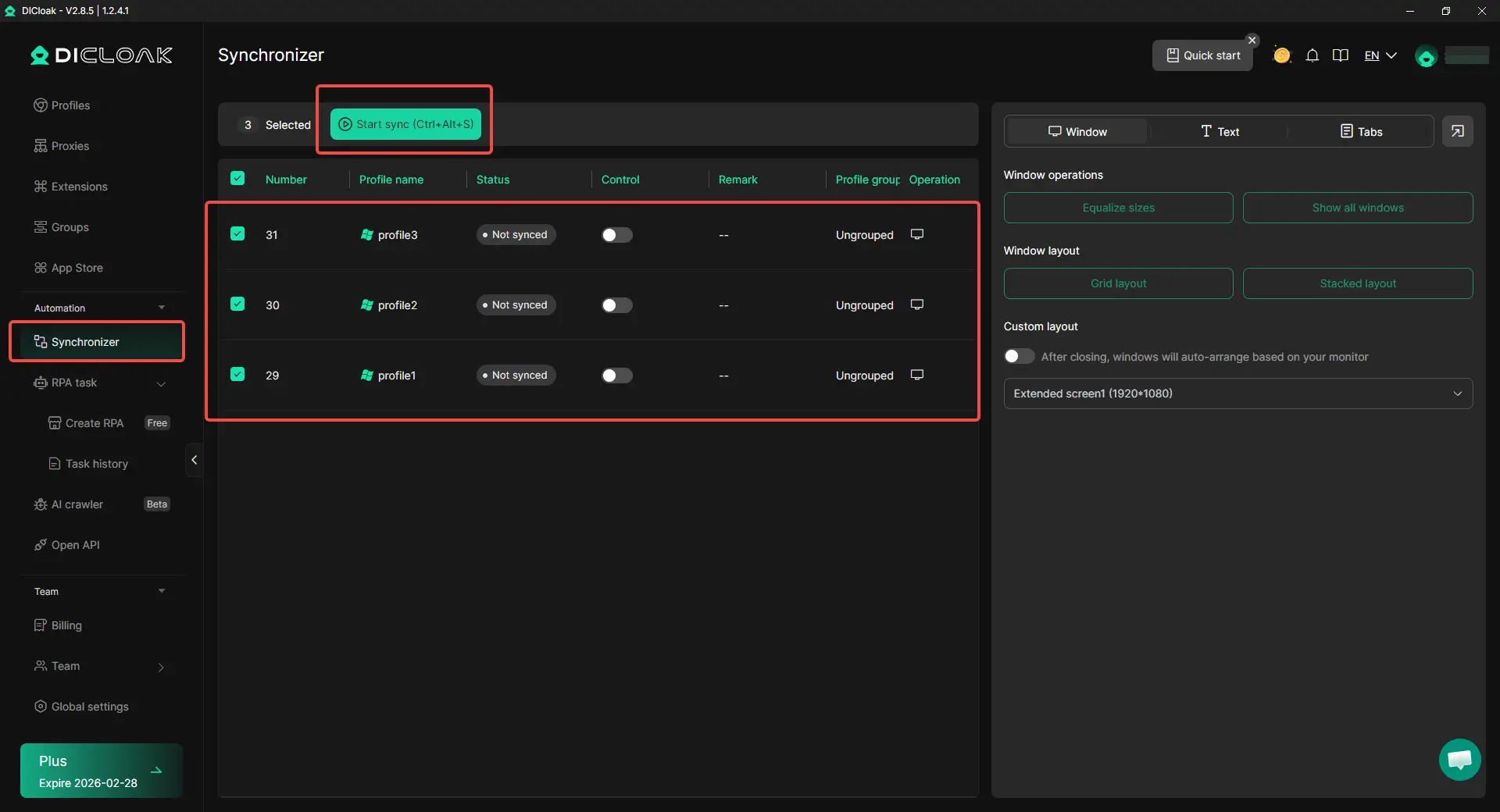
- Synchronizer for repeated actions: When similar steps need to be completed across multiple profiles, users can use Synchronizer to perform those actions more efficiently. This helps reduce repeated manual work when managing several Microsoft account environments.
What Are the Most Common Login Errors on Microsoftonline?
Solving the "Account Does Not Exist" (AADSTS50020) Loop
This error frequently occurs when a user tries to access a corporate resource while their browser is still holding a valid session token from a personal account. The microsoftonline.com endpoint checks the personal token against the enterprise database, finds no match, and returns a failure. The only permanent fix is to use isolated profile paths to ensure tokens never cross paths.
Dealing with Endless Authentication Refreshes
If you are stuck in a refresh loop, your browser is likely caught in a conflict between a cached Tenant ID and a new login request. This mismatch prevents the OIDC flow from completing. Using an environment like DICloak makes that each session starts with the correct metadata, avoiding these refresh traps entirely.
Will Microsoft Authentication Change Later in 2026?
As we progress through 2026, Microsoft is doubling down on Continuous Access Evaluation (CAE). This means the system will no longer just check your credentials at login; it will constantly monitor your IP reputation and fingerprint stability throughout the session. Any sudden change in your "environment signal" will trigger an immediate re-authentication request. Maintaining a consistent, isolated digital environment is no longer an "expert tip"—it is a requirement for maintaining "trusted" status in the Microsoft ecosystem.
Frequently Asked Questions
Why does my Outlook redirect to login.live.com instead of microsoftonline?
Outlook.com is a consumer-facing service. Even if you start at a general Microsoft page, the "Traffic Controller" identifies your account as a Personal (MSA) type and routes you to the consumer authentication database at live.com.
Is microsoftonline.com a paid service?
The domain itself is a free gateway, but it only grants access to services that require an organizational license (like Microsoft 365 Business or Azure). Personal accounts generally cannot authenticate through this portal.
Can I use the same phone number for a Live.com and a Microsoftonline account?
Technically yes, but it is highly discouraged. Using one phone number creates a "hard link" between accounts. If your personal account is flagged for suspicious behavior, your work account may face increased scrutiny or lockouts.
Why am I stuck in a "pick an account" loop between work and personal?
This is caused by cookie leakage. Your browser is attempting to use a session token from one domain to access the other. Without environment isolation, the browser cannot distinguish which "identity" should be active for a specific request.
Does Microsoft track my hardware ID when I log in?
Yes. In 2026, Microsoft uses advanced telemetry to collect hardware concurrency, GPU noise, and screen resolution to create a unique device identifier for fraud prevention.
How do I stop Microsoft from asking "Stay Signed In?" every time?
This prompt relies on persistent cookies. If you use Incognito mode or a browser that clears cookies on exit, Microsoft cannot recognize your previous session, triggering the prompt as a security precaution every time you return.
 Web Proxy Tools
 Free Tools
 Cookie Plugin
 UA Generator
 MAC Address Generator
 IP Generator
 IP Address List
 2FA Code Generator
 World Clock
 Anonymous Check
 WebRTC Leak Test
 UUID Generator
 Free Web Proxy Site
 Proxy Checker
 FB Ad Checker
 AI Web Scraping
 Free SMM Tools
 Twitter Shadowban Checker
 Instagram Name Checker
 UTM Generator
 Username Generator
 AI Hashtag Generator
 LinkedIn Headline Generator
 Social Media Image Resizer