Managing multiple Amazon seller accounts in 2026 can help sellers grow faster, but it also adds real risk if the accounts are not structured well. Amazon’s marketplace is huge, and the stakes are high. In 2025, more than 75,000 independent sellers surpassed $1 million in sales in Amazon’s store, and U.S.-based independent sellers averaged more than $375,000 in annual sales. That kind of opportunity is why many sellers build more than one brand, enter new product lines, or manage several client accounts.
But more accounts also mean more responsibility. Amazon usually allows one Seller Central account per selling region unless there is a legitimate business need for another account, and all accounts need to stay in good standing. If business records, browser sessions, network setups, or store operations become mixed, accounts may look related in ways that create review or suspension risk. This guide explains how to manage multiple Amazon seller accounts without getting them linked in unnecessary ways, while keeping your setup compliant, organized, and easier to scale.
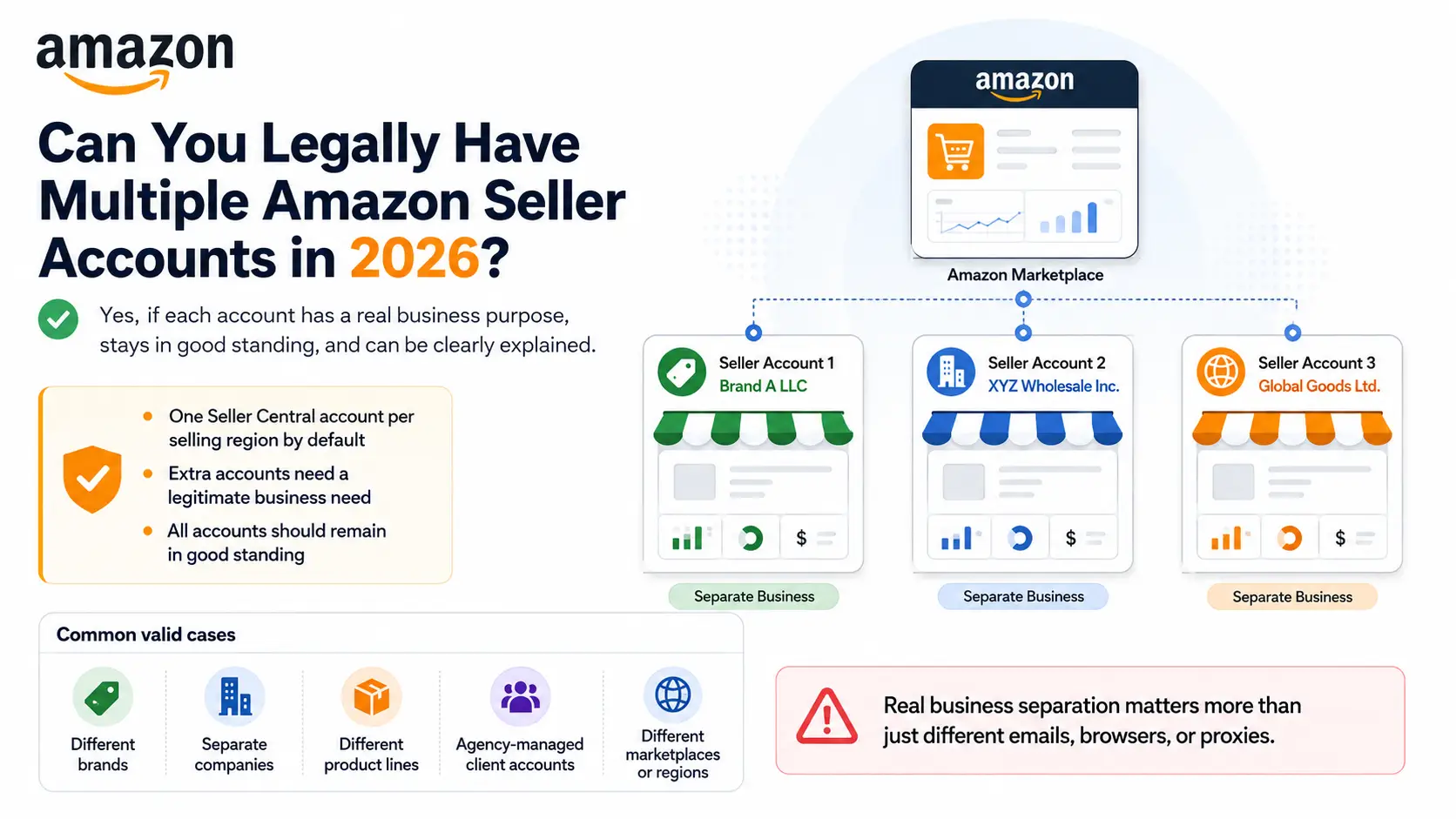
Can You Legally Have Multiple Amazon Seller Accounts in 2026?
Yes, you can legally have multiple Amazon seller accounts in 2026 if each account has a clear business purpose. Amazon usually allows one Seller Central account per selling region, unless a seller has a legitimate business need for another account and keeps all accounts in good standing.
This rule matters because Amazon does not treat every second account as a violation. The risk starts when sellers use extra accounts to repeat the same business, avoid limits, or keep selling after another account has been suspended. For safer long-term management, each account should have its own role, clean records, and a reason that can stand up during an account review.
Common valid cases include:
- Managing different brands with separate storefronts and marketing plans
- Running separate companies under different legal entities
- Selling product lines that need different teams, suppliers, or operations
- Managing client accounts as an agency
- Expanding into different marketplaces or regions
For example, one seller may operate a home goods brand and a pet products brand through separate accounts. This can make sense if the brands have different products, teams, suppliers, and customer groups. But if both accounts sell the same items with the same business details, the setup looks much harder to justify.
The important point is that separation should be real, not just technical. Different emails, browsers, or proxies cannot fix a weak business reason. Before opening another Amazon seller account, sellers should first make sure the new account has a clear purpose and that the existing account has no unresolved policy issues.
Risks of Linked Amazon Seller Accounts
Having multiple Amazon seller accounts is not automatically a problem. The real risk begins when Amazon believes those accounts are connected and one of them has compliance, verification, or policy issues. In that situation, the impact can extend beyond a single account and affect the wider business.
This is why sellers who manage multiple brands, companies, or marketplaces pay close attention to account separation. The goal is not simply to run multiple accounts. The goal is to make sure a problem in one account does not create unnecessary risk for the others.
Why Does Amazon Monitor Related Accounts?
Amazon monitors related accounts to protect the marketplace and reduce abuse. When multiple accounts appear connected, Amazon may review them together rather than treating them as completely independent businesses.
Some of the main reasons include:
- Preventing fraud and policy violations
- Preventing sellers from bypassing account restrictions
- Maintaining marketplace integrity and fair competition
- Protecting buyers from bad seller experiences
- Stopping suspended sellers from reopening under new accounts
From Amazon's perspective, this approach helps create a safer marketplace. If a seller could simply open another account after a suspension, enforcement would become much less effective. That is why Amazon takes related account reviews seriously.
What Happens If Amazon Links Your Accounts?
When Amazon links multiple seller accounts, the consequences can range from a routine review to a major business disruption. The outcome often depends on the health and compliance status of the related accounts.
| Possible Outcome |
What It Can Mean for Sellers |
| Related account suspension |
One account issue may affect other linked accounts |
| Account reviews |
Amazon may request additional explanations or documents |
| Funds held |
Payouts can be delayed during investigations |
| Listing restrictions |
Some listings may be limited or removed |
| Verification requests |
Additional identity or business checks may be required |
| Business disruption |
Sales, inventory planning, and advertising can be affected |
For example, a seller may operate two brands that have been performing well for years. If one account is later linked to another account that has been deactivated, Amazon may review both accounts before allowing normal operations to continue. Sellers frequently report spending days or even weeks gathering documents and responding to verification requests before the issue is resolved.
In some cases, the effect can be even broader. Amazon's multiple-account policy states that if one related account is not in good standing, other connected seller accounts may also face deactivation until the underlying issue is resolved.
For sellers researching how to manage multiple Amazon seller accounts without getting them linked, this is usually the biggest concern. The risk is not simply losing access to one store. The bigger risk is allowing a single account problem to create interruptions across multiple brands, teams, or revenue streams.
How Amazon Links Seller Accounts and What to Avoid
Amazon may link seller accounts when they share strong signs of being controlled by the same person, company, team, or operation. These signs can come from business records, login environments, network setups, and daily selling behavior.
This is why account separation is not only about using different emails or browsers. If two accounts look connected in their documents, login setup, and store activity, Amazon may review them as related accounts. A clean setup should be easy to explain from both a business and compliance point of view.
| Account Area |
What Can Create Linkage Risk? |
What Sellers Should Avoid |
| Business records |
Shared tax details, bank accounts, cards, addresses, emails, or phone numbers |
Mixing business information between accounts |
| Browser environment |
Shared sessions, cookies, cache, device data, or browser fingerprints |
Logging into multiple seller accounts from the same browser profile |
| Network setup |
Repeated IP overlap, unstable IP changes, or unclear access locations |
Changing networks too often without a clear business reason |
| Store operations |
Duplicate listings, reused images, similar descriptions, or shared support routines |
Running different accounts like the same store |
| Team access |
The same people managing all stores in the same way |
Unclear roles, shared logins, and unmanaged access habits |
When Business Records Make Accounts Look Connected
Business identity signals are often the strongest signs of account connection. Amazon may look at the company, tax, payment, and contact details behind each Seller Central account. These signals may include:
- Business entity
- Tax information
- Bank account
- Credit card
- Business address
- Email address
- Phone number
Problems often happen when sellers reuse the same payment method, mix business records, or create unclear relationships between accounts. For example, one seller may open two accounts for two brands but use the same bank card, same address, and same contact number for both. Even if the brands are real, the setup may look hard to separate during a review.
The safer approach is to keep business information accurate, organized, and easy to explain. If each account represents a real brand, company, or product line, the records should support that story. Weak paperwork can make a legitimate setup look risky.
When Login Environments Create Account Linkage Risk
Technical environment signals can also connect seller accounts, especially when several accounts are accessed from the same browser, device, or network. Amazon does not need to rely on one signal alone. A repeated pattern can be enough to raise concern. These signals may include:
- IP addresses
- Browser sessions
- Cookies
- Cache
- Device information
- Browser fingerprints
- Timezone settings
A common mistake is logging into several seller accounts from the same browser profile. Cookies, cache, and saved sessions can mix over time. Another mistake is changing networks too often, such as switching between office Wi-Fi, home Wi-Fi, mobile hotspots, and low-quality proxies without a stable reason.
Each seller account should have its own stable browser profile and network setup. For example, an agency managing five client accounts should not open all accounts in the same browser session. A cleaner setup gives each account a separate working space and reduces accidental overlap between clients.
When Daily Operations Reveal the Same Team Behind Different Stores
Operational behavior can link accounts even when the business records and login setup look separate. If two stores sell the same products, use the same listing text, or follow the same support pattern, they may still look connected. These signals may include:
- Duplicate product catalogs
- Reused product images
- Similar listing descriptions
- Shared customer service workflows
- Shared account management patterns
- Shared team access patterns
For instance, two seller accounts may use different emails and different browser profiles, but both upload the same product photos, copy the same listing descriptions, and use the same support team to reply to buyers in the same style every day. That pattern can make the accounts look like one operation split into two stores.
Account separation should extend beyond technology into daily operations. Each account needs its own product plan, listing process, customer support routine, and team access rules. If the business reason is real, the daily work should also look real.
How to Manage Multiple Amazon Seller Accounts Step by Step
Once you understand how Amazon may connect related accounts, the next step is to build a setup that stays organized, stable, and easy to explain. The goal is not to hide accounts. The goal is to separate real businesses, teams, login environments, and daily operations in a clean way.
1. Understand Amazon's Requirements for Multiple Seller Accounts
Before creating another account, confirm why the second account is needed. Valid reasons may include managing different brands, operating separate companies, selling different product lines, managing client accounts, or expanding into another marketplace.
Existing accounts should also stay in good standing. If one account already has unresolved policy issues, opening another account can create more risk instead of solving the problem. A new account should have a clear business purpose that can be explained during a review.
2. Prepare Separate Documents and Account Credentials
Each seller account should have its own clean records. This may include business registration, tax information, bank details, credit cards, billing information, email addresses, phone numbers, and identity verification documents.
Good documentation makes account reviews easier. For example, if one account belongs to a home goods company and another belongs to a pet products company, the records should clearly support that separation. Mixed records can make a real business setup look unclear.
3. Create a Dedicated Browser Profile for Each Seller Account
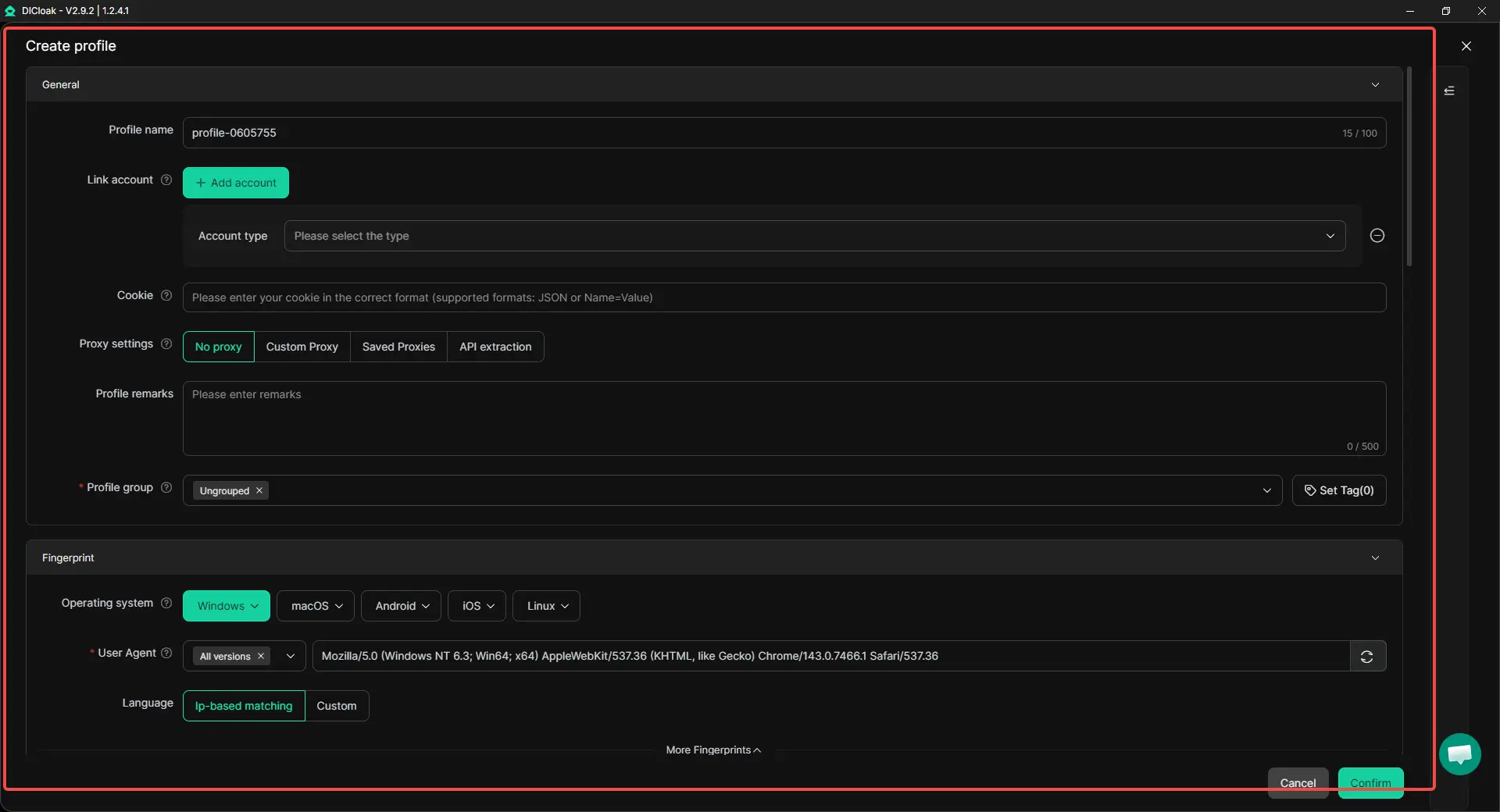
Each seller account should have its own browser profile. This keeps cookies, sessions, login data, saved account information, and local storage separate.
Logging into multiple seller accounts inside one browser profile can mix data and create avoidable mistakes. With DICloak, users can create a separate browser profile for each Amazon seller account, so each account has its own working environment.
4. Assign a Stable Network Setup to Each Account
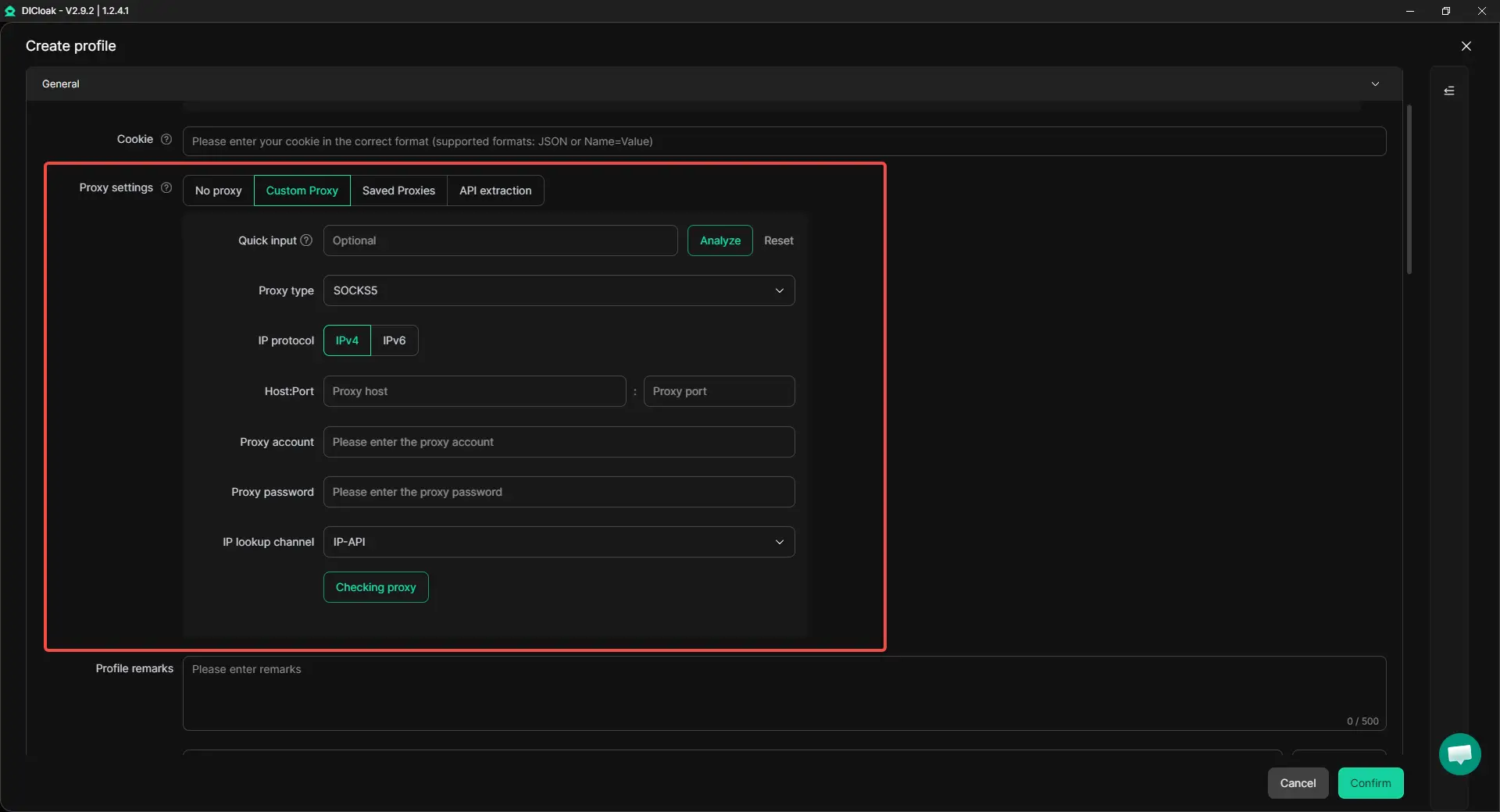
Each account should use a stable network setup. This includes proxy configuration, IP consistency, location consistency, and timezone consistency.
Stability matters more than frequent switching. If an account appears to move across unrelated networks too often, it may become harder to explain during a review. With DICloak, users can configure different proxies for different browser profiles to keep each account's network setup more consistent.
5. Log Into Each Seller Account Through Its Assigned Environment
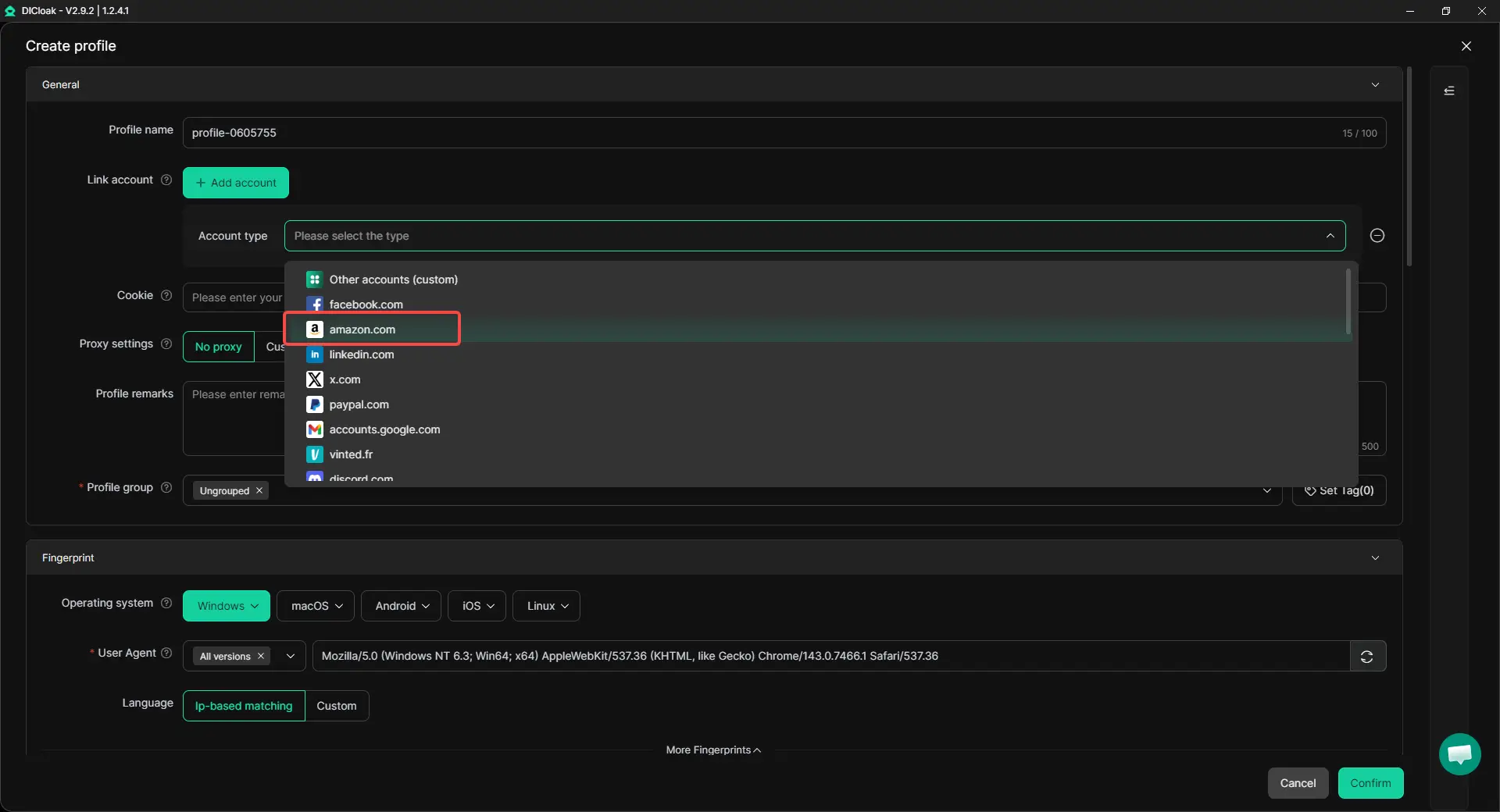
Each seller account should always be opened through its assigned browser profile. Avoid logging into one account, logging out, and then switching to another account inside the same profile.
This habit sounds simple, but it prevents many daily mistakes. For example, an agency managing several client accounts should open the correct profile first, then access the matching Seller Central account. Consistent login habits help keep account activity clean.
6. Keep Store Operations Separate
Account separation should continue after login. Each account should have its own listings, product titles, bullet points, A+ content, product images, customer service replies, inventory process, and promotion strategy.
For example, two stores should not copy the same product photos, listing text, and support replies across different accounts. Even with separate browser profiles, repeated store activity can make accounts look like one operation split into several stores.
7. Use Automation Carefully for Research and Routine Tasks
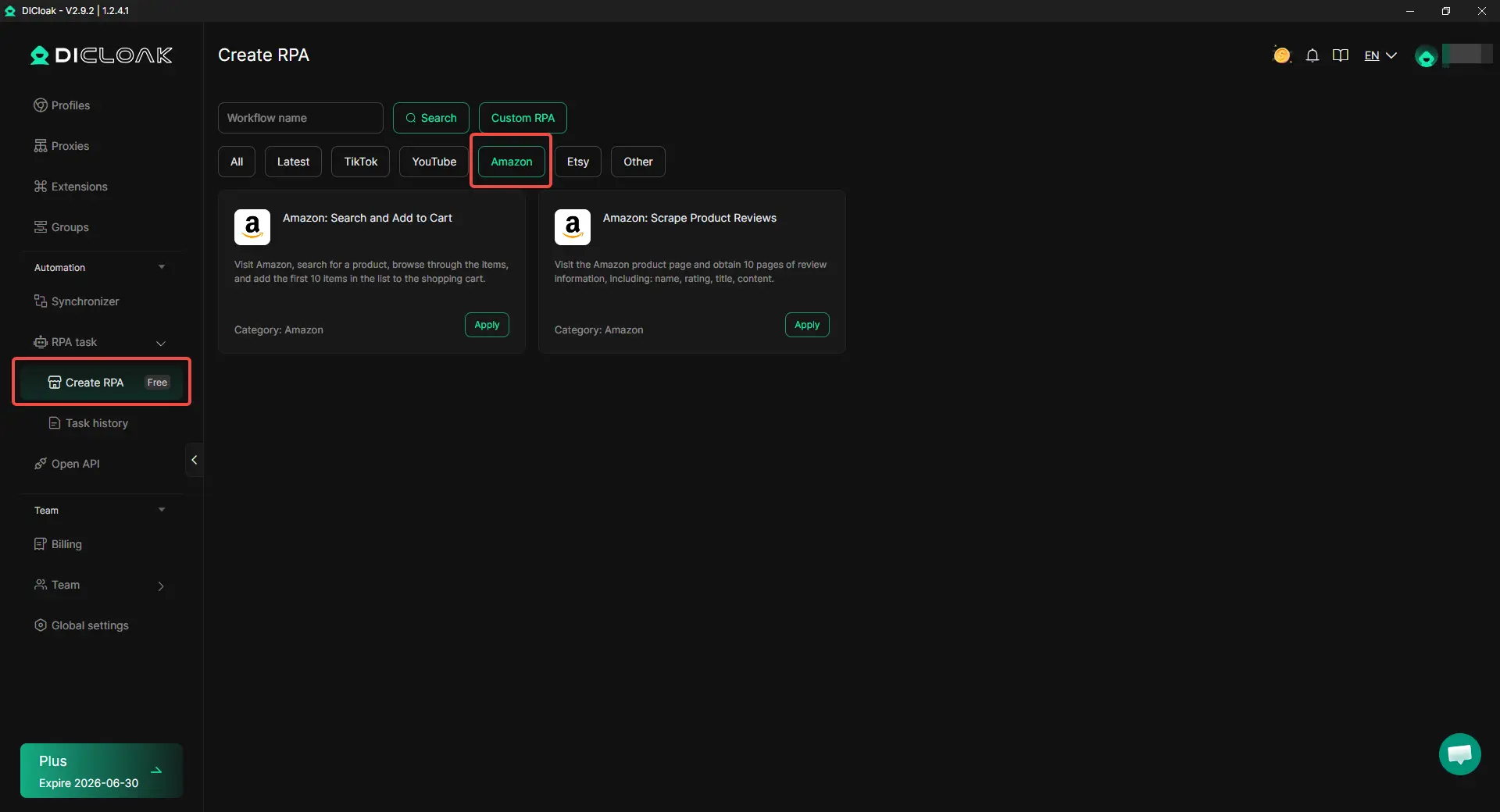
Automation can save time, but it should support real business tasks. With DICloak, users can use Amazon-related RPA templates for tasks such as product search, shopping flow testing, and product review collection. For example, a team can collect review data to study customer pain points, or test how products appear in the shopping journey. These tasks should stay documented and separated by accounting environment.
8. Delegate Access and Responsibilities Carefully
When several people manage seller accounts, roles should be clear. This may include PPC managers, customer support staff, inventory managers, content teams, or agency partners.
Avoid sharing the main account password with everyone on the team. With DICloak, users can share browser profiles with team members without exposing the main account credentials. This helps teams manage access while keeping account ownership clearer.
9. Create SOPs and Track Account Activity
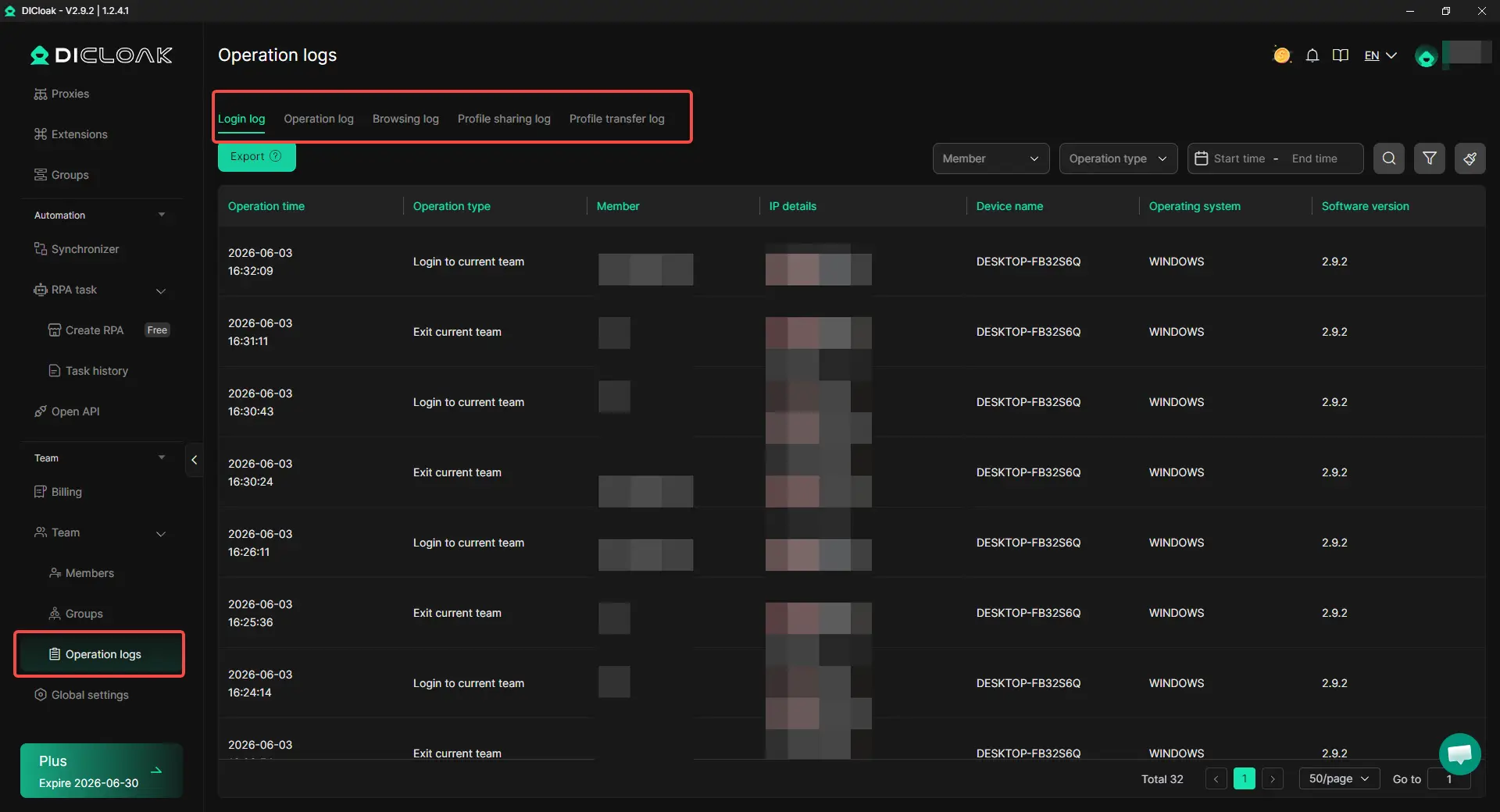
As the number of accounts grows, written processes become more important. Teams should keep account notes, SOPs, access records, activity records, profile usage logs, and handover records.
This helps when a team member changes roles or leaves the company. DICloak's operation logs can help teams maintain clearer access records and review profile activity when needed.
10. Monitor Account Health and Stay Compliant
The final step is ongoing maintenance. Check Account Health, Order Defect Rate, late shipment rate, cancellation rate, policy warnings, verification requests, and document updates on a regular schedule.
Multiple seller accounts are easier to manage when problems are caught early. A clean setup is not a one-time task. It is a routine that keeps each account stable, compliant, and ready for review.
Best Practices Checklist for Managing Multiple Amazon Seller Accounts in 2026
Managing multiple Amazon seller accounts becomes much easier when every account follows the same operational standards. Most account linkage problems come from inconsistent records, mixed environments, unclear team access, or poor account maintenance.
Use the checklist below as a quick reference when setting up or reviewing multiple seller accounts.
| Area |
Best Practice |
| Business Purpose |
Maintain a clear business reason for every seller account |
| Business Information |
Keep company, tax, payment, and contact information organized |
| Browser Environment |
Use one browser profile for each seller account |
| Network Setup |
Keep IP, location, and network settings stable |
| Account Sessions |
Always access each account through its assigned environment |
| Store Operations |
Keep listings, images, and support activities separate |
| Team Access |
Use permissions and avoid sharing primary credentials |
| Activity Tracking |
Maintain SOPs, notes, and access records |
| Account Health |
Monitor warnings, performance metrics, and verification requests |
For example, a seller operating two brands may have separate business records, separate browser profiles, and separate support processes, but still review Account Health metrics for both stores every week. Small habits like these often make account management more predictable over time.
If there is one principle that applies to every item in this checklist, it is consistency. The more clearly each seller account operates as its own business unit, the easier it becomes to manage multiple Amazon seller accounts while reducing unnecessary account linkage risks.
Frequently Asked Questions About Managing Multiple Amazon Seller Accounts
Can Amazon detect multiple seller accounts?
Yes. Amazon can identify relationships between seller accounts through a combination of business information, account access patterns, technical environments, and operational activities. A single signal is not always enough, but multiple overlapping signals can make accounts appear related.
This is why sellers should focus on maintaining clear business separation rather than relying on a single technical solution. Many multi-account operators use an antidetect browser like DICloak to create separate browser profiles for different seller accounts while keeping business records and operations organized.
Can I use the same bank account for multiple Amazon seller accounts?
In most cases, using the same bank account across multiple seller accounts can create account linkage risk. If multiple accounts serve different businesses, brands, or legal entities, it is generally better to keep financial records separate and organized.
Clear documentation makes account reviews and verification requests easier to handle. When managing multiple stores, sellers should think about separation across both financial records and daily account operations.
Is it safe to manage multiple Amazon seller accounts from the same computer?
Yes, many sellers manage multiple Amazon seller accounts from the same computer. The important factor is how those accounts are managed.
The larger risk comes from mixing browser sessions, cookies, login history, and saved account data. Antidetect browsers like DICloak allow users to create separate browser profiles, so each seller account operates within its own browser profile instead of sharing the same session data.
Can team members manage multiple Amazon seller accounts?
Yes. Many agencies, aggregators, and multi-brand businesses have team members working across several seller accounts. The important part is maintaining clear access controls, defined responsibilities, and proper activity tracking.
Instead of sharing one primary login across the entire team, many businesses use tools such as DICloak Antidetect Browser to assign access through separate browser profiles while keeping account credentials protected and easier to manage.
What is the biggest mistake sellers make when managing multiple Amazon seller accounts?
The biggest mistake is assuming account separation is only a technical issue. Successful multi-account management requires separation across business records, browser profiles, network setups, team access, and daily operations. Even if accounts use different login environments, they may still appear related if they share the same business information or operate in nearly identical ways.
The strongest setups combine both business separation and operational separation rather than focusing on only one area.
Conclusion
Managing multiple Amazon seller accounts in 2026 is less about having multiple accounts and more about managing them correctly. Amazon allows multiple seller accounts when there is a legitimate business need, but each account should have a clear purpose, organized records, and strong account health. The more clearly each account operates as its own business, the easier it becomes to manage growth while reducing unnecessary account linkage risks.
Successful sellers focus on separation across business information, browser profiles, network setups, team access, and daily operations. With a structured approach and consistent management practices, multiple Amazon seller accounts can remain organized, scalable, and easier to maintain over the long term. For sellers who need separate browser profiles for different accounts, an antidetect browser like DICloak can help keep account workspaces organized and easier to manage.
 Web Proxy Tools
 Free Tools
 Cookie Plugin
 UA Generator
 MAC Address Generator
 IP Generator
 IP Address List
 2FA Code Generator
 World Clock
 Anonymous Check
 WebRTC Leak Test
 UUID Generator
 Free Web Proxy Site
 Proxy Checker
 FB Ad Checker
 AI Web Scraping
 Free SMM Tools
 Twitter Shadowban Checker
 Instagram Name Checker
 UTM Generator
 Username Generator
 AI Hashtag Generator
 LinkedIn Headline Generator
 Social Media Image Resizer