ChatGPT is one of the most popular AI tools today. People use it for writing, learning, coding, and daily work. It is fast most of the time. But many users still ask, “why is ChatGPT so slow?” or “why is my ChatGPT so slow?” when replies take longer than expected.
This problem often happens during busy hours. When millions of users send questions at the same time, the system can slow down. OpenAI has confirmed that high traffic, network issues, or temporary service events can cause delays. For example, during past peak periods, users reported long loading times even with simple questions.
Understanding these performance issues matters. If you know the real reason behind the delay, you can decide whether to wait, refresh, or fix the problem on your side. In the next sections, we will break down the causes and show clear, practical ways to speed things up.
Causes of Slowness: Why Is ChatGPT So Slow?
After knowing that busy hours and service pressure can slow things down, the next step is to understand where the delay comes from. When users ask why is ChatGPT so slow, the reason is often a mix of system load, question size, connection quality, and local device limits. Below are the most common causes, explained with real and familiar examples.
Server Load and Traffic
One of the main answers to why is ChatGPT so slow is high server traffic. ChatGPT is used by millions of people every day. When many users send requests at the same time, the system must line them up and process them in order.
This often happens during busy hours. Even short questions may take longer to respond. In these cases, the delay is not caused by your device. Waiting a few minutes or refreshing the page usually helps.
Complexity of Queries
The way you ask a question affects speed. Simple questions are processed quickly. Long or complex prompts take more time.
For example, asking for a detailed guide with steps, examples, and explanations requires the model to handle much more information. This increases processing time. If replies feel slow, splitting one large request into smaller questions often speeds things up.
Network Latency
ChatGPT works through real-time data transfer between your device and remote servers. If your internet connection is slow or unstable, the response will feel delayed.
This is why some users ask why is my ChatGPT so slow only on certain networks. Busy or low-quality connections can add seconds before text appears, even when ChatGPT itself is working normally.
API Rate Limits
For users accessing ChatGPT through apps or tools, request limits are part of the system design. These limits control how many requests can be processed within a short time.
When too many requests are sent quickly, later ones may slow down or wait. This behavior is expected and helps keep the service stable for everyone.
Processing Power and Model Size
ChatGPT uses large AI models to generate accurate answers. Larger models can handle complex tasks, but they also require more computing power.
When a request needs heavy reasoning or long output, it naturally takes more time to process. During busy periods, these heavier tasks may feel slower than short responses.
Local Device and Network Issues
Many speed problems come from the user’s own device.
ChatGPT slow on browser (Chrome, Firefox, Safari):
Cache, cookies, or browser extensions can interfere with ChatGPT. Ad blockers, grammar tools, or security add-ons may block scripts. Opening a private window or disabling extensions often fixes the issue. On some browsers, outdated versions can also cause lag.
ChatGPT slow on desktop or PC:
Too many open tabs or background programs can use up CPU and memory. When system resources are low, streaming text appears slowly. Closing other apps or restarting the computer often gives an instant boost.
ChatGPT slow on iOS app and keyboard issues:
Some users notice typing lag in the mobile app. Predictive text, autocorrect, or third-party keyboards can cause delays. Switching to the default keyboard, restarting the app, or updating the system usually solves the problem.
ChatGPT Slow on Long Conversations
Long conversations also affect speed. ChatGPT must read the entire chat history each time it responds. Each word counts as a “token.” When the conversation gets very long, response time increases. This is why starting a new chat often feels much faster than continuing an old one.
By understanding these causes, it becomes easier to see why is ChatGPT so slow in different situations. In the next section, we will focus on clear and practical steps to make ChatGPT faster, based on the exact problem you are facing.

Why is ChatGPT Slow? (Quick Summary Table)
| Reason |
Technical Factor |
Fix / Optimization |
| ChatGPT slow on browser |
Cache, cookies, extensions interfering with scripts |
Clear cache, disable extensions, reload page |
| Too many users at once |
Server load and request queueing |
Wait a few minutes and retry |
| Long conversations |
Large context window and token usage |
Start a new chat or reset conversation |
| Complex or long prompts |
Higher processing and inference time |
Split the request into smaller prompts |
| Slow internet connection |
Network latency and routing delays |
Use a more stable connection |
| API usage limits |
Rate limiting and request control |
Reduce request frequency or upgrade plan |
| Large AI model processing |
High computational cost per response |
Allow more time for complex tasks |
| Low device performance |
Limited CPU or memory resources |
Close background apps or restart device |
| Mobile typing lag |
Keyboard and app performance issues |
Switch to default keyboard, restart app |
Troubleshooting: Why Is ChatGPT So Slow and How to Fix It?
Now that you understand the main causes, the next step is action. When users ask why is ChatGPT so slow or why is my ChatGPT so slow, they usually want a clear fix, not just an explanation. The good news is that many speed issues can be improved with simple steps.
Immediate Troubleshooting Steps
Start with the basics. First, check your internet connection. If pages load slowly or videos buffer, ChatGPT will also feel slow. Refreshing the page or reconnecting to a stable network often helps.
Next, look at your device. If many apps or tabs are open, your system may struggle to keep up. Closing unused programs, stopping background tasks, or restarting the device can improve response speed right away. Many users notice that ChatGPT becomes faster after a simple restart.
Optimizing User Queries
The way you write your prompt matters more than most people expect. Long and complex requests take longer to process.
For example, instead of asking for a full guide with many sections at once, try asking one clear question at a time. Shorter prompts reduce processing time and often lead to faster replies. This small change alone answers why is ChatGPT so slow for many users.
Using Proxies
In some network setups, routing tools such as proxies can help data travel more efficiently between your device and remote servers. When the connection path is cleaner and more direct, delays may be reduced.
This is more common in managed networks or business environments. For regular users, the key idea is simple: a smoother connection path can lead to faster responses.
Timing of Use
Timing also plays a role. ChatGPT slows down most when many users are active at the same time. During these busy periods, requests wait in line.
If possible, try using ChatGPT during quieter hours. Many users report faster replies and smoother performance when overall traffic is lower. Sometimes, waiting just a short time and trying again makes a clear difference.
Device and Browser Optimization
Your browser and system software should always stay up to date. Updates often fix performance issues and improve how pages load.
Clearing browser cache and cookies can also help, especially if ChatGPT feels slow only in one browser. Disabling heavy extensions like ad blockers or grammar tools is another common fix. On mobile devices, updating the app and system software can solve typing lag and slow responses.
By following these steps, most users can clearly see why is ChatGPT so slow in their case and fix it quickly. In the next section, we will look at how to keep ChatGPT running fast over the long term and avoid repeated slowdowns.
Faster Alternatives When Why Is ChatGPT So Slow and Time Is Critical
Sometimes, even after troubleshooting, waiting is not an option. When deadlines are tight, users stop focusing on why is ChatGPT so slow and start looking for faster ways to get results. In these moments, switching tools or models is often the most practical solution. Below are proven alternatives that many users rely on when why is my ChatGPT so slow becomes a real problem.
Use Different AI Models for Different Tasks
ChatGPT is powerful, but it is not always the fastest choice for every job. Some models are optimized for speed, long text, or specific tasks. Choosing the right one can save a lot of time.
Claude
Claude is well known for handling very long texts smoothly. It often responds faster than large ChatGPT models when working with big documents.
Best use cases:
- Summarizing long reports or books
- Reviewing large blocks of text
- Rewriting or analyzing long articles
If ChatGPT feels slow while summarizing a long research document, Claude often completes the task faster with fewer delays. This makes it a strong backup when why is ChatGPT so slow during heavy text work.
Gemini (Google AI)
Gemini is designed for speed and real-time tasks. It works especially well when tasks involve searching, organizing, or combining information.
Best use cases:
- Fast summaries
- Short explanations
- Tasks connected to documents or spreadsheets
When ChatGPT is slow and you need a quick explanation or structured output, Gemini often delivers results faster, especially for short and clear prompts.
DeepSeek
DeepSeek focuses on specific tasks instead of general knowledge. Because they are smaller and more optimized, they often respond very quickly.
Best use cases:
- Coding help
- Structured data output
- Logic-based or technical tasks
If ChatGPT is slow when generating code snippets or structured formats, DeepSeek can return results almost instantly. This is a common choice when why is my ChatGPT so slow affects development work.ed users do not rely on one AI tool only. They switch based on task type, speed needs, and workload.
When speed is critical, flexibility matters more than loyalty to one tool. Instead of waiting and asking why is ChatGPT so slow, using the right alternative helps you stay productive and finish work on time.
Using DICloak Antidetect Browser to Reduce ChatGPT Slowdowns in Shared Accounts
In many team scenarios, why is ChatGPT so slow is not caused by servers or devices, but by unstable account usage. When several people log in and out of the same ChatGPT account, sessions reset, pages reload, and access is interrupted. These actions often make users feel why is my ChatGPT so slow, even though the system itself is working normally.
To avoid this, users can rely on an antidetect browser like DICloak to create a stable and controlled sharing environment for ChatGPT accounts.
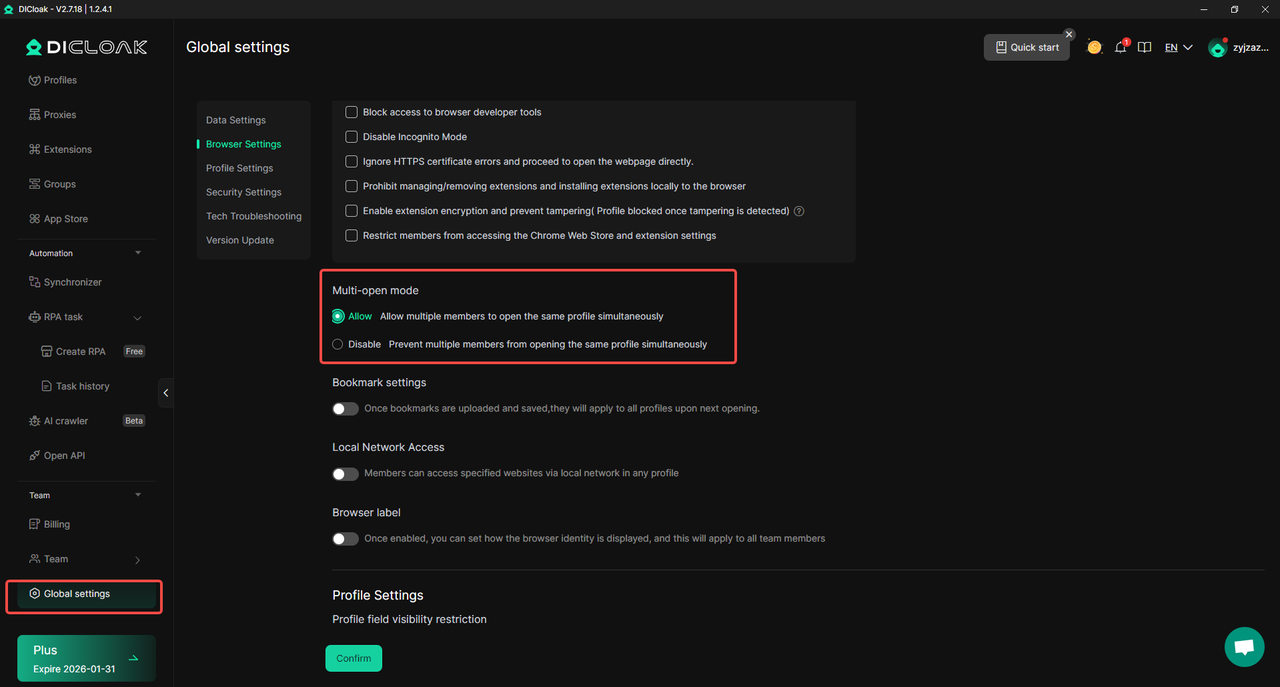
- With DICloak, users can enable simultaneous access without conflicts. By turning on Multi-open mode, multiple team members can use the same ChatGPT account at the same time. No one gets logged out when another person opens the session. This prevents repeated reloads and interruptions that slow work down.
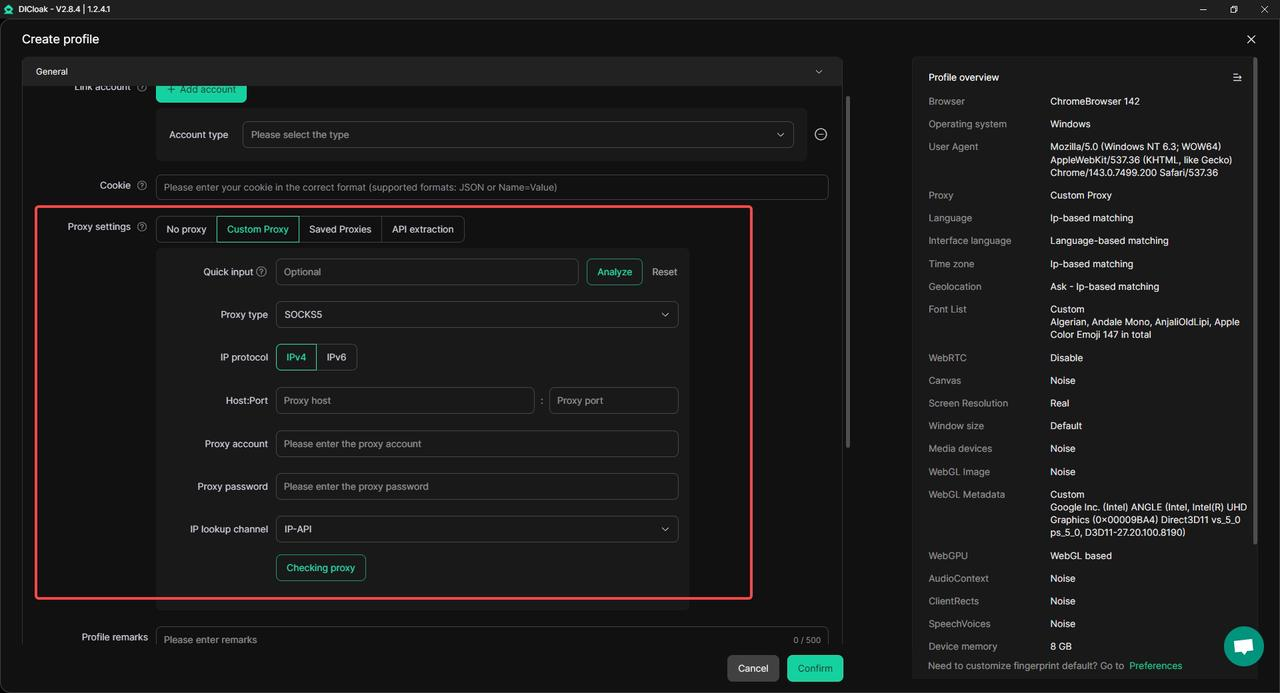
- Users can keep a consistent login environment with a single stable IP. By configuring one static residential proxy inside the browser profile, all access appears to come from the same location. This consistency reduces security checks and forced session resets, which are common reasons ChatGPT suddenly feels slow during team use.
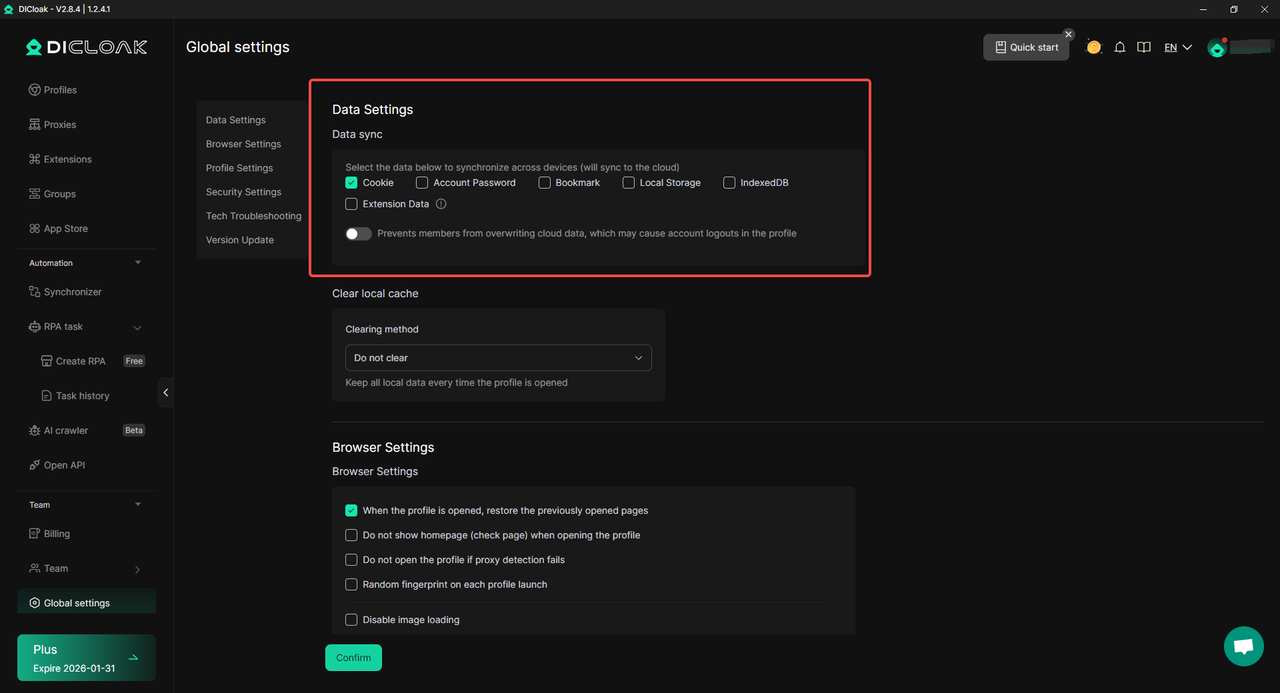
- Login sessions can stay synced across team members. Once the main user logs in, the session data is saved. Other team members can open the same profile and access ChatGPT without re-entering the password. This removes repeated authentication steps that often cause delays and page refreshes.
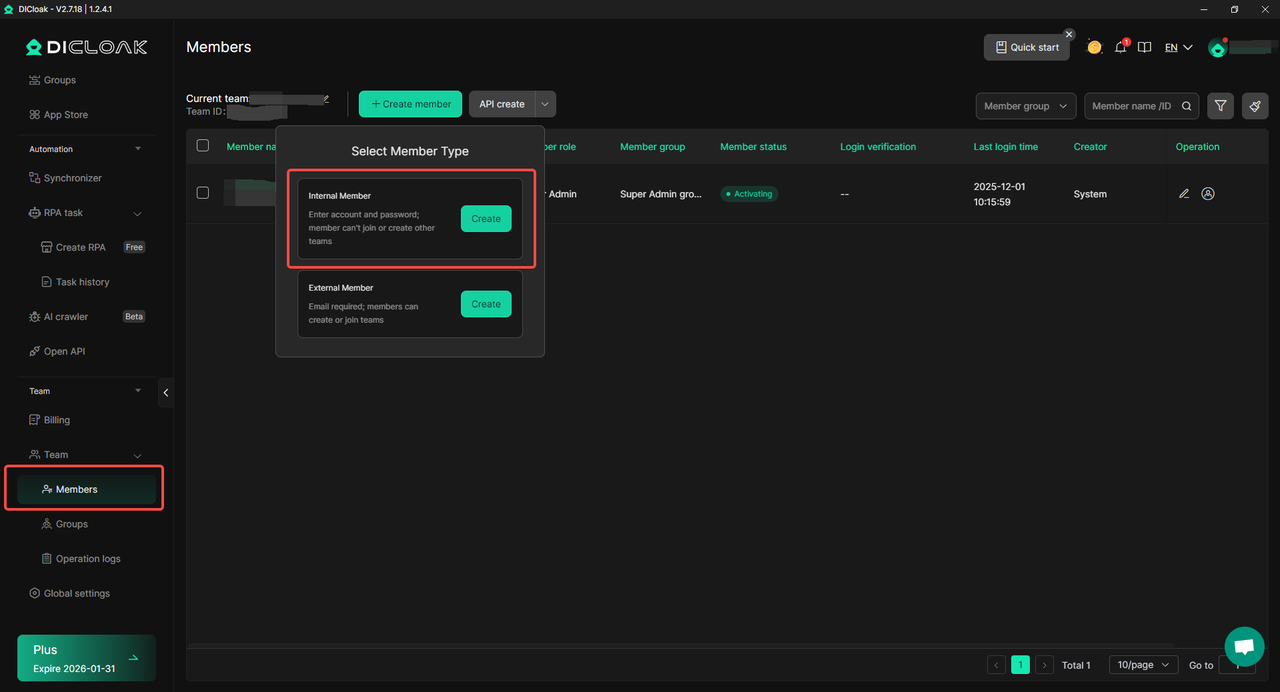
- Team access can stay secure and limited. Users can create separate team member accounts and grant access only to the ChatGPT profile. Other websites and personal accounts remain isolated. This avoids risky behavior that could trigger security actions and slow down account access.
- Sensitive account data can stay protected while sharing. Users can hide passwords, block developer tools, restrict extensions, and limit accessible websites to ChatGPT only. Billing details or account settings can also be hidden. This keeps shared use clean, stable, and controlled.
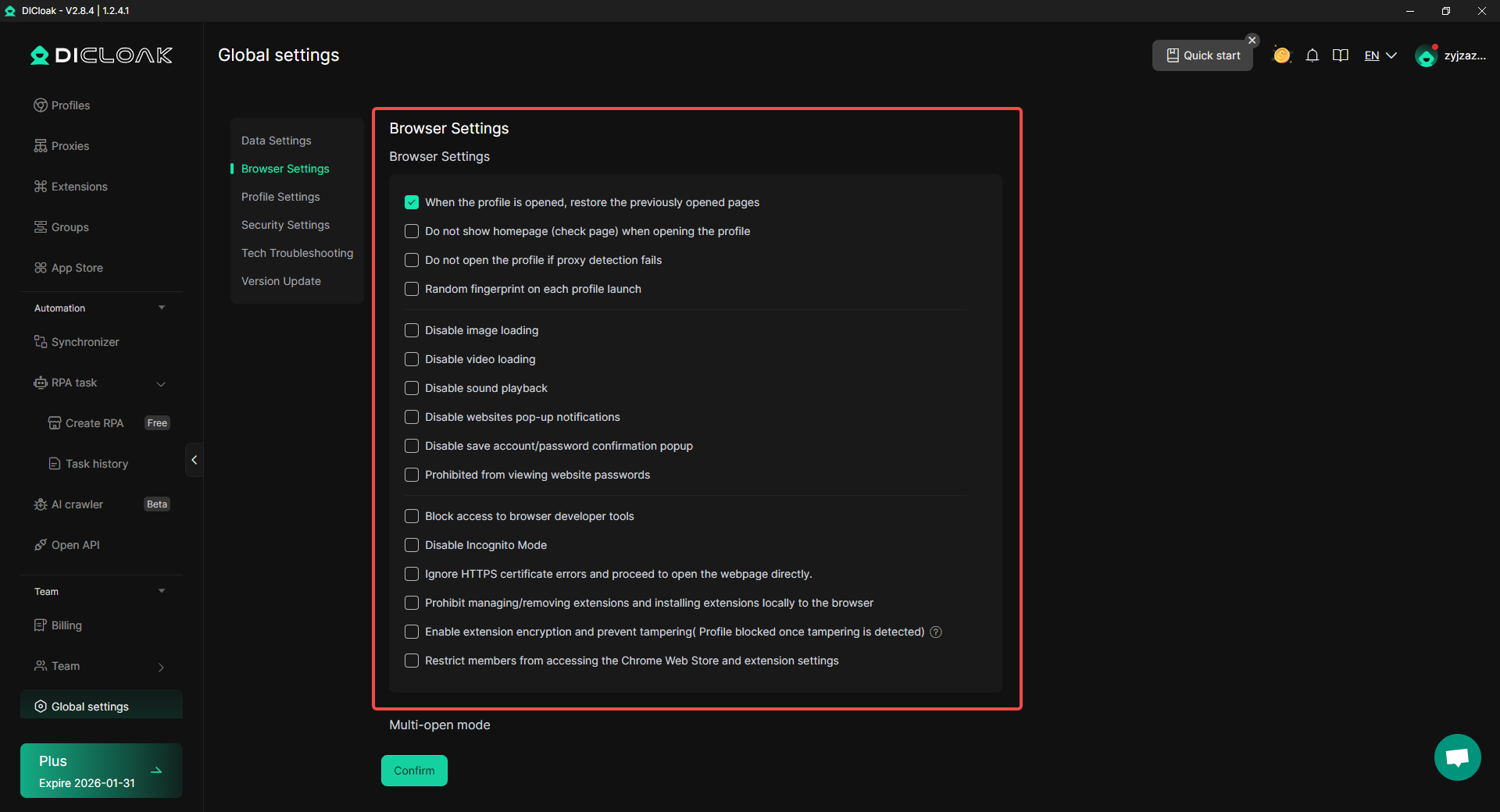
In team workflows, slow performance is often the result of messy account access rather than system speed. When why is ChatGPT so slow happens during shared use, managing access through an antidetect browser like DICloak helps keep sessions stable, reduces interruptions, and allows teams to work smoothly without constant delays.
Conclusion
If you have ever asked why is ChatGPT so slow, the answer is usually not just one single problem. Slow performance often comes from a mix of factors, such as high server traffic, long or complex prompts, large conversation history, or limits on your own device or browser. During busy periods, even simple questions may take longer to respond, which can make the experience feel frustrating.
At the same time, many delays are under your control. Shortening prompts, starting a new chat, keeping your browser clean, and making sure your device runs smoothly can noticeably improve speed. In real use, small changes—like breaking one big request into smaller steps—often make ChatGPT feel much faster and easier to use. This is why understanding the real reason behind why is my ChatGPT so slow matters more than guessing.
When time is critical, flexibility becomes important. Using lighter tools, task-focused AI models, or alternative assistants can help you stay productive instead of waiting. For teams, managing shared access in a stable and structured way also reduces interruptions that make ChatGPT feel slow or unreliable.
In the end, ChatGPT is a powerful tool, but like any online service, its speed depends on how and when it is used. By understanding the key factors and applying the right solutions, you can reduce slowdowns, work more efficiently, and get consistent results—even when performance issues appear.
Frequently Asked Questions (FAQs)
Why is ChatGPT so slow all of a sudden?
ChatGPT can suddenly become slow when many users are online at the same time. Server load often increases during busy hours. In some cases, long conversations, large prompts, or temporary service issues can also cause delays. If it happens suddenly, waiting a short time or refreshing the page often helps.
Why is my ChatGPT so slow even with fast internet?
A fast internet connection does not always mean fast responses. ChatGPT may feel slow due to high server traffic, long chat history, or heavy processing requests. Browser cache, extensions, or device performance can also slow things down, even when your internet speed is good.
Does a long conversation make ChatGPT slower?
Yes. Long conversations are a common reason why is ChatGPT so slow. The system needs to read the full chat history every time it responds. As the conversation grows, response time often increases. Starting a new chat usually makes replies faster.
Is ChatGPT slower during certain times of the day?
ChatGPT often slows down during peak usage periods. When many people use the service at the same time, requests wait in line. Using ChatGPT during quieter hours can result in faster and smoother responses.
Can browser or device issues cause ChatGPT to be slow?
Yes. Outdated browsers, heavy extensions, low device memory, or too many open apps can all affect performance. Clearing cache, disabling extensions, updating software, or restarting the device can often fix issues related to why is my ChatGPT so slow.
 Web Proxy Tools
 Free Tools
 Cookie Plugin
 UA Generator
 MAC Address Generator
 IP Generator
 IP Address List
 2FA Code Generator
 World Clock
 Anonymous Check
 WebRTC Leak Test
 UUID Generator
 Free Web Proxy Site
 Proxy Checker
 FB Ad Checker
 AI Web Scraping
 Free SMM Tools
 Twitter Shadowban Checker
 Instagram Name Checker
 UTM Generator
 Username Generator
 AI Hashtag Generator
 LinkedIn Headline Generator
 Social Media Image Resizer