You set up a proxy, open Facebook, and hit a wall, login page reloads, codes never arrive, or the site just spins. For anyone running multiple accounts or working from restricted networks, facebook login not working with proxy isn’t just a glitch. It’s a daily blocker that turns a simple workflow into a guessing game. Sometimes you see “facebook not loading with proxy,” or you get stuck in a loop where you can’t log into facebook using proxy even after swapping IPs.
But the real headache isn’t just the failed login. If you keep retrying with the same proxy setups, Facebook starts flagging your activity as suspicious. Accounts that log in from mismatched device fingerprints or inconsistent IP zones get stuck in extra verification, or worse, face temporary locks. The risk isn’t only about getting in, it’s about avoiding the kind of detection that can sideline your pages or campaigns for days.
What most people miss is that Facebook doesn’t just check your IP. It cross-checks cookies, browser fingerprints, and even time zone settings. Relying on standard proxies without managing these layers leaves visible traces. That’s why copy-paste proxy setups that work for other platforms break down here, Facebook’s anti-fraud systems are designed to spot the patterns most proxy users ignore.
If you’re tired of chasing fixes that only work for a day, it’s time to look at what actually causes these login failures and what a safer workflow looks like. Here’s what you should check first.
Why Facebook Login Fails When Using a Proxy in 2026
If your Facebook login isn’t working with a proxy, the root issue usually isn’t just the IP, it’s the way Facebook connects your proxy use to other signals. Even a paid, “clean” proxy won’t help if your browser fingerprint, cookies, or login habits don’t line up with the new IP. That mismatch is what triggers blocks or endless loops of verification.
Common Proxy-Related Triggers for Login Blocks
Frequent IP changes, especially from different countries, or using a rotating proxy almost always puts your login under review. When your browser profile says “Berlin” but your proxy routes through São Paulo, Facebook’s checks pick it up in seconds.
How Facebook Detects Proxy Use in 2026
Facebook’s anti-fraud systems have evolved past simple IP checks. Now the platform cross-references your IP against known blocklists and looks for obvious proxy hosting ranges. If your proxy is on a public list or has been abused in the past, your account gets flagged before you even see the login screen. The platform also tracks geo-location signals and time zone data from your browser. If your IP says “Tokyo” but your device clock or browser locale points to Paris, Facebook sees that as a high-risk session. These mismatches don’t just cause one-off headaches, they often lock you into endless CAPTCHAs, or trigger warnings that can slow down every future login. The main reason logins fail with proxies is that Facebook’s checks now combine IP, fingerprint, and behavioral data to spot even minor inconsistencies.
How Facebook Responds to Suspicious Proxy Activity
- CAPTCHA challenges appear after a single failed login or geo mismatch.
- SMS or email verification is required if your session looks risky, sometimes every time you log in.
- Temporary or even permanent account locks are triggered if you trigger too many alerts or the proxy is on a blocklist.
If your login gets stuck at any of these hurdles, it’s a signal that Facebook is treating your proxy use as a possible threat. Next, it’s worth checking which detail tripped the system before trying another workaround.
What to Check First When Facebook Login Isn’t Working with a Proxy
When you can’t log into Facebook using a proxy, it’s rarely just “the proxy is bad.” The fastest way to find the real cause is to check proxy status, browser fingerprint alignment, and Facebook’s own service health, in that order. Here’s exactly what you should review before trying random fixes.
Is the Proxy Working and Not Blocked by Facebook?
Start by testing if your proxy connects at all and whether Facebook has already flagged its IP. Many so-called “fresh” proxies are already on Facebook’s internal denylist, so even if they work elsewhere, Facebook might block or restrict logins from that address. Use a proxy checker tool to confirm the IP’s web access and that it isn’t geo-blocked or associated with bulk abuse. If the proxy fails a basic IP reputation test or returns a Facebook checkpoint page every time, switch proxies before checking anything else.
Are Your Browser Fingerprints Consistent with the Proxy Location?
- Check your browser’s time zone and system clock match the proxy’s country.
- Make sure language and geolocation settings fit the IP location.
- Confirm your device type, user agent, and OS aren’t mismatched (for example, Windows user agent on a Mac).
Is Facebook Down or Experiencing Service Issues?
It’s easy to waste time troubleshooting your setup when the problem is actually on Facebook’s end. A quick check here can save you half an hour of dead-end fixes.
- Visit Facebook’s official status page for current outages.
- Try logging in from your normal home connection, without any proxy or custom browser.
- Test with a different browser profile to rule out corrupted cookies or local data.
If everything above checks out, but you still face login issues, the cause is likely a common misconfiguration or a repeated mistake in your workflow, exactly what’s covered next.
Top Mistakes That Cause Facebook Proxy Login Problems
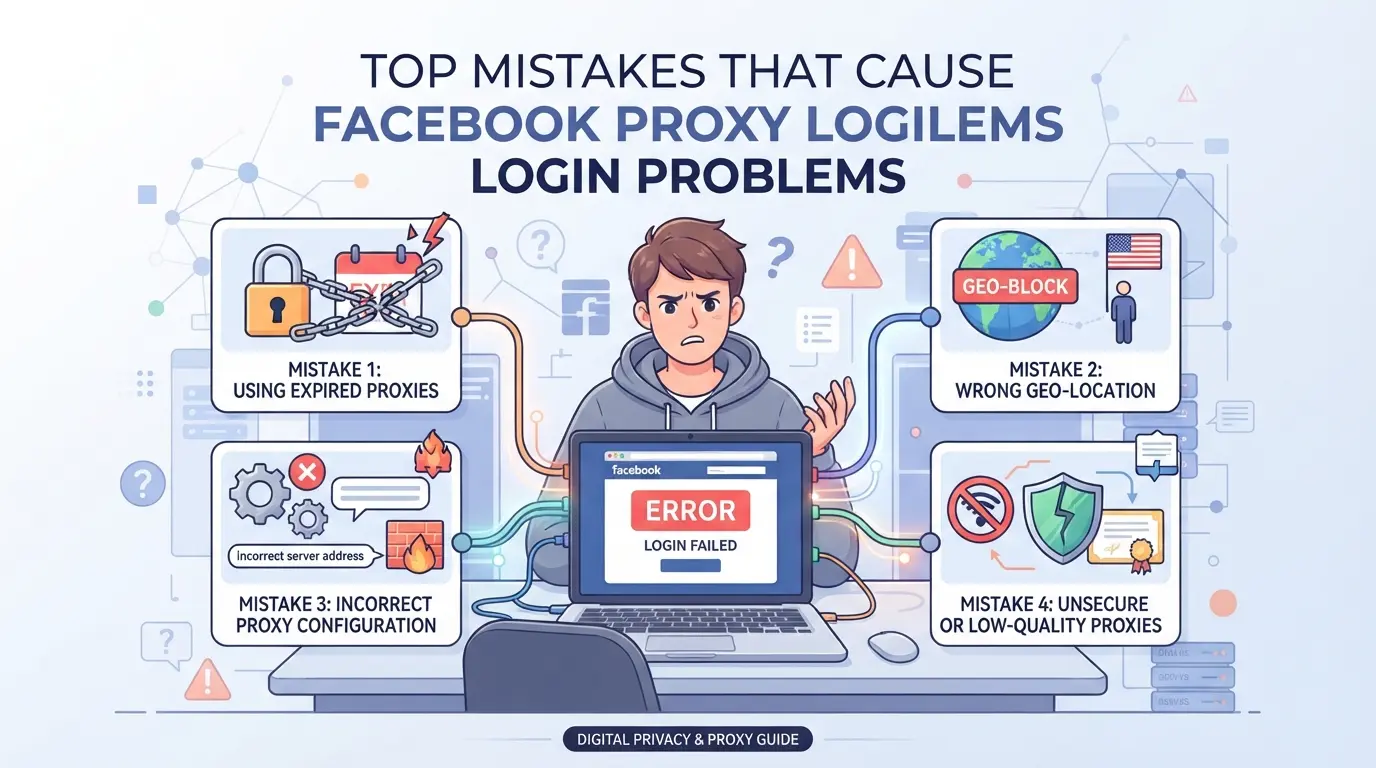
Most Facebook proxy login failures don’t come from technical setup, they happen because of avoidable mistakes that trip Facebook’s risk checks. If you keep seeing “facebook login not working with proxy” errors, check these problem spots before wasting time swapping proxies or resetting passwords.
Using Free or Overused Proxies
Public proxies are almost always flagged by Facebook. These IP addresses have been used by hundreds or thousands of people, so they end up blacklisted or rate-limited. If you’re using a “free” proxy, expect unpredictable errors, blocks, or endless security loops.
Mixing Multiple Accounts on the Same Browser Session
Running several Facebook accounts in the same browser window, even with different proxies, is a fast track to detection. The problem isn’t just cookies, session data, local storage, and even browser extensions can mingle between accounts. Facebook’s systems connect these dots and can lock all linked accounts at once. For example, if you switch between business pages without isolating browser profiles, Facebook may see overlapping cookies or device IDs, flagging your accounts for suspicious activity. Isolating each account in its own browser profile is the only way to avoid this cross-contamination.
Not Matching Browser Environment to Proxy Location
If your proxy shows a London IP, but your browser language is set to Spanish and your device clock is on Beijing time, Facebook’s risk engine lights up. These mismatches look like bot behavior. A real user’s time zone, browser language, and system locale usually match their IP’s country. When they don’t, login challenges or even permanent locks become more likely.
Switching Proxies Too Frequently
- Don’t change proxies every login, rapid IP shifts look like automation.
- Stick with one IP per account for at least several sessions.
- If you must rotate, use proxies from the same country and similar subnets.
These mistakes waste hours and risk account loss. Fixing them is far faster than trying random proxy swaps. The next step is handling each problem with a clear fix, moving from diagnosing to solving.
How to Fix Facebook Login Issues Caused by Proxies: Step-by-Step
If facebook login not working with proxy is your main headache, you need an ordered fix, not just random tweaks. This section walks through exactly what to check and change, starting with your proxy and moving through browser setup, profile isolation, rotation habits, and cookie management. If your login still breaks after these steps, the issue likely isn’t proxy-related.
Step 1: Test Your Proxy Connection and IP Reputation
- Open a new browser window and visit an IP checker like ipinfo.io to confirm your proxy is active and shows the expected location.
- Use tools such as scamalytics.com or check.getipintel.net to scan your proxy IP for blacklisting or fraud scores. If your IP is flagged, Facebook will often block login or trigger extra verification.
- If your proxy is dead or blacklisted, swap to a fresh IP from a different subnet, reusing old, burned IPs rarely works.
Step 2: Align Browser Fingerprints with Proxy Location
- Set your browser’s time zone and language to match the proxy's country. Facebook compares these against your IP, mismatches trigger security checks.
- Change your user agent and operating system settings to fit the region (for example, use Windows and Chrome for US proxies, Android and Chrome for India).
- If you skip fingerprint alignment, Facebook often sends you straight to the “Confirm Your Identity” screen.
Step 3: Use Isolated Browser Profiles for Each Facebook Account
- Create a separate browser profile for every Facebook account. This blocks session leaks and prevents cross-account cookie contamination.
- Never log into two accounts from the same profile, Facebook tracks session overlaps and flags accounts sharing device fingerprints.
- If you see “Suspicious Login Attempt” after switching profiles, your isolation isn’t set up right. Rebuild the profile from scratch.
Step 4: Avoid Rapid Proxy Switching and Maintain Consistency
- Stick to one proxy per account for at least five login sessions. Rapid IP changes look like bot behavior and spike Facebook’s fraud checks.
- Rotate proxies only if your current IP gets flagged, not on a fixed timer. Over-rotating leads to account locks.
- If you get back-to-back login failures, your IP rotation is too aggressive, slow down and use stable proxies.
Step 5: Clear Cookies and Cache Before Retrying Login
- Before retrying, wipe cookies and cache for the profile you’re using. Leftover data ties your session to past IPs, increasing detection risk.
- Use your browser’s “Clear browsing data” menu, not third-party cleaners, these can miss hidden session storage.
- If login still fails, switch to a new profile and restart the process. This step alone fixes most “can’t log into Facebook using proxy” issues.
If you’ve gone through these steps and still can’t log in, your next move is to rethink how you manage multiple accounts, not just proxy settings.
Running several Facebook accounts in 2026 means you can’t rely on quick proxy swaps or bulk login tricks, those setups trigger more lockdowns than access. The safer workflow is simple: isolate each account’s browser profile and assign a unique proxy. This blocks Facebook’s cross-checks and keeps your login history clean.
Why Each Account Needs Its Own Browser Profile and Proxy
If you log into multiple Facebook accounts from one browser or device, Facebook can link their activity and flag them as related. Using separate browser profiles and dedicated proxies for each account keeps their fingerprints and IPs independent.
Best Practices for Multi-Account Facebook Workflows in 2026
Profile isolation isn’t just about running accounts in separate browser windows. You need to make sure each profile has its own set of cookies, user agent, time zone, and proxy. If you’re working as a team, set up access controls so only the assigned operator interacts with each account. The main tradeoff here is speed versus safety, trying to speed up by sharing proxies or profiles usually ends with facebook login not working with proxy errors or accounts stuck in verification. For instance, using a shared proxy to save money can get every account flagged together if one triggers Facebook’s risk review. The safest setups mirror real users: unique device, unique IP, consistent fingerprint, and no overlap on login times. If someone ignores these details, their accounts often get forced into phone verification or locked out for days.
Common Pitfalls: What Gets Multi-Account Setups Flagged
- Mixing cookies from different accounts in one browser profile, Facebook detects the overlap and blocks logins.
- Reusing the same proxy IP across several accounts, this pattern gets flagged as non-human behavior.
- Failing to randomize browser fingerprints or device settings, Facebook sees repeated values and treats the accounts as suspicious.
If you’re auditing your workflow, check each profile for cookie contamination, proxy uniqueness, and fingerprint consistency. Fixing these drops the risk of login failures and account restrictions.
Configuring Isolated Browser Profiles and Proxies for Facebook Accounts in DICloak
Once you’ve seen how separate browser profiles and proxies can cut down cross-account headaches, the next step is setting them up the right way. For teams handling several Facebook accounts, especially when “facebook login not working with proxy” becomes a pattern, the real fix isn’t just changing proxies. It’s making sure each browser profile has its own storage, fingerprint, and network setup. Here’s how operators use DICloak for this workflow.
Setting Up Profile Isolation and Fingerprint Configuration in DICloak
Operators start by creating a new browser profile for every Facebook account they need to handle. Each profile gets its own storage and lets the user adjust key fingerprint signals, like browser version, language, time zone, and even screen size. This means a marketer can set a fresh environment for each account, making sure no browser details or cookies mix between sessions. The scope here is limited to browser-profile controls; nothing changes inside the connected Facebook account itself.

Assigning and Testing Proxies for Each Profile in DICloak
For every profile, users can enter their own proxy details, host, port, username, and password, then run a built-in check to confirm the proxy works and matches the needed region. This helps keep network signals consistent for each account. Since DICloak does not supply proxies, it’s up to the operator to pick and test the right one per workflow. The feature sticks to network setup for the browser profile; it won’t override Facebook’s own checks.

If Facebook login still fails after this setup, it’s time to look at other causes beyond just the proxy settings.
When Facebook Login Issues Aren’t Proxy-Related: Other Causes to Rule Out
Sometimes facebook login not working with proxy points to a totally different problem, one not fixed by changing IP or browser. Here’s how to spot those cases fast.
Account Security Checks and Temporary Locks
If Facebook asks for ID, a code, or flags “unusual activity,” it’s running a security challenge. Most sessions unlock after you finish the steps or wait up to 48 hours.
Credential Errors and Password Issues
Wrong email, phone, or password is still the top reason for blocked logins. If reset links don’t arrive, check your spam folder or try the “forgot password” tool with another contact method.
Device, App, or Browser Problems
One example: using an outdated browser or an app with blocked permissions often gets you stuck at the login screen, even with the right proxy and credentials.
Facebook Platform Outages or Regional Restrictions
- Check https://www.facebook.com/help/ for outage reports
- Search Twitter/X for “Facebook down”
- Try mobile and desktop, sometimes one fails, the other doesn’t
Key Takeaways: Safer Facebook Login with Proxies in 2026
Logging into Facebook with a proxy only works if your setup hides every trace that Facebook checks, not just your IP. Before logging in, you need to cover more than just the basics.
Checklist: What to Always Do Before Logging In
- Use a high-quality proxy with a clean reputation.
- Isolate each browser profile and keep its fingerprint stable.
- Clear cookies and cache before switching accounts.
Missing even one of these steps can make Facebook login not working with proxy a constant headache. The fastest way to get locked out is mixing old cookies, mismatched fingerprints, or a reused proxy, Facebook connects the dots faster than most people realize.
Frequently Asked Questions About facebook login not working with proxy
Why does Facebook say my login is suspicious when using a proxy?
Facebook often flags logins as suspicious when it detects a proxy. This happens because proxies can show a different location or IP reputation from your normal one. If your browser fingerprint or device info doesn’t match your usual pattern, Facebook may trigger extra security checks or block your access.
Can I use the same proxy for multiple Facebook accounts?
It's risky to use one proxy for several Facebook accounts. Facebook can link accounts with the same IP address, which may cause them to be flagged for suspicious activity. For better safety, use a unique or private proxy for each account to reduce the chance of detection and account bans.
How do I know if my proxy is blocked by Facebook?
To check if your proxy is blocked, try logging into Facebook using the proxy. If you see frequent CAPTCHAs, error messages, or can't load your news feed, the proxy is likely blocked. You can also use online tools to check the proxy IP's reputation and see if it's on any blacklist.
Is it safe to use free proxies for Facebook login?
Free proxies are usually not safe for Facebook logins. They are often used by many people, making them easy targets for Facebook to block or flag. Free proxies can also be slow, unreliable, or even steal your data, so it's better to use trusted, private proxies.
What should I do if Facebook login fails even after changing proxies?
If facebook login not working with proxy issues continue, check for other problems. Make sure your username and password are correct. Clear your browser cache and cookies. Try a different device or browser. Sometimes, Facebook may ask for extra verification if it senses unusual activity, even with a new proxy.If you're still struggling to access your account while using a proxy, consider switching to a more reliable privacy tool that is specifically designed to handle authentication issues. Testing alternative solutions can help maintain both security and smooth access without unnecessary interruptions or errors. Try DICloak For Free
 Web Proxy Tools
 Free Tools
 Cookie Plugin
 UA Generator
 MAC Address Generator
 IP Generator
 IP Address List
 2FA Code Generator
 World Clock
 Anonymous Check
 WebRTC Leak Test
 UUID Generator
 Free Web Proxy Site
 Proxy Checker
 FB Ad Checker
 AI Web Scraping
 Free SMM Tools
 Twitter Shadowban Checker
 Instagram Name Checker
 UTM Generator
 Username Generator
 AI Hashtag Generator
 LinkedIn Headline Generator
 Social Media Image Resizer