Encountering the "this account can't use gemini" error in Google Chrome is a frequent roadblock for users attempting to integrate Google’s next-generation AI into their daily operations. Even in 2026, access is far from universal. Whether you are prompted with a notification stating Gemini isn't supported in your country or that your account lacks the necessary permissions, these hurdles usually stem from specific technical configurations or geographic IP-fencing rather than temporary service outages.
Most Gemini access issues are triggered by one of three factors:
- administrative restrictions on managed Workspace domains,
- regional IP-fencing based on geographic location,
- strict age requirements linked to your verified Google identity.
Why does Chrome say my account can't use Gemini in 2026?
The technical logic behind these blocks is rooted in Google’s compliance with localized data laws and organizational safety protocols.
Managed Google Workspace and Education accounts
If you are using an account provided by a school or employer, your access is governed by centralized policies. Organization-level permissions override individual user preferences. Even if Gemini is available in your region, your IT administrator may have the service disabled for the entire domain to maintain compliance or security.
Geographic restrictions and IP detection
Google monitors your digital location via your IP address. Access is restricted in countries where local regulations, data privacy laws, or international sanctions conflict with Google’s operational policies. According to the latest 2026 data, restricted regions typically include: China、North Korea、Iran、Russia、Syria、Parts of Africa and the Middle East .
Note: Vietnam was previously restricted until mid-2025, but some users there still report intermittent access issues depending on their ISP.
Account age and identity verification status
To comply with digital consent laws—which often require a minimum age of 16 in the EU and 18 globally for generative AI—Google mandates that users be at least 18 years old to access Gemini. If your Google account lacks a verified birth date, or if the birth date indicates you are under 18, the system will trigger an automatic block to prevent the generation of potentially sensitive content.
Is your Google Workspace administrator blocking Gemini?
Professional and enterprise users often face blocks implemented at the root level of their organization’s IT department.
Checking your "Early Access Apps" permissions
If you see the "contact your admin" prompt, follow these command-style steps to verify the account status (or provide them to your IT department):
- Navigate to the Google Admin Console.
- Select Apps > Additional Google Services.
- Locate 'Early Access Apps' in the service list.
- Verify if the service status is set to 'ON' for your specific Organizational Unit (OU).
Why some organizations disable AI by default
IT departments often restrict generative tools due to concerns regarding data privacy, security risks, and bandwidth usage. Organizations may also block these tools to prevent the accidental exposure of proprietary company data to public AI training models.
How to bypass the "Gemini isn’t supported in your country" error
If you are located in a region where Gemini is geo-blocked, you must modify your digital footprint to appear as if you are accessing the service from a supported region like the US or UK.
Addressing WebRTC and DNS Leakage
A common reason location checks fail is WebRTC leakage. It can expose your real local IP or network details even when you are trying to keep your browsing environment separate. For a more advanced fix, go to chrome://flags/#disable-webrtc in Chrome and turn off the related WebRTC-sharing features. This can help reduce the chance of your real network information being exposed.
The importance of clearing persistent cookies and LSO
Chrome often stores older session and location signals in cookies, cache, and other browser data. If you switch to a different browsing setup without clearing that data, can't use gemini in chrome issues may still appear because the browser may still reflect the earlier environment. Clearing cookies and cache before a new login can help lower that risk.
Why a fresh Google account may be necessary
Google may connect access eligibility to the original region where an account was first created. If that account started in a restricted location, can't use gemini in chrome problems can continue even after other settings are changed. A cleaner option may be to use a newly created Google account in a supported region with a consistent browser profile, while keeping Location History disabled from the start.
Are your Chrome browser settings interfering with AI access?
Sometimes the issue is not your account or location, but the local browser profile and script execution.
Conflicting Chrome extensions and ad-blockers
Privacy-focused extensions or aggressive ad-blockers can inadvertently break cross-origin resource sharing (CORS) or trigger JavaScript execution blocks required for Gemini to function. If you use tools that block tracking scripts, they may prevent the AI interface from loading correctly.
The role of Incognito mode and Guest profiles
To isolate the cause, test Gemini in an Incognito window or a Guest profile. This provides a clean environment free from your primary account's persistent cookies and extensions. If Gemini works in Incognito mode, a browser extension or cached data is the culprit.
Managing multiple Gemini identities for global workflows
For digital marketers, SEO agencies, and researchers who must manage multiple AI identities across different regions, standard browser setups are insufficient for 2026 workflows. DICloak provides a professional-grade solution by allowing users to manage these identities without triggering Google’s security flags.
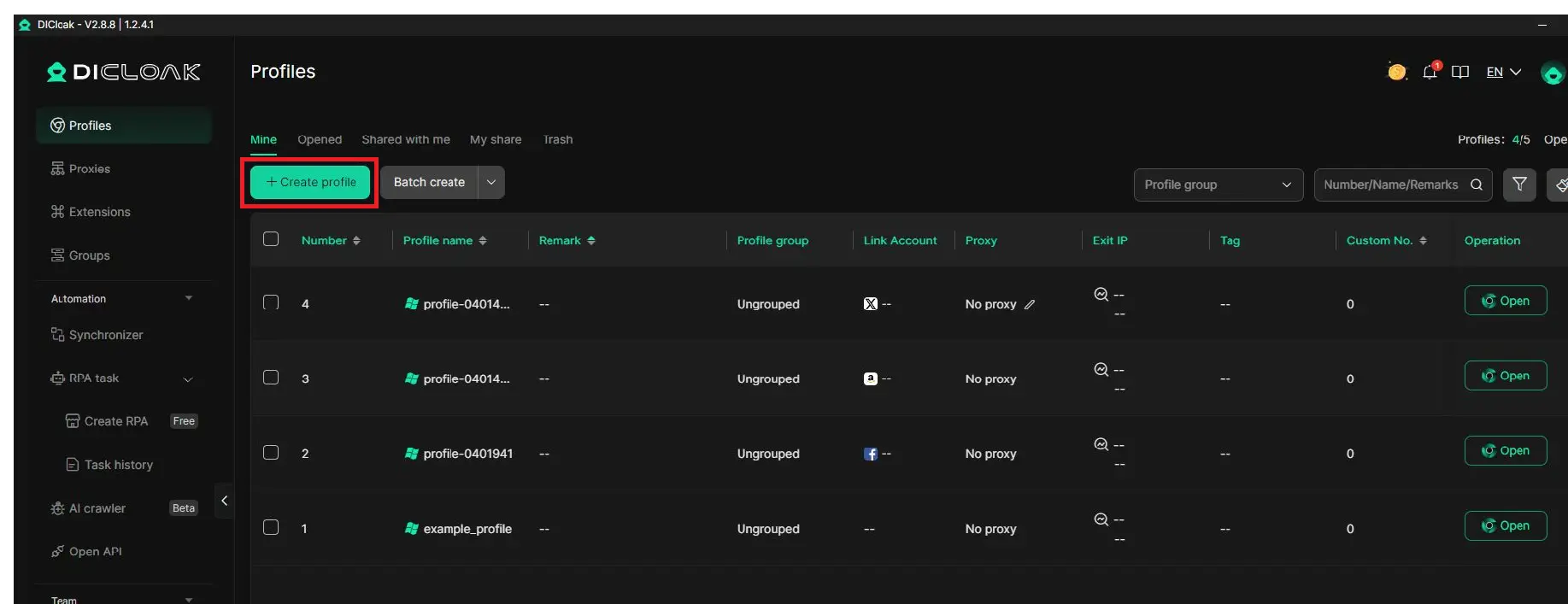
By using DICloak, users can:
- Create isolated browser profiles with unique digital fingerprints. This solves the "Home region" account lock by allowing you to create a profile that appears natively in the US or UK from the moment of account creation.
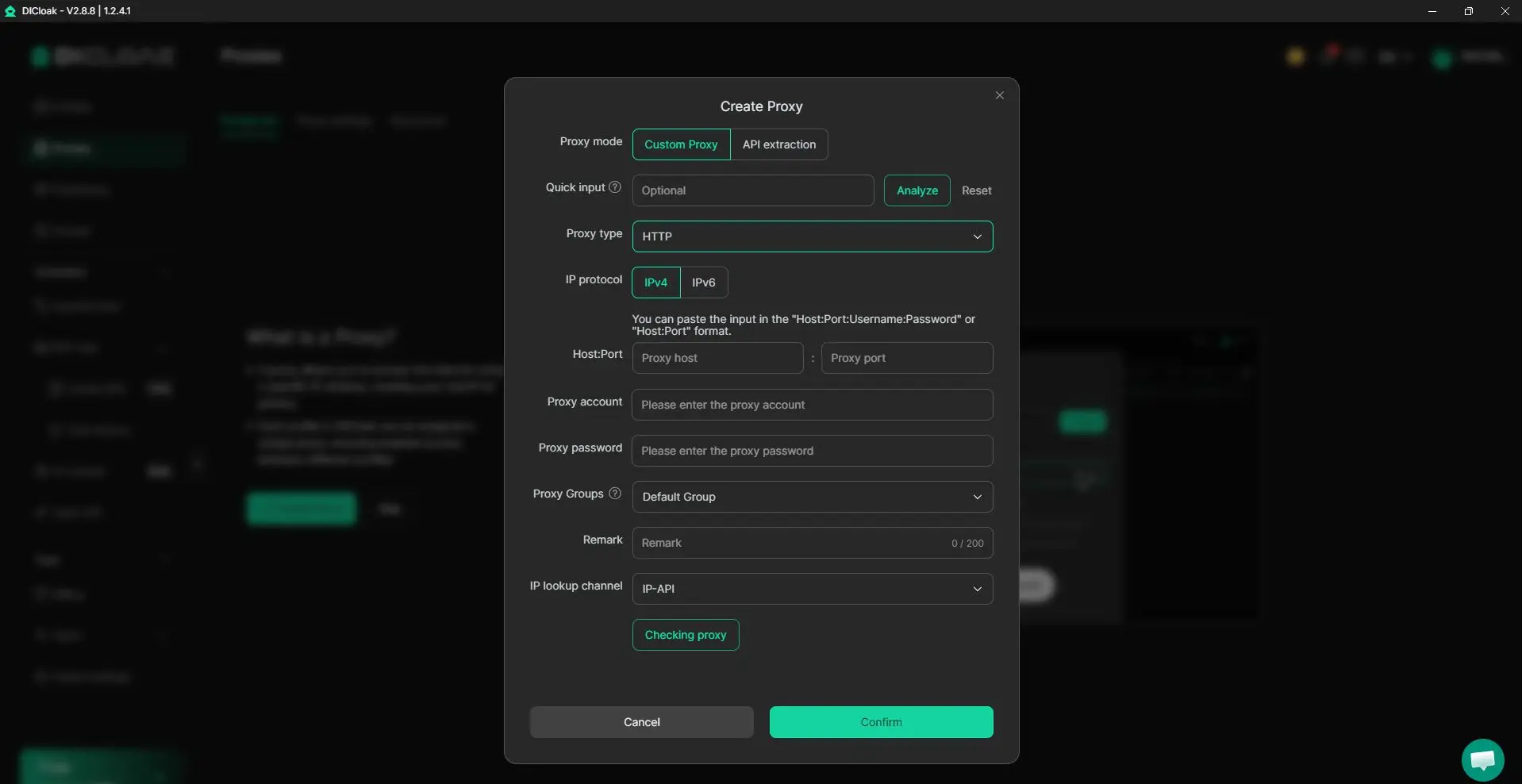
- Assign specific residential proxies to individual profiles, ensuring stable "local" access with high-reputation IP scores.
- Prevent account linking by ensuring that Google cannot see the connection between your various AI identities via browser fingerprinting.
- Manage team-based AI workflows to share access across different geographic regions without triggering IP collision alerts or account bans.
Is your Google account age set correctly for AI access?
Google’s age-gate is a hard requirement that cannot be bypassed browser settings.
Verifying your birth date in Google Account settings
Navigate to Google Account > Personal Info to check your birth date. If this field is blank or indicates you are under 18, Gemini will default to a restricted state. Updating this to reflect your actual age is the only way to clear this specific block.
Why 13–17-year-old accounts are often restricted
While the digital consent age is 16 in many EU jurisdictions, Google maintains a global 18+ policy for Gemini in 2026. This is a safety measure intended to ensure that generative content, which can be unpredictable, is only handled by users who meet the legal maturity requirements.
Frequently Asked Questions about Gemini Access
Question 1: Can I use Gemini if I am under 18 with parental consent?
Generally, no. As of 2026, Google Gemini is strictly 18+. Even with parental permission via Google Family Link, the service typically remains restricted for minor accounts.
Question 2: Why does Gemini work on my phone but not in my Chrome browser?
This is often an account sync or extension conflict issue. Ensure you are logged into the same account and that your desktop browser is not running CORS-blocking extensions that are absent on your mobile device.
Question 3: Will a free VPN unblock Gemini in restricted regions?
It is unlikely to be stable. Free VPNs often have low-reputation IP scores and are frequently blacklisted by Google's bot-detection systems. They also pose significant privacy risks regarding your data.
Question 4: How do I know if my organization has blocked Gemini?
Look for the specific "contact your administrator" prompt. This is a definitive sign that the service is disabled at the domain level in the Google Admin Console.
Question 5: Does using an antidetect browser violate Google’s Terms of Service?
Using tools to misrepresent your location can be flagged as a violation. While tools like DICloak help avoid detection, users should be aware that excessive account creation or suspicious activity can still lead to verification requests.
Question 6: Which countries are currently blocked from using Gemini in 2026?
Access is strictly restricted in China, Iran, North Korea, Russia, and Syria due to regulatory and legal frameworks.
Final Technical Summary
Resolving the "this account can't use gemini" error requires a targeted audit of your digital identity. Start by verifying your account type and age settings. If the issue is geographic, use a clean browser profile or a dedicated tool like DICloak to maintain a consistent, supported IP. Verification of the "holy trinity" of access—Account Type, IP Reputation, and Browser Fingerprint—is the only way to ensure 100% uptime for your AI workflows.
 Web Proxy Tools
 Free Tools
 Cookie Plugin
 UA Generator
 MAC Address Generator
 IP Generator
 IP Address List
 2FA Code Generator
 World Clock
 Anonymous Check
 WebRTC Leak Test
 UUID Generator
 Free Web Proxy Site
 Proxy Checker
 FB Ad Checker
 AI Web Scraping
 Free SMM Tools
 Twitter Shadowban Checker
 Instagram Name Checker
 UTM Generator
 Username Generator
 AI Hashtag Generator
 LinkedIn Headline Generator
 Social Media Image Resizer