Imagine opening TikTok to check your views, only to see a message saying your account is gone. It is a scary and frustrating moment. You might immediately ask, "why did my tiktok account get banned?" In 2026, TikTok uses very fast AI to scan every profile, and sometimes, the system makes a mistake.
It is common to feel like your tiktok account get banned for no reason, but you don't have to give up. This guide will walk you through the steps to get your account back. We will cover everything from filing a professional appeal to using tools like DICloak to protect your business. Let’s get your digital voice back online.
What is a TikTok Account Ban?
A TikTok account ban is when the app locks you out of your profile. It means you cannot share your life, like videos, or talk to your fans. In 2026, TikTok’s security systems are very fast, which is why many creators wake up and ask, “why did my tiktok account get banned?” It can be a short "timeout" for a few days, or it can be a permanent ban where your videos are gone forever.
For example, a small business owner named Sarah recently felt her tiktok account get banned for no reason after she posted a video of her handmade jewelry. Even though she followed every rule, the app’s AI made a mistake and thought her video was spam. Knowing that a ban is often just a technical error is the first step to staying calm and getting your account back.
Common Causes Why Your TikTok Account Get Banned
Getting banned on TikTok can feel personal, especially if you have spent months building your audience. However, in 2026, most bans are triggered by automatic systems that watch for specific patterns. If you understand these "red flags," you can keep your account safe.
Violating Community Guidelines
This is the most frequent reason for an x account suspended or a TikTok ban. TikTok has a long list of rules about what you can and cannot post.
- Dangerous Acts: If you post a "challenge" that could hurt someone, your account will be flagged immediately.
- Sensitive Content: In 2026, TikTok is very strict about nudity, violence, and hate speech. Even if you are joking, the AI might not understand the humor and will shut you down.
- Age Requirements: If the system thinks you are under 13 years old, they will issue an immediate ban to follow privacy laws.
AI and Commercial Content
As of early 2026, TikTok has added new rules for creators who use AI tools or promote products.
- Unlabeled AI: If you use AI to create realistic videos (like deepfakes or AI-generated news) and you don't use the "AI Disclosure" tag, your account is at high risk. TikTok wants viewers to know what is real and what is fake.
- Missing Ad Disclosures: If you are a business or an influencer and you don't use the Paid Partnership toggle when promoting a product, TikTok might limit your reach or ban your account for Misleading Content.
Suspicious Bot-Like Activity
TikTok wants real people, not machines. If your account acts too fast, the system will flag you.
- Mass Following: Following 100 people in 10 minutes is a major red flag.
- Spamming Comments: Writing "Nice video!" 50 different clips in a row will make you look like a bot.
- Buying Engagement: Buying fake likes or views is a 100% way to get a permanent ban. TikTok’s AI is now excellent at spotting these "fake" numbers.
Shadowban
Sometimes, you aren't fully banned, but your views suddenly drop to zero. This is called a Shadowban. It happens when TikTok doesn't want to delete your account but wants to hide your videos from the For You page.
- Triggers: This often happens for smaller mistakes, like using copyrighted music you don't own or using a banned hashtag.
- Signs: If your analytics show that 0% of your views are coming from the "For You" page, you are likely shadowbanned.
Managing Too Many Accounts
If you are a business owner and try to log into 10 TikTok accounts from the same phone, you are in danger. TikTok tracks your device ID and your IP address. If one account breaks a rule, the system might link them all and ban every profile on that device. This is why many professional teams now use antidect browsers and residential proxies to keep their accounts completely separate and safe.
Temporary Suspension vs. Permanently Banned TikTok Account
If you are staring at a message about your account, you need to know exactly what it means. Not all bans are the same. TikTok uses a "strike system" to decide if you get a quick timeout or if you are kicked off the platform forever. Understanding which one you have is the only way to know if you can get your videos back.
The Temporary Suspension
A temporary suspension is like a warning. TikTok is telling you that you made a mistake, but they are giving you a second chance. During this time, you might be able to log in and watch videos, but you cannot post, comment, or like anything.
Usually, these suspensions last between 24 hours and 7 days. For example, if you once posted a video using a sharp knife too close to the camera. TikTok’s AI flagged it as "dangerous activity." Your tiktok account got banned for only 48 hours. After the timer ended, your account went back to normal. If this happens to you, don't worry—just wait for the timer to run out and be careful with your next post.
The Permanent Ban
A permanent ban is much more serious. This happens if you break a major rule or if you keep breaking smaller rules over and over. When you try to log in, you will see a big banner that says, "Your account is permanently banned."
If you get a permanent ban, your profile and all your videos are hidden from the world. Often, it’s because of "accumulated strikes." TikTok keeps track of your mistakes for 90 days. If you get too many strikes at that time, the system deletes your account forever.
How to Tell the Difference
- Check the Notification: A temporary ban will usually show you a date and time when the ban will end. A permanent ban will not have a timer.
- Try to Post: If you can still see your profile but the "Post" button doesn't work, it is likely temporary. If your profile says "Account not found," it is permanent.
- Appeal Window: If you are banned for being underage, you have a specific number of days to appeal (usually 23 to 180 days depending on where you live). If you miss this window, your data is deleted for good.
How to Appeal a TikTok Account Ban
If you see a ban notice, do not give up. You can fight to get your account back. In 2026, TikTok has a clear system for users to explain their side of the story. Follow these steps to start your appeal.
Use the Appeal Button First
The easiest way to fix a ban is through the app itself. When you try to log in and see the ban message, look for a button that says Appeal.
- Tap the button and follow the instructions on the screen.
- TikTok will ask you why you think they made a mistake.
Don’t brush off that notification, because you’ve only got a short appeal window of:
- 113 days for most regions
- 180 days if you’re in the European Economic Area
- 23 days if you’re in the United States
Use the TikTok Feedback Form
Sometimes, the "Appeal" button is not there, or you cannot even log in to see it. If this happens, you need to use the Official TikTok Feedback Form.
- Provide your details: Enter your username and the email you used for your account.
- Be specific: Tell them exactly what happened. Many users feel their tiktok account get banned for no reason**,** so they send a message saying "I did nothing wrong!" This usually does not work. Instead, say: "I believe my account was flagged by mistake. I do not use bots, and I only post original art. Please help me review my case."
Provide Proof for Age Bans
In 2026, TikTok is very strict about users being at least 13 years old. If the system thinks you are a child, they will ban you immediately. To fix this, you must prove your age.
- Show your ID: You will need to upload a photo of a government-issued ID (like a passport or driver's license).
- Take a "Selfie" with your ID: TikTok might ask you to hold your ID next to your face so they can see it is really you. If you provide this proof quickly, TikTok will usually unlock your account within 48 to 72 hours.
Writing a Winning Appeal Letter
When you write your appeal, remember that a human might eventually read it.
- Be polite: Do not use mean words or shout in all capital letters.
- Keep it short: Support agents read thousands of these every day. Get straight to the point.
How to Redownload TikTok After Ban
If your TikTok account got banned due to any of the reasons we discussed earlier, and you weren’t able to get it restored, you can still re-download the TikTok app and start fresh with a new profile.
Clearing Your Digital Tracks
Before you go to the App Store or Google Play, you must clear your device's memory. TikTok stores "cookies" and "cache" files that tell the app who you are.
- For Android users: Go to your phone settings, find "Apps," select TikTok, and click "Clear Data" and "Clear Cache" before you uninstall.
- For iPhone users: You should "Offload" the app and then delete it entirely to make sure all hidden files are gone.
Handling a Region or Device Ban
TikTok sometimes blocks entire devices or regions. If you live in an area where the app was recently restricted in early 2026—you might not even see TikTok in your app store.
- Change Your Region: You may need to change your App Store or Google Play country to a place where TikTok is fully available, like Canada or the UK.
- Use a New Identity: If you are a business owner managing many accounts, do not use the same phone number or email.

How to Use TikTok After the Ban with DICloak
If your TikTok account got banned and your appeal was also disregarded, it doesn’t mean you’re permanently exiled from the platform. You just need a smarter way back in.
DICloak, for example, is an antidetect browser that creates fresh, clean digital identities with completely separate browser profiles, i.e., IP, time zone, screen size, OS, and browser plugins.
You can log back into the platform as if you’re an entirely new user on a different device. Using DICloak gives you complete peace of mind that your account won’t be suspended again if you manage multiple TikTok accounts.
Here’s how to use TikTok after the ban with DICloak:
- Head to DICloak's website, download the app, and sign up using your Google account or email.
- Once your account is registered, you can directly use the free trial with 5 profiles.
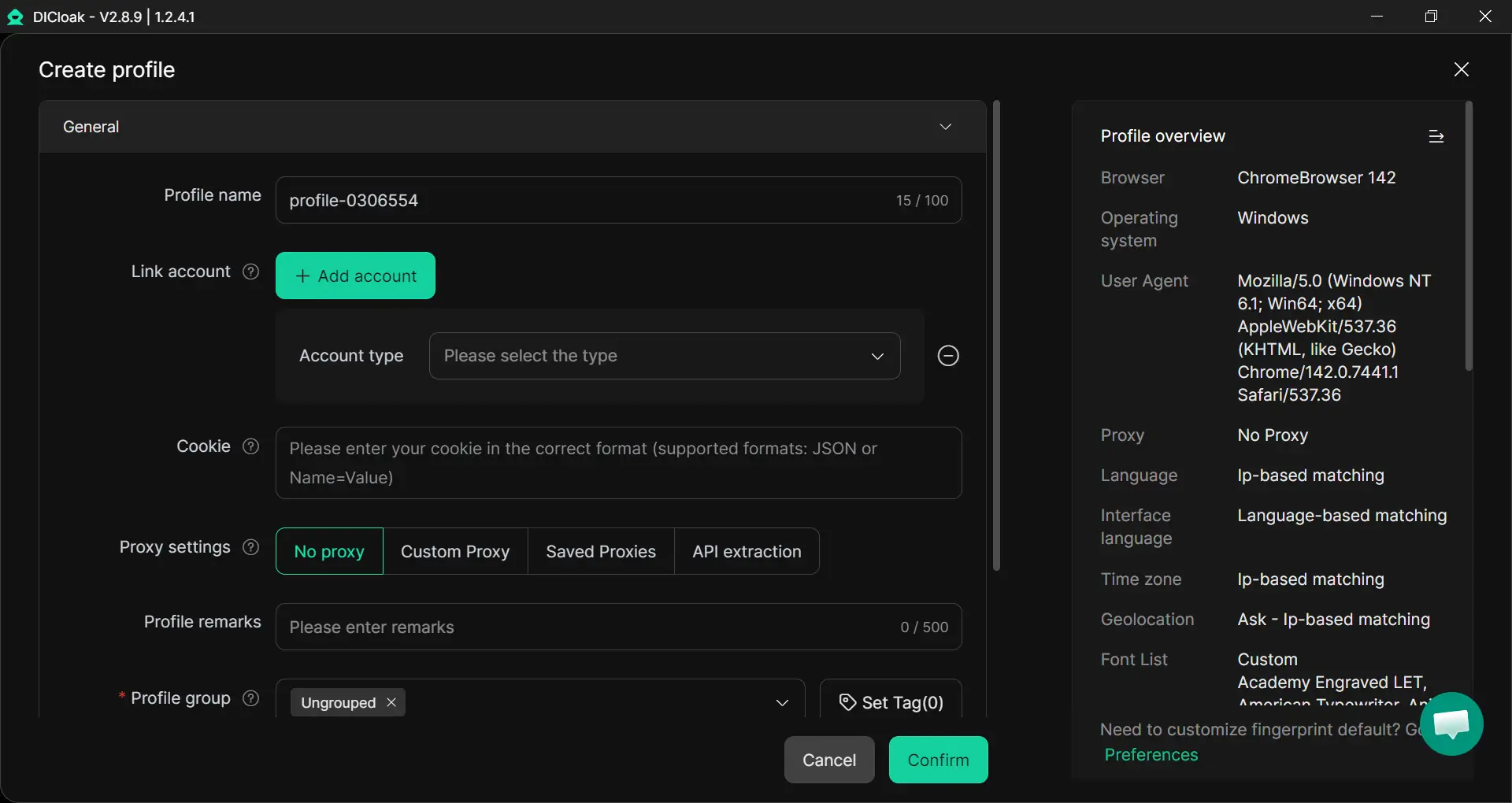
- Click “Create Profile”, enter a profile name, and choose Account Type as TikTok.
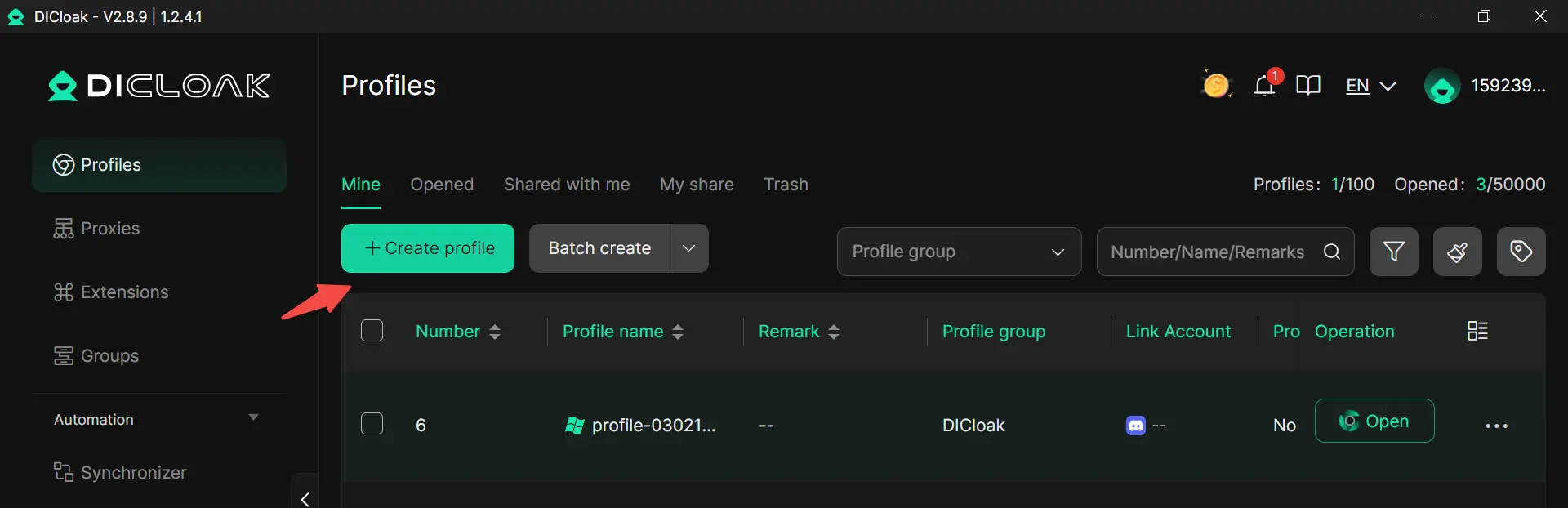
- Configure your purchased proxies.
- Name the profile group if you want to organize better.
- Click confirm.
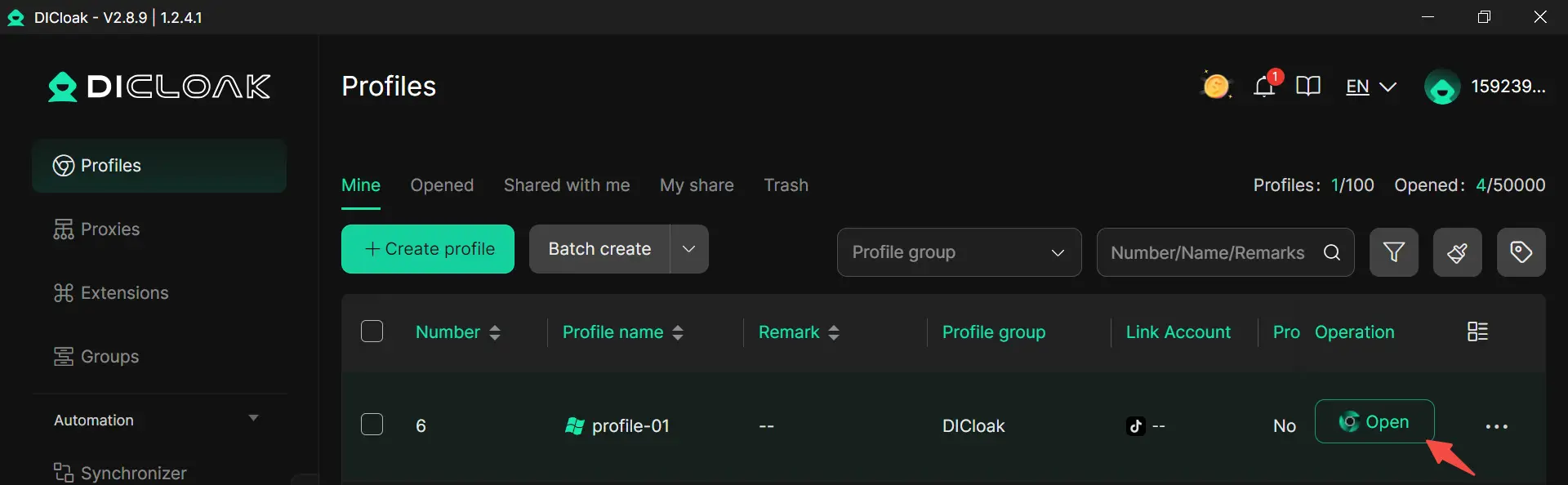
- Next, click “Open” on the profile you just made, a new browser window will open up.
- Go to TikTok, log in with the details you just set, and save the session.
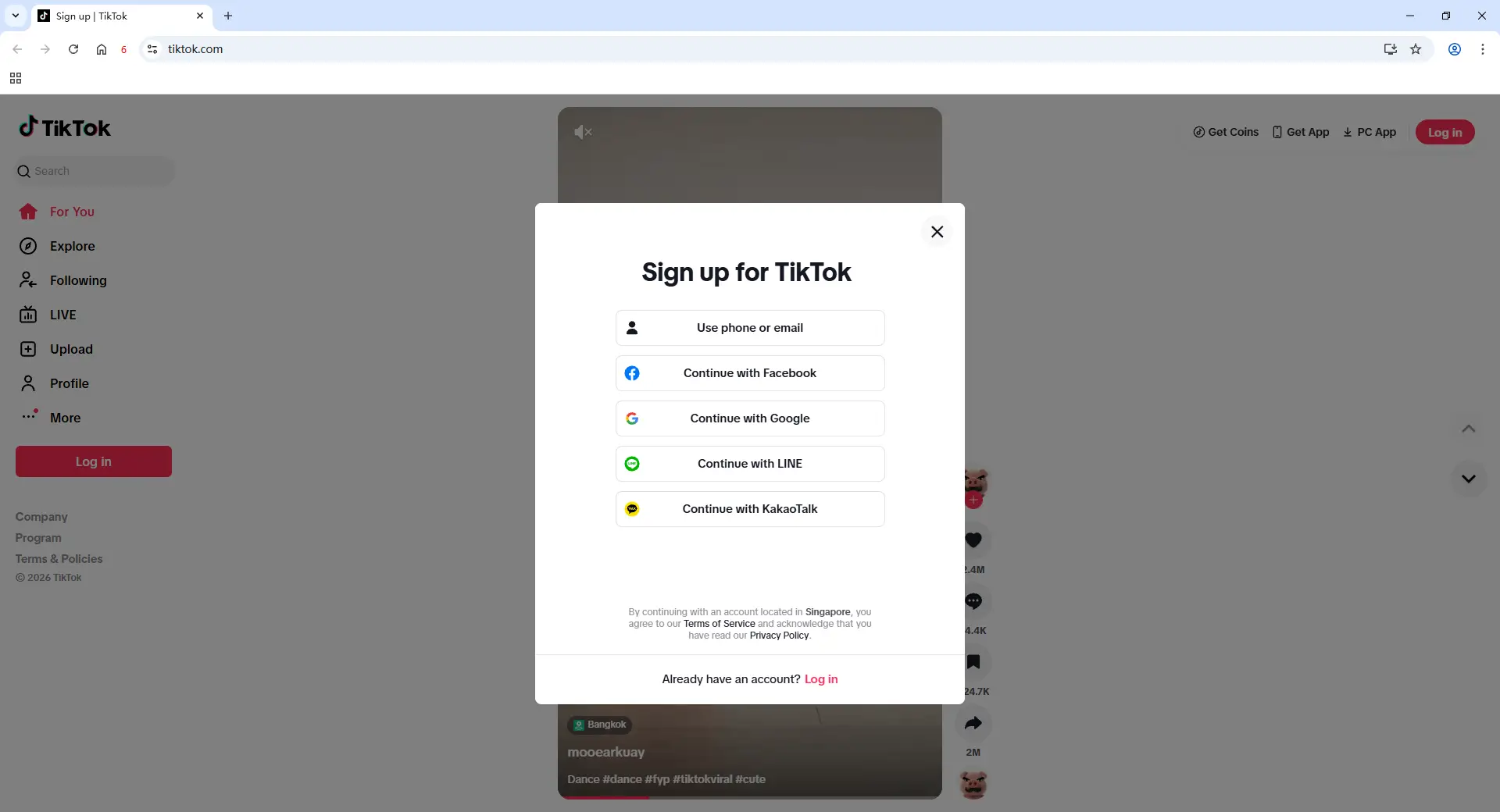
From now on, you can return to this same profile anytime, and TikTok will treat it like the same device. And if you need to run multiple TikTok accounts, you can follow this guide to batch import profiles and bulk operation for your purchased proxies.
How to Prevent Future TikTok Account Bans
Most TikTok account bans are avoidable if you follow a few simple habits. In 2026, TikTok’s AI is very smart, so the best way to stay safe is to act like a real person. Here are some easy tips to protect your profile:
Read the Official Rules
Take a few minutes to read the TikTok Community Guidelines. Most people get in trouble because they don't realize they are breaking a small rule. If you are careful about what you post, you can stay out of the "ban zone."
Avoid Fake Growth
Do not try to "shortcut" your way to fame. Stay away from bots, fake followers, or apps that promise thousands of likes. Real fans are better than fake numbers every time. If TikTok catches you using "shady" growth apps, you will likely end up tiktok account get banned when your views suddenly drop to zero.
Respect Copyright Laws
Using a popular song or a clip from a movie might seem like a fast way to go viral, but if it is unlicensed, it is not safe. TikTok is very strict about copyright in 2026. Only use music from the TikTok library or sounds you have permission to use.
Strengthen Your Security
Keep your account locked tight. Use a very strong password and turn on Two-Factor Authentication (2FA). Also, avoid logging into your account while using public Wi-Fi at a cafe or airport. These networks are not safe and make it easy for hackers to steal your profile.
Manage Multiple Accounts Wisely
Be smart if you run more than one profile. As of now, TikTok generally allows up to 6 accounts on one device. If you go over this limit, the system’s spam filters might flag you.
And in case you really need to handle multiple accounts, use a tool like DICloak to keep each account isolated with a unique digital fingerprint.
Conclusion
A TikTok ban is a major hurdle, but it doesn't have to be the end of your story. In 2026, the platform's AI moves fast to check for things like AI labels and security. This is often why your tiktok account get banned even when you try your best to follow the rules.
To stay safe, focus on real fans and original content. If you are running a business with many accounts, don't take risks. You can use professional tools like DICloak and residential proxies to keep your profiles separate and secure. This stops the app from linking your accounts by mistake. Stay calm, use official appeal tools, and keep sharing your voice with the world.
Frequently Asked Questions (FAQs)
Why did my TikTok account get banned without warning?
In many cases, TikTok’s automated moderation system detects potential violations such as spam-like behavior, repeated guideline violations, copyright issues, or suspicious activity. These automated systems may suspend accounts before a manual review happens.
Why did my TikTok account get banned even though I didn’t break any rules?
It may be due to automated detection errors or unusual account activity. Logging in from different locations, using automation tools, or triggering TikTok’s security system can sometimes cause a mistaken suspension. In these cases, submitting an official appeal can help resolve the issue.
Why did my TikTok account get banned after managing multiple accounts?
Some creators' TikTok account get banned when they manage several accounts. TikTok may flag accounts if multiple profiles are operated from the same device, IP address, or browser profile, especially if the activity appears automated or coordinated.
Why did my TikTok account get banned permanently instead of temporarily?
Permanent bans usually occur when TikTok identifies serious or repeated violations of its policies. If your TikTok account get banned permanently, possible reasons include posting prohibited content, repeated copyright violations, fake engagement tactics, or attempting to bypass previous suspensions.
How can I fix the problem if my TikTok account get banned?
The first step is to check your email and TikTok notifications for any messages explaining the suspension. Then use the in-app appeal button or TikTok feedback form to submit an appeal and provide any necessary verification or supporting information.
 Web Proxy Tools
 Free Tools
 Cookie Plugin
 UA Generator
 MAC Address Generator
 IP Generator
 IP Address List
 2FA Code Generator
 World Clock
 Anonymous Check
 WebRTC Leak Test
 UUID Generator
 Free Web Proxy Site
 Proxy Checker
 FB Ad Checker
 AI Web Scraping
 Free SMM Tools
 Twitter Shadowban Checker
 Instagram Name Checker
 UTM Generator
 Username Generator
 AI Hashtag Generator
 LinkedIn Headline Generator
 Social Media Image Resizer