Blocking is one of the simplest ways to stay in control on TikTok. Many users search for how to block accounts on TikTok when they feel uncomfortable, annoyed, or unsafe. When you block someone, TikTok cuts off direct contact. That person cannot see your videos, comment on your posts, or send you messages. This feature is built to help users protect their space without confrontation.
Understanding TikTok’s Blocking
Importance of Blocking Accounts on TikTok
Blocking matters because TikTok is very interactive. Comments, likes, and messages happen fast. Sometimes, that attention is not welcome.
For example, imagine you post a video and one account keeps leaving rude or strange comments. You do not need to argue or report right away. Blocking that account removes them from your experience in seconds.
Blocking is also useful for spam. Many fake accounts send links or repeated messages. Learning how to block a TikTok account helps stop this behavior before it becomes stressful. For many users, blocking is not about conflict. It is about peace of mind and enjoying content without distraction.
Can You Block Someone Without Them Knowing?
This is a common concern. The short answer is yes. You can block someone without them getting a notification. TikTok does not alert users when they are blocked.
That said, the person may figure it out later. If they search for your profile and cannot see your videos or follow you, they might guess what happened. Still, there is no message, warning, or public sign. This makes blocking a quiet and low-drama option for most situations.
Overview of User Safety and Privacy
Blocking is only one part of TikTok’s safety system. The platform also lets users control who can comment, who can send messages, and who can duet or stitch videos. You can switch to a private account if you want more control over who sees your content.
For families and younger users, TikTok also offers tools that help limit unwanted exposure. These settings work together with blocking to create a safer experience. Knowing how to block accounts on TikTok is often the first step users take when managing their privacy and protecting their mental well-being.
Used the right way, blocking is not extreme. It is a normal tool. Many experienced TikTok users rely on it to keep their feed positive, focused, and safe.
Reasons to Block Accounts on TikTok
Once you understand how blocking works, the next question is simple. When should you use it? Many users learn how to block accounts on TikTok after dealing with real problems, not just minor annoyances. Below are the most common and valid reasons people choose to block an account.
Harassment and Bullying
Harassment is one of the top reasons people block others on TikTok. This can include rude comments, insults, threats, or repeated negative replies.
For example, a creator might post a harmless video, but one account keeps attacking them in the comments. Even if the comments seem small at first, they can quickly affect mood and confidence.
Blocking stops the behavior right away. Once you know how to block a TikTok account, that person can no longer comment, message you, or interact with your content. This gives you instant relief and helps protect your mental health.
Inappropriate Content
Some accounts post content that feels unsafe or offensive. This may include hate speech, sexual comments, or violent language. Even if the content is not aimed directly at you, seeing it can still be disturbing.
Blocking these accounts cleans up your TikTok space. Many users choose to block instead of engaging, because arguing often makes things worse. Learning how to block accounts on TikTok helps you control what shows up in your interactions and keeps your experience more positive.
Managing Unwanted Attention
Not all unwanted attention is aggressive. Sometimes, a stranger comments on every video you post or sends repeated messages that feel uncomfortable. Even if the tone seems friendly, it can cross personal boundaries.
Blocking is a clear way to set limits without explaining yourself. Once blocked, the account cannot follow you or interact with your posts. This is a healthy way to manage attention and feel more in control of your online presence.
Privacy Concerns
Privacy matters, especially when you share personal moments or opinions. Some users worry about strangers watching their activity too closely or saving their videos without consent.
Blocking helps reduce that risk. If someone makes you uneasy, knowing how to block accounts on TikTok allows you to protect your personal space before a problem grows. It is a simple step, but it can prevent bigger issues later.
Dealing with Spam and Fake Accounts
Spam and fake accounts are common on TikTok. These profiles often have no real content and send links, promotions, or repeated comments. Some even pretend to be brands or influencers.
Blocking these accounts keeps your notifications clean and reduces the chance of scams. Many experienced users block spam as soon as they see it. Once you understand how to block a TikTok account, dealing with fake profiles becomes quick and stress-free.
In short, blocking is not about being rude. It is about staying safe, calm, and in control. For most users, learning how to block accounts on TikTok is part of using the platform wisely and confidently.
How to Block Accounts on TikTok
After knowing when blocking makes sense, the next step is action. Many users look for clear instructions on how to block accounts on TikTok without making mistakes. The process is simple, but the steps change slightly depending on the device you use. Below is a clear guide for mobile and desktop users.
How to Block Accounts on TikTok App
Most people use TikTok on their phone. Whether you are on iPhone or Android, the steps are very similar.
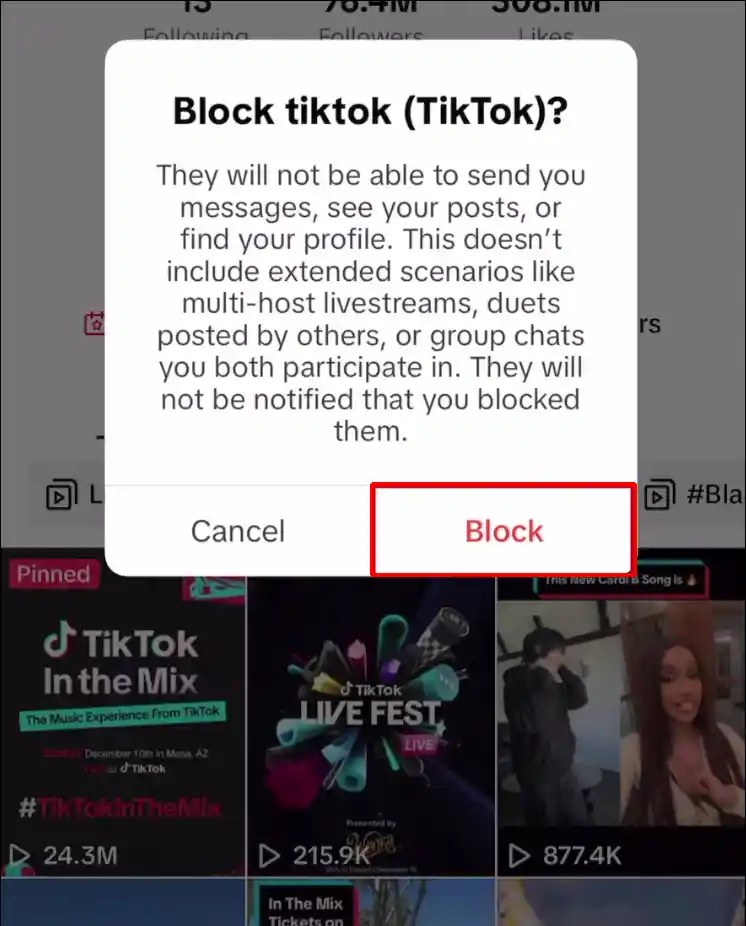
Step-by-step for iPhone users
- First, open the TikTok app and go to the profile of the account you want to block.
- Tap the share arrow in the top corner of the screen.
- From the menu, select “Block.”
- TikTok will ask you to confirm. Tap “Block” again.
That’s it. Once blocked, the account cannot view your videos, comment, or send you messages. Many users learn how to block a TikTok account this way after dealing with rude comments or spam messages.
Step-by-step for Android users
- On Android, the process feels almost the same.
- Open TikTok and visit the user’s profile.
- Tap the three dots or share icon at the top.
- Choose “Block” from the list.
- Confirm your choice.
For example, if a fake account keeps sending links, blocking it on mobile takes less than ten seconds. Knowing how to block accounts on TikTok on your phone helps you react fast before things get worse.
How to Block Accounts on the TikTok Website
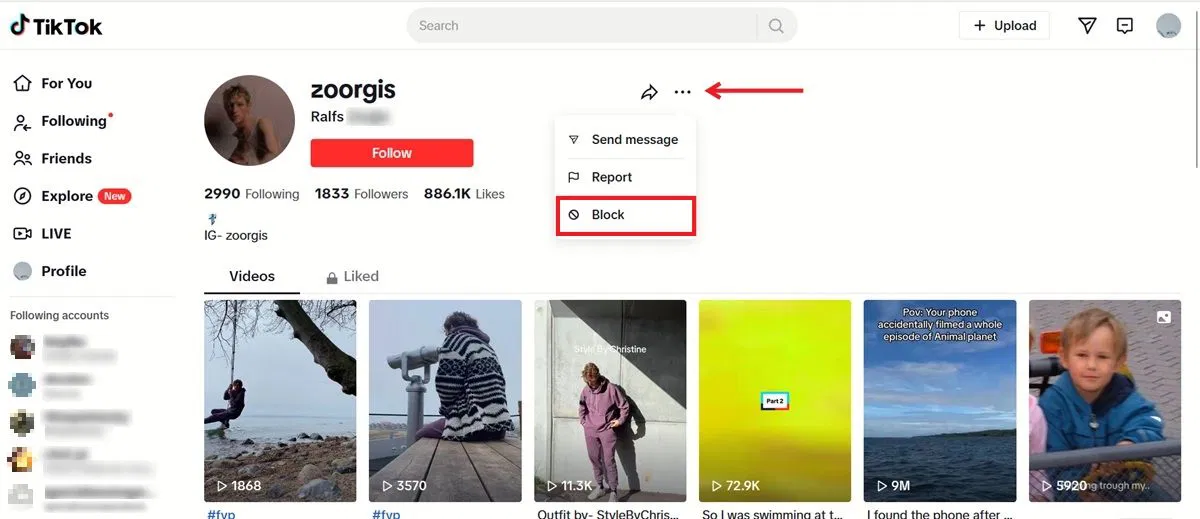
Some users prefer TikTok on a computer. The desktop version also allows blocking, though the layout looks different.
- Log in to TikTok using your browser.
- Click on the profile of the account you want to block.
- Look for the three dots near the profile area.
- Click “Block” and confirm.
This option is useful if you manage content or comments from a desktop setup. Creators who review many comments often use the website to block problem accounts in a calm and organized way. Learning how to block a TikTok account on desktop gives you more flexibility when managing interactions.
No matter which device you use, the goal is the same. Blocking gives you control. Once you understand how to block accounts on TikTok, you can protect your space quickly and keep your experience safe and enjoyable.
How to Block Accounts on TikTok in Bulk
Sometimes, blocking one account is not enough. After learning how to block accounts on TikTok one by one, many users face a bigger problem. A video goes viral. Suddenly, dozens of strange or aggressive accounts appear. In these cases, bulk blocking becomes very useful.
How to Block Multiple Accounts at Once
TikTok does not have a single “block all” button. Still, there are smart ways to block many accounts faster.
One common method is blocking directly from the comment section.
If a video attracts spam or hate comments, you can tap on a comment, open the user’s profile, and block them right away. Doing this while scrolling comments saves time.
Another option is using comment management tools. When many unwanted comments appear, creators often turn off comments first. This stops new attacks while you block the worst accounts one by one. Many users who learn how to block a TikTok account this way say it feels more controlled and less stressful.
For example, a small creator shared a personal story and received hundreds of comments. Most were kind, but some came from fake profiles. By blocking several accounts in a short session, the creator restored a safe space without deleting the video.
How to Check the Block Has Worked
After blocking, it is normal to want confirmation. TikTok makes this easy.
First, go to your settings.
Open “Privacy,” then find the “Blocked accounts” section.
Here, you can see a list of every account you have blocked.
If the account appears on this list, the block is active. You can also test it by visiting the blocked profile. You will not see their content, and they will not be able to interact with yours.
Knowing how to block accounts on TikTok is only part of the process. Checking that the block worked gives peace of mind. It helps users feel confident that the situation is handled and that unwanted contact will not return.
Bulk blocking may take a little time, but it is worth it. For users dealing with spam, harassment, or sudden attention, learning how to block a TikTok account quickly and correctly makes TikTok feel safe again.
How to Unblock Someone on TikTok
After bulk blocking accounts, it is normal to change your mind. A conflict may end. A mistake may be clear later. Just like learning how to block accounts on TikTok, knowing how to unblock someone gives you full control over your account.
How to Unblock Accountson Mobile
Most users unblock accounts using the TikTok mobile app. The process is quick and easy.
- Open the TikTok app
- Go to your profile page
- Tap the menu icon in the top corner
- Select Settings and privacy
- Tap Privacy
- Open Blocked accounts
You will now see a list of blocked users.
- Find the account you want to unblock
- Tap Unblock next to the name
- Confirm when prompted
Example: You may have blocked someone during a stressful moment in the comments. Later, you realize the situation was harmless. Unblocking lets that user view your content and interact again. Knowing how to block a TikTok account also means knowing when it is okay to reverse that action.
How to Unblock Accounts on Desktop (TikTok Website)
If you use TikTok on a computer, you can also unblock accounts from the website.
- Log in to TikTok using your browser
- Click your profile icon
- Open Settings
- Go to the Privacy section
- Select Blocked accounts
From here:
- Locate the account you want to unblock
- Click Unblock
- Confirm your choice
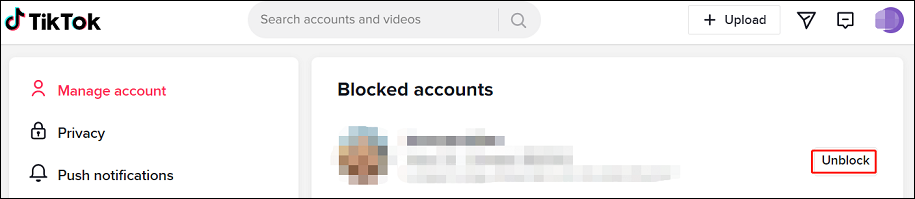
This method is useful for creators who block many accounts during viral moments. Later, they can review the list calmly and unblock users who were blocked by mistake. Understanding how to block accounts on TikTok is important, but knowing how to unblock keeps your control flexible and fair.
Good to know: Unblocking does not send a notification. The other person will not be alerted. They will only notice if they can see your profile again.
Blocking and unblocking are normal tools. When used together, they help you manage your TikTok space with confidence, balance, and peace of mind.
How to Increase Your Privacy on TikTok
Blocking and unblocking help you react to problems. Privacy settings help you prevent them. After learning how to block accounts on TikTok, many users realize they can avoid most issues by adjusting a few key settings in advance.
Private Account
You can switch to a private account in Settings → Privacy → Private account. Once enabled, only approved followers can see your videos, comment, or message you. This reduces unwanted attention and lowers the need to block users later.
Comments and Messages
Comment and message controls are found under Settings → Privacy. Here, you can limit who can comment on your videos or send you messages. When fewer strangers can reach you, situations that require how to block a TikTok account happen far less often.
Comment Controls
Go to Settings → Privacy → Comments to manage this feature. You can filter keywords, review comments before they appear, or turn comments off on specific videos. This is useful when a post attracts negative replies but you do not want to block many accounts one by one.
Message Preferences
Message settings are located in Settings → Privacy → Direct messages. You can allow messages from friends only or turn messages off completely. This helps protect your personal space without needing to block every unfamiliar account.
Profile Suggestions
TikTok suggests your profile to others by default. You can reduce this in privacy-related discovery settings. Turning this off lowers random exposure and helps keep your account visible only to people you choose.
Activity Status
Activity status can be turned off in Settings → Privacy → Activity status. When disabled, others cannot see when you are online. This removes pressure to reply and keeps your activity private.
Personal Details
Your bio and profile links can be edited from your Profile → Edit profile page. Removing extra personal details reduces tracking risks and makes your account less attractive to spam or fake profiles.
Followers List
You can review your followers directly from your profile page.
Removing unknown or suspicious followers early helps keep your account clean and reduces future blocking needs.
Use Antidetect Browser
Advanced users who manage multiple TikTok accounts often use an antidetect browser.This allows each account to run in a separate browser profile, reducing fingerprint linking and privacy risks. Combined with knowing how to block accounts on TikTok, it offers stronger long-term account protection.
Privacy on TikTok is not about one setting. It is about smart choices. When privacy controls work together with blocking tools, your account becomes safer, calmer, and much easier to manage.
Why choose DICloak Antidetect Browsers for your business?
⚡The DICloak Antidetect Browser has become a global favorite for its unparalleled ability to efficiently and securely manage multiple accounts. Designed for professionals in social media management, and more, DICloak offers powerful features like RPA automation, bulk operations, and a synchronizer. Additionally, it allows you to customize fingerprints and integrate proxies for each profile, ensuring top-level security and operational efficiency. It’s the ultimate tool for seamless, secure, and scalable operations.

What Makes DICloak Stand Out?
✅ Manage 1,000+ Accounts on One Device: Stop wasting money on extra hardware! DICloak allows you to manage multiple accounts on a single device, cutting costs and boosting efficiency.
✅ Guaranteed Account Safety, No Ban Risks: Every account gets its own isolated browser profile with custom fingerprints and IPs, drastically reducing the risk of bans. Your accounts, your control!
✅ Flexible Proxy Configuration for Maximum Performance: Seamlessly integrate with all major proxy protocols (HTTP/HTTPS, SOCKS5) and manage your proxy pool with bulk operations. No more struggling with IP management—DICloak has you covered.
✅ Streamlined Team Collaboration for Better Results: Easily manage your team with advanced tools like profile sharing, permission settings, data isolation, and operation logs. Your team works smarter, not harder.
✅ Automate the Grind with RPA: DICloak's built-in RPA saves you hours of manual work. Automate repetitive tasks, streamline workflows, and focus on what really matters—growing your business.
✅ Powerful Bulk Tools to Scale Your Operations: Create, import, and launch multiple browser profiles in one click. DICloak makes scaling your business as easy as it gets.
✅ Compatible with All Major Operating Systems: Based on the Chrome core, DICloak supports simulating Windows, Mac, iOS, Android, and Linux operating systems. No matter what platform you need, DICloak has you covered.
🔗 Ready to Get Started?
Visit the DICloak website to explore more details and choose the plan that’s right for you. Start for free today and experience the power of secure, efficient, and scalable multi-account management!
FAQs
Can You Block a Non-Follower?
Yes. You can block any TikTok user, even if they do not follow you.You just need to visit their profile and choose the block option. Knowing how to block a TikTok account works the same for followers and non-followers.
Can a Blocked User See Your Comments?
No. Once blocked, a user cannot see your profile, videos, or comments.They also cannot reply to or interact with your content in any way.
Why Can’t I Block Someone?
This usually happens due to a temporary app issue or an outdated version.Try updating the app, refreshing the page, or blocking from the user’s profile instead of comments. If problems continue, restart the app and try again.
How to See Who I’ve Blocked?
You can view blocked users in Settings → Privacy → Blocked accounts.This list shows every account you have blocked and lets you unblock them at any time.
Conclusion
TikTok offers simple but powerful tools to protect your space. Learning how to block accounts on TikTok helps stop harassment, spam, and unwanted contact quickly, while privacy settings reduce problems before they begin. Whether you block, unblock, or adjust who can see and contact you, these features give you control. Once you understand how to block a TikTok account and use privacy tools together, your TikTok experience becomes safer, calmer, and more enjoyable.
 Web Proxy Tools
 Free Tools
 Cookie Plugin
 UA Generator
 MAC Address Generator
 IP Generator
 IP Address List
 2FA Code Generator
 World Clock
 Anonymous Check
 WebRTC Leak Test
 UUID Generator
 Free Web Proxy Site
 Proxy Checker
 FB Ad Checker
 AI Web Scraping
 Free SMM Tools
 Twitter Shadowban Checker
 Instagram Name Checker
 UTM Generator
 Username Generator
 AI Hashtag Generator
 LinkedIn Headline Generator
 Social Media Image Resizer