It can be frustrating when Claude stops in the middle of a useful answer. You may see the message claude's response could not be fully generated, and you may not know what caused it. In many cases, the problem is not just one thing. It can come from long prompts, full chat history, weak connections, wrong settings, or heavy workflows. This article explains the most common causes, how to fix them, and how to make Claude more stable in daily use.
What Causes Claude's Response to Be Incomplete?
It can be very annoying when you are in the middle of a great conversation and suddenly the text just stops. You might see a message saying claude's response could not be fully generated. This usually happens for a few technical reasons. In 2026, AI models like Claude are smarter than ever, but they still have "invisible walls" that they cannot cross. Understanding these walls can help you get the full answers you need without frustration.
How Token Limits Affect Response Length
The most common reason for a cutoff is something called a "token limit." You can think of tokens like the pieces of a puzzle. Every word or part of a word that Claude writes uses up one token.
In early 2026, Anthropic updated its models. For example, the new Claude 4.6 can write very long responses, sometimes up to 300,000 tokens in special modes. However, in the standard chat window, there is still a smaller limit to keep things fast. If you ask Claude to write a 50-page book in one go, it will run out of "paper" before it finishes. When it hits this limit, it simply stops. To fix this, you can just ask Claude to "please continue where you left off," and it will start a new response to finish the thought.
Why Network Issues Lead to Truncated Outputs
Sometimes the problem isn't the AI at all; it's the "road" the data travels on. In March 2026, Claude became so popular that the servers faced a "success tax." This means so many people were using it at once that the system slowed down or glitched.
If your internet connection "wobbles" for even a second, the stream of text can break. This is like a phone call cutting out while someone is telling a story. You might see an error that says the "response was interrupted." If this happens, a quick page refresh usually solves the problem. It clears the broken path and lets the data flow smoothly again.
How Session Management Impacts Response Completion
Another reason your chat might stop is how the computer manages your "session." A session is basically the current "memory" of your conversation. In 2026, some users have reported bugs in the Claude Desktop app where the session resets itself by mistake.
If the app gets confused, it might send a message saying claude's response could not be fully generated because it "forgot" what it was doing for a split second. Also, if your chat history gets too long, it can fill up Claude's "context window." In April 2026, some older models had their memory windows changed. If you are using an old chat from months ago, Claude might struggle to keep up. Starting a fresh chat window is often the best way to give the AI more room to breathe and finish its work.
How to Troubleshoot Incomplete Responses from Claude
If you see a message saying claude's response could not be fully generated, don't panic. It is usually just a small technical hiccup that can be fixed in a minute or two. By following a few simple steps, you can figure out what went wrong and get back to your work without losing your progress. In 2026, troubleshooting is much easier because the system gives you more clues than it used to.
Steps to Identify the Root Cause of Truncated Outputs
To find the root cause of these truncated outputs, you should start by looking at the "Status" page on the Anthropic website. If the servers are very busy, Claude might struggle to finish a long sentence or a complex thought. You should also look closely at exactly where the text stopped. If it cut off right at a certain length, you probably hit an "invisible wall" called a token limit. For instance, a college student named Jake once tried to have Claude summarize a massive 200-page research paper all at once. The AI stopped halfway through because it simply ran out of "thinking space" for that specific turn. Jake realized that the text wasn't broken; he just needed to ask for 20 pages at a time to get the full summary he needed.
How to Adjust Settings for Better Response Generation
You can also change a few simple things in your chat window to help with response generation. In 2026, many power users have found that starting a fresh chat window is the best way to fix a "stuck" conversation. If your current chat is very long, Claude has to remember everything you said before, which leaves less room for the new answer. By clicking the "New Chat" button, you give the AI a "clean slate" and more memory to work with. If you still see the error that claude's response could not be fully generated, try breaking your big question into smaller pieces. For example, if you are writing a computer program, ask for the "login screen" first and the "database" second. This keeps the data flow small and steady so the system doesn't get overwhelmed.
When to Contact Support for Persistent Issues
Sometimes, the problem is deeper than just a full memory or a slow internet connection. If you have tried a fresh chat and split your questions into small parts, but the error still happens on every single prompt, it might be a bug in your specific account. This is the right time to reach out to the Anthropic support team for help. You can usually find a small "Help" or "Chat" icon in the bottom corner of your screen. Be sure to copy the specific error code if you see one. In early 2026, some users had a bug where their "Pro" subscription wasn't syncing correctly, which caused their answers to cut off early. Once they messaged support, the team fixed the account settings, and the AI started giving full, long responses again within just a few hours.
Risks of Ignoring Claude's Response Errors
Because these risks can ruin your workflow and cause a lot of frustration, the best plan is to stop the problem before it starts. If you want to avoid seeing that annoying claude's response could not be fully generated message, you can adopt a few simple habits used by professionals in 2026. These small tricks will keep the AI focused, ensuring it finishes even the longest tasks without losing power.
How Incomplete Responses Affect Decision-Making
When Claude stops talking in the middle of a sentence, it often leaves out the "why" or the "how" of its advice. In 2026, many business leaders use AI to help them make big choices, but an incomplete response can lead to a very bad decision. For example, if you ask Claude to analyze a complex legal contract and the response cuts off, you might miss a hidden fee or a dangerous clause. One marketing manager recently shared that Claude stopped right before explaining the risks of a new ad campaign. Because she didn't realize claude's response could not be fully generated, she moved forward and accidentally broke a local privacy law. Always make sure you have the full picture before you act on AI advice.
Why Overlooking Errors Can Lead to Data Loss
Another major risk is losing your hard work. In 2026, Claude is often connected directly to your files through tools like Claude Code. If a response fails while the AI is editing a file, it might leave that file in a "broken" state. Users on Reddit have reported that when they ignore these errors, they sometimes find their code files are half-empty or filled with errors. To prevent this, many pros now use a "tracker" system where they ask Claude to list the steps it will take before it starts. This way, if you see that claude's response could not be fully generated, you know exactly which file to check for damage. It is much easier to fix a small mistake now than to rebuild a whole project later.
How Response Errors Impact User Experience
Finally, constant errors can make using AI feel like a chore instead of a help. In 2026, we talk about something called the "Prompt Success Rate," which tracks how often the AI gets it right on the first try.() When you keep seeing errors, your trust in the tool starts to fade. You might spend 30 minutes trying to get a simple answer that should have taken ten seconds. This "user frustration" can slow down your entire team and make people stop using helpful tools altogether. By learning to spot these errors early and using the "Continue" button, you can keep your workflow smooth. A better experience means you spend less time fighting with the computer and more time getting things done.
How to Optimize Prompts for Complete Responses
Because these errors can affect decisions, damage files, and make AI tools harder to trust, it makes sense to prevent the problem before it starts. One practical way to do that is to improve your prompts. If you often run into claude's response could not be fully generated, the issue is not always the system itself. Sometimes the prompt is too vague, too long, or too unfocused. When that happens, Claude may go off track or stop before finishing. A clearer prompt helps Claude stay focused and makes a complete response much more likely.
Techniques for Crafting Effective Prompts
A good prompt starts with one clear job. Tell Claude what you want, who the answer is for, and what the output should look like. For example, “Summarize this email in 3 bullet points for a manager” works better than “Help me with this email.” Clear prompts reduce guessing, and that lowers the chance of claude's response could not be fully generated. Anthropic recommends direct instructions and clear formatting for better output quality.
If the task is large, do not ask for everything at once. Break it into steps. A user who asks Claude to read a report, find trends, compare regions, and write a strategy in one prompt may get a cut-off answer. But if the user asks for one step at a time, the response is often more complete and easier to use. Anthropic also recommends prompt chaining for complex work.
How to Use Contextual Clues to Enhance Responses
Claude gives better answers when the prompt includes useful context. This means small details like the target reader, the tone, the goal, and the format. For example, instead of saying “Write a follow-up email,” it is better to say, “Write a friendly follow-up email to a small business owner. Keep it under 150 words. Focus on price and easy setup.” These clues help Claude stay focused and avoid wasting space, which can help prevent claude's response could not be fully generated.
Structured context also helps. Anthropic recommends separating parts of the prompt clearly, especially for longer tasks. You can label sections like source text, instructions, and output format. This makes the request easier to follow. When Claude can quickly see what matters, the answer is usually cleaner and more complete.
Why Prompt Length Matters in Response Quality
Many users think adding more detail always helps, but that is not always true. Claude works inside a context window, which is the space it uses to read your input and write its answer. If the prompt is too long, too messy, or full of repeated rules, there may be less room left for the response. That is one reason Claude's response could not be fully generated may appear. Anthropic explains that message length, file size, and conversation length can all affect output completion.
A common example is a user pasting a long article, adding many extra instructions, and asking for a full rewrite in one step. Claude may start well, then stop halfway. In many cases, the fix is simple: remove repeated instructions, cut unneeded background, and split the work into smaller prompts. This gives Claude more room to finish the answer well.
Decision Criteria for Choosing Claude's Settings
If prompt design helps reduce errors, the next step is choosing the right settings. This matters because Claude does not respond the same way in every setup. Response length, model choice, and output controls can all affect whether the answer is clean and complete. Anthropic’s documentation explains that prompt complexity, generated response length, and token settings all affect performance, latency, and completion.
How to Balance Response Length and Accuracy
A longer answer is not always a better answer. In Claude, longer outputs use more tokens, and Anthropic notes that developers may need to adjust max_tokens as prompt length changes, especially on newer Claude models with extended thinking. If you ask for a very detailed answer but leave too little room for output, the result may stop early or feel rushed. That is one reason Claude's response could not be fully generated can appear in long tasks.
A better approach is to match the output length to the job. For a quick summary, ask for 5 bullets or 150 words. For a harder task, split it into steps instead of forcing one huge response. Anthropic’s prompt guidance also shows that clear output formatting improves control and consistency. In real use, a product manager asking for “3 key risks and 3 next actions” will often get a more complete answer than someone asking for a “full deep analysis of everything” in one turn.
Which Settings Minimize Response Errors
The safest settings are usually the ones that reduce unnecessary load. Anthropic’s docs show that token usage, prompt size, and response size all matter. For long or important work, it helps to set a reasonable max_tokens value, keep prompts focused, and avoid stuffing too many tasks into one request. Anthropic’s release notes also show that longer output caps exist in some cases, but they are special options, not a reason to make every prompt bigger.
Another way to reduce response errors is to choose the right workflow, not just the right number. Anthropic recommends structured prompting, clear formatting, and in some cases prompt chaining. For example, if a user keeps seeing claude's response could not be fully generated while generating long code or reports, the fix may be to ask Claude for an outline first, then request each section one by one. That usually works better than changing settings alone.
How to Customize Claude for Specific Use Cases
The best Claude settings depend on the task. Anthropic’s docs say model selection can be a better fix than prompt changes when the real issue is latency, cost, or task fit. A short customer support reply, a long legal summary, and a coding task do not need the same setup. For writing tasks, define the format and word count. For coding tasks, give Claude one file or one function at a time. For large repeated workflows, Anthropic also provides settings and project-level controls in Claude Code.
Context should also match the use case. Anthropic recommends direct instructions, structured sections, and examples when the job is complex. So if you are using Claude for research, include the goal, source type, and output format. If you are using it for editing, say what to keep, what to cut, and how long the rewrite should be. Small changes like these make Claude easier to steer, and they lower the chance of seeing claude's response could not be fully generated during important work.
Tools to Assist with Claude's Response Generation
Good prompts and smart settings can prevent many problems, but they are not the whole answer. If you use Claude often, the right tools can help you spot weak prompts, track failed runs, and build a more stable workflow.
How to Use Monitoring Tools for Better Insights
Monitoring tools help you see patterns instead of guessing. Anthropic’s platform includes usage and rate-limit tracking in the Developer Console, and its prompt-engineering guidance says teams should define success criteria and test prompts against them instead of changing things blindly. In simple terms, you should track which prompts finish well, which ones get cut off, and which ones use too many tokens. That makes it much easier to understand why Claude's response could not be fully generated keeps showing up.
Which Third-Party Tools Enhance Claude's Performance
Langfuse is useful for observability and debugging. It helps teams trace prompts, responses, latency, and tool use across Anthropic-based apps. That is valuable when you want to reduce repeated failures or understand why one workflow performs better than another.
For broader integrations, Anthropic supports the Model Context Protocol, or MCP, which connects Claude to data sources, tools, and workflows. In practice, this means Claude can pull the right file, search the right source, or use the right external tool without forcing the user to paste everything into one huge prompt. That can lower context overload and reduce the chance that claude's response could not be fully generated appears during longer tasks.
How to Integrate Automation for Consistent Results
Automation helps most when the same task happens again and again. Anthropic’s Claude Code docs show several ways to automate work, including hooks, scheduled prompts, programmatic usage, GitHub Actions, and subagents. Claude Code can also work with MCP and custom subagents, and Anthropic says those subagents run in their own context windows. That matters because separate context windows can keep large workflows more organized and reduce overload in one long chat.
A simple example is a content team that runs the same document-check workflow every day. Instead of sending one giant prompt each time, they can automate the job into steps: first collect the file, then summarize it, then extract risks, then generate the final output. Anthropic also offers prompt caching, which can reduce latency and cost by reusing previously processed prompt parts, and release notes state that prompt caching can cut latency by up to 80% in supported cases. Used well, this kind of automation makes Claude outputs more consistent and gives users fewer chances to run into Claude's response could not be fully generated in the middle of important work.
Edge Cases: When Claude's Responses Are Unreliable
Most of the time, this error has a clear cause. The prompt is too long. The chat is too full. The connection drops for a moment. But there are also edge cases. In real use, Claude can become less stable when the system is busy, when the task is unusually large, or when a long workflow gets cut off halfway through. That is why claude's response could not be fully generated sometimes appears even when the prompt seems normal.
How to Handle Responses in High-Load Scenarios
Busy periods often make long tasks less stable. A request that normally works may suddenly slow down, stop early, or fail halfway through. This happens more often when the chat is already long, the file is large, or the task includes too many steps in one turn. In these cases, claude's response could not be fully generated is often a sign that the request was simply too heavy for that moment.
A better approach is to reduce the load of each request. Keep the chat shorter. Split one large task into smaller parts. Do not upload a large file and ask for a full analysis, rewrite, and summary in the same prompt. For example, if you need help with a long report, ask for the outline first, then ask Claude to work through one section at a time. This usually makes the response more stable.
Why Certain Queries Consistently Fail
Some queries fail again and again because they ask Claude to do too much at once. A common example is a prompt like this: read a long file, compare it with other sources, find risks, write a summary, and give action steps. Another example is pasting a large block of background text with repeated rules and extra context that does not really help. Even when the goal is clear to you, the request may still be too crowded.
When that happens, the problem is often not the topic itself. The real issue is task overload. Claude works better when the request is clean and focused. If claude's response could not be fully generated shows up on the same type of task again and again, try removing repeated instructions, cutting extra background, and breaking the job into steps. A smaller request is often much more reliable.
How to Prepare for Unexpected Response Interruptions
Even a well-written prompt can still be interrupted, so it helps to plan for that before it happens. This is especially important for long writing jobs, coding tasks, file edits, or multi-step research. If Claude stops in the middle, it is much easier to recover when the work is already split into clear stages.
A simple habit is to use checkpoints. Ask for the outline first. Then ask for section one. Then move to the next part. If Claude is editing files or code, save versions as you go. For example, instead of asking for a full report in one turn, ask Claude to draft the structure, then complete each section separately. If Claude's response could not be fully generated appears halfway through, you will only need to fix one part, not rebuild the whole task.
A Smarter Way to Keep Shared Claude Workflows Stable
When Claude is used by more than one person, the problem is not always the prompt itself. In many teams, response failures happen because the workflow is messy. One person logs in from one browser, another opens the same account elsewhere, and the session history starts to feel inconsistent. In that kind of setup, claude's response could not be fully generated may be only one part of a bigger stability problem.
How DICloak Enables Safe Claude Account Sharing
DICloak offers several key features that make it possible for multiple people to use the same account safely and at the same time.
• Simultaneous Access: DICloak’s "Multi-open mode" allows multiple team members to use the same Claude account simultaneously without logging each other out.
• Consistent IP Address: By configuring a static residential proxy in the browser profile, all logins can appear to come from a single, stable location. Think of your IP address like a key to your house. If you use the same key every day, your security system knows it's you. But if ten different keys from all over the world suddenly start working, the system will lock everything down. A static proxy ensures everyone on your team uses the same "key," so Claude never gets suspicious.
• Synced Login Status: The "Data Sync" feature saves the login session information. Once the primary user logs in, other members can access the account without needing to re-enter the password.
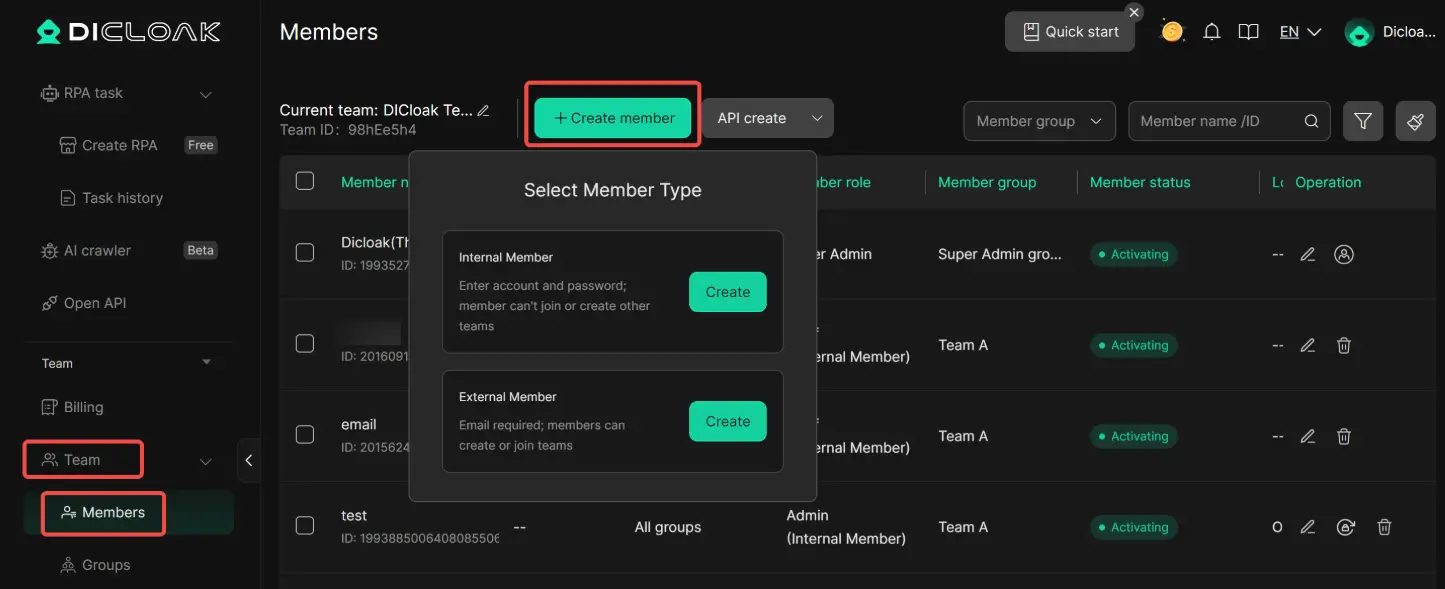
• Secure Team Management: You can create separate member accounts within DICloak and grant them access only to the specific Claude profile, keeping your other online accounts private and secure.
How DICloak Helps Teams Share Claude More Smoothly
For small teams that still share one Claude account, DICloak can help make the workflow more stable. Each user can work inside a separate browser profile, with isolated cookies, local storage, and a more consistent browsing environment. That makes handoffs cleaner and reduces the mess that often happens when multiple people use the same account casually.
It can also help teams manage access without passing the raw login around every time. In practice, that matters because a shared Claude workflow becomes much easier to control when each person uses a fixed profile instead of logging in from random devices and browsers.
Step-by-Step Guide to a Secure Claude Account Share with DICloak
Setting up a shared Claude account with DICloak is a straightforward process that doesn't require technical expertise.
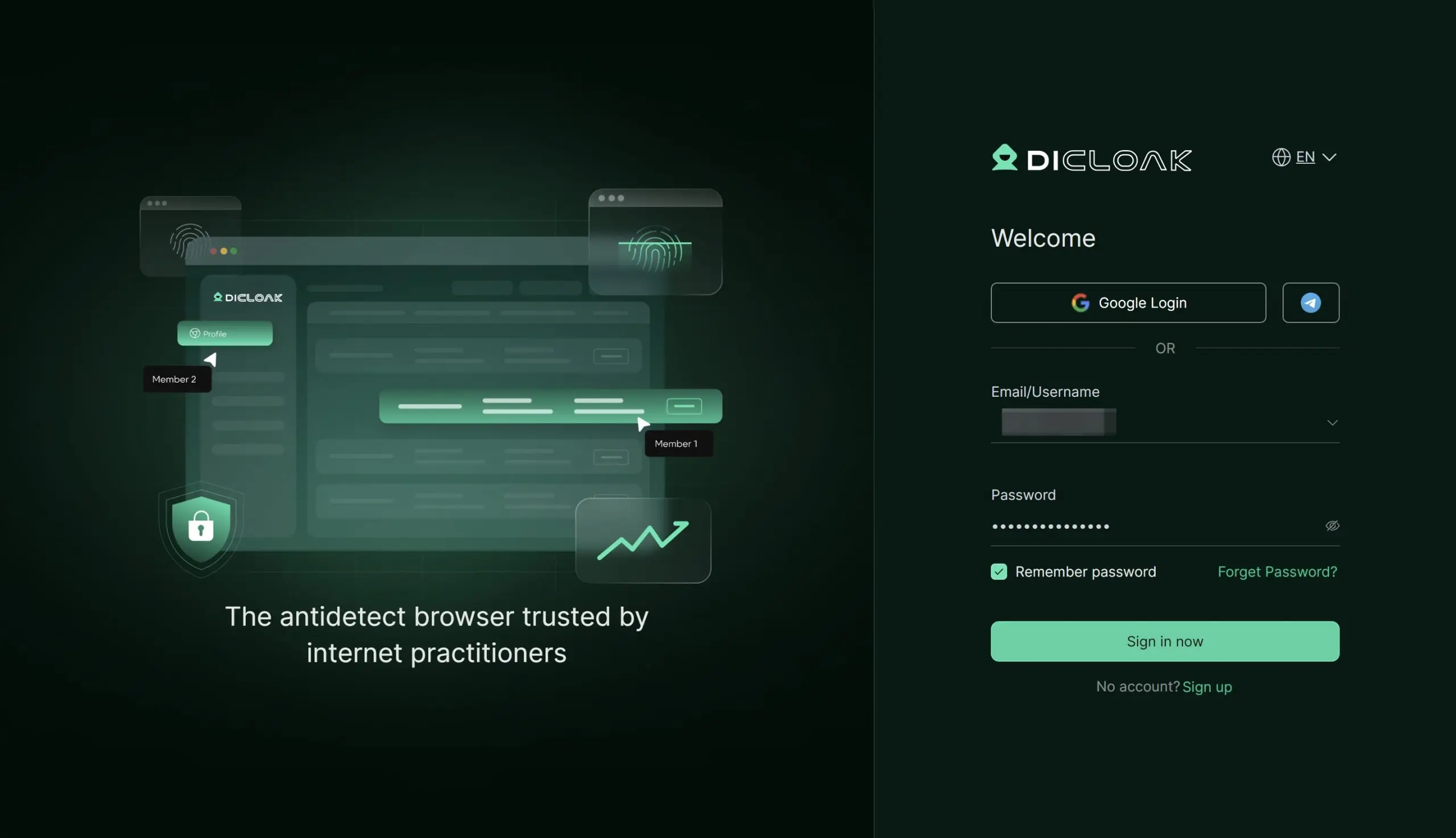
1.Download and Install DICloak
Visit the official DICloak website, register for an account, and download and install the application on your computer.
2. Choose the Right Plan
To share profiles with your team, you should subscribe to DICloak. The choice depends on your team size. The Base Plan is a good starting point for smaller teams, while the Share+ Plan is recommended for larger teams needing unlimited member access.
3. Step 3: Set Up a Static Residential Proxy (Recommended)
While not mandatory, using a single static residential proxy is highly recommended. This provides a stable, fixed IP address for your shared profile, which prevents security systems from being flagged by logins from different locations. This greatly reduces the risk of forced logouts or other security issues. DICloak does not sell proxies but partners with several third-party providers.
Inside the DICloak application, create a new browser profile. This profile will serve as the dedicated, secure borwser profile for your shared Claude account.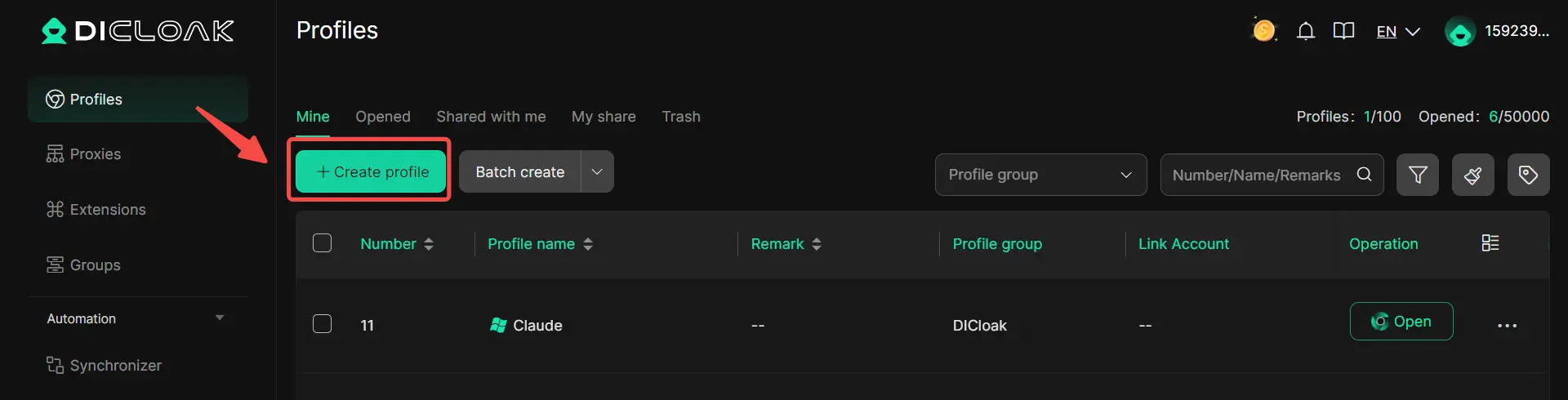
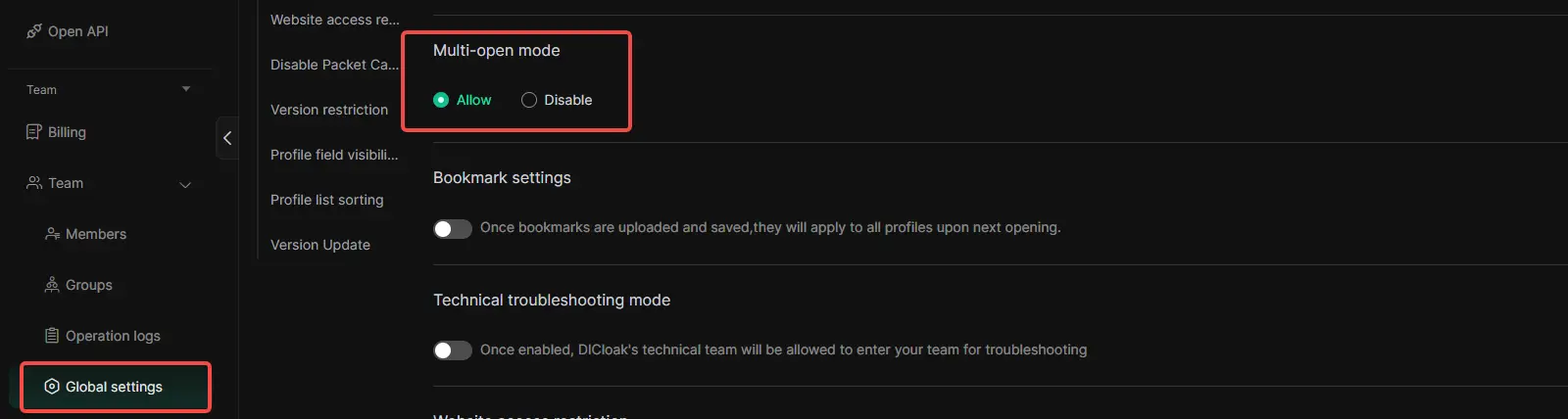
5.Enable Multi-open Mode
You shoud Go to [Global Settings], find the [Multi-open mode] option, and select [Allow].This feature allows multiple people access the same Chatgpt account at the same time.
6. Log In to Claude
Launch the browser profile you just created. It will open a new browser window. Navigate to the official Claude website and log in with your account credentials.
7. Share the Profile with Your Team
Return to the DICloak main screen. Use the team feature to create members to invite your friends to your DICloak Team.
8. Access the Shared Account
Once your teammate accepts the invite, the shared profile will appear in their DICloak application. They can launch it from their own computer and will be automatically logged into the same session.
FAQs About Claude's Response Could Not Be Fully Generated
What Should I Do If Claude's Response Is Always Truncated?
First, shorten the prompt and split the task into smaller steps. Large files, long chats, and big output requests can all make Claude stop early. Starting a new chat also helps when the current one is too full.
How Can I Tell If a Network Issue Is Affecting Claude?
Look for signs like slow loading, sudden stops, failed retries, or the page hanging before the answer finishes. Network routing problems and temporary service issues can cause unstable behavior, especially when everything else in your prompt looks normal.
Why Does Claude Sometimes Skip Parts of My Prompt?
This usually happens when the prompt is too long, too crowded, or poorly structured. Claude works better when the request is clear, direct, and broken into labeled sections instead of one large block of instructions.
How Do I Know If My Settings Are Causing Errors?
Check whether your output limit is too small for the task, or whether your prompt plus output setting is too large for the context window. If errors happen more often on long tasks than short ones, your settings may be part of the problem.
What Are the Best Practices for Maintaining Claude's Performance?
Keep prompts focused, break complex work into steps, avoid stuffing one chat with too much context, and split large PDFs or documents when needed. For repeated workflows, caching and a stable step-by-step structure can make results more consistent.
Conclusion
In most cases, claude's response could not be fully generated does not mean Claude is broken. It usually means the task, session, or workflow needs to be adjusted. Shorter prompts, cleaner structure, better settings, and step-by-step tasks can make a big difference. And if Claude is being used in a shared team setup, a more stable account workflow can also help reduce confusion and interruptions. The goal is simple: make Claude easier to trust, easier to control, and more likely to finish the job well.
 Web Proxy Tools
 Free Tools
 Cookie Plugin
 UA Generator
 MAC Address Generator
 IP Generator
 IP Address List
 2FA Code Generator
 World Clock
 Anonymous Check
 WebRTC Leak Test
 UUID Generator
 Free Web Proxy Site
 Proxy Checker
 FB Ad Checker
 AI Web Scraping
 Free SMM Tools
 Twitter Shadowban Checker
 Instagram Name Checker
 UTM Generator
 Username Generator
 AI Hashtag Generator
 LinkedIn Headline Generator
 Social Media Image Resizer