Hiring a new provider for white label Google Ads can seem like a shortcut for agencies that want to scale fast without adding in-house staff. You get to promise more to clients, PPC setup, ongoing management, reports, while someone else handles the day-to-day. But that “hands-off” approach is exactly where things start to break down for a lot of agencies.
Plenty of white label google ads management offers sound solid until you dig into the details. One batch of campaigns comes back with mismatched tracking, another with incomplete location exclusions, and suddenly you’re left cleaning up after someone else’s mistakes, under your own brand. Worse, if you skip the right checks, your client’s ad account can get flagged, and you’re the one on the hook for the fallout.
The real challenge isn’t just picking a provider or reselling a service. Agencies need to know where quality gaps creep in, which project handoffs create risk, and what you can (and can’t) control in a white label PPC for agencies workflow. That means looking past the sales sheet and knowing what to check, what to avoid, and how to set up a process that won’t come back to bite you three months later.
Start with the hidden risks most agencies miss when outsourcing white label google ads.
What Agencies Should Check Before Choosing a White Label Google Ads Provider
The wrong provider can leave you scrambling to fix account bans, missing conversions, or broken reporting. Before handing over client budgets, use a checklist, not gut feel, to spot the red flags that don’t always show up on a sales call.
Provider Transparency and Credentials
Agencies should ask for the provider’s official Google Partner badge and confirm it links back to a live, verifiable directory listing, screenshots or PDFs are not enough. A reliable provider shares their management account ID before the contract, names the team members handling your accounts, and outlines which parts of spend, billing, and ad ownership you’ll control. If you get vague answers or see delays after asking for these basics, walk away.
Reporting and Data Access
Account visibility is non-negotiable. Too many agencies discover late that “weekly reports” mean static PDFs with lagging data or filtered results. Before you commit, check these access points:
- Confirm you get direct login or read-only access to the client’s account, not just emailed snapshots.
- Ask for a sample live dashboard (Data Studio or similar) showing spend, clicks, and conversions updated at least daily.
- Check whether you can pull raw search terms and ad copy data yourself, if not, you’ll be flying blind when clients ask tough questions.
Checklist: Must-Do Agency Checks
- Demand a client reference you can talk to, written testimonials are easy to fake; a five-minute call exposes a lot.
- Review a real post-launch campaign audit (with client name hidden) to see how the provider handles mistakes, over-delivery, or policy strikes.
- Look at their process for new client onboarding, if they can’t show a template or workflow with timelines, expect delays and confusion.
- Ask how they separate client data between agencies. If “we use the same MCC for everyone” is their answer, your client’s accounts are at risk of cross-contamination or mass suspension.
- Test their support: send a technical question (like “How do you handle disapproved ads for medical keywords?”) and see how fast and specific the reply is.
Agencies that rush this stage often end up with locked accounts, missing ad spend, or support that ghosts you when Google issues a warning. The hardest problems show up when you don’t know what’s happening behind the scenes, so build your process to catch gaps before money or reputation is on the line.
The next step is understanding why account risks are so common in outsourced management, and which handoff points deserve your closest attention.
Why Agencies Often Face Account Risks with White Label Google Ads
Agencies run into real risks when outsourcing Google Ads work, mainly account bans, platform detection, and client trust failures. These risks don’t just threaten campaign results; they can break client contracts and damage your brand overnight.
Account Linking and Platform Detection
Google’s systems look for patterns that tie accounts together. When multiple clients share an IP address, browser fingerprint, or device environment, detection ramps up fast. Most white label setups trigger risk at these points:
- Shared logins or browser profiles across clients (one mistake connects all accounts)
- Overlapping proxy IPs or device fingerprints (Google flags “network clusters”)
- Using the same automation or session for different clients (easy to miss until accounts get restricted)
Client Trust and Data Security
Trust is hard to win back once lost. If a provider mishandles logins, shares credentials, or stores sensitive data outside your control, client data can leak, sometimes without warning. For example, if two clients’ accounts are accessed from the same white label team’s browser or proxy, Google may link them as related entities. If one account gets banned, the “connection” can cascade, causing multiple account losses. Even worse, clients will blame you, not the behind-the-scenes provider. Agencies then face angry calls, lost retainers, and the scramble to prove they didn’t cause the breach.
The real risk isn’t just losing one campaign, it’s losing a client’s trust for good, with no chance to explain what happened behind closed doors. That’s why agencies handling sensitive spend or regulated verticals need airtight controls on who accesses what, when, and from where. Even a single spreadsheet with unlocked passwords or the wrong browser session can start a chain reaction that’s impossible to unwind. No white label Google Ads service can “undo” a platform ban or restore trust after a leak. Prevention is the only safe play, and that means agencies have to set strict access and workflow boundaries from day one.
How Pricing, Packages, and Service Levels Actually Work in White Label Google Ads
Agencies looking at white label Google Ads always hit one wall first: pricing and package terms rarely match what’s promised in the pitch. You need to know exactly how fees are structured, and what you actually get for each tier, before signing a contract.
Typical Pricing Models
There are only a few real pricing setups in this space. Here’s how they compare:
| Model |
How It Works |
When It’s Best |
| Flat Fee |
Pay a set amount per month/campaign |
Simple campaigns, predictable spend |
| Performance-Based |
Pay a % of ad spend or results |
High budgets, proven vendors |
| Retainer |
Monthly fee for ongoing service |
Long-term, hands-off management |
Most agencies start with flat fees to keep costs predictable, but performance-based pricing is common when spend hits $10k+ per month or you want a provider with real skin in the game.
What Service Levels Include
Standard packages usually cover ad setup, ongoing tweaks, basic reporting, and email support. If you need weekly calls, custom reporting, or rush changes, those are almost always extra, even if a “premium” label is attached.
The biggest miss for agencies is assuming all packages include real account management, many just automate changes and send templated reports.
What Actually Drives Cost Differences
You’re not just paying for ad spend and setup. Costs jump for anything custom: split testing creative, handling disapprovals, or client calls outside a fixed schedule. Also, if your provider bills on percent of spend, watch for minimums, many charge a base fee (often $500+) no matter how small your account.
One last catch: “24/7 support” almost never means live help. More often, it’s a ticket system with next-day replies.
If you don’t see these details in the contract, ask. Agencies get burned most when they assume what’s “included”, the next section covers how those blind spots turn into real losses.
Where Agencies Usually Get Burned: Common Mistakes and Red Flags in White Label Google Ads

Most agencies get burned not by bad luck but by missing the early warning signs, unrealistic promises, sloppy account handling, or poor reporting. Spot these issues before you sign, or you risk wasted spend and angry clients leaving faster than you can repair the damage.
Overpromising and Under-delivering
“Guaranteed ROAS” and “unlimited campaign changes” are classic traps. If the provider’s claims sound too good for your client’s real budget or niche, expect late reports, missed deadlines, or campaigns that never reach profit. The fix: get commitments in writing and check past client references, don’t just trust the demo deck.
Lack of Account Isolation
One careless move, like sharing the same login or proxy across accounts, can trigger a chain reaction of bans. The real cost isn’t just losing one campaign, but sometimes all your linked clients in a single sweep.
- What can go wrong:
- Shared logins or IPs cause platform algorithms to see a pattern and suspend every connected account.
- You may not know there’s a problem until multiple clients report their ads are down, with little recourse from support.
- The safer move: require true account isolation in your provider’s workflow. Each client should have dedicated logins, unique proxies, and no cookie overlap. If your provider can’t show you how they keep accounts separate, walk away.
Weak Reporting and Communication
If you’re chasing down reports or only get vague performance summaries, prepare for client churn. Set clear reporting standards up front, weekly data, full spend breakdowns, and real-time access, so you’re not left guessing when clients ask hard questions.
How Agencies Can Safely Manage Multiple Google Ads Accounts: Using DICloak for Workflow Isolation and Team Access
Agencies handling white label google ads run into bans fast if browser profiles or team access aren’t isolated. Here’s how to set up a safer workflow and avoid cross-account issues.
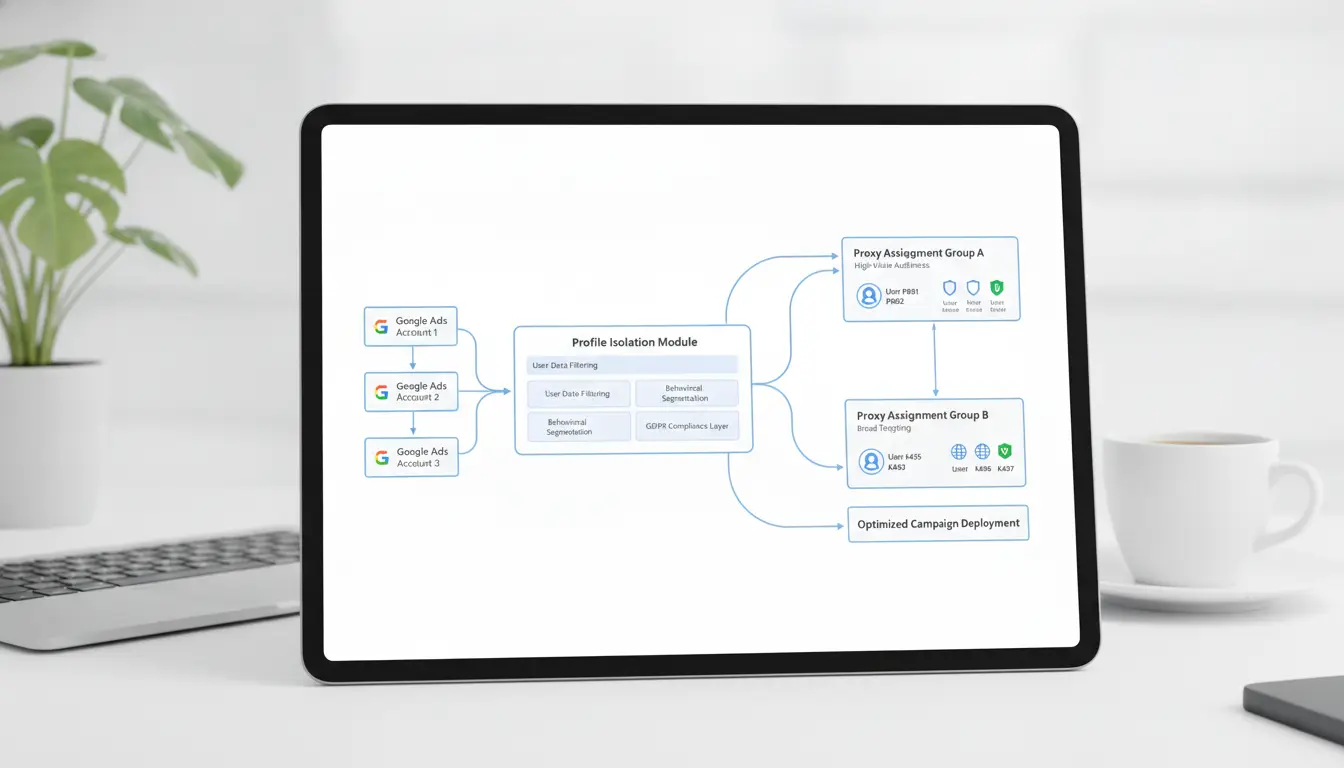
Setting Up Isolated Browser Profiles for Each Client
- Create a separate browser profile for every client account, never reuse profiles.
- Assign a unique proxy to each profile to split fingerprints and IPs.
- Store cookies and session data in the assigned profile only.
- Test each new setup, if Google Ads triggers a verification prompt, wipe the profile and start again.
Team Collaboration and Permission Control
- Add team members to client profiles by role, not by sharing master logins.
- Set permissions so only account managers can edit payment info or campaigns.
- Rotate credentials and access logs monthly to catch unused or risky accounts.
Operation Logs and Workflow Automation
- Log every login, edit, and session, missing logs often signal credential sharing.
- Use automation for daily tasks like budget checks, but avoid auto-login scripts.
- Review logs after any account flag to spot patterns before they spread.
Step-by-Step: Onboarding Clients and Launching Campaigns with White Label Google Ads
Getting clients live with a white label Google Ads provider is all about process control, miss a handoff and you risk confusion, slow launch, or account flags. Agencies need a workflow that covers intake, campaign build, and ongoing management without leaving gaps.
Client Intake and Account Setup
- Gather the client’s business goals, budget, and market restrictions up front, missing these details now means costly rewrites later.
- Set up Google Ads access using a new user or manager invite, never sharing passwords directly. If the client hesitates, explain that this step keeps their billing and data safe.
- For agencies managing multiple accounts, create a separate browser profile for each client using DICloak. This reduces account linking risks with Google.
Campaign Creation and Approval
- Build campaigns in draft and add clear naming for each client.
- Send a summary for sign-off, if approval stalls, set a 48-hour reminder or risk launch delays.
- Only push campaigns live after written approval. Skipping this means the agency, not the provider, eats the blame for bad ads.
Ongoing Optimization and Reporting
- Check results weekly and request access to conversion data; otherwise, you’ll miss key signals when testing changes.
- Share performance reports with clients using simple dashboards, avoid jargon to keep trust high.
- Assign team members to review logs in DICloak for every major change, so you can track who did what, and catch mistakes faster.
DICloak supports workflow isolation and secure team collaboration but cannot guarantee Google Ads account safety or campaign performance.
When Scaling White Label Google Ads Stops Making Sense: Limits, Alternatives, and Decision Points
Agencies usually hit a wall with outsourcing when growth introduces new risks, slower changes, and less control over campaign quality. If client churn rises or support tickets pile up, it's time to rethink the model before damage spreads.
Operational Limits and Bottlenecks
When you double client volume, provider delays and ticket backlogs can start. More hands in the workflow often means slower approvals and miscommunications. Use this table to spot the tipping points:
| Limit Type |
Warning Sign |
Impact on Agency |
| Provider Capacity |
Delayed launches (2+ days) |
Missed deadlines |
| Workflow Complexity |
4+ handoffs per campaign |
Errors, lost context |
| Support Responsiveness |
Tickets >48h open |
Client frustration |
When you see deadlines slip and support slow down, adding more clients just compounds the pain.
Alternatives: In-house vs Hybrid Models
Building in-house means more control but higher cost and longer ramp-up. Hybrid setups, where core accounts stay internal but overflow goes to a provider, balance risk and flexibility for agencies not ready to fully switch.
Decision Points for Agencies
Look at profit per client, missed deadlines, and error rates. If support issues or rework start to eat up more than 20% of your margin, holding off on scaling, or switching models, usually saves more than chasing new signups.
Frequently Asked Questions About white label google ads
Is white label Google Ads legal for agencies in 2026?
Yes, using white label google ads is legal for agencies, as long as services comply with Google’s advertising policies and all local laws. Agencies must follow platform rules, avoid misleading clients, and ensure transparent reporting. Violating Google Ads terms, like using fake accounts or unapproved practices, can lead to account suspension.
Can I use my own proxies with white label Google Ads management?
Most providers of white label google ads management do not support custom proxies. Google’s platform tracks IPs and may flag unusual activity. Using personal proxies can risk account bans or limit access. Agencies should use trusted connections and follow provider guidelines to avoid detection and policy violations.
How many Google Ads accounts can an agency safely manage?
Agencies can manage dozens or hundreds of accounts using manager accounts (MCC). However, handling too many accounts without proper workflow can trigger Google’s fraud detection. Keep account ownership clear, use secure logins, and avoid overlapping billing to stay safe.
What happens if a client account gets banned?
If a client’s account is banned, agencies should review the reason, contact Google Support, and help clients appeal. The agency must clarify responsibilities in contracts. Recovery options include fixing violations, submitting appeals, or creating new accounts if allowed by Google policies.
Is white label Google Ads better than building an in-house team?
White label google ads services offer scale and expertise fast, without hiring staff. An in-house team gives more control and direct access but needs training and resources. Agencies should consider budget, campaign complexity, and client needs to decide which model fits best.
If you’re considering expanding your digital marketing services without the overhead of in-house development, now is the time to research trusted providers and evaluate how a white label solution could fit your business model. Assessing client needs and the scalability of your offerings will help you determine the right approach for smooth integration and growth. Try DICloak For Free
 Web Proxy Tools
 Free Tools
 Cookie Plugin
 UA Generator
 MAC Address Generator
 IP Generator
 IP Address List
 2FA Code Generator
 World Clock
 Anonymous Check
 WebRTC Leak Test
 UUID Generator
 Free Web Proxy Site
 Proxy Checker
 FB Ad Checker
 AI Web Scraping
 Free SMM Tools
 Twitter Shadowban Checker
 Instagram Name Checker
 UTM Generator
 Username Generator
 AI Hashtag Generator
 LinkedIn Headline Generator
 Social Media Image Resizer