A bank in Singapore saved over 30,000 hours a year by automating routine tasks with RPA, according to Deloitte’s case study. That kind of impact isn’t just for big enterprises, smaller teams now use rpa robotic process automation to cut manual work, reduce errors, and speed up jobs that used to take hours. The real surprise is how often these “robotic” tools run behind the scenes without code. Instead of building complex software, you can use drag-and-drop bots to handle tasks like data entry, invoice matching, or moving files between apps.
For most people, the pain isn’t about learning a new technology, but about wasting time copying data between systems, tracking down mistakes, or dealing with repetitive rules. RPA solves this by letting you automate those steps, no programming required. You set the logic, the bot clicks and types just like a human, but much faster. This guide breaks down what RPA actually means, how it works in practice, and which risks or mistakes beginners should watch out for. From simple one-person setups to team workflows, here’s how you can start using robotic process automation to save hours and avoid routine headaches.
What Does RPA (Robotic Process Automation) Actually Mean?
Image generation pending: Blog illustration for section "What Does RPA (Robotic Process Automation) Actually Mean?" Reason: AI image generation returned no usable image and no stock fallback was available
RPA, or robotic process automation, means using software “bots” to do routine computer tasks that people usually do by hand. These bots can click, type, copy, and move files across apps, following clear rules you set, no coding needed. For example, a bot can copy data from emails into spreadsheets or handle invoices in your accounting system.
How RPA Differs from Traditional Automation
Traditional automation often needs programmers to write scripts or build custom integrations. With RPA, the focus shifts to rule-based and logic-based steps you can set up without deep technical skills. Most platforms offer no-code or low-code tools, so you drag and drop actions instead of writing lines of code. The bot acts just like a person but doesn’t get tired or distracted.
| Traditional Automation |
RPA Robotic Process Automation |
| Needs coding |
No-code/Low-code tools |
| Built for one system |
Works across apps/screens |
| Changes are complex |
Rules can change quickly |
Sources: UiPath, Wikipedia
Key Components: Bots, Scripts, and Orchestration
A software bot is a program that follows your steps, like logging into a site, entering data, or checking reports. Orchestration platforms manage these bots at scale, so you can schedule, monitor, and update tasks for an entire team. Tools such as UiPath and Automation Anywhere are common in large businesses.
Why RPA Has Grown So Fast in Business
The main reason RPA robotic process automation is everywhere now is cost and speed. Companies save thousands of hours each year by cutting out boring, manual work. Bots scale up fast, one person can launch dozens at once, and they don’t need breaks or overtime. That’s why banks, hospitals, and even small offices are now using RPA to stay ahead.
How Does RPA Work Step by Step?
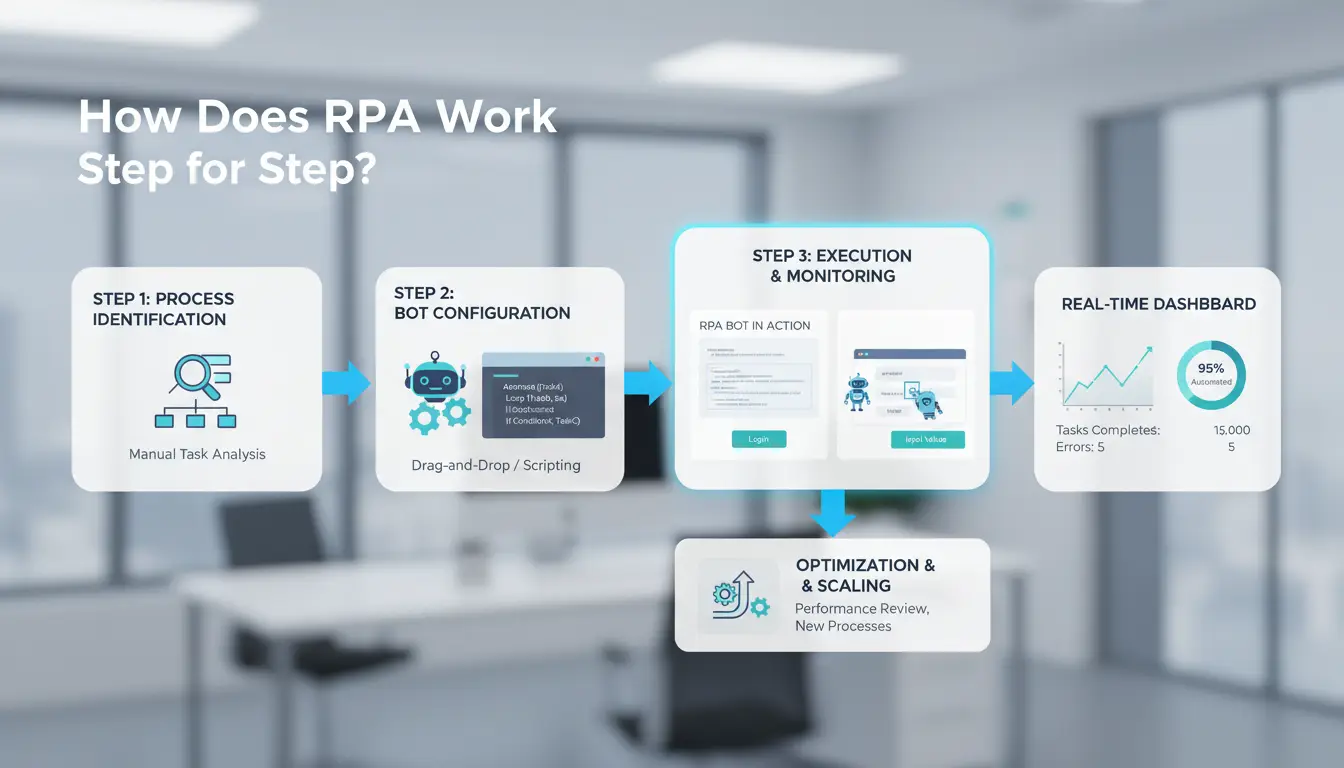
The real power of rpa robotic process automation comes from breaking down routine tasks and letting bots handle them without human error or fatigue. You start by picking the right process, build a bot to match your needs, and then put it into action, watching for issues as it runs.
Identifying Processes That Are RPA-Ready
Not every job fits automation. The best targets are repetitive tasks where rules rarely change, like copying data from emails to spreadsheets or updating records in a CRM. If you deal with high-volume routines, think invoice processing or payroll, RPA makes the most sense. The key is finding steps that use clear logic and follow predictable patterns. Tasks with exceptions or creative judgment usually don’t work well.
Designing and Building RPA Bots
Most beginners use no-code tools that let you drag blocks, set actions, and test flows visually. For complex scenarios, you might add scripting to handle special cases or connect to APIs. Setting up a bot means mapping each action: where to click, what to type, how to handle pop-ups. You can use platforms like UiPath or Automation Anywhere for larger setups, or simpler tools for one-off jobs.
Deploying, Testing, and Monitoring Automation
Before going live, run pilot tests to catch mistakes. Validate that every step works as expected, no skipped fields or wrong clicks. Once deployed, keep monitoring for errors like failed logins or changed layouts. The most critical step is setting up real-time alerts and logs, so you catch problems before they cascade. RPA bots need regular checkups, not just one-time setups.
What Makes a Business Process a Good Fit for RPA, and What Doesn’t?
Choosing the right task matters more than picking any tool. If you automate the wrong process, you waste time and end up with more headaches. Here’s how to spot which workflows in your company are ready for rpa robotic process automation, and which ones will just trip up your bots.
Signs a Process Is Ideal for RPA
Processes that use structured data and follow clear steps are the best candidates. Think about tasks that repeat every day, like copying customer records from one system to another or sending invoices. If people make lots of mistakes when doing these tasks by hand, a bot can help cut errors fast. For example, banks often use RPA to check data across different databases, where every field follows a set format (UiPath banking case). When the process doesn’t change and rules stay simple, RPA is a good fit.
Red Flags: When RPA Fails or Is Not Worth It
Bots struggle with unstructured info, like emails with mixed formats or images that need human review. If your workflow has exceptions every week or rules keep changing, automating it will likely cost more than it saves. A classic example is customer support tickets, unless all questions follow the same pattern, the bot can’t keep up. Trying to automate messy, fast-changing jobs usually leads to wasted effort.
How to Evaluate ROI Before Automating
Estimate how much time you spend now. If a task takes 10 hours a week, and you pay $30/hour, automating saves $300 weekly. But add the cost to set up and maintain the bot. If updates are frequent, expect higher maintenance costs. RPA works best when the savings outweigh the setup and upkeep. Always factor in error rates, fixing mistakes can erase your gains. For more examples, check Gartner's RPA guide.
What Are the Biggest Risks and Mistakes in RPA Implementation?
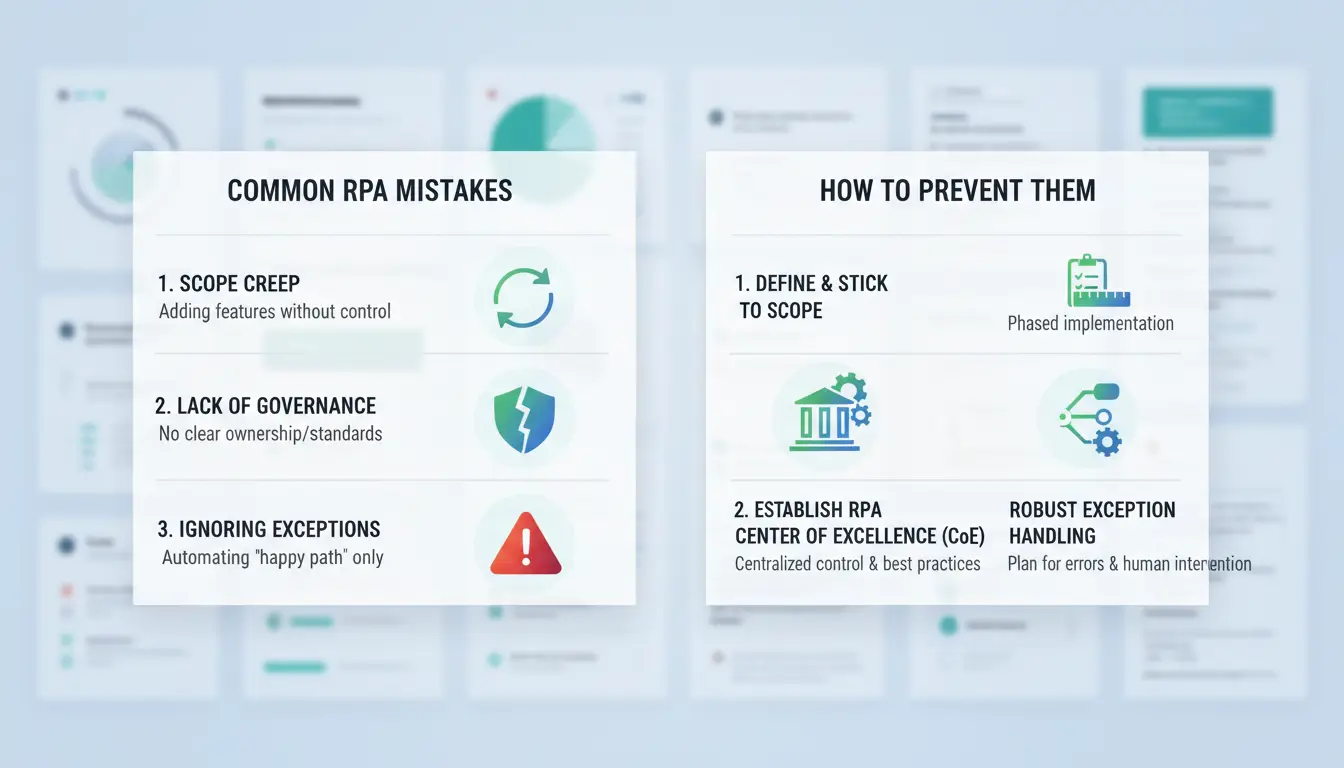
Jumping into rpa robotic process automation can be tempting, but skipping careful planning leads to wasted effort and expensive fixes. Many teams run into trouble by automating the wrong processes, overlooking security, or failing to test bots properly. Knowing these pitfalls means you can build automations that actually work, and avoid headaches down the line.
Why RPA Projects Fail: Top Causes
Most failures start with poor process selection. Automating messy, unpredictable tasks, like handling exceptions in customer emails, usually backfires. Bots work best on routine, rule-based steps. Another common mistake is ignoring stakeholder buy-in. If the people who use the process aren’t involved, bots may miss key details or create new manual work. You can see these issues in real company case studies at UiPath's RPA stories.
Security, Compliance, and Data Privacy Risks
Many rpa robotic process automation setups involve sensitive data. If a bot handles payroll, customer records, or financial info, sloppy access controls can expose confidential files. Missing audit trails makes it hard to track who changed what. Companies should require bots to log every action and use strict permissions, as shown in Gartner’s RPA security guides.
How to Avoid Common RPA Errors
Testing and validation matter more than most people expect. Skipping pilot runs and live tests often leads to bots breaking after launch. Ongoing maintenance is just as important, business rules change, and bots need updates. Keeping a checklist for each automation helps spot problems early. For more tips, see Automation Anywhere’s best practices.
How Do RPA and AI Work Together, and Where Are the Limits?
RPA vs. AI: What’s the Difference?
RPA robotic process automation handles fixed, rule-based tasks, like copying data, moving files, or clicking through forms. It follows clear logic you set. AI, on the other hand, learns patterns from data and adapts. AI is better at tasks like image recognition or sorting messy documents. The main difference is that RPA does exactly what you tell it, while AI figures things out from examples.
| Automation Type |
Core Method |
Best Use Case |
| RPA |
Rules you set |
Repetitive clicks |
| AI |
Learns from data |
Unstructured info |
When to Combine RPA and AI for Smarter Automation
You get more power by combining both. For example, AI reads invoices, RPA moves the data into your system. Chatbots use AI to understand questions, then RPA handles the follow-up actions. This mix saves time but can be tricky, AI needs good training data, and mistakes can slip through.
Limits of RPA and When to Consider Other Tools
RPA struggles with messy, unpredictable data. If the task changes often or needs judgment, RPA alone won’t cut it. Scaling up may require tools like DICloak for team workflows or more advanced AI platforms.
How to Manage Multi-Account RPA Operations Safely, And Where DICloak Makes a Difference
Risks of Multi-Account Automation: Fingerprinting, IP Leaks, and Access Control
Running rpa robotic process automation on many accounts sounds easy, until a platform bans you for “unusual activity.” Most sites track browser fingerprints, IP addresses, and login patterns. If two accounts share a fingerprint or IP, they can get linked and restricted. Loss of access or a sudden data leak often comes from one weak point: poor account isolation.
You can use tools like DICloak to keep each account truly separate. DICloak creates unique browser profiles for every account, each with its own fingerprint and proxy. This breaks the “linkage” pattern that platforms use to block automation. When you rotate proxies and automate tasks, accounts stay isolated and bans are much less common.
Team Collaboration, Permission Control, and Workflow Automation
Managing rpa robotic process automation in a team gets messy fast. DICloak lets you share profiles safely, set who can access what, and track every change. Bulk operations and built-in RPA mean you can automate work across accounts without losing control or leaking data.
Real-World RPA Use Cases: What Actually Works (and What Doesn’t)
Robotic process automation (RPA) gets real traction when it solves boring, repeatable tasks that drain team time. But not every workflow fits, seeing what works (and where things break) is the fastest way to avoid wasted effort.
Successful RPA Examples by Industry
In finance, RPA robotic process automation shines when bots handle invoice processing or account reconciliations. A bot can pull data from emails, match invoices to purchase orders, and update ERP systems, freeing analysts for work that needs judgment. In e-commerce, RPA bots enter orders from web forms into inventory tools, trigger shipping, and sync numbers across platforms. These use cases succeed because the steps are clear and rules rarely change. You can find more finance and e-commerce RPA examples on UiPath’s case studies and the Automation Anywhere site.
When RPA Fails: Lessons from Real Projects
Problems hit when teams try to automate messy, changing processes. Over-automation causes headaches, every time a screen changes, the bot breaks. Ignoring how people actually use tools makes things worse. Some projects skip change management, so staff fight the new process or bypass the bot. The most common lesson: don’t automate what you haven’t cleaned up. Gartner and Forrester both highlight these failures.
How to Spot New RPA Opportunities in Your Workflow
Start by watching for steps where people copy-paste, wait for approvals, or transfer data between apps. These are bottlenecks ripe for automation. Sketch out how much time is lost and what mistakes cost. If the return is clear, test a bot on a small task before scaling. For team setups, tools like DICloak support batch actions and safe account hand-offs, especially where browser automation matters.
How to Get Started with RPA: Practical Steps for Beginners
Setting Goals and Building Your First RPA Bot Jumping into rpa robotic process automation works best when you start with one clear, boring task you always dread. Think invoice data entry, copying customer info, or updating spreadsheets. Pick a process that’s rules-driven and doesn’t change much day to day. When choosing an RPA tool, look for easy setup and drag-and-drop logic. Tools like UiPath and Automation Anywhere let you build bots visually, so you don’t need to code. If you’re working solo, stick to free or trial versions until you see real value.
Testing, Scaling, and Measuring Success Don’t launch a bot and expect instant results. Start with a pilot project, run your bot for a week on a small sample, then check for mistakes and missed steps. Create a feedback loop: ask coworkers for input, fix errors, and rerun tests. Set clear KPIs like time saved, error reduction, or number of hours automated. Small wins matter, so track changes and document any process tweaks for reference. You’ll spot gaps faster this way.
Avoiding Beginner Mistakes and Planning for Growth If you skip documentation, you’ll have trouble scaling. Write down every step your bot takes, including login details and special cases. When your process starts changing or volume grows, plan for change management. That means updating bot logic and training users. Only move to advanced tools, like team dashboards or API-based bots, when your basic setup works reliably. Getting the foundation right prevents future headaches.
Frequently Asked Questions
Is RPA the same as artificial intelligence (AI)?
No, RPA robotic process automation is different from AI. RPA uses set rules to copy human actions, like clicking buttons or moving files. It does not learn or make choices. AI can analyze data, learn patterns, and make decisions. RPA is best for simple, repeatable tasks, while AI handles more complex, changing work.
What are the most common mistakes when starting with RPA robotic process automation?
A big mistake is picking the wrong tasks for rpa robotic process automation, like trying to automate work that often changes or needs human judgment. Skipping proper testing is another pitfall. If you don’t test bots with real data first, you may find errors later that are harder and more costly to fix.
Can small businesses benefit from RPA, or is it only for large enterprises?
RPA robotic process automation is not just for big companies. Small businesses can use RPA to handle basic, repetitive jobs, like data entry or sending invoices. This helps save time, reduce errors, and cut costs. Many RPA tools are affordable and easy to use, even for teams with little or no IT staff.
How do you keep RPA bots secure and compliant?
To keep RPA bots safe, use software with strong access controls. Only the right people should run or change bots. Good tools also have audit logs to track what bots do. Always use encryption for sensitive data in rpa robotic process automation projects. Check that your software meets rules for your industry, like GDPR or HIPAA.
What skills do I need to start with RPA robotic process automation?
You do not need to be a programmer to start with rpa robotic process automation. Basic skills in process analysis help you spot tasks to automate. Many RPA tools are no-code, so you only need to be willing to learn new software. Reading user guides and watching tutorials can quickly get you started.
RPA is transforming how businesses operate by automating repetitive tasks, improving efficiency, and reducing errors. As organizations continue to adopt robotic process automation, they gain a competitive edge through simplifyd workflows and improved productivity. Try DICloak For Free
 Web Proxy Tools
 Free Tools
 Cookie Plugin
 UA Generator
 MAC Address Generator
 IP Generator
 IP Address List
 2FA Code Generator
 World Clock
 Anonymous Check
 WebRTC Leak Test
 UUID Generator
 Free Web Proxy Site
 Proxy Checker
 FB Ad Checker
 AI Web Scraping
 Free SMM Tools
 Twitter Shadowban Checker
 Instagram Name Checker
 UTM Generator
 Username Generator
 AI Hashtag Generator
 LinkedIn Headline Generator
 Social Media Image Resizer