Earning $50 from a single weekend of phone-based tasks sounds unlikely, but that’s what new users reported after joining clickworker in late 2025, according to posts on the r/beermoney forum. The draw? Quick, bite-sized online jobs, like tagging photos, short surveys, or audio checks, that pay out via PayPal or SEPA transfer as soon as you hit the minimum. For people searching “how does clickworker work” or looking for a straight-up clickworker review, the surface pitch is simple: sign up, pick tasks, get paid. But what’s not obvious is which jobs are actually worth your time, and what happens if you miss a quality check or submit work too fast.
The real question most people have is whether clickworker is a reliable way to earn side cash, or just another gig site with hidden catches. You’ll see actual task examples, payout timing, and how the rating system can boost, or tank, your job access. This guide gets straight to what you need: what clickworker is, what the workflow looks like in 2026, and the steps that matter if you want to actually get paid. Here’s what every new user should watch for before taking their first task.
What Should You Know Before Signing Up for Clickworker?
What Is Clickworker and Who Uses It?
Clickworker is a microtask platform where you complete small online jobs for pay. Tasks can be as simple as tagging images or as involved as writing product descriptions. Most people who use Clickworker fall into three groups: students looking for flexible side income, freelancers filling gaps between bigger projects, and remote workers testing out gig work. If you’re searching for a quick “clickworker review,” you’ll notice that many users are from the US, India, or Eastern Europe, but registration is open worldwide. You don’t need special skills to start, but having a stable internet connection and basic English usually helps with most tasks.
What Types of Tasks Are Available on Clickworker?
The bread and butter of Clickworker jobs are microtasks. Expect to see things like data entry, short surveys, web research, audio transcription, and usability testing. Some days you might find writing or translation gigs too, but those tend to fill up fast. The variety is a double-edged sword, on one hand, you can pick what fits your skills and schedule. On the other, some types pay much less per hour than others, and top-paying jobs may require passing short qualification tests. For example, a typical survey might pay less than $1 and take five minutes, while a writing task could pay $5 but need more time and accuracy.
Before you sign up, it’s worth checking Clickworker’s official FAQ and browsing real user stories on forums like Reddit’s r/beermoney. This gives you a realistic sense of both potential earnings and the time commitment. Once you understand the mix of tasks, you’ll be ready to look at how the signup and verification process works in 2026.
How Does the Clickworker Signup and Verification Process Work in 2026?
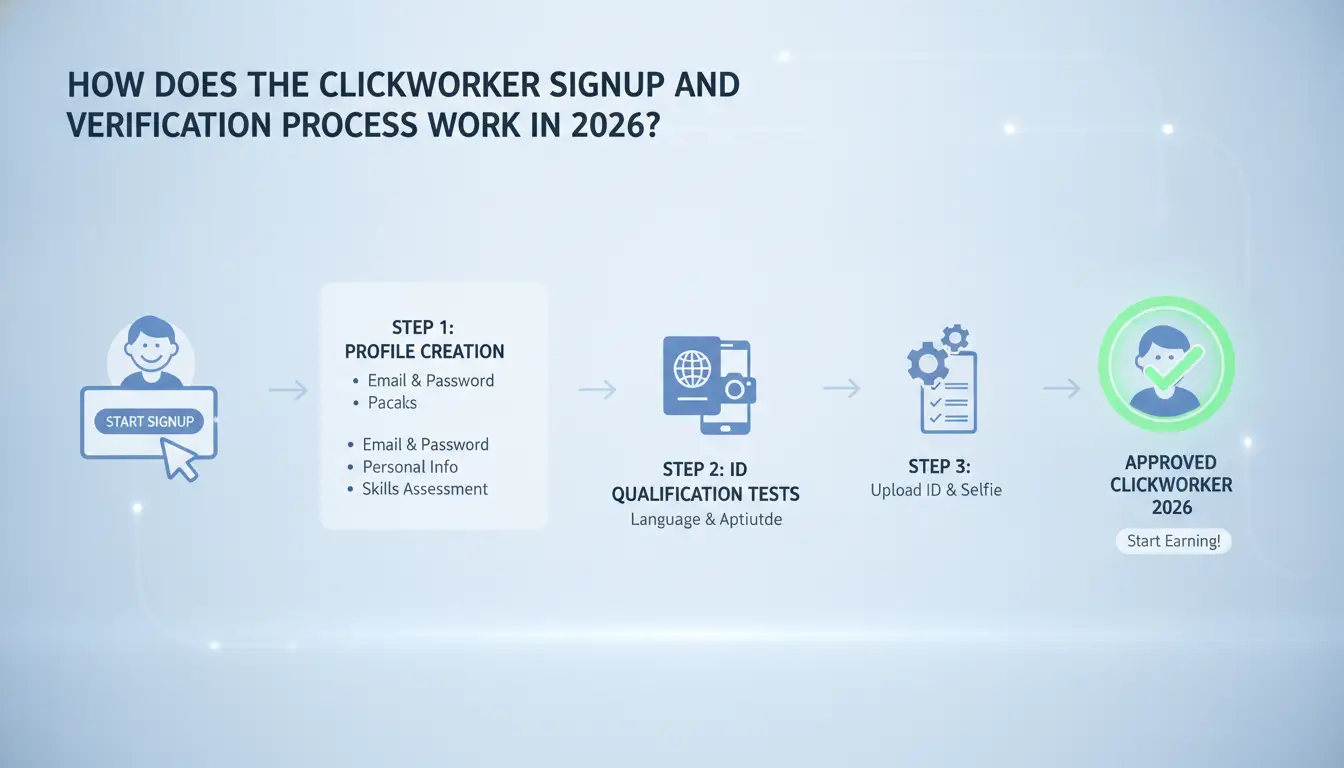
Getting started with clickworker in 2026 is quick if you know what to prep. While the surface pitch is “sign up and pick tasks,” real friction shows up during account checks and onboarding tests. Here’s exactly what you’ll face as a new user.
Step-by-Step: Creating Your Clickworker Account
You’ll need a working email, your full legal name, birth date, and a valid address. Choose a strong password, weak ones get flagged right away. Have a government-issued ID ready; it’s needed for later verification, not just for sign-up. If you plan to get paid by bank transfer, some regions require you to pre-add your account info.
For a smooth registration, use the same name and address as on your ID. If your email is from a “temporary mail” service, you might get blocked before you even reach the dashboard. Most people finish the signup in under 10 minutes when they have details ready.
What Verification Steps Are Required?
Identity checks are standard. You’ll upload a scan or photo of your ID, and sometimes a selfie holding it. Clickworker’s system compares your signup info to your documents, any mismatch triggers a review. Location checks use your IP and address; using a proxy from a different country than your documents can cause instant rejection.
The most common holdup is unclear scans or mismatched info, double-check before uploading. Some accounts get stuck for days if the system flags possible duplicate users or suspicious locations. If your account stays in “pending” for more than 72 hours, reach out to clickworker support through their official portal.
How to Pass the Clickworker Onboarding Tests
Right after account creation, you’ll see basic language and logic tests. For most clickworker jobs, English and basic writing are required. Some tasks need extra “qualifications”, short quizzes on grammar or task rules. Many new users fail the first test by rushing or not reading instructions. Slow down and check sample answers before you start. If you fail, you can retake after 24 hours, but repeated failures limit your access to higher-paying tasks.
Next, you’ll want to know what can trip you up once you start working, especially the risks and mistakes that get new accounts flagged.
What Are the Real Risks and Common Mistakes for New Clickworkers?
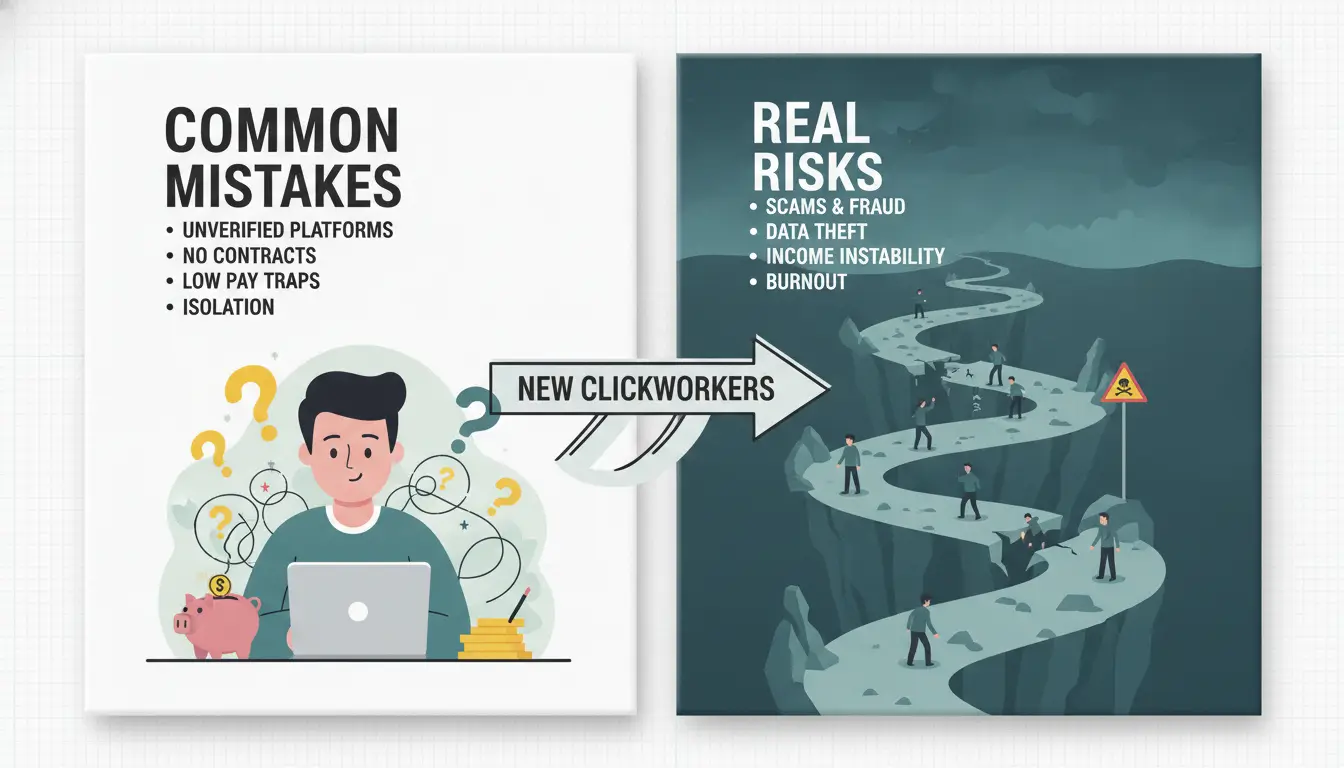
New users often expect clickworker to be simple, sign up, pick tasks, get paid. But the real problems start when you miss what triggers bans, lose access to earnings, or fall for scams. Here’s what actually gets accounts into trouble and how to avoid the worst mistakes.
Why Do Some Clickworker Accounts Get Banned or Limited?
Most bans happen because people try to open more than one account or use fake details during signup. Clickworker’s system checks your IP address and device fingerprints, so if you switch between computers or use public Wi-Fi, you might get flagged as a duplicate. Even changing your phone or browser too often can raise suspicion. Failed verification steps or mismatched information are also common causes. Once your account is limited, it’s hard to recover access or any money inside.
What Mistakes Lead to Lost Earnings or Unpaid Work?
The fastest way to lose out is by rushing through tasks or not following instructions. Clickworker jobs often include hidden quality checks. If you submit sloppy work or copy-paste answers, your rating drops fast. Miss a deadline or ignore a required step, and the platform can withhold payment for that job. Some new users find out the hard way that a single mistake on a long project means all that time is wasted, no pay, no redo.
How to Spot and Avoid Clickworker Scams
Scams usually show up as fake emails or messages pretending to be from clickworker. They might ask for your password, payment info, or get you to click a sketchy link. Always check the sender’s address, official emails end with “@clickworker.com.” Inside the platform, watch for “too good to be true” offers or tasks that ask you to pay upfront. Real clickworker tasks never require payment to join or complete a job.
Staying alert here means you keep your account safe, and your earnings secure for withdrawal. The next step is understanding how and when you actually get paid.
How Does Payment Work on Clickworker and What Should You Expect?
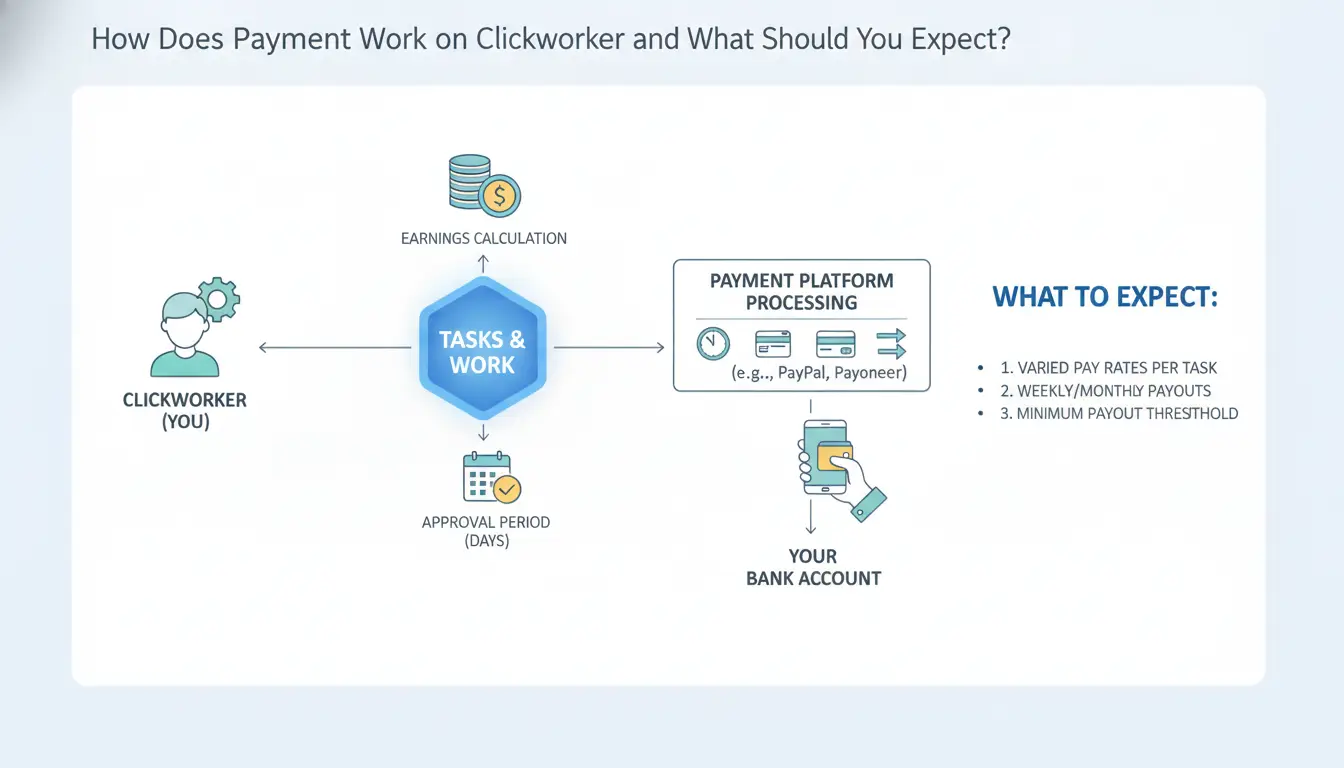
Getting paid on Clickworker is more predictable than some gig sites, but there are still a few details that trip up new users. If you’re reading a clickworker review, wondering “how does clickworker work” for payments, here’s how the payout process actually works, plus what can go wrong if you’re not careful.
How and When Does Clickworker Pay Out?
Clickworker supports PayPal, SEPA (for EU users), and some regional payment options. Not every method is available in every country, so check your account settings before you start working. Most users stick to PayPal for speed, but SEPA is more common if you’re in the EU.
The usual payout schedule is once per week, but only after your earnings hit the minimum threshold. For PayPal, the minimum is often just €5; for SEPA, it may be around €10. Payments process automatically, no manual requests needed. Tasks must be marked as “approved” before they count toward your payout balance.
What Payment Problems Do Users Face Most Often?
The most common complaint in forums is delayed payments. This usually happens if a task hasn’t been approved yet, or if you entered your payment info incorrectly. If you see “pending” for more than a week after approval, double-check your bank or PayPal info.
Disputes over missing payments are handled through Clickworker’s support ticket system. Response times can vary, expect a wait of 2–5 days, sometimes longer if you’re not in the EU. Keep screenshots of your completed tasks and payment dashboard in case you need proof.
How to Track Your Earnings and Taxes
Your Clickworker dashboard shows pending, approved, and paid amounts. Download statements for each month, these are important for taxes, especially if you’re freelancing in countries with strict filing rules. There’s no automatic tax withholding, so you’re responsible for your own tax payments. For more on freelancer taxes, check IRS gig economy info or HMRC self-employment guidance.
All of this ties directly to how much you can actually earn, which is where the next section comes in.
What Steps Actually Help You Earn More on Clickworker in 2026?
Earning more on clickworker is less about working nonstop and more about picking the right steps. People new to the platform often waste hours on low-paying jobs, miss out on higher rates, or get blocked from good tasks by small mistakes. Here’s what actually moves the needle.
How to Qualify for Higher-Paying Tasks
You won’t see the best clickworker jobs unless you pass qualification tests. Spend time on practice runs, these quizzes control what shows up in your dashboard. Language, writing, and UHRS access tests make a difference. If you rush and fail, you’ll be locked out of better jobs for weeks. Hold off on your first batch of tasks until you can pass at least two skill tests.
A strong work reputation is the next gate. Clickworker rates you on accuracy and speed. Even one or two failed quality checks can block you from bonus projects. Always double-check instructions, each job type has hidden rules, and the hit comes when you miss the small stuff.
Which Tasks Are Worth Your Time, and Which Aren't?
Not every job pays enough to be worth it. Data entry and basic surveys often pay less than $1 per hour. Short writing gigs and complex UHRS microtasks can go up to $5–$8 per hour when you build speed. Skip any task with a fixed rate under $0.10 and a long description. Chasing every available job wastes your time and tanks your hourly rate.
| Task Type |
Typical Pay/hour |
Worth Doing? |
| UHRS Microtasks |
$5–$8 |
Yes |
| Short Writing |
$4–$7 |
Yes |
| Surveys |
$0.50–$2 |
Sometimes |
| Data Entry |
<$1 |
No |
(Source: clickworker review, Clickworker FAQ)
How to Organize Your Workflow for Maximum Efficiency
Batch similar jobs together so you don’t switch focus every five minutes. Use a notepad or free browser reminder tools to track deadlines and recurring tasks, missing a deadline can lock you out of future work. Fast tab switching and keyboard shortcuts shave seconds off every task. The top earners treat clickworker like a real shift, not a background browser tab. All of this gets you ready for handling bigger task loads or even managing multiple accounts safely.
How to Safely Manage Multiple Clickworker Accounts or Team Operations (with DICloak)
What Are the Dangers of Handling Multiple Clickworker Accounts?
Running more than one clickworker account, whether for yourself or as a team, gets risky fast. Clickworker systems track device IDs, browser fingerprints, and IP addresses. If you log in to several accounts from the same laptop or share a home Wi-Fi, those accounts can get linked and banned together. Teams often get flagged because one mistake, like reusing a browser or missing a fingerprint reset, can connect everyone. The real risk is losing all accounts in one sweep.
How DICloak Makes Multi-Account Management Safer
You can use tools like DICloak to isolate every clickworker login in its own browser profile, each with a unique fingerprint and separate proxy IP. This means one account’s mistake won’t drag the rest down. DICloak’s workflow also lets you quickly switch between accounts without leaving traces, reducing the chance of mass bans.
Team Collaboration and Automation with DICloak
For teams, DICloak supports profile sharing and custom permission controls. You decide who can access which clickworker jobs and when. Bulk actions and RPA automation handle repetitive work, saving time and cutting human error. This makes handling team operations on clickworker much less stressful.
How Does Clickworker Compare to Other Microtask Platforms?
What Makes Clickworker Different?
Clickworker stands out for its mix of task types, data entry, text creation, surveys, and moderate-level AI training. Unlike Amazon Mechanical Turk, which leans toward repetitive HITs (like image labeling or transcription), Clickworker offers more jobs in local languages and regional markets. This matters if you’re outside the US or the UK, as Clickworker has broader support for European and Asian users. Payment is direct via PayPal or bank transfer, not Amazon gift cards. What’s less obvious from a typical clickworker review is that many jobs require passing a qualification test, fail that, and you won’t even see the better-paying tasks. The site also posts “UHRS” jobs, which are higher-volume but need separate account linking.
| Platform |
Typical Tasks |
Payment Method |
Regional Access |
Language Support |
| Clickworker |
Surveys, text, UHRS |
PayPal, bank |
Europe, Asia |
Multi-language |
| MTurk |
HITs, labeling |
Amazon Gift Card |
US, UK |
English |
| Appen |
AI training, search |
PayPal, bank |
Global |
Multi-language |
Source: Official platform sites
When Is Another Platform a Better Fit?
If you want steady, high-volume work and don’t mind simple, repetitive tasks, MTurk can make sense, especially for US-based workers. Appen tends to offer more long-term projects and AI data annotation, which suits those looking for remote contracts. Sometimes, switching platforms is the only way to hit your earnings target. For example, UHRS jobs on Clickworker dry up fast, while Appen’s projects can last months. If you’re chasing “clickworker jobs” for side cash, watch how task volume changes week to week.
How to Safely Use Multiple Microtask Platforms
Managing accounts across Clickworker, MTurk, and Appen means tracking separate logins, payment cycles, and qualification tests. The biggest risk is overlapping browser sessions or mixing up profiles, which can trigger account flags or missed payments. Use a spreadsheet to track which jobs you’ve completed and which platform paid. If you need to handle multiple accounts, keep browser sessions isolated and never reuse login details. This setup avoids most common mistakes and lets you shift between sites as needed.
When Is Clickworker Not the Right Choice, and What Are the Alternatives?
Who Should Avoid Clickworker?
If you're searching for steady, full-time income, Clickworker won't cut it. Most clickworker jobs are short tasks, like surveys or text categorization, that pay anywhere from a few cents to a couple dollars. Payment cycles and task volume just don't support reliable, month-over-month earnings. Another major blocker: location. If you live in a country or region not supported by Clickworker’s payment system, you won’t be able to withdraw funds or access many tasks. Some users also run into trouble when their language skills or device setup don't match task requirements.
What Are the Best Alternatives to Clickworker?
If you need more stability or want higher payouts, look at other microtask platforms or freelance sites that score better in user reviews. Amazon Mechanical Turk is the most direct alternative, task variety is similar, but high-performing workers can land better-paying gigs if they maintain strong ratings (Mechanical Turk). Appen offers more language and data annotation jobs, but onboarding takes longer (Appen). For people ready to handle bigger projects, sites like Upwork and Fiverr let you bid for freelance work, often earning $10–$50 per task after you build reputation.
| Platform |
Task Type |
Typical Earnings |
Payment Speed |
Notable Limits |
| Clickworker |
Microtasks |
$0.10–$5 |
Weekly |
Country restrictions |
| Mechanical Turk |
Microtasks |
$0.20–$10 |
Weekly |
US/India focus |
| Appen |
Data annotation |
$1–$20 |
Monthly |
Slow onboarding |
| Upwork/Fiverr |
Freelance projects |
$10–$100+ |
Per project |
Need to build profile |
Sources: Official platform pages, clickworker review, Appen
How to Transition Smoothly to a New Platform
Switching platforms is simple on paper, but the trick is making your reputation count. Start by saving proof of your work quality, screenshots, feedback, or payout records help when applying elsewhere. Avoid rushing your switch; take time to learn each platform’s task rules and payment quirks. If you’re moving to freelance sites, focus on completing early jobs quickly and asking for reviews. The biggest mistake is treating every site like clickworker, each platform has its own rules, so copy-paste workflows often lead to rejected tasks or delayed payments.
Frequently Asked Questions About clickworker
Is Clickworker legit and safe to use in 2026?
Clickworker has a solid reputation as a microtask platform. Most users report getting paid for their work, usually through PayPal or SEPA bank transfer. The site uses standard security measures to protect your data. Avoid sharing personal info in task responses. Never pay to join, Clickworker registration is always free.
How much can you realistically earn on Clickworker?
Most Clickworker users earn between $5 and $12 per hour, depending on the tasks they complete and their speed. Higher-paying clickworker jobs, like writing or research, may pay more. However, task availability can vary, so consistent, full-time income is not common. Many people use Clickworker for extra cash, not as a main job.
Can you use Clickworker from any country?
Clickworker is open to many countries, but not all. Some tasks are only available in certain regions, especially the US and Europe. If you live outside these areas, you may see fewer jobs. Check the sign-up page for your country’s eligibility before registering.
What should you do if your Clickworker account is suspended?
If your Clickworker account is suspended, contact support through the help section. Common reasons include low-quality work, using multiple accounts, or failing qualification tests. To prevent issues, always follow instructions, keep one account, and complete tasks carefully. Appeals may take a few days for a response.
Does Clickworker require any special skills or experience?
Most Clickworker tasks only need basic computer skills and attention to detail. For higher-paying clickworker jobs, like writing or translations, you must pass qualification tests. Reading instructions well and submitting quality work helps unlock more types of tasks over time. No formal experience is required to start.
Clickworker offers flexible online work opportunities suitable for those seeking to earn extra income or work remotely on their own schedule. While it provides a straightforward way to access microtasks, users should be mindful of potential income limitations and task availability. Try DICloak For Free
 Web Proxy Tools
 Free Tools
 Cookie Plugin
 UA Generator
 MAC Address Generator
 IP Generator
 IP Address List
 2FA Code Generator
 World Clock
 Anonymous Check
 WebRTC Leak Test
 UUID Generator
 Free Web Proxy Site
 Proxy Checker
 FB Ad Checker
 AI Web Scraping
 Free SMM Tools
 Twitter Shadowban Checker
 Instagram Name Checker
 UTM Generator
 Username Generator
 AI Hashtag Generator
 LinkedIn Headline Generator
 Social Media Image Resizer