Many people encounter IG restrictions, and their first reaction is that their accounts suddenly can't like, comment, or post, or even can't send messages. It may seem like Instagram restrictions, but the actual reasons are often more complex than you think. Sometimes it just triggers platform risk controls, sometimes it directly affects whether the account can operate normally afterward. Being stuck here not only affects daily interactions but can also lead to temporary or permanent account bans.
But many users think that waiting a day or two will automatically restore the account, but the real risk lies in the platform's subtle detection of abnormal account behavior. For example, IG account restrictions are not always due to violations; frequent operations, device switching, batch registrations, or even logging into multiple accounts on the same network environment can all be detected as abnormal by the system. You might think these small actions are harmless, but after Instagram is restricted, you realize the platform is more sensitive than you imagined.
What really matters is not "how long to wait for unbanning," but what exactly the restriction is, what triggers it, whether it can be completely lifted later, and whether the risks increase during the process. Especially for those operating multiple accounts, marketing, or daily management, simply waiting a few days after encountering Instagram restrictions often cannot solve the root problem. In practice, identifying the type of restriction, investigating behavior, and adjusting the environment are the keys to reducing losses.
Let's first look at what types of Instagram restrictions exist and the triggers that are most likely to fall into traps.
What are Instagram's limitations? Common causes and triggering scenarios
Instagram restrictions mean the platform automatically determines that an account is at risk based on behavior, content, or environment, and imposes restrictions. These restrictions do not mean blocking; they usually disable some features temporarily, and in severe cases, may they be banned or permanently disabled. The platform uses an automated system to first screen for anomalies, then manually reviews and decides whether to take more severe measures. If users are only restricted, they can usually log in, but interaction, posting, and private messaging functions will be restricted.
Definition of Instagram restrictions and platform policies
The biggest difference between Instagram restrictions and blocks lies in whether you can log in normally. Restrictions mainly involve the platform automatically detecting abnormal behavior and temporarily suspending some operational permissions. Blocking is a manual review that determines violations and directly blocks login. The platform's automatic judgments include large-scale operations in a short period, abnormal device switching, and repeated content posting; manual review usually targets serious violations or appeal cases.
Common behaviors triggering Instagram's restrictions
The actions most likely to restrict accounts are often repeated actions in a short period, such as batch liking, continuous comments, or quickly following multiple new accounts. These behaviors are classified as machine operations by the system and easily trigger risk controls. Another common scenario is content violations, such as posting sensitive images, advertising links, or fake information, all of which are key monitoring areas for platforms. Another frequently overlooked point: abnormal login locations or devices. For example, if the same account suddenly logs in on different countries or devices, the system may think the account has been hacked and immediately restrict operations. **The real risk is not a single action but a compound operation, such as multiple accounts operating in batches on the same network environment, in which the restrictions are often harder to lift. **The most common failure cases are ignoring risk control warnings and continuing to repeat operations, resulting in accounts being directly banned, and it is difficult to recover after appeals.
New trends on Instagram in 2026
- AI automatic review is enhanced, making abnormal behavior judgments more precise, making batch operations easier for the system to target.
- The risks of multi-account operations increase significantly, especially when managing multiple accounts simultaneously on the same device and network, where the system directly marks them as high risk.
- The platform began to focus on proxy and environment switching, frequently changing IPs or devices in a short period, significantly increasing the probability of triggering restrictions.
To understand your situation, first determine what kind of restrictions it is to address the symptoms. Next, look at what specific symptoms will appear after Instagram restrictions and how to assess the scope of impact.
What happens after Instagram is restricted? Main performance and impact analysis
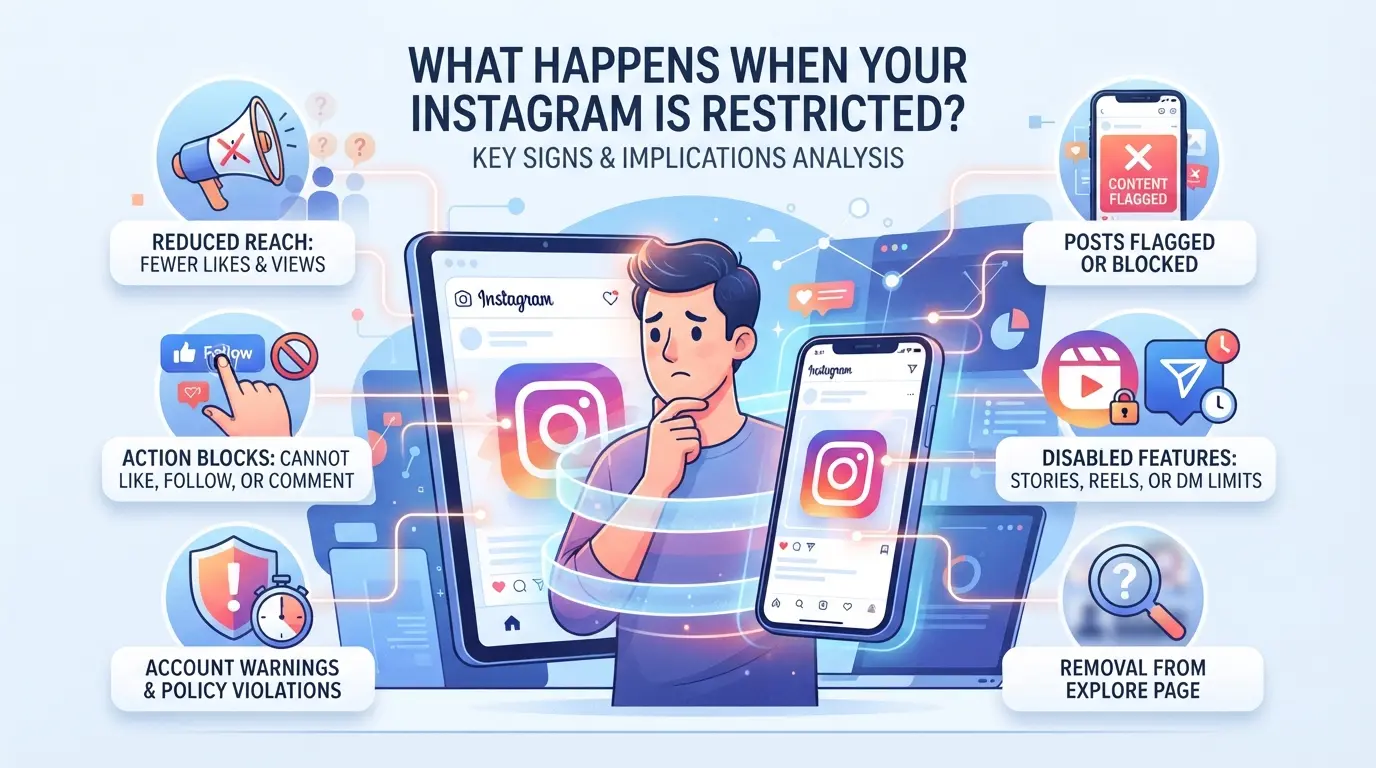
Most users, once faced with IG account restrictions, immediately feel that certain actions suddenly become impossible, such as not being able to post posts, leaving messages, or being "invisible" in Stories. But behind these behaviors lies the platform's various handling methods for different violations or risk control scenarios. Some cases only restrict interaction, while others affect the entire account's exposure and subsequent benefits.
Common signs of restricted accounts
Common situations include: unable to post, comment features suspended, Stories or new posts no longer appearing in others' feeds, and sometimes not even receiving SMS notifications. At this point, not only does interaction break down, but the account's content is actually "downgraded" by the platform.
The scope of impact of different types of restrictions
Interaction restrictions usually mean the account can still log in but cannot like, reply, or send private messages. These are mostly short-term risk controls, such as being found to have mechanical operations or engaging in a large number of similar behaviors within a short period. Posting restrictions further prohibit users from posting or uploading Stories, and even locking up personal data modifications. In such cases, even if the account logs in normally, it cannot generate new content externally. If only interaction restrictions appear, they usually automatically lift within a few days; But when facing post restrictions, it is likely the platform recognizing serious abnormalities or violations, greatly increasing the difficulty of recovery. Some marginal cases allow you to see your own posts but others cannot see them at all. This "invisible" punishment is hardest for newcomers to recognize and has effectively entered the stage of demotion. The real problem is the gradual tightening of features, such as first disabling interactions, then blocking posts, and eventually even login being blocked, which significantly lowers the success rate of appeals.
The difference between Instagram restrictions and lockdowns
- After being restricted, the account content may be "self-visible," but others won't be able to search your posts, and interactions won't show up
- Blocking means you can't log in, can't even open your personal homepage, and the other party loses their contact window completely
- Notifications received during the restriction period may be incomplete, and some messages may be lost or pushed late
When encountering these situations, don't just wait for unblocking; first confirm which restriction it is and what the root cause is, so you can avoid making the process more complicated as you apply it. Next, we will further break down common misconceptions and misbehaviors that cause restrictions to become distorted, so that self-inspection and follow-up handling are no longer blind.
Common Misconceptions and Mistakes in Instagram Restrictions (2026 Latest)
Many people rush to restore their IG account restrictions after encountering restrictions, which only makes the problem more complicated. What really increases risk is often the lack of understanding of operational details.
Misconception 1: Repeated appeals or frequent data changes
If there are too many appeals, the platform will think you're trying to evade risk controls, leading to extended or even upgraded restrictions. Frequently changing account information (such as nickname, bio, linked email) in an attempt to "remove anomalies" is actually more likely to be judged by the system as malicious operation. During restriction periods, blindly appealing or repeatedly changing data can only make the platform doubt the authenticity of the behavior
Misconception 2: Using unknown tools or third-party services
- Automated scripts frequently brush operations, making them easy to be directly blocked by the platform.
- Unauthorized third-party applications may steal account data and trigger security alerts.
- Using unknown "unsealing tools" and switching to a high-risk account.
Misconception 3: Overlooking device and network anomalies
Switching between multiple devices and operating on multiple phones at once can sometimes cause the platform to determine account theft. Abnormal IP address changes, especially short-term cross-region switching, are often considered abnormal logins by the system.
- Check if the most recent login device is abnormal.
- Check if your network environment is stable and avoid frequently changing IPs.
- If you find any abnormalities, pause operations for a while and try again.
How to lift Instagram restrictions? Latest steps and advice for 2026
Encountering IG account restrictions isn't something that can automatically resolve them by waiting. To lift restrictions, you don't rely on blind appeals, but on step-by-step confirmation of the cause, adjustment of your operations, and timely adjustment of the environment. Below is the detailed process for handling common IG restrictions in 2026. Following these steps can greatly reduce the chances of misjudgments and repeated restrictions.
Step 1: Confirm the type and reason for the restriction
- Open the app, check the pop-up restriction notifications or warning messages, and carefully record the error code or prompt.
- Review all actions taken in the past 24 hours, including batch friend additions, frequent device switching, or repeated comments in a short period, and check the platform's rules for any abnormal behavior.
- If you haven't received a clear notification but can't operate certain features, it's recommended to try again with the web version. Some restrictions only apply on the app side.
Step 2: Pause high-risk operations and wait for recovery
- Stopping any batch interactions (such as crazy likes or frequent private messages) can easily be identified as bot operations.
- Avoid frequent cross-device and cross-region logins, especially avoiding switching accounts across multiple network environments at the same time.
- If you have been temporarily blocked, it is recommended to remain still for 24-72 hours and observe if the ban is automatically unlocked. If there are abnormal pop-ups during this period, do not force repeated operations, or the restrictions may be further increased.
Step 3: Correct appeal and contact the official authorities
- Click the "Submit Appeal" or "Report Issue" button in the restriction notice, and briefly state your recent actions and the reasons for your mistake.
- Upload screenshots to prove abnormalities, avoid using templated statements, making it easier for the official team to handle specific situational explanations.
- After appealing, you generally need to wait 24-72 hours. Processing may be delayed on weekends or holidays, so do not repeatedly submit or change accounts during this period.
Step 4: Check the device and network environment
- Confirm whether you have recently switched IPs from different regions, or operated the same account simultaneously on multiple devices. This is a key risk control point.
- Secure login on a commonly used device to reduce abnormal login records in account history.
- Avoid using public WiFi or shared networks, as IPs often overlap with unfamiliar accounts in such environments, which can easily trigger risk controls.
Step 5: Safety recommendations after recovery
- Once restrictions are lifted, it is recommended to change passwords immediately, re-review all third-party app licenses, and disable unnecessary plugins or automation tools.
- Check your account's recent login history for any abnormal devices or locations, and remove any suspicious devices promptly.
- Maintain low-frequency operations for the following week to avoid similar risk control anomalies in a short period.
Risks and precautions for Instagram under multi-account operations
When managing multiple IG accounts at once, the biggest fear isn't which account suddenly gets restricted, but that once the system discovers a connection between accounts, it often ends up in a chain. Relying solely on "normal operations" cannot fundamentally avoid risk control, especially for marketing promotions, agency operations, or frequent environment changes, where the risk of restrictions is far greater than for a single account.
Common restrictions and risks in multi-account operations
- Duplicate fingerprints lead to account linkage: If different accounts have identical browser fingerprints, device IDs, or cookie details, platforms can easily identify them as the same person, greatly increasing the chances of batch restrictions.
- IP anomalies trigger platform risk control: If multiple accounts share a single IP or proxy, or frequently switch regions within a short period, the system will mark such abnormal traffic as machine behavior and directly enter the risk control queue.
- Unnatural Operation Behavior: Actions such as mass logouts/logins in a very short period, frequently operating multiple accounts simultaneously, or opening too many IG pages on one device are all high-risk actions and easily detected automatically.
Practical advice to reduce the risk of multi-account restrictions
Accounts should be managed separately; don't switch between the same phone, computer, or browser repeatedly. The safest approach is to create an independent environment for each account, such as using different user folders, devices, or even separate proxies. Don't save all accounts by placing them in the same browser tabs or under the same IP just to save trouble. If the system detects overlapping behavior patterns, device fingerprints, or IPs, the common result is that the entire batch of accounts is simultaneously under risk control, making appeals much harder. In practice, even a single detail that isn't properly isolated—like cookies not being cleared or proxy configuration errors—can render all your efforts wasted. When Instagram is restricted, prioritize checking whether the environment is mixed or the operation pace is too fast—this is more effective than simply waiting for unblocking.
How to securely manage multiple Instagram accounts using DICloak? Practical practice of environment isolation and proxy configuration
When operating with multiple accounts, Instagram restrictions mainly risk from overlapping environments and mixing IPs. If marketers or teams manage multiple IG accounts on just one device, the platform can easily detect that these accounts are linked, resulting in no warning restrictions. Traditional practice involves multiple devices or separate browsers, but often due to oversights in fingerprint, IP, or settings, accounts are processed by the system. To truly reduce risk control misjudgments, the most effective way is to create an independent operating environment for each account and configure a dedicated proxy. DICloak provides a concrete implementation tool in this regard.
Configure DICloak browser file isolation and fingerprint settings
When operating multiple Instagram accounts, the biggest concern is that browser fingerprints are repeatedly linked by the platform. DICloak allows users to create an independent profile for each account, setting fingerprint parameters such as operating system, User Agent, language, time zone, geographic location, and screen resolution. Marketers can adjust profile settings according to account needs, ensuring each account has its own browser profile. This way, even if the same device manages multiple IG accounts simultaneously, the platform can avoid misinterpreting batch operations due to fingerprint consistency. It should be noted that profile isolation only separates local environments and does not guarantee absolute account security. Platforms also consider factors such as operation frequency and content interaction when determining abnormal behavior.

Assign dedicated proxies for each account
Not separating IP sources is another major risk of multiple accounts being restricted by the platform. DICloak supports setting independent proxies for each profile. Users can prepare their own HTTP, HTTPS, or SOCKS5 proxies and enter the proxy host, port, and account password in the profile. The system automatically checks connection status and displays basic information such as proxy IP, region, and time zone, making it easy for users to confirm whether the proxy is legitimate. The advantage of this is that each account can operate independently, reducing the platform's judgment of batch actions due to IP duplication or abnormal switches. Users control proxy selection and quality; DICloak itself does not sell proxies and does not guarantee that successful connections are always secure.

This process only solves the separation of operating environment and IP; long-term security management must also combine behavioral control with content policies.
Instagram long-term safety management advice under limiting risks
Avoid IG account restrictions long-term, focusing not on temporary unbans but on daily operations and management details. The following methods can directly reduce the likelihood of your account being restricted and can be implemented without additional tools.
Regularly check the security of accounts and devices
Change passwords regularly; do not reuse simple combinations. Check all authorized third-party apps; immediately remove any unclear or unnecessary permissions. Check phones and computers for malware and system updates at least once every six months. If even one device is compromised, all accounts could be compromised.
Establishing compliance operation procedures
- Stagger daily operation times and avoid running repetitive tasks in batches
- Posting, interaction, and login should try to mimic real user behavior
- Immediately pause operations when abnormal alerts are detected to avoid chain restriction
Permission and record management under team collaboration
When managing accounts as a team, division of labor and record-keeping must be detailed.
- Clarify who is responsible for which accounts to avoid multiple people operating simultaneously
- Important steps (such as logging in from another location) must be recorded and recorded
- Regularly review permission allocation and historical operations
Frequently Asked Questions about Instagram Restrictions
How long does it take for Instagram restrictions to be automatically lifted?
Generally, Instagram restrictions are automatically lifted within 24 to 72 hours. Minor cases such as brief mutes or pauses for liking or commenting usually resume within a day. If accounts violate rules multiple times or are classified as high risk by the system, restrictions may last longer and may require users to appeal proactively to lift them.
Does Instagram restriction notify the other party?
When you restrict someone, they won't receive any clear notification. But restricted people will be restricted in messages, private messages, and other interactions. For example, only you can see their messages, private messages will be moved to 'Message Requests,' and you can choose whether to view them.
What is the difference between Instagram restrictions and lockdowns?
Restrictions only limit the interaction between the other person, such as messages only visible to both you and the other person. Blocking means completely cutting off contact, preventing both parties from viewing each other's posts, stories, or messages. Choosing between restriction or blocking depends on the level of privacy you want.
Does multi-account operation increase Instagram restrictions risk?
Operating multiple IG accounts simultaneously, especially on the same device or network environment, significantly increases the risk of being detected and restricted by the system. If a clean environment is not used for isolation or proxies, all accounts may be identified as abnormal behavior together, leading to collective restrictions.
Can I delete my account and re-register after being restricted by Instagram?
Although you can choose to delete your account and re-register, this is not recommended. Because Instagram manages risks based on device information and IP addresses, new accounts may continue to be restricted or even unusable, and the problem cannot be truly resolved.
Now is the time to develop specific collaborative security plans based on your team's actual needs and choose the right tools to implement them. If you want to further enhance your team's information protection, you can immediately experience solutions designed specifically for secure collaboration. Download DICloak and start safer team collaboration
 Web Proxy Tools
 Free Tools
 Cookie Plugin
 UA Generator
 MAC Address Generator
 IP Generator
 IP Address List
 2FA Code Generator
 World Clock
 Anonymous Check
 WebRTC Leak Test
 UUID Generator
 Free Web Proxy Site
 Proxy Checker
 FB Ad Checker
 AI Web Scraping
 Free SMM Tools
 Twitter Shadowban Checker
 Instagram Name Checker
 UTM Generator
 Username Generator
 AI Hashtag Generator
 LinkedIn Headline Generator
 Social Media Image Resizer