Running Facebook through a proxy should hide your real location, but the process is more fragile than most people think. Even with a good proxy setup, a dns leak when using facebook with a proxy can send your real DNS requests to your ISP, exposing the true network you’re on. Many marketers only realize this problem after a fresh account gets flagged for “unusual activity,” despite using new proxies, devices, and browsers.
The catch is, browser and system-level DNS leaks don’t throw obvious errors. Facebook rarely tells you “your DNS leaked”, you just see more checkpoints, forced logouts, or bans that don’t match your proxy’s IP. Relying on a proxy alone gives a false sense of safety, especially if you’re switching accounts, rotating proxies, or running multiple Facebook sessions for marketing.
What trips up most setups is the way browsers, operating systems, and proxy tools handle DNS lookups. Some requests still go straight to the local resolver, even when the browser shows the right IP. That means a hidden dns leak risk sticks around if you don’t test and fix it directly. If you skip this step, your accounts may keep getting caught, no matter how often you swap proxies or change browsers.
Here’s what you need to check before your next Facebook campaign goes live.
Why DNS Leaks Still Happen When Using a Proxy on Facebook in 2026
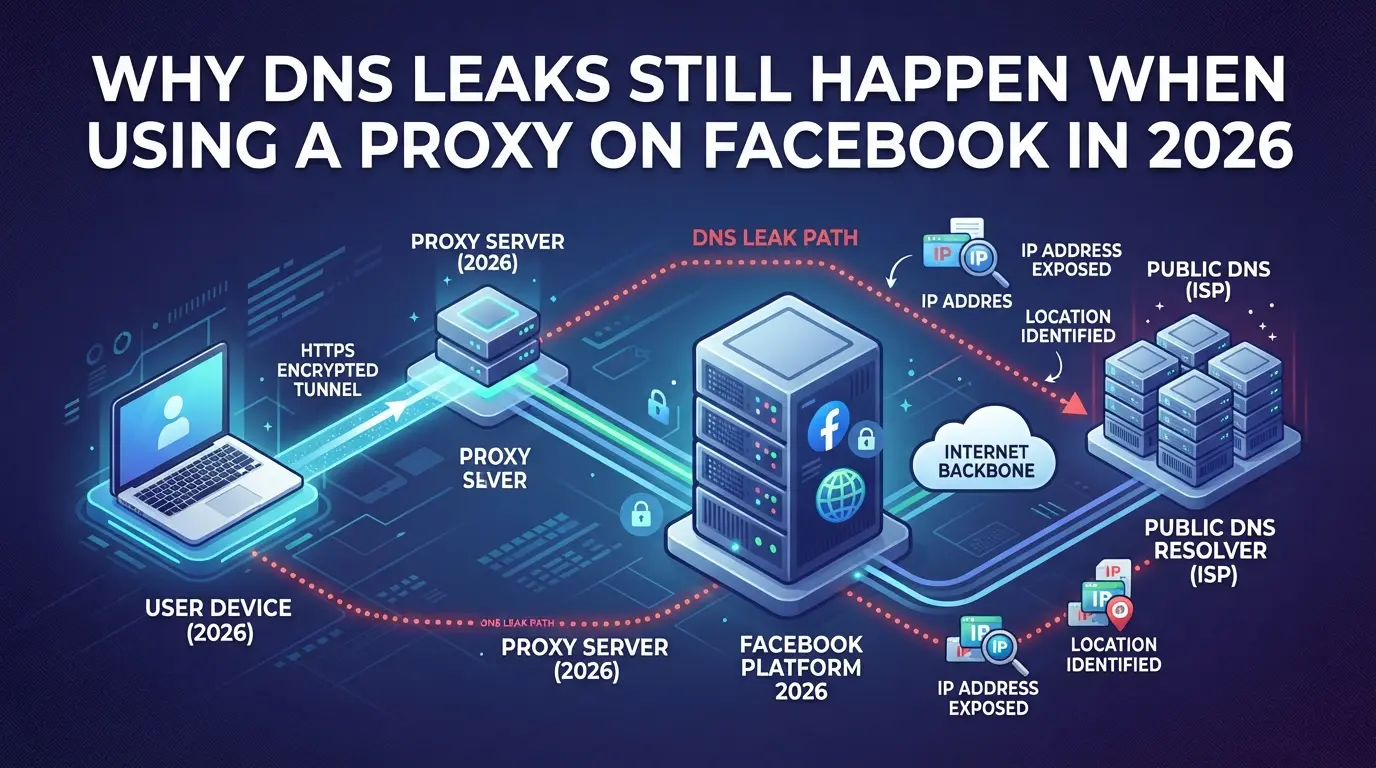
Most Facebook account operators expect a proxy to hide their real location, but a DNS leak can quietly expose your actual network details to Facebook, sometimes even when everything else looks correct. That’s why even experienced users keep running into unexpected bans, checkpoints, or device verifications that don’t line up with their proxy IP.
What Is a DNS Leak and How Does It Expose Your Real Identity?
A DNS leak happens when your device’s DNS requests go outside the proxy tunnel and reach your local network or ISP. This can expose your real location and network to Facebook, even if your browser shows the proxy IP.
- DNS lookups can still use your default network route, not the proxy.
- Facebook may match your DNS resolver’s location with your account activity.
- Proxy settings that only cover HTTP/S traffic often miss DNS queries.
Why Facebook Activity Makes DNS Leaks Especially Risky
Facebook tracks far more than just your login IP. When you visit Facebook with a proxy, your browser may still send DNS requests directly from your real network. If Facebook sees a login from a proxy IP, but the DNS traffic comes from a completely different country or ISP, their risk systems flag this as suspicious. This isn’t theory, accounts get hit with identity checks or session terminations when DNS leaks reveal patterns that don’t match your proxy setup.
A common failure comes from using browser-only proxies or system proxies that aren’t configured to handle DNS. For example, you might load Facebook through a US proxy, but your device’s DNS requests still go to an ISP in Europe. Facebook can spot this mismatch and tie it to your account, even if you’re running multiple sessions or rotating proxies. In many cases, you won’t get a clear error. Instead, you’ll see random checkpoints, forced logouts, or sudden security popups. The real risk isn’t just losing one account, when running multiple accounts, a single DNS leak can link them all to your real network, putting your whole operation at risk. This is why fixing DNS leaks must come before scaling up Facebook proxy workflows.
How DNS Leaks Actually Happen When Using a Proxy with Facebook
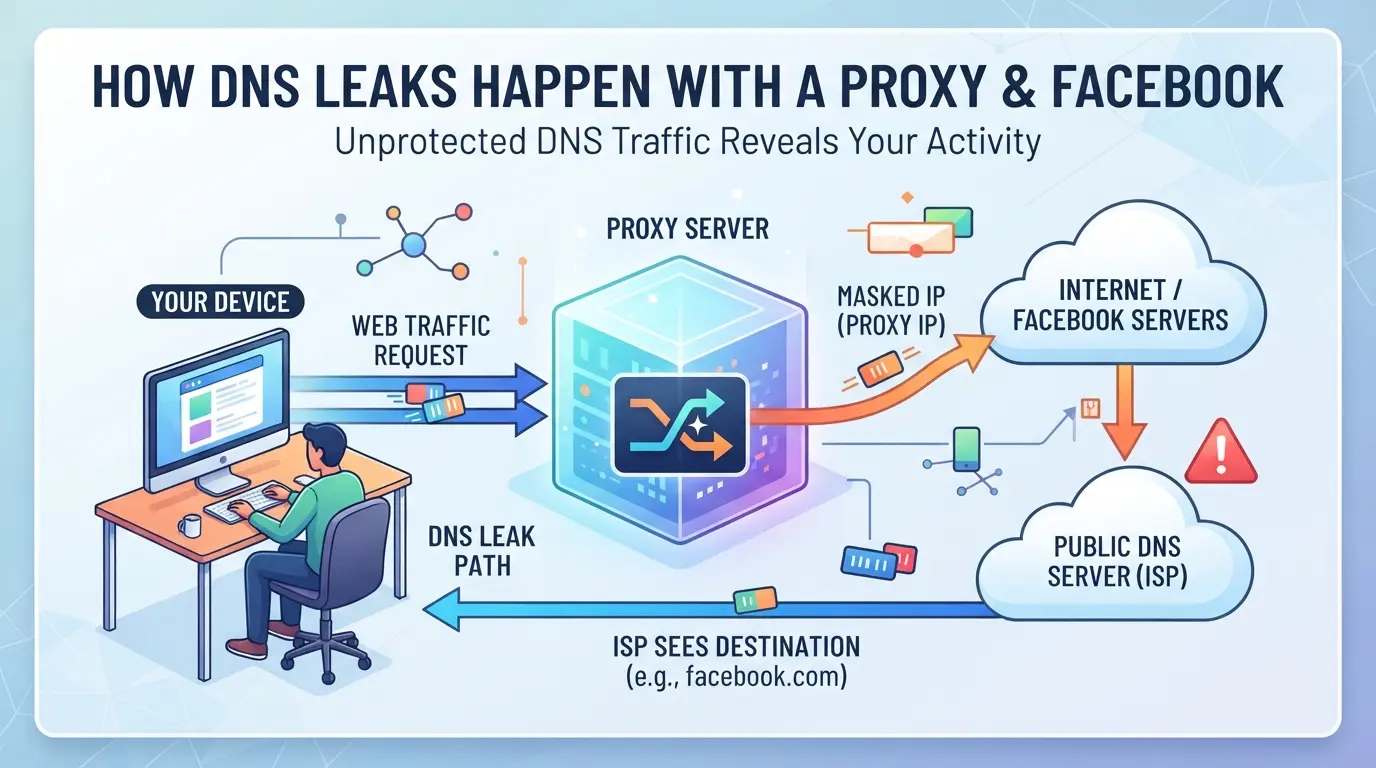
Even with a proxy set up for Facebook, DNS leaks can slip through gaps in your browser, operating system, or proxy configuration. The problem isn’t just picking the wrong proxy, it’s missing the real path DNS requests take behind the scenes.
Where DNS Requests Can Escape: Browser, OS, and Proxy Gaps
- Browser DNS vs. System DNS: Some browsers (like Chrome or Edge) may send DNS queries straight to the operating system, even when a proxy is active.
- Proxy Type Handling: Not all proxy types route DNS, HTTP proxies usually ignore DNS, while SOCKS5 can route them if set up correctly.
- System-wide Leaks: Background apps and services often send DNS requests outside the proxy, exposing your real location even when Facebook loads through the proxy.
Common Proxy Setups That Still Leak DNS on Facebook
A typical setup goes wrong when you pick an HTTP proxy, configure it in your browser, and assume every request gets routed safely. What actually happens is that HTTP proxies handle only web traffic, not DNS, so your computer still asks its default resolver (often your home or office ISP) to look up facebook.com. This creates a clear path back to you, even when your Facebook session appears to use the proxy’s IP. SOCKS5 proxies can stop this if you enable “proxy DNS through SOCKS5” in your browser or use a tool that forces DNS over the proxy, but most people miss this step. Edge cases pop up when users mix browsers, like running Facebook in one and Google in another, or when auto-start apps trigger DNS lookups outside the proxy’s control. On Windows, certain system services (like prefetch or search indexing) leak DNS regardless of your browser settings. The hardest leaks to spot happen when a single Facebook tab looks clean, but another app or extension triggers a DNS request in the background, sabotaging the whole proxy setup.
If you only check your IP address in the browser, you’ll overlook these escape routes. The next step is to test for DNS leaks directly and fix them before running campaigns.
What to Check Before Using a Proxy for Facebook: DNS Leak Risks and Warning Signs
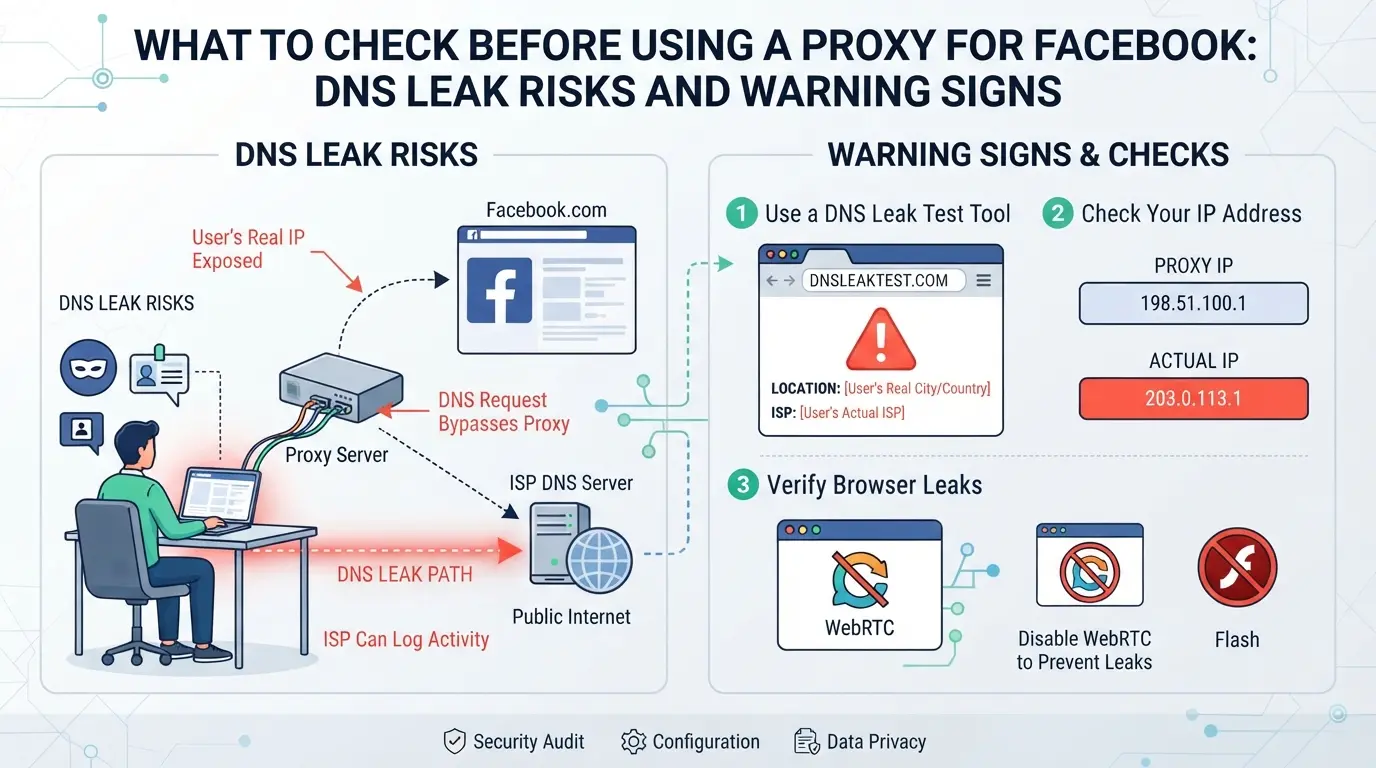
If you skip DNS leak checks before logging into Facebook with a proxy, you risk tipping off Facebook to your real location, even when your browser shows the proxy IP. Fast, direct checks catch leaks before they cost you accounts.
How to Test for DNS Leaks Before Logging In
Run a DNS leak test using trusted sites like dnsleaktest.com or ipleak.net right after setting up your proxy and before opening Facebook. If you see your real ISP or any local DNS provider in the results, your setup is leaking, Facebook may see your true network even if the proxy changes your visible IP. One mismatched server is enough to trigger risk flags.
Red Flags in Your Proxy and Browser Setup
Quick leaks often start with sloppy setup. You don’t need complex tools, just watch for these warning signs before touching any Facebook login:
- Proxy tool doesn’t have a “route DNS through proxy” or “remote DNS” option, or leaves it unchecked.
- Your browser, especially Chrome or Edge, runs with “Use system DNS” enabled, or you never disabled DoH (DNS over HTTPS) when running a proxy.
- After connecting, your DNS leak test shows any server from your real country, ISP, or local network, not just your proxy’s location.
Missing any of these means Facebook can still connect your activity to your real network, even if you’ve switched IPs. The easiest way to get caught is trusting the proxy is “on” without checking where your DNS requests really go. That’s how even paid proxy setups fail in the field.
When these checks catch a problem, fix it before you log in. The next section gives a full step-by-step, but never skip this leak test phase, once Facebook sees a mismatch, bans or extra verification hit fast.
Step-by-Step: How to Fix or Prevent DNS Leaks When Using Facebook with a Proxy
Even if your proxy shows the right IP in browser tests, DNS leaks can still expose your real network to Facebook. Fixing this means changing more than just the proxy in your browser, your system and proxy type both matter. Skip a single setting, and your main DNS can still leak requests in the background.
Configuring Your Proxy and System for Safer DNS Handling
- Use a SOCKS5 or HTTPS proxy, not HTTP. Only SOCKS5 and HTTPS proxies can handle DNS requests safely; HTTP proxies leave DNS untouched.
- Change your operating system’s DNS to a public resolver (like 1.1.1.1 or 8.8.8.8) or, even better, set it to “localhost” if your proxy supports remote DNS. This stops Windows or Mac from leaking DNS through your default ISP.
- Set your browser to force remote DNS. In Chrome, launch with the
--proxy-server and --host-resolver-rules="MAP * 0.0.0.0 , EXCLUDE localhost" flags. For Firefox, enable “Proxy DNS when using SOCKS v5” in settings.
If you miss any of these, Facebook may see your real location even when your IP looks correct.
Verifying Your Setup: Final DNS Leak Test Before Facebook Login
- Visit a DNS leak test site (like dnsleaktest.com) while connected to your proxy.
- Run a standard and extended test. If any DNS server from your home ISP or local provider shows up, your setup still leaks.
- If you detect a leak, double-check your proxy type and browser flags, don’t log into Facebook until the only DNS servers showing match your proxy’s location.
A clean test means Facebook only sees the proxy’s DNS. If you still see leaks, stop and fix them before opening any account. This step saves you from account blocks that seem random but actually come from DNS mismatches.
That’s the technical fix, next, you’ll see why these leaks hit multi-account operators even harder.
Why DNS Leaks Are a Bigger Problem for Multi-Account Facebook Operators
If you run several Facebook accounts, a single DNS leak can expose the shared device or network behind every profile, putting your whole operation at risk, not just one account.
How Facebook Can Link Accounts Through DNS and IP Patterns
Facebook looks for patterns. If two or more logins from different accounts produce DNS requests from the same real IP, even for a split second, Facebook’s risk system connects the dots. That’s how bans or “related account” restrictions hit operators who thought their proxies were enough. Once a DNS leak shows the real network, rotating residential proxies, fresh device fingerprints, or even different browsers won’t break the link.
Warning: If your DNS leaks, Facebook can group your accounts by real network, making mass bans or forced ID checks much more likely.- Multiple profiles can get flagged together, even if you used different proxies for each one.- The safer move: Always confirm DNS isolation before adding new Facebook accounts to your workflow.
If you skip DNS leak checks, a single mistake can burn a whole batch of accounts. Even careful proxy setup means little if your DNS traffic still exposes the real device or network.
How to Separate Facebook Account Environments and Proxy Settings Using DICloak
Multi-account Facebook operators quickly run into dns leak problems if all sessions share the same browser or network setup. Creating a new browser profile for each Facebook account, setting up the right fingerprints, and pairing each with the correct proxy lets teams contain leaks to only one session if something goes wrong. The main action here is splitting each Facebook account into a completely separate browser profile, so fingerprint and network signals don’t overlap, even if you’re working from one device.
Creating Isolated Browser Profiles with Custom Fingerprint Settings
Operators can create a distinct browser profile for every Facebook account in DICloak. Each profile stores its own browser settings, like User Agent, OS, time zone, language, and WebRTC handling, separate from other profiles on the same machine. Configuring these fingerprint signals stops your browser from leaking clues that would connect multiple accounts, which is essential when you’re running several Facebook sessions at once. The browser profile stores only the environment and fingerprint settings; it doesn’t manage the accounts themselves or promise they’ll avoid review or restriction. Operators can adjust settings for each profile as needed to match the intended use, but the real protection comes from not sharing storage or signals between sessions.

Assigning and Testing User-Provided Proxies for Each Profile
Teams can add and test their own proxy for every browser profile in DICloak, no need to share a single proxy across accounts. After entering the proxy’s host, port, and authentication, operators can run a built-in test to see the exit IP, country, and time zone before starting any Facebook session. This check quickly surfaces mismatches or failures that often lead to dns leak problems. The proxy configuration only applies to the browser profile’s network layer; it doesn’t affect Facebook accounts directly or guarantee they won’t be linked if other leaks exist. If a proxy fails the test, swap it before login or risk cross-account exposure.

The weakest link often comes from missed steps or reused resources, next, see where most setups still get DNS leaks wrong.
Common Mistakes That Still Cause DNS Leaks When Using Proxies on Facebook
Even with proxy tools or isolated browsers, small mistakes keep causing DNS leaks that quietly expose your real location or account links on Facebook.
Overlooking System DNS Settings or Proxy Limitations
Most people forget to change their operating system’s DNS, or they trust that their proxy handles everything. But if your system DNS is set to a local resolver, some requests can skip the proxy and leak your real IP. Not all proxies redirect DNS , some only tunnel web traffic. You can run every Facebook action through your proxy and still leak DNS if these settings aren’t fixed. Missing this step ruins most privacy setups, no matter how advanced your tools are.
Mixing Accounts or Profiles in the Same Browser Session
Running two Facebook accounts in one browser session, or quickly switching profiles without full isolation, lets DNS leaks slip through. This mistake keeps showing up in audits.
- Close all browser windows before switching proxies or accounts
- Use separate user profiles for each Facebook account
- Clear DNS cache after each session switch
Cutting corners on these basics leads to hidden leaks that Facebook tracks easily. If you’re still seeing bans or checkpoints, check session isolation first.
When a Safer Workflow Matters: Deciding If You Need Advanced Tools for Facebook Proxy Use
Signs Your Current Setup Isn’t Enough
If you still see surprise checkpoints, logouts, or accounts banned after switching proxies, your workflow probably isn’t fixing the real leak. Persisting DNS leaks mean your setup can’t hide network details well enough for Facebook’s checks.
- You keep getting flagged even after changing IPs or browsers
- Multiple accounts get hit at once
- Test tools show DNS requests leak outside your proxy
If these happen, it’s time to use strict profile isolation or specialized tools. Trying to run many Facebook accounts with only a basic proxy setup is likely to fail and trigger bans.
Frequently Asked Questions About dns leak when using facebook with a proxy
Can Facebook detect my real location if I have a DNS leak while using a proxy?
Yes, a dns leak when using facebook with a proxy can let Facebook see the real DNS servers your device uses. This can reveal your real IP address or network, even if your proxy hides your browsing. Facebook may then use this data to estimate your true location or link your account to your real identity.
How do I know if my proxy is leaking DNS requests on Facebook?
Before logging into Facebook, run a DNS leak test using tools like dnsleaktest.com or ipleak.net. These websites show which DNS servers your device contacts. If you see your home ISP or local DNS servers listed, your proxy setup is leaking DNS requests and could expose your real information.
Does using a SOCKS5 proxy prevent all DNS leaks on Facebook?
A SOCKS5 proxy can help, but it does not always stop facebook proxy dns leak issues. Your browser or operating system might still send DNS requests outside the proxy. Always check that your browser is set to use remote DNS, and test for leaks before using Facebook.
Is browser fingerprinting related to DNS leaks when using Facebook?
Browser fingerprinting and DNS leaks are two separate privacy risks. A DNS leak exposes your network details, while fingerprinting builds a profile from your device’s settings and habits. To protect your privacy on Facebook, you should guard against both risks by using privacy tools and checking for leaks.
Do I need a different proxy for each Facebook account to avoid leaks?
If you manage multiple Facebook accounts, using a different proxy and a separate browser profile for each account helps reduce the risk of dns leak when using facebook with a proxy. This setup keeps your accounts isolated and makes it harder for Facebook to link them together through shared network data.
Ensuring your online activity remains private requires more than just a basic proxy setup. Consider tools that address DNS vulnerabilities directly to strengthen your privacy when accessing social media and other sensitive platforms. Try DICloak For Free
 Web Proxy Tools
 Free Tools
 Cookie Plugin
 UA Generator
 MAC Address Generator
 IP Generator
 IP Address List
 2FA Code Generator
 World Clock
 Anonymous Check
 WebRTC Leak Test
 UUID Generator
 Free Web Proxy Site
 Proxy Checker
 FB Ad Checker
 AI Web Scraping
 Free SMM Tools
 Twitter Shadowban Checker
 Instagram Name Checker
 UTM Generator
 Username Generator
 AI Hashtag Generator
 LinkedIn Headline Generator
 Social Media Image Resizer